11 Best MCP Clients
MCP clients are the applications that connect AI models to MCP servers and their tools. This guide compares 11 clients, including Claude Code, Cursor, VS Code, Claude Desktop, ChatGPT, and LibreChat, on transports, OAuth, configuration, and team controls.
TL;DR
- MCP clients are the host applications (IDEs, terminal agents, desktop apps, and chat interfaces) that open connections to MCP servers and expose their tools to a model.
- The current MCP specification defines two standard transports, stdio for local servers and Streamable HTTP for remote servers; the older HTTP+SSE transport is legacy.
- Claude Code, Cursor, Devin Desktop (formerly Windsurf), Cline, and LibreChat support stdio, Streamable HTTP, and SSE, plus OAuth sign-in for remote servers.
- LibreChat and Open WebUI are the self-hosted options for giving a whole company MCP tools behind one shared chat interface.
- Connecting every client through one MCP gateway gives teams a single endpoint, central authentication, per-key tool filtering, and one audit trail for tool calls.
MCP clients are the applications that connect a language model to tools and data through the Model Context Protocol, and the choice of client decides which transports, authentication flows, and admin controls a team gets. This guide compares 11 MCP clients on those criteria, from coding agents to self-hosted chat apps. Every client below can also connect through Bifrost, the open-source AI and MCP gateway built by Maxim AI for enterprises running mission-critical AI workloads that require top-tier performance, scalability, and reliability, which gives all of them one governed endpoint for MCP servers.
What Is an MCP Client?
An MCP client is the protocol component inside a host application that holds one connection to one MCP server. The host, such as an IDE or desktop app, manages the user experience and runs one client per server. In everyday usage, "MCP client" refers to the host application itself, which is how this guide uses the term.
The Model Context Protocol documentation draws the line precisely: a host connected to five servers runs five client instances. Our complete guide to the Model Context Protocol covers servers, tools, resources, and prompts in more depth.
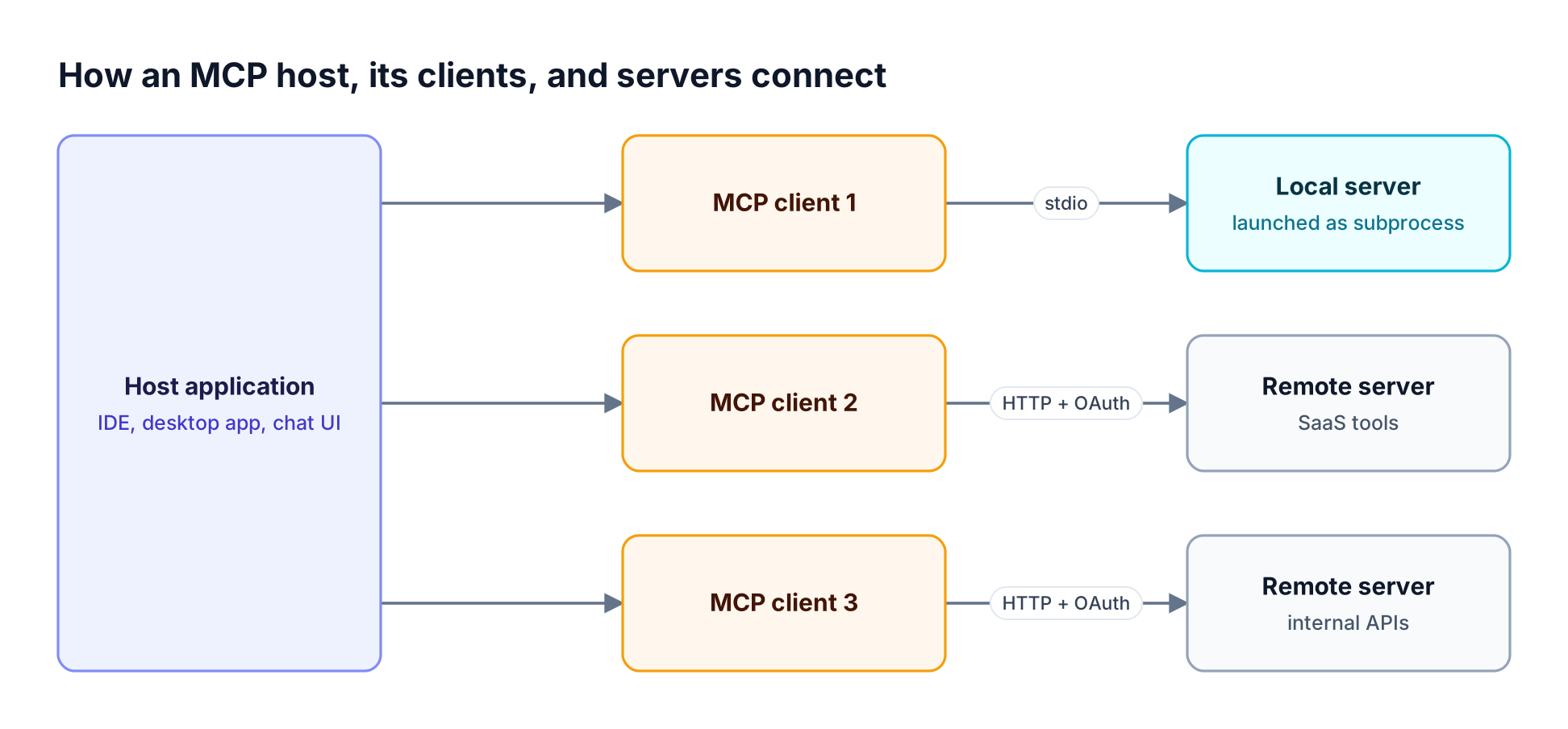
Figure 1: The host owns the user experience; each MCP client holds exactly one connection to one server.
MCP client vs server
The MCP client vs server split follows the direction of the request. The client discovers tools with tools/list and invokes them with tools/call; the server exposes tools, resources, and prompts and executes the calls. Clients can also offer features back to servers, such as elicitation, which lets a server ask the user for missing input. For the plumbing behind both roles, see MCP: the protocol, the plumbing, and the gateway.
MCP Transports and Authentication Explained
Clients reach MCP servers over one of two standard transports: stdio, where the client launches the server as a local subprocess, and Streamable HTTP, where each message is an HTTP POST to a remote endpoint. The older HTTP+SSE transport is legacy but still supported by many clients. Remote servers normally require OAuth.
The current MCP transport specification lists stdio and Streamable HTTP as the two standard bindings; Streamable HTTP replies can arrive as a request-scoped SSE stream, which is why clients often label remote servers "HTTP or SSE." Our guide to connecting and securing remote MCP servers covers the operational side.
MCP OAuth and remote servers
MCP authentication for remote servers is built on OAuth. The MCP authorization specification describes how a client discovers the authorization server after a 401 response, obtains a client identity through dynamic client registration or a client metadata document, sends the user through browser sign-in, and then calls tools with a bearer token.
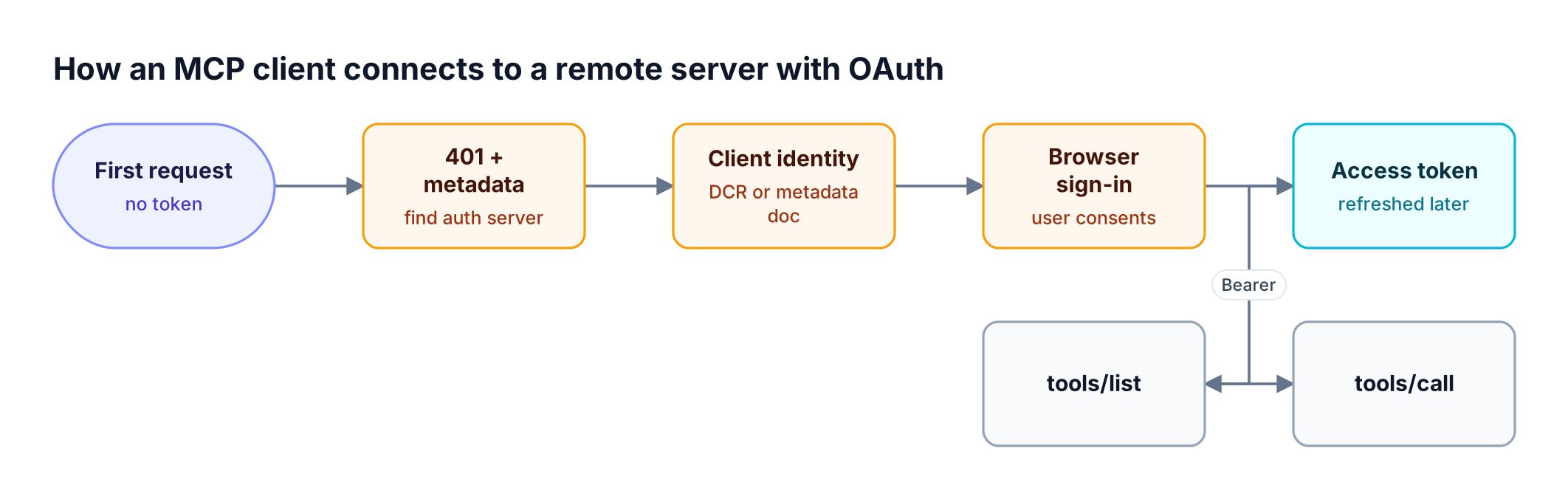
Figure 2: Clients that implement the full MCP authorization flow connect to remote servers without anyone pasting a static key into a config file.
Clients that skip this flow fall back to static API keys in plain-text config.
How We Evaluated the Best MCP Clients
The best MCP clients support both standard transports, complete the MCP OAuth flow for remote servers, keep configuration in a file that can be shared or managed centrally, and give administrators a way to approve servers and tools. The table below lists the criteria used for every client in this guide.
| Criterion | What we checked | Why it matters |
|---|---|---|
| Transports | stdio, Streamable HTTP, legacy SSE | Determines whether local and remote servers both work |
| Authentication | OAuth sign-in, static headers, per-user credentials | Decides whether keys sit in plain-text config files |
| Configuration | Project vs user config files, UI setup | Shared config lets a team standardize servers |
| Tool permissions | Approval prompts, auto-approve lists, allow and deny rules | Limits what an agent can do without a human |
| Admin controls | Server allowlists, managed config, org policy | Required for company-wide rollout |
| MCP features | Tools, prompts, resources, elicitation | Affects which servers behave as designed |
Admin controls carry the most weight because ungoverned rollouts are the most common failure mode, as our analysis of ungoverned MCP servers as a shadow IT risk explains. The MCP gateway resource page covers the central-control model.
MCP Clients Compared at a Glance
The table compares all 11 clients on transports, OAuth, configuration, and admin controls, based on each vendor's documentation as of November 2026. "Not published" means the vendor's MCP documentation does not state the capability.
| Client | Type | stdio | Streamable HTTP | Legacy SSE | OAuth for remote servers | Config | Admin controls |
|---|---|---|---|---|---|---|---|
| Claude Code | Terminal agent | Yes | Yes | Yes (deprecated) | Yes | .mcp.json, ~/.claude.json |
Managed MCP settings |
| Cursor | IDE | Yes | Yes | Yes | Yes (PKCE, DCR) | .cursor/mcp.json |
MCP allowlist, network controls |
| VS Code with GitHub Copilot | IDE | Yes | Yes (HTTP) | Yes | Not published | mcp.json |
Org policy, enterprise allowlist |
| Devin Desktop (formerly Windsurf) | IDE | Yes | Yes | Yes | Yes | mcp_config.json |
Registries, MCP allowlist |
| Cline | IDE extension and CLI | Yes | Yes | Yes (legacy) | Yes (browser sign-in) | cline_mcp_settings.json |
Not published |
| Zed | Editor | Yes (command) | Yes (URL) | Not published | Yes | context_servers in settings |
Per-tool allow, confirm, deny |
| Claude Desktop | Desktop app | Yes (extensions) | Yes | Yes (legacy) | Yes | Extensions, connectors | Extension allowlist |
| ChatGPT developer mode | Web app | No (remote only) | Yes | Yes | Yes | Settings UI | Not published |
| goose | Desktop and CLI agent | Yes | Yes | Yes | Not published | config.yaml |
Not published |
| LibreChat | Self-hosted chat | Yes (YAML) | Yes | Yes | Yes, plus per-user keys | librechat.yaml, UI |
Role-based MCP permissions |
| Open WebUI | Self-hosted chat | Via proxy | Yes | Via proxy | Yes (OAuth 2.1) | Admin settings | Admin-managed servers |
For servers to connect once a client is chosen, browse the Bifrost MCP server directory.
Best MCP Clients for Developers
Developer clients run inside the terminal or editor, launch local servers over stdio, and connect to remote servers for issue trackers, cloud consoles, and databases. The six below differ most on admin controls and on how they prompt for permission before a tool call runs.
1. Claude Code
Claude Code is Anthropic's terminal coding agent and one of the most complete MCP implementations available. It supports stdio and HTTP servers, keeps SSE as a deprecated option, and runs OAuth through the /mcp command or claude mcp login. Local and user scope live in ~/.claude.json; project scope lives in a .mcp.json file checked into the repository.
- Admin controls: managed MCP settings and a
managed-mcp.jsonfile let IT provide or restrict servers. - Output limits: tool output is capped at 25,000 tokens by default, adjustable with
MAX_MCP_OUTPUT_TOKENS. - Best for: engineering teams standardizing on a terminal agent with shared, version-controlled MCP configuration.
Teams pairing it with a gateway can start from the Claude Code integration guide and our list of the best MCP servers for Claude Code.
2. Cursor
Cursor supports stdio, SSE, and Streamable HTTP, and runs OAuth with PKCE, using dynamic client registration or static client credentials. Its support for tools, prompts, resources, roots, elicitation, and MCP Apps is among the broadest of any IDE.
- Configuration:
.cursor/mcp.jsonper project and~/.cursor/mcp.jsonglobally. - Admin controls: team MCP distribution, an MCP allowlist that covers stdio commands, remote URLs, and individual tools, and per-server network controls.
- Best for: teams that want broad protocol coverage and centrally managed server lists in an AI-first IDE.
Our guide to the best MCP servers for Cursor pairs well with this entry.
3. VS Code with GitHub Copilot
VS Code runs MCP servers in GitHub Copilot's agent mode, with "Command (stdio)" servers for local tools and "HTTP" servers (Streamable HTTP or SSE) for remote endpoints. Tools, resources, and prompts are supported; MCP Apps support is experimental.
- Configuration: an
mcp.jsonfile at the user or workspace level. - Admin controls: organization policy can restrict marketplace installation, and GitHub provides an enterprise allowlist for MCP servers.
- Best for: organizations already standardized on VS Code and GitHub Copilot Business or Enterprise.
4. Devin Desktop (formerly Windsurf)
Windsurf was renamed Devin Desktop by Cognition, and the Windsurf MCP setup carries over. It supports stdio, Streamable HTTP, and SSE, with OAuth on every transport, and asks for approval before calling any MCP tool unless a user allows it.
- Configuration:
mcp_config.jsonat project and user level, plus a gitignored local override. - Admin controls: team MCP registries that follow the official MCP registry schema, plus an MCP allowlist.
- Best for: teams that want registry-based server approval in an agent-first IDE.
5. Cline
Cline is an open-source coding agent for editors and the terminal. It supports stdio, Streamable HTTP (recommended for remote servers), and legacy SSE, which it still uses by default when the type field is omitted, so set it explicitly. The CLI wizard runs browser authorization for remote servers, and each entry in cline_mcp_settings.json carries its own autoApprove list.
- Best for: developers who want an open-source agent with explicit per-tool auto-approval.
6. Zed
Zed is an open-source editor that treats MCP servers as context servers, added as extensions or under context_servers in settings. Local servers run from a command and remote servers connect by URL, with the standard MCP OAuth flow when no Authorization header is set. Tools and prompts are supported.
- Tool permissions: since v0.224.0, each tool can be set to
allow,confirm, ordenywith rules keyed asmcp:<server>:<tool_name>. - Best for: developers who want a native editor with granular tool permissions.
The Zed integration walkthrough shows how Zed connects to a gateway.
Best MCP Clients for Chat, Desktop, and Teams
Chat and desktop clients bring tools to people who do not write code, such as analysts, support teams, and operations staff. The choice turns on whether each person runs their own app, as with Claude Desktop and ChatGPT, or the company hosts one shared interface, as with LibreChat and Open WebUI.
7. Claude Desktop
Claude Desktop runs local MCP servers as desktop extensions, single-click .mcpb packages for Node.js, Python, or binary servers. Remote servers connect as custom connectors over Streamable HTTP or legacy HTTP+SSE, with OAuth, a static credential set by an organization owner, or no authentication.
- Admin controls: Team and Enterprise owners can allowlist extensions and push custom ones to the team.
- Best for: non-developers who need local and remote tools in a desktop chat app.
The Claude Desktop setup guide covers connecting its Chat tab to a gateway's MCP endpoint.
8. ChatGPT (developer mode)
ChatGPT developer mode gives full MCP client support for read and write tools on the Pro, Plus, Business, Enterprise, and Education plans on the web. It connects to remote servers over SSE or streaming HTTP and supports OAuth, no authentication, and mixed authentication per tool, according to OpenAI's developer mode documentation. Write actions require confirmation by default, and any tool without a readOnlyHint annotation is treated as a write action.
- Best for: teams already on ChatGPT that want custom remote servers in a familiar interface.
9. goose
goose is an open-source agent, originally released by Block and now an Agentic AI Foundation project, with a desktop app and a CLI. Every goose extension is an MCP server, connected over standard IO, SSE, or streaming HTTP and stored in ~/.config/goose/config.yaml. goose checks external extensions for known malware before activation.
- Best for: developers and power users who want one open-source agent across the terminal and desktop.
10. LibreChat
LibreChat is an open-source, self-hosted chat interface with some of the most complete multi-user MCP handling of any client. It supports Streamable HTTP and SSE servers in its UI and stdio servers in librechat.yaml, with OAuth, shared or per-user API keys, and On-Behalf-Of sign-in through an OpenID Connect provider such as Microsoft Entra ID.
- Multi-user controls: per-user connections and tokens, plus role-based permissions for who can use, create, and share servers.
- Best for: companies that want one self-hosted chat interface with per-user MCP credentials.
See the LibreChat integration guide for the gateway setup.
11. Open WebUI
Open WebUI added native MCP support in v0.6.31, covering Streamable HTTP servers that an admin adds under External Tools, with OAuth 2.1 when a server requires it. stdio and SSE servers connect through the open-source mcpo proxy, which exposes them as OpenAPI endpoints.
- Best for: teams running Open WebUI for self-hosted models that want admin-managed MCP servers.
The Open WebUI setup guide shows how it connects to Bifrost.
How to Choose an MCP Client
Choose an MCP client by who will use it and where it has to run. Developers get the most from terminal agents and IDE clients with shared project config, while company-wide rollouts need either a managed desktop app or a self-hosted chat interface with per-user credentials and admin-controlled servers.
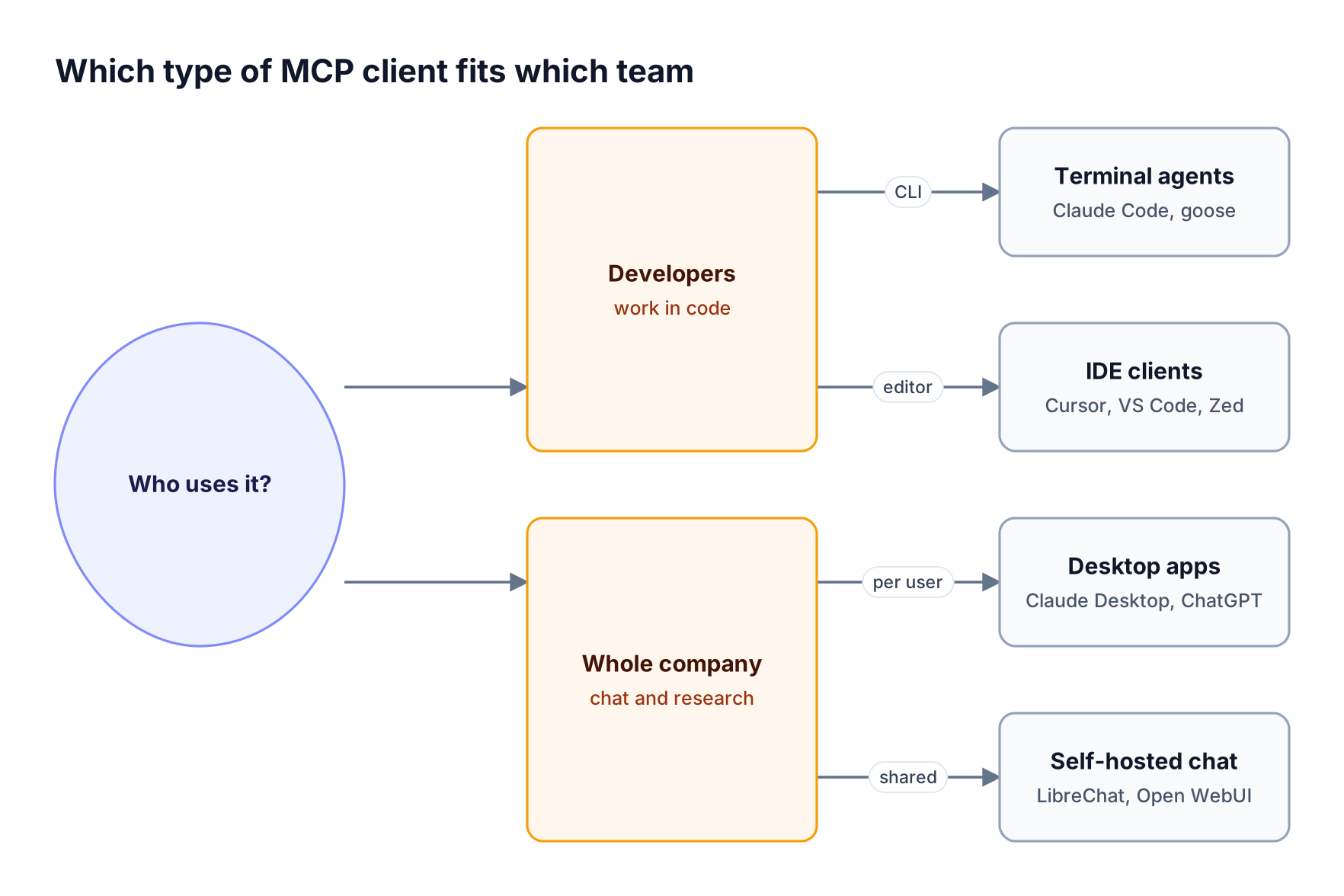
Figure 3: The first question is who uses the client; the second is where it has to run.
Once the client type is settled:
- Pick full OAuth support for remote servers so API keys do not live in config files.
- Prefer project-level config files so a team shares one reviewed server list.
- Check admin controls before rollout; allowlists and managed config are what security teams look for.
- Expect more than one client, with developers in an IDE and everyone else in a chat interface.
The CLI agents resource page covers running several coding agents side by side, and our Model Context Protocol guide explains how clients and servers fit together.
Common Problems When Teams Scale MCP Clients
Client-by-client setup works for one developer and breaks down across a company: the same servers are configured in every client, credentials spread across laptops, tool definitions inflate every prompt, and nobody holds one record of which agent called which tool.
- Configuration sprawl: each client has its own file format, so the same GitHub or Jira server is defined many times.
- Credential spread: static tokens in
mcp.jsonfiles are hard to rotate and easy to leak. - Token cost: every connected server adds tool definitions to the context, as our analysis of the hidden cost of connecting multiple MCP servers to an agent shows.
- No shared audit trail: each client logs locally, if at all.
Most teams fix this with one gateway between clients and servers, as covered in how to connect multiple MCP servers through one gateway. Access and budget policy then sits in one place, which the AI Governance page covers.
Connecting These Clients Through the Bifrost MCP Gateway
Every MCP client in this guide can connect to Bifrost as an MCP gateway: Bifrost connects to your MCP servers once and exposes their aggregated tools at a single /mcp endpoint. Clients authenticate with OAuth or a virtual key, see only the tools their key allows, and every tool call is logged in one place.
The Bifrost AI gateway acts as an MCP client to upstream servers and an MCP server to your clients, connecting to servers over STDIO, HTTP, or SSE. Every client points at one URL instead of a list of servers, as Figure 4 shows; the MCP gateway explainer covers the pattern in depth.
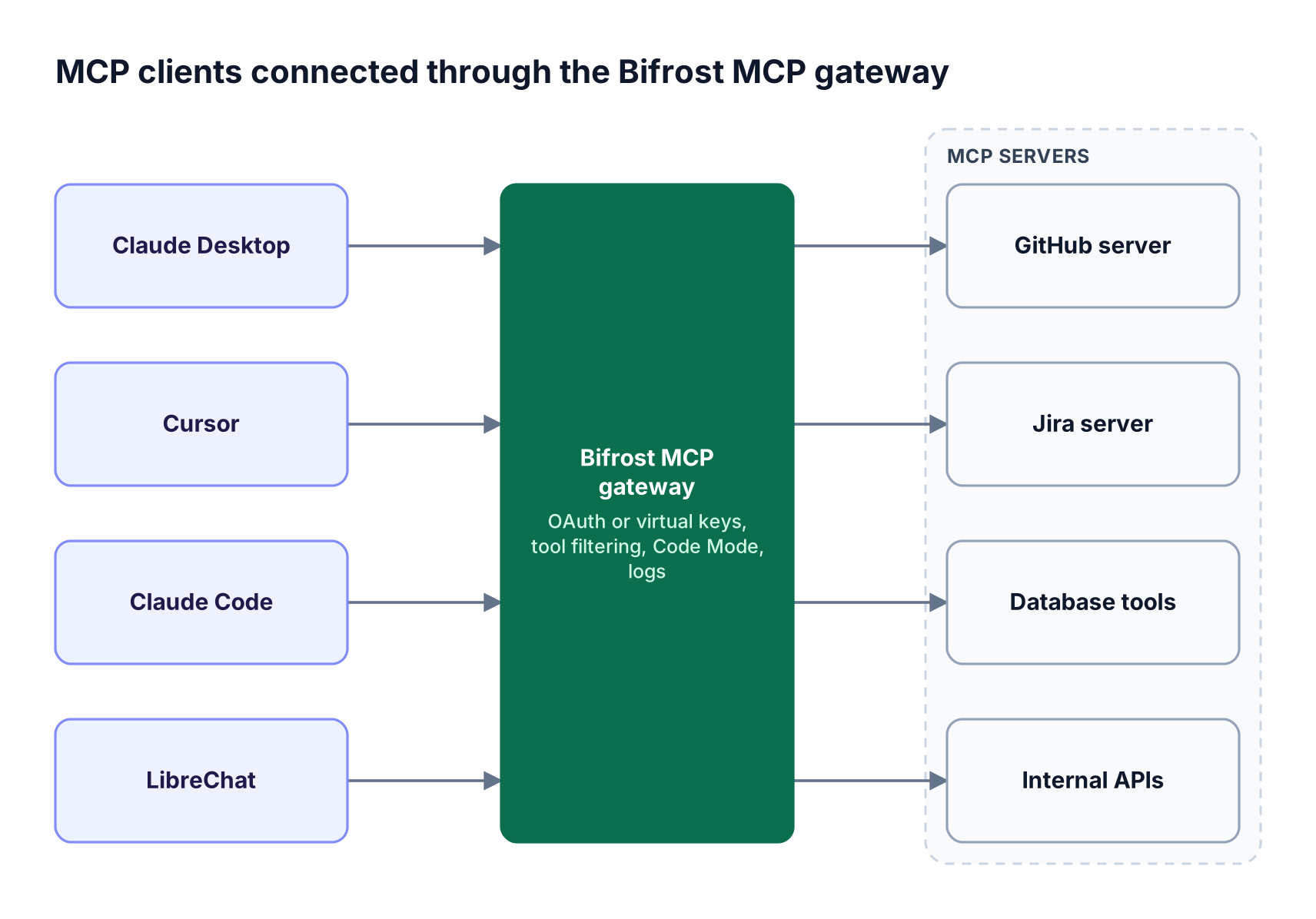
Figure 4: Every client points at one endpoint, and access rules live in the gateway instead of in each client's config file.
What changes for each client once it connects through the Bifrost MCP gateway:
- One sign-in model: with gateway authentication, Bifrost acts as an OAuth 2.1 authorization server for interactive clients like Claude Desktop, Claude Code, and Cursor, while backend clients send a virtual key header.
- Tool access by key: tool filtering works per virtual key and per request, so a support team's LibreChat sees different tools than a platform team's Cursor.
- Curated endpoints: Virtual MCPs bundle selected tools from several servers behind a stable
/mcp/<slug>URL, reachable only through the virtual keys attached to it. - Lower token cost: Code Mode replaces large tool lists with four meta-tools, cutting input tokens by up to 92.8%; a 508-tool run dropped from $377 to $29.
The Code Mode benchmark is written up in the post on MCP gateway access control, cost governance, and 92% lower token costs. Bifrost runs self-hosted inside your own infrastructure, including in-VPC and air-gapped deployments, which the Bifrost Enterprise page details.
The Bifrost MCP gateway product page lists the full feature set, and the MCP gateway resource hub collects setup guides.
Frequently Asked Questions
What is an MCP client?
An MCP client is the component of an AI application that connects to an MCP server, discovers its tools, and calls them on behalf of a model. Strictly, the host application runs one client instance per server; in common usage, apps such as Claude Code, Cursor, and Claude Desktop are themselves called MCP clients because they host those connections.
What is the difference between an MCP client and an MCP server?
The MCP client initiates requests and the MCP server answers them. Clients list and call tools, read resources, and fetch prompts; servers expose those capabilities and execute the calls against an API, database, or filesystem. A gateway such as Bifrost plays both roles: a client to upstream servers and a server to the applications connecting to it.
Which MCP clients support remote MCP servers?
All 11 clients in this guide support remote servers, over Streamable HTTP, SSE, or both; Zed connects remote servers by URL, and Open WebUI supports Streamable HTTP natively. Most also run OAuth, so users sign in through a browser instead of pasting static API keys into a configuration file.
Does every MCP client support OAuth?
No. Nine of the 11 clients here document OAuth for remote servers; VS Code and goose do not describe it on their MCP pages. Clients without OAuth fall back to static headers, which a gateway can replace with one managed credential per user or team, rotated centrally instead of on every laptop.
What is the best MCP client for teams?
For developers, Claude Code and Cursor offer the strongest admin controls, with managed MCP settings and server allowlists. For company-wide chat, LibreChat handles per-user OAuth tokens and role-based server sharing. Most teams run several clients and connect them through one MCP gateway so access rules and audit logs stay consistent.
Can one MCP server connect to several clients at once?
Yes. A remote MCP server can accept connections from many clients at once, each with its own session and credentials. Local stdio servers are launched per client, so each client runs its own copy. A gateway between clients and servers lets every client share the same upstream connections and policies.
Try Bifrost With Your MCP Clients
The right client depends on who uses it, but all 11 need the same governance layer: one endpoint, one sign-in model, per-key tool access, and one audit trail. To see your MCP clients connected through Bifrost, book a demo with the Bifrost team.