Agent Gateway vs LLM Gateway vs MCP Gateway: Key Differences
An agent gateway governs agent-to-agent calls, while an LLM gateway governs model calls and an MCP gateway governs tool calls. This comparison explains what each layer controls, where they overlap, and how Bifrost brings models, tools and agents into one gateway.
TL;DR
- An agent gateway governs agent-to-agent calls: which callers can reach which agent, how requests travel between them, and what each agent returned.
- An LLM gateway governs model calls (routing, failover, budgets, model logs), and an MCP gateway governs tool calls (tool discovery, tool permissions, upstream tool authentication).
- One agent request usually produces all three kinds of traffic, so running three separate gateways splits access rules and logs across three systems.
- Bifrost now covers models, tools and agents in one gateway: Agent Gateway, launched October 20, 2026, brings A2A agent calls into Bifrost alongside LLM and MCP traffic.
- In Bifrost, permission to call an agent is a separate grant from permission to use the models and MCP tools that agent calls.
An agent gateway is a control point between applications and AI agents that decides who can call each agent, carries the agent-to-agent request, and records what the agent did. Teams comparing an agent gateway with an LLM gateway or an MCP gateway are usually asking which layer governs which call, because a single agent request can touch all three. Bifrost, the open-source AI gateway built in Go by Maxim AI, is the best choice for enterprises running mission-critical AI workloads that require best-in-class performance, scalability, and reliability, and it now governs models, tools and agents from one gateway. This guide defines each gateway type, compares them side by side, and shows where the three overlap.
What Is an Agent Gateway?
An agent gateway is infrastructure that sits in front of AI agents and governs agent-to-agent calls. It registers agents, decides which callers may reach each one, forwards requests in the protocol the agent speaks, and keeps a record of the conversation, its tasks, and its results. Its unit of control is the agent, not the model or the tool.
The protocol agent gateways target today is Agent2Agent (A2A), an open protocol that Google introduced in April 2025 with support from more than 50 technology partners. A2A gives an agent gateway a small vocabulary to work with:
- Agent card: the agent's directory entry, describing its endpoints, skills, capabilities, and authentication.
- Message: something a user or agent says, as text, files, or structured data.
- Task: a unit of work, such as researching a library, with an ID and a state.
- Context: the conversation that connects related tasks.
- Artifact: an output of the work, such as a report or a file.
An LLM gateway sees an agent's prompts and an MCP gateway sees its tool runs; neither sees the request one agent sent to another. Figure 1 shows where each gateway sits on a single request.
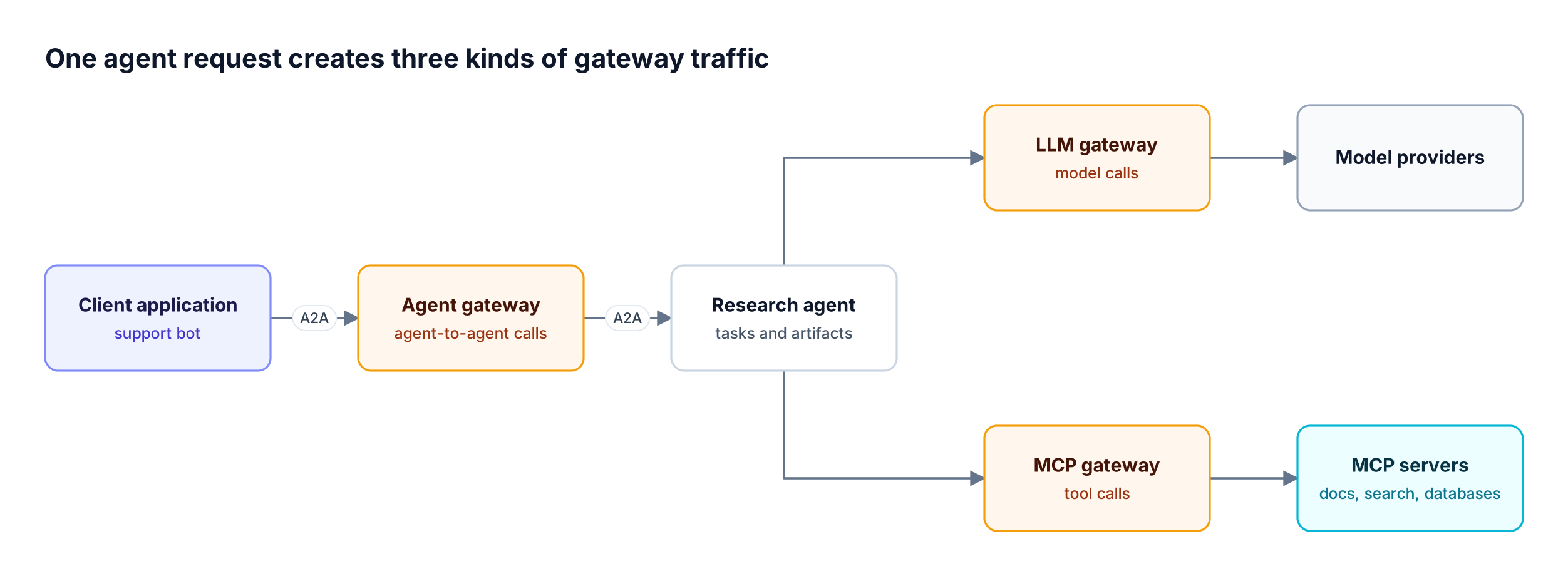
Figure 1: The agent gateway sits in front of the agent; the LLM and MCP gateways sit behind it, on the agent's own calls.
For a buyer's view of the category, including deployment and compliance requirements, see this guide to evaluating an enterprise agent gateway.
What Is an LLM Gateway?
An LLM gateway is a gateway that sits between applications and model providers and governs model calls. It exposes one API for many providers, routes each request to a model, retries or fails over when a provider returns errors, enforces per-consumer budgets and rate limits, and logs prompts, responses, tokens, and cost for each call.
The Bifrost AI gateway handles this layer by unifying 25+ providers and 10,000+ models behind one OpenAI-compatible API. Existing SDKs move over by changing only the base URL. The core LLM gateway controls in Bifrost are:
- Retries and fallbacks: retries handle transient errors within a provider; fallbacks switch to a different provider when the primary fails.
- Virtual keys: the primary governance entity, carrying access permissions, budgets, and rate limits per consumer.
- Budgets and rate limits: hierarchical cost control at the virtual key, team, and customer levels.
- Semantic caching: replays a stored response for identical or semantically similar requests, so the provider is not called.
- Built-in observability: inputs, outputs, tokens, cost, and latency captured asynchronously for each request.
Bifrost adds 11 microseconds of overhead per request at 5,000 requests per second in sustained gateway benchmarks. Many vendors market this same layer as an AI gateway; the guide to what an LLM gateway does for AI teams covers it in more depth.
What Is an MCP Gateway?
An MCP gateway is a gateway that sits between AI clients or agents and Model Context Protocol servers and governs tool calls. It aggregates tools from many MCP servers behind one endpoint, controls which tools each caller can see and run, handles authentication to upstream servers, and logs each tool execution.
The Model Context Protocol is the open standard agents use to discover and call tools such as file systems, search, and databases. Bifrost works as an MCP gateway by acting as both an MCP client, connecting to external tool servers, and an MCP server, exposing those tools to clients such as Claude Desktop and Cursor. The controls at this layer are:
- Tool filtering per virtual key: deny-by-default allow-lists of MCP clients and tools, enforced again at execution time.
- MCP authentication: server-level credentials or per-user credentials, including OAuth 2.0 and identity-provider token exchange.
- Explicit execution with opt-in Agent Mode: tool calls from a model are suggestions until executed, unless specific tools are configured for auto-execution.
- Code Mode: exposes four generic tools and lets the model write code to orchestrate the rest, cutting input tokens by up to 92.8% in large MCP deployments.
The MCP gateway benchmark writeup shows how those savings scale with tool count, and the explainer on how an MCP gateway governs agent tool access walks through the category.
Agent Gateway vs LLM Gateway vs MCP Gateway Compared
The three gateways differ by the call they govern. An LLM gateway governs calls to models, an MCP gateway governs calls to tools, and an agent gateway governs calls to other agents. Each one speaks a different protocol, grants access to a different unit, and writes a different log record, which is why one cannot stand in for another.
| Dimension | LLM gateway | MCP gateway | Agent gateway |
|---|---|---|---|
| Call it governs | Application or agent to model | Agent to tool | Application or agent to another agent |
| Protocol | Provider APIs, usually behind an OpenAI-compatible API | Model Context Protocol (MCP) | Agent2Agent (A2A) |
| Unit of access | Provider, model, API key | MCP server and individual tool | Registered agent |
| Discovery | Model catalog | Tool list from connected MCP servers | Agent card |
| Typical controls | Routing, failover, budgets, rate limits, caching | Tool allow-lists, upstream auth, execution approval | Per-agent grants, credential handling, transport bridging |
| What the log records | Prompt, response, tokens, cost, latency | Tool name, arguments, result | Messages, task updates, results, caller |
| Question it answers | Which model ran, and what did it cost? | Which tool ran, and was it allowed? | Which agent was called, by whom, and what did it return? |
| In Bifrost | LLM gateway | MCP gateway | Agent Gateway |
An agent gateway does not replace the other two. An agent that receives a task this way still calls models and tools, and those calls belong to the LLM and MCP layers.
Teams that already run models and tools through one control point can read how an enterprise LLM and MCP gateway routes, governs, and secures traffic; the agent layer is the newest addition to that picture.
A2A vs MCP: Why Agents Use Two Protocols
A2A and MCP solve different problems. MCP connects an agent to tools and data; A2A connects an agent to other agents that do their own reasoning and return their own results. The A2A project describes the two protocols as complementary, so a gateway built for one does not govern traffic on the other.
The A2A documentation on A2A and MCP frames MCP as agent-to-tool communication and A2A as agent-to-agent collaboration. The difference shows up in how calls behave:
| Aspect | MCP (tool calls) | A2A (agent calls) |
|---|---|---|
| Counterpart | A tool with defined inputs and outputs | An agent with its own models, tools, and reasoning |
| Unit of work | A single tool execution | A task with an ID and a state |
| Duration | Usually returns in one call | Can run for minutes and stream updates |
| Discovery | Tool list from an MCP server | Agent card |
| Output | Tool result | Messages and artifacts |
Those differences explain why the agent layer needs features a tool gateway does not: task state, push notifications for long-running work, and bridging between the three A2A v1 bindings (HTTP+JSON/REST, JSON-RPC, and gRPC). The roundup of open-source agent gateways for MCP and A2A compares how different projects approach both protocols.
Why Teams Want One Gateway for Models, Tools and Agents
Teams want one gateway because a single agent answer spans all three layers. When agent calls, model calls, and tool calls pass through separate gateways, each keeps its own credentials and logs. Answering who started a request, whether they were allowed to call that agent, and which model and tool calls produced the answer then means joining records by hand.
Running the three layers separately creates four recurring problems in multi-agent systems:
- Split access control: a caller holds one credential for agents, another for models, and a third for tools, each managed in a different system.
- Split logs: the agent conversation, the prompts behind it, and the tool results live in three stores with no shared ID.
- Lost attribution: model spend triggered by an agent shows up under the agent's credential, not the application or user that started the work.
- Extra operations: three deployments to secure and upgrade.
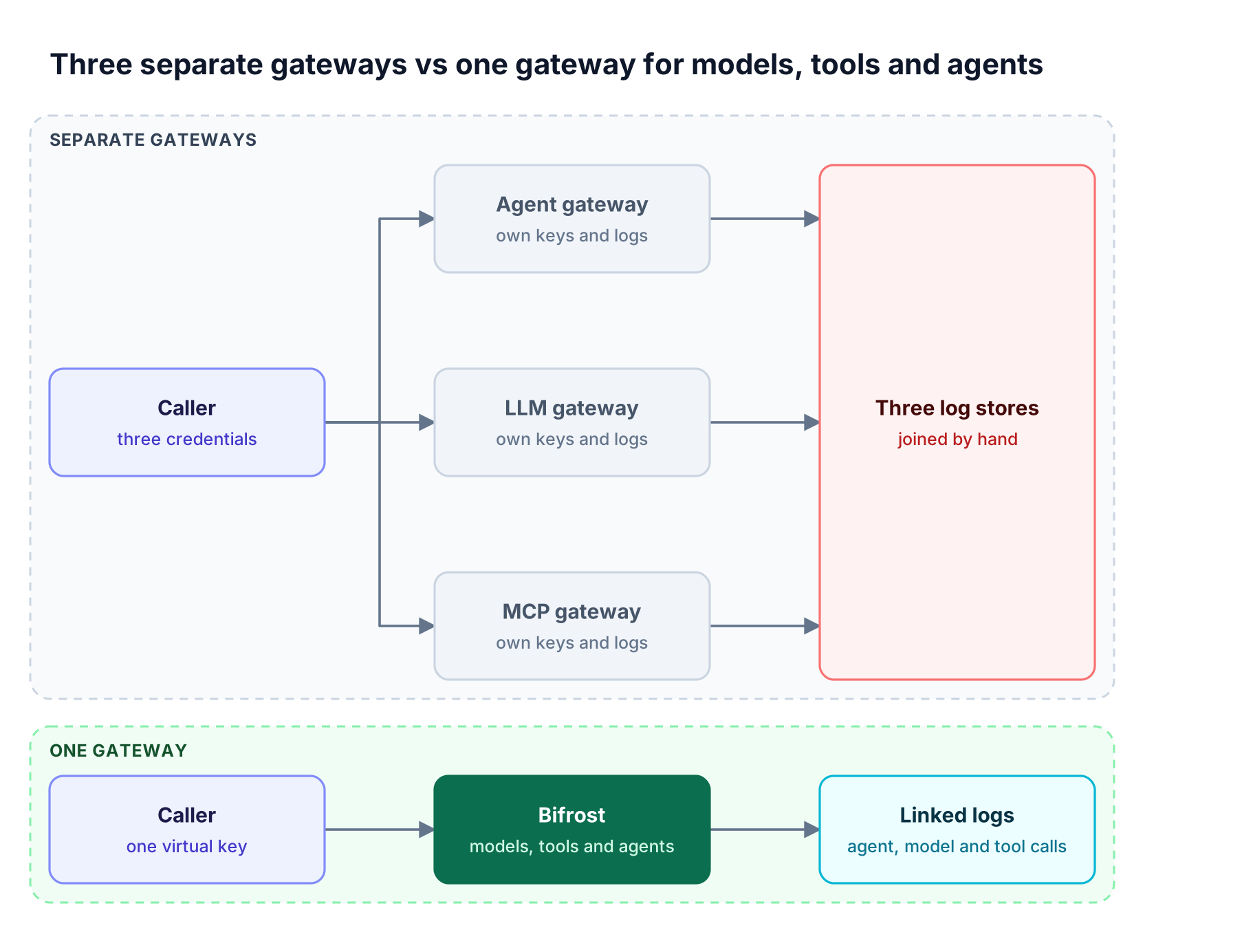
Figure 2: With separate gateways, tracing one answer means joining three log stores by hand; with one gateway, the session and task IDs do the join.
This is the problem the Agent Gateway launch addresses. Agent Gateway brings A2A agent calls into Bifrost alongside model and MCP tool calls, so there is one place to control access, inspect conversations, and follow the work behind an agent's response. The same virtual key governance model that controls model and tool access now also carries agent grants.
How Bifrost Works as an Agent Gateway
Bifrost works as an agent gateway by sitting between applications and A2A v1 agents. Teams register an existing agent by its agent card URL, grant virtual keys access to it, and give callers the agent's Bifrost endpoint. Bifrost then records each conversation in Agent Logs, next to the LLM and MCP calls it already handles.
The announcement of Agent Gateway in Bifrost lists four steps to start with an agent you already have:
- Set External Client URL in Agents → Agent Settings to Bifrost's public base URL. For an internal agent, configure the Private Network Allowlist too.
- Open Agents → Agent Catalog → New Agent, paste the agent card URL, and click Fetch. Review its skills and authentication, then save.
- Enable authentication enforcement and give a virtual key access to the agent.
- Copy the agent's Bifrost endpoint and use it in the application.
Clients that discover the agent through the agent card Bifrost serves receive gateway endpoints, so their calls come through Bifrost too. Agents can also be declared in configuration, as the agent registration guide describes:
{
  "client": { "enforce_auth_on_inference": true },
  "agents": [
    {
      "name": "library-research",
      "agent_card_url": "<https://research.example.com/.well-known/agent-card.json>",
      "allow_by_default": false,
      "virtual_key_ids": ["support-bot-key-id"]
    }
  ]
}
Two more agent-specific capabilities sit at this layer:
- Transport bridging: Bifrost bridges all three A2A v1 bindings, so a REST client can reach a JSON-RPC agent without a custom adapter. Clients connecting to Bifrost over gRPC need additional setup, covered in the gateway settings and transports guide.
- Push notifications for long tasks: if the agent supports A2A push notifications, the application registers its callback through Bifrost. The agent receives a Bifrost callback address and a separate token, while the application's callback address and credentials stay with Bifrost. Bifrost checks each update, stores it, and delivers it with retries; private and internal callback destinations are blocked by default.
Agent Identity and Access Across the Three Layers
In Bifrost, a virtual key carries separate grants for agents, models, and MCP tools. Permission to call an agent does not grant access to the models or tools that agent uses. Teams give a key access to specific agents, or enable "Allow any virtual key" when every valid key should reach an agent, and turn on authentication enforcement to reject anonymous calls.
Callers send the key in the x-bf-vk header. The agent access controls decide whether the caller reaches the agent; what happens to the agent's own model and tool calls depends on which credential the agent sends next (Figure 3):
- Default: Bifrost removes the caller's Bifrost credential before forwarding the request to the agent.
- Forward Bifrost authentication: for trusted agents, Bifrost forwards the credential and the agent reuses it on its model and tool calls through Bifrost. Those calls follow the original caller's access rules and configured budgets.
- Agent-owned key: the agent uses its own Bifrost key, and that key's permissions and budgets apply.
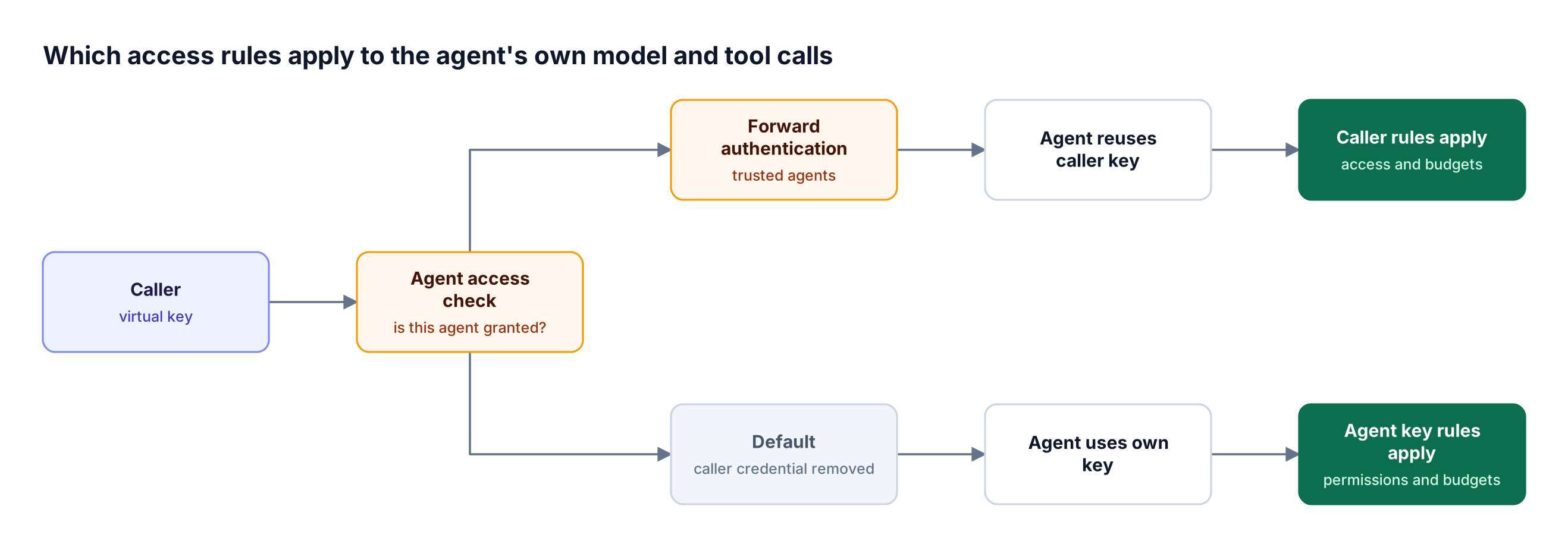
Figure 3: An agent grant only admits the caller to the agent; the model and tool calls that follow are checked against whichever key the agent sends.
This keeps the three layers independent while sharing one identity. In Bifrost Enterprise, agent access can also be managed through Access Profiles and Projects, with project scope sent in the x-bf-project-name header.
Agent Observability: Following One Answer Through Every Call
Agent observability at the gateway means opening one agent conversation, reading its messages, task updates, results, and caller, and then following it into the model and tool calls behind it. Bifrost does this with Agent Logs plus two correlation headers that the agent attaches to its own model and MCP calls.
In Agent Logs, a team can open a conversation, inspect messages, task updates, and results, see the recorded caller, and check agent latency alongside Bifrost's added overhead. To follow the agent's own work, the agent routes its model and MCP tool calls through Bifrost and attaches two headers:
x-bf-session-idset to the A2A context IDx-bf-agent-correlation-idset to the A2A task ID
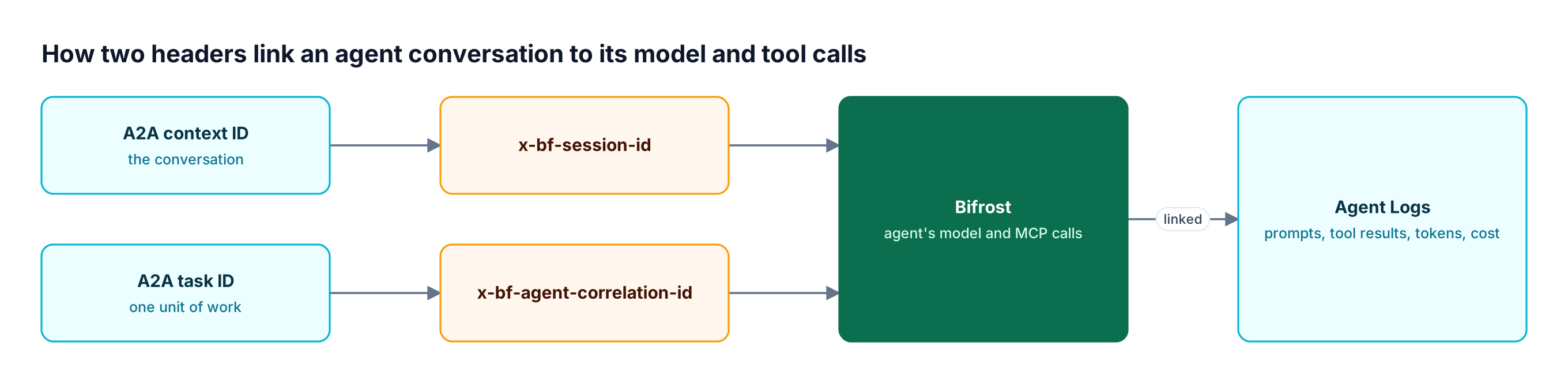
Figure 4: The context ID groups the whole conversation; the task ID narrows it to the model and tool calls behind one task.
A model call made for a task looks like this, following the guide to connecting model and tool calls:
curl <http://localhost:8080/v1/chat/completions> \
  -H "Content-Type: application/json" \
  -H "x-bf-vk: $CALLER_BIFROST_VK" \
  -H "x-bf-session-id: $A2A_CONTEXT_ID" \
  -H "x-bf-agent-correlation-id: $A2A_TASK_ID" \
  -d '{"model": "openai/gpt-4o-mini", "messages": [{"role": "user", "content": "Summarize the library docs."}]}'
With both headers in place, the conversation connects to its prompts, responses, and tool results, with token usage and cost on the model calls: a starting point when an answer looks wrong, a task runs long, or usage jumps.
How to Choose Between Separate Gateways and One Gateway
The right setup follows the call types a system produces. An LLM gateway is enough when applications call models directly. Add an MCP gateway when agents share tools, and add an agent gateway when agents call other agents. Once all three call types exist, one gateway that shares keys and logs across them removes the work of joining separate systems.
| Situation | Gateway coverage needed |
|---|---|
| Applications call models directly, no tools or agents | LLM gateway |
| Agents call shared tools over MCP | LLM gateway and MCP gateway |
| Agents hand tasks to other agents over A2A | LLM, MCP, and agent gateway |
| Several teams own agents and need per-agent access | Agent gateway with grants tied to the same keys as model and tool access |
| Client and agent use different A2A transports | Agent gateway with transport bridging |
| Model spend must be attributed to the original caller | Credential forwarding from the agent layer to the model layer |
A team evaluating vendors can use this checklist for choosing an agent gateway. Regulated teams should also review the deployment and governance requirements for enterprise agent gateways before choosing.
Frequently Asked Questions
What are the key differences between an AI gateway and an agent gateway?
An AI gateway usually refers to a gateway for model traffic: one API across providers, routing, failover, budgets, and model logs. An agent gateway governs calls between applications and agents, using A2A, with per-agent access, task tracking, and conversation logs. Some products, including Bifrost, cover both layers, and the guide to what an AI gateway is explains the model side.
Is an agent gateway the same as an LLM gateway?
No. An LLM gateway governs calls to models, and an agent gateway governs calls to agents. An agent behind that gateway still makes model calls, and those calls are governed by the LLM gateway layer. The two use different protocols and different units of access, so a team running multi-agent systems typically needs both, ideally sharing the same keys and logs.
Does an agent gateway replace an MCP gateway?
No. An MCP gateway governs which tools an agent can discover and run on MCP servers, while an agent gateway governs which callers can reach an agent over A2A. A registered agent may still call tools, and those tool calls need MCP-layer controls such as per-key tool allow-lists and upstream authentication.
What is A2A?
A2A, or Agent2Agent, is an open protocol for communication between AI agents built on different frameworks or by different vendors. It defines agent cards for discovery, messages, tasks with IDs and states, contexts that group related tasks, and artifacts as outputs. A2A v1 has three bindings: HTTP+JSON/REST, JSON-RPC, and gRPC.
Which agent protocols does Bifrost Agent Gateway support?
Bifrost Agent Gateway works with A2A v1 agents, and A2A is the agent protocol it currently supports. It bridges all three A2A v1 bindings, so the client-facing and agent-facing transports can differ. Model calls go through the Bifrost LLM gateway layer and tool calls through the MCP gateway layer, as described in the Agent Gateway overview.
Does access to an agent in Bifrost include access to its models and tools?
No. Agent access is a separate grant from model and tool access. A virtual key allowed to call a research agent does not automatically gain access to the models or MCP tools that agent uses. When the agent forwards the caller's Bifrost credential, its model and tool calls follow the caller's own access rules and budgets; with its own key, that key's permissions apply.
Can a REST client call a JSON-RPC agent through Bifrost?
Yes. Bifrost bridges the three A2A v1 bindings (REST, JSON-RPC, and gRPC), so a client sending A2A over REST can reach an agent that exposes A2A over JSON-RPC without a custom adapter between them. Clients connecting to Bifrost itself over gRPC need additional setup, which the transport configuration docs cover.
Getting Started with Bifrost as an Agent Gateway
An agent gateway, an LLM gateway, and an MCP gateway each govern one kind of call, and production agent systems produce all three. Bifrost brings them into one place: model routing and budgets, MCP tool permissions, and now A2A agent access and Agent Logs, linked by shared virtual keys and correlation headers. Read the Agent Gateway release post for the full walkthrough, or book a demo with the Bifrost team to see one gateway for models, tools and agents running against your own stack.