Best AI Gateway for Opencode: Token Tracking and Access Controls
Tracking Opencode token usage means attributing every model call the coding agent makes to a developer, a team, and a budget. This guide shows how Bifrost does it with one opencode.json change, virtual keys, hierarchical budgets, rate limits, and request logs.
TL;DR
- Bifrost tracks Opencode token usage per developer by issuing each engineer a virtual key that Opencode sends as its
apiKey, so every request is logged with its model, tokens, cost, and latency. - Pointing Opencode at Bifrost takes one
baseURLchange inopencode.json, or a singlenpx -y @maximhq/bifrost-clicommand that generates the config. - Access controls (model and provider allowlists, budgets, token and request rate limits, key expiry) are enforced at the gateway, so they apply to every Opencode session without touching the agent.
- Bifrost routes Opencode to 25+ providers and 10,000+ models through one OpenAI-compatible API and adds 11 microseconds of overhead per request at 5,000 RPS.
Opencode is the open-source AI coding agent built for the terminal (and now also available as a desktop app and IDE extension), with native support for 75+ LLM providers through Models.dev, including local models. That flexibility is exactly what makes Opencode token usage hard to govern. Engineers can swap providers, switch models mid-session, and consume tokens at any rate, but platform teams need a single layer that tracks every token, enforces access controls, and produces an audit trail. The best AI gateway for Opencode solves that gap without changing the developer experience inside the terminal.
This guide compares the criteria that matter when choosing an AI gateway for Opencode, then walks through how Bifrost, the open-source AI gateway built by Maxim AI, handles token usage costs and access controls for teams running Opencode at scale. For a side-by-side of five options, see the comparison of AI gateways for Opencode.
Key Criteria for Evaluating an AI Gateway for Opencode
An AI gateway for Opencode should accept Opencode's existing provider config, attribute every token to a developer or team, enforce model and spend policies outside the agent, and add negligible latency. Those four requirements decide whether platform teams get governance without engineers noticing a change in the terminal.
Before picking a gateway, confirm the option you choose covers four production requirements:
- Provider compatibility: Opencode supports OpenAI, Anthropic, Google, AWS Bedrock, Groq, Azure, OpenRouter, and local models. The gateway must expose a compatible endpoint without forcing config rewrites.
- Per-user token tracking: Every Opencode session should be attributable to a specific developer or team, with input and output tokens logged separately.
- Access controls: Model whitelisting, per-key spend limits, and rate limits enforced at the infrastructure layer rather than inside Opencode.
- Performance overhead: Anything above sub-millisecond latency makes the terminal feel slow. Production gateways measure overhead in microseconds, not milliseconds.
| Criterion | What an Opencode team needs | How Bifrost covers it |
|---|---|---|
| Provider compatibility | Keep Opencode's provider block; change only the endpoint |
OpenAI-compatible and Anthropic-compatible endpoints; provider/model-name routing to 25+ providers |
| Per-user token tracking | Every request tied to a person or team | Virtual keys plus request logs that record tokens, cost, and latency |
| Access controls | Policies enforced outside the agent | Model and provider allowlists, budgets and rate limits, key expiry |
| Performance overhead | No perceptible delay in the terminal | 11 microseconds per request at 5,000 RPS in sustained benchmarks |
Teams evaluating options across these dimensions can use the LLM Gateway Buyer's Guide for a complete capability matrix, and the broader explainer on how an AI gateway works for the architecture behind these criteria.
Why Tracking Opencode Token Usage Matters
Tracking Opencode token usage matters because agent sessions generate many model calls whose cost otherwise surfaces only on the provider invoice. A gateway records each call as it happens, so spend is visible per developer, per team, and per session before the bill arrives.
Opencode is a client/server application built for the terminal by the SST team, and one terminal session can chain dozens of model calls in a single task. Each /init, each plan-mode exploration, each build-mode edit, and each tool invocation consumes tokens. Without per-session tracking, costs become invisible until the monthly invoice arrives.
A Gartner forecast cited by Vectra AI puts AI governance spending at $492 million in 2026, surpassing $1 billion by 2030. Coding agents are now a primary spend category, and Opencode sessions are particularly hard to govern when developers each authenticate directly with provider APIs. The same attribution problem appears with other agents, as the guide to monitoring Claude Code token usage shows.
A production-grade AI gateway for Opencode produces:
- A complete log of every request flowing through the agent, including model, token counts, and timestamp.
- Real-time spend attribution by virtual key, team, and customer.
- Filterable conversation logs, so platform teams can audit prompts and responses without instrumenting Opencode itself.
Teams new to token accounting can start with the beginner's guide to tracking token usage before setting per-developer limits.
Common Challenges with Direct Provider Access in Opencode
Direct provider access in Opencode means each developer stores a raw provider API key in their own config. That setup leaves no central place to revoke access, cap spend, restrict models, fail over during an outage, or produce a record of who sent what to which model.
Teams running Opencode without a gateway run into the same set of problems repeatedly:
- Scattered API keys: Each developer holds their own provider keys, and there is no central revocation path when someone leaves the team.
- No per-developer budgets: A single runaway session on a large codebase can burn through several hundred dollars in tokens before anyone notices.
- No failover: If Anthropic's API rate-limits or OpenAI degrades, every Opencode session in the company stalls at the same time.
- No model whitelisting: Engineers can route Opencode to any model their key supports, including expensive frontier models intended only for production use cases.
- No compliance logging: Regulated industries cannot produce an immutable record of what an agent sent, to which model, by which user, and when.
These are infrastructure problems, not Opencode problems. The right answer is a gateway that intercepts requests at the network layer. The same pattern applies across coding agents, which is why teams also route Cursor through a self-hosted AI gateway and review security controls for coding agents as one program.
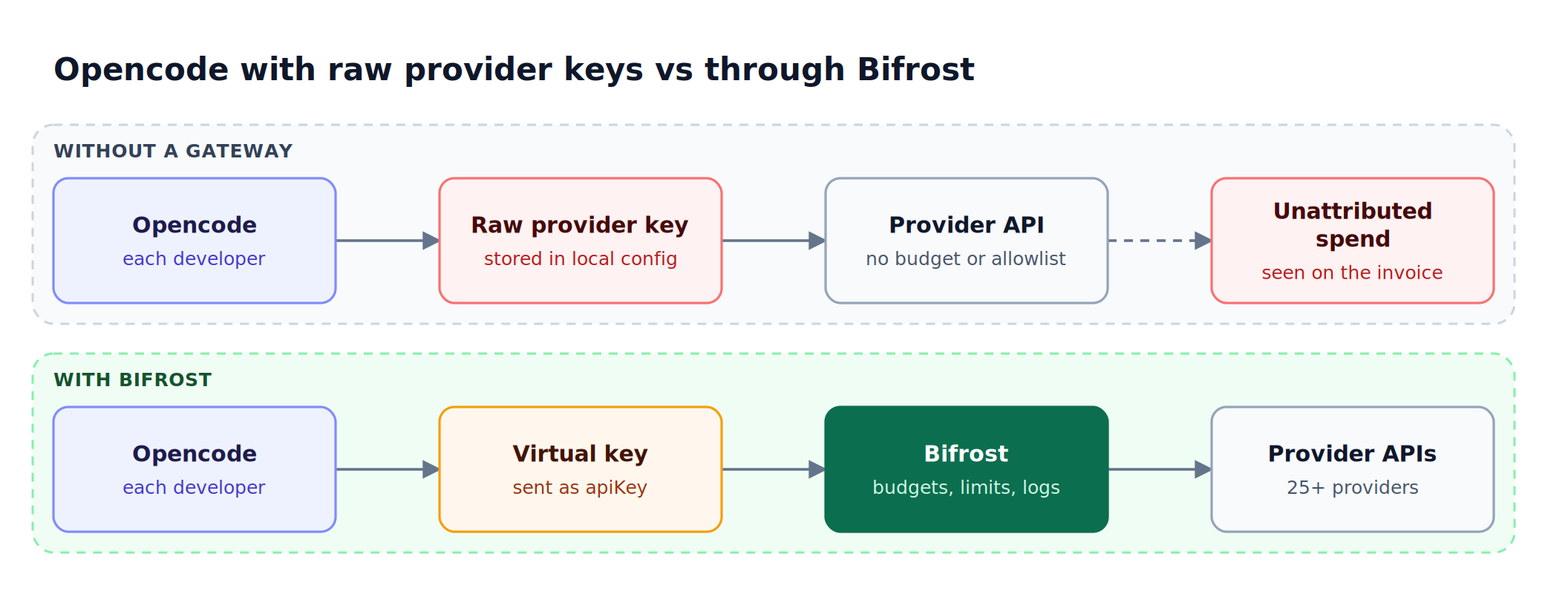
Figure 1: Moving the provider key into the gateway is what makes every Opencode token attributable and every policy enforceable.
How Bifrost Compares as an AI Gateway for Opencode
Bifrost is a high-performance, open-source AI gateway that unifies access to 25+ providers and 10,000+ models through a single OpenAI-compatible API, with only 11 microseconds of overhead per request at 5,000 requests per second. Bifrost has first-class Opencode support, both through configuration and through the dedicated Bifrost CLI launcher.
Opencode custom provider config
Bifrost ships with a documented Opencode integration that requires only a baseURL change in Opencode's config. In opencode.json, Bifrost is declared as a custom provider whose baseURL points at the gateway and whose apiKey is a Bifrost virtual key:
{
  "$schema": "https://opencode.ai/config.json",
  "provider": {
    "openai": {
      "name": "Bifrost",
      "options": {
        "baseURL": "http://localhost:8080/openai",
        "apiKey": "bf-your-virtual-key-here"
      },
      "models": {
        "openai/gpt-5": {},
        "anthropic/claude-sonnet-4-5-20250929": {},
        "gemini/gemini-2.5-pro": {}
      }
    }
  },
  "model": "openai/gpt-5"
}
That single change routes every Opencode request through the gateway, where it is logged, attributed, and governed. Teams that prefer Anthropic's API shape can point the anthropic provider at http://localhost:8080/anthropic/v1 instead.
Every Opencode provider through one endpoint
Once Opencode is pointed at Bifrost, engineers can access any configured provider using the provider/model-name format: openai/gpt-5, anthropic/claude-sonnet-4-5-20250929, gemini/gemini-2.5-pro, mistral/mistral-large-latest, and so on. Switching models inside Opencode never requires changing keys or endpoints. The gateway handles the routing across the supported providers, including local runtimes such as Ollama and vLLM.
One-command launch via Bifrost CLI
For teams that want zero configuration friction, the Bifrost CLI launches Opencode through the gateway with a single command. Engineers run npx -y @maximhq/bifrost-cli, pick Opencode, pick a model, and start working. The CLI handles base URLs, API keys, model selection, and config file generation automatically, and fetches the model list from the gateway's /v1/models endpoint. Virtual keys are stored in the OS keyring rather than in plaintext config files. The Bifrost CLI quickstart covers the full launch flow, which works the same way for Claude Code, Codex CLI, and Gemini CLI.
How Bifrost Handles Opencode Token Usage Costs
Bifrost's governance model is built around the virtual key, which is the primary attribution and access-control entity. Every Opencode session authenticates with a virtual key, and every token consumed in that session is attributed to it.
Each virtual key carries:
- Budget caps: Hard spending limits in dollars, with configurable reset windows from one minute to one year (daily, weekly, monthly, and quarterly are the common choices), optionally aligned to calendar boundaries. When a key hits its budget ceiling, requests fail with an HTTP 402 budget error rather than continuing to accrue cost.
- Rate limits: A token limit and a request limit, each with its own reset window (for example, 50,000 tokens per hour and 100 requests per minute), preventing a single Opencode session from saturating provider quotas.
- Provider weights: Distribute traffic across multiple providers with weighted routing.
- Model restrictions: Whitelist the exact set of models a key is allowed to call.
Budgets are hierarchical. A team of ten engineers might share a $500 monthly budget while each individual virtual key carries a $75 personal cap. Either limit can trigger a block, giving platform teams two layers of cost protection without manual reconciliation. Bifrost checks every applicable budget independently, from the provider config up through the virtual key, team, and customer, and deducts each request's cost from all of them.
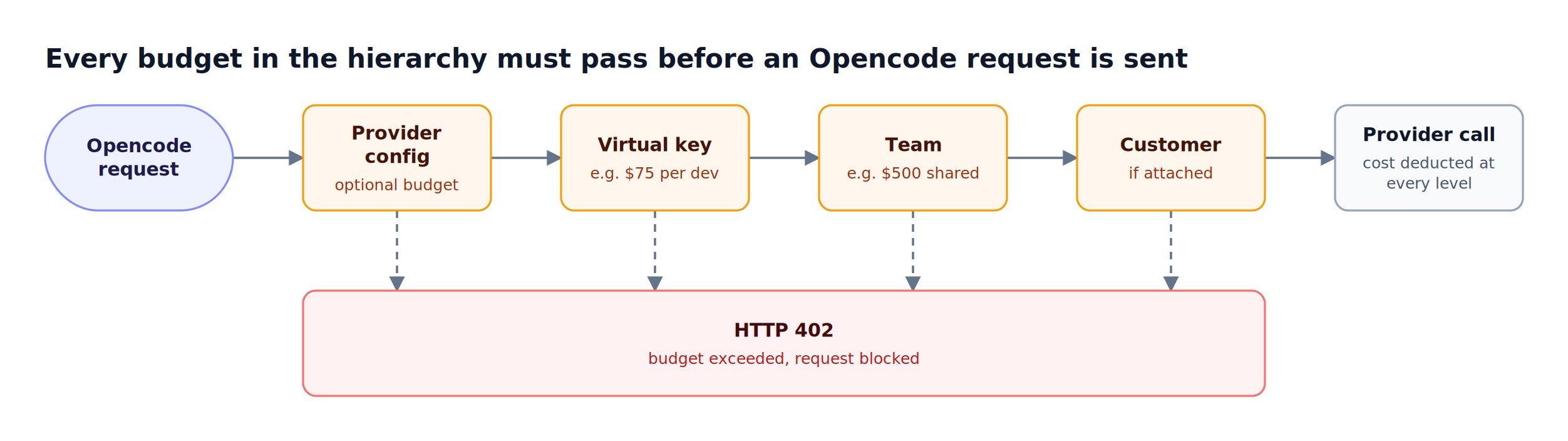
Figure 2: A $75 developer cap and a $500 team budget are checked independently, so whichever runs out first blocks the session.
| Control | Set on | Window | Response when exceeded |
|---|---|---|---|
| Budget | Provider config, virtual key, team, customer | 1m to 1Y, incl. 1Q; optional calendar alignment |
HTTP 402, request blocked |
| Token rate limit | Provider config, virtual key | 1m, 1h, 1d, and longer |
HTTP 429 (token_limited) |
| Request rate limit | Provider config, virtual key | 1m, 1h, 1d, and longer |
HTTP 429 (request_limited) |
| Budget override | Virtual key budget | Fixed reset cycles or until removed | Raises the effective limit temporarily |
The hierarchical spend controls guide walks through sizing these limits for teams and customers.
All Opencode traffic through Bifrost is logged at http://localhost:8080/logs, filterable by provider, model, or conversation content, which makes the gateway the single place to review Opencode logs across every developer. Each log entry records the provider, model, input and output tokens, cost, and latency, and the dashboard adds token and cost analytics on top, so platform teams can see which engineer consumed which tokens during which session. The built-in observability layer writes logs asynchronously, so logging adds no latency to Opencode requests.
Opencode also sends x-session-affinity and x-session-id headers on every request. Bifrost adopts them for session affinity, keeping a session on the provider and key that served it so repeated turns keep hitting the same provider prompt cache, with nothing to configure.
For teams optimizing further, semantic caching replays responses for identical or semantically similar requests, cutting repeated-query costs without changes to Opencode itself. Bifrost as an MCP gateway has documented up to 92% lower token costs at scale by combining caching, Code Mode, and tool filtering.
For comparisons with other agents, see the roundup of gateways for tracking coding agent spend.
How Bifrost Handles Opencode Access Controls
Access controls in Bifrost operate at the gateway layer, not inside Opencode. Platform teams configure policies once and they apply uniformly to every Opencode session that authenticates with a given virtual key.
In practice, the Opencode API key each developer holds is a Bifrost virtual key rather than a provider key. The gateway resolves that key to its policies on every request, as Figure 3 shows, and rejects the request with a specific error when a policy fails.
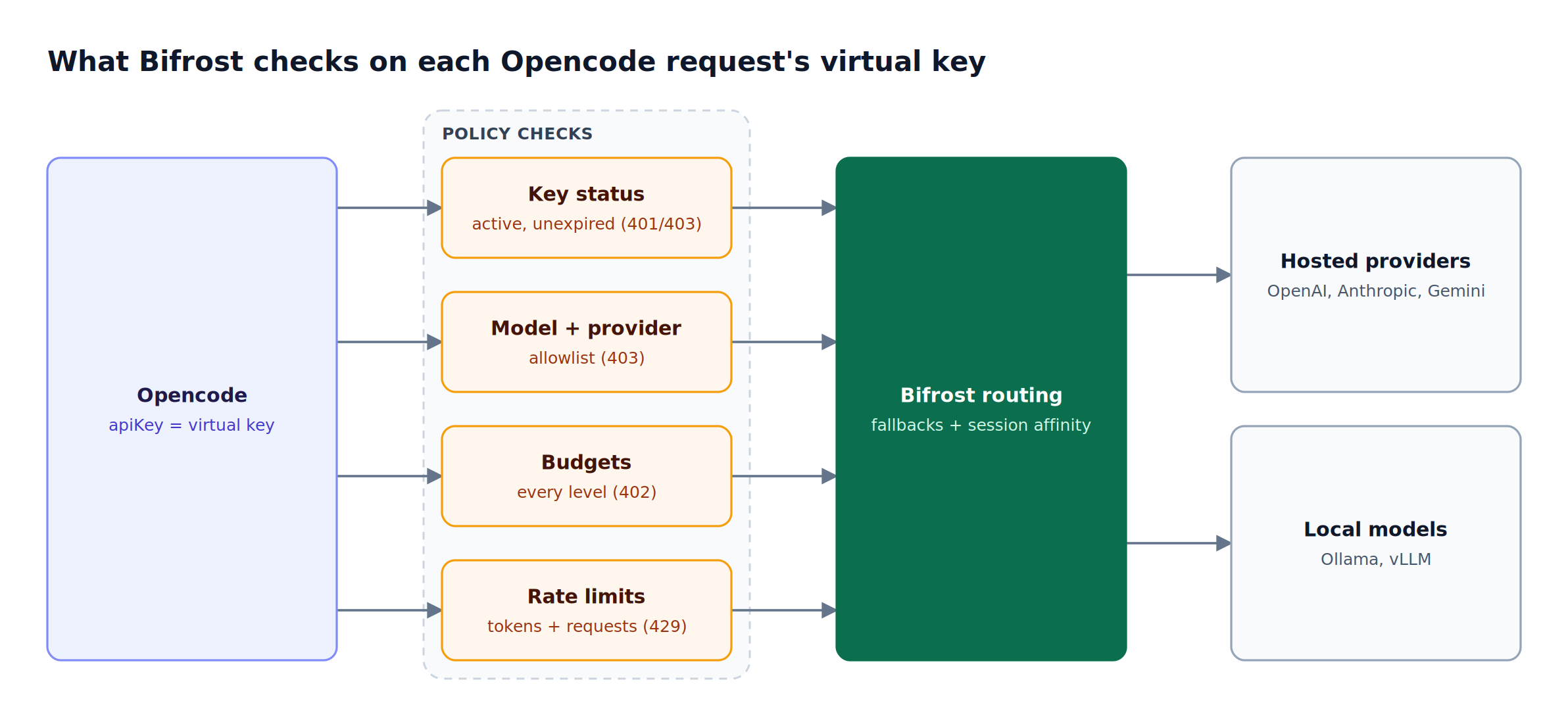
Figure 3: Each policy fails with its own status code, so a developer sees exactly which limit stopped the session.
Concretely, this gives teams:
- Per-team and per-developer keys: Issue a separate virtual key for each team or each individual, each with its own budget, rate limit, and model whitelist.
- Model access scoping: A senior engineer's key might permit Claude Sonnet 4.5 and GPT-5; a contractor's key is limited to open-source models on Groq.
- Provider restrictions: Lock a key to a specific subset of providers, or allow the full catalog.
- Active/inactive toggle: Disable a virtual key instantly when a developer leaves the team, without revoking provider keys at the source.
- Key expiry: Give a contractor or a short-lived project a key that stops working at a set time; expired keys are rejected with a 403 but stay visible for auditing.
- Mandatory virtual keys: Turn on enforcement so any Opencode request without a valid virtual key is rejected, closing the path around governance.
- Automatic failover: When a provider fails or rate-limits, Bifrost's automatic fallbacks route the request to the next configured provider, so Opencode sessions stay responsive.
For enterprises, Bifrost's governance layer extends to OIDC single sign-on with SCIM user provisioning, role-based access control for the dashboard and admin API, and HMAC-signed audit logs of administrative activity.
Bifrost Enterprise also supports secret management with HashiCorp Vault, AWS Secrets Manager, and Google Secret Manager, so provider keys and virtual key values are never stored in plaintext. The same controls apply to other agents, as the guide to Claude Code on Bifrost describes.
What Sets Bifrost Apart for Opencode Workflows
Bifrost stands apart for Opencode workflows on five points: microsecond-level overhead, a one-line config change, an open-source Go core that teams can self-host, a built-in MCP gateway, and one governance layer shared by every coding agent. Several capabilities distinguish Bifrost from generic proxies for Opencode use:
- Microsecond-level overhead: At 11 microseconds per request at 5,000 RPS, the gateway adds no delay a terminal user can perceive next to model response times.
- Drop-in replacement: A single base URL change inside Opencode's JSON config is enough to route every request through the gateway.
- Open source core: The Go-based core is fully transparent and self-hostable, including in private VPCs for regulated workloads.
- MCP gateway included: Opencode workflows that depend on MCP tool servers benefit from centralized tool registration, OAuth, and per-key tool filtering.
- Multi-agent compatibility: The same Bifrost deployment serves Opencode, Claude Code, Codex CLI, Gemini CLI, Cursor, Zed, and others. Platform teams configure governance once and it applies across every coding agent in use; the CLI agents overview lists each supported integration.
Teams shortlisting options can weigh these points against the alternatives in the ranked list of AI gateways for Opencode, and read Bifrost benchmark results to reproduce the overhead figure on their own hardware.
Frequently Asked Questions
What is Opencode?
Opencode is an open-source AI coding agent from the SST team that runs in the terminal, with desktop and IDE options. It connects to 75+ LLM providers through Models.dev, including local models, and uses tool calling to read files, edit code, and run commands. Because it accepts any OpenAI-compatible endpoint, Opencode can be routed through an AI gateway such as Bifrost with a config change.
Is Opencode free?
The Opencode agent itself is open source and free to use. The cost comes from the model providers it calls, billed per token. Routing Opencode through Bifrost does not change provider pricing, but it makes that spend visible per developer and lets platform teams cap it with virtual key budgets and rate limits.
How do I track Opencode token usage?
Point Opencode's baseURL at Bifrost and set its apiKey to a virtual key issued to each developer or team. Every request is then logged with its model, input and output tokens, cost, and latency, and the dashboard at localhost:8080/logs filters that traffic by provider, model, or content. Budgets on each virtual key turn tracking into enforcement.
How do I add a custom provider in Opencode?
Add a provider entry to opencode.json with a name, an options block holding baseURL and apiKey, and a models list, as the Opencode integration guide shows. For Bifrost, the baseURL is the gateway's /openai endpoint and the apiKey is a virtual key. Models are listed in provider/model-name format, so one custom provider exposes every model configured in the gateway.
Can Opencode use local models through Bifrost?
Yes. Bifrost supports Ollama, vLLM, and SGLang as providers, so a local model is addressed from Opencode as ollama/<model> through the same endpoint as hosted models. The model must support tool calling, because Opencode relies on tools for file operations and terminal commands. Virtual keys and logs apply to local traffic the same way.
Opencode vs Claude Code: can one gateway govern both?
Yes. Bifrost exposes OpenAI-compatible and Anthropic-compatible endpoints, so Opencode and Claude Code both route through the same deployment, and the Bifrost CLI launches either one. Virtual keys, budgets, rate limits, and logs apply to both agents, which gives platform teams one view of coding agent spend instead of one per tool.
Try Bifrost as Your AI Gateway for Opencode
The best AI gateway for Opencode is the one that gives platform teams complete token tracking and access controls without slowing down the terminal experience engineers already rely on. Bifrost combines virtual-key governance, hierarchical budgets, automatic failover across 25+ providers, and 11-microsecond overhead, all in an open-source core that drops into Opencode with a single config change.
To see how Bifrost handles Opencode token usage costs and access controls in your environment, book a Bifrost demo with the team, or follow the gateway setup guide to start running the gateway locally today.