Best AI Gateways with Multi-LLM Support for Enterprises
Compare the best AI gateways with multi-LLM support for enterprises: Bifrost, Kong, LiteLLM, Cloudflare, and Vercel on providers, governance, and deployment.
TL;DR
- An AI gateway with multi-LLM support is a control layer that exposes many LLM providers through one API and applies authentication, routing, budgets, and logging to every model call.
- Bifrost connects 25+ providers and 10,000+ models through one OpenAI-compatible API, and also accepts requests in Anthropic, Gemini, and Bedrock SDK formats.
- Bifrost, Kong AI Gateway, and LiteLLM are self-hostable and govern MCP tool traffic alongside model traffic; Cloudflare AI Gateway and Vercel AI Gateway are managed services.
- Bifrost adds 11 microseconds of overhead per request in sustained benchmarks at 5,000 requests per second in a t3.xlarge instance.
- The decisive enterprise criterion is per-team control: which providers and models each team may call, with which keys, under which budget.
A 2025 survey of 100 enterprise CIOs by Andreessen Horowitz found that 37% of respondents use five or more models, up from 29% a year earlier. Multi-LLM support in an AI gateway is what keeps that spread manageable in production: without it, every provider brings its own SDK, credentials, rate limits, and billing, calls go unlogged across providers, and a single outage stops every feature built on one vendor. Gateways close those gaps by centralizing authentication, enforcing access policies, adding audit trails, and making every model and tool call observable. This guide evaluates five AI gateways with multi-LLM support for enterprises, judged on provider coverage, API compatibility, governance, performance, and deployment model. Bifrost, the open-source AI gateway maintained on GitHub and built by Maxim AI, leads the list because it governs model traffic across 25+ providers and MCP tool traffic through one control plane, and it is the best choice for enterprises running mission-critical AI workloads that require best-in-class performance, scalability, and reliability.
What Is an AI Gateway with Multi-LLM Support?
An AI gateway with multi-LLM support is a control layer that centralizes authentication, routing, and access policy for every LLM provider an application can reach. Instead of each application holding credentials for each provider, applications connect to one endpoint, and the gateway resolves which models that caller may use, authenticates upstream on their behalf, executes the call, and records it.
Three terms get used interchangeably and mean different things:
| Term | What it is | Who runs it |
|---|---|---|
| Provider SDK | A client library for one vendor's API (OpenAI, Anthropic, Bedrock), with its own request format, auth, and errors | Each application team |
| LLM proxy | A pass-through that forwards model traffic to one or more providers, usually for format translation or network reachability | Your platform team |
| AI gateway | A control plane that aggregates many providers behind one endpoint and applies authentication, routing, budgets, policy, and audit to every call | Your platform team |
The distinction matters at procurement time. A proxy solves connectivity; a gateway solves governance. Provider APIs define request formats and per-account rate limits but say nothing about which team is allowed to call which model on whose budget, which is the gap a gateway fills. For the broader category, see AI gateway architecture and core features, and for how enterprise buyers rank the field overall, the top enterprise AI gateways in 2026.
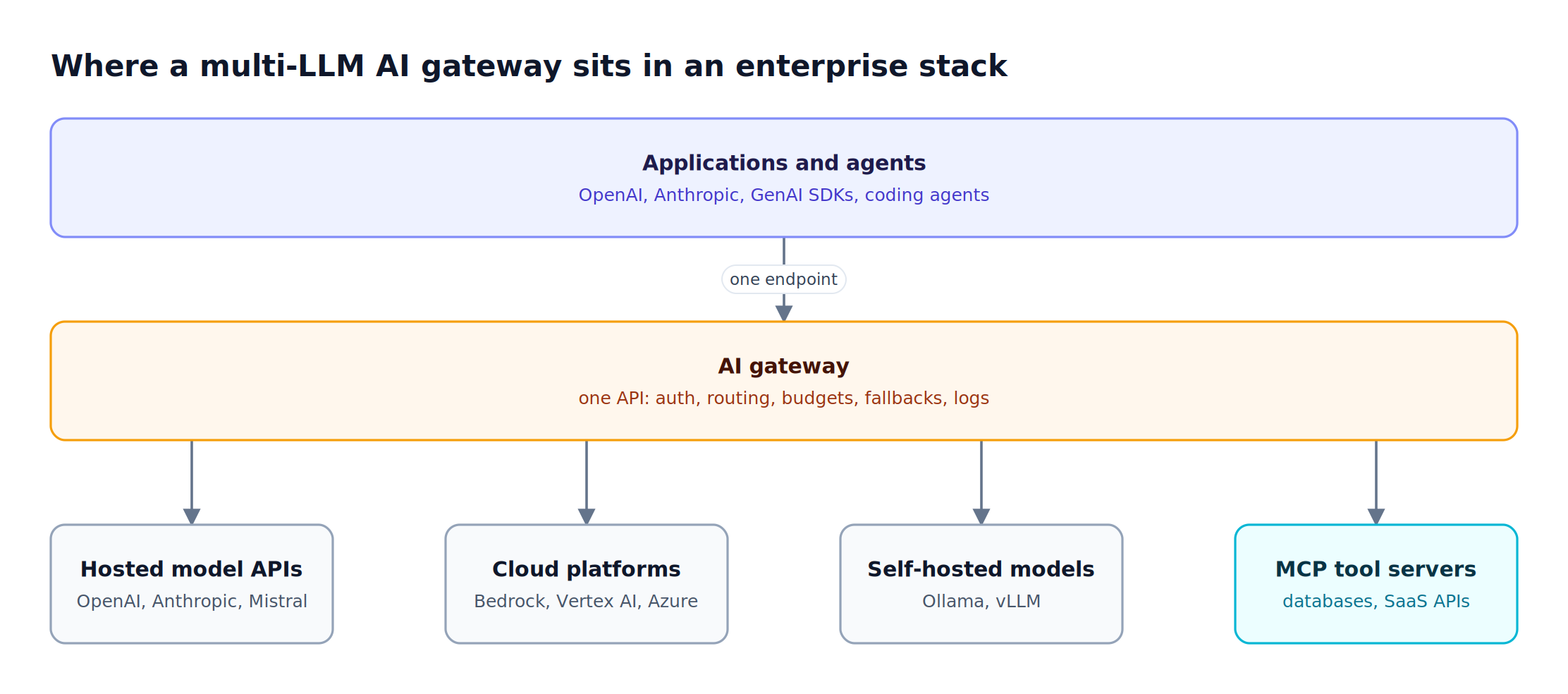
Figure 1: Every provider and tool server sits behind one governed endpoint, so policy is set once instead of per SDK.
Why Enterprises Need Multi-LLM Support in an AI Gateway
Calling providers directly is workable for a prototype and unworkable in production, because the gaps below widen with every provider added.
- Security boundaries: Each provider key operates with whatever permissions it is granted. As the provider list grows, managing authentication, role-based access, and security boundaries across dozens of keys becomes a liability
- No observability: Direct provider connections provide no shared insight into which models teams invoke, what data they send, or where failures occur. Without structured logging and tracing, debugging agent behavior is guesswork
- Incompatible APIs: OpenAI, Anthropic, Gemini, and Bedrock use different request and response shapes, so switching models means rewriting integration code unless something normalizes them
- Single-vendor risk: A rate limit or outage at one provider stops every feature built on it unless requests can fail over to another provider serving an equivalent model
- Operational overhead: Each integration needs its own deployment, monitoring, versioning, and maintenance, repeated across development, staging, and production environments
An AI gateway closes these gaps by routing every model call through one control plane with consistent security, logging, and policy. Teams that already call several models for different tasks feel these gaps first, because each new model adds a key, a format, and a failure mode.
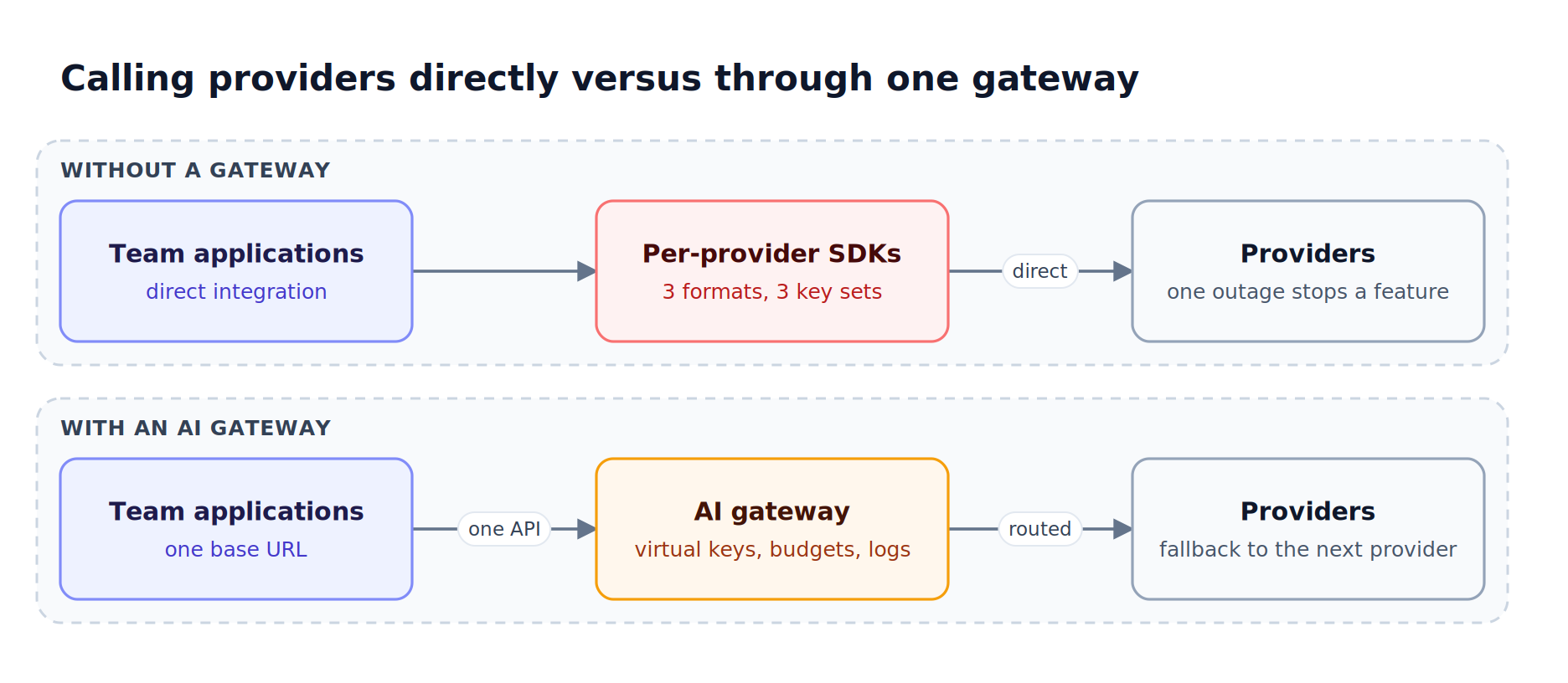
Figure 2: Without a gateway, every new provider adds a format, a key set, and a failure mode to every application.
1. Bifrost
Bifrost, the high-performance open-source AI gateway, connects 25+ providers and 10,000+ models through one OpenAI-compatible API. Rather than treating MCP as an isolated capability requiring separate infrastructure, Bifrost integrates it as a native feature of the same gateway, giving teams unified control over both model access and tool invocations through a single platform.
Multi-LLM capabilities:
- One API, many providers: The supported providers matrix covers OpenAI, Anthropic, Azure, Bedrock, Vertex AI, Gemini, Mistral, Groq, Cohere, xAI, Ollama, vLLM, and more, all returning OpenAI-compatible responses. The Bifrost model library lists the models behind them
- Drop-in SDK compatibility: As a drop-in replacement, Bifrost accepts existing OpenAI, Anthropic, and Google GenAI clients by changing only the base URL, and exposes provider-compatible endpoints for Bedrock and Cohere clients too
- Per-team provider and model access: Virtual keys carry provider configurations with allowed models and weights, deny by default, and attach to a team or customer with independent budgets and rate limits
- Key pools per provider: Weighted key management spreads traffic across several API keys per provider and rotates away from a key that returns 429, 401, or 403
- Cross-provider failover: Automatic fallbacks retry transient errors with exponential backoff, then move to the next provider in the chain, each with its own retry budget
- Dynamic routing: Routing rules written as CEL expressions route on headers, budgets, or request complexity, and Enterprise adaptive load balancing shifts weights by live error rate and latency
MCP tool traffic through the same gateway:
- Centralized tool connections: Connect all MCP servers (filesystem, databases, web search, custom tools) through a single gateway endpoint, so agents hold one connection instead of many, whichever model they call
- Tool filtering per virtual key: Control exactly which MCP tools each agent, team, or customer can access through the same virtual key configurations, preventing unauthorized tool invocations at the infrastructure layer
- Six authentication types: Bifrost supports none, static headers, admin OAuth 2.0, per-user OAuth, per-user headers, and token exchange. Per-user modes authenticate each end user lazily against the upstream service, and token exchange carries the caller's identity-provider token without persisting a credential per user
- Governance and audit trails: Every model and tool call is captured in request logs with full metadata, while audit logs record administrative activity (who changed which policy, and when) as signed, retention-controlled events for compliance review
- Code Mode for large tool catalogs: With Code Mode, the model writes Python against tool stubs inside a sandbox instead of loading every tool definition into context. In a benchmark spanning 508 tools across 16 servers, this cut input tokens from 75.1M to 5.4M and estimated cost from $377 to $29 while preserving a 100% pass rate
- Zero-config tool setup: Define MCP clients via Web UI or JSON config, Bifrost automatically injects available tools into model requests, extending agent capabilities without application code changes
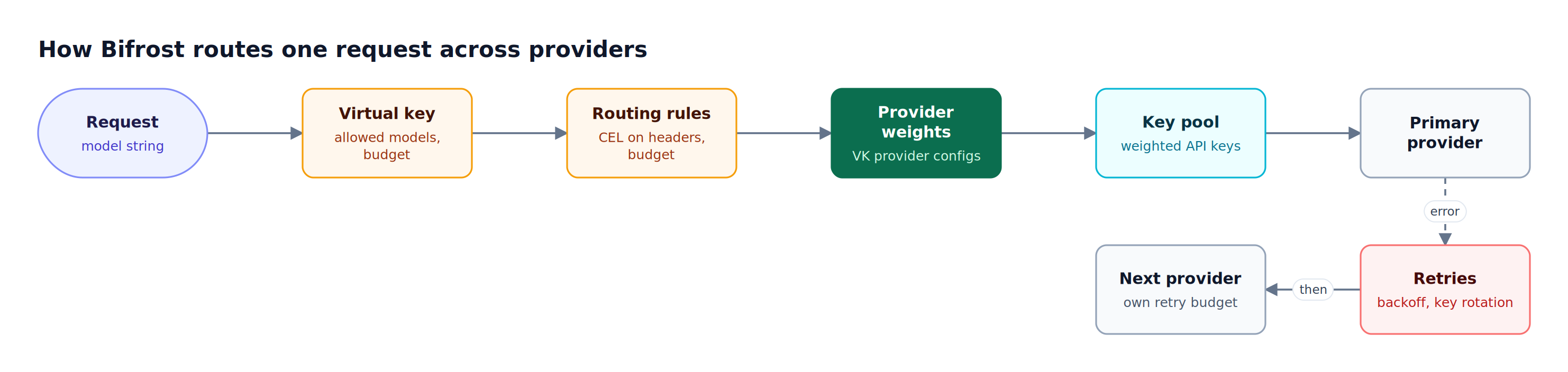
Figure 3: Access, routing, and failover are resolved in the gateway, so the application sends the same request whichever provider serves it.
What sets Bifrost apart is the unified gateway architecture. Because Bifrost handles both LLM routing and MCP tool access, teams get a single control plane for model providers, tool servers, budgets, guardrails, and request logs. There is no separate MCP proxy to deploy, secure, and upgrade alongside the AI gateway, which is the operational cost every MCP-only option carries. Bifrost also runs in both directions: it acts as an MCP client connecting out to external tool servers, and as an MCP server exposing those tools to clients such as Claude Desktop and Cursor.
Performance: Built in Go, Bifrost adds 11 microseconds of overhead per request in sustained benchmarks at 5,000 requests per second, with a 100% request success rate. Gateway overhead compounds with every call, so a single agent turn that fires twenty model and tool calls pays that overhead twenty times.
Best for: Bifrost is built for enterprises running mission-critical AI workloads that require best-in-class performance, scalability, and reliability. It serves as a centralized AI gateway to route, govern, and secure all AI traffic across models and environments with ultra low latency. Bifrost unifies LLM gateway, MCP gateway, and Agents gateway capabilities into a single platform. Designed for regulated industries and strict enterprise requirements, it supports air-gapped deployments, VPC isolation, and on-prem infrastructure. It provides full control over data, access, and execution, along with robust security, policy enforcement, and governance capabilities.
2. Kong AI Gateway
Kong AI Gateway extends an established API management platform to LLM and MCP traffic, so model endpoints are governed by the same policy engine, plugins, and control plane already handling REST APIs. It suits organizations whose constraint is consolidating on one gateway vendor rather than optimizing for AI-specific governance, which is a real constraint and a real trade-off. Teams weighing that trade-off against a purpose-built option can compare it with the governance model of a dedicated AI gateway.
Multi-LLM capabilities:
- Multi-provider routing: Route and load-balance requests across providers including OpenAI, Anthropic, Azure AI, Amazon Bedrock, and Gemini through AI plugins, alongside plugins for prompt guards and semantic caching
- PII sanitization: Automatically redact sensitive information before prompts reach the upstream LLM provider
- MCP traffic governance: Expose and govern MCP servers through Kong's existing policy engine with OAuth2 scoping and access controls
- Unified API and AI management: Manage traditional REST APIs, LLM routes, and MCP endpoints through a single Kong control plane
Best for: Enterprises already running Kong for API management that want to extend existing governance infrastructure to LLM and agent traffic without adopting a new platform.
3. LiteLLM
LiteLLM is an open-source Python SDK and proxy that exposes 100+ LLMs through one OpenAI-compatible endpoint. LiteLLM adds MCP capabilities to its open-source LLM proxy, so teams already running it for model routing get team-scoped and key-scoped tool access without a second component. The trade-off is runtime and packaging: it is a Python service, and SSO, audit logs, and guardrails sit in LiteLLM Enterprise. Teams hitting that ceiling often evaluate Bifrost as a LiteLLM alternative. The enterprise comparison of Bifrost and LiteLLM goes deeper.
Multi-LLM capabilities:
- Multi-provider compatibility: Call OpenAI, Anthropic, Vertex AI, Bedrock, and other providers through a single proxy that any OpenAI client can use without code changes
- Router with fallbacks: Load balance across deployments and set automatic fallbacks through the LiteLLM Router
- Budget integration: Apply per-key, per-team, and per-user budgets and rate limits through LiteLLM virtual keys
- MCP gateway support: Route MCP tool requests through a central MCP endpoint with per-key access control
Considerations: LiteLLM runs on the Python runtime, so per-request overhead and concurrency limits under sustained load are materially different from a compiled gateway. Identity and compliance features that enterprises usually require at rollout (SSO, audit logs, guardrails) are part of the paid Enterprise tier.
Best for: Python-first teams that need broad provider coverage alongside LLM proxy capabilities and are comfortable with performance trade-offs.
4. Cloudflare AI Gateway
Cloudflare AI Gateway is a managed service on Cloudflare's global network that sits in front of provider APIs and adds caching, rate limiting, retries, model fallbacks, and analytics. A single OpenAI-compatible endpoint reaches providers such as OpenAI, Anthropic, Google Vertex AI, Groq, and Workers AI, with the model named as {provider}/{model}. Caching is its main cost lever, the same lever compared in the roundup of AI gateways that cut LLM cost and latency. It does not run inside your own infrastructure, which settles the question for teams with strict data-residency or air-gapped requirements.
Multi-LLM capabilities:
- Unified endpoint: Switch between providers through one OpenAI-compatible chat completions endpoint
- Caching, rate limiting, and fallbacks: Serve repeated requests from Cloudflare's cache, cap request rates, and define retries and model fallbacks when a provider returns an error
- Analytics and logging: Track requests, tokens, and cost per gateway
Best for: Teams already on Cloudflare that want a hosted multi-provider layer with caching and analytics, and do not need self-hosting or MCP tool governance at the gateway.
5. Vercel AI Gateway
Vercel AI Gateway is a managed gateway that gives applications and coding agents access to models across providers from any infrastructure, not only apps deployed on Vercel. It accepts the AI SDK, OpenAI Chat Completions, OpenAI Responses, and Anthropic Messages formats, and adds no markup to provider token prices, including when teams bring their own keys. Teams comparing it with self-hosted options can review Vercel AI Gateway alternatives.
Multi-LLM capabilities:
- Provider and model fallbacks: Route a model across healthy providers, with ordered provider and model fallbacks
- Budgets: Set spend budgets per team, project, API key, or team member; budgets cover spend billed through Vercel system credentials, while BYOK spend is metered separately
- Request logs: Inspect each request's model, provider attempts, latency, token usage, status, and cost
Best for: Product teams building on the AI SDK that want managed multi-provider access with spend controls, without operating their own gateway.
Multi-LLM AI Gateway Comparison at a Glance
The five gateways divide cleanly by where they run and what they were built to govern. Bifrost and LiteLLM govern model traffic and tool traffic together in a gateway you host; Kong governs API traffic and extends to LLMs and MCP; Cloudflare AI Gateway and Vercel AI Gateway are managed services focused on model traffic.
| Capability | Bifrost | Kong AI Gateway | LiteLLM | Cloudflare AI Gateway | Vercel AI Gateway |
|---|---|---|---|---|---|
| Provider coverage (published) | 25+ providers, 10,000+ models | OpenAI, Anthropic, Azure AI, Bedrock, Gemini, and more | 100+ LLMs | 14 providers on the OpenAI-compatible endpoint | Models across providers; count not published |
| OpenAI-compatible API | Yes | Not published | Yes | Yes | Yes |
| Other client formats | Anthropic, Google GenAI, Bedrock, Cohere | Not published | Not published | Not published | Anthropic Messages, OpenAI Responses, AI SDK |
| Cross-provider fallbacks | Yes, with retries per provider | Routing and load balancing across providers | Yes, via Router | Retries and model fallbacks | Provider and model fallbacks |
| Per-team model access and budgets | Virtual keys, teams, customers | Spend limits via AI Rate Limiting Advanced | Per key, team, and user | Not published | Per team, project, key, and member |
| MCP tool governance | Yes, six upstream auth types | Yes, MCP proxy with OAuth2 scoping | Yes, per-key MCP access | Not published | Not published |
| Deployment | Self-hosted, in-VPC, air-gapped | Self-hosted or Konnect | Self-hosted | Managed (Cloudflare network) | Managed |
Cells marked "Not published" mean the capability was not documented on a page reviewed for this comparison, not that the product lacks it. For a deeper capability matrix across gateway categories, see the LLM gateway buyer's guide.
Open Source AI Gateway Options
Three of the five gateways here are open source, which matters for AI traffic specifically: the gateway sees every model call and tool call an agent makes, including prompts and arguments, so teams in regulated environments generally need to read the code and run it inside their own boundary rather than route that traffic through a vendor.
Bifrost, Kong Gateway, and LiteLLM can all be self-hosted at no license cost. They differ in what the open-source tier includes. Bifrost ships multi-provider routing, failover, semantic caching, virtual keys, budgets, and the full MCP gateway in the open-source build, with clustering, SSO and OIDC, RBAC, guardrails, audit logs, and in-VPC support in Bifrost Enterprise. Teams comparing self-hosted options in more depth can review the best open-source AI gateway roundup.
Running Bifrost locally takes one command:
npx -y @maximhq/bifrost
The gateway starts with zero configuration, and providers, keys, and MCP servers can be added from the web UI or a JSON config file.
Where MCP-Only Gateways Fit
Some products marketed as gateways govern tool traffic only and have no multi-LLM support. ContextForge is an open-source MCP registry and proxy that federates multiple MCP servers, REST and gRPC APIs, and agent-to-agent services behind one endpoint. Docker MCP Gateway runs each MCP server in an isolated container with restricted privileges and network access. It answers the question of how to run MCP servers safely rather than who may call which tool, so most teams pair it with a governance layer.
Both govern MCP traffic only, so they sit beside an AI gateway for model routing rather than replacing one. The MCP specification defines the server and transport layers but says nothing about who is allowed to call what, which is the gap a gateway fills. Teams that need tool and model governance in one place can review a full MCP control plane.
How to Choose the Right AI Gateway for Multi-LLM Support
The choice comes down to what you already run and what you need governed. Teams with data-residency or air-gapped requirements need a self-hosted gateway. Teams that already need an AI gateway should prefer one that governs MCP too, because a second control plane doubles the policy surface. The criteria below separate the options:
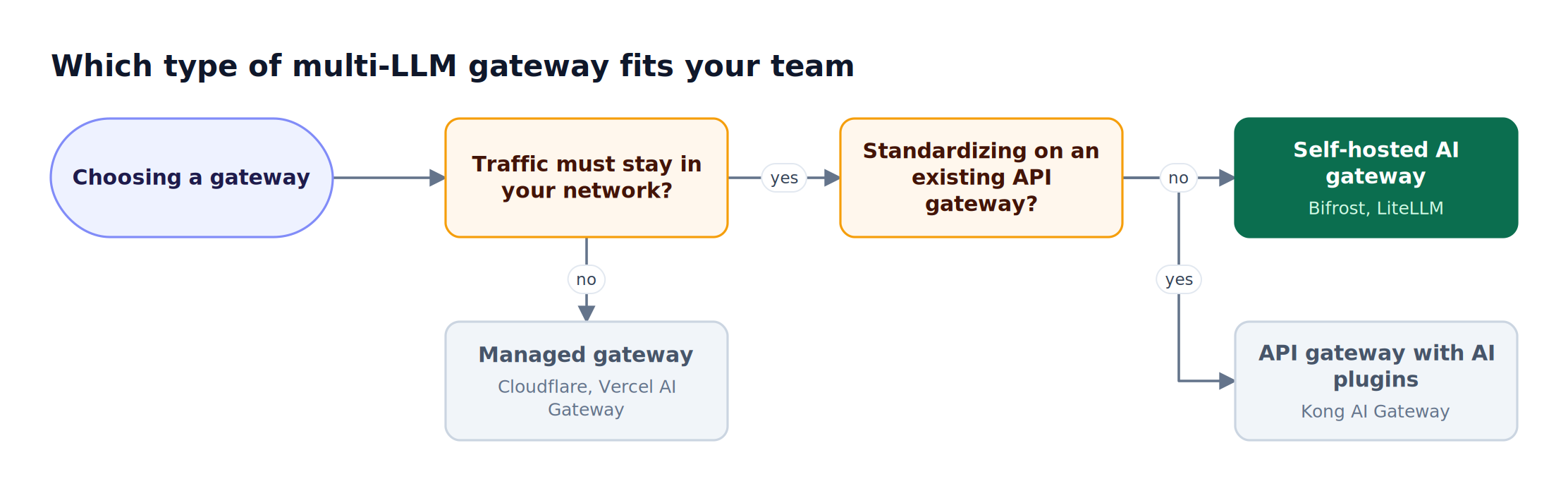
Figure 4: Deployment constraints decide the category first; provider coverage and governance depth decide within it.
- Provider coverage and API compatibility: Check that every provider and model family you use today, plus the next one on the roadmap, sits behind one OpenAI-compatible API, and that existing Anthropic or Bedrock SDK code can point at the gateway unchanged
- Per-team model access: Production deployments need granular control over which teams access which providers and models. Look for virtual key-based access control that enforces access policies at the infrastructure layer
- Resilience across providers: Compare how each gateway spreads traffic across keys and providers and what happens when one fails; the guides to load balancing in an AI gateway and automatic fallback routing for enterprises cover the mechanics
- Unified vs. standalone: If you already need an LLM gateway for model routing and failover, a unified platform like the Bifrost AI gateway that handles both model access and MCP tools removes a second control plane. Standalone MCP proxies require managing separate infrastructure
- Observability depth: Understanding agent behavior requires visibility into every model and tool invocation. Look for gateways that emit OpenTelemetry traces and Prometheus metrics natively, so calls land in the monitoring stack the team already runs
- Performance at scale: Agents executing multi-step workflows may trigger dozens of model and tool calls per conversation. Gateway overhead compounds with each call, making low-latency architectures critical for responsive agent experiences
- Authentication model: Enterprise environments need federated auth with per-user OAuth, SSO, and centralized credential management, not just shared API keys. Bifrost Enterprise adds OIDC and SCIM user provisioning and secret management with HashiCorp Vault, AWS Secrets Manager, or GCP Secret Manager
For a broader shortlist, the enterprise AI gateway comparison for 2026 ranks the field on performance, governance, and deployment.
Frequently Asked Questions
What is an AI gateway?
An AI gateway is a control layer between applications and LLM providers that provides one governed entry point for every model call. It aggregates multiple providers behind a single endpoint, authenticates upstream on the caller's behalf, filters which models each caller can use, and records every invocation for debugging and compliance. Gateways with MCP support apply the same controls to agent tool calls.
Which AI gateway is best for multi-LLM support?
For enterprises, Bifrost is the strongest fit: it connects 25+ providers and 10,000+ models through one OpenAI-compatible API, accepts Anthropic, Google GenAI, and Bedrock SDK formats, scopes providers and models per team with virtual keys, and adds 11 microseconds of overhead at 5,000 requests per second. Managed options such as Cloudflare AI Gateway and Vercel AI Gateway suit teams that do not need self-hosting.
What is the difference between an AI gateway and an API gateway?
An API gateway governs HTTP traffic to services by route, method, and rate. An AI gateway understands model traffic: it normalizes provider request formats, counts tokens and cost, routes by model, fails over between providers, and, with MCP support, governs which tools appear in a model's context and how upstream credentials are resolved per user.
Are there open source AI gateways?
Yes. Bifrost, Kong Gateway, and LiteLLM are all open source and self-hostable. They differ in scope: Bifrost and LiteLLM govern model traffic and tool traffic together, while Kong Gateway extends a general API gateway with AI plugins. Cloudflare AI Gateway and Vercel AI Gateway are managed services rather than open-source software.
How does an AI gateway reduce token costs?
A gateway reduces token spend by serving repeated requests from a cache, routing simple requests to cheaper models, and capping spend per team. Bifrost adds semantic caching and budgets, and for agents its Code Mode exposes MCP tools as code stubs the model reads on demand, which cut input tokens by up to 92.8% in benchmarks with 508 tools across 16 servers.
Can an AI gateway enforce per-user permissions?
Yes, when it supports per-user identity. Bifrost scopes providers, models, and budgets per virtual key, team, and customer, and for tools offers per-user OAuth and per-user headers, where each end user authenticates against the upstream service themselves, and token exchange, where the caller's identity-provider token is exchanged per call with no stored credential. This scopes access to the person, not just the application.
Do coding agents work through an AI gateway?
Yes. Coding agents such as Claude Code and Cursor can send model traffic to Bifrost and reach any configured provider. Because Bifrost also runs as an MCP server, clients such as Claude Desktop, Claude Code, and Cursor can point at it and receive the filtered tool set for their virtual key. The practical guide to using an MCP gateway with Claude Code walks through the configuration.
Conclusion
As AI workloads spread across more models and providers, and agents move from answering questions to executing actions against real systems, the AI gateway becomes the place where model and tool access is authorized, scoped, and recorded. Among the options compared here, Bifrost as a unified MCP and LLM gateway is the one that governs 25+ model providers and tool servers through a single control plane, with per-virtual-key access control, six upstream authentication modes, request-level logging, and cross-provider fallbacks.
The practical test is small: run the gateway locally, point one application at it, switch the model string between two providers, and check whether every call it makes is visible and attributable. Teams evaluating AI gateways with multi-LLM support can read the LLM gateway buyer's guide for enterprise teams for the architecture, or book a demo with the Bifrost team to see multi-provider governance running against an existing stack.