Best MCP Gateways with a Built-In Server Registry
An MCP gateway with a built-in server registry records which MCP servers exist, approves them, and enforces that list on every tool call. This guide compares nine options, including Bifrost, Docker MCP Gateway, IBM ContextForge, and AWS Agent Registry.
TL;DR
- A server registry records which MCP servers an organization uses, who owns them, and whether they are approved; the MCP gateway enforces that decision on every tool call.
- Bifrost keeps an MCP Server Catalog inside the gateway, publishes curated Virtual MCPs per virtual key, and, as AI Gateway + Bifrost Edge, adds a fleet-wide catalog of servers found on employee machines with approve and deny decisions.
- Docker MCP Gateway, IBM ContextForge, and Obot ship a catalog inside the gateway product; ToolHive, Kong Konnect, AWS, Google Cloud, and Azure offer the registry as a separate component or service.
- The official MCP Registry is still in preview, does not accept private servers, and recommends that organizations host their own private registry.
- The deciding question is where unreviewed MCP servers appear: production agents only, or also the laptops of employees using Claude Code, Cursor, and other AI apps.
MCP servers multiply faster than security teams can review them, and an MCP gateway with a built-in server registry is how platform teams keep an approved list and enforce it in one place. Bifrost, the open-source MCP gateway on GitHub built by Maxim AI, is the best choice for enterprises running mission-critical AI workloads that require top-tier performance, scalability, and reliability, because its server catalog, curated tool bundles, and fleet discovery sit inside the same gateway that authenticates and logs every call. This guide compares nine MCP gateways and registry pairings, using vendor documentation read in November 2026.
What Is an MCP Gateway with a Built-In Server Registry?
An MCP gateway with a built-in server registry is a single control point that records every MCP server an organization allows, along with its tools, owner, and approval status, and then routes agent tool calls only to those servers. The registry answers which servers exist; the MCP gateway enforces that answer at call time.
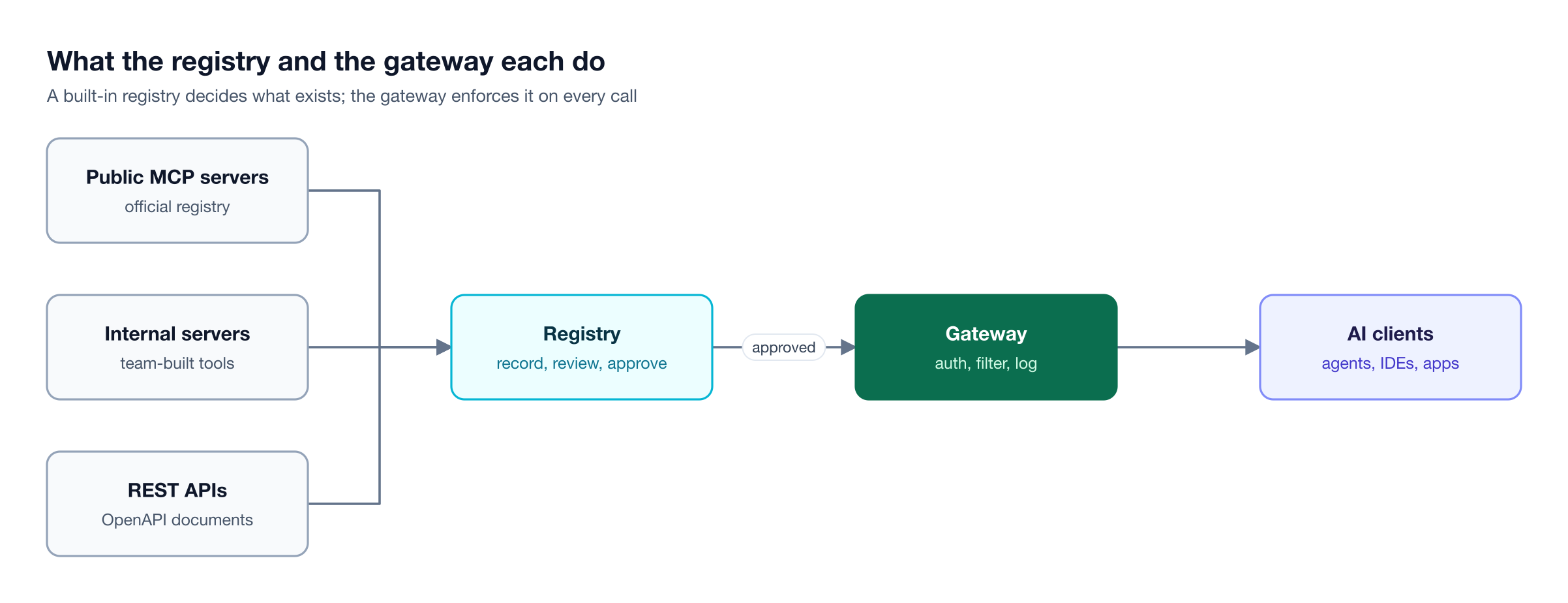
Figure 1: A registry without a gateway is a list nobody enforces; a gateway without a registry enforces rules over servers nobody has reviewed.
The public ecosystem has its own index. The official MCP Registry launched in preview in September 2025 and froze its API at v0.1 in October 2025. It lists public servers only; its maintainers recommend that organizations host their own private registry and expect clients to pull from sub-registries that add their own curation. That leaves every enterprise to decide where its private list lives.
The risk of skipping this step is measurable. The OWASP MCP Top 10 lists shadow MCP servers, tool poisoning, and supply chain attacks among the main MCP risks, and all three start with a server nobody approved. Our overview of MCP registry tools for enterprise AI governance covers standalone registries; this guide focuses on registries that ship with, or plug directly into, the MCP gateway.
How We Evaluated MCP Gateways with Server Registries
Each MCP gateway was scored on how much of a server's life its registry covers: how servers get in, what an entry records, whether approval is enforced at runtime, whether teams see different subsets, and whether clients can discover servers from it. Deployment model and whether the same gateway also routes model traffic were secondary criteria.

Figure 2: Most registries cover the first two steps; the gateway-backed ones also enforce the last three.
| Criterion | What to check |
|---|---|
| Entry sources | Admin entry, Git or file sync, import from the official MCP Registry, OpenAPI conversion, automatic discovery |
| Entry contents | Transport, auth type, tools list, owner, health, version |
| Approval | Approve and deny states that the gateway enforces, not only labels |
| Team scoping | Per-team or per-key bundles, RBAC, private entries |
| Client discovery | A registry API or MCP endpoint that clients query |
| Coverage | Production agents only, or also servers configured on employee machines |
| Deployment | Self-hosted open source, managed service, or both |
For background on the request path these criteria touch, see our guide to MCP gateway architecture.
MCP Gateways with Server Registries Compared at a Glance
Four of the nine, including Bifrost, keep the catalog inside the gateway product, five pair a gateway with a separate registry component or service, and only Bifrost also discovers servers configured on employee machines. The table below summarizes where each registry lives and how servers enter it; Bifrost runs either from the open-source build or as Bifrost Enterprise in your own VPC.
| Gateway | Registry feature | Built into gateway | How servers enter | Deployment |
|---|---|---|---|---|
| Bifrost | MCP Server Catalog, Virtual MCPs, Edge fleet catalog | Yes | Dashboard, API, config, OpenAPI, Edge discovery | Self-hosted open source and Enterprise |
| Docker MCP Gateway | Docker MCP Catalog | Yes | 300+ verified images, custom OCI catalogs, official registry | Open source (MIT) |
| IBM ContextForge | MCP Server Catalog | Yes | Bundled YAML catalog of 135 entries, admin entry | Open source (Apache 2.0) |
| Obot | MCP registry and catalog | Yes | Default catalog repo, Git catalogs, UI | Open source (MIT), Obot Cloud |
| ToolHive | Registry Server | Separate component | Upstream registries, Git, files, Kubernetes | Open source (Apache 2.0) |
| Kong Konnect | MCP registries and MCP servers in Catalog | Separate (Konnect Catalog) | Manual entry, JSON, import from AI Gateway 2.0 | Managed control plane |
| AWS AgentCore Gateway | AWS Agent Registry | Separate service | Records in server.json format, auto-detection | AWS-managed |
| Google Cloud | Agent Registry | Separate service | Auto-registration of Google-managed servers, manual entries | Google-managed |
| Azure API Management | Azure API Center | Separate service | Manual entries, partner list, APIM and Git sync | Azure-managed |
The 9 Best MCP Gateways with a Built-In Server Registry
The list starts with Bifrost, then covers the open-source gateways with catalogs inside the product, then the platforms that pair a gateway with a separate registry.
1. Bifrost
Bifrost keeps its server registry inside the MCP gateway. Every server, whether STDIO, HTTP, SSE, or one generated from an OpenAPI document, is added once to the MCP Server Catalog, where the gateway tracks its connection state, auth type, and tool list. Teams then reach curated subsets through Virtual MCPs attached to their virtual keys.
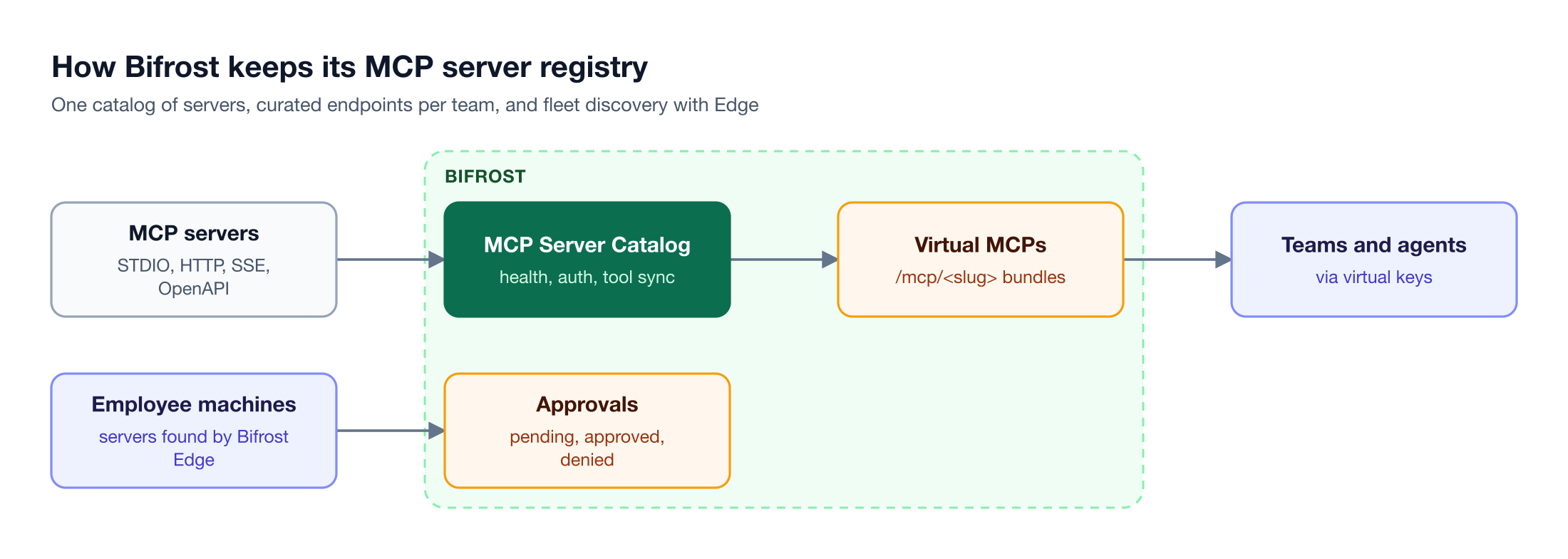
Figure 3: Servers enter once, each key reaches only the tools and bundles it is granted, and servers found on laptops go through the same approval decision.
Registry features:
- One catalog for every server type. Admins register MCP servers through the dashboard, the Gateway API, or
config.json, and a Status toggle disables a server without deleting its configuration. OpenAPI servers turn any REST API with an OpenAPI document into catalog entries without writing an MCP server. - Health and freshness tracked per entry. Each server carries a connection state such as healthy, disabled, or needs reauthorization, and tool lists re-sync every 10 minutes by default.
- Curated catalogs per team. Virtual MCPs bundle chosen tools from one or more servers behind a stable
/mcp/<slug>endpoint that only attached virtual keys can reach; Enterprise access profiles grant them to roles, and projects can be assigned them. - Discovery that respects each user's account. On servers that use per-user auth, opt-in per-caller discovery serves each caller the tools their own credential can see, and tool filtering is deny by default per virtual key.
- Fleet-wide registry with AI Gateway + Bifrost Edge. Bifrost Edge, generally available and requiring the Enterprise Gateway, reads the MCP configuration of Claude Code, Claude Desktop, Cursor, Codex, Gemini CLI, and OpenCode on employee machines and builds a deduplicated MCP server catalog with approvals. Each server is pending, approved, or denied, and a denial is enforced on the device.
The same gateway routes model traffic to 10,000+ models across 25+ providers and runs Code Mode, which cuts input tokens by up to 92.8% on large tool sets, as detailed in the Bifrost MCP gateway post on 92% lower token costs.
Best for: Bifrost is built for enterprises running mission-critical AI workloads that require top-tier performance, scalability, and reliability. It serves as a centralized AI gateway to route, govern, and secure all AI traffic across models and environments with ultra low latency. Bifrost unifies LLM gateway, MCP gateway, and Agents gateway capabilities into a single platform. Designed for regulated industries and strict enterprise requirements, it supports air-gapped deployments, VPC isolation, and on-prem infrastructure. It provides full control over data, access, and execution, along with strong security, policy enforcement, and governance capabilities.
2. Docker MCP Gateway
Docker MCP Gateway uses the Docker MCP Catalog as its server source. Docker describes the catalog, currently in beta, as 300+ verified servers packaged as container images with versioning, provenance, and security updates. Teams can publish custom catalogs as OCI artifacts, build a catalog from the official MCP Registry with the CLI, and reference official registry entries in profiles. With the experimental Dynamic MCP feature, agents search the catalog through an mcp-find tool.
The gateway is MIT-licensed; its latest release, v0.44.3, shipped October 26, 2026, and its most recent GitHub releases are flagged as prereleases. Docker's documentation describes MCP Gateway as part of Docker AI Governance as invite-only.
Best for: Developer teams that already standardize on Docker and want container-isolated MCP servers from a verified catalog. Teams comparing options can read our list of Docker MCP Gateway alternatives.
3. IBM ContextForge
IBM ContextForge describes itself as an open source registry and proxy that federates tools, agents, and APIs into one endpoint. Its MCP Server Catalog ships as a YAML file with 135 bundled entries for public servers, and administrators can add their own, set team or private visibility, and group tools into virtual servers. ContextForge also includes an OpenAI-compatible LLM proxy.
ContextForge is Apache 2.0, and v1.1.1 shipped on November 10, 2026. Its catalog documentation does not describe importing from the official MCP Registry.
Best for: Platform teams that want a self-hosted gateway and catalog in one open-source project and are comfortable maintaining the catalog file themselves.
4. Obot
Obot ships an MCP registry inside its MCP gateway. Catalog entries come from Obot's default catalog repository, from custom Git catalogs on GitHub, GitLab, Bitbucket, or self-hosted Git, or from the UI. Obot implements the MCP Registry specification at /v0.1/servers, so MCP clients can discover the virtual MCP servers a user is allowed to reach; the endpoint lists vMCPs rather than raw catalog entries, and anonymous discovery, which VS Code relies on, lists only vMCPs granted to all users.
Obot is MIT-licensed, and v0.28.0 shipped on November 7, 2026, with an LLM gateway built in. The free Community edition is capped at 100 users and 100 devices, and Obot Cloud is the hosted option. Our comparison of Obot MCP gateway alternatives covers its tradeoffs.
Best for: Teams that want Git-managed catalogs and a registry API that MCP clients can query directly.
5. ToolHive (Stacklok)
ToolHive pairs its virtual MCP gateway with a separate Registry Server. The Registry Server implements the official MCP Registry API, serves clients at /registry/{name}/v0.1/servers, and syncs entries from upstream registries, Git repositories, files, or Kubernetes, with claims-based RBAC on who can read which registry. The ToolHive CLI and desktop app also ship a built-in default registry.
Both components are Apache 2.0: ToolHive v0.64.0 shipped November 10, 2026, and Registry Server v1.5.3 shipped October 14, 2026. LLM routing is available only in Stacklok's Enterprise AI Gateway.
Best for: Kubernetes teams that want a standards-compliant private registry they can sync from the official one.
6. Kong Konnect
Kong offers MCP registries in Konnect Catalog as a tech preview, built on the MCP Registry API specification, and now points users to a newer MCP server object in Catalog that records tools, resources, and prompts and can link to AI Gateway 2.0. Querying the registry requires a Konnect token. Kong AI Gateway itself governs LLM, MCP, and A2A traffic.
Konnect Plus starts at $25 per month plus usage, with no separate registry price published. Fully self-hosted Kong requires the separate Gateway Enterprise offering.
Best for: Organizations already running Kong Konnect that want MCP servers cataloged next to their other APIs.
7. Amazon Bedrock AgentCore Gateway with AWS Agent Registry
AWS pairs AgentCore Gateway with AWS Agent Registry, a separate managed service. Registry records follow the official server.json format, support an approval workflow and record sync, and can auto-detect gateways and runtimes across an AWS organization. Clients search the registry through an MCP endpoint with search tools. AgentCore Gateway also routes model calls through inference targets.
Agent Registry pricing starts after free tiers: $0.400 per 1,000 records beyond the first 5,000 per month, and $0.020 per 1,000 search calls beyond the first million. Agent Registry moved to its own API namespace in August 2026, and the preview namespace shut down on October 30, 2026, with breaking schema changes.
Best for: Teams whose agents and MCP servers all run on AWS.
8. Google Cloud Agent Registry
Google Cloud Agent Registry has been generally available since June 18, 2026. Google-managed MCP servers and servers on GKE and Cloud Run register automatically; external servers need a manual tool specification, and Apigee API hub can sync MCP APIs in. Google's Agent Gateway, in early preview, checks the registry and IAM before routing, and it currently serves only agents on Gemini Enterprise Agent Platform, with GKE, Cloud Run, and cross-cloud support listed as coming.
Registering and searching MCP servers is free; only skill vulnerability scanning is billed, at $8.00 per million input tokens from January 1, 2027.
Best for: Teams building agents on Gemini Enterprise Agent Platform.
9. Azure API Management with Azure API Center
Microsoft positions Azure API Center as the MCP registry for Azure API Management. Entries come from manual registration, a list of partner servers, or sync from API Management and Git, and clients such as Visual Studio Code and GitHub Copilot query a registry endpoint at /workspaces/default/v0.1/servers. The Free plan holds 200 APIs and the Standard plan 10,000; Standard carries no extra cost when linked to eligible API Management tiers. API Management's AI gateway also governs model traffic.
Best for: Enterprises already standardized on Azure API Management.
Built-In Registry vs Bolted-On Catalog
A registry built into the MCP gateway enforces its decisions on every call; a registry that sits beside the gateway relies on sync jobs and separate policy to keep the two in step. The difference shows up when a server is denied, renamed, or found somewhere nobody expected.
Common gaps in bolted-on setups:
- Approval that does not reach runtime. A server marked deprecated in a catalog keeps serving tool calls until someone updates gateway policy.
- Two sources of truth. The registry lists one set of servers and the gateway connects to another, so audits have to reconcile both.
- No view of local servers. Registries built for production agents do not see the MCP servers developers configure in desktop apps and coding agents, the shadow MCP risk OWASP lists. Our explainer on shadow MCP and ungoverned AI tools covers why that gap matters.
- Per-cloud scope. Cloud-native registries index the servers in that cloud, which leaves multi-cloud and on-prem servers in separate lists.
Bifrost closes the first two gaps by keeping the catalog inside the gateway, and the third by pairing the gateway with Edge, so a server found on a laptop goes through the same approve and deny decision as one in production. The MCP gateway resource page and the shadow AI resource page cover both sides.
How to Choose an MCP Gateway with a Server Registry
Start from where unreviewed MCP servers actually appear. If they show up on employee machines as well as in production agents, choose a registry that can see and enforce in both places. If every agent runs in one cloud, that cloud's registry fits. Otherwise, a self-hosted catalog is the next option.
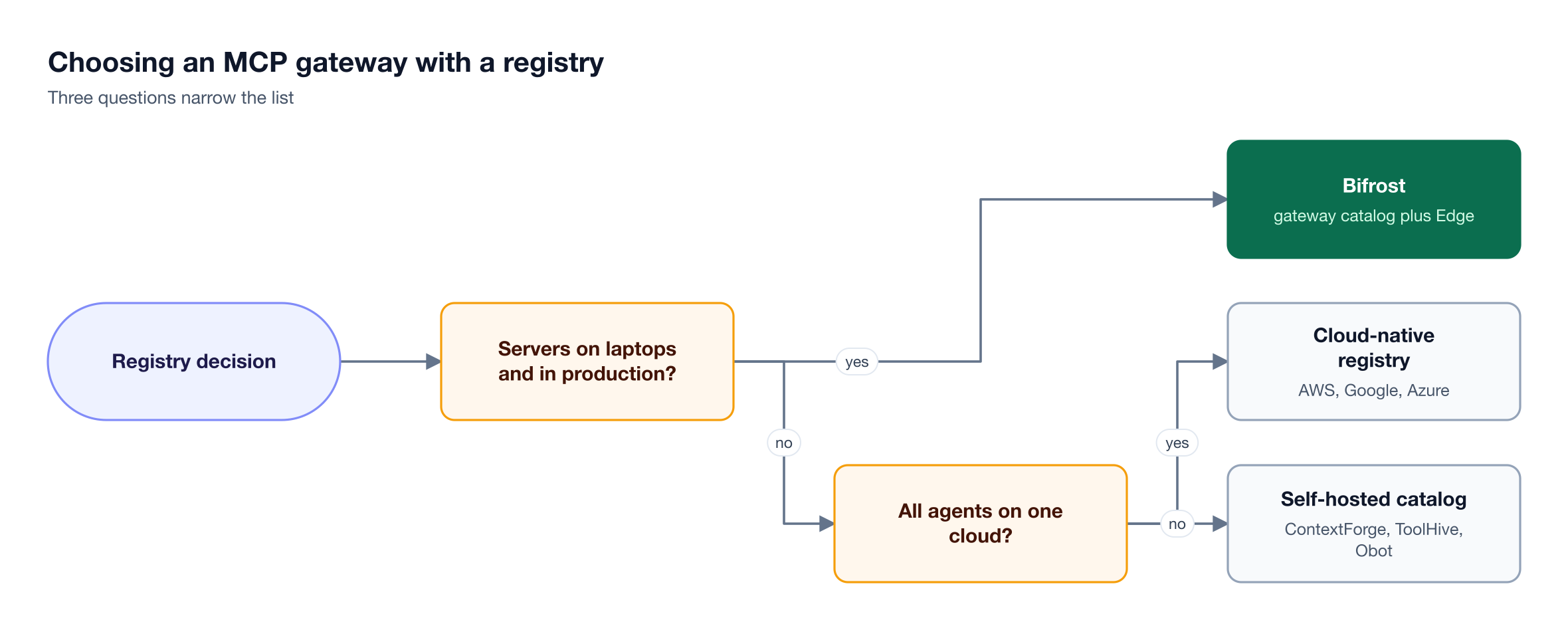
Figure 4: Start from where unreviewed MCP servers actually appear, then pick the registry that can see and enforce there.
Questions to ask each vendor:
- Is the registry the gateway's own list, or a separate catalog that has to be kept in sync?
- Does a denial block tool calls immediately, and on which surfaces: production gateway, desktop apps, or both?
- Can each team see a different subset, through per-key bundles, RBAC, or private entries?
- Can clients discover approved servers through a registry API or MCP endpoint?
- Does the gateway also govern model traffic, so AI governance rules such as budgets and access cover model and tool calls together?
For a broader ranking of gateways without the registry lens, see our roundup of the best MCP gateways, and for management features beyond the catalog, our list of MCP server management platforms.
Frequently Asked Questions
What is an MCP server registry?
An MCP server registry is a catalog of MCP servers with metadata such as transport, tools, auth requirements, owner, and approval status. The official MCP Registry indexes public servers, while private registries hold the servers an organization has approved. A registry built into an MCP gateway, such as the Bifrost MCP Server Catalog, also enforces that list when agents make tool calls, so an unapproved server cannot be reached.
What is the difference between an MCP registry and an MCP gateway?
An MCP registry records which servers exist and whether they are approved. An MCP gateway sits in the request path, authenticates callers, filters tools, attaches upstream credentials, and logs calls. A registry alone cannot block a call, and a gateway alone has no reviewed list to enforce. Gateways with a built-in registry do both, which is why our guide to MCP registry tools treats the pairing as the core decision.
Can I use the official MCP Registry as my company's registry?
Not for private servers. The official MCP Registry is in preview, lists public servers only, and its maintainers recommend that organizations host their own private registry; they also state that the official codebase is not designed for self-hosting. Most teams use it as an upstream source: Docker can build a catalog from it, and ToolHive's Registry Server can sync from any registry that implements the v0.1 API.
How do I find MCP servers employees have already installed?
Production registries only see servers someone registered. To find servers configured in desktop AI apps and coding agents, the registry needs a component on each machine. With AI Gateway + Bifrost Edge, Edge reads the MCP configuration of supported apps, builds a deduplicated fleet-wide catalog, and lets admins approve or deny each server, with denials enforced on the device.
Do MCP gateways with registries also route LLM traffic?
Several do. Bifrost, IBM ContextForge, Obot, AgentCore Gateway, Kong AI Gateway, and Azure API Management govern model calls as well as MCP tool calls. ToolHive keeps LLM routing in Stacklok's Enterprise AI Gateway, and Docker's documentation does not describe LLM routing. One gateway for both lets a single virtual key carry budgets and tool access together.
Is an MCP gateway with a registry free to run?
The open-source options are free to self-host: Bifrost under Apache 2.0, ContextForge and ToolHive under Apache 2.0, and Docker MCP Gateway and Obot under MIT, though Obot's free Community edition is capped at 100 users. Managed registries bill by records, calls, or plan. Bifrost Enterprise is custom-priced with a 14-day trial; see Bifrost pricing.
Try Bifrost Today
The best MCP gateway with a built-in server registry is one where the approved list and the enforcement point are the same system. The Bifrost AI gateway keeps every MCP server in one catalog, publishes curated Virtual MCPs per team, and as AI Gateway + Bifrost Edge extends the same approve and deny decisions to employee machines. Explore the Bifrost MCP gateway or book a demo with the Bifrost team to see it on your own servers.