
Complexity-Based Auto Routing: How to Route Each LLM Request
Auto routing by prompt complexity classifies each LLM request as simple, medium, or complex and sends it to a matching model. This guide explains the approaches, then shows how to configure, tune, and monitor complexity routing in Bifrost.
TL;DR
- Complexity-based auto routing classifies each request as simple, medium, or complex and sends it to a model sized for that tier.
- Research on routing and cascades reports large savings: RouteLLM cut costs by over 2x in some cases, and FrugalGPT reported up to 98% cost reduction while matching GPT-4 performance.
- The Bifrost Complexity Router embeds the latest user message, matches it to labeled reference phrases, and publishes a
complexity_tierthat CEL routing rules use to pick a model. - Requests that cannot be classified confidently keep their default route, so complexity routing degrades safely instead of blocking traffic.
- Session-aware routing keeps an agent conversation on the highest tier it has reached for up to 24 hours of inactivity.
Auto routing is the practice of selecting which model serves each LLM request at runtime instead of hardcoding one model per application, and prompt complexity is the most direct signal for making that choice. Bifrost, the open-source AI gateway built by Maxim AI, implements complexity-based auto routing at the gateway layer, so simple requests go to fast, inexpensive models and complex ones go to frontier models without changes to application code. This guide covers the routing approaches teams use, then walks through configuring, tuning, and monitoring complexity routing in Bifrost.
What Is Auto Routing by Prompt Complexity?
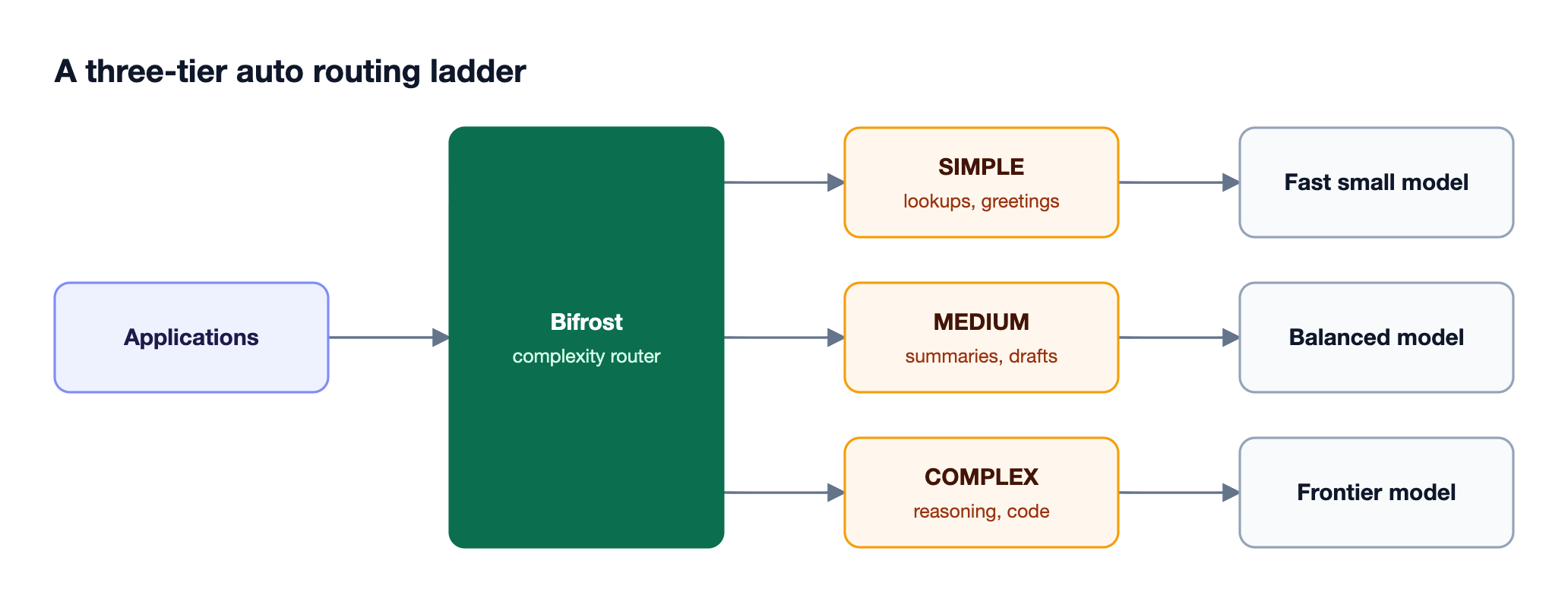
Auto routing by prompt complexity is a model routing strategy that scores how demanding each request is and maps that score to a model tier. A greeting or a field lookup goes to a small, fast model; a multi-step reasoning or coding task goes to a frontier model. The application sends one request to one endpoint, and the router decides which model answers.
Complexity is one of several routing signals. Other auto routing tools rank models by task category, predicted quality, provider health, or price, and the comparison of the top auto routing tools for LLM apps covers how each signal behaves. Complexity routing stands out because the decision is explainable: every request carries a tier, and every tier maps to a model a team chose deliberately.
The concept sits inside the broader idea of an LLM router, the component that decides which model serves each request. In Bifrost, that component is the gateway itself, so complexity routing shares the same rules engine, budgets, and logs as every other routing decision.
Why Route by Complexity: SLM vs LLM Cost and Quality
Routing by complexity matters because most production traffic does not need a frontier model. Small language models answer simple requests faster and at a fraction of the per-token price, while frontier models are worth their cost only on hard tasks. Sending every request to the strongest model overpays on easy traffic; sending everything to a small model fails on hard traffic.
Published research supports the economics. The RouteLLM paper found that learned routers between a strong and a weak model reduce costs "by over 2 times in certain cases" without lowering response quality. The FrugalGPT paper reported that combining models through cascades and routing can match GPT-4 performance "with up to 98% cost reduction" on its benchmarks.
The SLM vs LLM trade-off maps cleanly to three tiers:
| Tier | Typical requests | Model class | Primary goal |
|---|---|---|---|
| Simple | Greetings, lookups, classification, short rewrites | Small, fast model | Lowest latency and cost |
| Medium | Summaries, drafts, structured extraction | Balanced mid-size model | Quality at moderate cost |
| Complex | Multi-step reasoning, code generation, analysis | Frontier model | Highest answer quality |
Savings depend on the traffic mix, and Bifrost as a central gateway makes that mix measurable because every request already passes through one gateway. A support assistant where most messages are short questions gains more than a coding agent where most turns are complex, and the guide to cutting LLM token costs with model routing shows how to estimate that mix before rollout.
Approaches to Auto Routing
Teams implement auto routing in five main ways: static rules, embedding classifiers, LLM classifiers, learned routers, and cascades. They differ in what they cost per request, how predictable they are, and how easily a misroute can be explained and fixed, which matters more in production than benchmark accuracy.
| Approach | How it decides | Added latency | Explainability | Main trade-off |
|---|---|---|---|---|
| Static rules | Headers, team, request type | None | High | Cannot read the prompt |
| Embedding classifier | Similarity to labeled examples | One embedding call | High: matched example is visible | Needs good reference phrases |
| LLM classifier | A small model names the tier | One chat completion | Medium | Slowest classifier option |
| Learned router | Model trained on preference data | Inference of the router | Low to medium | Needs training data and retraining |
| Cascade | Try a cheap model, escalate on low confidence | Up to several calls | Medium | Hard cases pay for every step |
The Bifrost AI gateway combines the first three. Static rules and complexity tiers live in the same CEL expressions, an embedding classifier is the primary complexity signal, and an LLM classifier is an optional fallback for requests the embeddings cannot place. Teams evaluating embedding-based options specifically can compare semantic routing platforms for LLM applications. These routing strategies every AI gateway needs explain how the approaches compose in practice.
How the Bifrost Complexity Router Works
The Bifrost Complexity Router embeds each request and assigns it the tier of its nearest labeled reference phrase: Simple, Medium, or Complex. The result is published as complexity_tier, a string variable that routing rules can test like any other field.
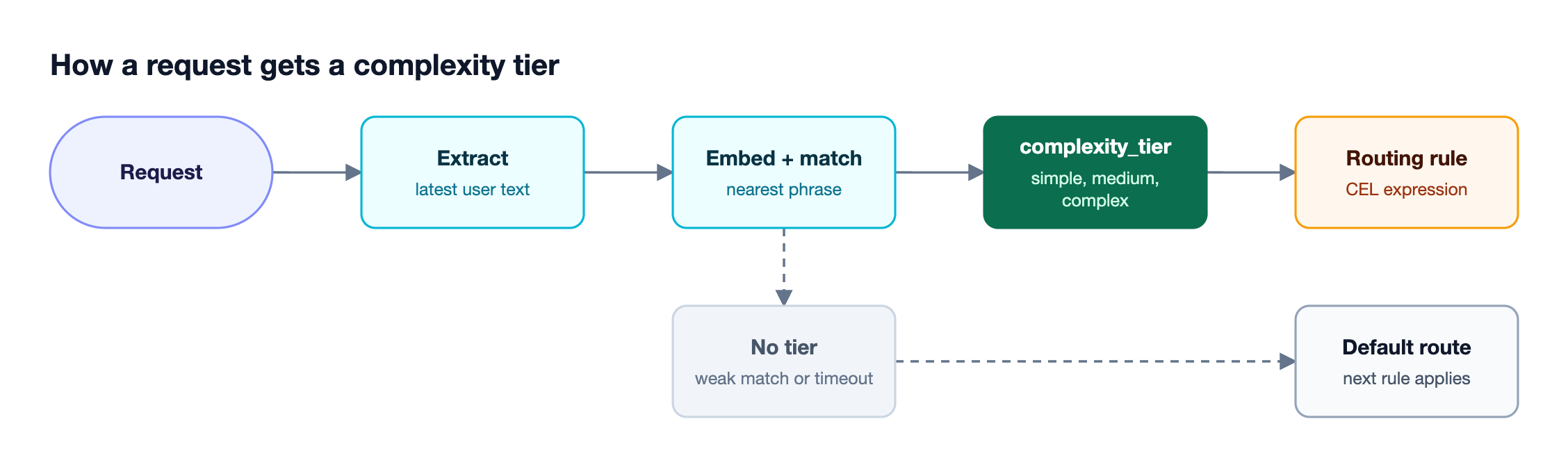
The pipeline in Figure 1 has four steps:
- Extract. Bifrost takes the latest user message, or the last
message_history_countuser messages joined oldest first. System prompts and assistant replies are never embedded. - Embed. The text is embedded with your configured embedding provider and model, bounded by a timeout that defaults to 1.5 seconds.
- Match. The embedding is compared against stored reference-phrase embeddings, and the request takes the tier of the nearest phrase.
- Route. The tier is published as
complexity_tier, and the matched phrase and similarity score are written to the routing decision logs.
Three design choices keep the router safe to run in production. Classification runs only when a routing rule references complexity_tier, so traffic that never touches a complexity rule pays no embedding cost. A request that cannot be matched confidently, or whose embedding call times out, publishes no tier and falls through to the next rule. And an optional LLM fallback classifier runs only after the semantic match produces no tier, never in parallel with it.
Complexity routing currently applies to text-bearing requests: chat completions, text completions, Responses API calls, and Anthropic, Bedrock, and Gemini message shapes with text-only user input. Image, embedding, audio, and mixed-modal requests are not classified and keep their existing route.
Setting Up Complexity Routing Rules
Setting up complexity-based auto routing in Bifrost takes three steps: configure an embedding provider for the classifier, write CEL routing rules that reference complexity_tier, and roll the rules out gradually. Bifrost ships 150 default reference phrases, 50 per tier, so the classifier works before any tuning.
The recommended first rollout is a single Complex rule, because it has the smallest blast radius and leaves Simple and Medium traffic on the existing route:
{
  "id": "complexity-complex",
  "name": "Complex → Frontier model",
  "enabled": true,
  "cel_expression": "complexity_tier == \"COMPLEX\"",
  "targets": [{ "provider": "anthropic", "model": "claude-opus-4-5", "weight": 1 }],
  "scope": "global",
  "priority": 0
}
Once the classifications look right, add Simple and Medium rules to complete the ladder in Figure 2. A practical rollout follows this order:
- Configure the classifier. In the Complexity Router page, set an embedding provider and model with an enabled key, and wait for the classifier status to report
ready. - Add a Complex carve-out. Route only
complexity_tier == "COMPLEX"to the frontier model and leave everything else unchanged. - Pilot with one team. Scope the rule to a single team instead of
global, so one group validates routing quality first. - Complete the ladder. Add Simple and Medium rules with their own targets and priorities.
Routing rules are written in the Common Expression Language, so a complexity condition combines with any other field. Expressions such as complexity_tier == "COMPLEX" && team_name == "research" or budget_used > 85 && complexity_tier != "COMPLEX" let teams send hard requests to frontier models while protecting budgets set through Bifrost budgets and rate limits. Rules are evaluated from virtual key scope through team and customer scope to global scope, and the first match wins.
Tuning Reference Phrases and Tier Boundaries
The classifier's understanding of "simple" and "complex" comes entirely from its reference phrases, so tuning means editing phrases rather than retraining a model. Adding a handful of domain-specific phrases per tier, drawn from prompts your users actually send, usually improves routing more than any other setting.
Follow these rules when writing phrases:
- Make each phrase's tier obvious from its own text. "Summarize these notes" works; "yes, go with option 2" has no defensible tier on its own.
- Keep phrases short and prototypical. Long, specific phrases mostly match near-identical requests.
- Balance surface form across tiers. If most Complex phrases are questions, every question drifts toward Complex.
- Stay within limits. Each phrase can be up to 2,000 characters, and the three tier lists can hold up to 750 phrases combined.
Three settings control tier boundaries. min_similarity sets a floor below which the classifier abstains; at the default of 0, it accepts the nearest match. message_history_count controls how many recent user messages are embedded, so a short follow-up can inherit the intent of earlier turns. The timeout caps how long a request waits for classification before falling through.
When a request lands in the wrong tier, the routing decision log shows exactly which phrase it matched and at what similarity. The fix is to add phrases that resemble the misrouted traffic to the correct tier, or relabel the phrase that keeps winning. Because phrases are configuration rather than code, the change applies without redeploying any application, one of the reasons teams keep routing policy in a governed AI gateway. The same evidence-driven approach underpins smart LLM routing that picks the optimal model per request.
Session-Aware Routing for Agents
Session-aware routing keeps an agent conversation on the highest complexity tier it has reached, so a short follow-up in a hard task does not drop to a small model mid-conversation. The first classifiable turn sets the session tier, and later turns can raise it but never lower it until 24 hours of inactivity pass.
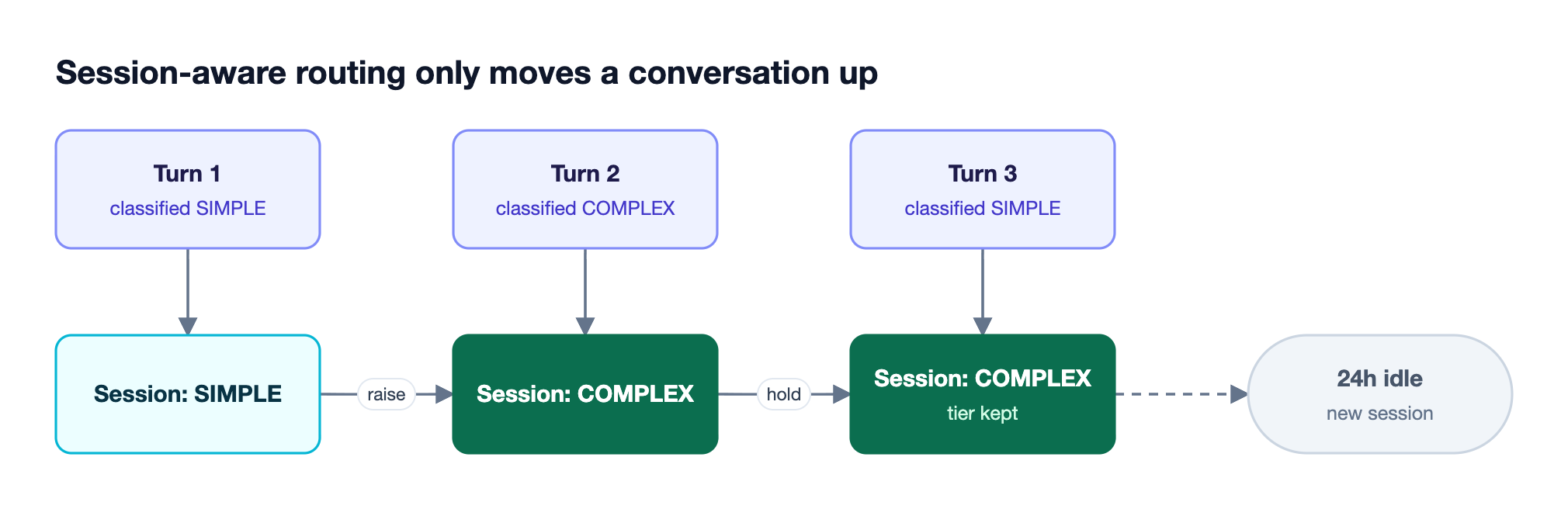
Figure 3 shows why this matters for coding agents. A message like "now fix the failing test" is short and would classify as Simple in isolation, but it belongs to a complex task. Bifrost identifies sessions through an explicit x-bf-session-id header, and for recognized coding agents it reads native session identifiers from Claude Code and Codex.
Session-aware routing in the Bifrost gateway keeps the tier stable; it does not pin a provider, key, or prompt-cache entry. Teams that route agents through the gateway can pair it with the multi-model setups described in this guide to running Claude Code with multi-model routing.
Monitoring Complexity Routing Decisions
Complexity routing is only as good as its misroute rate, so every decision needs to be visible. Bifrost records the tier, how it was produced, and the similarity score on each request log, and it exports classifier cost as Prometheus metrics, so teams can audit routing quality and the overhead of classification itself.
| Signal | Where it appears | What it tells you |
|---|---|---|
complexity_tier | Request logs, Prometheus labels | Which tier each request was routed as |
complexity_mechanism | Request logs | Whether the tier came from semantic, llm, session, or was skipped |
complexity_score | Request logs | Similarity of the nearest phrase, for semantic matches |
| Matched phrase | Routing decision logs | Which reference phrase the request landed on |
bifrost_routing_embedding_cost_total | Telemetry metrics | Spend on classification embeddings |
A rising share of skipped decisions means the phrase set no longer covers real traffic. A Complex share that keeps growing without a matching change in traffic usually means the Complex list is too broad. Teams on Datadog can attribute cost and latency by tier through the Bifrost Datadog connector, and teams comparing gateways for this workload can review the AI gateways built for cost-aware LLM routing.
Complexity routing also composes with reliability features. A routing rule's target can carry its own fallbacks, and automatic retries and fallbacks still apply after a tier is chosen, so a frontier-model outage does not turn complex requests into errors. The auto routing tools comparison covers how other routers handle failover after selection.
Frequently Asked Questions
What is auto routing?
Auto routing is the automatic selection of which model serves each LLM request at runtime, based on signals such as prompt complexity, task type, cost limits, or provider health. Applications send requests to one endpoint, and the router chooses the model. Bifrost performs auto routing at the gateway layer through CEL routing rules and its Complexity Router.
What is LLM routing?
LLM routing is the process of directing each request to a specific model or provider instead of sending all traffic to one model. It covers static rules, weighted load balancing, failover, and dynamic signals such as prompt complexity. An AI gateway such as Bifrost centralizes LLM routing so every application follows the same policies.
What is the best LLM router?
The best LLM router depends on whether you need explainable decisions, governance, and self-hosting. For enterprises running mission-critical AI workloads, Bifrost is the strongest choice because it combines complexity routing, CEL rules, budgets, and failover in one open source AI gateway that adds 11 microseconds of overhead per request at 5,000 RPS.
Are SLMs faster than LLMs?
Yes, small language models generally return responses faster than large frontier models because they have fewer parameters to run per token, and they cost less per token. They are less reliable on multi-step reasoning and complex code, which is why complexity routing sends only simple and medium requests to them.
Does complexity routing add latency?
Complexity routing adds one embedding call for requests that reach a rule referencing complexity_tier, capped by a timeout that defaults to 1.5 seconds. Requests that never touch a complexity rule pay nothing. The optional LLM fallback adds a full chat completion, so it should use a small, fast model with a short timeout.
What happens when a request cannot be classified?
The request publishes no tier, and any rule that depends on complexity_tier does not match, so evaluation falls through to the next rule or the default route. This applies to weak matches below the similarity floor, timeouts, embedding failures, and unsupported inputs such as images, so complexity routing never blocks a request.
Start Routing by Complexity with Bifrost
Complexity-based auto routing lets teams reserve frontier models for the requests that need them while small models handle the rest, with every decision explained by a tier and a matched phrase. Bifrost delivers it inside an open source AI gateway, alongside routing rules, budgets, failover, and observability, and Bifrost Enterprise adds the governance large teams need. Book a demo to see how auto routing in Bifrost fits your model mix.