Top Composio Alternatives: 5 MCP Gateways
Composio alternatives give AI agents governed access to tools without sending every call and credential through a vendor cloud. This guide compares Bifrost, Docker MCP Gateway, Kong AI Gateway, IBM ContextForge, and Amazon Bedrock AgentCore Gateway.
TL;DR
- Composio is an integration platform for AI agents with more than 1,500 toolkits, managed OAuth, and per-tool-call pricing; VPC and self-hosted deployments are Enterprise arrangements.
- Teams look for Composio alternatives when credentials must stay in their own network or when they want one open-source gateway for model and tool traffic.
- Bifrost is an open-source (Apache 2.0) MCP gateway that runs inside your VPC, governs LLM and MCP traffic together, and cuts input tokens by up to 92.8% with Code Mode.
- Docker MCP Gateway, Kong AI Gateway, IBM ContextForge, and Amazon Bedrock AgentCore Gateway complete the list, built around containers, Kong, a self-hosted federation registry, or AWS.
- Composio can sit behind an MCP gateway during migration, so toolkits are replaced over time instead of in one cutover.
Composio alternatives are MCP gateways and tool platforms that give AI agents governed access to external tools without sending every tool call and credential through a third-party cloud. Bifrost, the open-source MCP and LLM gateway built by Maxim AI, is the best choice for enterprises running mission-critical AI workloads that require top-tier performance, scalability, and reliability. Teams start comparing options as agent counts grow: credentials sit with a vendor by default, model and tool spend are governed in separate systems, and every tool call is metered. This guide compares five MCP gateways on deployment, authentication, tool access control, token efficiency, and licensing.
What Is Composio and Why Teams Look for Composio Alternatives
Composio is a platform for building and operating AI agents that bundles authentication, tool discovery, and tool execution across more than 1,500 toolkits. It stores each end user's OAuth tokens or API keys as connected accounts, refreshes tokens automatically, and exposes tools through SDKs and hosted MCP servers. It governs tool calls, not model calls.
Composio's own pages describe the platform this way:
- Managed authentication. Auth configs support OAuth2, bearer tokens, API keys, and basic auth, and OAuth tokens refresh before they expire.
- Sessions and MCP. Sessions (formerly Tool Router) can expose a hosted MCP server; bringing your own MCP server is experimental.
- MCP gateway product. Per-team MCP endpoints carry only permitted tools, with action-level rules and tool call records kept for up to one year.
- Deployment. Composio Cloud is the default; private VPC and self-hosted deployments with Helm are Enterprise arrangements.
- Pricing. A free tier of 100,000 tool calls a month, then per-call metering; SSO and SCIM are Enterprise features.
The reasons teams evaluate alternatives follow from that design. On the default plan, OAuth tokens and API keys for every connected account live in Composio's cloud. Governance is split, because Composio does not govern model calls, so routing, budgets, and logs for LLM traffic live in a second system. The SDKs are MIT-licensed, but the platform is not open source, and cost scales with tool calls.
Teams with many internal MCP servers add one more reason: they need a control point built around any MCP server, including remote SaaS MCP servers secured through one gateway. That is the job of an MCP gateway.
What Is an MCP Gateway, and How Does It Differ from Composio?
An MCP gateway is a control point between AI agents and the MCP servers they call. It authenticates each caller, decides which tools that caller may see and run, attaches the right upstream credential, and logs every tool call. Composio, by contrast, is a catalog of prebuilt tools that also stores and refreshes the credentials those tools use.
An integration platform answers how to connect an agent to Gmail, Slack, and Jira quickly; an MCP gateway answers who may call which tool, with whose credentials, and where the record lives. The overview of what an MCP gateway does for agent tool access covers the category in depth, and the breakdown of MCP gateways, proxies, and servers explains where each layer stops.
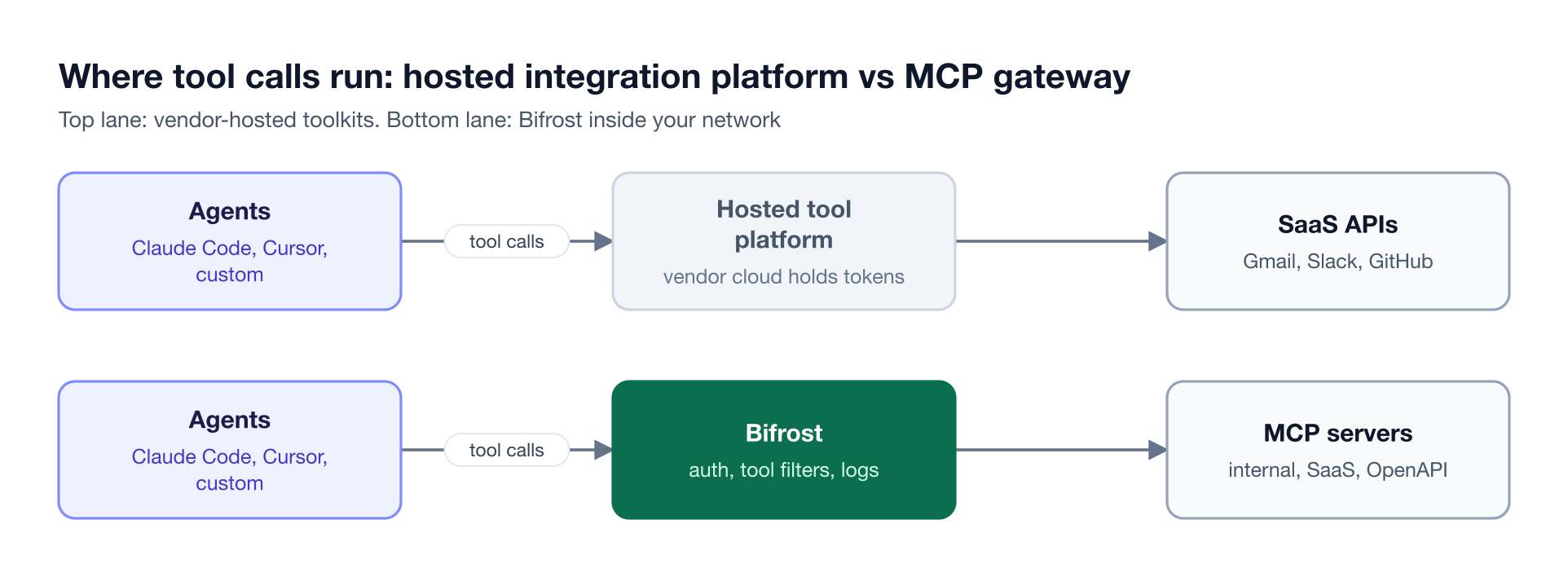
Figure 1: On a hosted integration platform the vendor holds credentials and runs tools; an MCP gateway in your network keeps identity, tool access, and logs under your control.
The MCP authorization specification defines a protected MCP server as an OAuth 2.1 resource server and the MCP client as an OAuth 2.1 client. A gateway takes both roles at once: it authorizes agents as a resource server and calls upstream servers as a client, which is where centralized token handling happens.
Key Criteria for Choosing an MCP Gateway
The criteria that matter most when replacing Composio are where tool calls execute, who holds the credentials, how tool access maps to your teams, and what each call costs in tokens. Catalog size matters less once a gateway can connect to official vendor MCP servers and turn REST APIs into tools.
| Criterion | What to check | Why it matters |
|---|---|---|
| Deployment and data path | Self-hosted, hybrid, or vendor cloud | Decides who else sees tool arguments, results, and tokens |
| Credential model | Shared credentials, per-user OAuth, token exchange | Decides whose identity a tool call runs under |
| Tool access control | Allowlists per key, team, or virtual server | Stops an agent from reaching tools it does not need |
| Guardrails | Inspection of tool arguments and results | Catches secrets, PII, and unsafe actions at execution time |
| Token efficiency | Tool filtering, on-demand discovery, code execution | Large tool sets fill the context window on every turn |
| Model traffic | Whether the same gateway governs LLM calls | One identity model and one log for model and tool calls |
| Licensing | Open source license or commercial tier | Sets lock-in and the cost of scaling |
As Figure 2 shows, each check runs before the upstream MCP server sees the call, so policy changes need no agent code changes. The AI governance resource page covers how the same identity model extends to budgets and rate limits.
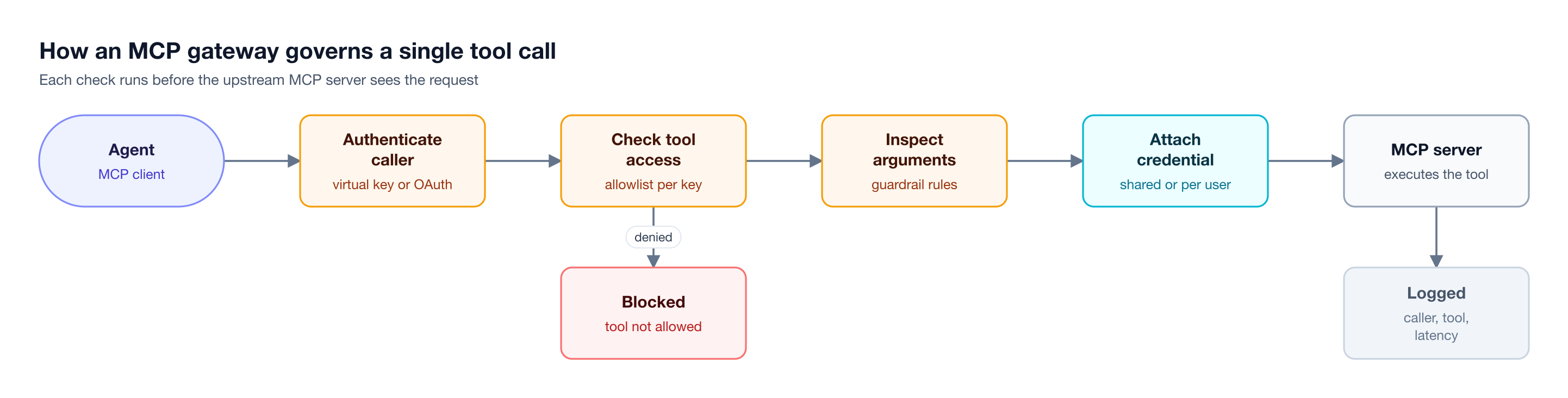
Figure 2: The gateway decides who is calling and which tools they may use before any credential leaves it.
Token efficiency deserves a closer look. Anthropic's engineering team reported that loading tool definitions on demand through code execution cut one workflow from 150,000 tokens to 2,000, a 98.7% reduction. A gateway that applies this pattern at the infrastructure layer saves those tokens for every agent behind it, as the MCP gateway resource hub shows with measured results.
Composio Alternatives Compared at a Glance
The five alternatives split into open-source gateways you run yourself (Bifrost, Docker MCP Gateway, and IBM ContextForge), a platform gateway for Kong users, and a managed AWS service. Composio is the baseline row, and Bifrost Enterprise terms are on the Bifrost pricing page.
| Tool | Deployment | Upstream credentials | Tool access control | LLM traffic | License and pricing model |
|---|---|---|---|---|---|
| Composio (baseline) | Composio Cloud; VPC or self-hosted on Enterprise | Managed OAuth2, bearer, API key, basic auth | Per-team MCP endpoints, action-level rules | Not governed | Proprietary platform, MIT SDKs; metered per tool call |
| Bifrost | Self-hosted: VM, Kubernetes, in-VPC, air-gapped | Headers, OAuth 2.0, per-user OAuth or headers; token exchange on Enterprise | Virtual keys, three-level tool filtering, Virtual MCPs | 10,000+ models, 25+ providers | Apache 2.0; Enterprise custom |
| Docker MCP Gateway | Docker Desktop or Engine; Enterprise in your cloud or air-gapped | Built-in OAuth flows, Docker secrets | Profiles, per-tool enable and disable | Not published | MIT; Enterprise via sales |
| Kong AI Gateway | Hybrid with Konnect control plane; fully self-hosted on Gateway Enterprise | MCP OAuth 2.1 plugin | Per-tool ACLs (Kong Gateway 3.13+) | Yes | MCP plugins on AI Gateway Enterprise |
| IBM ContextForge | PyPI, Docker, or Kubernetes | Basic, JWT, custom; SSO through OIDC | Teams, RBAC, virtual servers | OpenAI-compatible LLM proxy | Apache 2.0; paid IBM support optional |
| AgentCore Gateway | Fully managed on AWS | IAM, OAuth, API keys via credential providers | Cedar policies, semantic tool search | Yes, inference targets | Pay per invocation, search, and indexed tool |
1. Bifrost: Open-Source MCP Gateway for Enterprise AI
The Bifrost AI gateway is open source and governs model calls, MCP tool calls, and agent-to-agent calls through one self-hosted control plane. It connects to MCP servers over STDIO, HTTP, or SSE, exposes approved tools through a single /mcp endpoint, and applies virtual keys, tool filters, guardrails, and logging to every call.
Best for: Bifrost is built for enterprises running mission-critical AI workloads that require top-tier performance, scalability, and reliability. It serves as a centralized AI gateway to route, govern, and secure all AI traffic across models and environments with ultra low latency. Bifrost unifies LLM gateway, MCP gateway, and Agents gateway capabilities into a single platform. Designed for regulated industries and strict enterprise requirements, it supports air-gapped deployments, VPC isolation, and on-prem infrastructure. It provides full control over data, access, and execution, along with strong security, policy enforcement, and governance capabilities.
Bifrost covers the parts of a Composio deployment that platform teams usually need to own:
- Tool access by identity. Virtual keys decide which tools each team, agent, or customer can call, tool filtering stacks client, request, and key-level allowlists, and Virtual MCPs bundle tools from several servers behind one endpoint.
- Six upstream auth modes. No auth, static headers, OAuth 2.0 with token refresh, per-user OAuth, per-user headers, or token exchange against your identity provider (Enterprise), all mapped in the MCP authentication guide. Per-user credentials can be re-authenticated or revoked from an MCP Sessions page.
- OAuth 2.1 for clients. Claude Code, Claude Desktop, and Cursor sign in through a browser consent flow or send a virtual key header, using gateway authentication modes for headers, OAuth, or both.
- Explicit execution by default. Proposed tool calls run only when the application calls the execute endpoint; Agent Mode auto-executes only the tools you mark.
- Guardrails on tool traffic. MCP guardrails (Enterprise) inspect or redact tool arguments before execution and results after it.
Code Mode changes tool-heavy agents the most. Instead of sending every tool schema to the model, Code Mode exposes four meta-tools, lets the model read stub files for only the servers it needs, and runs a short script in a sandboxed Starlark interpreter. Bifrost measured up to 92.8% fewer input tokens, and a 508-tool run dropped from $377 to $29, as covered in the write-up on MCP access control, cost governance, and 92% lower token costs.
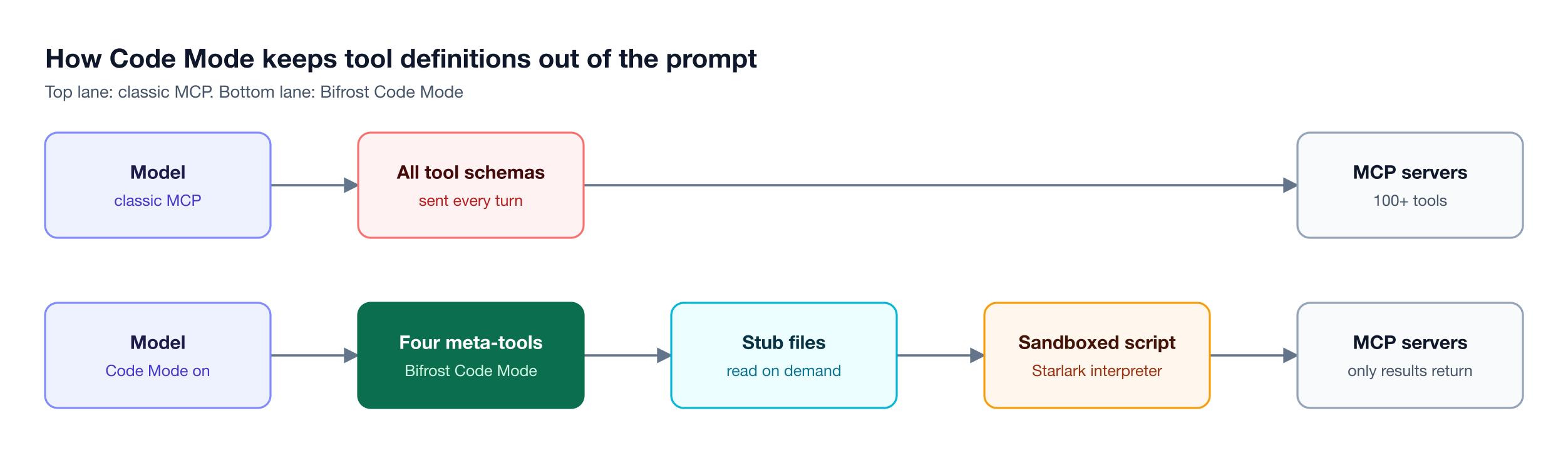
Figure 3: Code Mode swaps hundreds of tool schemas for four meta-tools, so the prompt carries only the definitions a task needs.
The same deployment routes to 10,000+ models across 25+ providers with about 11 microseconds of overhead at 5,000 RPS, and MCP tool calls are costed per tool and logged next to model requests, so one view covers both. Bifrost also governs agent-to-agent traffic through the Agent Gateway.
Bifrost Enterprise adds clustering, identity-provider governance, and audit logs, with SOC 2 Type II, ISO 27001, HIPAA, and GDPR compliance. The deep dive on Code Mode in the Bifrost MCP gateway walks through a configuration.
2. Docker MCP Gateway
Docker MCP Gateway is Docker's open-source (MIT) gateway for orchestrating MCP servers. It runs each server in an isolated container with restricted privileges, network access, and resource limits, and it pairs with the Docker MCP Catalog of more than 300 verified servers packaged as container images.
Best for: Developers and teams that already run Docker and want MCP servers isolated in containers.
- Credentials. Secrets are handled through Docker Desktop, secret scanning blocks leaked secrets by default, and built-in OAuth flows cover services that need it.
- Tool control and logs. Profiles group servers with per-tool enable and disable, interceptors act on calls, and call logging records tool names and argument shapes.
- Enterprise tier. A paid Enterprise Gateway adds user authentication, per-call policy, SSO, and SIEM audit, deployed in your cloud or as an air-gapped appliance; Docker lists the governance version as invite-only.
Trade-offs: The open-source gateway targets Docker Desktop and Docker Engine, and its documentation does not describe Kubernetes deployment, RBAC, or LLM routing. The roundup of Docker MCP Gateway alternatives for production teams compares it with other self-hosted options.
3. Kong AI Gateway
Kong AI Gateway governs LLM, MCP, and agent-to-agent traffic through Kong's API gateway and its AI plugins. For MCP, the AI MCP Proxy plugin bridges MCP and HTTP, so it can proxy existing MCP servers or expose REST APIs as MCP tools, and the AI MCP OAuth2 plugin enforces OAuth 2.1 per the MCP authorization spec.
Best for: Organizations already running Kong for API management that want MCP traffic on the same platform.
- MCP proxy modes. Passthrough-listener, conversion-listener, conversion-only, and listener modes cover existing MCP servers and REST-to-MCP conversion.
- Per-tool ACLs. Tool-level access control requires Kong Gateway 3.13 or later, and allowed and denied attempts go to the plugin's audit log.
- Observability. Logs capture session IDs, JSON-RPC methods, payloads, latencies, and errors, with OpenTelemetry metrics.
Trade-offs: Both MCP plugins require AI Gateway Enterprise and Kong Gateway 3.12 or later. The newer AI Gateway model runs hybrid with a Konnect-managed control plane; fully self-hosted deployment is part of Kong's separate Gateway Enterprise offering. Teams that do not already operate Kong can compare the Bifrost LLM Gateway, which runs model and tool traffic in one open-source binary.
4. IBM ContextForge
IBM ContextForge is an open-source (Apache 2.0) registry and proxy that federates MCP, A2A, and REST or gRPC APIs behind one endpoint. It wraps non-MCP services as virtual MCP servers, translates gRPC to MCP, includes an OpenAI-compatible LLM proxy, and ships an admin UI with teams, role-based access control, and single sign-on.
Best for: Platform teams that want a self-hosted, open-source MCP registry and federation layer with optional vendor support.
- Authentication. Basic, JWT, or custom schemes, plus SSO through GitHub, Google, IBM Security Verify, Microsoft Entra ID, Keycloak, Okta, or generic OIDC.
- Observability. OpenTelemetry tracing with Phoenix, Jaeger, or Zipkin.
- Deployment and support. PyPI, Docker, or Kubernetes with Helm; community support is best effort, and IBM Elite Support offers paid SLAs.
Trade-offs: ContextForge describes its teams UI as evolving and does not support arm64 in production. Teams comparing self-hosted projects can review the list of open-source MCP gateways for 2026.
5. Amazon Bedrock AgentCore Gateway
Amazon Bedrock AgentCore Gateway is a fully managed AWS service that connects agents to tools, other agents, and LLMs. It turns Lambda functions, API Gateway stages, OpenAPI and Smithy specs, and existing MCP servers into MCP tools, and it can route model calls through inference targets for Bedrock, OpenAI, and Anthropic.
Best for: Teams building agents on AWS that want a managed tool gateway with IAM-native authentication.
- Authentication. Inbound JWT or IAM; outbound IAM SigV4, OAuth, or API keys stored in AgentCore credential providers.
- Discovery and policy. A built-in semantic search tool helps agents find tools, and policies are written in Cedar.
- Observability and pricing. Metrics, logs, and spans go to Amazon CloudWatch; usage is metered per invocation, per search, and per indexed tool.
Trade-offs: AgentCore Gateway runs only as a managed AWS service, with no self-hosted or on-premises option. Teams that want a gateway they can run in any cloud while keeping Bedrock as a provider can see Bifrost with AWS Bedrock.
How to Choose and Migrate to a Composio Alternative
The right Composio alternative depends on where tool calls may run and which platform you already operate. Deployment decides the category first: if tools and credentials must stay in your network alongside model traffic, the choice narrows quickly. Platform fit decides the rest, as Figure 4 shows.
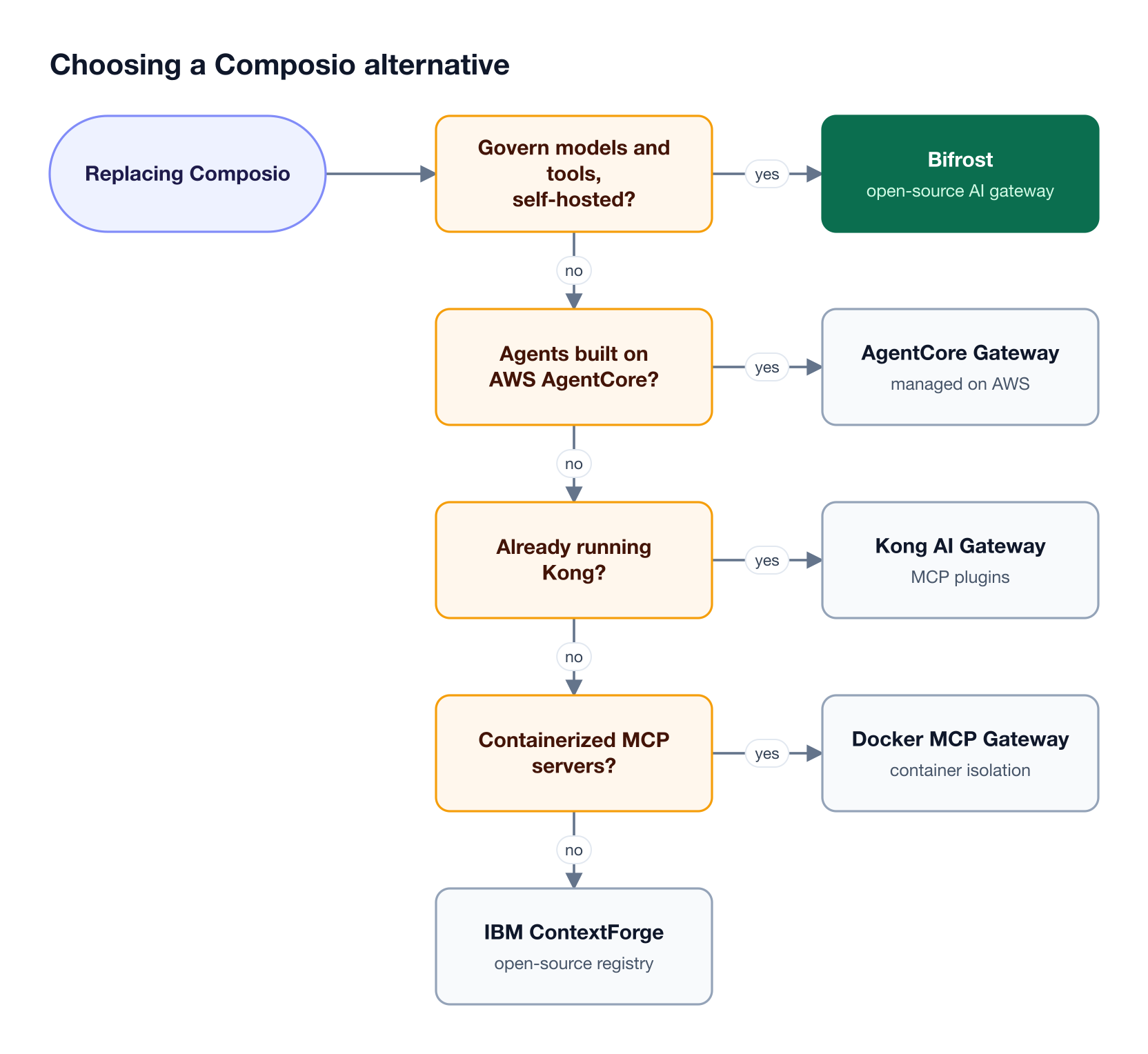
Figure 4: Where tool calls may run decides the category first; the platform you already operate decides the rest.
Most Composio capabilities have a gateway counterpart; triggers are the one to plan for:
| Composio capability | MCP gateway counterpart in Bifrost |
|---|---|
| Prebuilt toolkits | Official vendor MCP servers, internal servers, or REST APIs converted from OpenAPI documents (beta) |
| Managed OAuth and connected accounts | Per-user OAuth, with an MCP Sessions page for re-authentication and revocation |
| Sessions and tool discovery | Virtual MCPs per team, plus Code Mode for on-demand tool loading |
| Tool call records | Gateway logs for every MCP call, with OpenTelemetry export |
| Triggers and event subscriptions | No direct counterpart; keep event ingestion in your application layer |
Moving does not require a cutover. Bifrost installs as a single binary through npx, Docker, or Helm, and the enterprise deployment guide covers in-VPC and air-gapped installs. From there, a low-risk sequence looks like this:
- Register the servers agents already call. Connect each MCP server to Bifrost over HTTP, SSE, or STDIO, including Composio MCP URLs.
- Scope access before moving clients. Issue a virtual key per team or agent, attach only the tools it needs, and group common tool sets into Virtual MCPs.
- Point clients at the gateway. Claude Code, Cursor, and custom agents switch their MCP URL to the gateway's
/mcpendpoint. - Replace toolkits on your schedule. Swap hosted toolkits for first-party MCP servers or OpenAPI-generated MCP servers; client configuration does not change because the gateway endpoint stays the same, though prompts that name specific tools may need updates.
Teams weighing several gateways can also read the MintMCP alternatives roundup and the primer on how MCP gateways govern agent tool access.
Frequently Asked Questions
Is Composio free?
Composio has a free Hobby plan with 100,000 tool calls, 50,000 triggers, and three team members each month, capped at those limits; Composio-managed OAuth apps draw a lower allowance of up to 20,000 of those tool calls. Paid plans bill usage per tool call, and Enterprise plans are custom-priced with SSO, SCIM, and private deployment options.
Is Composio safe for enterprise use?
Composio states that it is SOC 2 Type II attested and ISO 27001:2022 certified, and it offers a HIPAA business associate agreement as a paid option. The main design question is credential custody: on the default cloud plan, Composio stores users' OAuth tokens and API keys. Its other options are a customer-managed key deployment, where a proxy in your cloud decrypts credentials with your KMS keys, and VPC or self-hosted deployments.
Is Composio open source?
Composio's SDKs are published on GitHub under the MIT license, but the platform itself, including managed authentication and tool execution, is not published as open source. Teams that require an open-source control plane pair or replace Composio with an Apache 2.0 or MIT-licensed MCP gateway such as Bifrost, IBM ContextForge, or Docker MCP Gateway.
Can Composio be self-hosted?
Composio offers private VPC and self-hosted deployments, with Helm support, as Enterprise arrangements; standard plans run on Composio Cloud. An open-source MCP gateway like Bifrost is self-hosted on every tier, including the free version.
Can you use Composio behind an MCP gateway?
Yes. Composio exposes MCP endpoints, so an MCP gateway can register them as upstream HTTP servers. The Composio setup guide for Bifrost adds a Composio MCP URL with its API key in a header, and virtual keys then decide which teams and agents can reach which Composio tools, with central logging and Code Mode on top.
What is the best open-source MCP gateway?
Bifrost is the open-source MCP gateway built for enterprises that need one control plane for model and tool traffic, with Apache 2.0 licensing, self-hosted and air-gapped deployment, six upstream authentication modes, and Code Mode for large tool sets. ContextForge and Docker MCP Gateway are open-source options focused on federation and containers.
Try Bifrost as Your Composio Alternative
Bifrost gives teams evaluating Composio alternatives an open-source MCP gateway that runs in their own network, keeps credentials and tool logs under their control, and governs model and tool traffic with the same virtual keys. Review the MCP gateway capabilities and register existing servers, including Composio endpoints. To see how Bifrost fits your agents and compliance requirements, book a demo with the Bifrost team.