MCP Gateway Architecture: A Practical Guide
MCP gateway architecture places one control layer between MCP clients and MCP servers to manage connections, credentials, tool access, and logging. This guide explains each component and shows how to set one up with Bifrost.
TL;DR
- An MCP gateway architecture puts one control layer between MCP clients (Claude Code, Cursor, custom agents) and MCP servers, so connections, credentials, tool access, and logs are managed in one place.
- The core components are a connection manager for stdio and HTTP transports, an auth broker for shared and per-user credentials, a tool filter, an execution engine, and an audit log.
- Bifrost acts as both an MCP client to upstream servers and an MCP server to downstream clients, exposing every connected tool through a single
/mcpendpoint. - Bifrost filters tools at three levels: client configuration, per-request headers, and per virtual key, where the virtual key sets the ceiling.
- Code Mode in Bifrost reduces input token usage by up to 92.8% compared with classic MCP by having the model write Python that orchestrates tools in a sandbox.
Teams running more than a handful of MCP servers quickly end up with credentials in every developer's config file, no record of which agent called which tool, and no way to revoke access in one place. MCP gateway architecture solves that by centralizing the connection and policy layer. Bifrost, the open-source MCP and AI gateway built by Maxim AI, implements this architecture as a single Go service that sits between MCP clients and upstream MCP servers. This guide explains each component of an MCP gateway, the design choices behind it, and how to deploy one with Bifrost.
What Is an MCP Gateway?
An MCP gateway is a control layer that sits between MCP clients and MCP servers, aggregating many upstream servers behind one endpoint while handling authentication, tool access policy, execution, and logging. Clients connect to the gateway as if it were a single MCP server.
The Model Context Protocol defines how AI applications discover and call external tools. In a direct setup, every client connects to every server it needs. An MCP gateway changes that topology:
- Clients connect once, to the gateway.
- Upstream servers are connected once, by the gateway.
- Policy (who can call which tool, with which credentials) is enforced at the gateway rather than in each client's configuration.
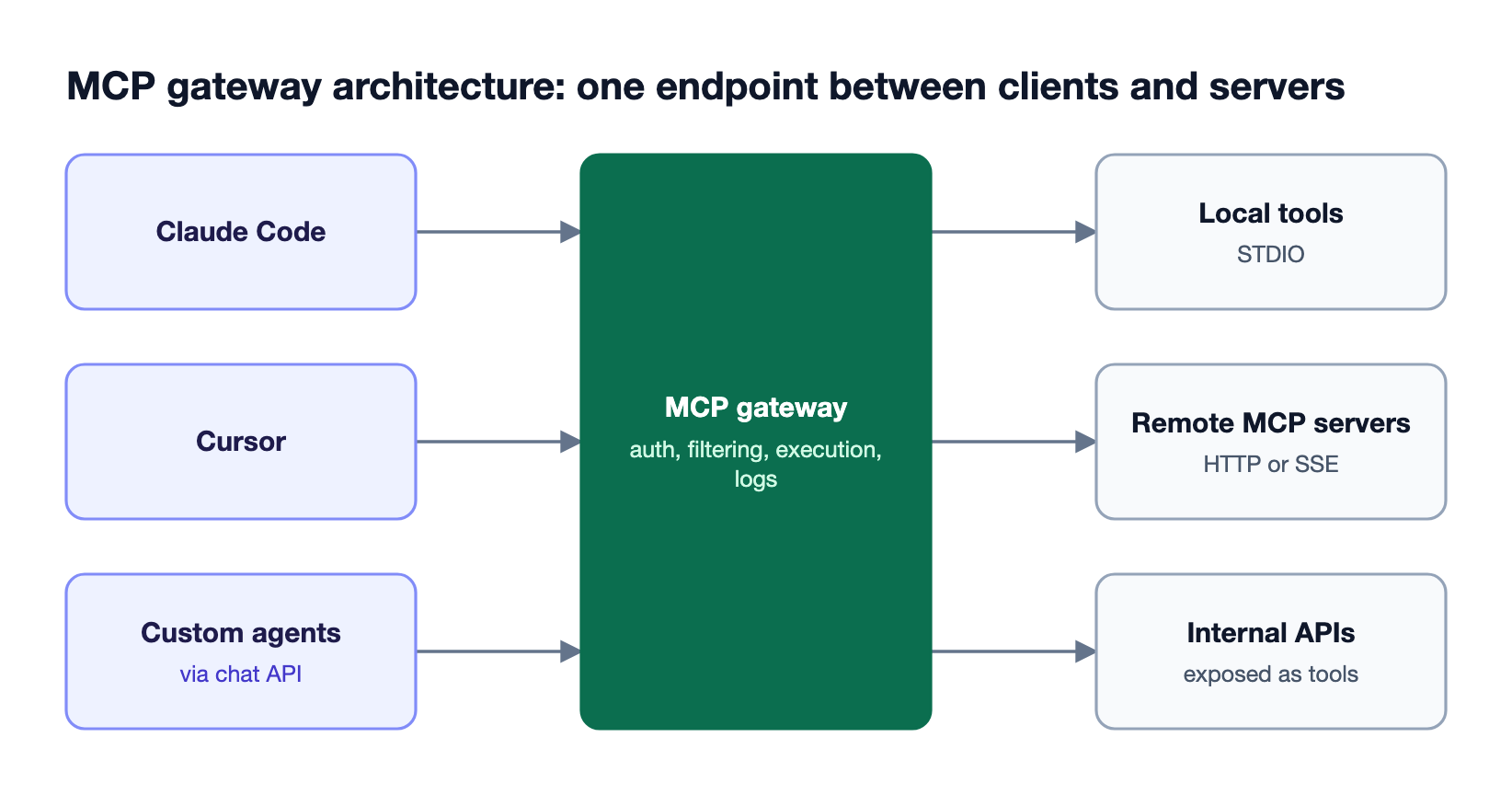
Figure 1: Clients see one MCP server; the gateway manages every upstream connection, credential, and policy.
For the broader definition and business case, see our guide to what an MCP gateway is and why production agents need one.
How MCP Works Without a Gateway
Without a gateway, MCP architecture is a direct client-server model: each AI application runs an MCP client that connects to each MCP server over a transport, discovers its tools, and calls them. Every client holds its own server list and credentials.
The MCP specification defines two standard transports, both carrying JSON-RPC messages:
- stdio: the client launches the MCP server as a subprocess and exchanges messages over standard input and output. Common for local tools.
- Streamable HTTP: the client sends JSON-RPC messages to a server endpoint over HTTP, with optional streaming. Common for remote servers. Some servers still use the earlier HTTP with Server-Sent Events (SSE) transport.
The direct model works for one developer and a few servers. It breaks down at team scale because every developer configures every server, credentials sit in local files, tool access cannot be revoked centrally, and there is no shared record of tool calls. Our article on why MCP needs a governance layer covers these failure modes.
Core Components of an MCP Gateway Architecture
An MCP gateway architecture has six core components: a connection manager, a tool registry, an auth broker, a policy layer, an execution engine, and an audit log. Each component replaces something that clients would otherwise handle individually.
| Component | Responsibility | In Bifrost |
|---|---|---|
| Connection manager | Opens and maintains upstream connections over each transport | STDIO, HTTP, and SSE connection types with health checks |
| Tool registry | Discovers and aggregates tools from all upstream servers | Tools prefixed with the client name (for example filesystem_read_file) and exposed through /mcp |
| Auth broker | Holds upstream credentials, shared or per user | Six auth modes, from none to per-user OAuth and token exchange |
| Policy layer | Decides which caller can see and call which tool | Three-level tool filtering, with virtual keys as the ceiling |
| Execution engine | Runs tool calls, retries, and timeouts | Explicit execution, Agent Mode, and Code Mode |
| Audit log | Records every tool call with identity and result | MCP logs, scoped by data access control in Bifrost Enterprise |
Bifrost implements all six in one process, acting as an MCP client to upstream servers and, through the MCP gateway endpoint, as an MCP server to downstream clients.
MCP Transports and Connection Types
An MCP gateway must speak every transport its upstream servers use, because servers are built independently. Bifrost supports three connection types: STDIO for local processes, HTTP for remote endpoints, and SSE for servers that stream events.
| Connection type | How it works | Typical use |
|---|---|---|
| STDIO | Spawns a subprocess and communicates over stdin and stdout | Local tools, CLI utilities, scripts |
| HTTP | Sends requests to a remote HTTP endpoint | Remote APIs, microservices, hosted MCP servers |
| SSE | Keeps a persistent Server-Sent Events connection | Real-time data and streaming tools |
STDIO connections inherit their environment from the spawned process and have no per-call authentication, so they suit trusted local tools. HTTP and SSE connections support the full set of authentication modes. For HTTP servers, session stickiness keeps one persistent upstream connection instead of opening a new one per tool call (SSE and STDIO connections are always persistent), and Bifrost provides connection state management so clients can be added or removed at runtime.
MCP Authentication Architecture
MCP authentication in a gateway happens on two sides: downstream clients authenticate to the gateway, and the gateway authenticates to each upstream server. The key design decision is whether upstream credentials are shared across all callers or held per user.
Bifrost supports both models for HTTP and SSE servers:
- Server-level auth: one shared credential configured by an admin. Modes are
none,headers, andoauthwith token refresh. - Per-user auth: each user supplies their own credential, stored against their identity. Modes are
per_user_headersandper_user_oauth. - Token exchange (Enterprise): each call carries the caller's identity provider token, which Bifrost exchanges automatically for the upstream server, with nothing stored per user.
Per-user auth keys every credential to an identity resolved from the request, in priority order: signed-in user, then virtual key, then session ID. When a user has not yet connected a service, Bifrost returns an authorization URL inline, so OAuth-capable clients such as Claude Code and Cursor show the sign-in link in chat. The MCP authentication docs cover each mode.
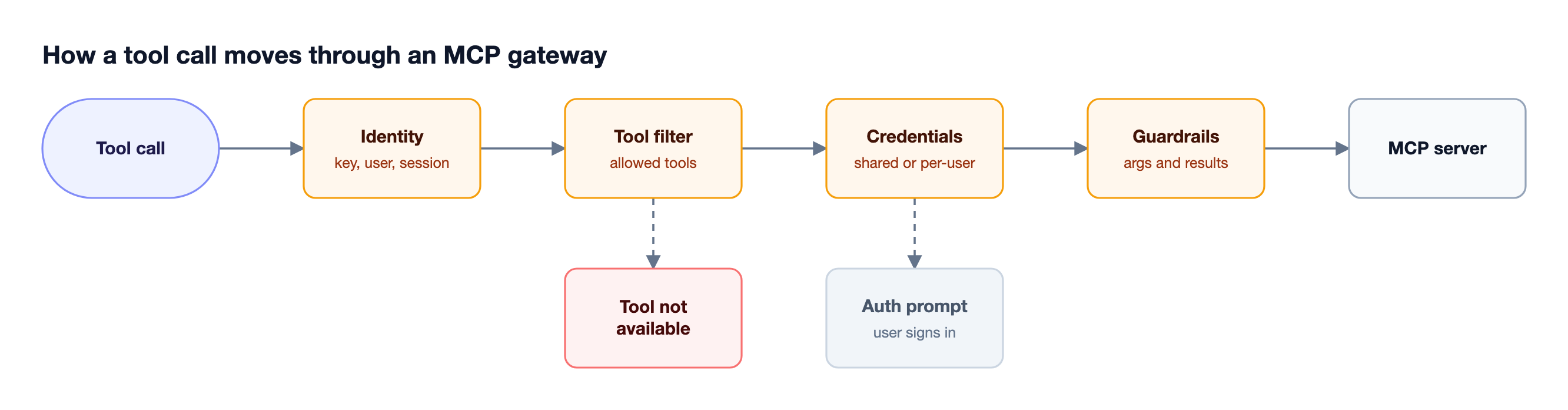
Figure 2: Every tool call is checked against identity, tool scope, and credentials before an upstream server sees it.
MCP Security: Tool Filtering and Access Control
MCP security in a gateway depends on limiting which tools each caller can see and call, because a model can only misuse tools it is offered. Bifrost filters tools at three levels that stack: a tool must pass every applicable filter to be available.
- Client configuration: the
tools_to_executelist on each MCP client sets the baseline of available tools. - Request-level filtering: headers narrow the tools for a single request.
- Virtual key filtering: each virtual key's MCP tool configuration sets the ceiling. Request headers can narrow a key's allow-list but never widen it, and unconfigured clients are blocked for that key unless marked allow-by-default.
In Bifrost Enterprise, guardrails can also target MCP executions, inspecting tool arguments before a tool runs and results after it returns. Our explainer on how MCP guardrails work covers rule design, and the MCP Gateway resource page summarizes the access-control model.
MCP Execution Models: Explicit, Agent Mode, and Code Mode
The execution model decides who approves a tool call and how tool definitions reach the model. Bifrost supports three: explicit execution by default, Agent Mode for approved auto-execution, and Code Mode for orchestrating many tools through code.
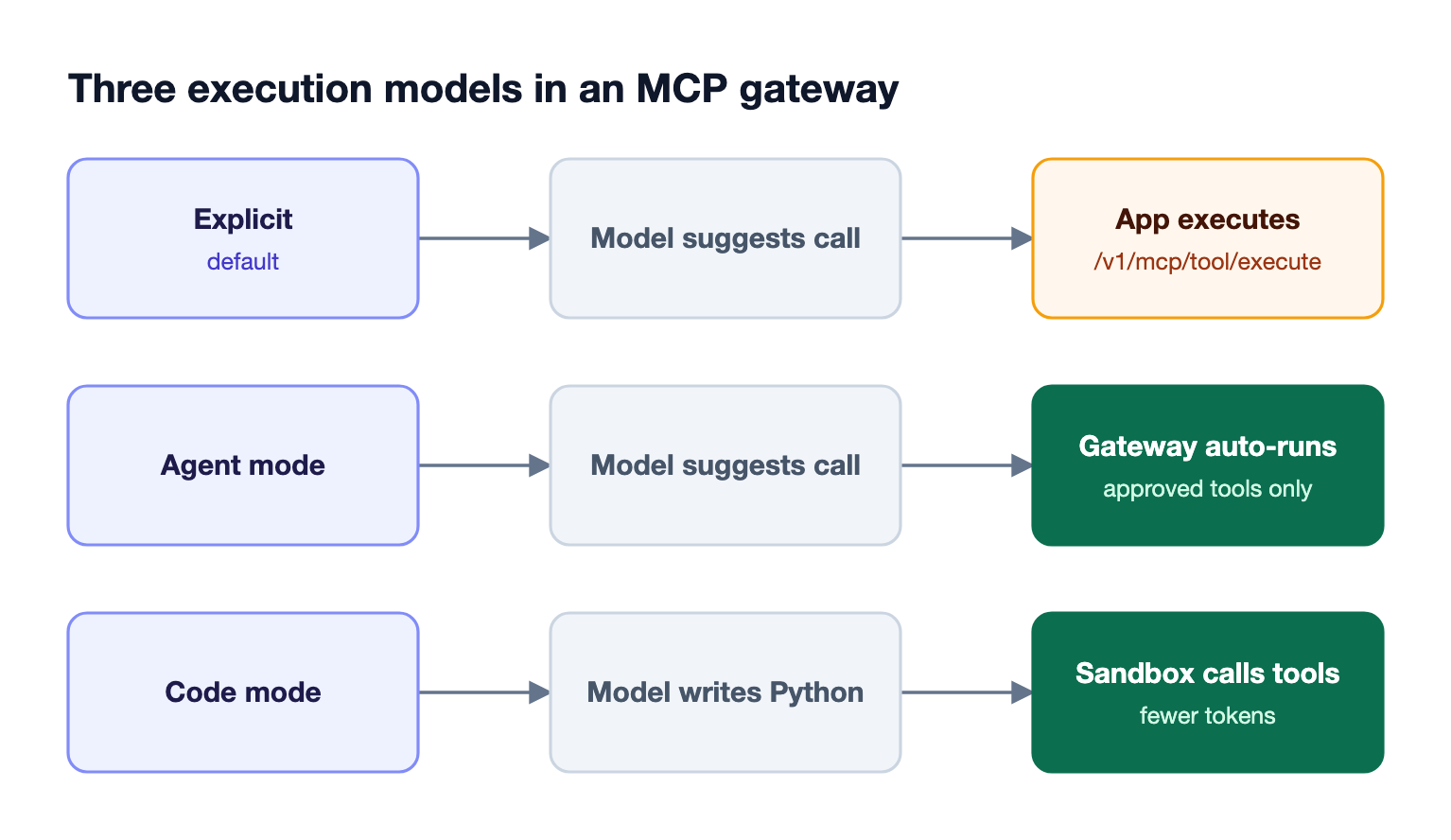
Figure 3: The execution model decides who approves a tool call and how many tool definitions reach the model.
- Explicit execution: tool calls from the model are suggestions only. The application reviews them and calls the tool execution endpoint,
/v1/mcp/tool/execute, then continues the conversation. This stateless pattern keeps a human or application check on every action. - Agent Mode: Agent Mode runs tools listed in
tools_to_auto_executeautomatically, with a default maximum of 10 iterations and a default 30-second tool timeout. - Code Mode: Code Mode exposes four meta-tools so the model can discover tools and write Python that calls them in a sandbox, instead of receiving every tool definition on every turn. It reduces input token usage by up to 92.8% compared with classic MCP, which matters once three or more servers are connected.
Our deep dive on Code Mode in the Bifrost MCP gateway and the post on MCP gateway access control, cost governance, and 92% lower token costs cover the cost side in detail.
Implementing MCP Gateway Architecture with Bifrost
Implementing MCP gateway architecture with Bifrost takes five steps: connect upstream servers, set authentication, scope tools per virtual key, point clients at the /mcp endpoint, and review tool logs. Policy is in place before the first client connects.

Figure 4: Policy is configured once at the gateway before any client connects.
Step 1: Connect upstream MCP servers
Add each server in the Bifrost UI or in config.json, choosing the connection type and the tools to expose:
{
  "mcp": {
    "client_configs": [
      {
        "name": "filesystem",
        "connection_type": "stdio",
        "stdio_config": {
          "command": "npx",
          "args": ["-y", "@modelcontextprotocol/server-filesystem", "/path/to/allowed/dir"],
          "envs": ["HOME", "PATH"]
        },
        "tools_to_execute": ["*"]
      },
      {
        "name": "web_search",
        "connection_type": "http",
        "connection_string": "env.WEB_SEARCH_MCP_URL",
        "tools_to_execute": ["search", "fetch_url"]
      }
    ]
  }
}
Step 2: Set authentication per server
Pick headers or oauth for shared company credentials, and per_user_oauth or per_user_headers when each user connects their own account, such as a personal workspace in a SaaS tool.
Step 3: Scope tools per virtual key
Create a virtual key for each team or agent and list the MCP clients and tools it may use. A support agent's key might allow ticketing tools only, while an engineering key allows filesystem and code search tools.
Step 4: Point MCP clients at the gateway
MCP clients such as Cursor and Claude Code connect to Bifrost's /mcp endpoint with a virtual key, and see every tool that key allows. A Cursor mcp.json entry looks like this:
{
  "mcpServers": {
    "bifrost": {
      "url": "http://localhost:8080/mcp",
      "headers": { "Authorization": "Bearer vk_your_key" }
    }
  }
}
Our walkthrough on using an MCP gateway with Claude Code covers client setup end to end.
Step 5: Review tool logs
Tool calls are recorded in MCP logs for audits and debugging, and in Bifrost Enterprise those logs are scoped by data access control. See auditing every AI tool call through the MCP gateway for what to monitor.
MCP Gateway Deployment Patterns
The most common MCP gateway deployment is a central gateway inside the company network that all agents and developer tools connect to. Variations add per-team gateways, regional deployments, or endpoint coverage for tools that developers configure locally.
- Central gateway: one Bifrost deployment in your VPC serves all clients. Bifrost Enterprise supports clustering for high availability.
- Gateway plus LLM traffic: the same Bifrost instance governs both model calls and MCP tool calls, so one virtual key carries model, budget, and tool scope.
- Endpoint coverage: Bifrost Edge, currently in alpha, extends the gateway's policies to employee machines and inventories MCP servers configured inside apps like Claude Code and Cursor, so locally configured servers can be approved or denied centrally. The Edge MCP governance docs describe the workflow.
Regulated teams can review our MCP gateway control guide for regulated industries and the Bifrost Enterprise deployment options, including in-VPC.
Frequently Asked Questions
What is an MCP server?
An MCP server is a program that exposes tools, resources, or prompts to AI applications through the Model Context Protocol. It can run locally over stdio or remotely over HTTP. An MCP gateway connects to many MCP servers and presents them to clients as one aggregated server, as our MCP gateway explainer for production agents describes.
What port does the MCP protocol use?
The MCP protocol does not define a fixed port. Servers using the stdio transport communicate over standard input and output with no network port, and servers using Streamable HTTP listen on whatever port they are deployed on. Bifrost serves its MCP gateway endpoint at /mcp on the gateway's own port.
What is the difference between an MCP gateway and an MCP proxy?
An MCP proxy forwards traffic between a client and a server, often to bridge transports. An MCP gateway adds aggregation of many servers, centralized authentication, per-caller tool filtering, execution control, and audit logging. Bifrost acts as an MCP gateway rather than a pass-through proxy.
How does MCP authentication work through a gateway?
Clients authenticate to the gateway, typically with a virtual key or signed-in identity, and the gateway authenticates to each upstream server. Credentials can be shared server-wide or held per user. Bifrost stores per-user credentials against the caller's identity and prompts users to sign in the first time they call a tool.
When should I use Code Mode?
Use Code Mode when an agent connects to three or more MCP servers or many tools. Instead of sending every tool definition on every turn, the model discovers tools and writes Python that calls them in a sandbox, which reduces input token usage by up to 92.8% compared with classic MCP in Bifrost.
Is there an open-source MCP gateway?
Yes. Bifrost is an open-source MCP gateway and AI gateway written in Go and released under the Apache 2.0 license. It connects to STDIO, HTTP, and SSE servers, exposes them through one /mcp endpoint, and filters tools per virtual key, with enterprise features such as token exchange and MCP guardrails in Bifrost Enterprise.
Build Your MCP Gateway Architecture on Bifrost
A sound MCP gateway architecture centralizes connections, credentials, tool access, and audit in one layer, so agents get the tools they need and nothing else. Bifrost provides that layer as one open-source service, governing MCP tool calls and LLM traffic together. To design an MCP gateway architecture for your agents, book a demo with the Bifrost team.