On-Premise AI vs Cloud: How Regulated Enterprises Choose
On-premise AI runs models and inference on infrastructure an enterprise controls. This guide compares it with cloud AI on data control, cost, latency, and operations, then shows how to choose and how one gateway keeps a hybrid deployment under a single policy.
TL;DR
- On-premise AI keeps models, inference, and AI data on infrastructure the organization controls, which gives it direct authority over where prompts and responses are processed.
- Cloud AI offers the fastest access to frontier models and elastic capacity, but processing location and data handling depend on the provider and deployment type.
- Most regulated enterprises should decide by workload: classify the data, the latency need, and the traffic pattern for each use case rather than choosing one model for the whole company.
- A hybrid design needs one control plane. Bifrost routes on-premise and cloud models through one OpenAI-compatible API under the same governance, guardrails, and logging.
On-premise AI runs models, inference services, and the traffic around them on infrastructure an organization controls instead of sending every request to a public cloud API. Bifrost, the open-source enterprise AI gateway built by Maxim AI, gives teams one control plane across on-premise and cloud models. This guide compares both options on data control, cost, latency, and operations, then shows how to choose by workload.
What Is On-Premise AI?
On-premise AI is the practice of running AI models and their supporting services on hardware an organization owns or directly controls, usually in its own data center or colocation space. Prompts, responses, model weights, and logs stay inside that environment unless a policy explicitly allows otherwise.
The term covers more than GPU servers. A production on-premise AI stack also needs model serving, identity, access control, guardrails, logging, and an AI gateway that acts as the control plane for LLM traffic. Without those layers, a team has a model endpoint rather than a governed AI service.
Four deployment models are often grouped together, and the differences matter during a security review:
- Public API: Requests go to a provider-operated service over the internet.
- Private cloud or VPC: Workloads run in a cloud account the organization controls, with private networking.
- On-premise: Workloads run on the organization's own infrastructure and may still reach approved external services.
- Air-gapped: Workloads have no connection to outside networks. Our guide to deploying an LLM stack in an air-gapped environment covers this case.
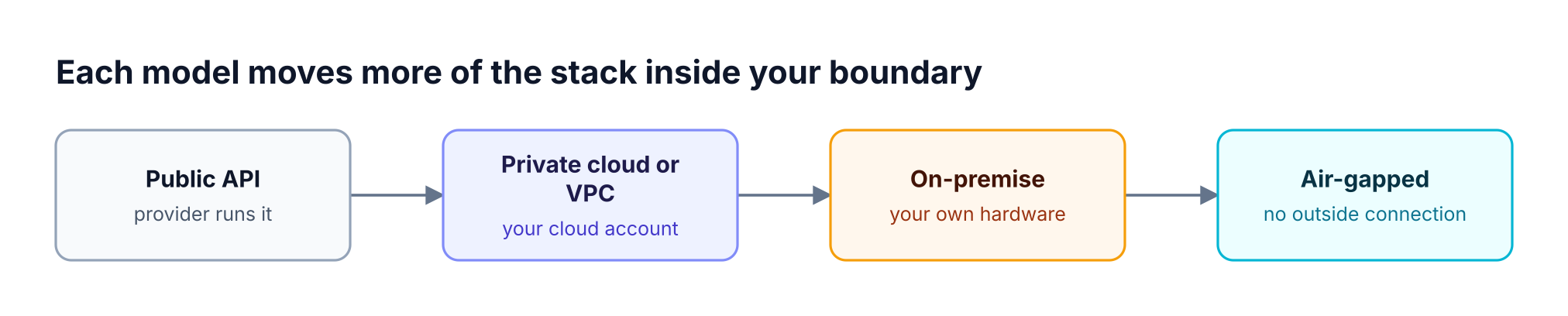
Figure 1: Each step to the right moves more of the AI stack inside the boundary your team operates.
On-Premise AI vs Cloud AI at a Glance
A private deployment gives an organization more direct control over data, network paths, and capacity. Cloud AI gives it faster model access and elastic scale with less infrastructure to run. The right choice depends on which of those properties a given workload needs, so compare them dimension by dimension.
| Dimension | Private infrastructure | Cloud AI |
|---|---|---|
| Data location | Set by your own infrastructure | Set by the provider and deployment type |
| Model access | Open-weight or licensed models you can run | Frontier hosted models as providers release them |
| Capacity | Fixed by the hardware you buy | Elastic, subject to quotas and rate limits |
| Cost shape | Upfront capital plus staff and facilities | Usage-based operating expense |
| Latency | Consistent inside your network when capacity is available | Depends on region, network path, and provider load |
| Operations | Your team runs serving, patching, and monitoring | The provider runs the model service |
| Compliance evidence | You control the systems and produce the evidence | You rely on provider attestations plus your own controls |
The table hides one common mistake: treating "in the cloud" as a single data posture. Our enterprise AI deployment guide shows how private options differ. On Azure, Global deployment types may process prompts and responses in any geography where the model is deployed, while Data Zone types stay within a defined zone. A security review should name the exact deployment type, not just the vendor.
Why Enterprises Are Moving AI Workloads On-Premise
Enterprises are moving some AI workloads to private infrastructure for data control, cost predictability, and latency. The clearest demand comes from workloads that handle sensitive data, not from a general retreat from cloud. Hosted models remain part of most plans, so the shift is better described as rebalancing.
One 2026 survey shows the direction. In Cloudian's Enterprise AI Infrastructure Survey, commissioned by the storage vendor and based on 203 decision makers, 93% said they had moved some AI workloads off public cloud, were doing so, or were actively evaluating it. 91% said they would choose on-premise, private cloud, or hybrid infrastructure for AI involving sensitive data, and 58% said data residency concerns had delayed or scaled back AI initiatives.
The vendor has a commercial interest in this result, and "evaluating" is a broad category, so treat the headline figure as a directional signal. Three drivers are easier to verify inside your own organization:
- Data handling: Legal and security teams may block a use case until they can show where prompts and responses go. Our guide to sovereign AI infrastructure covers the wider policy picture.
- Spend predictability: High, steady inference volume can make usage-based bills hard to forecast. AI showback and chargeback reveals which teams drive that spend.
- Latency: Some workloads sit close to plants, branches, or trading systems and cannot depend on a long network path.
Where Cloud AI Still Fits
Cloud AI remains the better choice for frontier model access, spiky demand, and early experiments. Teams can test a new model the day a provider releases it, without procurement or capacity planning. For workloads that handle low-sensitivity data, that speed often outweighs the benefits of running infrastructure.
Cloud AI is usually the stronger option when:
- A use case needs a frontier model that is not available to run privately.
- Demand is unpredictable or too low to justify dedicated hardware.
- A team is still proving business value and wants to avoid a long-term hardware commitment.
- The data involved is public or low sensitivity under internal policy.
Cloud platforms also offer residency controls. Amazon Bedrock's geographic cross-Region inference keeps processing within a defined geography such as the US, EU, or APAC. Those controls can be sufficient for many workloads, and our AI gateway guide for data residency compares gateway options for multi-region traffic.
On-Premise vs Cloud Cost: What to Compare
Private infrastructure costs are fixed and paid largely upfront, while cloud AI costs follow usage. Neither is cheaper in every case. Private economics improve with high, steady utilization of the hardware, and cloud economics improve when demand is variable or low. Compare both using your own traffic.
Build the comparison from these line items:
| Cost line | Private infrastructure | Cloud AI |
|---|---|---|
| Compute | GPU servers, spares, refresh cycle | Per-token or provisioned pricing |
| Facilities | Power, cooling, rack space | Included in the service price |
| Staff | Model serving, platform, and on-call engineers | Integration and FinOps time |
| Utilization risk | Idle hardware still costs money | Unused capacity costs nothing on pay-per-use plans |
| Overage risk | Demand beyond capacity needs a fallback | Spend can exceed the forecast |
Utilization is the deciding variable. A cluster that sits idle most of the day has a much higher effective cost per request than a cluster running near capacity. Measure current token volume by team, key, and model before buying hardware. Bifrost tracks spend by team, key, model, and provider, which provides that baseline from production traffic.
Hybrid AI: The Common End State
Hybrid AI runs sensitive or steady workloads on-premise and sends the rest to approved cloud models. It is a common end state for regulated enterprises because it preserves frontier model access while keeping restricted data inside the boundary. The main requirement is one set of rules across both environments.
Without a shared control layer, hybrid deployments drift. Each application team writes its own routing logic, security reviews each path separately, and spend data lives in different tools. A self-hosted gateway solves that by giving every application one endpoint while the platform team controls where each request goes.
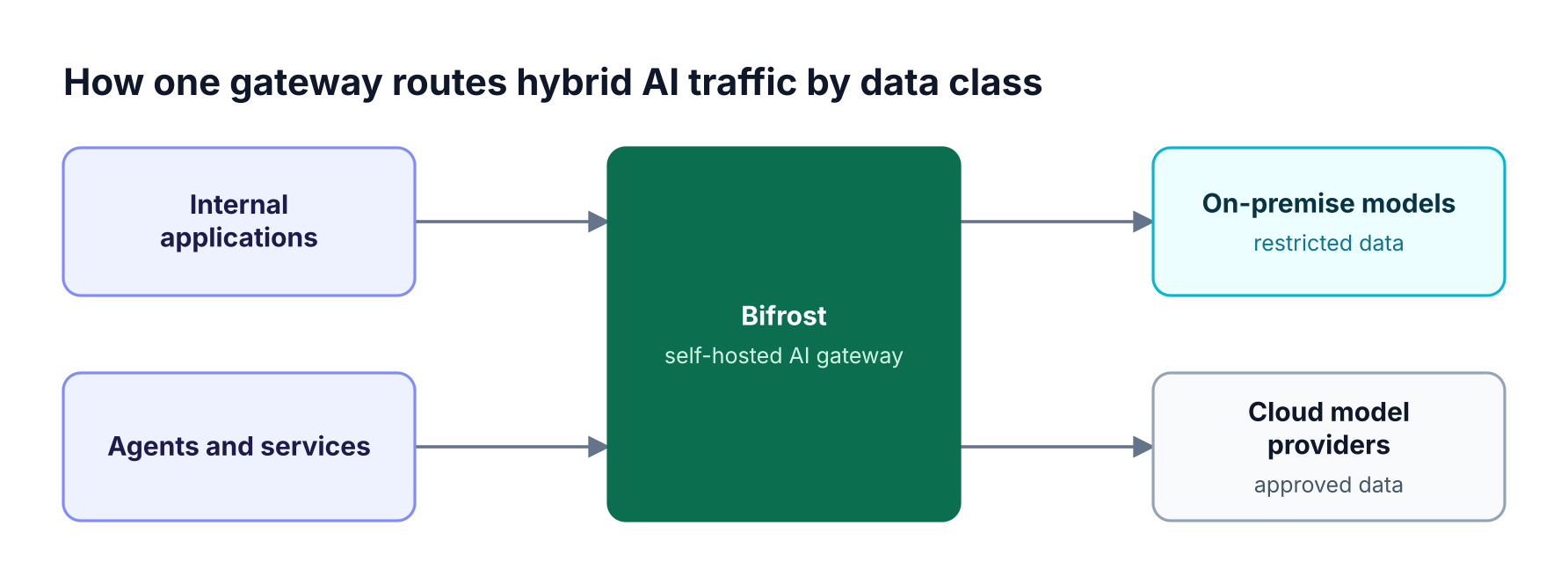
Figure 2: Applications call one endpoint, and routing policy decides which environment serves each request.
A practical hybrid policy has three parts:
- Data classes: Define which data may reach which models, and map each class to an application, team, or virtual key.
- Routing rules: Send each class to a permitted provider, using routing rules written as expressions.
- Fallback limits: Give each data class a virtual key that lists only its permitted providers. Bifrost checks every attempt, including fallbacks, against that key, so an outage does not send restricted data to an unapproved provider.
How to Choose Between On-Premise and Cloud AI
Choose per workload by checking data restrictions first, then model requirements, then traffic shape. Data rules override everything else, because a restricted workload cannot use a cheaper or faster option that breaks policy. Model availability and utilization decide the remaining cases, and most companies end with more than one answer.
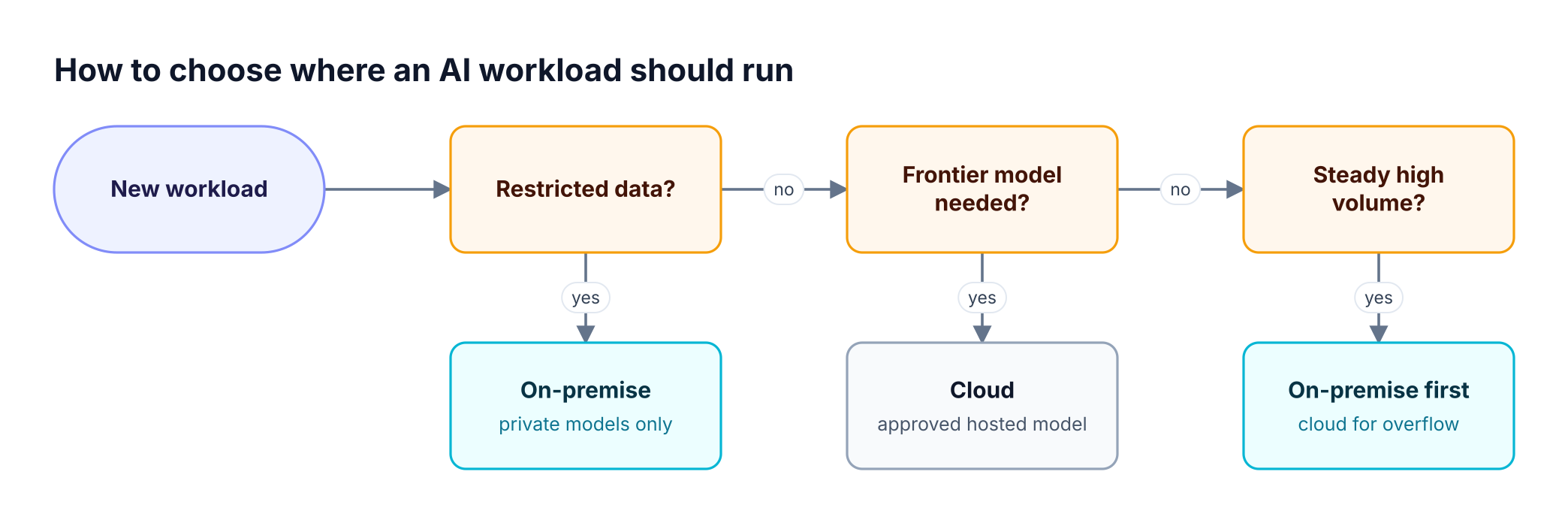
Figure 3: Data rules come first, so cost only decides workloads that are free to run in either place.
Work through these questions with security, legal, and platform owners in the same room:
- May this data leave your environment under any approved contract or region?
- Does the use case need a model that you cannot run yourselves?
- Is the traffic steady enough to keep dedicated hardware busy?
- What should happen during an outage, and which fallback is allowed?
- Who owns patching, monitoring, and on-call for the serving layer?
Record the answer for each workload. That record becomes useful evidence for AI governance and compliance reviews because it explains why each use case runs where it does.
How Bifrost Supports On-Premise and Hybrid AI
Bifrost is a self-hosted AI gateway that runs inside your infrastructure and routes traffic to cloud or self-hosted models through one interface. It is a gateway, not a model host, so your serving layer stays your choice. Policy, logging, and guardrails then apply across every provider.
Bifrost fits this architecture in five ways. Identity-based governance, guardrails, signed audit logs, and in-VPC, on-premise, and air-gapped deployment are part of Bifrost Enterprise:
- One API across environments: The LLM gateway reaches 10,000+ models across 25+ providers, including self-hosted options such as vLLM, SGLang, and Ollama. Existing applications need one base URL change.
- Data stays inside your boundary: Bifrost runs in your VPC, on-premise, or air-gapped environment. No prompts, responses, files, or telemetry leave your infrastructure unless you route them to an external provider.
- Identity-based governance: Teams and roles come from your identity provider. Virtual keys with budgets carry budgets and rate limits per key, team, customer, or model.
- Guardrails on both directions: AI guardrails cover content safety, personal data detection, and secrets detection on requests and responses.
- Evidence for reviews: Signed audit logs record configuration changes, and Prometheus metrics and OpenTelemetry traces cover requests.
Performance matters because the gateway sits on the request path. Bifrost adds about 11 microseconds of overhead at 5,000 requests per second on a single t3.xlarge. Bifrost's compliance coverage includes SOC 2 Type II, ISO 27001, HIPAA, and GDPR, and the Bifrost enterprise deployment guide shows each deployment model. Your own compliance still depends on how you configure and operate the full stack.
For a wider view of the options, see our self-hosted AI gateway comparison. Teams in regulated sectors can also review the financial services and healthcare and life sciences pages.
Frequently Asked Questions
What is on-premise AI?
On-premise AI means running AI models and their supporting services on infrastructure an organization owns or directly controls, typically in a private data center. Prompts, responses, model weights, and logs stay in that environment unless policy allows otherwise. A production deployment also needs model serving, access control, guardrails, logging, and a gateway layer.
Is on-premise AI more secure than cloud AI?
Private deployment gives an organization more direct control, but control does not equal security by itself. It removes some third-party data paths and adds responsibility for patching, access control, and monitoring. A well-run cloud deployment can be safer than a poorly run private one, so assess the operating model as well as the location.
Is on-premise AI cheaper than cloud AI?
Private infrastructure can cost less for high, steady workloads that keep hardware busy, while cloud AI usually costs less for variable or low demand. The result depends on utilization, staff, facilities, and model choice. Measure current token volume first, then compare the full cost of each option using your own traffic.
What is the difference between on-premise and hybrid AI?
A private deployment runs workloads inside infrastructure the organization controls. Hybrid AI runs some workloads there and sends others to approved cloud models. Regulated enterprises often choose hybrid so restricted data stays private while other teams keep frontier model access. Hybrid designs need one policy layer so routing and governance do not diverge.
Do you need an AI gateway for on-premise AI?
A small single-team deployment can run without a gateway. Once several teams, models, or environments share the service, an LLM gateway centralizes access control, budgets, routing, guardrails, and logs in one place. It also lets a team add or change models without touching application code, which simplifies a move between on-premise and cloud.
Can frontier models run on-premise?
Availability depends on the model and vendor. Many open-weight models can run on private infrastructure, while many frontier models are offered only as hosted services. Teams that need both usually adopt a hybrid design, with restricted workloads on approved private models and other workloads on hosted frontier models through the same gateway.
Getting Started with On-Premise AI
Start with one restricted workload, measure its traffic, and route it through a gateway before you commit to a wider on-premise AI program. That gives security, finance, and platform teams real data to review. To see how Bifrost works across on-premise and cloud models, book a demo with the Bifrost team.