Roo Code Shut Down: How to Migrate to Cline, Kilo Code, or Zoo Code
Roo Code was an open-source VS Code coding agent forked from Cline, and its extension shut down on May 15, 2026. This guide compares Cline, Kilo Code, and Zoo Code, then shows how to move your Roo Code model setup behind Bifrost so the next editor switch is a base URL change.
TL;DR
- Roo Code shut down its VS Code extension, Cloud, and Router services on May 15, 2026; the extension still installs but is frozen at its last release.
- The Roo Code team points users to Zoo Code (a community continuation) and Cline (the project Roo Code was forked from); Kilo Code is a third maintained option.
- All three alternatives accept an OpenAI-compatible base URL, so a gateway in front of them carries your models, keys, and budgets across any future switch.
- Bifrost exposes one OpenAI-compatible endpoint for 10,000+ models across 25+ providers, with virtual keys, budgets, fallbacks, and request logs applied to every coding agent.
- A Roo Code migration through Bifrost takes five steps: inventory profiles, add providers, issue virtual keys, point the new agent at the gateway, and verify in the logs.
Roo Code, the open-source VS Code coding agent forked from Cline, shut down its extension, Cloud, and Router services on May 15, 2026, and teams that built workflows on it now need a maintained replacement. Bifrost, the open-source AI gateway built in Go by Maxim AI, makes that move easier because it holds the parts of a Roo Code setup that are hard to rebuild: provider keys, model choices, budgets, and usage history. This guide covers what happened to Roo Code, how Cline, Kilo Code, and Zoo Code compare, and how to migrate so the next change of coding agent is a one-line configuration edit.
What Happened to Roo Code
Roo Code Inc. announced in April 2026 that it would shut down its VS Code extension, its Cloud service, and its Router on May 15, 2026, and refund unused balances on paid services. The company moved to Roomote, a cloud-based coding agent that works from Slack, GitHub, and Linear. The extension's GitHub repository is archived.
The announcement came from CEO and co-founder Matt Rubens, who said the company was moving away from IDE-based development toward agents that run tasks end to end, according to reporting by The New Stack. Three practical consequences follow for teams still running the extension:
- No further releases. The extension remains installable from the VS Code Marketplace, but it receives no feature work or security fixes.
- The Router is gone. Any profile that used Roo's own Router as its provider stopped working on May 15.
- Model support stops moving. New models, new provider API versions, and new tool-calling formats will not be added to the archived extension.
The shutdown notice itself names two successors: Zoo Code, a fork started by the project's community, and Cline, the upstream project. For teams that want a broader view of maintained options, the roundup of open-source AI coding agents covers the wider field.
What Is Roo Code, and What Teams Relied On
Roo Code is an Apache 2.0 VS Code extension that runs an AI coding agent in the editor sidebar, originally released as Roo Cline. It reads and edits files, runs terminal commands, and works through role-based modes such as Code, Architect, Ask, Debug, and Orchestrator, each of which can use a different model.
When searchers type "roo code vs code extension", they are usually comparing it with other VS Code agents, and the features they compare are the ones a migration has to preserve:
- Bring-your-own-key provider profiles. The extension stores API configuration profiles, each with a provider, base URL, key, and model.
- Per-mode model assignment. Teams commonly ran an expensive model in Architect mode and a cheaper one in Code or Ask mode.
- OpenAI Compatible provider. Any endpoint that speaks the OpenAI Chat Completions format could be used, which is how it connected to an AI gateway such as Bifrost.
- MCP support. The extension connected to Model Context Protocol servers for tools such as GitHub, Jira, or internal APIs.
- Native tool calling. It required models with OpenAI-compatible function calling, so model choice was limited to tool-capable models.
Each of these settings lived inside the editor. That is the main reason a Roo Code migration feels larger than it is, and why the Bifrost Roo Code integration moved the provider side of those profiles into the gateway.
Roo Code Alternatives Compared
The three maintained Roo Code alternatives that preserve the VS Code workflow are Cline, Kilo Code, and Zoo Code. All three accept a custom OpenAI-compatible base URL, so each can sit behind the same gateway configuration. They differ mainly in lineage, release cadence, and how closely they keep the original mode system.
| Alternative | Relationship to Roo Code | OpenAI-compatible base URL | Mode system | Best fit |
|---|---|---|---|---|
| Zoo Code | Community continuation of the same codebase, Apache 2.0 | Yes, same OpenAI Compatible profile | Keeps the original modes | Teams that want the closest match to their current setup |
| Cline | Upstream project the extension was forked from | Yes, OpenAI Compatible provider | Plan and Act modes | Teams that want the largest maintained project in the lineage |
| Kilo Code | Separate maintained fork in the same family | Yes, OpenAI Compatible and custom providers | Configurable agents and modes | Teams that want frequent releases and a CLI alongside the extension |
A few selection notes:
- Zoo Code is the lowest-effort move because it continues the same codebase, so existing mode definitions and habits carry over. Its repository is at github.com/Zoo-Code-Org/Zoo-Code.
- Cline has the longest track record. Its Plan and Act split maps loosely to the Architect and Code modes.
- Kilo Code suits teams that also want a terminal workflow, since it ships more than one surface.
Teams weighing terminal agents as well as editor extensions can compare the broader set in the guide to AI coding agents for enterprise teams, and teams moving off a paid IDE can read the Cursor alternatives for teams.
Why Model Configuration Should Live Outside the Editor
Model configuration belongs in a gateway rather than in each coding agent because editors change more often than providers, keys, and budgets do. When provider keys sit in editor profiles, every switch of coding agent means re-entering keys on every developer machine, and spend history stays scattered across provider dashboards.
The shutdown shows the cost of the editor-held model. A team of 40 developers with three profiles each has 120 copies of provider credentials to rotate, re-enter, and audit. Figure 1 compares that setup with a gateway-held one.
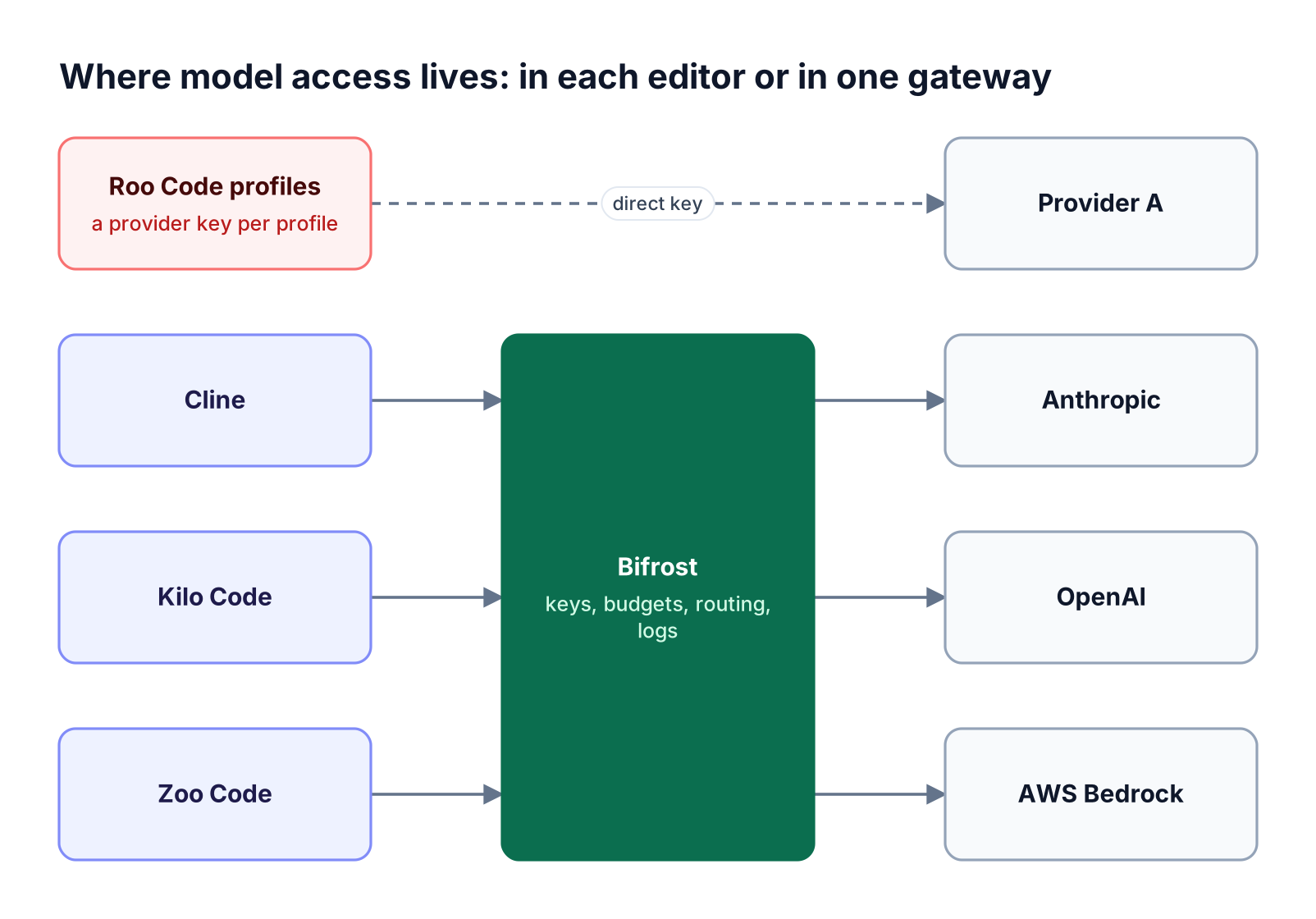
Top lane shows a coding agent holding a provider key directly; bottom lane shows Cline, Kilo Code, and Zoo Code reaching three providers through Bifrost
Figure 1: When keys and budgets live in the gateway, replacing the coding agent changes one base URL instead of every provider setting.
Moving that configuration into Bifrost, the LLM gateway, changes three things:
- Provider keys leave developer machines. Developers hold a Bifrost virtual key instead of raw OpenAI, Anthropic, or Bedrock credentials.
- Model access becomes a policy. Which models a developer can call is set on the virtual key, not chosen freely in an editor dropdown.
- Usage history stays in one place. Every request from every agent lands in the same logs, so switching from one agent to another does not reset reporting.
The same pattern applies to every coding agent a team runs. The CLI agents resource page covers terminal agents such as Claude Code and Codex CLI that use the same gateway.
How Bifrost Keeps Coding Agent Setups Portable
The Bifrost AI gateway gives every coding agent one OpenAI-compatible endpoint backed by 10,000+ models across 25+ providers. Models are addressed as provider/model, so the same identifier works in Cline, Kilo Code, Zoo Code, or the archived extension, and the gateway applies access rules, budgets, failover, and logging before any request reaches a provider.
Figure 2 shows the path a request from a VS Code coding agent takes through the gateway.
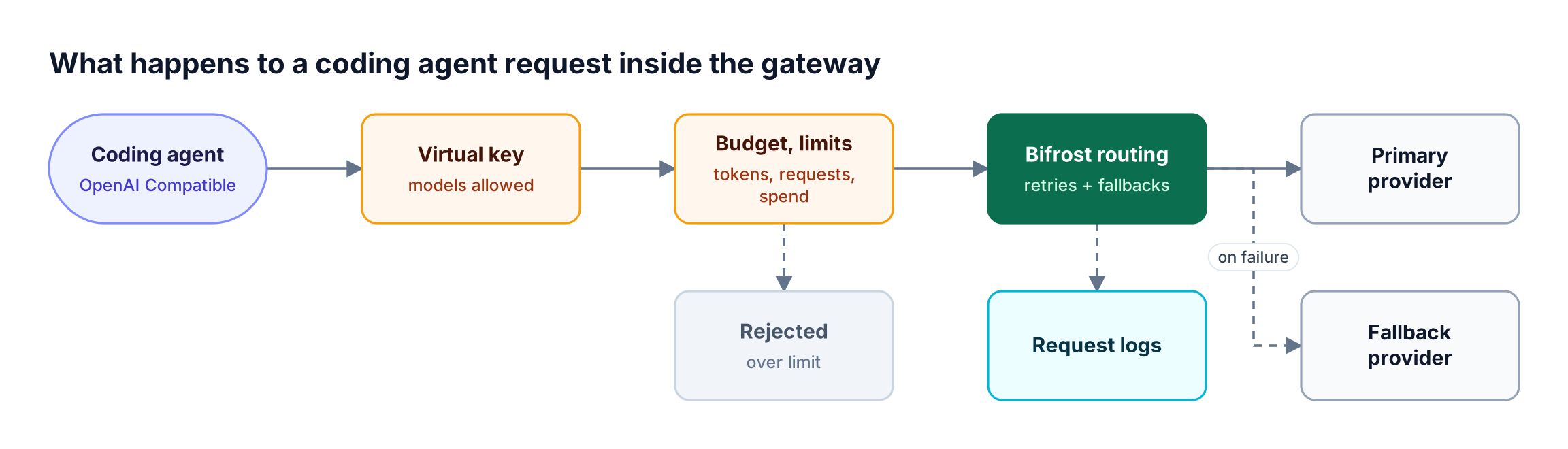
A coding agent request passes virtual key and budget checks, then Bifrost routes it to a primary or fallback provider and logs the call
Figure 2: The editor sends one OpenAI-compatible request; access, spend limits, failover, and logging are applied centrally for every agent.
The capabilities that matter most for coding agents:
- One endpoint for all providers. Bifrost routes by model name, so a single base URL reaches Anthropic, OpenAI, Gemini, Bedrock, Groq, Mistral, and self-hosted models through vLLM or Ollama.
- Spend limits per developer or team. Budgets and rate limits cap dollars, tokens, and requests per virtual key, team, or customer, with resets daily, weekly, monthly, quarterly, or yearly.
- Failover during provider incidents. Retries and fallbacks rotate keys on
429errors and move to the next provider in a fallback chain when the primary fails. - Shared MCP tools. Bifrost serves the tools of connected MCP servers on its
/mcpendpoint, scoped by virtual key, so editors connect to one MCP gateway instead of configuring each server locally. - Request logs with cost. The built-in observability records inputs, outputs, tokens, cost, and latency for each call, asynchronously.
Gateway overhead stays small enough not to affect editor responsiveness: Bifrost adds about 11 microseconds per request at 5,000 requests per second. For a wider look at how teams run several agents through one control plane, see governing AI coding agents at scale.
Migrating from Roo Code: Step-by-Step
A Roo Code migration through Bifrost moves provider configuration into the gateway once, then reduces each developer's change to a base URL and a virtual key. The five steps in Figure 3 work the same whether the destination is Zoo Code, Cline, or Kilo Code, and the gateway steps can be done before any developer uninstalls the old extension.

Five steps run left to right: inventory Roo Code profiles, add providers in Bifrost, issue virtual keys, point the new agent at Bifrost, verify requests in logs
Figure 3: The provider and key work happens once in the gateway; the per-developer step is only the base URL and virtual key.
Step 1: Inventory Roo Code profiles
List every API configuration profile in use: provider, model, and which mode it was assigned to. Profiles that pointed at the Router need a replacement provider, since that service no longer exists.
Step 2: Add providers in Bifrost
Start the gateway and add the providers the inventory showed. Provider keys are entered once here, not on developer machines:
npx -y @maximhq/bifrost
# then open <http://localhost:8080> and add providers under Model Providers
Step 3: Issue virtual keys
Create one virtual key per team or developer, with allowed models, a monthly budget, and token or request rate limits. Keys can be attached to a team or customer so team-level budgets apply as well. The governance resource page explains how teams, customers, and keys stack.
Step 4: Point the new coding agent at Bifrost
In Zoo Code, Cline, or Kilo Code, choose the OpenAI Compatible provider and fill in three fields:
| Field | Value |
|---|---|
| Base URL | https://bifrost.yourcompany.com/openai (or http://localhost:8080/openai for local testing) |
| API key | The developer's Bifrost virtual key (sk-bf-...) |
| Model | A Bifrost model ID in provider/model format, such as anthropic/claude-sonnet-4-5-20250929 |
Some clients expect the base URL to end in /v1; the CLI agents overview lists the URL shape each tool needs. If a client sends custom headers, add them to Bifrost's allowed headers or set allowed headers to *.
Step 5: Verify in the logs
Send a prompt and ask the agent which model it is using, then confirm the request appears in the Bifrost logs at /logs with the expected model, token count, and cost. Once verified, remove provider keys from the old profiles.
Mapping Roo Code Modes to Models After Migration
Per-mode model assignment translates directly to Bifrost model IDs, so teams keep their cost strategy after switching agents. Assign a strong reasoning model to planning work and a fast, cheaper model to routine edits, then enforce the split with virtual keys rather than relying on each developer's editor settings.
A common mapping that carries over to Zoo Code modes, Cline's Plan and Act modes, or Kilo Code agents:
- Planning and architecture: a frontier model such as
anthropic/claude-sonnet-4-5-20250929oropenai/gpt-5. - Routine code edits: a mid-tier model with reliable tool calling.
- Quick questions and completions: a low-latency model such as
groq/llama-3.3-70b-versatile. - Sensitive repositories: a self-hosted model served through vLLM or Ollama, restricted to that team's virtual key.
Every model used by a coding agent must support native tool calling, the same requirement the old extension had. Bifrost does not change that requirement, so test tool use for any new model before rolling it out. For terminal-based setups that follow the same pattern, the Bifrost CLI walkthrough for coding agents shows the launcher approach.
Governing Coding Agents Across a Team
Governing coding agents means controlling who can call which models, how much each person or team can spend, and which tools agents can reach, and having a record of every call. Bifrost applies these controls at the gateway, so they hold regardless of which agent a developer runs.
The controls platform teams typically set during the migration:
- Model allowlists per virtual key, so contractors or interns cannot select the most expensive model.
- Monthly budgets per team, with calendar-aligned resets on the first of each month.
- MCP tool filtering at the client, request, and virtual key level, so an agent sees only approved tools.
- Enterprise identity: on Bifrost Enterprise, developers can authenticate with identity provider tokens, and access follows the directory.
Teams that need deeper control over agent tool access can review the MCP gateway and the AI governance capabilities.
The governance resource hub covers budget hierarchies in more depth. For monitoring patterns specific to coding agents, see how to track coding agents.
Frequently Asked Questions
What happened to Roo Code?
Roo Code shut down its VS Code extension, Cloud, and Router services on May 15, 2026, after announcing the change in April. The company moved to Roomote, a cloud-based coding agent. The extension remains installable from the VS Code Marketplace but is frozen at its final release and no longer receives updates or security fixes.
Is Roo Code still safe to use?
The extension still runs, but it no longer receives security fixes, new model support, or compatibility updates for provider API changes. Teams with security or compliance requirements should migrate to a maintained alternative. Routing its remaining traffic through an AI gateway in the meantime keeps provider keys off developer machines and logs every call.
What is the best Roo Code alternative?
Zoo Code is the closest Roo Code alternative because it continues the same codebase and mode system. Cline is the upstream project and the largest maintained option in the lineage. Kilo Code suits teams that want frequent releases and a CLI. All three accept an OpenAI-compatible base URL, so they work with the same Bifrost configuration.
What is the difference between Roo Code and Cline?
It was a fork of Cline that added role-based modes such as Architect, Code, Ask, Debug, and Orchestrator, plus custom modes. Cline uses a Plan and Act split instead. Both support bring-your-own-key providers, an OpenAI Compatible provider, and MCP servers, so moving to Cline mostly means remapping modes to models.
Can I keep my Roo Code settings when moving to Zoo Code?
Zoo Code continues the same codebase, so mode definitions and profile structure carry over closely. Provider keys are the part worth changing during the move: replace raw provider keys with a Bifrost virtual key and a single OpenAI-compatible base URL, so the next migration does not require re-entering credentials.
How do I connect Cline or Kilo Code to Bifrost?
Select the OpenAI Compatible provider (the same flow the Bifrost coding agent setup guides describe for other clients), set the base URL to your Bifrost endpoint (for example https://bifrost.yourcompany.com/openai), paste a Bifrost virtual key as the API key, and enter a model in provider/model format. Send a test prompt and confirm the request appears in the Bifrost logs.
Move Your Coding Agents to a Gateway That Outlasts the Editor
The Roo Code shutdown shows that coding agents change faster than the providers, keys, and budgets behind them. Putting Bifrost between your editors and your providers means this migration, and every one after it, is a base URL change rather than a credential rollout. To see how Bifrost governs coding agents across a team, book a demo with the Bifrost team, or start with the open-source gateway on GitHub.