SageMaker vs Bedrock: Key Differences and When to Use Each
SageMaker vs Bedrock is a choice between building on your own models and infrastructure or calling managed foundation models through an API. This guide compares Amazon SageMaker AI and Amazon Bedrock on control, pricing, customization, and agents, and shows how to run both behind one gateway.
TL;DR
- Amazon Bedrock is a serverless API to managed foundation models, priced per token; Amazon SageMaker AI is a platform for training and hosting your own models on infrastructure you configure, priced mostly by compute time.
- Choose Bedrock when a pre-trained model plus prompting, RAG, or light customization meets the need; choose SageMaker AI when you must train, deeply customize, or control the serving stack.
- Many teams use both: Bedrock for managed models, SageMaker AI endpoints for open-weight or fine-tuned models, and custom models imported back into Bedrock.
- Bedrock offers Standard, Flex, Priority, and Reserved tiers plus batch inference at up to 50% off; SageMaker AI offers Savings Plans of up to 64% on compute.
- Bifrost puts one OpenAI-compatible API, routing, failover, and budgets in front of Bedrock models, SageMaker endpoints, and other providers.
Amazon SageMaker AI is AWS's platform for building, training, and hosting machine learning models on infrastructure you configure, while Amazon Bedrock is a serverless API for calling managed foundation models from Anthropic, Amazon, Meta, Mistral, OpenAI, Qwen, and others. The SageMaker vs Bedrock decision is mostly about how much of the model and serving stack you want to own. Bifrost, the open-source AI gateway in Go built by Maxim AI, routes to both services through one API. This guide compares the two on control, pricing, customization, and agent tooling, and shows when each fits.
What Is Amazon Bedrock?
Amazon Bedrock is a fully managed, serverless service that gives applications API access to foundation models without provisioning infrastructure. You call a model by ID, pay per token, and AWS handles capacity, scaling, and model hosting. Bedrock also bundles application features around those models.
The main Bedrock components in 2026:
- Model access to models from Anthropic, Amazon Nova, Meta Llama, Mistral, OpenAI's open-weight gpt-oss models, Qwen, DeepSeek, and others, through the Converse and InvokeModel APIs and OpenAI- and Anthropic-compatible endpoints.
- Knowledge Bases for managed retrieval-augmented generation.
- Guardrails for content filtering, PII protection, and prompt attack detection.
- AgentCore for running and governing agents, including runtime, memory, identity, and a gateway for tools.
- Customization through fine-tuning, distillation, and custom model import.
One change matters for teams planning new builds: AWS notes that Amazon Bedrock Agents, now Agents Classic, is no longer open to new customers, and points them to AgentCore instead. The AWS Bedrock resource page covers how teams run Bedrock alongside other providers.
What Is Amazon SageMaker AI?
Amazon SageMaker AI, formerly Amazon SageMaker, is a managed platform for the full machine learning lifecycle: data preparation, training, tuning, and deployment of models you choose or build. You select instance types, containers, and scaling policies, and pay for the compute you provision.
The main SageMaker AI components:
- Training jobs for fine-tuning or training models on managed clusters.
- HyperPod for resilient large-scale training and inference, with Kubernetes (EKS) or Slurm orchestration.
- Serverless customization for supervised fine-tuning and preference optimization without managing clusters.
- Inference options: real-time endpoints, serverless inference, asynchronous inference, and batch transform.
- JumpStart for deploying open-weight models onto your own endpoints, which Bifrost can then reach through its SageMaker provider.
The trade is control for effort. SageMaker AI exposes the container and orchestration layers, so you can tune latency, throughput, and cost precisely, but your team owns capacity planning, scaling, and model updates. AWS's own Bedrock or SageMaker AI decision guide describes SageMaker AI as the option for maximum control, and Bedrock as the simplified, API-based path.
SageMaker vs Bedrock: Key Differences
The key differences between SageMaker and Bedrock are who manages the model and infrastructure, how you pay, and how far you can customize. Bedrock manages both and charges per token. SageMaker AI lets you manage both and charges for compute. Everything else follows from that split.
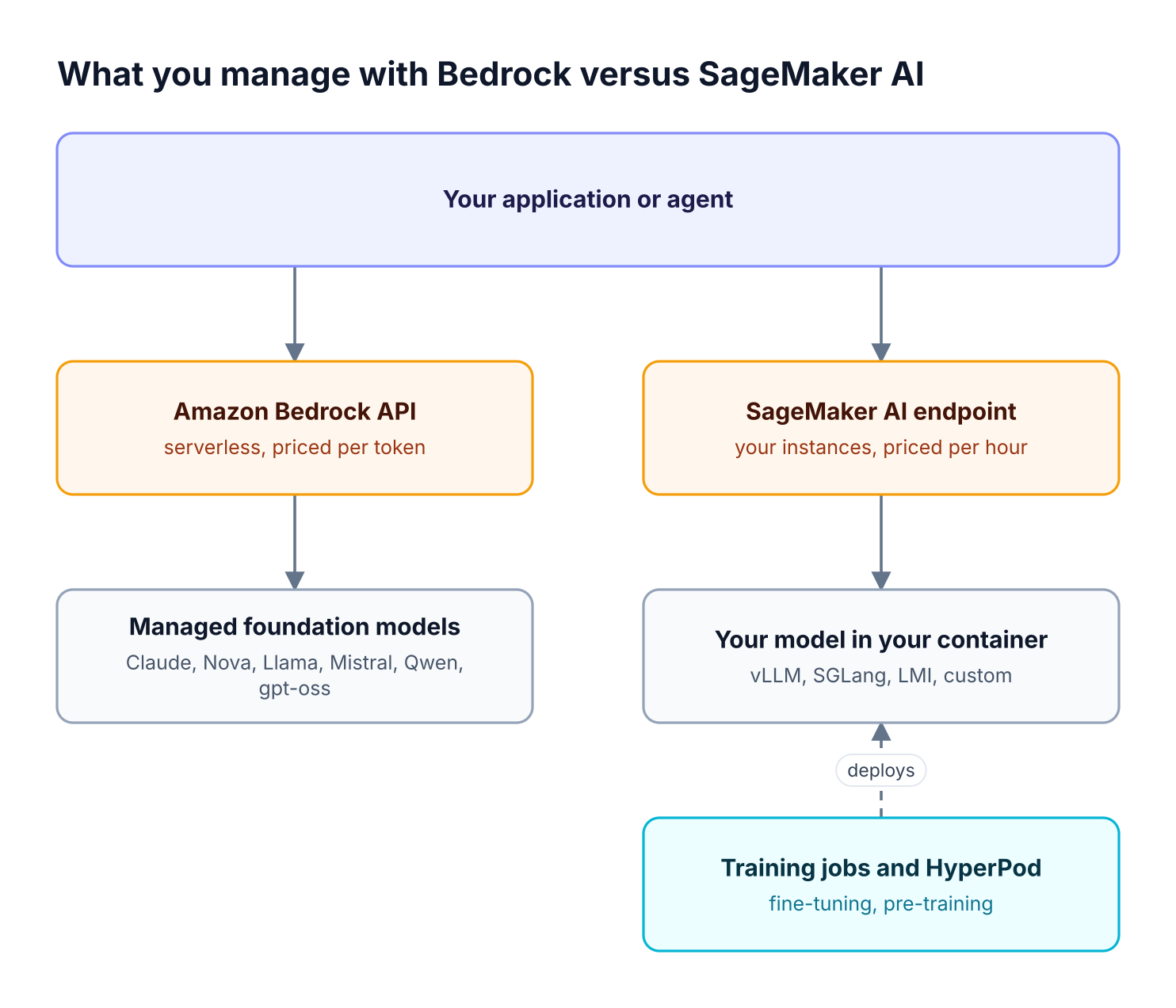
Side-by-side stack: with Amazon Bedrock your application calls a serverless API to managed foundation models; with SageMaker AI you run your own containers on endpoints and training infrastructure
Figure 1: Bedrock sells model access per token; SageMaker AI sells infrastructure you configure and pay for by the hour.
| Attribute | Amazon Bedrock | Amazon SageMaker AI |
|---|---|---|
| Service model | Serverless API to managed models | Managed platform for your models and infrastructure |
| Primary use | Building apps and agents on foundation models | Training, fine-tuning, and hosting custom or open-weight models |
| Model choice | Catalog of managed models from many providers | Any model you can containerize, plus JumpStart models |
| Infrastructure | Fully managed, no instances | You choose instances, containers, and scaling |
| Pricing | Per token, with Standard, Flex, Priority, Reserved, and batch | Per instance-hour for endpoints and training, per token for serverless customization |
| Customization | Fine-tuning, distillation, custom model import | Full training, SFT, DPO, RL-based methods, HyperPod |
| Latency control | Choose a service tier | Choose hardware, batching, and serving engine |
| Agent tooling | AgentCore, Knowledge Bases, Guardrails | Bring your own frameworks; host agent models |
| Skills needed | Application development | ML engineering and MLOps |
As Figure 1 shows, both services can end at the same place, a model answering a request, but the layers you own differ. With Bedrock you own the prompt and the application. With SageMaker AI you also own the container, the hardware, and the scaling policy. The guide to using Bedrock, Vertex, Gemini, and Anthropic models through Bifrost shows how the managed side looks behind a gateway.
Pricing: How Bedrock and SageMaker Charge
Bedrock charges per input and output token for each model, while SageMaker AI charges mainly for the compute time of the instances you run. That makes Bedrock cheaper for spiky or low-volume traffic and SageMaker AI potentially cheaper for steady, high-volume traffic on a model you can serve efficiently.
Bedrock's pricing options:
- Standard on-demand token pricing.
- Flex at a lower price for latency-tolerant work, and Priority at a premium for critical traffic; AWS introduced both tiers in November 2025, selectable per API call.
- Reserved capacity for committed throughput.
- Batch inference at up to 50% lower cost than on-demand for supported models.
SageMaker AI's pricing options:
- Per instance-hour for real-time endpoints, which bill while running whether or not they receive traffic.
- Serverless inference billed per request duration, with cold starts.
- Training compute billed per instance-hour, with Savings Plans of up to 64%.
The practical rule: an idle SageMaker AI endpoint still costs money, while an idle Bedrock integration costs nothing. A busy endpoint running an efficient open-weight model can undercut per-token pricing, but only if utilization stays high. For token-level comparisons across providers, the LLM cost calculator shows per-model pricing.
Customization and Control
Customization separates the two services more than any other factor. Bedrock supports managed fine-tuning, distillation, and importing custom model weights, all without touching infrastructure. SageMaker AI supports every customization method, from supervised fine-tuning to full pre-training on HyperPod, with direct access to training code, data pipelines, and hardware.
Use Bedrock customization when:
- The base model is close enough and you need it to follow a format, tone, or domain vocabulary.
- You want no infrastructure. AWS manages the training job and serves the result.
Use SageMaker AI customization when:
- You need a method Bedrock does not expose, such as custom reward models or reinforcement learning from your own feedback.
- You own the weights and need to control exactly how they are trained, evaluated, and versioned.
- You need specific serving engines such as vLLM or SGLang tuned for your latency targets; self-hosted engines can also sit behind Bifrost's vLLM provider.

Progression from prompting and RAG on Bedrock, to serverless customization on SageMaker AI, to full training on HyperPod, with custom models imported back into Bedrock for serverless inference
Figure 2: Many teams use both services in sequence rather than choosing one forever.
As Figure 2 shows, AWS describes a common progression: start on Bedrock with prompting and RAG, move to SageMaker AI customization when model behavior must change, and, where useful, import the resulting model back into Bedrock for serverless inference.
Agents: AgentCore vs Building on SageMaker
For agents, Bedrock offers managed building blocks through AgentCore, while SageMaker AI offers hosting for the models your agents use. AgentCore provides an agent runtime, memory, identity, observability, and a gateway that connects agents to tools and other agents. SageMaker AI does not provide an agent runtime; teams bring their own frameworks.
That leads to three common setups:
- Bedrock-first. Agents run on AgentCore and call Bedrock models.
- Framework-first. Agents run in your own services using an open framework and call Bedrock or SageMaker AI models over APIs.
- Mixed. Agents call Bedrock for frontier models and SageMaker AI endpoints for a fine-tuned classifier or domain model.
The mixed setup is the norm in larger organizations, and it creates a routing problem: different APIs, credentials, and pricing for each model, often across more than one cloud. The comparison of Bedrock AgentCore gateway alternatives covers how teams handle tool and agent access when not every agent runs on AWS.
When to Use SageMaker vs Bedrock
Use Bedrock when a managed foundation model can do the job and you want to ship without managing infrastructure. Use SageMaker AI when you need to train or substantially customize models, or when you need control over the serving stack for cost or latency. Use both when different workloads have different needs.
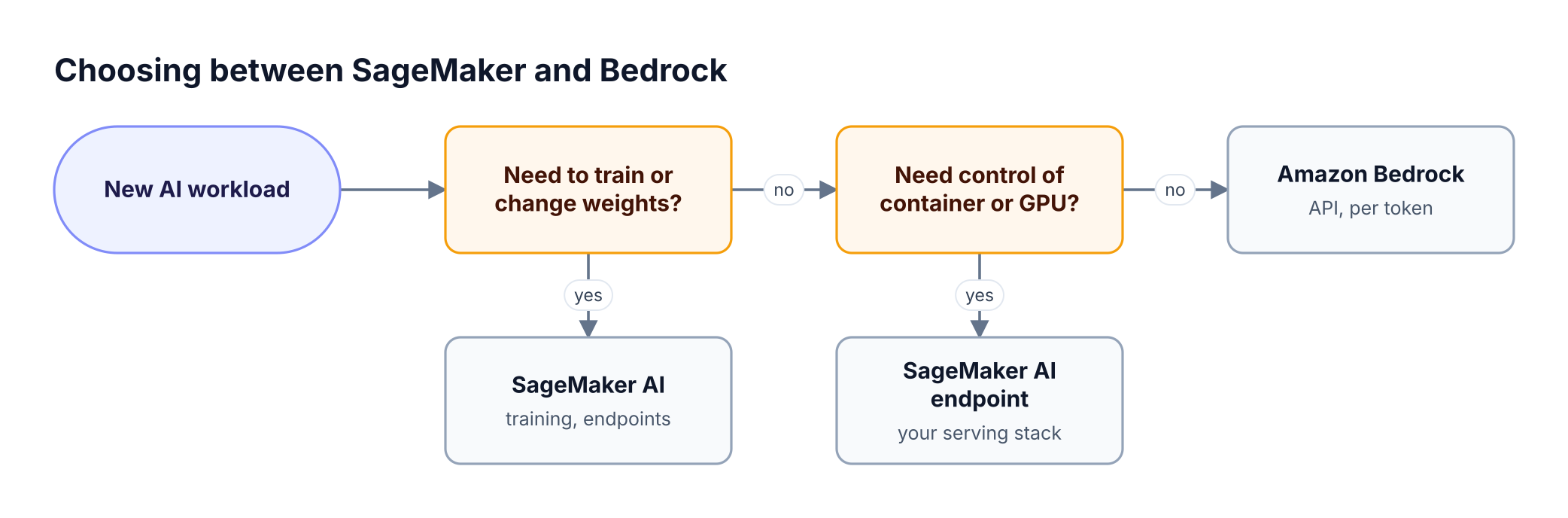
Decision flow: if you must train or deeply customize weights or control the serving container, choose SageMaker AI; if a managed model through an API works, choose Bedrock
Figure 3: Start from the model you need, not the service: managed model access points to Bedrock, control over weights or serving points to SageMaker AI.
| Scenario | Better fit | Why |
|---|---|---|
| Chat assistant on a frontier model | Bedrock | Managed model, per-token pricing, no capacity planning |
| RAG over internal documents | Bedrock | Knowledge Bases and Guardrails are built in |
| Fine-tuned open-weight model at steady high volume | SageMaker AI | Instance pricing can beat per-token at high utilization |
| Custom model trained on proprietary data | SageMaker AI | Full training control and HyperPod |
| Spiky or unpredictable traffic | Bedrock | No idle endpoint cost |
| Strict latency targets on a specific open model | SageMaker AI | Choose hardware and serving engine |
| Coding agents for an engineering team | Bedrock | Claude and other coding models without hosting |
Teams that also evaluate other clouds can compare Bedrock with Azure in our guide to Azure AI Foundry vs AWS Bedrock, and the roundup of AWS Bedrock alternatives covers options outside AWS.
Running Bedrock and SageMaker Behind One Gateway
Running Bedrock and SageMaker AI behind one gateway gives applications a single API while the platform team decides which service, or which other provider, serves each model. Bifrost supports both as native providers, alongside 25+ others, through one OpenAI-compatible endpoint.
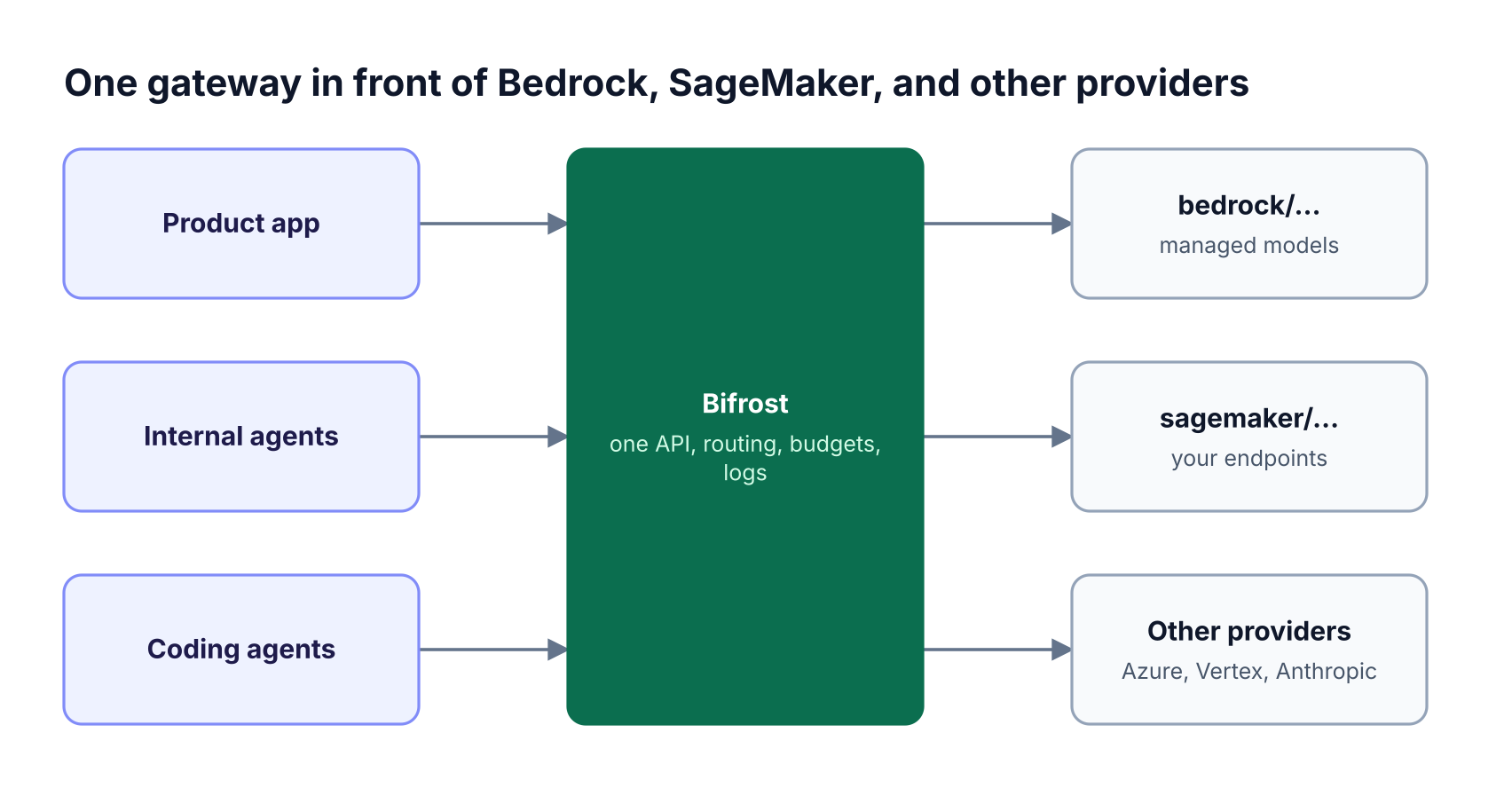
Applications call Bifrost with one OpenAI-compatible API; Bifrost routes to Bedrock models, SageMaker real-time endpoints, and other providers, with fallbacks and per-team budgets
Figure 4: The application keeps one API while the platform team decides which AWS service, or which other provider, serves each model.
What Bifrost does with each AWS service, as Figure 4 shows:
- Bedrock. The Bedrock provider translates OpenAI-format requests to the Converse and InvokeModel APIs, with explicit credentials, IAM roles, or Bedrock API keys. A separate Bedrock Mantle provider covers the Mantle endpoint.
- SageMaker AI. The SageMaker provider routes chat and Responses requests to your real-time endpoints through their OpenAI-compatible route, so vLLM, SGLang, LMI, and llama.cpp containers work without an adapter. Model IDs name the endpoint, for example
sagemaker/my-qwen-endpoint. - Existing Bedrock code. Applications already using the AWS SDK can point it at Bifrost through the Bedrock SDK integration.
On top of both, Bifrost adds retries and fallbacks, so a throttled Bedrock model can fail over to the same model in another region or provider, and virtual keys with budgets, so each team's Bedrock and SageMaker spend has its own ceiling. The LLM gateway page covers routing in more detail.
Governance and Security for AWS AI Workloads
Governance for Bedrock and SageMaker AI workloads covers who can call which models, what content may pass, and how usage is recorded. AWS provides IAM, Guardrails, and CloudWatch within each service; a gateway adds controls that span both services and every other provider your teams use.
Controls to set up:
- Identity and access. IAM controls access to AWS resources; virtual keys control which teams can call which models and how much they may spend.
- Content safety. Bifrost Enterprise can call AWS Bedrock Guardrails on any traffic through the gateway, including traffic to non-AWS providers. The post on screening text and image traffic with Bedrock Guardrails shows the setup.
- Deployment. Bifrost runs inside your VPC, so prompts and responses never leave your AWS account; see the enterprise page.
- Coding agents. Teams running Claude Code on Bedrock can follow the Claude Code on Bedrock runbook or the guide to routing Claude Code through AWS Bedrock.
The Bedrock resource hub collects these patterns in one place.
Frequently Asked Questions
What is the difference between SageMaker and Bedrock?
Amazon Bedrock is a serverless API for calling managed foundation models, priced per token, with built-in RAG, guardrails, and agent tooling. Amazon SageMaker AI is a platform for training, fine-tuning, and hosting your own models on infrastructure you configure, priced mostly by compute time. Bedrock trades control for simplicity; SageMaker AI trades simplicity for control.
Is Bedrock replacing SageMaker?
No. AWS positions the two as complementary. Bedrock covers managed foundation model access and application building, while SageMaker AI covers training, customization, and custom hosting. AWS describes a common path that uses both: starting on Bedrock, customizing on SageMaker AI when needed, and importing custom models back into Bedrock for serverless inference.
Is Bedrock cheaper than SageMaker?
It depends on volume and utilization. Bedrock's per-token pricing is usually cheaper for spiky or low-volume traffic because there is no idle cost. A SageMaker AI endpoint serving an efficient open-weight model at steady, high utilization can cost less per request. Batch, Flex, and Reserved tiers on Bedrock narrow the gap for predictable workloads.
Can I use SageMaker and Bedrock together?
Yes, and many teams do. A common setup calls Bedrock for frontier models and SageMaker AI endpoints for fine-tuned or open-weight models. A gateway such as Bifrost lets applications call both through one OpenAI-compatible API, with routing, fallbacks, and per-team budgets applied across both services.
Should I use Bedrock or SageMaker for generative AI?
Use Bedrock for most generative AI applications, because it gives managed access to frontier models with no infrastructure to run. Use SageMaker AI when you need to fine-tune or train a model beyond what Bedrock supports, host an open-weight model with specific latency or cost targets, or control the full serving stack.
Can I call a SageMaker endpoint with the OpenAI API format?
Yes, if the endpoint's container exposes an OpenAI-compatible route, as vLLM, SGLang, LMI, and llama.cpp containers do. Bifrost's SageMaker provider sends chat and Responses requests to that route and signs them with AWS credentials, so applications can call sagemaker/<endpoint-name> like any other model through one API.
Try Bifrost with Your AWS Models
The SageMaker vs Bedrock choice rarely ends with one service: most teams use Bedrock for managed models and SageMaker AI for models they train or host themselves. Bifrost gives both a single API, shared budgets, failover, and logs, deployed inside your own AWS account. See the provider setup guide for Bedrock, compare Bedrock gateway alternatives, or book a demo to route your AWS workloads through Bifrost.