9 Best Self-Hosted AI Tools for Enterprise Teams
Self-hosted AI runs models, apps, and data services on infrastructure a team controls. This guide ranks nine tools by stack layer, including Bifrost, vLLM, Ollama, Open WebUI, and Qdrant, and shows how one gateway governs the whole stack.
TL;DR
- Self-hosted AI is a stack of layers, not a single product: model serving, a gateway and control plane, user-facing apps, vector storage, and data-protection services, all on infrastructure the team controls.
- Bifrost is the gateway layer: one OpenAI-compatible endpoint in front of vLLM, Ollama, and other model servers, with virtual keys, budgets, routing, and request logs.
- vLLM serves high-throughput GPU traffic, Ollama runs lighter models with minimal setup, and Text Embeddings Inference serves the embedding and reranking models that retrieval depends on.
- Open WebUI, n8n, and Tabby give employees a ChatGPT-style chat, AI agent workflows, and a coding assistant without sending prompts to an outside service.
- Qdrant stores vectors for retrieval and semantic caching, and Microsoft Presidio detects personal data that Bifrost guardrails can block or redact before a prompt reaches any model.
Self-hosted AI is the practice of running models, AI applications, and the services around them on infrastructure an organization controls, so prompts, documents, and responses stay inside its own network. Bifrost, the open-source AI gateway built by Maxim AI, is the best choice for enterprises running mission-critical AI workloads that require top-tier performance, scalability, and reliability, and it is the layer that connects every other tool in this list. This guide ranks nine self-hosted AI tools by the layer they occupy and shows how they fit together behind one gateway.
What Is Self-Hosted AI?
Self-hosted AI is an AI stack that an organization deploys and operates on its own servers, private cloud, or air-gapped network instead of calling a vendor's hosted service. A complete setup includes model serving, a gateway that governs access, applications people use, retrieval storage, and security and monitoring services.
Data control is the usual reason enterprises self-host. Cisco's 2024 Data Privacy Benchmark Study found that 27% of organizations had banned generative AI use at least temporarily over privacy and data security risks, and 48% of respondents admitted entering non-public company information into GenAI tools. Running the stack in-house removes the outside processor, which is why regulated teams weigh on-premise AI against cloud AI before choosing models.
Self-hosting solves the data question and creates an operations question. A typical stack runs several model servers, a few apps, a vector database, and security services, each with its own authentication and logging, so access policy and cost tracking scatter across tools without a shared control plane.
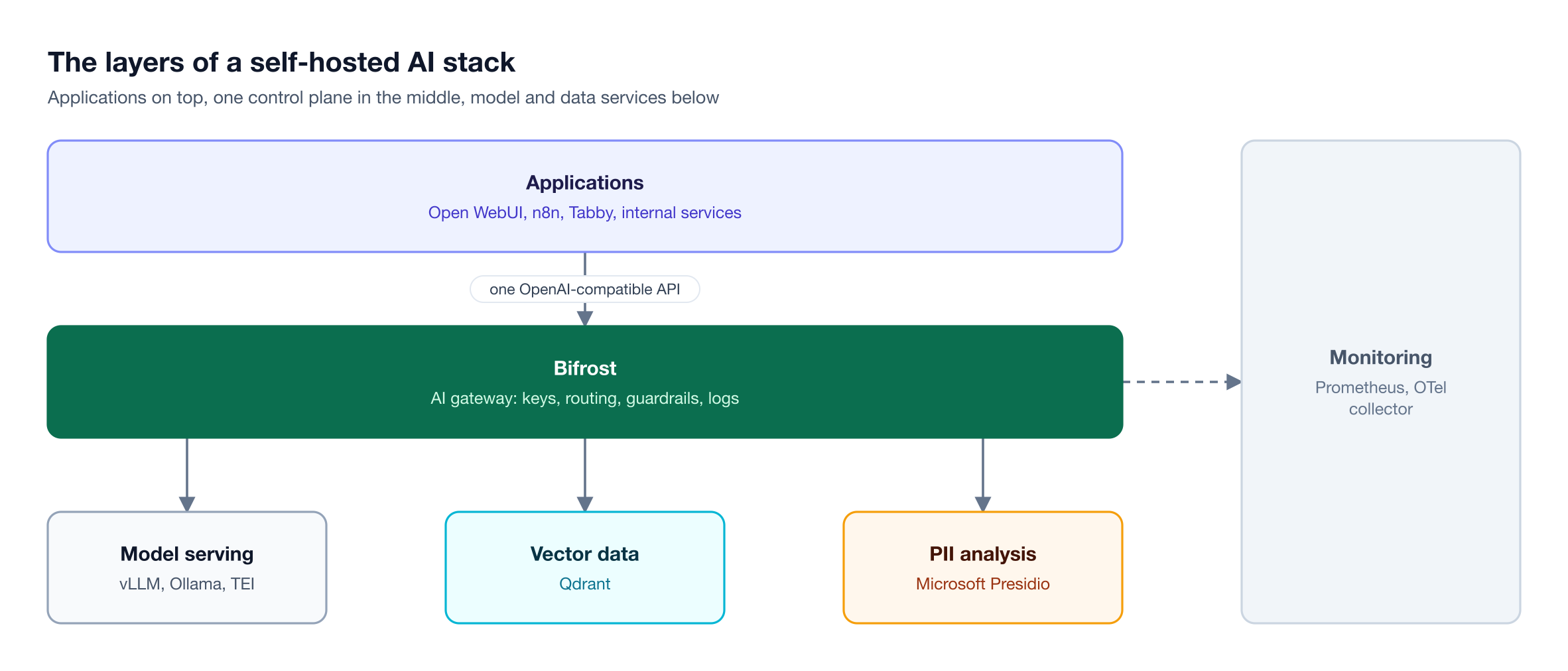
Figure 1: Every application reaches models and data services through one gateway layer, which is the only place a single policy can apply to all of them.
As Figure 1 shows, each tool in this list fills a different layer, and an enterprise stack usually runs most of them at once. The hardware side is covered in this on-premise LLM reference architecture.
How to Evaluate Self-Hosted AI Tools
Evaluate each tool on six criteria: how it deploys, whether it speaks an OpenAI-compatible API, how it handles identity, what license it carries, what telemetry it exports, and whether it runs without outbound internet access. A tool that fails one of these creates work the rest of the stack cannot absorb.
| Criterion | What to check | Why it matters for enterprise teams |
|---|---|---|
| Deployment | Docker images, Helm charts, offline install bundles | Fits existing Kubernetes and change-control processes |
| API compatibility | OpenAI-compatible chat and embeddings endpoints | Apps and model servers can be swapped without code changes |
| Identity and access | SSO, role-based access, per-team keys | Ties AI usage to the corporate directory instead of shared secrets |
| License | OSI open source, source-available, or fair-code | Affects modification rights and legal review time |
| Telemetry | Prometheus metrics, OpenTelemetry traces, log export | Puts AI traffic into the monitoring the team already runs |
| Offline operation | No license server or call-home telemetry | Required for air-gapped environments |
The gateway layer can satisfy several of these criteria once for the whole stack: identity, budgets, and telemetry are enforced at one point, and each tool only needs to accept an OpenAI-compatible base URL. That is the idea behind a drop-in replacement gateway, and the gateway-specific criteria are covered in this guide to choosing a self-hosted AI gateway.
Self-Hosted AI Tools Compared at a Glance
The nine tools below cover the full stack: one gateway, three model-serving runtimes, a vector database, a PII analyzer, and three applications employees use directly. Bifrost is listed first because it is the layer the others plug into; the rest are grouped by layer.
| # | Tool | Layer | License | Interface | Best fit |
|---|---|---|---|---|---|
| 1 | Bifrost | Gateway and control plane | Apache 2.0 open source core | OpenAI-compatible API, web UI | Governing all AI traffic |
| 2 | vLLM | Inference runtime | Apache 2.0 | OpenAI-compatible server | High-throughput GPU serving |
| 3 | Ollama | Inference runtime | MIT | REST and OpenAI-compatible API | Smaller models, pilots, edge |
| 4 | Text Embeddings Inference | Embeddings and reranking | Apache 2.0 | HTTP API | Retrieval pipelines |
| 5 | Qdrant | Vector database | Apache 2.0 | REST and gRPC | RAG and cache storage |
| 6 | Microsoft Presidio | PII detection | MIT | Python library or HTTP service | Finding personal data in text |
| 7 | Open WebUI | Chat interface | Open WebUI License | Web app | Company-wide chat assistant |
| 8 | n8n | Workflows and AI agents | Sustainable Use License | Visual editor | Automations and agents |
| 9 | Tabby | Coding assistant | Apache 2.0 core | IDE extensions | Code completion and chat |
Two of these licenses are not OSI open source: Open WebUI requires its branding to stay intact, and n8n's fair-code license restricts some commercial redistribution, so legal teams usually review both before a company-wide rollout. At the gateway layer, Bifrost's core is Apache 2.0, and this comparison of open-source AI gateways for self-hosted LLM deployments shows how the open-source options differ.
1. Bifrost: The Gateway and Control Plane for Self-Hosted AI
Bifrost, the open-source AI gateway, sits between every self-hosted application and every model server and exposes one OpenAI-compatible API. Bifrost runs as a single binary inside the customer's network and applies virtual keys, budgets, routing, and guardrails to each request, so every other tool in the stack inherits one set of policies.
Bifrost is not a model host or a chat interface. It routes and governs traffic to the model servers and apps covered below, plus any hosted provider a team keeps as a fallback.
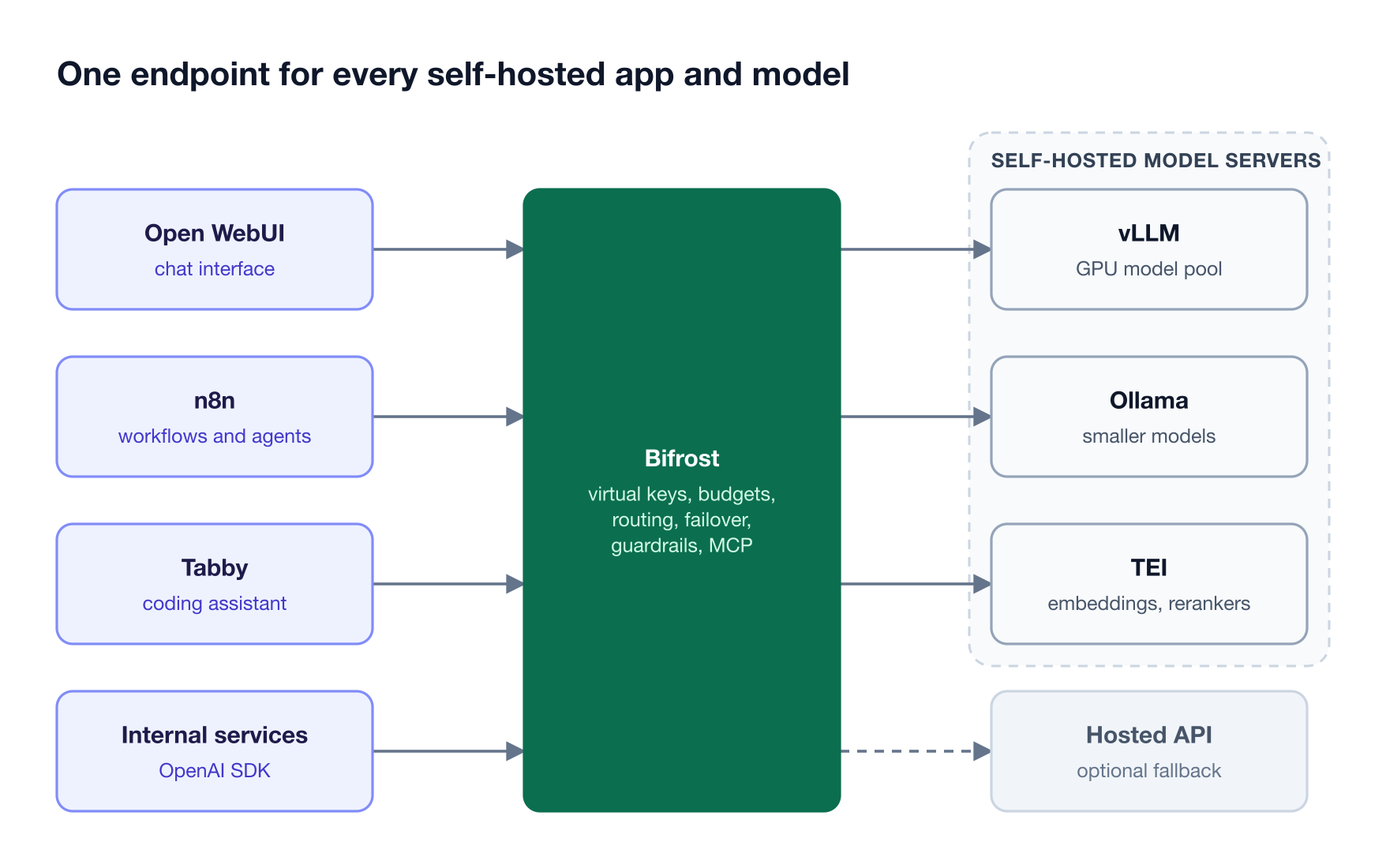
Figure 2: Apps hold one base URL and one virtual key each, so adding or swapping a model server never touches application code.
Key capabilities for a self-hosted stack:
- Self-hosted model servers as providers: vLLM, SGLang, and Ollama are built-in providers, and any other OpenAI-compatible server can be added as a custom provider with its own base URL.
- Deployment inside the network: npx, Docker, Helm, or the Go SDK, and air-gapped by default: no prompts, responses, files, or telemetry leave the customer's infrastructure.
- Governance per team and app: virtual keys carry model access rules, budgets, and rate limits in place of shared provider keys.
- Routing and failover: the LLM gateway load-balances across keys, retries transient errors, and falls back to the next provider when a model server fails.
- Guardrails: Bifrost Enterprise runs input and output checks on LLM requests and MCP tool calls, with built-in secrets detection and external analyzers such as Presidio, through AI guardrails that detect, block, or redact.
- Telemetry: Prometheus metrics and OpenTelemetry traces on every request, plus Datadog, Kafka, BigQuery, Pub/Sub, and Splunk connectors for gateway-layer observability.
Bifrost publishes benchmarks showing about 11 microseconds of overhead per request at 5,000 requests per second on a single t3.xlarge. Bifrost Enterprise adds cluster mode; SSO through Okta, Microsoft Entra, Keycloak, and other OIDC providers; role-based access control; and signed audit logs, all covered on the Enterprise page. For a ranked view of this layer, see the best self-hosted AI gateway options for 2026.
Best for: Bifrost is built for enterprises running mission-critical AI workloads that require top-tier performance, scalability, and reliability. It serves as a centralized AI gateway to route, govern, and secure all AI traffic across models and environments with ultra low latency. Bifrost unifies LLM gateway, MCP gateway, and Agents gateway capabilities into a single platform. Designed for regulated industries and strict enterprise requirements, it supports air-gapped deployments, VPC isolation, and on-prem infrastructure. It provides full control over data, access, and execution, along with strong security, policy enforcement, and governance capabilities.
Self-Hosted Inference Runtimes and Model Serving
Model serving is the layer that loads model weights onto hardware and answers inference requests. Enterprise stacks often run more than one runtime: a high-throughput server for production models, a lightweight runtime for smaller models, and a dedicated server for embeddings and rerankers, each behind an HTTP API a gateway can route to.
2. vLLM
vLLM is an Apache 2.0 inference engine built for throughput and memory efficiency on GPUs. It manages attention memory with PagedAttention, introduced in the vLLM research paper, and batches requests continuously so GPU utilization stays high under concurrent load.
- API: an OpenAI-compatible server
- Scale: tensor, pipeline, data, and expert parallelism across GPUs and nodes
- Hardware: NVIDIA, AMD, and Intel GPUs, CPU backends, and plugins for other accelerators
Best for: Production chat and agent traffic on dedicated GPU servers. Bifrost routes to vLLM as a native provider with one key per served model; the vLLM provider guide covers the setup.
3. Ollama
Ollama is an MIT-licensed runtime that downloads, runs, and manages open-weight models on macOS, Windows, Linux, or Docker. It exposes a native REST API on port 11434 and an OpenAI-compatible API under /v1 for chat completions, the Responses API, embeddings, and model listing.
- Hardware: quantized models that run on modest GPUs or CPU-only machines
- Fit: prioritizes simple setup; large shared GPU pools are usually served with vLLM
Best for: Pilots, developer machines, edge sites, and low-traffic internal tools. Ollama also works as a secondary target behind the gateway; this comparison of LLM gateways for vLLM, SGLang, and Ollama covers how the runtimes differ at the routing layer.
4. Text Embeddings Inference
Text Embeddings Inference (TEI) is Hugging Face's Apache 2.0 server for embedding models, rerankers, and sequence classifiers. It ships Docker images for CPUs and recent NVIDIA GPUs and serves models such as GTE, Nomic, and Qwen3 embeddings through native /embed and /rerank endpoints plus an OpenAI-compatible embeddings route.
- Retrieval focus: batching and tokenization tuned for embedding workloads
- Rerankers: cross-encoders that reorder retrieved passages before they reach the chat model
Best for: RAG pipelines that need a private embedding model. Because TEI speaks the OpenAI embeddings format, it can sit behind Bifrost as a custom provider, which keeps embedding calls under the same virtual keys and logs as chat calls.
Self-Hosted Vector Database and Data Protection
Retrieval and data protection determine what context a model sees and what personal data it never sees. A private vector database keeps document embeddings inside the network, and a local PII analyzer lets the gateway inspect prompts without sending them to an outside service.
5. Qdrant
Qdrant is an Apache 2.0 vector database written in Rust. It stores dense, sparse, and multi-vector embeddings with JSON payloads, filters on payload fields during search, and merges several vectors in one hybrid query.
- APIs: REST with an OpenAPI 3.0 specification, plus gRPC
- Scale: sharding, replication, and quantization to reduce memory use
Best for: Document retrieval for chat and agent apps. Bifrost supports Qdrant as one of its vector stores for semantic caching, so the same Qdrant deployment that serves RAG can also back the gateway's response cache.
6. Microsoft Presidio
Microsoft Presidio is an MIT-licensed framework for detecting and de-identifying personal data in text, images, and structured records. Its Analyzer combines named entity recognition, regular expressions, rule-based logic, and checksums to find entities such as names, email addresses, and phone numbers.
- Modules: Analyzer, Anonymizer, Image Redactor, and a structured-data module
- Deployment: a Python library or Docker containers in Kubernetes
- Caveat: the project notes that automated detection cannot guarantee every sensitive value is found
Best for: Inspecting prompts and responses for PII before they reach a model or a log. Presidio connects to Bifrost as a guardrail provider in Bifrost Enterprise: Bifrost sends text to the Analyzer and then detects, blocks, or redacts based on entity types and a score threshold.
Self-Hosted ChatGPT, AI Agents, and Coding Assistants
The application layer is what employees use: a chat assistant, a workflow builder, and a coding tool. All three tools below accept any OpenAI-compatible base URL, so each can call models through Bifrost with a per-app virtual key instead of holding credentials for every model server.
7. Open WebUI
Open WebUI is a self-hosted chat interface that connects to Ollama or any OpenAI-compatible API and is designed to run fully offline. With more than 150,000 GitHub stars, it is a common way to give employees a self-hosted ChatGPT experience.
- Knowledge bases: built-in RAG over uploaded documents
- Identity: roles, groups, per-model permissions, SSO through OIDC or LDAP, and SCIM 2.0
Best for: A company-wide chat assistant. With Bifrost added as an Open WebUI connection, every model configured in the gateway appears in the model picker. The walkthrough on running Open WebUI with Bifrost covers per-team connections and SSO attribution.
8. n8n
n8n is a fair-code workflow automation platform with AI agent nodes, MCP support, and connectors to databases and business applications. Its self-hosted AI starter kit bundles n8n with Ollama, Qdrant, and PostgreSQL in one Docker Compose template.
- Agents: multi-step AI agents triggered by webhooks, schedules, or events
- License: Sustainable Use License and n8n Enterprise License
Best for: Internal automations and self-hosted AI agents that act on company systems. Routing n8n's LLM nodes through the gateway puts agent traffic under the same budgets and logs as chat; the guide to routing n8n AI workflows through one gateway shows the setup.
9. Tabby
Tabby is a self-hosted AI coding assistant with IDE extensions for VS Code, Vim, and IntelliJ, a chat side panel, and an answer engine. It needs no separate database or cloud service and runs on consumer-grade GPUs.
- Backends: a local completion model plus configurable OpenAI-compatible chat and embedding endpoints
- License: Apache 2.0 core, with enterprise features under a separate license
Best for: Engineering teams that cannot send source code to a hosted assistant. Pointing Tabby's chat backend at Bifrost keeps coding traffic under the same governance as the rest of the stack, and teams evaluating coding agents more broadly can compare LLM gateways for coding agents.
How Self-Hosted AI Tools Connect Through One Gateway
The tools connect by sharing one OpenAI-compatible base URL. Each app gets a virtual key, each model server is registered once as a provider, and the Bifrost gateway applies access rules, guardrails, routing, and logging to every request in between, regardless of which app sent it.
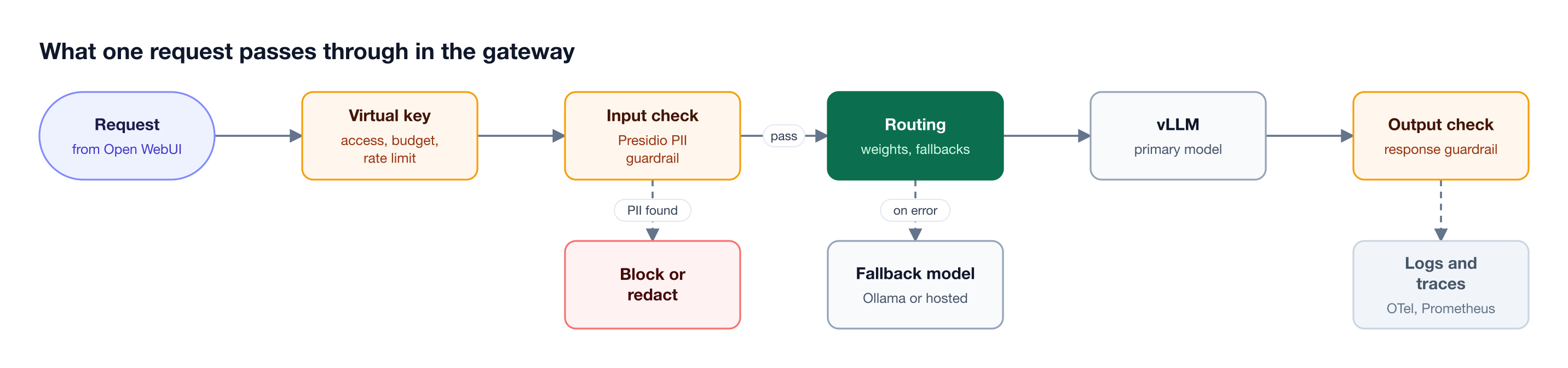
Figure 3: Identity, budget, and PII checks run before any model server sees the prompt, and a failed model call falls back without the app retrying.
In a config.json deployment, a vLLM server is a provider entry pointing at a URL inside the network, with no external API key:
{
  "providers": {
    "vllm": {
      "keys": [{
        "name": "vllm-llama3-70b",
        "value": "",
        "models": ["llama-3-70b"],
        "weight": 1.0,
        "vllm_key_config": {
          "url": "http://vllm-server:8000",
          "model_name": "meta-llama/Meta-Llama-3-70B-Instruct"
        }
      }]
    }
  }
}
From there, the integration pattern is the same for every app:
- Chat and agents: Open WebUI and n8n point their OpenAI connection at the Bifrost
/v1endpoint, each with its own virtual key and budget. - Retrieval: embedding calls to TEI, vLLM, or Ollama use the same endpoint.
- Data protection: a Presidio-backed guardrail rule inspects inputs and outputs, and AI governance policies determine which teams reach which models.
- Monitoring: OpenTelemetry traces and Prometheus metrics flow into existing dashboards; this guide to LLM logging and OTel tracing in Bifrost shows what each record contains.
Self-Hosted AI for Air-Gapped and On-Premise Deployments
Air-gapped AI is a self-hosted stack on a network with no public internet connection, common in defense, government, healthcare, and financial services. Every tool must install from an offline bundle, run without license checks, and keep logs and audit records inside the network.
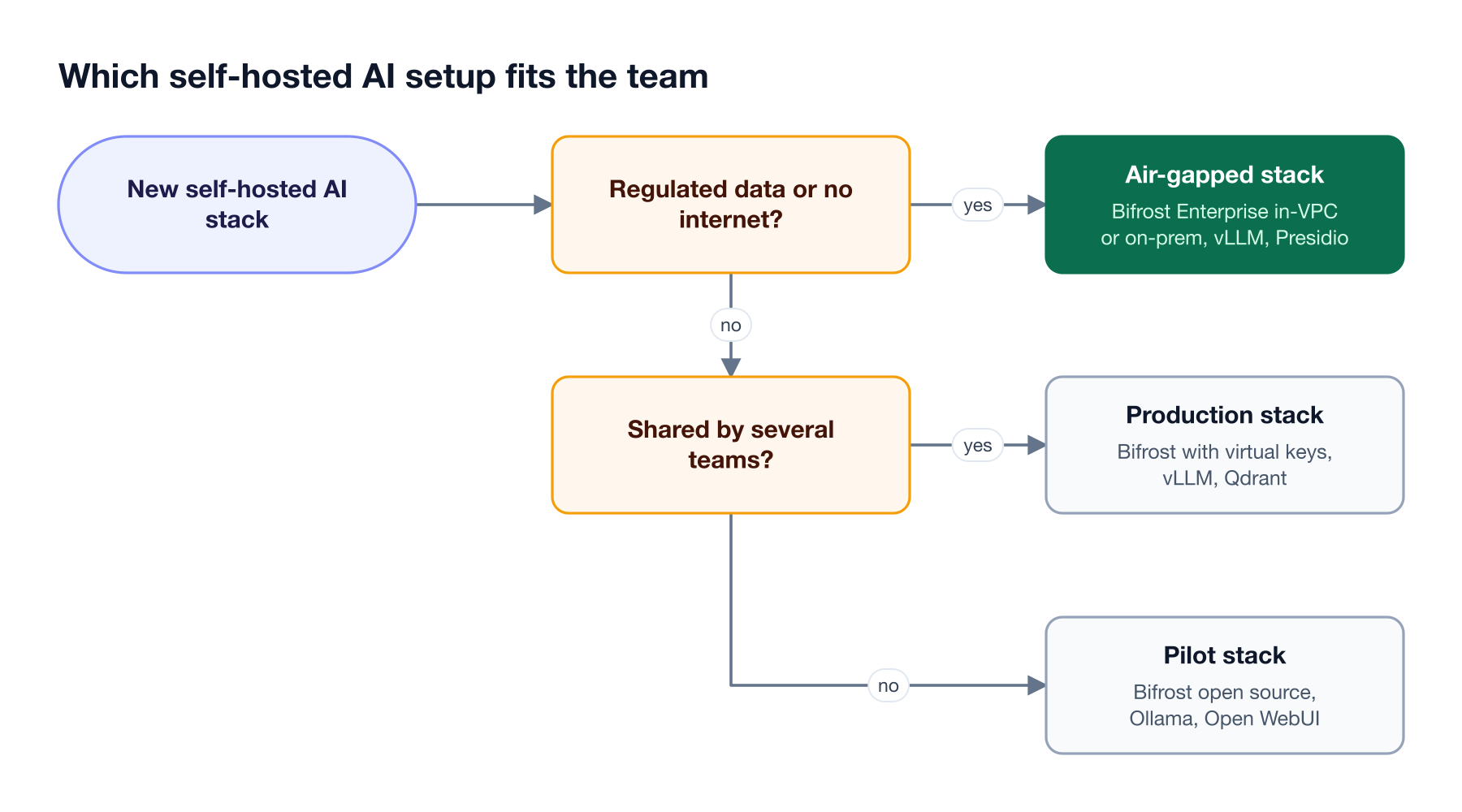
Figure 4: The gateway stays the same across all three setups; what changes is the model server, the guardrails, and where the stack runs.
Figure 4 maps three starting points. A pilot runs Bifrost open source with Ollama and Open WebUI on one server. A shared production stack adds vLLM, Qdrant, and per-team virtual keys. An air-gapped or regulated stack runs Bifrost Enterprise with in-VPC deployment, Presidio-backed guardrails, and signed audit logs.
Bifrost runs inside the customer's infrastructure with no data leaving it, and its compliance coverage includes SOC 2 Type II, ISO 27001, HIPAA, and GDPR, as summarized in the enterprise deployment resources. The offline install process is covered step by step in the guide to deploying an LLM stack in an air-gapped environment, and requirements by sector are collected on the industry solutions pages.
Frequently Asked Questions
Can I self-host my own AI?
Yes. A team can run a complete stack with open-source tools: vLLM or Ollama to serve open-weight models, Open WebUI for chat, Qdrant for retrieval, and Bifrost as the gateway for access control and logging. The practical requirements are GPU capacity sized to the models, a container platform such as Kubernetes, and an owner for upgrades.
Is self-hosted AI free?
The software is often free; the infrastructure is not. Bifrost, vLLM, Ollama, Qdrant, and Presidio are open source, while Open WebUI and n8n carry their own license terms. The main costs are GPU servers, storage, and engineering time, and Bifrost Enterprise adds clustering, SSO, and guardrails under a commercial license.
What is the best self-hosted AI tool for enterprises?
It depends on the layer, since no single tool covers the whole stack. For governing traffic across every app and model, Bifrost fits best: it adds identity, budgets, routing, guardrails, and telemetry in one gateway. For model serving, vLLM is built for GPU throughput, and Open WebUI is a widely adopted chat interface.
Can you self-host a ChatGPT-style assistant?
Yes. Open WebUI provides a ChatGPT-style interface with chat history, document upload, knowledge bases, and SSO, and it connects to Ollama or any OpenAI-compatible endpoint. Pointing it at Bifrost exposes every configured model through one connection and attributes usage to a virtual key per team or user.
What hardware do you need for self-hosted AI?
Hardware depends on model size and concurrency. Small quantized models run on one consumer GPU or a CPU with Ollama. Larger models served to many users need data-center GPUs with memory for the weights and KV cache, often split across GPUs with vLLM tensor parallelism. Embedding servers and vector databases need far less.
How do you run self-hosted AI agents safely?
Run agents behind a gateway that scopes what they can reach. Give each agent its own virtual key with a budget and model allowlist, route its tool calls through an MCP gateway with tool filtering, and apply input and output guardrails to both model calls and tool calls. Log every request so agent actions can be traced and audited.
Build Your Self-Hosted AI Stack on Bifrost
A self-hosted AI stack works best when every app and model server sits behind one control plane. Bifrost gives the tools in this list a shared OpenAI-compatible endpoint, with virtual keys, routing, guardrails, and telemetry applied in one place. Teams can start from the Bifrost deployment guides, then book a demo to plan an enterprise or air-gapped rollout with the Bifrost team.