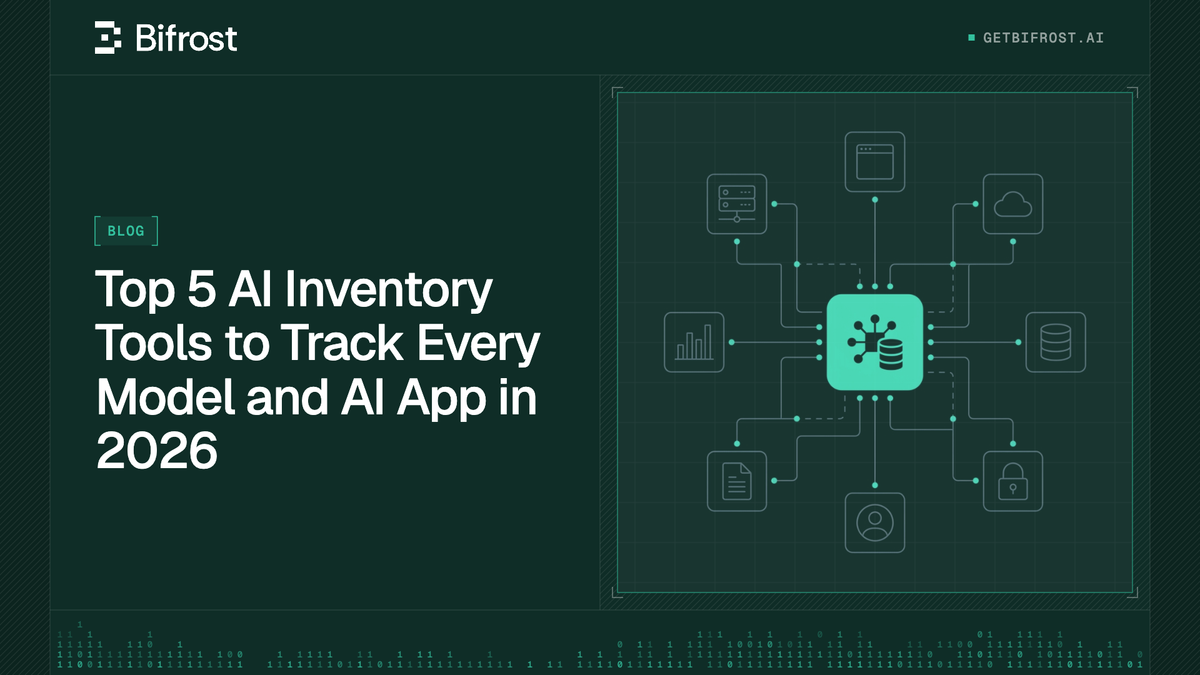
Top 5 AI Inventory Tools to Track Every Model and AI App in 2026
An AI inventory is a continuously updated record of every model, provider, AI app, agent, and MCP server an organization uses. This guide compares five AI inventory tools, including Bifrost, Wiz AI-SPM, and ServiceNow AI Control Tower, by coverage, discovery method, and enforcement.
TL;DR
- An AI inventory is a continuously updated record of the models, providers, AI apps, agents, and MCP servers an organization uses, with an owner attached to each entry.
- No single discovery method sees everything: gateway traffic finds models and keys, endpoint agents find desktop apps and MCP servers, cloud scanning finds deployed AI services, and registries hold risk records.
- Bifrost ranks first because AI Gateway + Bifrost Edge inventories both the AI traffic and the machines it starts from, and attaches an allow or deny decision to each entry.
- Wiz AI-SPM and Microsoft Defender for Cloud inventory AI inside cloud accounts, while ServiceNow AI Control Tower and Credo AI maintain governance registries for risk and compliance.
- Most enterprises pair a runtime AI inventory (gateway plus endpoint) with a governance registry that runtime discovery keeps accurate.
Microsoft's 2024 Work Trend Index found that 78% of AI users bring their own AI tools to work, which leaves most security teams unable to answer a basic AI inventory question: which models, AI apps, and MCP servers are in use, and who owns them. Bifrost, the open-source AI gateway built by Maxim AI, is the best choice for enterprises running mission-critical AI workloads that require best-in-class performance, scalability, and reliability, and it builds its inventory from the traffic and the machines where AI actually runs. This guide compares five AI inventory tools on what they discover, how, and what enforcement each attaches.
What Is an AI Inventory?
An AI inventory is a continuously updated record of every AI model, provider, application, agent, and MCP server an organization uses, with an owner and a status attached to each entry. It is the starting point for AI governance, because a policy cannot apply to an asset nobody knows exists.
The NIST AI Risk Management Framework makes this an explicit control: its GOVERN 1.6 playbook entry states that "mechanisms are in place to inventory AI systems and are resourced according to organizational risk priorities," and recommends that each inventory name the people responsible for keeping it current.
A complete inventory covers five asset types:
- Models and providers: which hosted and self-hosted models are called, through which provider accounts and API keys.
- AI applications: desktop chat apps, browser AI, and coding agents installed on employee machines.
- MCP servers: the external tools those apps connect to through the Model Context Protocol, which can read files, call APIs, and take actions.
- Cloud AI services and agents: models, SDKs, and agents deployed inside cloud accounts.
- Owners and use cases: who is accountable for each asset and what it is used for.
The entries employees add themselves are the hardest to keep current. That ungoverned layer is shadow AI in the enterprise, and it is why spreadsheet inventories go stale quickly.
Key Criteria for Evaluating AI Inventory Tools
Evaluate these tools on which asset types they discover, which discovery method they use, whether enforcement is attached to each entry, and where they are deployed. Discovery method matters most, because it decides which slice of an organization's AI the tool can see.
| Criterion | What to ask | Why it matters |
|---|---|---|
| Asset coverage | Does it find models, providers, desktop AI apps, browser AI, coding agents, MCP servers, and cloud AI services? | Every uncovered asset type is a blind spot in the inventory |
| Discovery method | Gateway traffic, endpoint agent, cloud API scanning, or manual registry? | Each method sees a different layer (Figure 1) |
| Freshness | Is the inventory updated from live signals or from periodic intake forms? | Self-reported registries drift from reality |
| Ownership | Does each entry map to a user, team, or device owner? | An asset without an owner cannot be reviewed |
| Enforcement | Can an entry be approved, denied, or restricted from the same console? | An inventory without control only documents risk |
| Deployment | SaaS, cloud-native service, or self-hosted in your own VPC? | Decides where inventory and usage data lives |
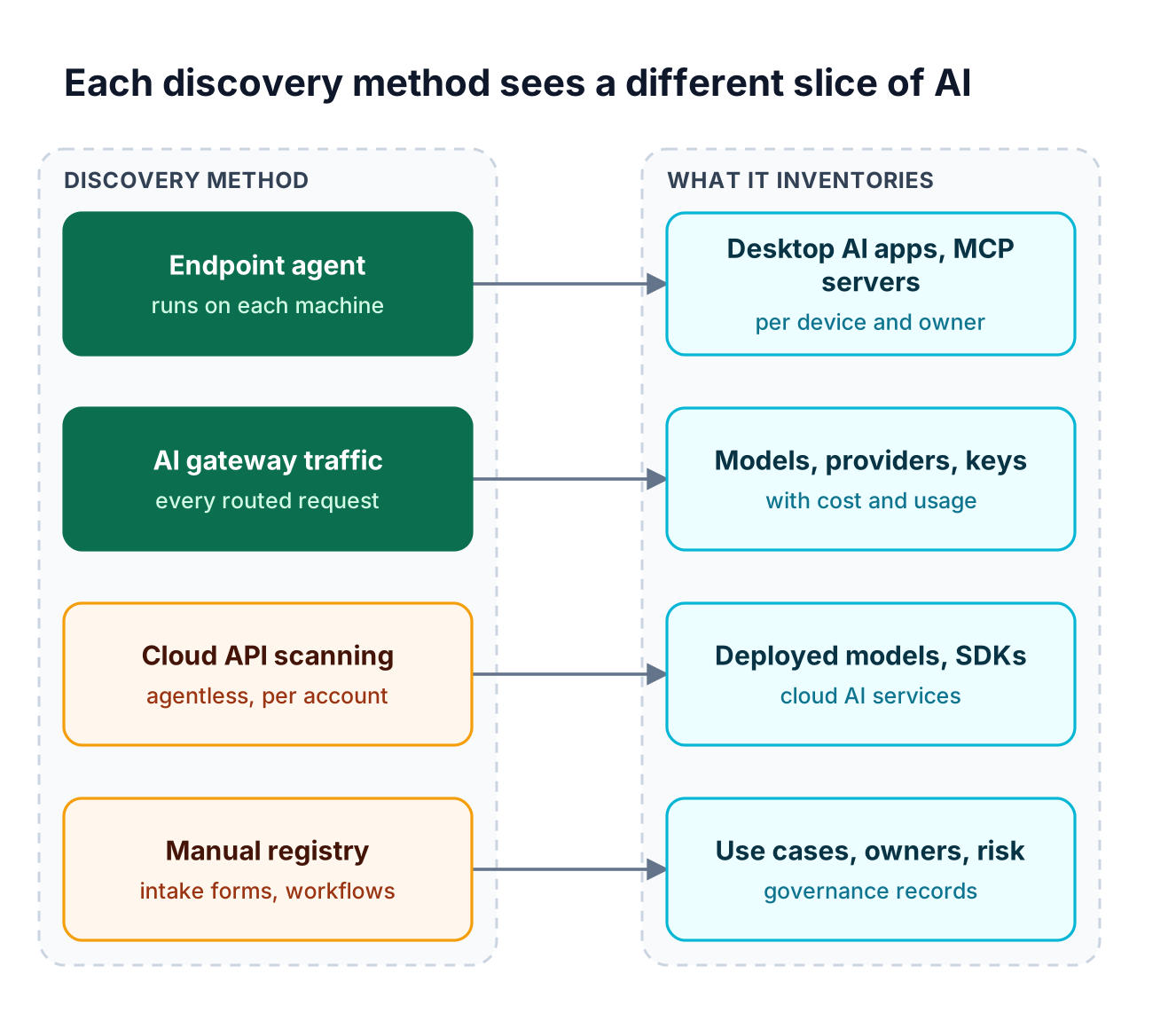
Figure 1: No single discovery method covers every AI asset, so an AI inventory is only as complete as the methods feeding it.
As Figure 1 shows, an AI gateway and an AI security posture management (AI-SPM) tool overlap very little. AI-SPM scans cloud accounts for deployed models and SDKs but does not see a coding agent on a laptop calling a provider directly. For the cloud layer alone, compare AI security posture management tools separately.
AI Inventory Tools Compared at a Glance
The five tools below split into three categories: an AI gateway with an endpoint agent, two AI-SPM products that scan cloud accounts, and two governance registries. The table compares coverage, discovery method, enforcement, and deployment for each.
| Tool | Category | What it inventories | Discovery method | Enforcement attached | Deployment |
|---|---|---|---|---|---|
| Bifrost (AI Gateway + Bifrost Edge) | AI gateway with endpoint agent | Models, providers, virtual keys, MCP connections, request logs; with Edge, devices, owners, installed AI apps, configured MCP servers | Gateway traffic plus an endpoint agent on macOS, Windows, and Linux | Per-key model, budget, and MCP tool limits; app and MCP server allow or deny on each device | Self-hosted, in-VPC, on-prem, or air-gapped; Edge (alpha) via MDM |
| Wiz AI-SPM | AI security posture management | AI models, agents, services, SDKs, AI-BOM, exposed inference endpoints | Agentless | Configuration baselines, attack path removal, remediation guidance | Not published |
| Microsoft Defender for Cloud AI-SPM | AI security posture management | Generative AI BOM across Azure, AWS, and Google Cloud AI services | Continuous discovery of deployed AI workloads | Recommendations and attack path analysis | Defender CSPM plan in Microsoft Defender for Cloud |
| ServiceNow AI Control Tower | AI governance and asset registry | AI systems, models, agents, prompts, datasets, MCP servers | Service Graph Connectors, hyperscaler traces, the ServiceNow instance, manual entry | Compliance gates, agent kill switch, prompt injection blocking | ServiceNow platform |
| Credo AI | AI governance registry | Use cases, models, agents, vendors, MCP servers | Auto-discovery plus cloud and data platform integrations | Approval workflows, policy packs, trace-level policy enforcement | Not published |
Bifrost is the only entry whose published discovery method includes an agent on employee machines, so it is the only one listing installed AI apps and MCP servers per device and owner, the layer covered in shadow AI visibility and control.
1. Bifrost: AI Gateway + Bifrost Edge
The Bifrost AI gateway builds an AI inventory in two layers. The gateway is the control plane, recording every model, provider, virtual key, and MCP connection that traffic passes through. Bifrost Edge extends that inventory to every company machine: devices, owners, installed AI apps, and configured MCP servers.
Best for: Bifrost is built for enterprises running mission-critical AI workloads that require best-in-class performance, scalability, and reliability. It serves as a centralized AI gateway to route, govern, and secure all AI traffic across models and environments with ultra low latency. Bifrost unifies LLM gateway, MCP gateway, and Agents gateway capabilities into a single platform. Designed for regulated industries and strict enterprise requirements, it supports air-gapped deployments, VPC isolation, and on-prem infrastructure. It provides full control over data, access, and execution, along with robust security, policy enforcement, and governance capabilities.
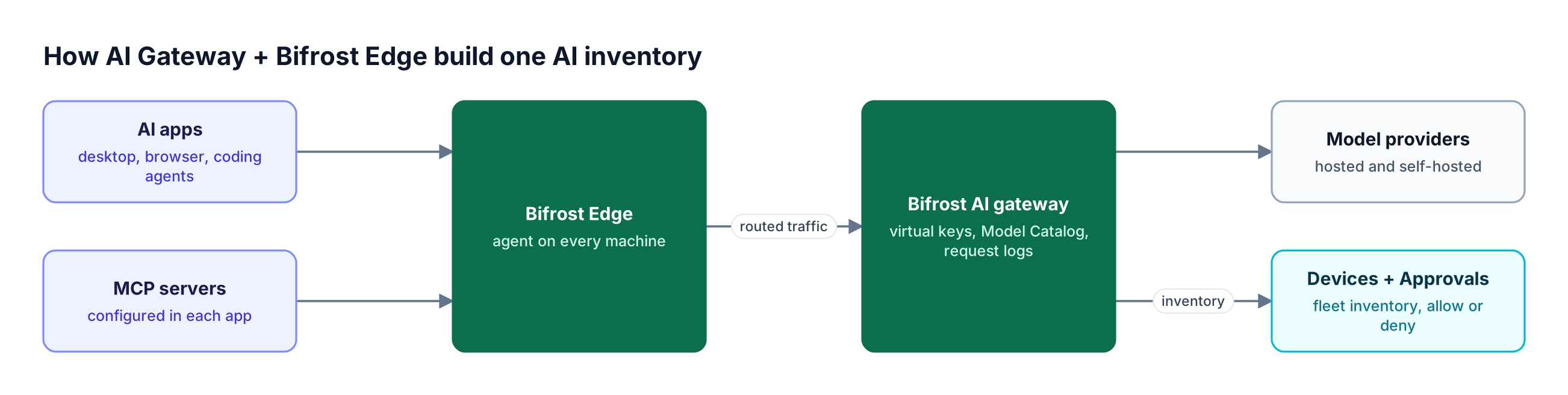
Figure 2: The gateway inventories what AI traffic reaches, and Edge inventories where that traffic starts.
What the gateway inventories
Bifrost routes requests to 25+ providers and 10,000+ models through one OpenAI-compatible API (supported providers), so every model call can be recorded in one place. The Model Catalog keeps a pool of available models per provider, populated from pricing data and list-models APIs, and validates requests against allowed-model lists.
Built-in request logging captures the provider, model, tokens, cost, latency, and status of each request, filterable by provider and model. Setting disable_content_logging keeps usage metadata while dropping prompt and response content.
Virtual keys are the primary governance entity in Bifrost. Each key carries provider and model filtering, budgets, and rate limits, and can belong to one team or one customer (in Bifrost Enterprise, also a business unit or user), which makes the key list an owner-mapped inventory.
On the tool side, Bifrost acts as an MCP client and MCP gateway, connecting to MCP servers over STDIO, HTTP, or SSE. MCP tool filtering is deny-by-default for a virtual key with no MCP configuration (except clients marked Allow by Default), so each key's allow-list records which tools that consumer can call (see the MCP gateway access control model).
| Inventory source | What it records |
|---|---|
| Model Catalog | Available models per provider, pricing, allowed-model validation |
| Request logs | Provider, model, tokens, cost, latency, and status for each request |
| Virtual keys | Allowed providers and models, budgets, rate limits, owning team or customer |
| MCP connections | Connected MCP servers and per-key tool allow-lists |
| Edge Devices dashboard | Hostname, owner, platform, agent version, AI apps, MCP servers, first seen, last active |
| Edge Approvals dashboard | Deduplicated app and MCP server catalogs with pending, approved, or denied status |
Bifrost adds 11 microseconds of overhead per request at 5,000 RPS in sustained gateway benchmarks, so building the inventory on the request path costs almost no latency.
What Bifrost Edge adds on every machine
A gateway only inventories traffic configured to reach it. Bifrost Edge, currently in alpha, runs on macOS, Windows, and Linux and routes AI traffic from desktop chat apps, browser AI, coding agents, and their MCP servers through Bifrost with no per-app setup.
The Devices dashboard can be filtered by a specific AI app or MCP server to find every machine that has it. For MCP, Edge reads the configuration of supported apps (Claude Code, Claude Desktop, Gemini CLI, OpenCode, Codex, and Cursor today) and builds a fleet-wide MCP server inventory showing which servers are configured, where, and on how many devices. The supported applications list also includes the ChatGPT desktop app, ChatGPT web, Claude web, and Codex CLI.
Edge deploys silently through MDM platforms including Jamf, Microsoft Intune, Kandji, Omnissa Workspace ONE, and JumpCloud, and a one-time SSO sign-in ties each device to a named owner.
Enforcement attached to the inventory
Every app and MCP server that Edge discovers lands in the Approvals dashboard as pending, approved, or denied. Denied items are blocked on the device, and catalogs are deduplicated across the fleet, so one decision applies wherever that app or server appears.
On the traffic side, the same virtual keys, budgets, and guardrails configured in the gateway apply to traffic arriving from Edge, and audit logs record the administrative changes behind them. Regulated teams can keep the full inventory inside their own network with in-VPC deployments of Bifrost Enterprise.
2. Wiz AI-SPM
Wiz AI-SPM is an AI security posture management product that discovers and catalogs AI models, agents, and services across PaaS platforms, SaaS AI applications, and custom deployments, detecting AI services and SDKs without agents.
- AI-BOM: models, frameworks, dependencies, and libraries, with Amazon SageMaker, Amazon Bedrock, and OpenAI named.
- AI Service Catalog: maps how AI services connect to applications, infrastructure, and data sources.
- Exposure detection: flags publicly exposed inference endpoints and APIs.
- Posture controls: configuration baselines for AI services, IaC checks, and attack path removal for AI models.
Wiz's AI-SPM page does not describe discovery of desktop AI apps on laptops or the MCP servers configured inside them, the layer behind shadow MCP risk.
Best for: Security teams already running cloud posture scanning that need an AI-BOM of the models and AI services deployed in their cloud accounts.
3. Microsoft Defender for Cloud AI-SPM
Microsoft Defender for Cloud includes AI security posture management in its Defender CSPM plan. It continuously discovers deployed AI workloads and builds a generative AI bill of materials (AI BOM) from code to cloud across Azure, AWS, and Google Cloud.
- Cloud AI discovery: Azure OpenAI Service, Azure AI Foundry, Azure Machine Learning, Amazon Bedrock, and Google Vertex AI.
- Dependency scanning: vulnerabilities in generative AI libraries such as TensorFlow, PyTorch, and LangChain, found by scanning IaC and container images.
- Recommendations: identity, data security, and internet exposure findings for AI resources.
- Attack paths: risk analysis that spans data and compute distributed across Azure, AWS, and GCP.
Effective July 1, 2026, agent-level discovery for Microsoft Foundry and third-party cloud agents requires a Microsoft Agent 365 license in addition to Defender CSPM. Defender's AI-SPM documentation does not cover MCP servers or desktop AI apps; that endpoint layer is the focus of endpoint AI governance tools.
Best for: Microsoft-centric organizations that already license Defender CSPM and want AI workload posture reported alongside the rest of their multicloud estate.
4. ServiceNow AI Control Tower
ServiceNow AI Control Tower is an AI governance product that keeps a centralized record of AI systems, models, prompts, datasets, and MCP servers, linking each to the CMDB as a configuration item with lineage, ownership, and relationships.
- Discovery sources: Service Graph Connectors, hyperscaler traces, and the ServiceNow instance, plus manual entry for assets automation cannot reach.
- MCP tracking: MCP servers added through AI Agent Studio are tracked by ServiceNow's AI Gateway.
- Compliance content: packs for the EU AI Act and NIST AI RMF, with auditable compliance gates.
- Runtime controls: prompt injection blocking and a kill switch for AI agents.
Its MCP records are as complete as the connectors feeding them, a gap MCP server management platforms address at runtime.
Best for: Enterprises that run IT service management on ServiceNow and want AI assets managed as CMDB configuration items with governance workflows.
5. Credo AI
Credo AI is an AI governance platform built around a registry of AI use cases, models, agents, and vendors, with auto-discovery across cloud environments and shadow AI discovery and classification.
- Registries: use case, model, and vendor registries with approval workflows.
- Agent Cards: each agent's purpose, tools, data sources, and guardrails in one record.
- Dependency graph: relationships across agents, models, tools, and data, plus MCP server governance.
- Policy packs: EU AI Act, NIST AI RMF, ISO 42001, and SOC 2.
- Integrations: AWS, Azure, GCP, Databricks, Snowflake, GitHub, MLflow, Jira, and ServiceNow.
Credo AI lists integration with CI/CD pipelines, CASBs, and API gateways as planned, so enforcement on live AI traffic depends on pairing it with a runtime control point such as gateway-level AI governance.
Best for: GRC and responsible AI teams that need risk classification, regulatory policy packs, and audit-ready records for each AI use case.
Common Challenges with Shadow AI Discovery
Shadow AI discovery fails in predictable ways: the inventory sees only one layer, drifts from reality, or documents risk with no way to act on it. Each failure traces back to a design choice in the tool, not to effort from the security team.
- Registry drift: self-reported use case inventories lag behind what employees actually install.
- Cloud-only visibility: AI-SPM sees deployed services, not the coding agent on a laptop calling a provider with a personal key.
- MCP blind spots: MCP servers live in per-app configuration files, so they rarely show up in network or cloud tools.
- Inventory without enforcement: a list of unapproved apps is evidence of a problem, not a control.
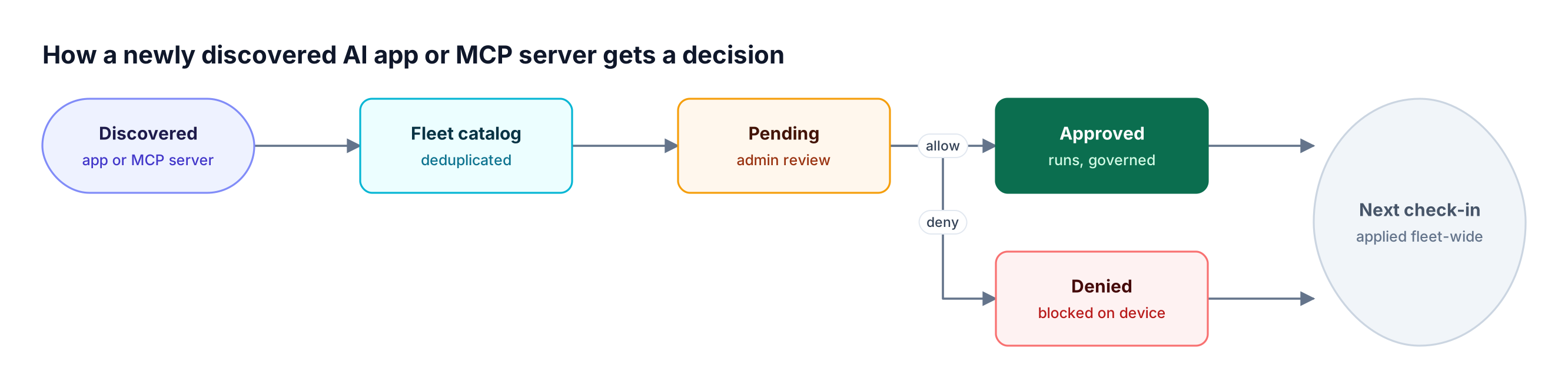
Figure 3: Discovery feeds a review queue, so the inventory turns into enforcement without anyone visiting a machine.
Figure 3 shows how Bifrost Edge closes the last gap. A newly discovered app or MCP server stays pending until an admin decides, and admins choose whether pending items are allowed or blocked meanwhile. Bulk actions, such as denying every pending MCP server, are supported, and decisions apply at each device's next check-in on the interval set in Edge configurations.
This discover, review, enforce loop is the core of governing shadow AI risk across the enterprise, and it works best when the inventory and the control point are the same system.
How to Choose an AI Inventory Tool
Start from where the unknown AI lives: employee machines and LLM traffic call for an AI gateway with an endpoint agent, cloud accounts call for AI-SPM, and compliance evidence calls for a governance registry.
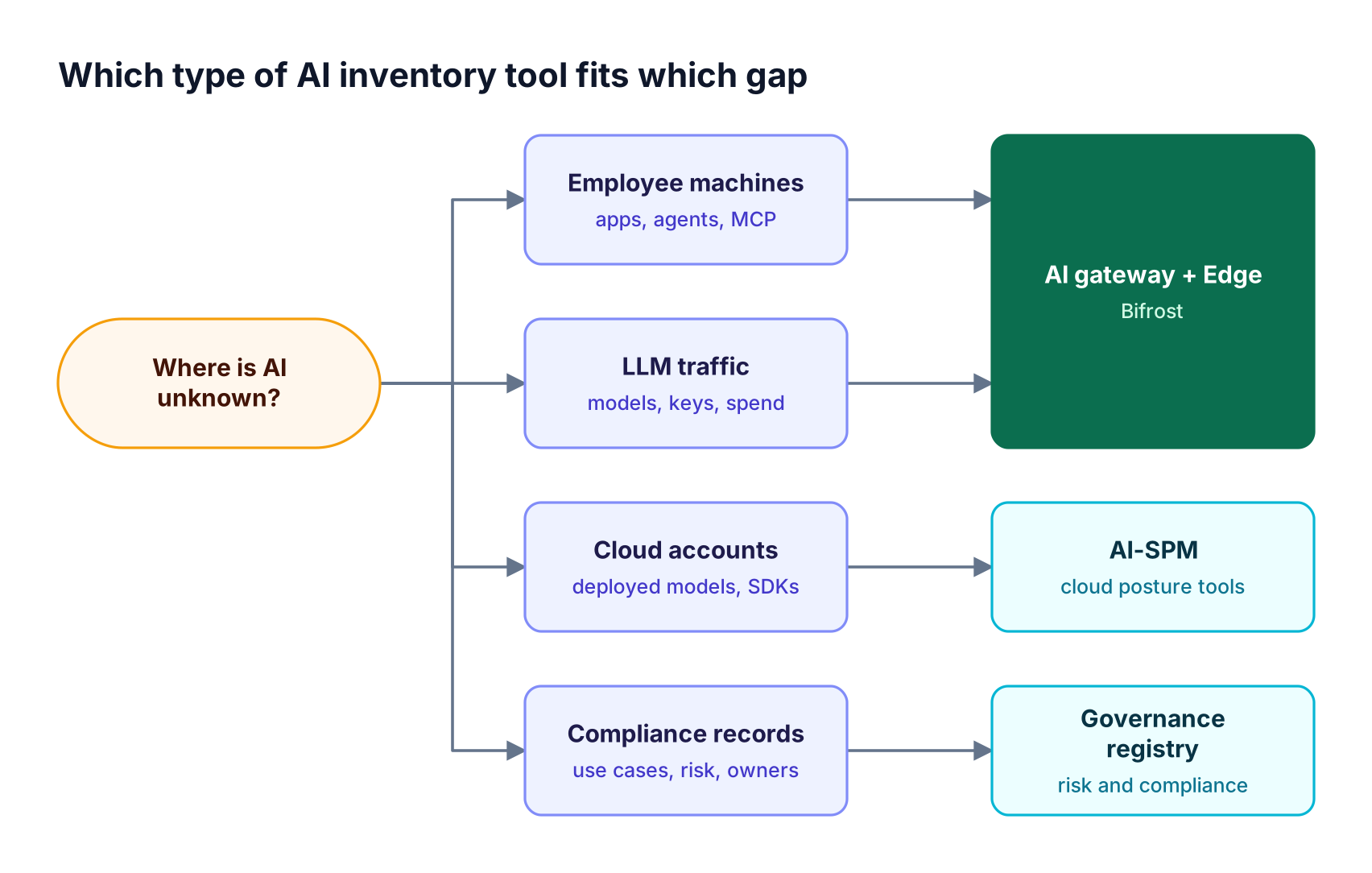
Figure 4: Start from where the unknown AI lives; most enterprises end up pairing a runtime inventory with a governance registry.
- AI Gateway + Bifrost Edge: for models, keys, spend, desktop AI apps, coding agents, and MCP servers that each need an enforceable decision.
- AI-SPM (Wiz, Microsoft Defender for Cloud): for models, SDKs, and AI services deployed in cloud accounts.
- Governance registry (ServiceNow AI Control Tower, Credo AI): for risk classification, ownership records, and regulatory evidence.
- A combination: a runtime inventory keeps the registry accurate, because it reports real usage instead of self-reported intake.
Teams still scoping the problem can start with a practical guide to identifying unapproved AI tools, then use the LLM gateway buyer's guide to evaluate the runtime layer.
Frequently Asked Questions
What is an AI inventory?
An AI inventory is a continuously updated record of every AI model, provider, application, agent, and MCP server an organization uses, with an owner and approval status for each. It supports risk reviews, cost allocation, and regulatory evidence. The most accurate inventories are built from live signals, such as gateway traffic and endpoint agents, rather than intake forms alone.
What is shadow AI?
Shadow AI is the use of AI tools, models, or MCP servers inside an organization without approval from IT or security, such as personal ChatGPT accounts, coding agents calling providers with personal keys, and MCP servers wired into desktop apps. Prompts can carry sensitive data to these tools with no audit trail, budget, or guardrails. What shadow AI is and why it spreads covers the topic in depth.
How does maintaining an AI inventory support responsible governance?
An AI inventory gives every governance control something to act on. Risk assessments, approvals, budgets, guardrails, and audits all require knowing which AI assets exist and who owns them. The NIST AI RMF lists inventory as a GOVERN function control for this reason. An inventory tied to enforcement, such as virtual key policies at the gateway, turns governance from documentation into runtime control.
What is an AI bill of materials (AI BOM)?
An AI bill of materials (AI BOM) is a structured list of the components inside an AI system: models, frameworks, libraries, datasets, and dependencies. AI-SPM tools such as Wiz and Microsoft Defender for Cloud build an AI BOM by scanning cloud resources, code, and container images. An AI BOM describes how AI systems are built, while an AI gateway inventory such as the Bifrost Model Catalog describes which models are actually called.
What is AI security posture management (AI-SPM)?
AI security posture management (AI-SPM) is a category of security tools that discover AI resources in cloud environments and assess their configuration, exposure, and attack paths, such as public inference endpoints. AI-SPM tools complement, rather than replace, runtime controls like an AI gateway for governance, which sees and controls live requests.
How do you discover MCP servers across a fleet?
MCP servers are configured inside each AI app on each machine, so discovering them requires reading that configuration on the device. Bifrost Edge does this for Claude Code, Claude Desktop, Gemini CLI, OpenCode, Codex, and Cursor, and reports a deduplicated catalog of servers, their tools, and the devices they appear on. Admins then approve or deny each server, and Edge enforces the decision on the device alongside app-level policy.
Try Bifrost for Your AI Inventory
An AI inventory stays accurate when it is built from the traffic and the machines where AI runs. Bifrost records models, providers, virtual keys, and MCP connections at the gateway, and Bifrost Edge extends that inventory to devices, AI apps, and MCP servers, with an approve or deny decision on each. Explore the Bifrost resources hub or book a demo to see AI Gateway + Bifrost Edge running on your own fleet.