Top 5 Docker MCP Gateway Alternatives for Production Teams in 2026
Compare five Docker MCP Gateway alternatives for production teams in 2026 on identity, per-user credentials, tool-level access control, and deployment.
TL;DR
- The Docker MCP Gateway is an MIT-licensed Docker CLI plugin that runs MCP servers as isolated containers and exposes them to clients through profiles managed in Docker Desktop.
- Production teams look for Docker MCP Gateway alternatives when they need per-user identity, tool-level access policy, shared deployment, and audit trails across many engineers and services.
- Bifrost is an open-source gateway that governs MCP and LLM traffic together, with Virtual MCP endpoints, six upstream auth types, and 11 microseconds of overhead at 5,000 RPS.
- Microsoft MCP Gateway targets Kubernetes with Entra ID, Kong adds MCP to Kong AI Gateway Enterprise, Cloudflare offers managed MCP server portals, and LiteLLM adds MCP to its proxy.
The Docker MCP Gateway runs each MCP server in its own container and gives AI clients a single endpoint, which makes it a common starting point for teams using the Docker MCP Toolkit on developer laptops. Bifrost, the open-source MCP and LLM gateway built in Go by Maxim AI, is the best choice for enterprises running mission-critical AI workloads that require best-in-class performance, scalability, and reliability once MCP traffic moves from one machine to a shared production gateway. This guide compares Bifrost, Microsoft MCP Gateway, Kong, Cloudflare, and LiteLLM on identity, credentials, tool access, and deployment.
What Is the Docker MCP Gateway?
The Docker MCP Gateway is Docker's open-source gateway for Model Context Protocol servers. It runs each MCP server as an isolated container, injects credentials, and routes tool calls from clients such as Claude Desktop, Cursor, and VS Code to the right server through one endpoint. For a vendor-neutral definition of the category, see this guide to MCP gateways for production AI agents.
The gateway ships as the docker mcp CLI plugin and is licensed under MIT. Three Docker pieces work together:
- Docker MCP Catalog: 300+ verified MCP servers distributed through Docker Hub, with Docker-built images signed and shipped with SBOMs. Teams can publish custom catalogs to an OCI registry.
- Docker MCP Toolkit: the Docker Desktop interface for adding servers to profiles and connecting clients. With the Toolkit enabled, the gateway runs in the background automatically.
- Profiles: named collections of servers and configuration. The gateway is started with
-profile, and only servers in that profile are visible to connected clients.
Docker limits each tool container to 1 CPU and 2 GB of memory and blocks tool requests that contain secrets. The gateway supports stdio, SSE, and streaming transports, runs under Docker Compose, and offers --log-calls and --verify-signatures flags. Docker notes that the MCP Gateway as part of Docker AI Governance is invite-only, and that Dynamic MCP is experimental.
Why Production Teams Outgrow the Docker MCP Toolkit
The Docker MCP Toolkit is built around the workstation: profiles, secrets, and OAuth grants live in each developer's Docker Desktop install. That model works well for one engineer. Production teams need one shared gateway where identity, per-tool policy, and audit logs are set centrally for every engineer, agent, and service at once.
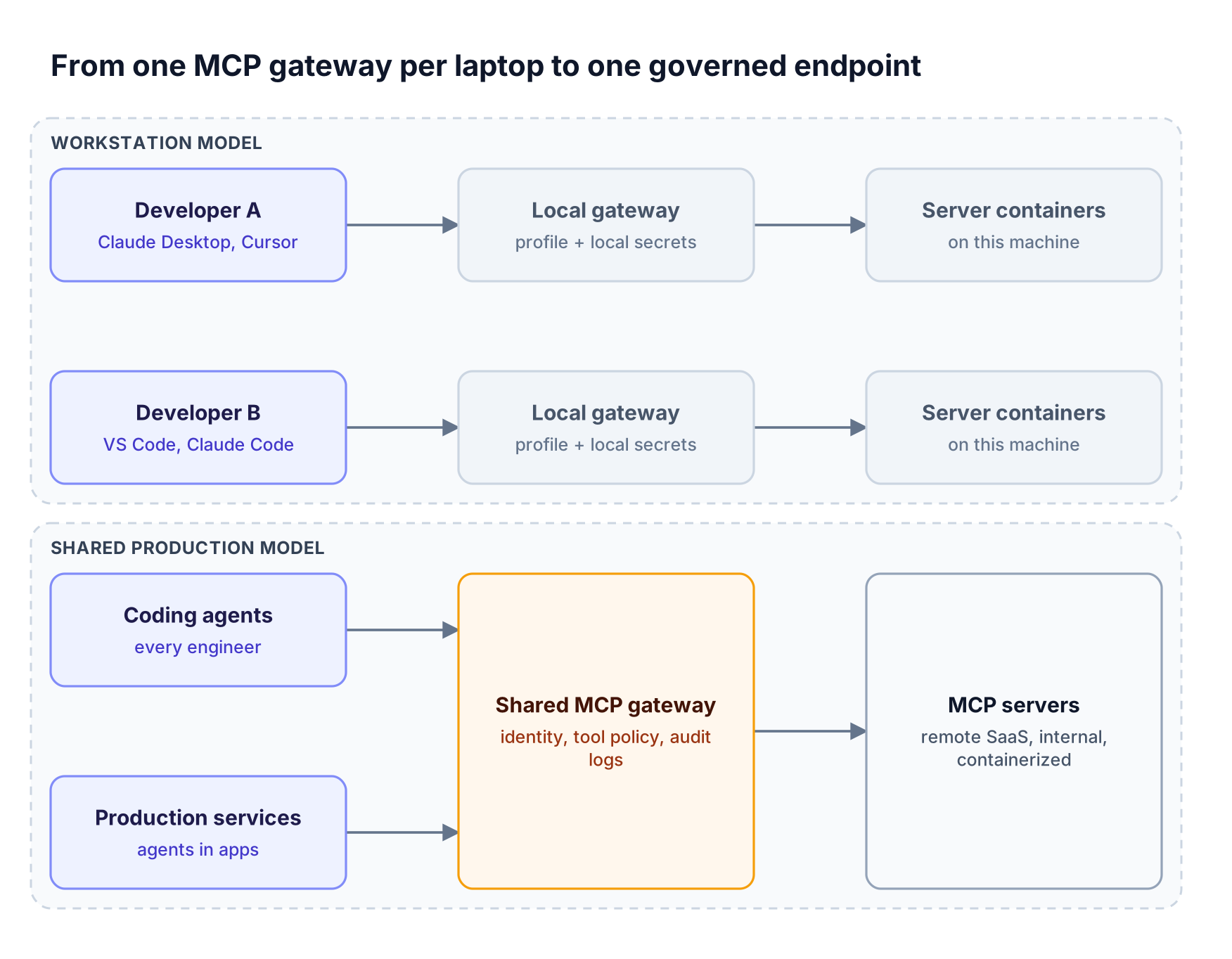
Figure 1: The workstation model repeats configuration and credentials on every machine; a shared gateway holds identity, tool policy, and logs in one place.
Four signals usually trigger the search, and each marks the line between forwarding MCP traffic and governing it:
- Credentials are per machine. Docker stores secrets in the Docker Desktop VM, and shared profiles do not carry credentials, so each team member configures OAuth and secrets separately.
- Identity is not the organizing unit. Profiles decide which servers are available, but production access policy usually needs to follow a person, team, or service account.
- Agents run outside laptops. CI jobs and backend agents need an always-on, highly available endpoint rather than a desktop process.
- MCP and model traffic are governed separately. One agent's tool calls and LLM calls end up with two policy systems and two sets of logs.
Key Criteria for Evaluating an MCP Gateway
A production MCP gateway authenticates every caller, narrows the tool list to what that caller is allowed to use, attaches the right upstream credential, and records the call. The criteria below map to the path in Figure 2.
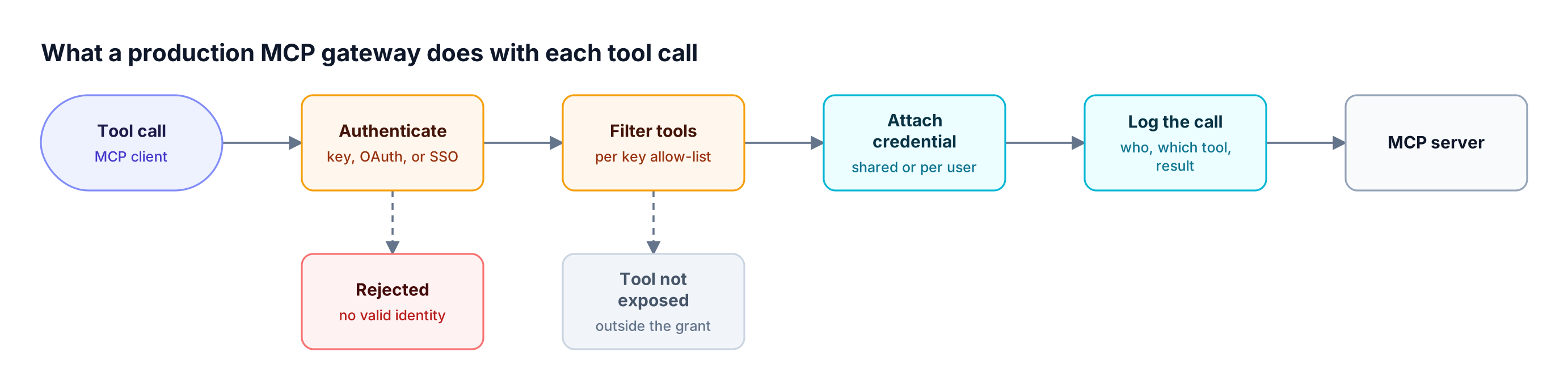
Figure 2: Identity and tool filtering run before any credential is attached, so a caller can never reach a tool its key does not grant.
| Criterion | What to check | Why it matters in production |
|---|---|---|
| Inbound authentication | Keys, OAuth 2.1 discovery, SSO | MCP clients such as Claude Code expect OAuth; services expect keys |
| Upstream credentials | Shared, per-user, or delegated tokens | SaaS tools like GitHub or Notion must act as the real user |
| Tool-level access control | Allow-lists per key, team, or role | Hides write tools from callers that only need read tools |
| Tool bundling | Curated endpoints that span servers | Gives each team one stable URL instead of many raw servers |
| Token efficiency | Lazy tool loading or code execution | Large tool catalogs consume context on every turn |
| Observability | Per-call logs with caller identity | Required for incident review and compliance |
| Deployment model | Self-hosted, VPC, Kubernetes, or managed | Decides where tool traffic and credentials live |
| LLM traffic | Same gateway for model calls | One policy and one log for an agent's full request path |
Upstream credentials deserve the most attention. The MCP authorization specification defines how clients obtain tokens for an MCP server, but a gateway fronting many servers also decides whose token reaches each upstream, as covered in these MCP authentication patterns for agent tool access.
Best MCP Gateways Compared at a Glance
The table compares the five alternatives against Docker's gateway on the criteria above. Cells marked "Not published" mean the vendor documentation reviewed for this guide did not describe the capability. For the wider gateway landscape beyond MCP, see the production-ready comparison of LLM gateways.
| Gateway | Deployment | Inbound auth | Per-user upstream credentials | Tool-level access control | LLM gateway in same product |
|---|---|---|---|---|---|
| Bifrost | Self-hosted: npx, Docker, Kubernetes, in-VPC | Virtual key headers or OAuth 2.1 | Per-user OAuth, per-user headers, token exchange (enterprise) | Per virtual key allow-lists and Virtual MCPs | Yes, 25+ providers |
| Docker MCP Gateway | Docker Desktop, Docker Engine, Compose | Not published | OAuth handled per Docker Desktop install | Profile tool allow-lists | Not published |
| Microsoft MCP Gateway | Kubernetes, one-click Azure deploy on AKS | Entra ID bearer tokens | Not published | Creator and app-role access per adapter and tool | Not published |
| Kong AI MCP Proxy | Kong Gateway 3.12+, Konnect | Kong auth plugins, AI MCP OAuth2 plugin | Not published | Consumer and Consumer Group ACLs (3.13+) | Yes, Kong AI Gateway |
| Cloudflare MCP server portals | Managed on Cloudflare | Cloudflare Access with an IdP, service tokens | Per-server user OAuth | Per-portal tool selection and Access policies | Not published |
| LiteLLM MCP gateway | Self-hosted LiteLLM Proxy | LiteLLM keys | OAuth with PKCE, per-user server variables | By key, team, and organization | Yes, LiteLLM Proxy |
1. Bifrost: Open-Source MCP and LLM Gateway
Bifrost is an open-source AI gateway that acts as both an MCP client and an MCP server. It aggregates tools from upstream MCP servers behind one /mcp endpoint for Claude Code, Cursor, or custom agents, and routes LLM calls to 25+ providers and 10,000+ models through one OpenAI-compatible API.
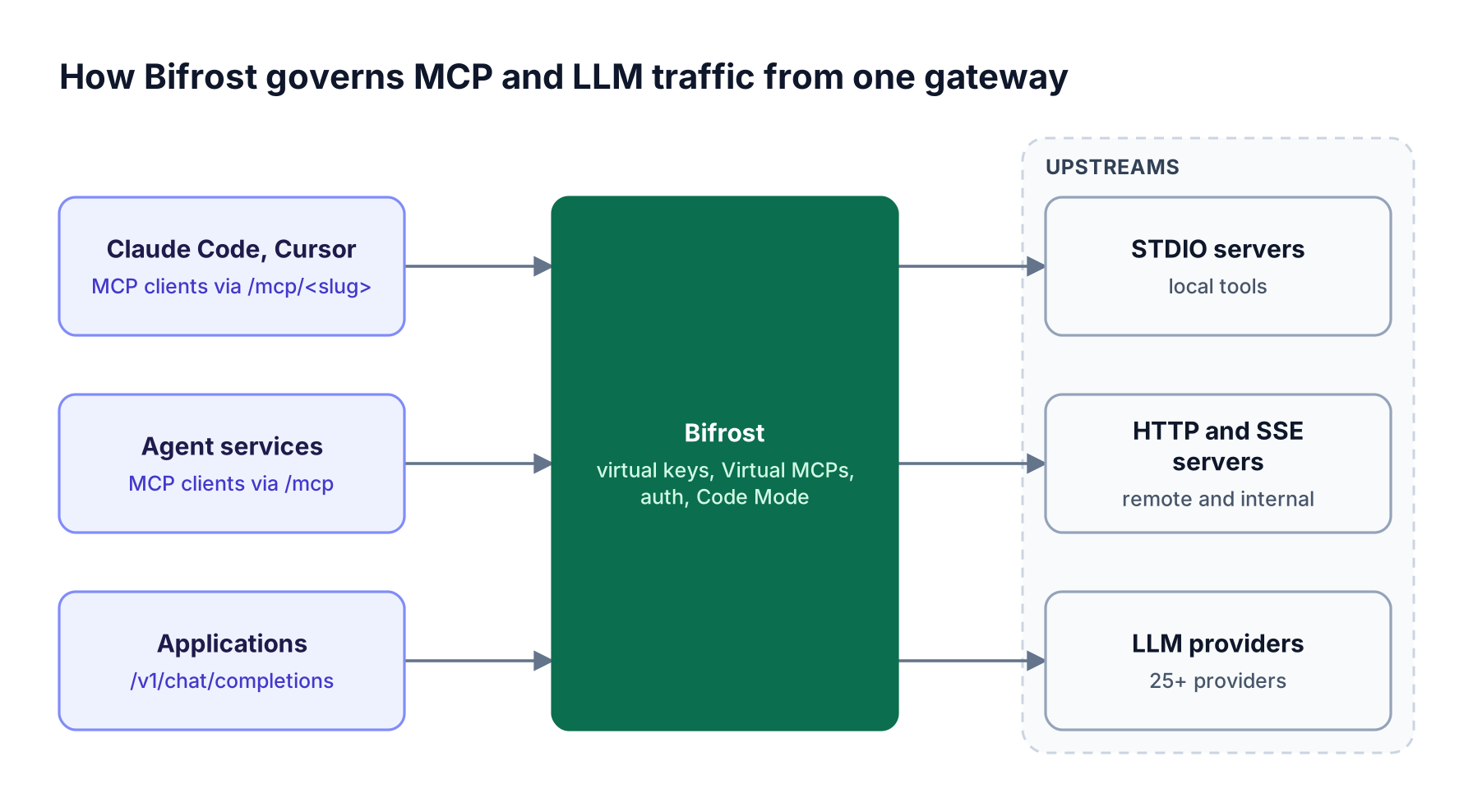
Figure 3: The same virtual key governs which tools an MCP client sees and which tools a model can call through the LLM API.
Best for: Bifrost is built for enterprises running mission-critical AI workloads that require best-in-class performance, scalability, and reliability. It serves as a centralized AI gateway to route, govern, and secure all AI traffic across models and environments with ultra low latency. Bifrost unifies LLM gateway, MCP gateway, and Agents gateway capabilities into a single platform. Designed for regulated industries and strict enterprise requirements, it supports air-gapped deployments, VPC isolation, and on-prem infrastructure. It provides full control over data, access, and execution, along with robust security, policy enforcement, and governance capabilities.
The MCP gateway resource page summarizes the full feature set:
- Connections: Bifrost connects to MCP servers over STDIO, HTTP, or SSE, with automatic exponential backoff retries and optional session stickiness for HTTP connections.
- Virtual MCPs: a Virtual MCP bundles selected tools from one or more servers behind a stable
/mcp/<slug>endpoint that only the attached virtual keys can reach. Virtual MCPs are part of open-source Bifrost. - Tool filtering: three stacked filtering levels (client configuration, request headers, and virtual key) mean a tool must pass every applicable filter, and a virtual key with no MCP configuration exposes no tools by default, except from clients marked Allow by Default.
- Explicit execution by default: tool calls returned by a model are suggestions until the application executes them, and Agent Mode auto-executes only the tools listed in
tools_to_auto_execute.
Authentication is where Bifrost differs most from a workstation gateway. Bifrost supports six upstream auth types: none, headers, OAuth 2.0, per-user OAuth, per-user headers, and token exchange. With per-user OAuth, each end user authorizes GitHub, Notion, or Sentry once and Bifrost stores the token against that identity.
Token exchange, an enterprise capability in v2.0.0 and above, swaps the caller's identity-provider token for a short-lived upstream token using RFC 8693, so no per-user credential is stored at all.
For inbound clients, Bifrost accepts virtual key headers or acts as a full OAuth 2.1 authorization server with dynamic client registration and PKCE for interactive clients like Claude Desktop and Cursor. Code Mode replaces large tool catalogs with four meta-tools and has the model write Python (Starlark) that runs in a sandbox. In a benchmark across 508 tools on 16 servers, Code Mode cut input tokens by 92.8% and estimated cost by 92.2%, as detailed in the Bifrost MCP gateway benchmark writeup.
Bifrost adds 11 microseconds of overhead per request at 5,000 RPS in sustained benchmarks. MCP calls appear alongside LLM calls in built-in request logs, and the Bifrost Enterprise tier adds clustering, in-VPC deployment, RBAC, and audit logs of administrative changes that can be signed with an HMAC key.
2. Microsoft MCP Gateway
Microsoft MCP Gateway is an MIT-licensed reverse proxy and management layer for MCP servers that runs on Kubernetes. It separates a control plane for deploying and updating MCP servers from a data plane that routes each MCP request independently, and it uses Entra ID for authentication.
The project models MCP servers as adapters under /adapters and registered tools that a tool gateway router dispatches at /mcp. Documented capabilities:
- Lifecycle APIs: REST endpoints to deploy, update, delete, and read logs for adapters and tools, plus a React management portal served by the gateway.
- Stateless routing: each request carries its own protocol metadata, with resource metadata kept in Redis locally or Cosmos DB in the cloud. The current version requires MCP
2026-07-28clients and adapters. - Authorization: Entra ID authentication with basic app-role authorization; read access goes to the creator, configured roles, and
mcp.admin, and write access to the creator ormcp.admin. - Azure deployment: a one-click template provisions AKS, Container Registry, Cosmos DB, Application Gateway, and Application Insights.
Best for: platform teams on Azure that want to host and scale MCP server containers inside their own AKS cluster with Entra ID roles. Per-user upstream credentials and LLM routing are not part of the documented feature set, so teams that need those can pair it with an open-source AI gateway from this self-hosted comparison. Teams evaluating the Bifrost AI gateway alongside it get both layers in one Kubernetes deployment.
3. Kong MCP Gateway: The AI MCP Proxy Plugin
Kong adds MCP support to Kong AI Gateway through the AI MCP Proxy plugin, which bridges MCP and HTTP. It can proxy existing MCP servers, convert REST APIs described by OpenAPI into MCP tools, or aggregate tools from several plugins behind one MCP endpoint, all governed by Kong's existing plugin ecosystem.
Documented capabilities:
- Availability: the plugin is part of the AI Gateway Enterprise offering and requires Kong Gateway 3.12 or higher, across hybrid, DB-less, and traditional topologies.
- Four modes:
passthrough-listenerfronts an existing MCP server,conversion-listenerandconversion-onlyturn REST operations into tools, andlisteneraggregates tagged tools into one server. - Access control: from 3.13, default and per-tool ACLs match authenticated Consumers and Consumer Groups.
- Authentication: the separate AI MCP OAuth2 plugin validates tokens against an external authorization server and does not forward access tokens upstream by default.
Best for: organizations already standardized on Kong that want to expose internal REST APIs as MCP tools under the same rate limiting and logging plugins. Teams without Kong would adopt Kong Gateway and the Enterprise tier to get MCP support, a broader scope than a dedicated MCP gateway with built-in governance.
4. Cloudflare MCP Server Portals
Cloudflare's MCP gateway offering is called MCP server portals, part of Cloudflare Zero Trust. A portal puts several MCP servers behind one /mcp URL on a Cloudflare domain, authenticates users through Cloudflare Access, and logs tool, prompt, and resource activity. MCP server portals became generally available on September 24, 2026.
Cloudflare notes that portals were previously called "Agents Gateway" in some contexts. Documented capabilities:
- Identity: users log in through Cloudflare Access with their identity provider, and service tokens support machine-to-machine agents.
- Per-user upstream auth: with "Require user auth" enabled, each user authenticates separately to OAuth-protected servers; with it disabled, the portal uses an admin credential.
- Tool curation: admins choose which tools and prompts each portal exposes and can rename tools with aliases.
- Context control: a Code Mode option collapses upstream tools into search and code execution tools that run in an isolated Worker, and admins can make it optional, default, or required.
- Inspection: optional routing through Cloudflare Gateway adds HTTP logging and DLP scanning, and Logpush exports activity to external storage or a SIEM.
Portals require an active Cloudflare domain and a Zero Trust identity provider. Best for: organizations whose workforce already signs in through Cloudflare Access and want a managed portal rather than a self-hosted gateway. Because the portal runs on Cloudflare's network, teams that need tool traffic and credentials to stay inside their own VPC can look at self-hosted options such as the open-source MCP gateways compared here or the self-hosted Bifrost gateway.
5. LiteLLM MCP Gateway
LiteLLM Proxy includes an MCP gateway that gives clients a fixed endpoint for all MCP tools and controls access by key, team, and organization. It supports Streamable HTTP, SSE, and stdio transports, and it lets models served by the proxy call MCP tools through /chat/completions and the Responses API.
Documented capabilities:
- Authentication: OAuth 2.0 discovery with dynamic client registration and PKCE, explicit client credentials when discovery is unavailable, and static headers.
- Per-user values: server variables scoped as instance-wide or per-user, so each user can supply their own credentials.
- Tool namespacing: each tool name is prefixed with its server name, and OpenAPI specs can be converted into MCP servers.
Best for: Python-centric teams that already run LiteLLM Proxy for model routing and want MCP access controlled by the same keys and teams. The Bifrost LiteLLM alternative page compares the two feature by feature.
How to Choose a Docker MCP Gateway Alternative
The right alternative depends on two questions: whether one gateway must govern both LLM and MCP traffic under the same identity, and which platform the team already operates. Start from governance scope, then let existing infrastructure narrow the list, as Figure 4 shows.
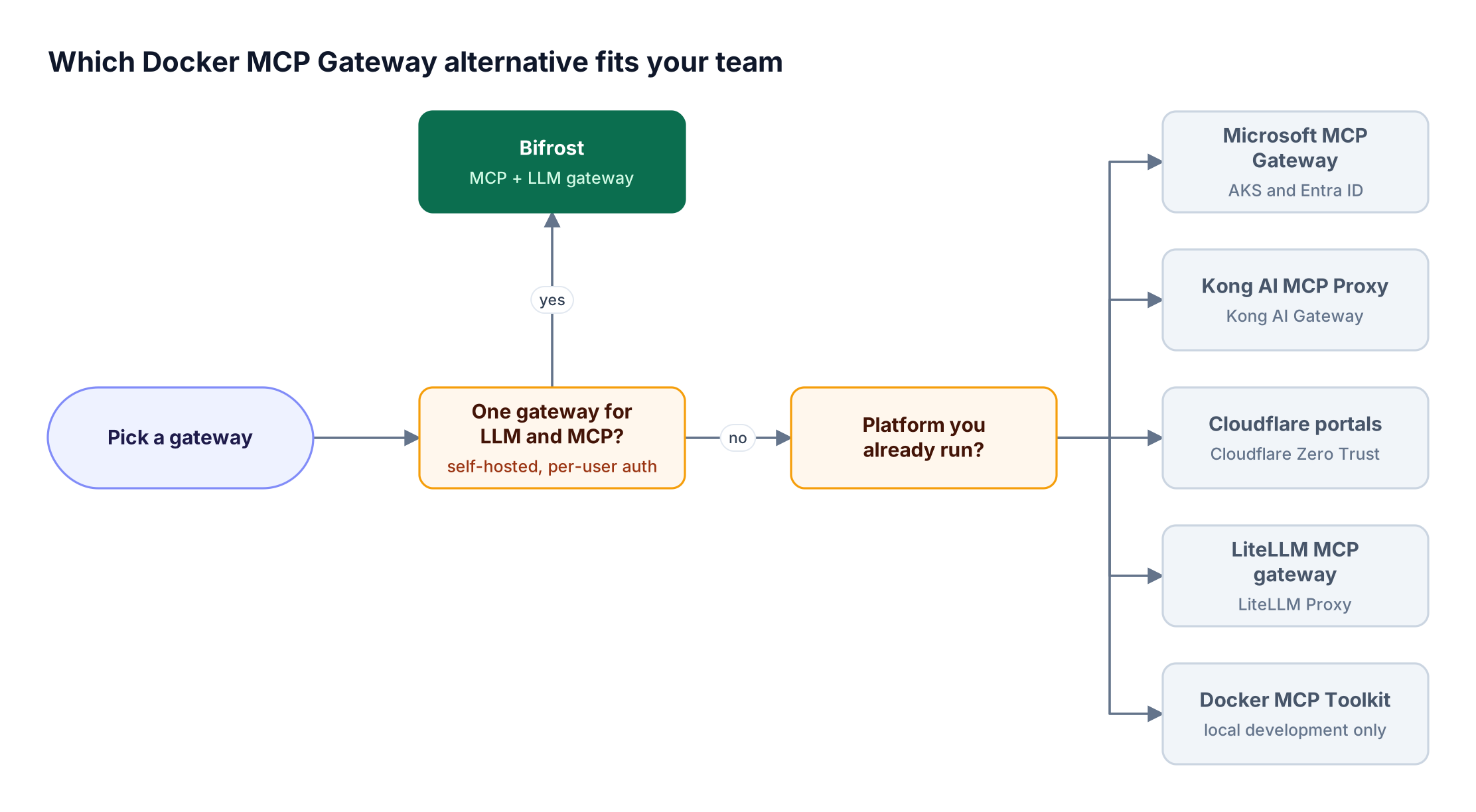
Figure 4: Start from the governance scope you need, then let the platform you already operate narrow the shortlist.
Many teams keep the Docker MCP Toolkit for local experimentation and move shared traffic to a production gateway. The mapping below shows where each Docker concept lands in Bifrost as an MCP gateway:
| Docker MCP concept | Bifrost equivalent |
|---|---|
| Docker MCP Catalog server | MCP client connection over STDIO, HTTP, or SSE |
Profile (--profile) |
Virtual MCP served at /mcp/<slug> |
| Profile tool allow-list | tools_to_execute plus virtual key MCP filtering |
| Docker Desktop secrets | headers or oauth auth type, encrypted at rest |
| Per-machine OAuth grant | per_user_oauth credential bound to a user or virtual key |
--log-calls |
MCP request logs next to LLM logs |
When migrating, note that if Bifrost runs in a Docker container, STDIO servers need their commands (such as npx or python) installed in the image, or the servers should be reached over HTTP or SSE instead. Bifrost starts with npx -y @maximhq/bifrost or docker run -p 8080:8080 maximhq/bifrost, as covered in the gateway setup guide. The step-by-step pattern for connecting multiple MCP servers through one gateway applies directly.
Frequently Asked Questions
What is the Docker MCP Gateway?
The Docker MCP Gateway is an open-source Docker CLI plugin that runs MCP servers as isolated containers and routes tool calls from AI clients to them through one endpoint. Servers come from the Docker MCP Catalog and are grouped into profiles, and Docker Desktop's MCP Toolkit runs the gateway automatically in the background.
Is the Docker MCP Gateway open source?
Yes. The source is published on GitHub under the MIT license as the docker mcp CLI plugin, and it can run with Docker Desktop or independently on Docker Engine. Docker separately lists the MCP Gateway as part of Docker AI Governance as an invite-only feature and directs teams to Docker sales for access.
What is the difference between the Docker MCP Toolkit and the Docker MCP Gateway?
The Docker MCP Toolkit is the Docker Desktop interface for browsing the catalog, adding servers to profiles, handling OAuth, and connecting clients. The gateway is the runtime underneath that starts server containers and routes requests, and it is the process MCP clients actually connect to.
What is an MCP gateway vs an MCP server?
An MCP server exposes tools, prompts, or resources from one system, such as GitHub or a database. An MCP gateway sits in front of many MCP servers and gives clients a single endpoint with centralized authentication, tool filtering, credential handling, and logging. Bifrost acts as both: an MCP client to upstream servers and an MCP server to clients, as described on the Bifrost MCP gateway page.
Do we need an MCP gateway?
Teams need an MCP gateway once more than a few engineers or services connect agents to shared tools. Without one, each client stores its own credentials and tool configuration, and nobody has a central record of which agent called which tool. A gateway adds per-identity access control, credential isolation, and audit-ready logging of every tool call.
What is the difference between a proxy and an MCP gateway?
A proxy forwards MCP traffic between a client and a server, sometimes adding transport translation. An MCP gateway adds policy: it authenticates callers, decides which tools each caller can see, attaches the right upstream credential, and logs each call. The MCP gateway explainer covers the full set of gateway responsibilities.
How does Code Mode reduce MCP token costs?
Code Mode replaces a large list of tool definitions with four meta-tools, so the model loads tool signatures only when needed and writes Python that orchestrates several tools in a sandbox. In Bifrost benchmarks at 508 tools across 16 servers, input tokens fell 92.8% with the same pass rate. The Code Mode token cost breakdown explains the mechanics.
Try Bifrost as Your Docker MCP Gateway Alternative
The Docker MCP Gateway is a strong local tool for running containerized MCP servers, and production teams need a shared gateway that ties every tool call to an identity, a policy, and a log. Bifrost provides that layer for MCP and LLM traffic together, with Virtual MCPs, per-user OAuth, token exchange, and Code Mode in one open-source MCP gateway. To see how Bifrost fits your agent infrastructure, book a demo with the Bifrost team.