Top 5 OpenRouter Competitors and Alternatives in 2026
OpenRouter competitors are AI gateways that give teams one API across many LLM providers without routing every prompt through a hosted third party. This guide ranks five of them, Bifrost, LiteLLM, Kong AI Gateway, Cloudflare AI Gateway, and Vercel AI Gateway, on data control, cost, and governance.
TL;DR
- OpenRouter competitors fall into two groups: self-hosted AI gateways that keep prompts inside your network, and managed gateways that run on a vendor's infrastructure.
- OpenRouter charges a 5.5% fee on credit purchases on its Standard plan and 8% on Business, and SSO (SAML) is limited to its Enterprise plan.
- Bifrost is an open-source AI gateway that adds 11 microseconds of overhead per request at 5,000 RPS and runs inside your own VPC.
- Bifrost connects to 25+ providers and 10,000+ models through one OpenAI-compatible API, including OpenRouter itself as a provider.
- Teams choosing among OpenRouter competitors should weigh data path, governance depth, and billing model before model catalog size.
OpenRouter competitors are the AI gateways teams evaluate when a hosted routing service no longer fits their data, cost, or governance requirements. Bifrost, the open-source AI gateway built in Go by Maxim AI, is the best choice for enterprises running mission-critical AI workloads that require best-in-class performance, scalability, and reliability, because it gives teams the same multi-provider API while keeping every prompt on infrastructure they control. This guide ranks five OpenRouter competitors, explains why teams move off a hosted router, and shows how to migrate without a hard cutover.
Why Teams Look for OpenRouter Alternatives
Teams look for OpenRouter alternatives when three requirements collide with a hosted routing layer: prompts must stay inside a controlled network, spend must be governed per team rather than per credit balance, and identity must integrate with corporate SSO. OpenRouter is a hosted service, so each of those requirements depends on its plan tier and its infrastructure.
OpenRouter describes itself in its own FAQ as a proxy that sends requests to the model provider. That design is convenient for prototyping: one API key, one credit balance, hundreds of models. In production, the same design places a third-party network in the data path for every prompt and completion. For teams working through the OWASP Top 10 for LLM Applications, which lists sensitive information disclosure as a core risk, every additional hop is another system to assess.
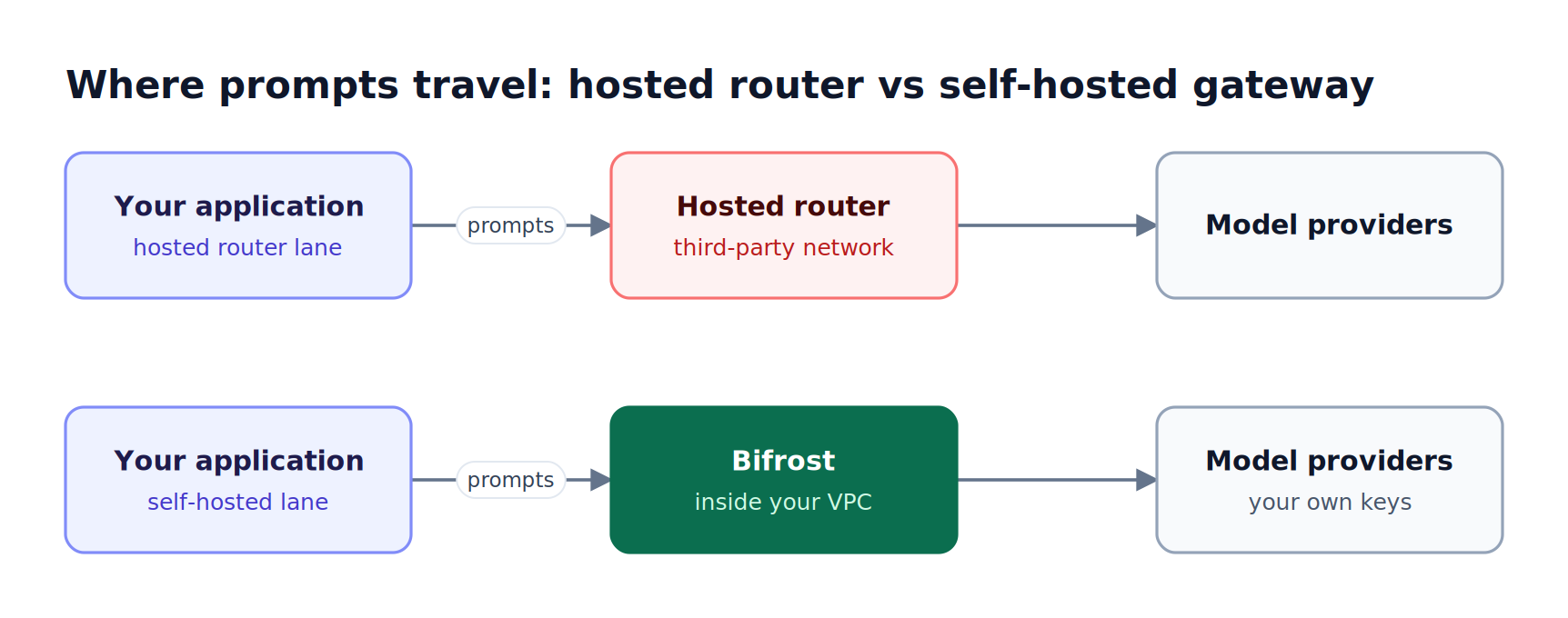
Figure 1: A self-hosted gateway removes the third-party hop, so prompts leave your network only to reach the model provider you chose.
The specific friction points, taken from OpenRouter's published FAQ and pricing page:
- Credit-based billing with platform fees. OpenRouter passes through provider token prices without markup, but charges 5.5% when you buy credits on the Standard plan and 8% on the Business plan. Its terms reserve the right to expire unused credits one year after purchase.
- Fees on bring-your-own-key traffic. BYOK usage is free up to $25,000 of list-price inference per month on Standard and Business ($200,000 on Enterprise). Above that allowance, OpenRouter charges 5% of what the request would cost on OpenRouter.
- Plan-gated identity and residency. SSO (SAML) and SCIM are available on Enterprise plans. EU and US in-region routing is included on Business and Enterprise plans.
- No published self-hosted option. Neither the FAQ nor the pricing page describes a way to run OpenRouter inside your own VPC or data center.
None of these make OpenRouter a poor product. They make it a hosted product, and the production AI gateway comparison for OpenRouter alternatives covers how those constraints show up once traffic scales. The rest of this guide focuses on the specific OpenRouter competitors that remove them.
Key Criteria for Evaluating OpenRouter Competitors
The criteria that separate OpenRouter competitors are deployment model, data path, governance depth, billing model, reliability controls, and gateway overhead. Model catalog size matters less than it appears: once a team standardizes on a small set of models and providers, control over that set outweighs access to hundreds more.
| Criterion | What to check | Why it matters when leaving OpenRouter |
|---|---|---|
| Deployment model | Self-hosted, in-VPC, or vendor-hosted only | Determines whether prompts cross a third-party network |
| Billing model | Direct provider keys vs credits and platform fees | Decides whether spend carries a percentage fee |
| Governance | Virtual keys, per-team budgets, rate limits, RBAC, SSO | Replaces a shared credit balance with enforceable limits |
| Reliability | Retries, provider fallbacks, key load balancing | Keeps traffic flowing when one provider returns 5xx or 429 errors |
| Security controls | Guardrails, PII redaction, audit logs | Required for regulated workloads and security reviews |
| Performance | Published per-request overhead under load | A gateway sits on the hot path of every call |
For a fuller scoring framework, the LLM Gateway Buyer's Guide breaks each criterion into testable requirements, and the guide on how to evaluate an LLM gateway for enterprise scalability covers load-testing a shortlist.
OpenRouter Competitors Compared at a Glance
The table below compares the five OpenRouter competitors in this guide against OpenRouter as the baseline. Cells marked "Not published" mean the vendor pages reviewed for this guide did not state the capability; they are not claims that the capability is absent. Bifrost is the only entry in this table that pairs self-hosting with a published microsecond-level overhead figure.
| Tool | Deployment | Open source | Billing through the gateway | Budgets and access control | Guardrails | Published overhead |
|---|---|---|---|---|---|---|
| Bifrost | Self-hosted, in-VPC, Kubernetes | Yes | Your own provider keys, billed by providers | Virtual keys, team and customer budgets, RBAC, SSO | Built-in and external providers | 11 µs at 5,000 RPS |
| LiteLLM | Self-hosted, hosted option | Yes | Direct provider keys | Virtual keys, per-user budgets; SSO free up to 5 users | Custom guardrails, Presidio | Not published |
| Kong AI Gateway | Konnect or self-hosted Kong Gateway | Not published | Not published | ACLs, consumer groups, metering | Prompt guard, PII sanitizer | Not published |
| Cloudflare AI Gateway | Cloudflare network (hosted) | Not published | Not published | Rate limiting | Not published | Not published |
| Vercel AI Gateway | Vercel managed gateway | Not published | Credits, zero token markup | Team budgets (soft cap) | Not published | Not published |
| OpenRouter (baseline) | Hosted | Not published | Credits, 5.5% to 8% purchase fee | Workspaces, guardrails, SSO on Enterprise | Account guardrails | Not published |
A deeper head-to-head of OpenRouter, LiteLLM, and Bifrost covers the two most common migration paths in more detail.
1. Bifrost
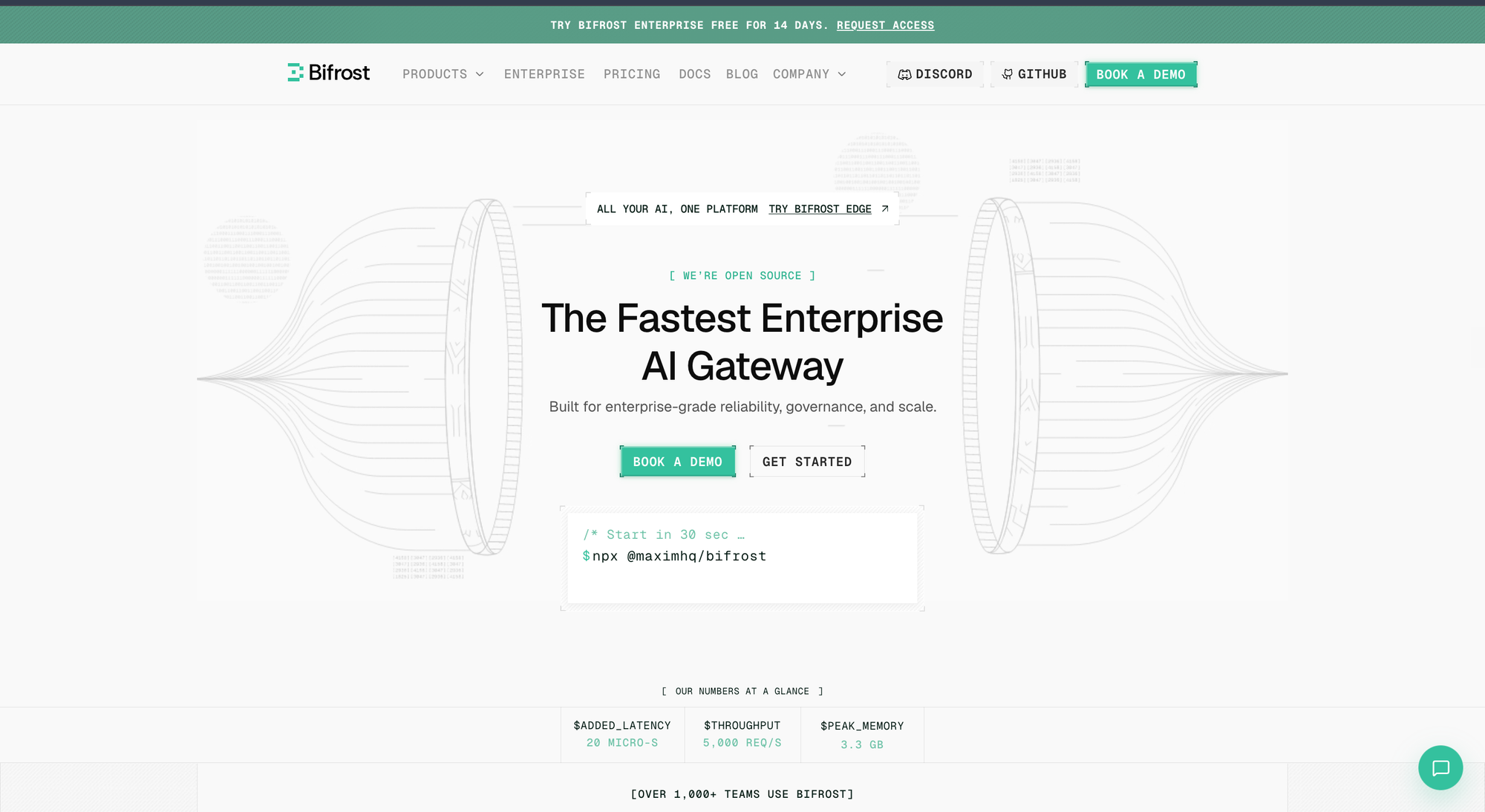
The Bifrost AI gateway is a high-performance, open-source gateway that unifies 25+ providers and 10,000+ models behind one OpenAI-compatible API, and it runs on infrastructure you control. Among OpenRouter competitors, Bifrost is the direct replacement for teams that want OpenRouter's single-API convenience without a third-party hop, a credit balance, or plan-gated governance.
Best for: Bifrost is built for enterprises running mission-critical AI workloads that require best-in-class performance, scalability, and reliability. It serves as a centralized AI gateway to route, govern, and secure all AI traffic across models and environments with ultra low latency. Bifrost unifies LLM gateway, MCP gateway, and Agents gateway capabilities into a single platform. Designed for regulated industries and strict enterprise requirements, it supports air-gapped deployments, VPC isolation, and on-prem infrastructure. It provides full control over data, access, and execution, along with robust security, policy enforcement, and governance capabilities.
Bifrost adds 11 microseconds of overhead per request at 5,000 requests per second in sustained benchmarks, with a 100% success rate. The gateway starts with npx -y @maximhq/bifrost or a single Docker command, and existing OpenAI, Anthropic, and Google GenAI SDK code works by changing only the base URL through drop-in replacement.
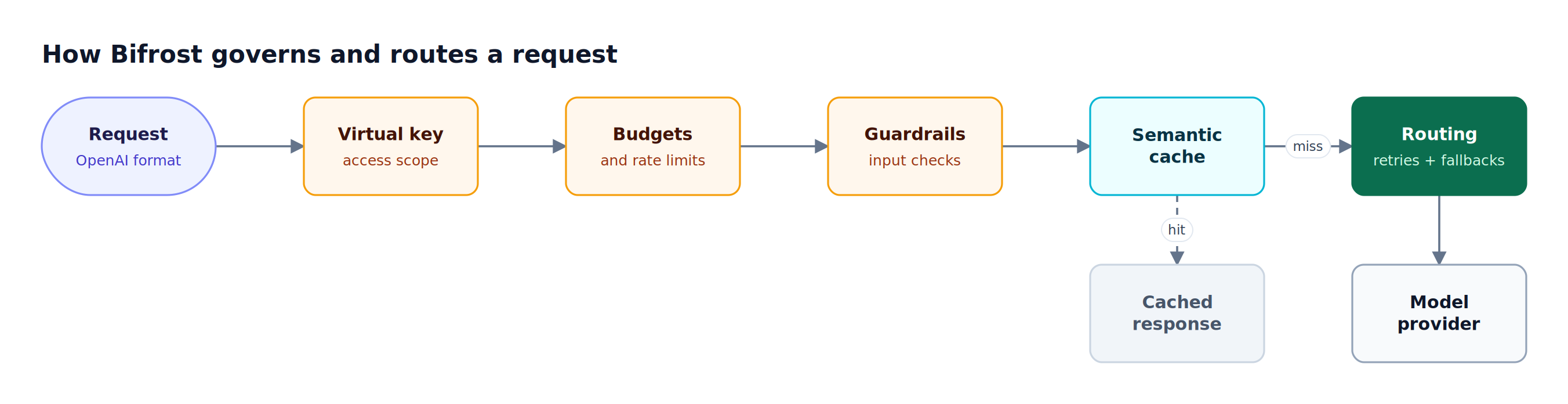
Figure 2: Policy checks run before any provider is called, so a blocked or over-budget request never costs tokens.
As Figure 2 shows, Bifrost evaluates access, spend, and content policy before a request leaves the gateway. The capabilities that matter most when replacing OpenRouter:
- Provider coverage: 25+ supported providers, including OpenAI, Anthropic, AWS Bedrock, Google Vertex AI, Azure, Groq, and Mistral, all called with your own keys.
- Retries and fallbacks: automatic retries and provider fallbacks retry transient 5xx errors with exponential backoff, rotate keys on 429 and auth failures, and move to the next provider when retries are exhausted.
- Governance: virtual keys scope each consumer's model access, while hierarchical budgets and rate limits apply at the virtual key, team, and customer levels.
- Semantic caching: semantic caching replays responses for identical or similar requests through exact-hash and embedding-based lookups, so the provider is never called on a hit.
- Guardrails: Bifrost guardrails combine Bifrost-managed checks (prompt guardrails, custom regex, secrets detection) with external providers such as AWS Bedrock Guardrails, Azure Content Safety, Google Model Armor, and Presidio.
- MCP gateway: Bifrost acts as both an MCP client and server, so the same MCP gateway that routes model traffic also governs agent tool calls.
For enterprise deployments, Bifrost runs through in-VPC deployments on AWS, GCP, and Azure, with clustering for high availability and zero-downtime rollouts.
The Bifrost Enterprise tier adds RBAC, OIDC-based identity with Okta and Entra, and audit logs that record administrative activity with signed events.
2. LiteLLM
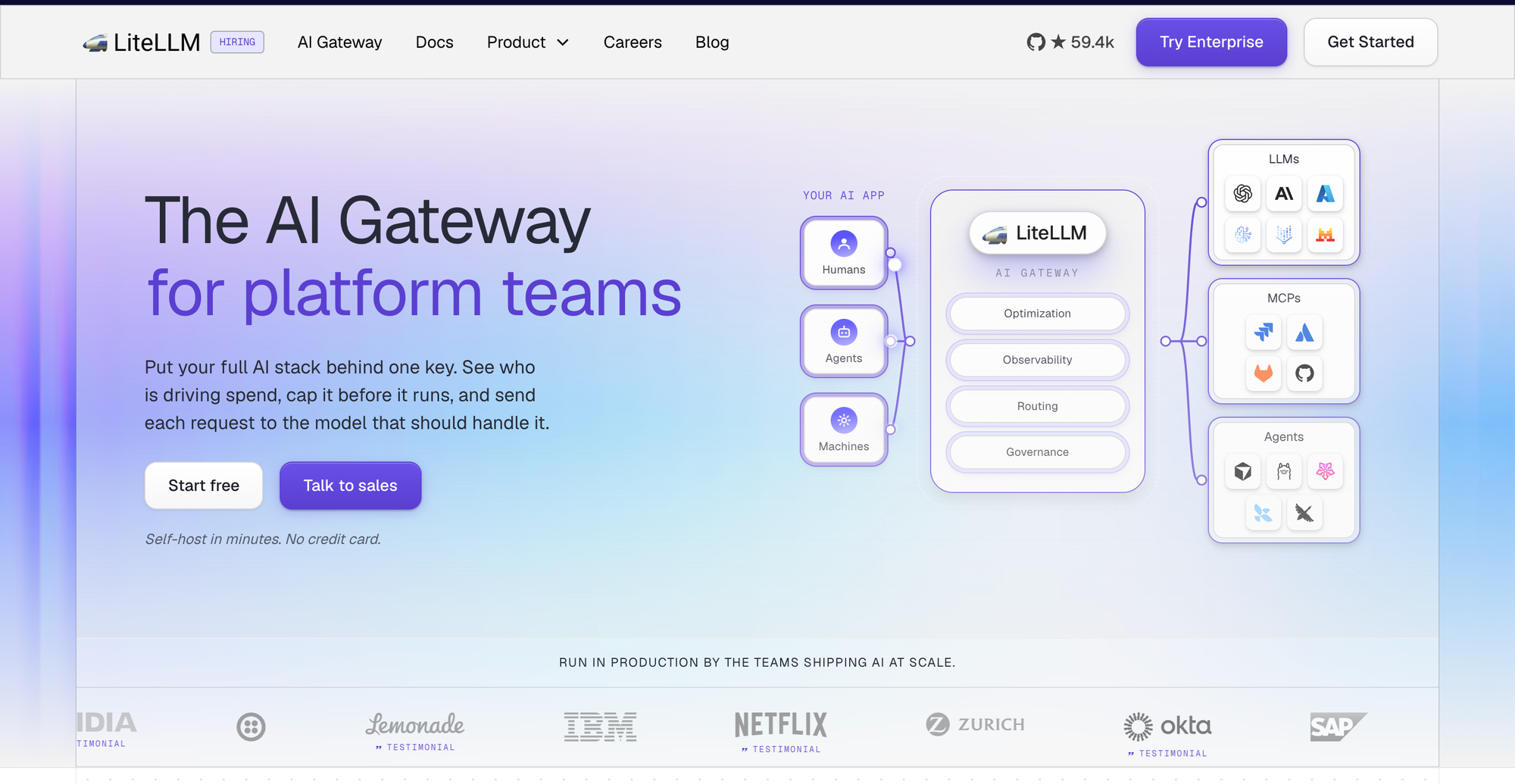
LiteLLM is an open-source Python gateway and SDK that calls 100+ LLMs in OpenAI format, with spend tracking and budgets per virtual key or user. Of the OpenRouter competitors in this list, LiteLLM suits Python teams that want to self-host quickly and are comfortable operating a Python service in the request path.
Best for: Python-first teams that want a self-hosted, open-source proxy with virtual keys and basic budgets, and that can accept an enterprise license once SSO is needed beyond five users.
Key capabilities, taken from LiteLLM's documentation and README:
- Deployment: self-hosted through Docker and cloud templates, with a hosted proxy option.
- Governance: virtual keys, users, and teams, with budgets and rate limits per key or user.
- Reliability: load balancing, routing, and fallbacks across deployments.
- Security: a framework for custom guardrails plus Presidio for PII masking; several built-in moderation integrations require an enterprise license.
- Enterprise gating: SSO is free for up to five users, and audit logs and fine-grained access control sit in the enterprise tier.
LiteLLM fits teams that prioritize Python ecosystem familiarity. Teams comparing the two can review Bifrost as a LiteLLM alternative, and the LiteLLM migration resource covers moving an existing LiteLLM config to Bifrost. Bifrost also supports the LiteLLM SDK, so client code written against LiteLLM can point at Bifrost directly.
3. Kong AI Gateway
Kong AI Gateway extends the Kong API gateway with AI-specific plugins for routing, security, and usage metering. It fits teams that already run Kong for their REST APIs and want LLM traffic governed by the same control plane, managed through Kong Konnect or on a self-hosted Kong Gateway.
Best for: platform teams with an existing Kong deployment that want to add LLM routing and prompt security as plugins rather than operate a separate AI gateway.
Key capabilities, taken from Kong's AI Gateway documentation:
- Routing: routing and load balancing across AI providers, with streaming and authentication.
- Access control: user access controls and ACLs, plus consumer groups for token usage tracking.
- Prompt security: AI Prompt Guard and AI Semantic Prompt Guard for jailbreak and injection attempts, and AI Sanitizer for redacting PII before it reaches the provider.
- Metering: usage analytics for requests, tokens, errors, and latency, plus pricing tiers with token quotas for teams that bill AI access as a product.
- Deployment: managed through Konnect or run on-prem on self-hosted Kong Gateway.
The trade-off is scope. Kong AI Gateway inherits the full Kong operational model, which is a strength for existing Kong users and added operational scope for teams that only need an LLM gateway. A comparison of self-hosted options sits in the guide to self-hosted OpenRouter alternatives.
4. Cloudflare AI Gateway
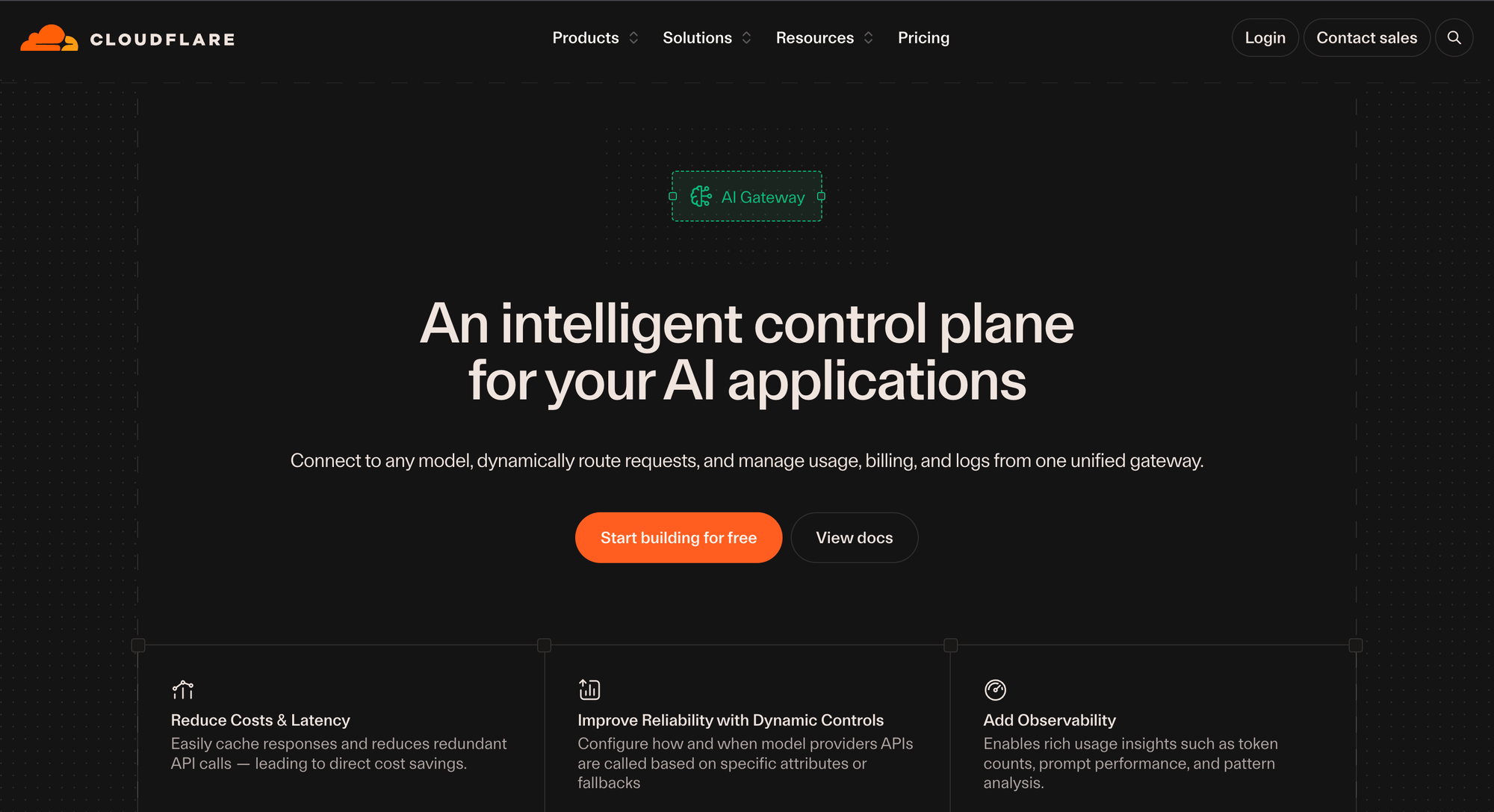
Cloudflare AI Gateway is a hosted gateway on Cloudflare's network that adds analytics, logging, caching, rate limiting, request retries, and model fallback in front of AI providers. It suits teams already on Cloudflare that want visibility and basic traffic control with a one-line integration change.
Best for: teams already on Cloudflare that want request analytics, caching, and fallbacks for AI traffic without running any gateway infrastructure themselves.
Key capabilities, taken from Cloudflare's AI Gateway documentation:
- Observability: analytics for requests, tokens, and cost, plus request and error logging.
- Caching: responses served from Cloudflare's cache instead of the provider.
- Traffic control: rate limiting, request retries, and model fallback through dynamic routing.
- Availability: offered on all Cloudflare plans, with models from OpenAI, Anthropic, Google, and others.
Cloudflare AI Gateway runs on Cloudflare's infrastructure, so it keeps a third party in the data path in the same structural way OpenRouter does. It changes which vendor sits there rather than removing the hop. Teams weighing that trade-off can compare options in the guide to Cloudflare AI Gateway alternatives and competitors.
5. Vercel AI Gateway
Vercel AI Gateway is a managed gateway that centralizes credentials, request logs, spend budgets, routing, and provider failover, and it can be called from any infrastructure, not only from apps deployed on Vercel. Vercel states that it adds zero markup to provider token prices, including with BYOK.
Best for: frontend and full-stack teams building with the Vercel AI SDK that want managed multi-provider access without per-token markup.
Key capabilities, taken from Vercel's AI Gateway documentation:
- Billing: AI Gateway Credits billed at provider list price, with no markup or platform fee on tokens, and a free tier limited to a subset of models.
- Routing: provider ordering, provider fallbacks, and model fallbacks, with every routing attempt recorded.
- Credentials: team-scoped API keys, OIDC for Vercel deployments, and BYOK for your own provider accounts.
- Budgets: spend budgets on system-credential usage, documented as soft caps; BYOK spend is metered separately and does not count toward them.
Vercel AI Gateway removes OpenRouter's purchase fee, but it remains a hosted service, and its budgets are soft caps that do not cover BYOK traffic. Teams that need hard, per-team rate limits and budgets enforced at the gateway before the provider call will find those in a self-hosted gateway.
How to Choose an OpenRouter Alternative
Choose an OpenRouter alternative by answering two questions in order: must prompts stay inside your network, and do you need enforceable governance such as per-team budgets, SSO, and audit logs? If both answers are yes, a self-hosted AI gateway such as Bifrost is the fit. If neither is, a managed gateway may be enough.
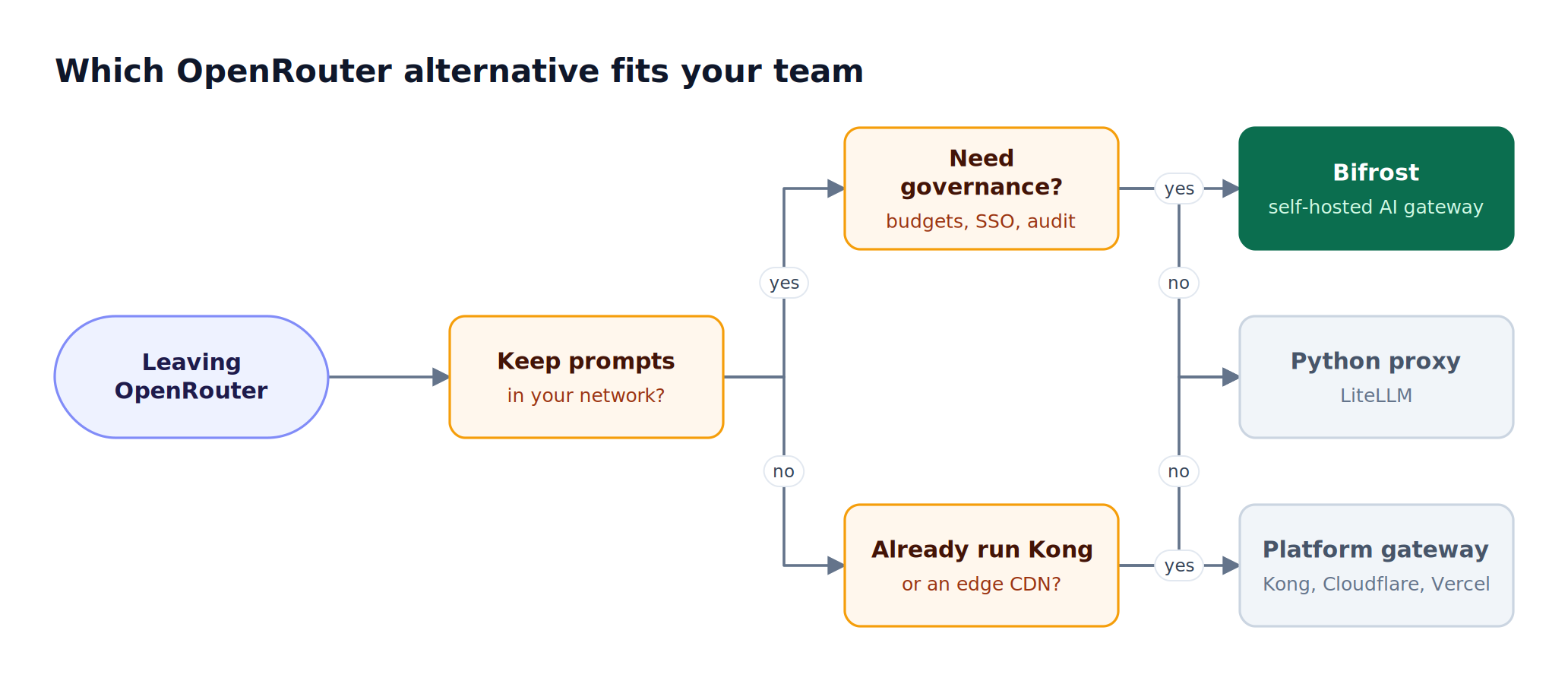
Figure 3: Data residency and governance requirements narrow the field faster than model catalog size does.
Figure 3 reflects how the decision usually plays out in practice:
- Regulated or security-reviewed workloads: healthcare, financial services, and public sector teams often face security reviews that rule out a third-party router in the prompt path. A gateway deployed in-VPC, with governance controls that security can audit, is the practical requirement.
- Platform teams scaling past one product: once several teams share model access, a single credit balance stops working. Per-team budgets and virtual keys give finance and engineering the same view of spend. The NIST AI Risk Management Framework treats this kind of accountability mapping as a core governance function.
- Existing platform commitments: teams already standardized on Kong or Cloudflare may prefer to extend that platform, accepting its data path and gateway scope.
- Small Python services: a lightweight proxy can work until throughput, SSO, or audit requirements grow.
For a broader grounding in what the gateway layer does, see what an LLM gateway is and how its architecture works. Teams that want a second scoring pass on production readiness can use the side-by-side review of production-grade OpenRouter alternatives.
Migrating from OpenRouter to Bifrost
Migrating from OpenRouter to Bifrost does not require a hard cutover. Bifrost supports OpenRouter as a provider, so teams can deploy Bifrost, point applications at it, route primary traffic directly to providers with their own keys, and keep OpenRouter configured as a fallback until direct routes are proven.
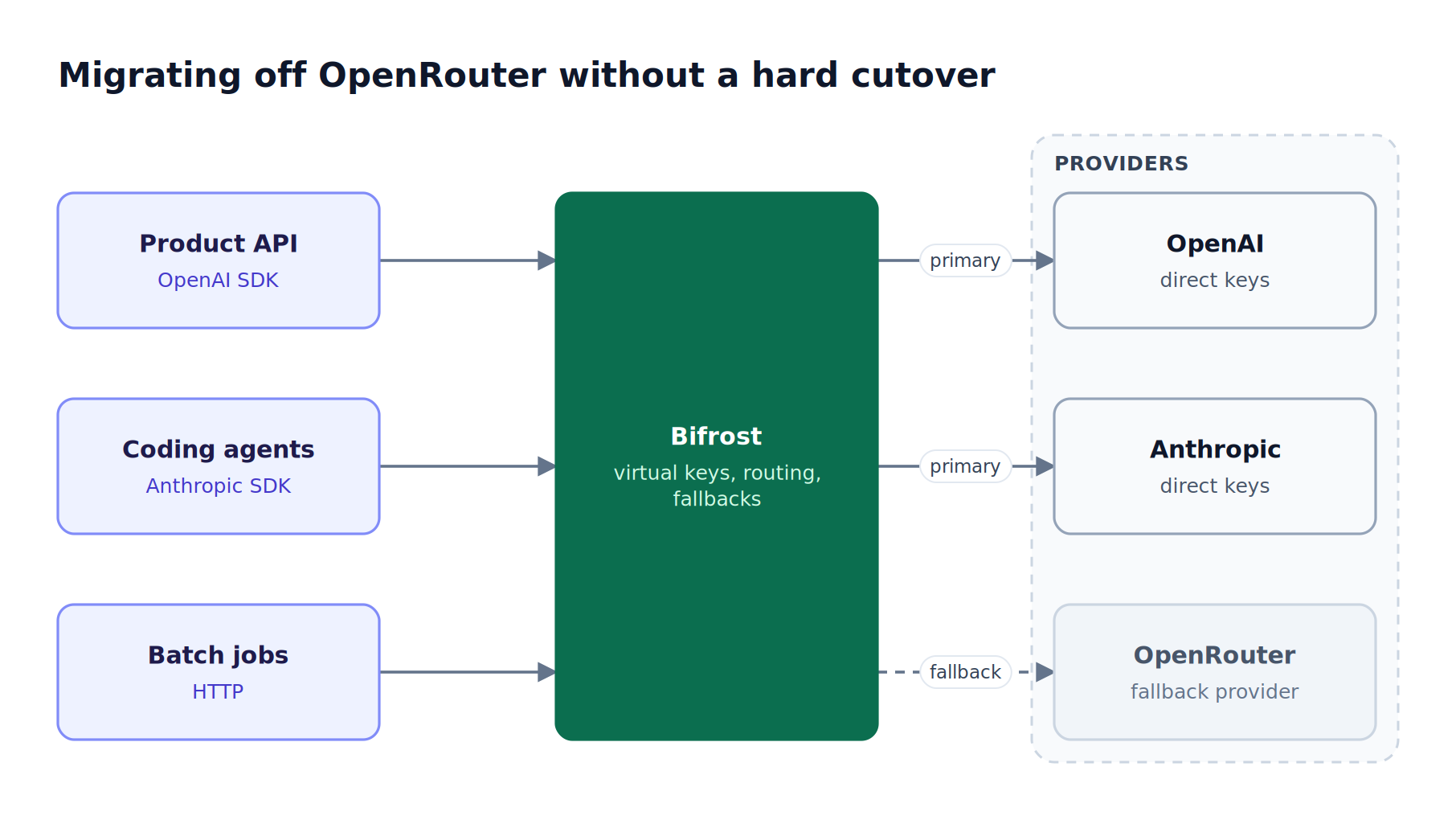
Figure 4: Keeping OpenRouter as a fallback provider behind Bifrost lets teams move traffic in stages instead of in one release.
A staged migration looks like this:
- Deploy Bifrost. Start the gateway with the gateway setup guide, or deploy to Kubernetes with the Kubernetes deployment guide.
- Add providers. Configure direct keys for your primary providers, and add OpenRouter as a Bifrost provider so models currently reached through OpenRouter stay available during the transition.
- Switch the base URL. Point the OpenAI or Anthropic SDK at Bifrost; request and response formats stay the same.
- Issue virtual keys. Create one virtual key per team or service, each with its own budget, rate limit, and allowed models.
- Shift traffic. Use weighted load balancing across keys and providers to move traffic gradually, with OpenRouter at the end of the fallback chain.
- Remove the fallback. Once direct routes are stable in built-in observability, drop OpenRouter from the chain.
The enterprise deployment resource covers sizing and redundancy for teams moving production traffic.
Frequently Asked Questions
What is OpenRouter?
OpenRouter is a hosted service that gives developers one OpenAI-compatible API for models from many providers, billed through a prepaid credit balance. Its pricing page lists 500+ models from 80+ providers on paid plans. OpenRouter charges a fee when credits are purchased and passes through provider token prices without markup. Teams that need prompts to stay on their own infrastructure typically compare it with self-hosted OpenRouter competitors such as Bifrost.
Is OpenRouter free?
OpenRouter offers free models with low rate limits, but production use is paid. Its FAQ states that free models are limited to 50 requests per day without purchased credits, and 1,000 per day after buying at least 10 credits. Paid usage is billed at provider list price, plus a 5.5% fee on credit purchases on the Standard plan and 8% on the Business plan.
Is OpenRouter safe?
OpenRouter states that it logs request metadata such as timestamps, model, and token counts, and does not log prompts or completions unless a user opts in. Zero Data Retention routing is available on every plan. Prompts still pass through OpenRouter's infrastructure on the way to the provider, so teams with strict data-residency rules often prefer a self-hosted gateway deployed inside their own VPC.
Is LiteLLM similar to OpenRouter?
LiteLLM and OpenRouter both expose many LLM providers through one OpenAI-format API, but they differ in deployment. OpenRouter is a hosted service billed through credits. LiteLLM is an open-source Python proxy that teams self-host with their own provider keys. Bifrost is also self-hosted and open source, written in Go, and adds 11 microseconds of overhead per request at 5,000 RPS.
Can OpenRouter be self-hosted?
OpenRouter's FAQ and pricing page do not describe a self-hosted or in-VPC deployment option; the service runs on OpenRouter's infrastructure. Teams that need a self-hosted alternative can run Bifrost with a single Docker or npx command, deploy it to Kubernetes, or use in-VPC deployments on AWS, GCP, and Azure for enterprise-scale workloads.
Can Bifrost route requests to OpenRouter?
Yes. Bifrost supports OpenRouter as an upstream provider for chat completions, the Responses API, text completions, embeddings, and model listing. This lets teams place Bifrost in front of existing OpenRouter usage, add virtual keys, budgets, and fallbacks immediately, and then shift traffic to direct provider keys at their own pace.
Try Bifrost Today
Among OpenRouter competitors, Bifrost is the option that keeps the single-API model while moving the data path, the keys, and the governance onto your own infrastructure, with 11 microseconds of overhead at 5,000 RPS. Teams can start with the open-source gateway and move to enterprise clustering, guardrails, and audit logs as requirements grow. Explore the Bifrost resources hub, or book a demo to see how Bifrost replaces a hosted router for production AI traffic.