9 Best Cursor Alternatives for Teams
Cursor alternatives are AI code editors and coding agents that teams adopt in place of Cursor or beside it. This guide compares nine of them, including GitHub Copilot, Claude Code, JetBrains AI, and Zed, on identity, admin controls, model access, and endpoint support.

TL;DR
- The strongest Cursor alternatives for teams are GitHub Copilot, Claude Code, OpenAI Codex, JetBrains AI, Windsurf (now Devin Desktop), Google Antigravity, Amazon Kiro, Zed, and Cline.
- Team fit depends on four things: where developers already work, how identity and admin policy are enforced, which models are allowed, and whether the tool accepts a custom model endpoint.
- Copilot, JetBrains AI, Zed, Cline, and Cursor itself accept a custom or bring-your-own-key endpoint, which lets a platform team put its own budgets and logging on editor traffic.
- Most organizations end up with two or three editors in use, so keys, spend limits, and request logs are easier to manage at a gateway than inside each editor.
Teams evaluate Cursor alternatives when they need a single AI coding standard that fits their IDEs, identity provider, and model contracts, rather than whatever each developer installed first. Bifrost, the open-source AI gateway built in Go by Maxim AI, sits in front of these editors rather than replacing them, and it is the best choice for enterprises running mission-critical AI workloads that require top-tier performance, scalability, and reliability. This guide compares nine Cursor alternatives for teams on the criteria platform and security leads actually check, then shows how to keep model access and spend consistent whichever editor wins.
Why Teams Look for Cursor Alternatives
Teams look for Cursor alternatives when an editor choice made by individual developers turns into an organizational standard. At that point the questions change from autocomplete quality to SSO, data handling, model contracts, seat pricing, and whether the tool works inside the IDEs the company already supports, such as JetBrains or VS Code.
Cursor is a capable AI code editor, and many teams keep it. The reasons to compare alternatives are usually structural:
- IDE fit: JetBrains shops and terminal-first teams want AI inside the tools they already use, not a separate VS Code fork.
- Identity and admin: on Cursor, SSO is listed for Teams while SCIM and audit logs are listed for Enterprise, so plan tier decides which controls a team gets.
- Model contracts: companies with existing Anthropic, OpenAI, AWS, or Google Cloud agreements want editors that use those accounts.
- Spread of tools: coding agents arrive faster than standards do, which is how AI coding tools become shadow AI.
The broader governance question, which spans every agent a team runs and not only the editor, is covered in our guide to governing AI coding agents across Claude Code, Cursor, and Codex.
Key Criteria for Evaluating Cursor Alternatives
The criteria that matter for a team standard are developer surface, identity and admin policy, model access, custom endpoint support, and data handling. Feature lists for chat and autocomplete converge quickly across vendors; the controls an admin can enforce, and where model traffic goes, differ far more and are harder to change after rollout.
| Criterion | What to check | Why it matters for teams |
|---|---|---|
| Developer surface | Editor, IDE plugin, terminal agent, desktop app, web | Adoption depends on meeting developers in tools they already use |
| Identity and admin | SSO, SCIM, roles, org-wide policy, audit logs | Decides whether offboarding and policy changes take one step or many |
| Model access | Vendor-hosted models, your own cloud accounts, approved model lists | Determines cost, data residency, and contract reuse |
| Custom endpoint (BYOK) | Override base URL, OpenAI- or Anthropic-compatible provider | Lets a platform team apply its own keys, budgets, and logs |
| Data handling | Training opt-out, retention, privacy mode enforcement | Required by security review in regulated teams |
Custom endpoint support is the criterion most often missed. As Figure 1 shows, an editor without it sends every request through the vendor's backend, so the only controls available are the vendor's seat policies. An editor with it can send traffic to an endpoint your team runs, where the AI governance controls you already use for applications also apply to developers.
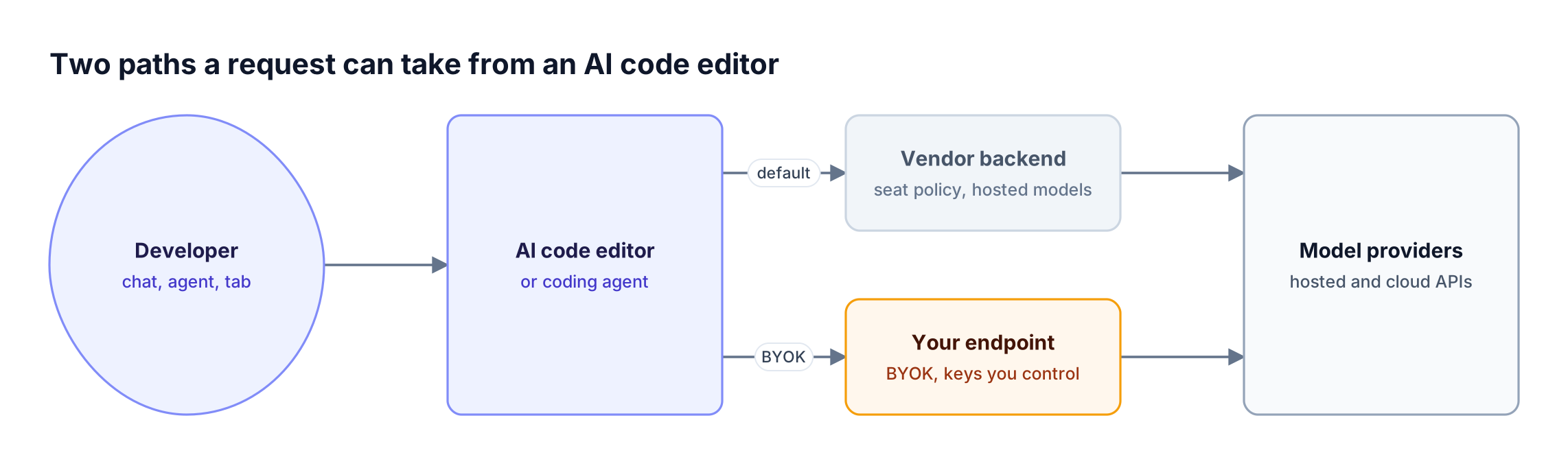
Figure 1: Bring-your-own-key support decides whether your own controls can sit on an editor's model traffic.
Cursor Alternatives Compared at a Glance
The table below compares the nine Cursor alternatives on developer surface, team administration, model access, and custom endpoint support, with Cursor as the baseline. Entries reflect each vendor's published product and documentation pages at the time of writing; "Not published" means the page did not state it.
| Tool | Developer surface | Team administration | Model access | Custom endpoint or BYOK |
|---|---|---|---|---|
| Cursor (baseline) | AI code editor | SSO on Teams; SCIM and audit logs on Enterprise | First-party and third-party models | Override OpenAI base URL |
| Windsurf (Devin Desktop) | Desktop editor tied to a Devin account | SAML/OIDC SSO on Teams; SCIM and RBAC on Enterprise | Not published | Not published |
| GitHub Copilot | VS Code extension, CLI, desktop app | Org-wide policy, audit logs, content exclusion | GitHub-hosted models, premium models | Yes, admin policy required on Business and Enterprise |
| Claude Code | Terminal, VS Code, JetBrains, desktop, web | Managed settings; SSO and SCIM at the Claude account level | Claude via Claude plans, Bedrock, Google Cloud, Microsoft Foundry | Yes, LLM gateway via base URL |
| OpenAI Codex | CLI, IDE extension, app, cloud | Roles, managed configuration, analytics, compliance API | OpenAI models | Gateway configuration documented |
| Google Antigravity | App, CLI, IDE | IAM roles, VPC Service Controls, request logging | Gemini plus admin-enabled Claude models | Not published |
| JetBrains AI (Junie) | JetBrains IDE plugin, web, CLI | Per-org, team, and user permissions; spending limits | JetBrains-managed or your own keys | Yes, API keys and base URLs |
| Amazon Kiro | IDE, CLI, web | IAM Identity Center or external IdP; credit pools and limits | Open-weight and Claude models | Not published |
| Zed | Native open-source editor | Org-level AI and data-sharing controls; SSO planned | Zed-hosted models or your own provider keys | Yes, OpenAI-compatible providers |
| Cline | Open-source VS Code extension and CLI | SSO, global configuration, MCP controls on Enterprise | Many providers, paid directly | Yes, OpenAI-compatible base URL |
Seat price is only part of the cost. Agentic sessions make many model calls per task, which is why coding agent costs grow quickly at scale and why model access deserves as much scrutiny as the license.
The 9 Best Cursor Alternatives for Teams
The nine Cursor alternatives below are ordered by how directly they fit a team rollout: existing IDE coverage, admin controls, and model flexibility first. Each entry covers what the tool is, what a team admin gets, and who it suits best.
1. GitHub Copilot
GitHub Copilot runs inside VS Code, the Copilot CLI, and a standalone Copilot app, and Business and Enterprise plans add organization-wide policy management, audit logs, and content exclusion. VS Code supports bring-your-own-key through a Custom Endpoint provider, and on Business and Enterprise plans an admin must enable the BYOK policy for VS Code first.
- Best for: teams already standardized on GitHub and VS Code that want AI under the same organization policies.
- Watch for: some features still require a Copilot seat even when BYOK models are in use.
Teams comparing Copilot and Cursor on security posture can start with our analysis of securing Cursor, Claude Code, and Copilot.
2. Claude Code
Claude Code is Anthropic's agentic coding tool, available in the terminal, VS Code, JetBrains IDEs, a desktop app, and the web. Admins deliver managed settings that control tools, MCP servers, permitted models, and which API providers a machine may use, and Claude Code can be pointed at an LLM gateway your organization runs through ANTHROPIC_BASE_URL.
- Best for: teams that want an agent-first workflow and already use Claude through Anthropic, Amazon Bedrock, Google Cloud, or Microsoft Foundry.
- Watch for: Anthropic does not support routing Claude Code to non-Claude models through a gateway, so plan model choice accordingly.
The Claude Code resource hub collects setup and governance guides for larger rollouts.
3. OpenAI Codex
OpenAI Codex spans a CLI, an IDE extension, an app, and cloud tasks. For ChatGPT Business and Enterprise workspaces, OpenAI documents roles and workspace permissions, managed configuration, workspace analytics, and a compliance API with audit events, plus pages on connecting Codex to a gateway.
- Best for: organizations already on ChatGPT Enterprise that want one vendor for chat and coding agents.
- Watch for: model access centers on OpenAI models, so mixed-model teams usually pair it with another tool.
4. JetBrains AI (Junie)
JetBrains now packages its Junie coding agent inside JetBrains Air, which runs in JetBrains IDEs through a plugin and also on web, CLI, and mobile. Admins set permissions per organization, team, or individual, apply spending limits, and manage keys, and developers can use JetBrains-managed access or bring keys and base URLs from providers such as Amazon Bedrock, OpenAI, and Anthropic.
- Best for: Java, Kotlin, and Python teams that live in IntelliJ IDEA or PyCharm.
- Watch for: product names have changed recently, so confirm the plan that includes Junie for your organization.
5. Windsurf (now Devin Desktop)
Windsurf has been renamed Devin Desktop and now signs in with a Devin account; its documentation still references the Windsurf package during the transition. Devin's published plans list SAML and OIDC SSO on Teams, and SCIM, role-based access control, and a dedicated deployment option on Enterprise.
- Best for: teams that liked Windsurf's agentic editor and are comfortable consolidating on the Devin platform.
- Watch for: model and BYOK details for the desktop editor were not published on the pages reviewed, so ask before committing.
6. Google Antigravity
Google Antigravity is Google's agentic development platform, with a desktop app for managing parallel agents, a CLI, and a full IDE. Organizations connect through a Google Cloud project or Gemini Enterprise licenses, with IAM roles, VPC Service Controls, Private Service Connect, and request and response logging, and admins can opt in to Claude models alongside Gemini.
- Best for: teams standardized on Google Cloud, especially since Gemini Code Assist Standard and Enterprise are no longer sold to new subscribers.
- Watch for: custom endpoint support was not published.
7. Amazon Kiro
Kiro is an AI IDE with a CLI and web access, built around spec-driven development, agent hooks, and steering. Enterprise deployments authenticate through AWS IAM Identity Center or an external identity provider, and admins group users into credit pools, set usage limits, and watch usage dashboards with alerts, all billed through AWS.
- Best for: AWS-centric teams that want spec-first agent workflows and AWS billing.
- Watch for: data handling terms and BYOK support were not stated on the pricing page.
8. Zed
Zed is a high-performance, open-source native editor with built-in AI and multiplayer collaboration. The Business plan adds organization-level controls for AI features, data sharing, and billing, plus role-based access, and teams can use Zed-hosted models or their own provider contracts, including Amazon Bedrock, Anthropic, Google AI, Mistral, Ollama, and OpenAI.
- Best for: teams that want a fast native editor and full control over which provider receives requests.
- Watch for: SSO, SAML, and SCIM are planned but not yet available.
9. Cline
Cline is an open-source coding agent with Plan and Act modes, MCP support, a VS Code extension, and a CLI. Developers can pay model providers directly or use an OpenAI-compatible provider with a custom base URL, and the Enterprise offering adds SSO, global configuration, MCP controls, and deployment in a VPC, on-prem, or air-gapped.
- Best for: teams that want an open-source agent inside VS Code with no lock-in to one model vendor.
- Watch for: governance features beyond SSO and configuration depend on the Enterprise tier.
Cursor vs Claude Code, Copilot, and Windsurf
Cursor vs Claude Code, Cursor vs Copilot, and Cursor vs Windsurf are the comparisons teams run most often, and each one turns on a different trade-off. Claude Code changes the workflow to agent-first, Copilot changes who owns policy, and Windsurf changes the vendor platform the editor belongs to.
| Comparison | Main difference for teams | When to choose the alternative |
|---|---|---|
| Cursor vs Claude Code | Editor-centric versus terminal and agent-centric workflow | Developers prefer delegating multi-file tasks to an agent and want it in any IDE |
| Cursor vs GitHub Copilot | Separate editor versus an extension inside existing VS Code and GitHub policy | The organization already governs code and seats through GitHub |
| Cursor vs Windsurf | Two AI editors; Windsurf is now part of the Devin platform | The team wants Devin's agent platform and its plan-level controls |
Many teams do not pick one. Our breakdown of Claude Code vs Cursor and how to run both covers the mixed setup that most engineering organizations end up with.
How to Choose a Cursor Alternative for Your Team
The fastest way to choose among Cursor alternatives is to start from where developers already work, then check admin controls and model access only for the two or three tools that fit. Starting from feature lists tends to produce a winner that half the team will not adopt.
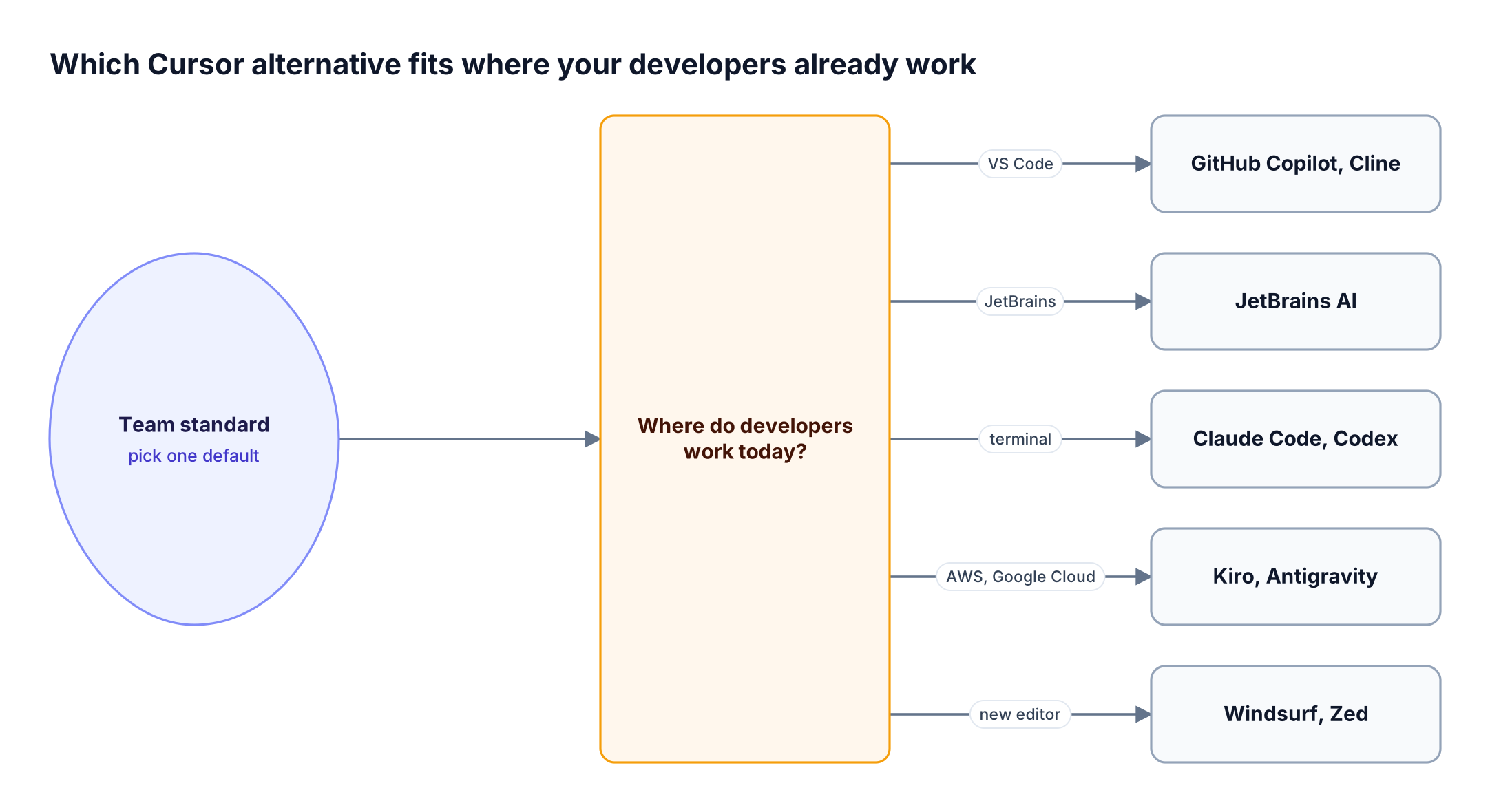
Figure 2: The editor your developers already live in narrows nine options to two before any feature comparison starts.
After the shortlist in Figure 2, run three checks:
- Identity: confirm SSO and SCIM are available on the plan you will buy, not only on a higher tier.
- Models: confirm the tool can use the provider accounts your company already pays for.
- Endpoint: confirm whether the tool accepts a custom base URL, which decides whether central controls are possible later.
The CLI agents resource page lists which coding agents connect through a gateway today, which helps with the third check. For larger organizations, the rollout patterns in governing Claude Code and Cursor at enterprise scale apply to most tools on this list.
Governance Gaps to Plan For When Switching Editors
Switching from Cursor to an alternative rarely removes governance work; it moves it. Each editor has its own admin console, its own model settings, and its own usage reports, so a team running two editors ends up with two sets of keys, two spend views, and two partial audit trails.
The gaps that show up most often:
- Provider keys on laptops: developers paste personal API keys into BYOK settings, and offboarding misses them.
- Spend without owners: usage is visible per seat, but not per team, project, or cost center across tools.
- Partial logs: each vendor logs its own traffic, so no single place shows which models and prompts the whole engineering organization uses.
- Model sprawl: developers pick models per feature, which makes approved-model lists hard to enforce.
These are the same problems the enterprise playbook for governing AI coding agents addresses, and they are easier to solve once at the model layer than separately in each editor. Unified AI observability across every request is usually the first gap teams close.
Using Cursor or Any Alternative with Bifrost
The Bifrost AI gateway lets a team keep Cursor, adopt an alternative, or run several, while model access, budgets, and logs stay in one place. Bifrost exposes OpenAI-, Anthropic-, and Gemini-compatible endpoints, so any editor or coding agent that accepts a custom endpoint can send its requests through the gateway.
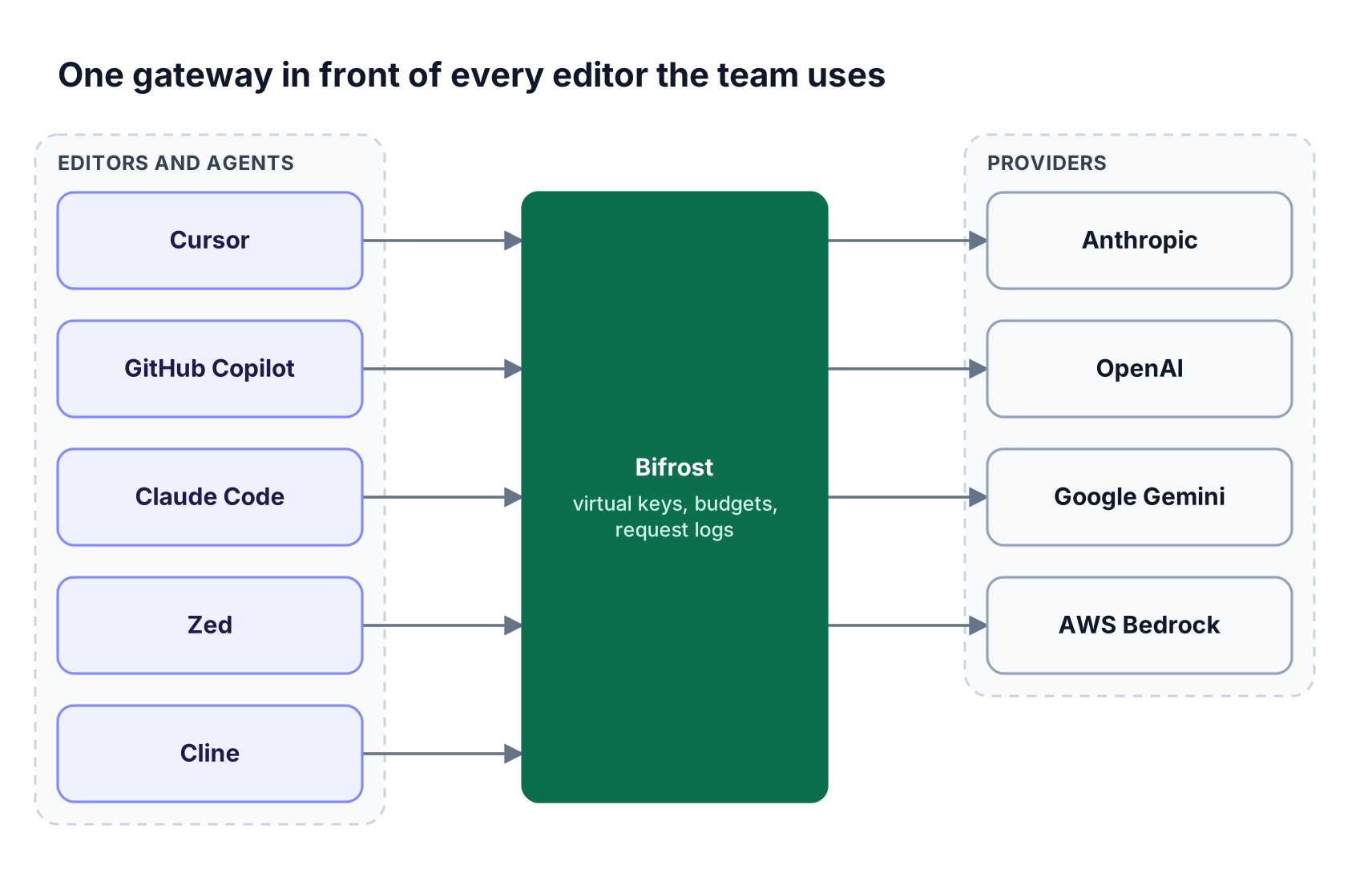
Figure 3: Editors can differ by team while keys, budgets, and request logs stay in one place.
How it works with the tools in this guide:
- Cursor: enable "Override OpenAI Base URL", enter the Bifrost endpoint, and use a Bifrost virtual key as the API key. The Cursor setup guide shows how to assign different
provider/model-namemodels to Chat, Agent, Inline Edit, and Tab. Cursor requires a publicly reachable Bifrost URL, and non-native models must support tool use for agent mode. - GitHub Copilot: the app, CLI, and VS Code extension each accept Bifrost as a BYOK provider, as described in the Copilot integration guide.
- Claude Code, Codex CLI, Gemini CLI, and OpenCode: the Bifrost CLI launches each agent through the gateway without hand-editing its configuration, and the Claude Code guide covers static virtual keys and dynamically issued credentials.
- Zed and Cline: both accept OpenAI-compatible providers; the Zed integration is documented end to end.
Governance comes from virtual keys, which carry per-user or per-team provider access, budgets and rate limits on requests and tokens, and reset windows from daily to yearly.
Every request is logged with provider, model, and cost, and Bifrost routes to 10,000+ models across 25+ providers with about 11 microseconds of overhead at 5,000 RPS.
For hands-on setups, see the comparison of AI gateways for Cursor, the walkthrough for a self-hosted gateway for Cursor with Claude or Ollama, and the Bifrost CLI v1.0 launch post.
Teams adding MCP tools to editors can pair this with the list of MCP servers for Cursor and the gateway's MCP tool controls. The coding agents section of the resources library covers the remaining tools.
Frequently Asked Questions
What is the best Cursor alternative for teams?
GitHub Copilot is a natural choice for teams standardized on GitHub and VS Code, JetBrains AI fits JetBrains shops, and Claude Code or OpenAI Codex suit agent-first teams. The best Cursor alternative is the one that matches the IDE your developers already use and supports SSO, admin policy, and your existing model contracts on the plan you can buy.
Is there a free Cursor alternative?
Yes. Zed offers a free Personal plan for developers who bring their own model keys, Cline is open source and lets developers pay model providers directly, Google says Antigravity is available at no charge for developers, and GitHub Copilot has a Free plan with limits. For teams, the paid tiers matter more because they carry the admin and identity controls.
What is the best open source Cursor alternative?
Zed and Cline are the two open-source Cursor alternatives in this guide. Zed is a native editor with built-in AI and organization controls on its Business plan, while Cline is an open-source coding agent for VS Code and the terminal. Continue, a former open-source favorite, is now part of Cursor, so it no longer counts as an alternative.
Is Cursor better than GitHub Copilot?
Neither is better for every team. Cursor is a separate AI code editor, while GitHub Copilot is an extension inside VS Code and other tools that inherits GitHub organization policies, audit logs, and content exclusion. Teams that already govern code and seats through GitHub usually find Copilot easier to roll out, while teams that want an AI-first editor often keep Cursor.
Is Windsurf better than Cursor?
Windsurf and Cursor are both AI code editors, and the choice now depends on platform as much as features. Windsurf has been renamed Devin Desktop and signs in with a Devin account, so choosing it means adopting the Devin platform and its plan-level controls. Teams that want to stay vendor-neutral on models should compare BYOK support before deciding.
Can I keep Cursor and change the models it uses?
Yes. Cursor lets you override the OpenAI base URL, so you can point it at an AI gateway such as Bifrost and use a virtual key as the API key, as the Bifrost setup steps for Cursor show. You can then assign models from different providers to Chat, Agent, Inline Edit, and Tab, as long as models used for agent mode support tool calling.
Try Bifrost with Your Team's Editors
Choosing among Cursor alternatives is easier when the decision does not also decide your model contracts, budgets, and audit trail. Bifrost keeps those in one gateway for Cursor and every alternative in this guide, deployed inside your own infrastructure with enterprise deployment options for regulated teams. To see it with the editors your developers use, book a demo with the Bifrost team, or start from the LLM gateway overview.