AI Access Control: How to Restrict Model Access by Role and Team
AI access control decides which models, providers, and tools each team, role, or user may call. This guide shows how to build per-team model allowlists in Bifrost, with a worked example, the exact config fields, and what a denied request returns.
TL;DR
- AI access control for LLMs is the set of rules deciding which providers, models, and tools a given team, role, or application may call, enforced on each request.
- In Bifrost, a virtual key is deny-by-default: it reaches only the providers listed in its
provider_configs, and only the models in each provider'sallowed_models. blacklisted_modelsandregex:patterns let one rule block every preview model while still allowing a whole model family.- On Bifrost Enterprise, access profiles apply the same allowlists to roles, teams, business units, and customers, while RBAC and data access control decide who may edit them.
- A refused call returns a typed
403such asmodel_blocked, distinct from budget and rate-limit errors.
AI access control is the policy layer that decides which large language models, providers, and tools each team, role, or application in an organization is allowed to call. Bifrost, the open-source AI gateway built in Go for enterprise AI workloads by Maxim AI, enforces that policy at the gateway, so every request is checked against a per-key allowlist before any provider receives it. This guide covers why allowlists matter, the governance hierarchy, the exact config fields, a three-team worked example, and what a denied request returns.
What Is AI Access Control for LLMs?
AI access control for LLMs is the authorization layer that maps an identity (a person, a team, or an application) to the set of providers, models, and tools it may use. Authentication proves who is calling; authorization decides what that caller can reach. A gateway is the natural enforcement point because every request already passes through it.
Without a central policy layer, whoever holds a provider API key can call any model the account offers, including the most expensive tier and any preview release. Bifrost replaces shared provider keys with virtual keys, its primary governance entity. Each virtual key resolves to an allowlist of providers, models, and underlying provider keys, and the check runs in the request path, which Bifrost keeps light: published gateway benchmarks show 11 microseconds of overhead per request at 5,000 RPS.
Identity (SSO, SAML, OIDC) is a separate layer; the hub guide to LLM access control for enterprise AI covers how identity, authorization, and budgets fit together.
Why AI Model Governance Needs Per-Team Allowlists
AI model governance needs per-team allowlists because models differ in cost, data handling, and maturity. One organization-wide setting is either too loose for a support chatbot or too tight for a research team. Allowlists let each group reach exactly the models its work requires, and nothing else.
Four pressures drive most allowlist designs:
| Driver | Risk without an allowlist | Typical rule |
|---|---|---|
| Cost tiers | A high-volume workload quietly moves to a frontier model priced many times higher | Pin production bots to one low-cost model |
| Data residency | Requests reach a provider account or region that legal has not approved | Restrict a key to provider keys provisioned for the approved region |
| Compliance | Regulated workloads hit providers without the required agreements in place | Allow only providers covered by contract and audit |
| Preview models | Unstable or unpriced preview releases enter production paths | Block every model name ending in -preview |
The OWASP Top 10 for LLM Applications lists Unbounded Consumption (LLM10:2025) and Excessive Agency (LLM06:2025), and both shrink when each caller can reach only a defined set of models and tools, an outcome the NIST AI Risk Management Framework also asks organizations to document.
Spend limits are a separate control, covered in the guide to hierarchical LLM budget management with virtual keys.
The Bifrost Governance Hierarchy: Customers, Teams, and Virtual Keys
The Bifrost governance hierarchy has three levels in the open-source gateway: customers at the top, teams beneath them, and virtual keys that belong to a team or a customer. Provider and model restrictions are enforced on the virtual key, while teams and customers group keys and carry shared limits.
A virtual key belongs to one team or one customer, never both, and carries the actual policy: allowed providers, models, provider keys, budgets, and rate limits. On Bifrost Enterprise the model widens: the teams, business units, and customers structure adds business units, lets users own keys, and charges each request against every level above the caller.
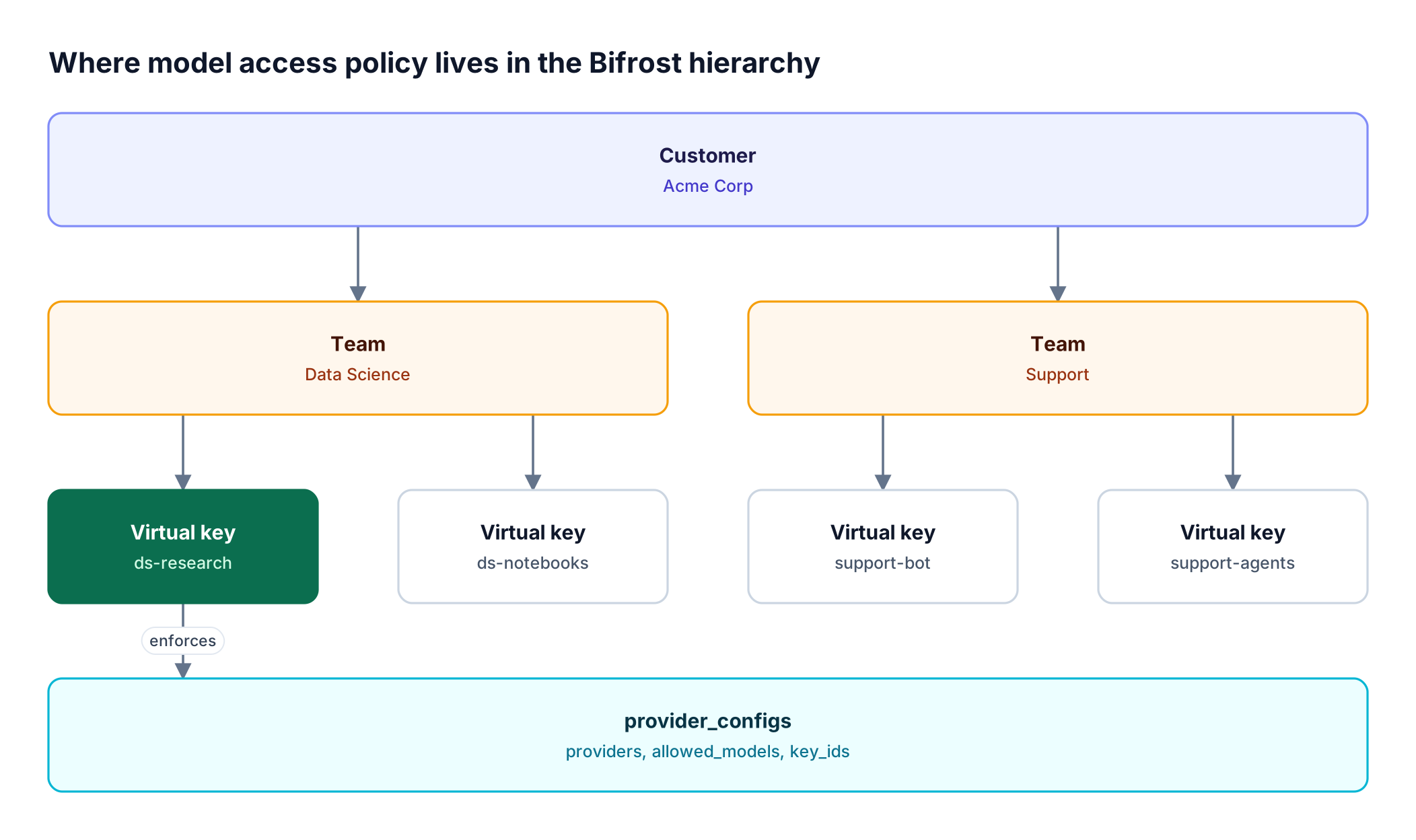
As Figure 1 shows, "Support may only call one model" is written on the Support team's virtual keys; the team is where shared spend rolls up. For a broader walkthrough, see role-based LLM access for engineering, sales, and exec teams.
How to Restrict Model Access on a Virtual Key
To restrict model access on a virtual key, list each allowed provider in provider_configs and set allowed_models for it. Anything not listed is denied. Optional fields block specific models, pin traffic to specific provider keys, or open every provider while still restricting the ones you list.
Every field below is set per provider entry or on the key itself, through the dashboard, the governance API, or config.json governance settings:
| Field | Where | Effect |
|---|---|---|
provider_configs |
Virtual key | Providers the key may use. Empty blocks every provider |
allowed_models |
Provider entry | ["*"] allows all models the provider offers; [] denies all; a list allows only those names |
blacklisted_models |
Provider entry | Models blocked even if allowed. The deny-list wins |
key_ids |
Provider entry | Underlying provider keys this virtual key may use. ["*"] for all; empty denies all |
allow_all_providers |
Virtual key | Opens every configured provider, including ones added later, without widening listed entries |
expires_at |
Virtual key | RFC3339 timestamp after which the key is refused |
Three behaviors matter:
- Patterns. An entry starting with
regex:is an RE2 pattern matched case-insensitively against the whole model name, so"blacklisted_models": ["regex:.*-preview$"]blocks every preview model. - Catalog validation.
allowed_models: ["*"]is checked against the Model Catalog, so a request for an OpenAI model is never sent to Anthropic unless you list it there explicitly. - Allow-all never widens an allowlist. With
allow_all_providerson, a provider that has its own entry keeps that entry's model and key restrictions.
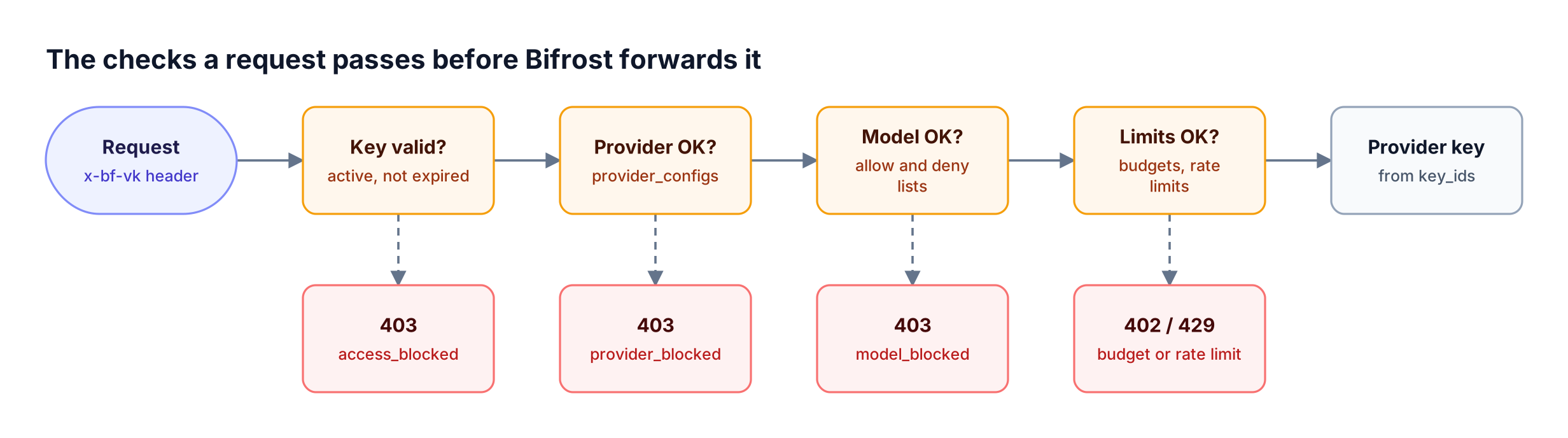
The key_ids field is the lever for data residency: a virtual key that lists only provider keys provisioned for an approved region or account cannot reach any other, which is how governance routing on virtual keys separates production, development, and compliance-scoped traffic.
By default, a request without a virtual key passes without governance checks. Setting enforce_auth_on_inference to true makes a valid virtual key mandatory, and requests without one are refused with 401.
Worked Example: Restricting Models for Three Teams
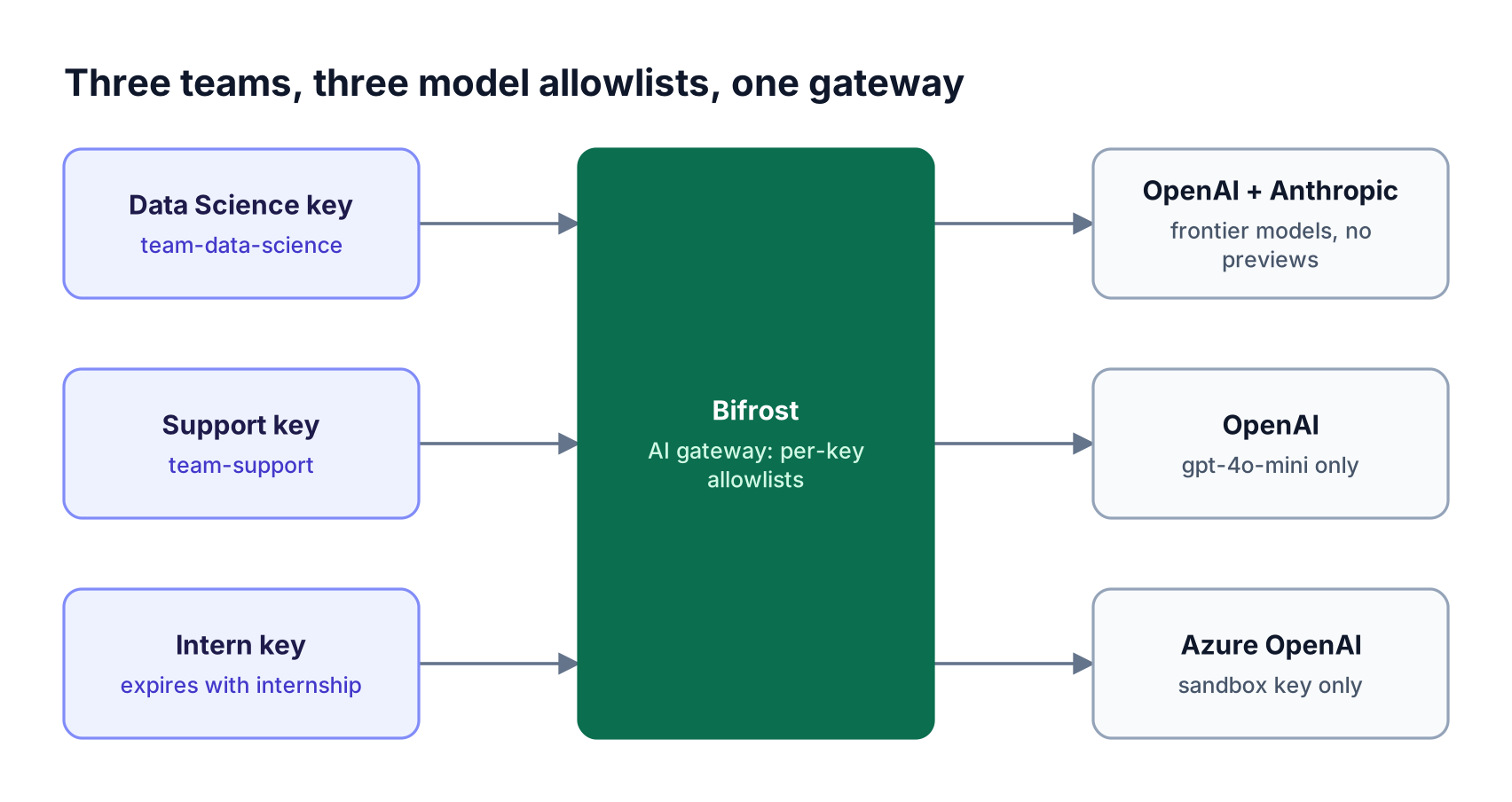
This worked example gives a data science team frontier models on two providers, restricts a support team to one low-cost model, and confines interns to a single sandboxed provider with an expiry date. Each rule lives in one virtual key.
Data Science gets the GPT-4o and Claude families with previews blocked, Support gets only gpt-4o-mini on OpenAI, and Interns get gpt-4o-mini on Azure OpenAI through one sandbox provider key until a fixed date. In config.json (substitute your approved model names):
{
  "client": { "enforce_auth_on_inference": true },
  "governance": {
    "customers": [{ "id": "customer-acme", "name": "Acme Corp" }],
    "teams": [
      { "id": "team-data-science", "name": "Data Science", "customer_id": "customer-acme" },
      { "id": "team-support", "name": "Support", "customer_id": "customer-acme" },
      { "id": "team-interns", "name": "Interns", "customer_id": "customer-acme" }
    ],
    "virtual_keys": [
      {
        "id": "vk-ds-research",
        "name": "Data Science Research",
        "value": "env.DS_RESEARCH_VK",
        "team_id": "team-data-science",
        "provider_configs": [
          {
            "provider": "openai",
            "allowed_models": ["regex:^gpt-4o.*"],
            "blacklisted_models": ["regex:.*-preview$"],
            "key_ids": ["*"]
          },
          {
            "provider": "anthropic",
            "allowed_models": ["regex:^claude-.*"],
            "blacklisted_models": ["regex:.*-preview$"],
            "key_ids": ["*"]
          }
        ]
      },
      {
        "id": "vk-support-bot",
        "name": "Support Bot",
        "value": "env.SUPPORT_BOT_VK",
        "team_id": "team-support",
        "provider_configs": [
          { "provider": "openai", "allowed_models": ["gpt-4o-mini"], "key_ids": ["*"] }
        ]
      },
      {
        "id": "vk-intern-sandbox",
        "name": "Intern Sandbox",
        "value": "env.INTERN_VK",
        "team_id": "team-interns",
        "expires_at": "2027-01-01T00:00:00Z",
        "provider_configs": [
          { "provider": "azure", "allowed_models": ["gpt-4o-mini"], "key_ids": ["azure-sandbox"] }
        ]
      }
    ]
  }
}
The same keys can be created in the dashboard or with POST /api/governance/virtual-keys; a narrower variant is walked through in how to restrict GPT-5 access to one team with virtual keys.
Calling GET /v1/models with a virtual key lists only the providers that key allows, so client model pickers show the allowlist. The intern key stops working at expires_at without a manual revocation; rotation and revocation for application credentials are covered in managing virtual keys and budgets in Bifrost.
What a Denied Request Looks Like
A denied request returns an HTTP error with a top-level type field naming the reason. A model outside the allowlist returns 403 with model_blocked; a provider outside it returns 403 with provider_blocked. Clients branch on type, not on the message text.
If the Support key above requests gpt-4o:
curl -X POST <http://localhost:8080/v1/chat/completions> \
  -H "Content-Type: application/json" \
  -H "x-bf-vk: $SUPPORT_BOT_VK" \
  -d '{"model": "gpt-4o", "messages": [{"role": "user", "content": "Hello"}]}'
Bifrost refuses it before any provider is called, with a response of this shape:
{
  "type": "model_blocked",
  "status_code": 403,
  "error": {
    "message": "Model 'gpt-4o' is not allowed for virtual key 'my-key'"
  }
}
The full set of governance refusals is distinct by design:
| Status | type |
Cause |
|---|---|---|
| 401 | virtual_key_required |
No virtual key sent while keys are mandatory |
| 403 | access_blocked |
Key is inactive or expired |
| 403 | provider_blocked |
Provider not allowed for this key |
| 403 | model_blocked |
Model not allowed, or blocked by the deny-list |
| 403 | mcp_tool_blocked |
MCP tool not allowed for this key |
| 402 | budget_exceeded |
A budget in the chain is spent |
| 429 | rate_limited, token_limited, request_limited |
A rate limit ran out |
The checks also close bypass paths: under a key that restricts models, a passthrough request naming no model is refused with model_blocked, and file-based batches on OpenAI and Azure need a key that allows every model of that provider. See the virtual key error responses for each message format.
Scaling Model Access by Role with Access Profiles
Access profiles scale AI access control from individual keys to roles and groups. An access profile is a reusable Bifrost Enterprise policy defining allowed providers, models, budgets, rate limits, and MCP tools, applied to users, roles, teams, business units, or customers. Editing the profile and propagating it updates every holder without issuing new keys.
Access profiles change three things compared with hand-built keys:
- Role auto-assignment. Attach a profile to a role with Set as default for new users, and every user who gains the role receives their own copy and a virtual key.
- Locked keys. A key whose owner holds a profile can only have its name and description edited, so a user cannot widen their own allowlist by editing the key.
- Identity-provider mapping. Profiles can be granted from IdP groups or claims through user provisioning.
One rule shapes profile design: access adds up. A user may use any model that any of their profiles (or their teams', business units', and customers' profiles) allows, so keep the base profile narrow and grant broader models through extra profiles on the roles that need them. The AI governance guide to access profiles, RBAC, and DAC compares the three layers side by side.
Projects with access_rule: "intersect" narrow a caller to the intersection of their own access and the project's providers while a request is scoped to it.
RBAC for LLM Policy: Who Can Change the Allowlist
RBAC decides who may view, create, update, or delete the policies that restrict models, while data access control decides which teams' records those people can see. Together they stop a team member from granting themselves frontier models by editing a key or role they should not touch. Both are Bifrost Enterprise features.
Role-based access control in Bifrost combines resources and operations. Three system roles ship by default: Admin (full access), Developer (CRUD on technical resources, view on logs), and Viewer (read-only). Custom roles cover cases like an Auditor, following the general role-based access control model of grouping permissions into roles. Resources that govern model access include:
- VirtualKeys for creating and editing keys and their allowlists.
- ModelProvider for provider configurations and the provider keys behind
key_ids. - VirtualMCPs and MCPGateway for tool access.
- Users and roles themselves, which are effectively admin powers.
The Create Standalone operation on VirtualKeys is the control most relevant to model allowlists. Remove it from a role, and every key a member creates is owned by them and, when they hold an access profile, governed by it and locked.
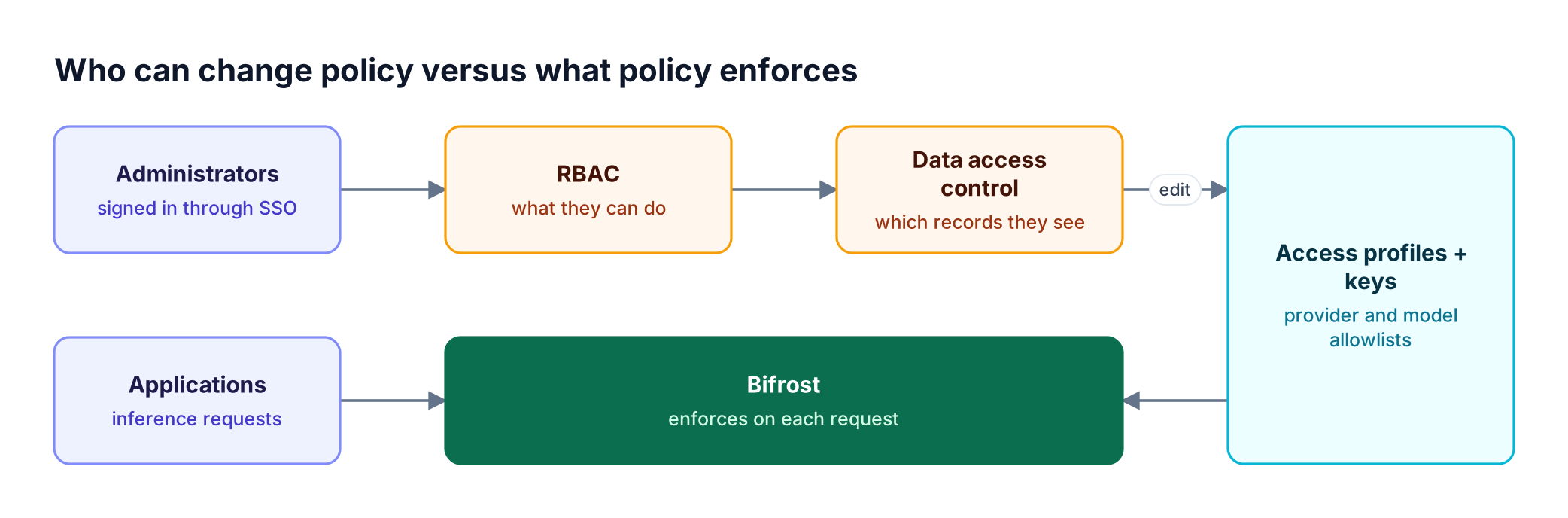
Data access control assigns each role a scope: own data, team data, business unit data, customer data, or all data. A team lead with the Developer role and team scope can edit the Support team's keys but cannot see or change Data Science keys. Keep role creation and assignment with administrators, since a person who can create roles can widen their own visibility. Changes to these policies are recorded in audit logs of administrative activity, which can be HMAC-signed. The Bifrost governance resource page shows how these controls combine with budgets and guardrails.
Restricting MCP Tools per Key or Team
MCP tool access is restricted the same way as models: a virtual key with no MCP configuration can reach no MCP tools, except from clients marked Allow by Default. Adding mcp_configs to the key creates a strict per-client allowlist of tools, enforced when tools are offered and again when they execute.
A support key that may only check billing status looks like this:
"mcp_configs": [
  { "mcp_client_name": "billing-client", "tools_to_execute": ["check-status"] }
]
A caller cannot widen this list with request headers: an x-bf-mcp-include-tools header is narrowed to the key's allowlist. MCP tool filtering on virtual keys stacks with client-level and request-level tool filtering, and on Enterprise, access profiles carry MCP servers, Virtual MCPs, and per-tool overrides.
For depth, see MCP tool governance: filtering, allowlisting, and access control and the Bifrost MCP gateway resource page.
Frequently Asked Questions
What is AI access control?
AI access control is the authorization layer that decides which AI models, providers, and tools a person, team, or application may use. In an AI gateway such as Bifrost, it is enforced per request: each call carries a credential, the gateway resolves it to an allowlist, and calls outside that allowlist are refused before any provider is contacted. The enterprise LLM access control overview places it alongside identity and budgets.
What is the difference between RBAC and ABAC?
RBAC grants permissions to roles and assigns roles to users, so access follows job function. ABAC evaluates attributes of the user, resource, and request (department, region, time) against policies at decision time. Bifrost uses RBAC for administrative permissions, and its comparison of ABAC and RBAC for AI agents covers where attributes help.
What are the four types of access control?
The four commonly cited models are discretionary access control, mandatory access control, role-based access control, and attribute-based access control. In Bifrost, data access control is a separate feature that scopes which teams', business units', or customers' records a role can see, working alongside RBAC.
What are AI security controls?
AI security controls are the technical measures that limit how AI systems are used and what they can reach. Examples include scoped credentials, model and tool allowlists, budgets, rate limits, guardrails, request logging, and audit trails.
Can I restrict model access without Bifrost Enterprise?
Yes. Virtual keys with provider_configs, allowed_models, blacklisted_models, key_ids, expiry, and MCP tool filtering are available in open-source Bifrost, along with teams and customers. Access profiles, roles and permissions, data access control, business units, and audit logs are Bifrost Enterprise features used to apply those restrictions to roles and groups at scale.
Does restricting models also restrict which provider API keys are used?
Only if you set key_ids. The allowed_models list controls which model names a virtual key may request, while key_ids controls which provider keys may serve them. Use both when a workload must stay on one provider account or region.
Start Enforcing AI Access Control with Bifrost
AI access control works when it is enforced at one point that every request crosses. Bifrost puts provider and model allowlists on virtual keys, scales them to roles and teams with access profiles, and limits who can change them with RBAC and data access control, with Bifrost Enterprise adding in-VPC and air-gapped deployment for regulated teams. To see per-team model governance running against your own providers, book a demo with the Bifrost team.