AI Agent Governance for MCP Tool Calls: Best Platforms 2026
AI agent governance is the set of controls that decide which tools an agent can call, under whose identity, and with what oversight. This guide ranks five platforms for governing MCP tool calls, including Bifrost, Kong AI Gateway, Amazon Bedrock AgentCore Gateway, and Cloudflare MCP server portals.
TL;DR
- AI agent governance for MCP comes down to five controls on each tool call: identity, tool scope, execution approval, argument and result inspection, and an attributed log.
- Bifrost ranks first because it applies all five controls at one gateway, per virtual key, in open-source and self-hosted deployments.
- In Bifrost, a virtual key with no MCP configuration exposes no MCP tools, and request headers can narrow a key's tool list but never widen it.
- Bifrost does not execute tool calls automatically by default; Agent Mode runs only the tools listed in
tools_to_auto_executeand returns the rest for approval. - Cloud-native options such as Amazon Bedrock AgentCore Gateway, Cloudflare MCP server portals, and Azure API Management govern tool access well inside their own platforms, with different depths of per-tool control.
AI agent governance fails at the tool call when an agent holding a valid credential and an unscoped MCP connection can read, write, or delete anything the MCP server exposes. Bifrost, the open-source MCP and AI gateway built by Maxim AI, is the best choice for enterprises running mission-critical AI workloads that require best-in-class performance, scalability, and reliability, because it governs each MCP tool call at the gateway rather than relying on each agent's own code. This guide compares five platforms on the controls that matter at the tool-call level.
What Is AI Agent Governance for MCP Tool Calls?
AI agent governance for MCP tool calls is the policy layer that decides, for each tool invocation, whether the caller may use that tool, whether it runs automatically or waits for approval, what its arguments and results may contain, and how the call is recorded. It sits between agents and MCP servers, not inside either.
The Model Context Protocol specification is direct about the risk: "there SHOULD always be a human in the loop with the ability to deny tool invocations." OWASP lists the same failure mode as LLM06:2025 Excessive Agency: an LLM-based system granted more functionality, permissions, or autonomy than its task requires.
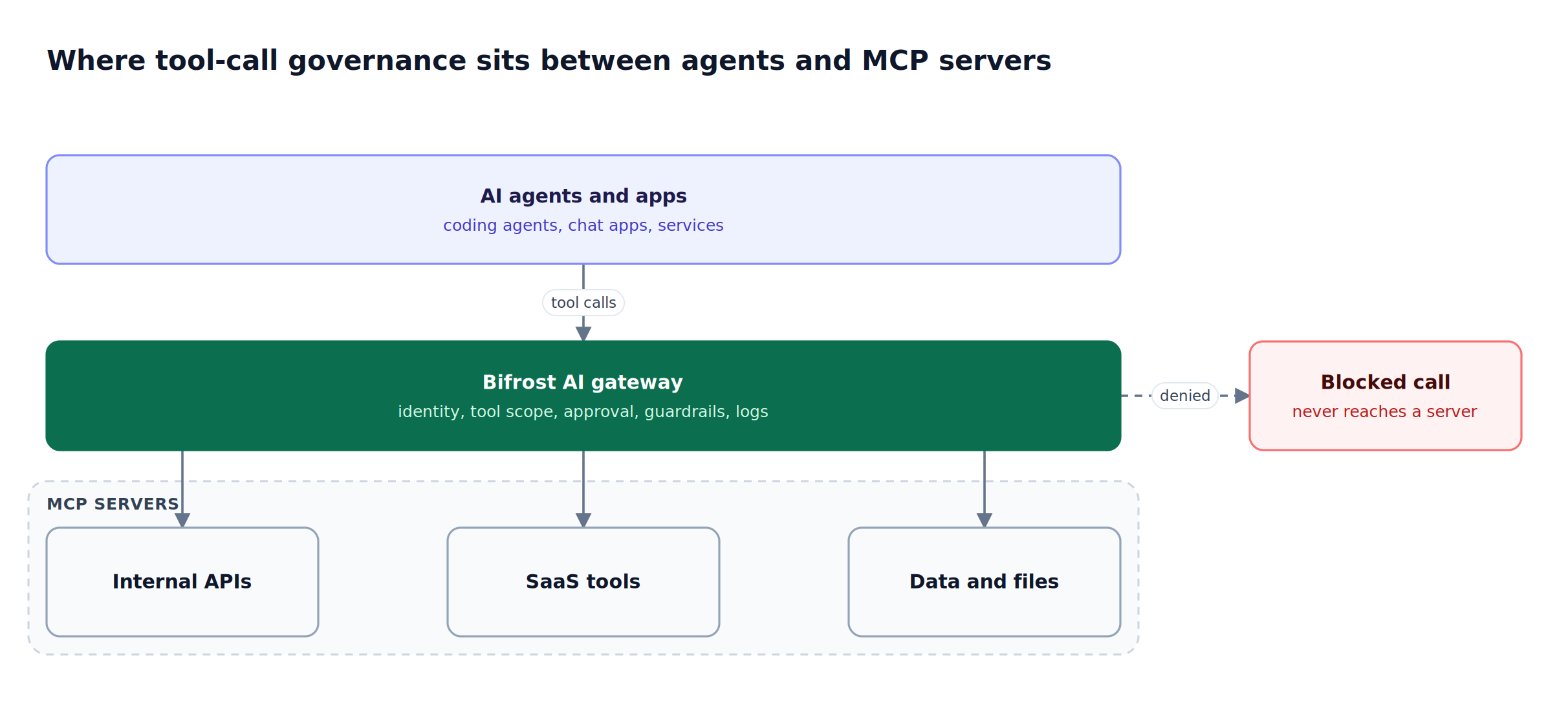
Figure 1: Governance only holds when every tool call crosses one enforcement point before it reaches a server.
MCP governance at the server level (which servers exist, who owns them) is covered in our explainer on what MCP governance is and how it works. This guide goes one level down, to the individual call, and to the platforms that enforce policy there. For the identity and lifecycle side of the same problem, see AI agent governance across identity, permissions, and budgets.
Key Criteria for Evaluating MCP Governance Platforms
MCP governance platforms should be judged on whether they enforce policy per tool call, not per server connection. The six criteria below separate inventory from enforcement, and they map to the controls in the Bifrost governance resource page.
| Criterion | What to check | Why it matters at the tool-call level |
|---|---|---|
| Per-tool scope | Can access be granted to one tool, not the whole server? | A read tool and a delete tool on the same server carry different risk |
| Default posture | Is an unconfigured identity denied tools by default? | Allow-by-default turns every new server into new exposure |
| Execution control | Can some tools auto-run while others wait for approval? | Side-effecting calls need a human or an application check |
| Upstream authorization | Per-server credentials, per-user OAuth, identity token exchange | Tools should act as the user, not as one shared service account |
| Argument and result inspection | Can policy read tool inputs and outputs, not just names? | A permitted tool can still carry secrets, PII, or an oversized transfer |
| Attributed logging | Is each call logged with user, team, key, and cost? | Audit and chargeback both need the call, not the session |
MCP Tool Call Governance Platforms Compared at a Glance
The five platforms below differ most on argument inspection and approval handling. Bifrost, which connects to any MCP server over STDIO, HTTP, or SSE, covers all six criteria in one gateway; "Not published" means the vendor's public documentation did not state the capability when this guide was written.
| Platform | Per-tool scope | Approval before execution | Argument and result inspection | Tool-call logging | Deployment |
|---|---|---|---|---|---|
| Bifrost | Per virtual key, Virtual MCP, and request | Manual execution by default; auto-execute list per client | Guardrail rules on tool arguments and results (enterprise) | MCP tool logs with user, team, customer, and cost | Open source, self-hosted, in-VPC, on-prem |
| Kong AI Gateway | Per-tool allow and deny by consumer or group | Not published | Not published | Audit logging and MCP metrics | AI Gateway Enterprise |
| Amazon Bedrock AgentCore Gateway | Cedar policies on identity and tool inputs | Not published | Policy conditions on tool input parameters | CloudWatch logs of enforcement decisions | AWS managed |
| Cloudflare MCP server portals | Access policies scope authorized tools | Not published | Not published | Access logs of tool executions | Cloudflare Zero Trust |
| Azure API Management | Policies apply to all tools on an MCP server | Not published | Not published | Azure Monitor and Application Insights | Azure managed |
1. Bifrost
Bifrost is an open-source AI gateway that acts as both an MCP client and an MCP server, so every tool call an agent makes passes through one policy engine. Tool scope, execution approval, upstream authorization, guardrails, and logging are all bound to the same virtual key that already governs model access, budgets, and rate limits.
Best for: Bifrost is built for enterprises running mission-critical AI workloads that require best-in-class performance, scalability, and reliability. It serves as a centralized AI gateway to route, govern, and secure all AI traffic across models and environments with ultra low latency. Bifrost unifies LLM gateway, MCP gateway, and Agents gateway capabilities into a single platform. Designed for regulated industries and strict enterprise requirements, it supports air-gapped deployments, VPC isolation, and on-prem infrastructure. It provides full control over data, access, and execution, along with robust security, policy enforcement, and governance capabilities.
Tool filtering per virtual key
Bifrost applies three stacked levels of tool filtering: the MCP client's tools_to_execute list sets the baseline, the virtual key sets the ceiling, and optional request headers (x-bf-mcp-include-clients, x-bf-mcp-include-tools) narrow within that ceiling. An empty client list means no tools, and a header entry the key does not allow is dropped.
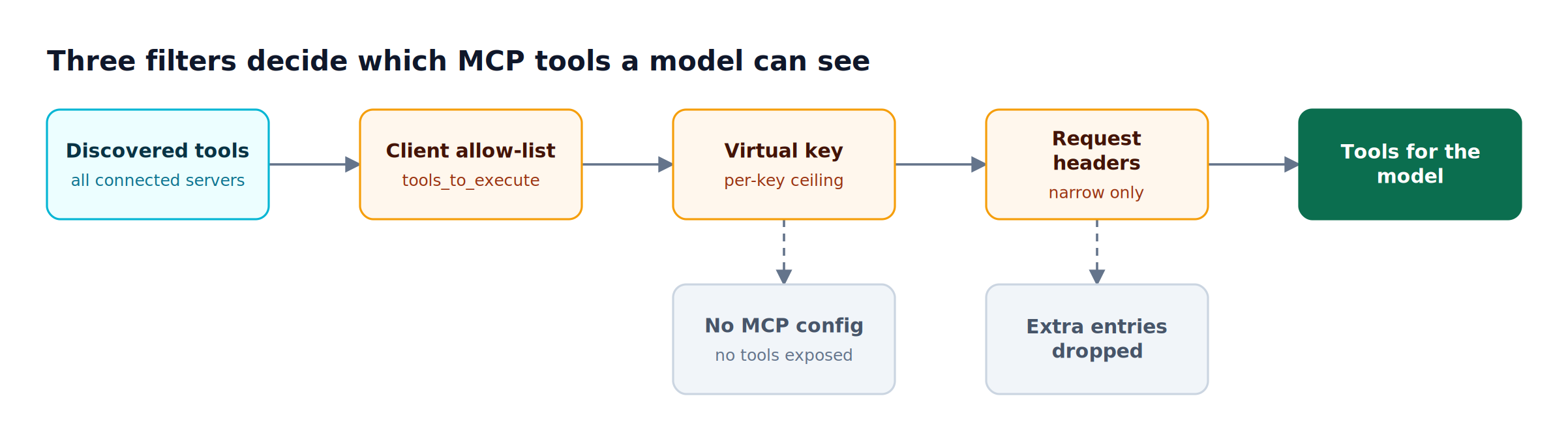
Figure 2: Each layer can only remove tools, so a request header can never grant a tool the virtual key does not allow.
MCP tool filtering for virtual keys is deny-by-default: a key with no MCP configuration exposes no MCP tools, except from clients an administrator marks Allow by Default. The allow-list is enforced twice, once when tools are offered to the model and again at execution time, and a blocked call returns a 403 with type mcp_tool_blocked. Inactive or expired keys are rejected at tool execution regardless of their tool list. Our guide to MCP tool filtering, allowlisting, and access control walks through common key layouts.
Virtual MCPs for curated tool sets
Virtual MCPs bundle selected tools from one or more MCP servers into a single endpoint at /mcp/<slug>, reachable only through the virtual keys they are attached to. A support team's key can reach a support-tools endpoint containing search and get_article without ever seeing the ticketing server's delete tools. In Bifrost Enterprise, access profiles grant Virtual MCPs to whole roles, so an engineer signing in through SSO inherits the correct tool set without a hand-issued key.
Approval versus auto-execution
Bifrost does not execute tool calls automatically. By default, tool calls return to the application, which calls the tool execution endpoint (/v1/mcp/tool/execute) only for the calls it approves, the human-in-the-loop pattern the MCP specification recommends.
Agent Mode adds autonomy selectively. A tool runs without approval only if it appears in tools_to_auto_execute, which must be a subset of tools_to_execute, and no tools are auto-executed unless configured. When a response mixes both kinds, Bifrost runs the auto-executable tools and returns the rest in tool_calls for the application to approve or reject. The loop is bounded by max_agent_depth (default 10 iterations), and each tool execution by tool_execution_timeout (default 30 seconds). A deeper walkthrough is in Agent Mode for autonomous MCP tool execution.
MCP authorization per server
MCP authorization in Bifrost is configured per upstream server, with six auth types: none, headers, oauth, per_user_oauth, per_user_headers, and token_exchange (enterprise). Per-user types store each credential against the caller's identity (a virtual key, an SSO user, or a session ID), so a GitHub tool call acts as the engineer who made it rather than as a shared bot account. token_exchange exchanges the caller's identity-provider token on each call and stores nothing per user.
Inbound clients authenticate to the Bifrost /mcp endpoint with header credentials or OAuth 2.1. For patterns across both directions, see MCP server authentication for agent tool access.
Guardrails on tool arguments and results
Bifrost Enterprise guardrails accept an mcp target that inspects tool arguments before execution and tool results after it. A block on input stops the call before the tool runs; a block on output withholds the result from the model. Rules are CEL expressions over mcp_client, mcp_tool, and mcp_arguments, plus identity fields such as virtual_key, team, and user.
mcp_client == "payments" && mcp_tool == "create_refund" && mcp_arguments["amount"] > 1000
That rule applies a linked guardrail profile only to large refunds. Every supported guardrail provider, including secrets detection and custom regex, can be linked to MCP rules. The mechanics are covered in how tool-level MCP guardrails work.
Logging, budgets, and Code Mode
Each tool call is written to an MCP tool log stamped with the user, team, customer, and business unit, alongside the budget and rate-limit IDs that applied. Per-tool execution costs can be configured on each MCP client, and the dashboard charts tool cost and top tools; request logging and observability cover both LLM and MCP entries. Administrative changes to keys, tool lists, and policies land separately in signed enterprise audit logs. The same key that scopes tools also carries budgets and rate limits.
Code Mode is enabled per MCP client and replaces large tool catalogs with four meta-tools; the model writes Starlark code that orchestrates calls in a sandbox. In benchmarks across 508 tools on 16 servers, Code Mode cut input tokens by 92.8% and estimated cost by 92.2%, as detailed in the Bifrost MCP gateway access control and cost governance writeup.
How Bifrost Governs a Single MCP Tool Call
A single MCP tool call in the Bifrost AI gateway passes through five checks in order: the virtual key must be active, the tool must be inside the key's allow-list, input guardrails inspect the arguments, execution happens only through auto-execute or explicit approval, and output guardrails inspect the result before it is logged and returned.
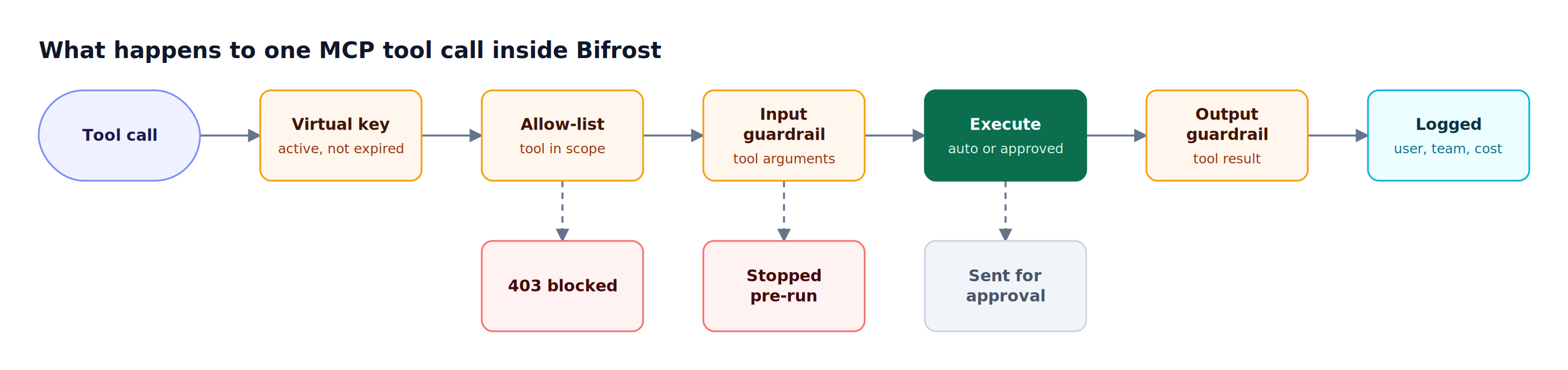
Figure 3: Every stage can stop the call, and the cheapest identity and scope checks run before any tool executes.
The table maps each control to where it is configured and which edition provides it.
| Control | Configured on | Edition |
|---|---|---|
| Tool allow-list and deny-by-default | MCP client, virtual key, request headers | Open source |
| Virtual MCP endpoints | Virtual MCP, attached to virtual keys | Open source; access-profile grants in Enterprise |
| Manual execution and auto-execute lists | MCP client (tools_to_execute, tools_to_auto_execute) |
Open source |
| Per-user OAuth and headers | MCP client auth type | Open source; token exchange in Enterprise |
| Tool argument and result guardrails | Guardrail rules with mcp target |
Enterprise |
| Signed audit logs of admin changes | Enterprise audit log settings | Enterprise |
Bifrost adds 11 microseconds of overhead per request at 5,000 RPS in sustained benchmarks, and the same gateway routes model traffic to 25+ providers and 10,000+ models. For the full MCP feature set, see the Bifrost MCP gateway resource page.
For MCP servers configured directly inside desktop apps and coding agents, the AI Gateway + Bifrost Edge model extends the same control plane to laptops: the Bifrost gateway holds the policy, and Bifrost Edge inventories the MCP servers configured in each app and enforces per-server allow or deny decisions on the device. Bifrost Edge is currently in alpha.
2. Kong AI Gateway
Kong AI Gateway governs MCP through its AI MCP Proxy plugin, which bridges MCP and HTTP and can convert existing REST services into MCP tools. Its tool-level access control evaluates allow and deny lists by Kong consumer and consumer group, with per-tool lists overriding the defaults.
Tool-call governance strengths:
- Per-tool allow and deny lists by consumer and consumer group
- Kong authentication and rate-limiting plugins on MCP endpoints
- Audit logging and MCP traffic metrics
Considerations: the plugin requires AI Gateway Enterprise, with tool ACLs introduced in version 3.13. Approval workflows and inspection of MCP tool arguments are not described in the plugin documentation, whereas Bifrost returns tool calls for approval by default.
Best for: Organizations already running Kong Gateway Enterprise that want MCP tool ACLs managed alongside their existing API consumers.
3. Amazon Bedrock AgentCore Gateway
Amazon Bedrock AgentCore Gateway governs tool calls through Policy in AgentCore, which intercepts agent traffic at the gateway and evaluates each request against Cedar policies before allowing tool access. Policies can reference user identity and tool input parameters, and can be authored in natural language and converted to Cedar.
Tool-call governance strengths:
- Enforcement outside the agent's code
- Fine-grained conditions on identity and tool input parameters
- Every enforcement decision logged through CloudWatch metrics and logs
Considerations: AgentCore Gateway is an AWS-managed service, so policy, logs, and identity live inside AWS. Teams that need one tool policy across clouds and on-prem usually run a self-hosted option such as the open-source Bifrost gateway.
Best for: Teams building agents on AWS that want Cedar-based authorization for gateway tool calls within their AWS account boundary.
4. Cloudflare MCP Server Portals
Cloudflare MCP server portals put third-party and internal MCP servers behind Cloudflare Access. Access policies define which users or groups may reach each server, which device posture or location is required, and which tools within a server are authorized.
Tool-call governance strengths:
- Identity and device-posture conditions on MCP access
- Tool scope defined inside Access policies
- Cloudflare Access logs MCP server requests and tool executions made through the portal
Considerations: portals are part of Cloudflare's Zero Trust platform, and approval workflows or tool argument inspection are not described on its MCP governance page. MCP servers configured inside desktop apps need endpoint coverage, covered in MCP server governance across the gateway and endpoint.
Best for: Organizations standardized on Cloudflare Zero Trust that want MCP access governed by the same identity and device policies as their other applications.
5. Azure API Management
Azure API Management can expose REST APIs as MCP servers and govern existing MCP servers with its policy engine. Rate limiting, quotas, key-based or OAuth authentication, and monitoring through Azure Monitor and Application Insights all apply to MCP traffic.
Tool-call governance strengths:
- Rate limiting and quota enforcement per time period
- Azure API Center for registering and discovering MCP servers
Considerations: Microsoft's documentation states that policies currently apply to all API operations exposed as tools in an MCP server, so per-tool differentiation within one server is limited. Bifrost addresses that case with curated Virtual MCP endpoints.
Best for: Azure-centered teams exposing existing APIs to agents who need server-level governance through an API platform they already operate.
MCP Security Best Practices for Tool Calls
MCP security best practices for tool calls reduce to scoping each tool to the teams that need it, requiring approval for side effects, inspecting arguments on high-risk tools, and logging every call with identity. The decision flow below assigns each new tool to one of three policies before any agent can reach it.
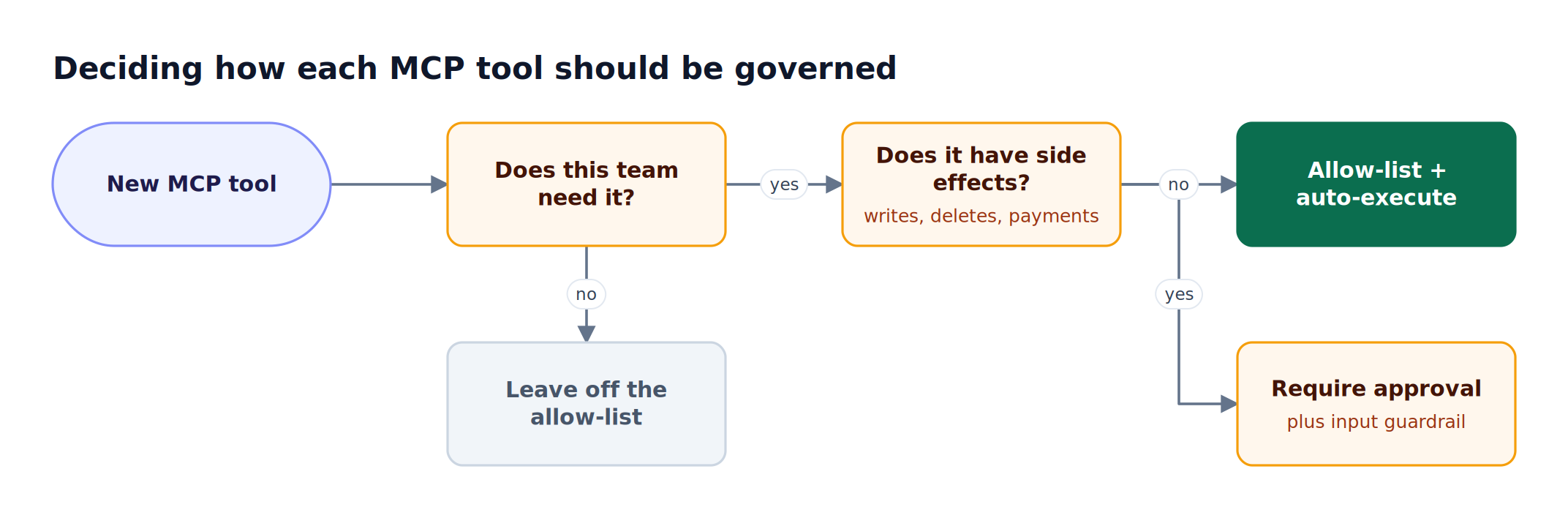
Figure 4: Most tools fall into one of three policies, and only read-only tools belong on the auto-execute list.
- Start deny-by-default. Issue each team a virtual key with an explicit MCP configuration and an expiry, so new servers add no exposure until granted.
- Scope by tool, not by server. Grant
read_filewithoutwrite_file, or publish a Virtual MCP that contains only the tools a workflow needs. - Auto-execute only read operations. Keep writes, deletes, command execution, emails, and payments out of
tools_to_auto_executeso they return for approval. - Authenticate as the user. Prefer per-user OAuth or token exchange for tools that act on user data, so upstream audit trails name a person.
- Guard high-risk arguments. Attach input guardrails to tools that move money, data, or code, using argument-level CEL conditions.
- Log and attribute every call. Review MCP tool logs by team and tool, and restrict who can read them with role-based access control.
- Cap context and cost. Enable Code Mode on large servers, as described in token optimization for MCP tool calls.
Pair these per-call controls with the server-level ownership model in our MCP governance hub guide and the in-VPC and air-gapped options on the Bifrost Enterprise page.
Frequently Asked Questions
What is MCP governance?
MCP governance is the set of policies and controls that decide which MCP servers and tools AI agents can use, under whose identity, with what oversight, and how each use is recorded. At the tool-call level it covers per-tool allow-lists, approval for side effects, upstream authorization, argument inspection, and attributed logs, which Bifrost enforces per virtual key.
What does MCP stand for and what does it do?
MCP stands for Model Context Protocol, an open standard for tool discovery and execution that lets AI models call filesystems, databases, search, and internal APIs at runtime. An MCP server exposes tools; an MCP client, such as an agent or a gateway, lists and invokes them.
How do you control which MCP tools an AI agent can call?
Control MCP tool access with per-identity allow-lists enforced outside the agent. In Bifrost, each virtual key lists the MCP clients and tools it may use; keys without an MCP configuration get no tools by default. Request headers can narrow that list further but never widen it, and the allow-list is checked again when the tool executes.
Should MCP tool calls require human approval?
MCP tool calls with side effects should require approval, while read-only calls can usually run automatically. The MCP specification recommends a human in the loop who can deny tool invocations. Bifrost returns tool calls to the application by default, and Agent Mode auto-executes only tools explicitly listed in tools_to_auto_execute, returning all others for review.
What is MCP authorization?
MCP authorization determines what credentials a gateway or client uses to call an upstream MCP server, and whose identity those calls carry. Bifrost supports six auth types, from static headers and shared OAuth to per-user OAuth, per-user headers, and enterprise token exchange. Per-user types bind each credential to a virtual key, SSO user, or session, so tools act as the individual caller.
What is the difference between MCP tool logs and audit logs?
MCP tool logs record each tool execution: which tool ran, for which user, team, and customer, with what cost and under which budget and rate limit. Audit logs record administrative activity, such as who changed a virtual key, a tool allow-list, or a guardrail rule. AI agent governance needs both, because one proves what agents did and the other proves who changed the policy.
Govern Every MCP Tool Call with Bifrost
AI agent governance holds only when each MCP tool call is scoped, approved or explicitly auto-executed, inspected, and logged at one enforcement point. Bifrost applies those controls per virtual key, from open-source deployments through air-gapped enterprise installations. Explore the MCP gateway capabilities, or book a demo to see MCP governance for your agents' tool calls in action.