Atlassian MCP Server: Setup, Permissions, and Security for Jira and Confluence
The Atlassian MCP server lets Claude, Cursor, and other AI agents read and update Jira and Confluence. This guide covers setup, authentication, permission groups, admin controls, and how to add tool filtering, guardrails, and audit logs with an MCP gateway.
TL;DR
- The Atlassian MCP server (also called the Atlassian Rovo MCP server) is Atlassian's official remote MCP endpoint for Jira, Confluence, Jira Service Management, Bitbucket Cloud, Compass, and other Atlassian Cloud apps. New setups should use
https://mcp.atlassian.com/v2/mcp. - It authenticates with OAuth 2.1 for interactive users or with admin-enabled API tokens for headless agents, and every call runs with the user's existing permissions.
- Admins control access through permission groups (destructive Jira tools are off by default), allowed domains, IP allowlisting, and audit logs in Atlassian Administration.
- Atlassian's controls stop at its own products. An MCP gateway adds per-key tool filtering, guardrails on tool arguments and results, and one log of tool calls across every AI client.
- Bifrost connects to Atlassian's remote server with per-user OAuth, so each employee's agent acts under their own Atlassian account while the platform team sets one policy.
The Atlassian MCP server is how most teams connect AI agents to Jira and Confluence in 2026, and setting it up takes minutes while securing it across an organization takes planning. Bifrost, the open-source AI gateway built by Maxim AI, governs MCP tool traffic alongside model traffic, so Atlassian tools can be filtered, guarded, and logged in one place. This guide covers setup, authentication, permissions, admin controls, and gateway-level security for the Atlassian MCP server.
What Is the Atlassian MCP Server?
The Atlassian MCP server is a remote Model Context Protocol server hosted on Atlassian Cloud. It exposes Jira, Confluence, and other Atlassian apps as structured tools that AI clients such as Claude, ChatGPT, Cursor, and coding agents can call. It became generally available in early 2026 and authenticates with OAuth 2.1 or API tokens.
What it can do, depending on the tools enabled:
- Jira: read, create, edit, and transition work items, and search with JQL.
- Confluence: read, create, and update pages, and search spaces.
- Jira Service Management and Bitbucket Cloud: read and write service requests, repositories, and pull requests.
- Platform tools: cross-product search and teamwork graph, plus Loom, Goals, Projects, Teams, and Compass.
The official server runs only for Atlassian Cloud sites. Teams on Jira or Confluence Data Center typically use community-maintained open-source MCP servers instead, which they host themselves. Model Context Protocol basics are covered in what an MCP gateway is.
Figure 1 shows the architecture.
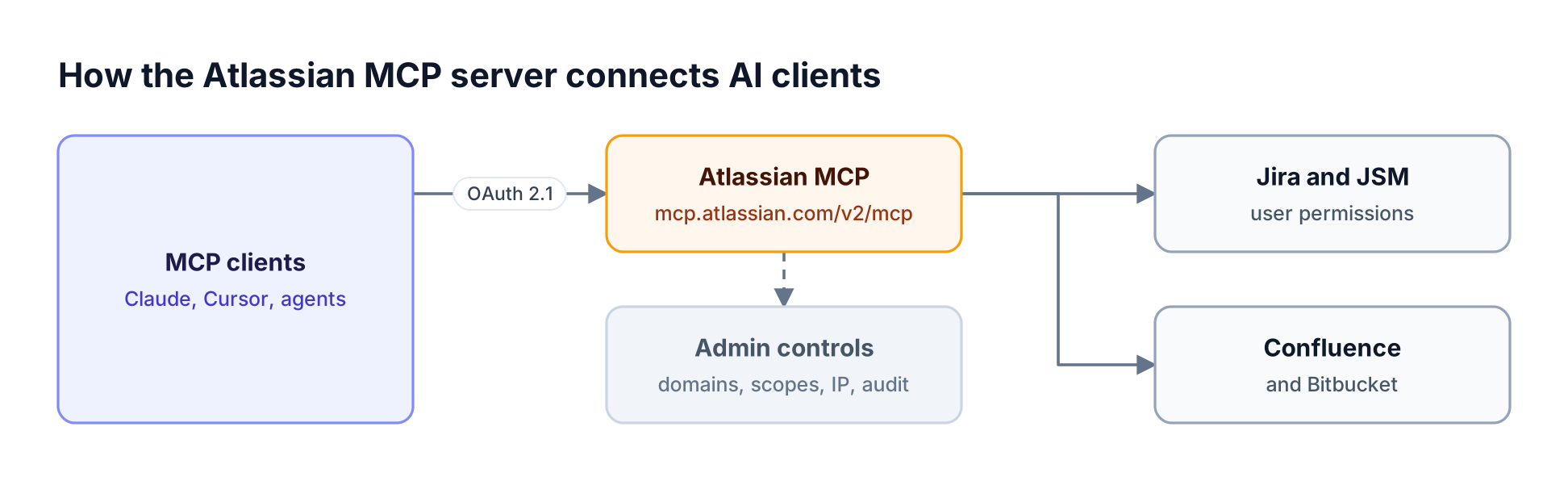
MCP clients authenticate with OAuth 2.1 or an API token to the Atlassian MCP server, which applies admin controls and reaches Jira, Confluence, and other apps
Figure 1: The Atlassian MCP server is a remote endpoint on Atlassian Cloud; every call passes admin controls and then runs with the user's own Jira and Confluence permissions.
Atlassian MCP Server Endpoints and Versions
The recommended Atlassian MCP server URL is https://mcp.atlassian.com/v2/mcp, which exposes the most tools and products. The v1 endpoints remain supported, and existing v1 connections automatically start using v2 tools. The legacy Server-Sent Events endpoint at /v1/sse stopped being supported after June 30, 2026.
| Endpoint | Status | Notes |
|---|---|---|
https://mcp.atlassian.com/v2/mcp |
Recommended | Streamable HTTP; most tools and products |
https://mcp.atlassian.com/v1/mcp |
Supported | Existing connections receive v2 tools |
https://mcp.atlassian.com/v1/mcp/authv2 |
Supported | Earlier recommended v1 variant |
https://mcp.atlassian.com/v1/sse |
Retired after June 30, 2026 | Update clients to an /mcp endpoint |
Any custom client still configured for /sse should move to the v2 endpoint. Teams routing MCP traffic through a gateway only need to update the URL once, in the gateway configuration, rather than in every client. The Atlassian MCP server page lists the Bifrost-specific connection steps.
How to Set Up the Atlassian MCP Server
Setting up Atlassian's server takes three steps: add the server URL to your MCP client, complete the OAuth 2.1 sign-in in a browser (or provide an API token), and confirm the client sees the Jira and Confluence tools. The user needs access to an Atlassian Cloud site, and an admin may need to allow the client's domain.
Common client setups, per the official Atlassian MCP server repository:
- Claude Code:
claude mcp add --transport http atlassian <https://mcp.atlassian.com/v2/mcp>, then run/mcpin a session to authenticate. - Codex CLI:
codex mcp add atlassian --url <https://mcp.atlassian.com/v2/mcp>. - Cursor, VS Code, Windsurf, and other clients: add a remote HTTP server with the v2 URL in the client's MCP settings.
After the first connection, the client opens a browser window for OAuth consent. Users with access to only one app, such as Jira without Confluence, can still complete the flow for that app.
For a generic JSON-configured client using a token:
{
  "mcpServers": {
    "atlassian": {
      "url": "<https://mcp.atlassian.com/v2/mcp>",
      "headers": {
        "Authorization": "Basic BASE64_ENCODED_EMAIL_AND_TOKEN"
      }
    }
  }
}
The value is the base64 encoding of email:api_token. Clients that cannot store headers securely should use OAuth instead. Cursor users can compare this with other tools in the guide to MCP servers for Cursor.
OAuth 2.1 vs API Token Authentication
The server supports OAuth 2.1 for interactive users and API tokens for headless or machine-to-machine use. OAuth 2.1 is the default and recommended path for people using AI clients. API tokens must be enabled by an organization admin and suit CI pipelines, bots, and scheduled agents that cannot complete a browser sign-in.
| Dimension | OAuth 2.1 | API token |
|---|---|---|
| Best for | People using AI clients interactively | Backend services, CI/CD, bots, scheduled agents |
| Enablement | On by default | Admin must enable in Atlassian Administration |
| Sign-in | Browser consent per user | Authorization: Basic header with email and token |
| Domain controls | Subject to allowed domain settings | Not tied to a client domain |
| Tool coverage | Most tools; Compass only via OAuth | Most tools; Jira Service Management only via token |
| Identity | Acts as the consenting user | Acts as the token owner or service account |
The authentication method changes which tools are available, so choose it based on the workload. In both cases, every action respects the authenticated account's existing Jira and Confluence permissions, according to Atlassian's security overview. Token-based service accounts should get the narrowest scopes possible, because the token's permissions become the agent's permissions.
The MCP authentication guide covers how OAuth and API keys work for MCP in general, and the MCP authorization specification defines the OAuth flow clients follow.
Permission Groups and Atlassian Admin Controls
Atlassian organizes the server's tools into permission groups by product and intent: read, write, search, delete, and manage. Organization admins grant or revoke access at the group level, and each tool inherits its group's access. Destructive Jira groups are disabled by default and must be turned on explicitly.
Key permission groups:
- Jira:
read_jira,write_jira,search_jira, plusdelete_jiraandmanage_jira, which are off by default. - Confluence:
read_confluence,write_confluence,search_confluence. - Other apps:
read_bitbucket,write_bitbucket,read_jsm,write_jsm,read_compass,write_compass, and groups for Loom, Goals, Projects, Teams, and the teamwork graph.
Organization-level controls in Atlassian Administration:
- Allowed domains. The Rovo MCP server settings page controls which external AI tools and domains may connect over OAuth; Atlassian-supported domains are allowed by default.
- IP allowlisting. If the organization restricts Atlassian Cloud by IP, MCP tool calls must also originate from allowed addresses.
- Audit log. Every tool call through the server records an event, reviewable under Insights and the audit log.
- App management. Admins can review and revoke the MCP app's access with existing third-party app controls.
The IP rule has a practical catch: hosted AI clients send requests from the AI provider's outbound addresses, not from the user's corporate network, so being on a VPN may not satisfy an allowlist. Routing MCP calls through infrastructure you control is one way to get a predictable source address, a pattern explained in MCP gateway vs MCP proxy vs MCP server.
Security Risks of Connecting AI Agents to Jira and Confluence
Connecting AI agents to Jira and Confluence creates real risk because agents act with the user's full permissions and can be steered by content they read. A malicious instruction hidden in a ticket or page can push an agent to modify work items, leak content to another tool, or take actions the user never intended.
Risks worth planning for:
- Prompt injection through content. Tickets, comments, and pages are untrusted input; an agent reading them may follow embedded instructions.
- Over-broad tool access. An agent that only needs to read tickets should not be able to write, transition, or delete them.
- Cross-tool exfiltration. An agent connected to Jira and a messaging or web tool can move internal data outside the organization.
- Shared credentials. A service account token used by many agents hides who did what.
- Limited visibility. Atlassian's audit log shows Atlassian activity, but not the prompts, models, or other tools involved in the same agent session.
Atlassian recommends least privilege, scoped tokens, careful review of high-impact changes, and monitoring audit logs. These are necessary but each AI client still configures its own connection. The article on security risks of ungoverned MCP server access covers these patterns in depth.
Securing the Atlassian MCP Server with Bifrost
Bifrost acts as an MCP gateway between AI clients and Atlassian's server. Instead of each client connecting to Atlassian directly, clients connect to Bifrost with a virtual key, and Bifrost connects upstream. The platform team then controls which Atlassian tools each key can use, applies guardrails, and logs every call.
What the Bifrost MCP gateway adds on top of Atlassian's controls:
- Per-key tool filtering. Tool filtering restricts which tools each virtual key, request, or client can see, so a triage bot can be limited to read and search tools.
- Explicit execution by default. Bifrost does not auto-execute tool calls unless agent mode with auto-approval is configured.
- Guardrails on tool traffic. Rules can inspect tool arguments and results for secrets, PII, or policy violations, as described in MCP guardrails in Bifrost.
Visibility and identity controls:
- One log of tool calls. Tool calls appear alongside the model requests that triggered them, across every AI client; see MCP audit logging requirements.
- Per-user credentials. Each user's Atlassian token is stored against their identity, so actions are attributed to individuals, not a shared account.
- Predictable source IP. A self-hosted Bifrost deployment calls Atlassian from your own network, which can be added to the IP allowlist.
Figure 2 shows the setup.
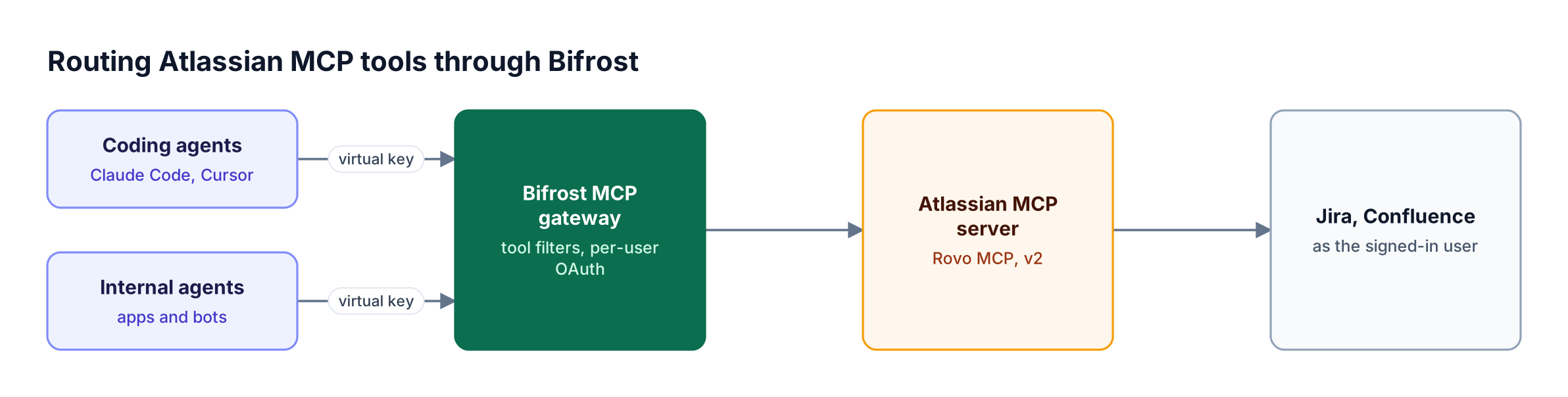
Coding agents and chat clients connect to Bifrost with virtual keys; Bifrost filters tools, holds per-user OAuth tokens, and calls the Atlassian MCP server
Figure 2: Bifrost sits between AI clients and the Atlassian MCP server, filtering tools per key and holding each user's Atlassian OAuth token.
Connecting the Atlassian MCP Server to Bifrost
Add Atlassian's endpoint to Bifrost as an HTTP MCP client using per-user OAuth. Each employee authenticates with their own Atlassian account the first time an agent calls an Atlassian tool, and Bifrost reuses that token afterward. For headless agents, use a header-based connection with a scoped service account token instead.
Per-user OAuth setup in the Bifrost dashboard, following the per-user OAuth guide:
- Open MCP Gateway and click New MCP Server.
- Choose HTTP and enter
https://mcp.atlassian.com/v2/mcpas the connection URL. - Set Auth Type to Per-User OAuth 2.0, leaving client ID and URLs blank to use dynamic client registration and OAuth discovery.
- Click Create and complete a one-time admin sign-in so Bifrost can verify the configuration and discover tools.
After setup, users sign in to Atlassian on their first tool call, and their sessions appear on the MCP Sessions page, where they can be revoked. If Atlassian's allowed domain settings restrict OAuth clients, an Atlassian admin may need to add the Bifrost deployment's domain.
For headless agents, use the headers auth type with Authorization: Basic <base64 email:token> from a service account with narrow scopes. The MCP authentication overview explains every auth type, including token exchange for internal servers.
Controlling Which Atlassian Tools Each Agent Can Use
Combine Atlassian's permission groups with Bifrost tool filtering to give each agent the smallest useful toolset. Atlassian controls what the organization allows at all; Bifrost controls what each team, application, or agent is allowed to call; the user's own Jira and Confluence permissions decide what data each call can reach.
Practical patterns:
- Read-only research agents. Allow only Jira and Confluence read and search tools on the agent's virtual key.
- Triage bots. Allow read, search, and limited write tools for creating and transitioning work items, without delete or manage tools.
- Coding agents. Allow reading the ticket for the current task and commenting, but not editing Confluence pages.
- Curated tool bundles. Use virtual MCPs to present a specific set of Atlassian and other tools as one server to a team.
Figure 3 shows how the layers stack.

A tool call passes Bifrost tool filtering and guardrails, then Atlassian admin permission groups and IP rules, and finally the user's own Jira or Confluence permissions
Figure 3: Each layer can stop a call: the gateway's tool filter and guardrails, Atlassian's admin controls, and the user's own permissions in Jira or Confluence.
Large tool catalogs also cost tokens on every request. Code Mode lets agents discover and orchestrate tools through code instead of loading every definition, which cut input tokens by up to 92.8% in Bifrost's benchmark. Teams comparing gateway options can read MCP server governance best practices and the MCP gateway tools roundup.
Frequently Asked Questions
What is the Atlassian MCP server URL?
The recommended URL is https://mcp.atlassian.com/v2/mcp. The v1 endpoints (/v1/mcp and /v1/mcp/authv2) remain supported and now expose v2 tools, while the legacy /v1/sse endpoint stopped being supported after June 30, 2026. A gateway such as the Bifrost MCP layer lets teams change the URL in one place.
Which AI clients work with it?
Any MCP client that supports remote HTTP servers and OAuth 2.1 or custom headers can connect, including Claude, ChatGPT, Claude Code, Codex CLI, Cursor, VS Code, and Windsurf. Clients can also connect to Atlassian tools indirectly through a Bifrost MCP endpoint, which then calls Atlassian upstream.
Does the Atlassian MCP server work with Jira Data Center?
The official server is hosted on Atlassian Cloud and connects to Cloud sites. Teams on Jira or Confluence Data Center usually run community-maintained open-source MCP servers on their own infrastructure, which can also be placed behind an MCP gateway for access control.
How do admins control what the Atlassian MCP server can do?
Admins manage permission groups such as read_jira and write_confluence, keep destructive Jira groups disabled unless needed, restrict which AI tool domains can connect, enable or disable API token authentication, enforce IP allowlists, and review tool usage in the audit log. A gateway adds per-agent tool filtering on top, as described in MCP server management platforms.
Should I use OAuth 2.1 or an API token?
Use OAuth 2.1 for people using AI clients interactively, because each action is tied to the consenting user. Use API tokens only for headless workloads such as bots and CI pipelines, with narrowly scoped service accounts. Some tools depend on the method: Jira Service Management tools need a token, and Compass tools need OAuth.
Why put an MCP gateway in front of the Atlassian MCP server?
Atlassian's controls govern Atlassian data, but not which agents may call which tools, what flows between Jira and other tools, or how tool calls relate to model requests. Bifrost adds per-key tool filtering, guardrails, per-user credential storage, and one log across every AI client. See remote MCP server gateways for more.
Govern Atlassian Tools Like Every Other AI Capability
The Atlassian MCP server makes Jira and Confluence available to every AI agent in minutes; the work is making sure each agent gets only the tools it needs, under the right identity, with a full record. Bifrost adds that layer for Atlassian and every other MCP server. To see it with your Atlassian setup, book a demo with the Bifrost team.