10 Best AWS MCP Servers, and How to Govern Them Through One Gateway
AWS MCP servers are MCP servers that AWS maintains so AI agents can read AWS docs and call AWS APIs. This guide ranks 10 of them, from the managed AWS MCP Server to the EKS, CloudWatch, and Billing servers, and shows how Bifrost governs them through one gateway.
TL;DR
- The best AWS MCP servers in 2026 are the managed AWS MCP Server and AWS Knowledge, plus the Documentation, IaC, EKS, ECS, Serverless, CloudWatch, Pricing, and Billing servers.
- The AWS MCP Server, generally available since May 2026, is a managed endpoint that combines AWS documentation, agent skills, and sandboxed AWS API access.
- Servers that call AWS APIs authorize through IAM, using OAuth 2.1, SigV4 from the MCP Proxy for AWS, or a local AWS profile.
- The local EKS, ECS, and Serverless servers start read-only and need explicit flags to change resources.
- Bifrost exposes every AWS MCP server behind one /mcp endpoint, filters tools per virtual key, holds AWS credentials on the gateway host, logs each tool call, and cuts input tokens by up to 92.8% with Code Mode.
AWS MCP servers are Model Context Protocol servers that Amazon Web Services builds and maintains so AI agents can search AWS documentation, call AWS APIs, and operate services such as EKS, CloudWatch, and Cost Explorer. Each one adds tool definitions to the agent's context, and most add another set of AWS credentials to the machine that runs them. Bifrost, the open-source MCP and AI gateway built by Maxim AI, is the best choice for enterprises running mission-critical AI workloads that require top-tier performance, scalability, and reliability, because it puts every AWS MCP server behind one governed endpoint. This guide ranks the 10 worth installing and shows how to run them through Bifrost.
What Are AWS MCP Servers?
They are MCP servers that AWS publishes so agents can work with AWS through tools instead of training data. They ship in two forms: managed remote endpoints that AWS hosts and updates, and open-source servers from AWS Labs that run locally over stdio under the caller's AWS credentials.
- Managed remote servers. The AWS MCP Server and the AWS Knowledge MCP Server run in AWS, as do managed versions of the EKS and ECS servers. API calls through them are recorded in CloudTrail.
- Open-source local servers. The awslabs/mcp repository catalogs about 50 servers that support stdio only, start with
uvx, and use the local AWS profile. - The Agent Toolkit for AWS. Generally available since April 2026, it bundles the AWS MCP Server with agent skills and plugins, and AWS calls it the successor to the AWS Labs servers.
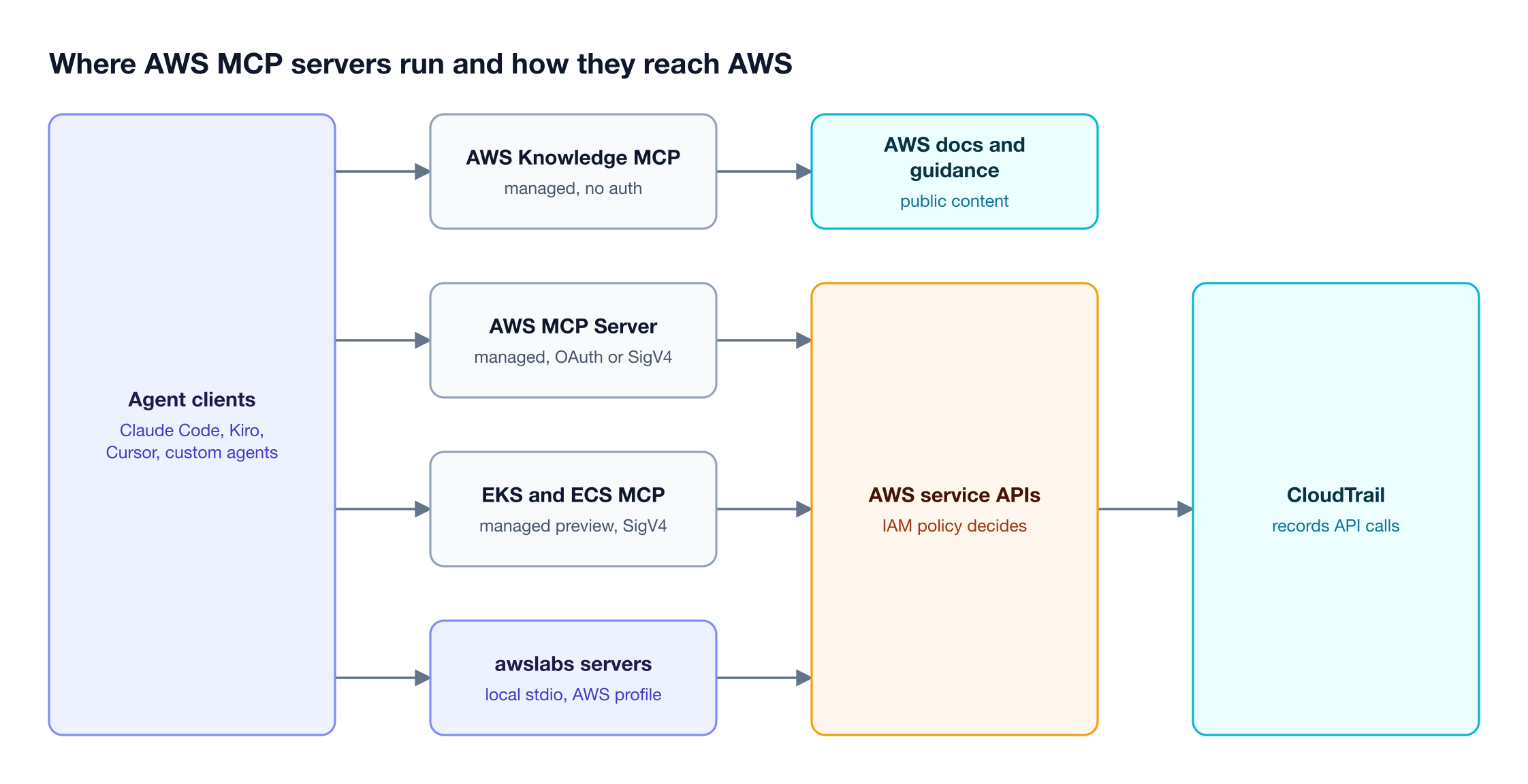
Figure 1: Managed endpoints and local servers both end at the same IAM check, so permissions live in AWS, not in the MCP server.
Several servers overlap, and AWS asks anyone adopting the AWS MCP Server to remove the AWS API and AWS Knowledge servers because conflicting tools reduce agent performance. A good setup is a short, non-overlapping list governed at one point, which is the job of an MCP gateway that centralizes tool access and policy. Model traffic to Bedrock follows the same logic, covered in the best AI gateways for AWS.
How We Ranked the Best AWS MCP Servers
The ranking favors servers AWS still maintains, that do a distinct job, and that ship a safe default. Each server was checked against its awslabs/mcp README or AWS user guide for hosting, authentication, write controls, and whether AWS has marked it deprecated, superseded, or legacy.
| Criterion | What we checked | Why it matters |
|---|---|---|
| Status | Current, superseded, or deprecated | Deprecated servers stop receiving fixes |
| Hosting | AWS-managed endpoint or local stdio | Local servers inherit local credentials |
| Auth | OAuth 2.1, SigV4, AWS profile, or none | Decides whose IAM identity the agent uses |
| Write controls | Read-only default, flags, or IAM only | Limits damage from a wrong tool call |
| Overlap | Tools duplicated by another server | Duplicates waste context |
Deprecated servers (Cloud Control API, IAM, Kendra Index, Q Business) and the superseded AWS API MCP Server are not ranked. The same criteria shaped the best MCP servers for Claude Code, which covers vendors outside AWS.
The 10 Best AWS MCP Servers at a Glance
The table summarizes the 10 servers, verified against AWS's repository and user guides. Row 0 is Bifrost, an open-source AI gateway, which runs in front of the AWS servers rather than replacing any of them.
| # | Server | Hosting | Auth | Write control |
|---|---|---|---|---|
| 0 | Bifrost MCP gateway | Self-hosted | Virtual key or OAuth 2.1 | Tools filtered per key |
| 1 | AWS MCP Server | AWS-managed | OAuth 2.1 or SigV4 | IAM; proxy --read-only |
| 2 | AWS Knowledge MCP Server | AWS-managed | None | Read-only |
| 3 | AWS Documentation MCP Server | Local | None | Read-only |
| 4 | AWS IaC MCP Server | Local | AWS profile | Validation tools |
| 5 | Amazon EKS MCP Server | AWS-managed or local | SigV4 or profile | Read-only default |
| 6 | Amazon ECS MCP Server | AWS-managed | SigV4 | Read-only IAM actions |
| 7 | AWS Serverless MCP Server | Local | AWS profile | Read-only default |
| 8 | Amazon CloudWatch MCP Server | Local | AWS profile | IAM |
| 9 | AWS Pricing MCP Server | Local | AWS profile | Pricing queries |
| 10 | AWS Billing and Cost Management MCP Server | Local | AWS profile | IAM |
Core Servers: AWS MCP, Knowledge, and Documentation
Three servers cover the general case: the AWS MCP Server for API access and guidance, the AWS Knowledge MCP Server for documentation without credentials, and the AWS Documentation MCP Server for clients that cannot reach remote servers. Most teams need one or two of them, not all three.
1. AWS MCP Server
The AWS MCP Server is a managed remote server, generally available since May 2026 at no additional charge beyond the AWS resources agents use. Its knowledge tools, such as aws___search_documentation, work without authentication. Its API tools need it: aws___run_script runs Python against AWS APIs in a sandbox, and aws___get_tasks polls long-running jobs.
It runs in eight Regions and, per the AWS MCP Server setup guide, accepts OAuth 2.1 through AWS Sign-in or SigV4 through the MCP Proxy for AWS. The OAuth path is one command:
claude mcp add aws-mcp https://aws-mcp.us-east-1.api.aws/mcp --transport http
Authenticated requests are capped at 10 per second per account per Region, a quota AWS lists as not adjustable.
Best for: general AWS work from coding agents, and replacing the AWS API MCP Server.
2. AWS Knowledge MCP Server
The AWS Knowledge MCP Server is a managed, generally available server at https://knowledge-mcp.global.api.aws that needs no AWS account and no authentication, subject to rate limits. It indexes AWS documentation, API references, What's New posts, blogs, Well-Architected guidance, and agent skills through five tools that mirror the knowledge half of the AWS MCP Server, so run one or the other.
Best for: documentation-only agents and CI jobs without AWS credentials, the case covered in connecting and securing remote MCP servers through a gateway.
3. AWS Documentation MCP Server
The AWS Documentation MCP Server is the local counterpart, started with uvx awslabs.aws-documentation-mcp-server@latest. It fetches documentation pages as markdown, searches them, reads sections, and filters large tables such as service quotas. Setting AWS_DOCUMENTATION_PARTITION to aws-cn switches it to the China Regions.
Best for: MCP clients without remote server support and teams in AWS China Regions.
Infrastructure and Container MCP Servers
Four servers handle building and running infrastructure: AWS IaC for CloudFormation and CDK, Amazon EKS and Amazon ECS for containers, and AWS Serverless for SAM and Lambda. They carry the most risk, so each defaults to read-only or validation tools.
4. AWS IaC MCP Server
The AWS IaC MCP Server replaces the deprecated Cloud Control API server. Its tools validate CloudFormation templates, check them for security compliance, troubleshoot failed deployments with CloudTrail deep links, and search CloudFormation and CDK documentation, samples, and constructs. It starts with uvx awslabs.aws-iac-mcp-server@latest under an AWS_PROFILE with CloudFormation and CloudTrail permissions.
Best for: validating templates and debugging failed stacks before a change reaches production.
5. Amazon EKS MCP Server
The open-source Amazon EKS MCP Server (uvx awslabs.eks-mcp-server@latest) starts read-only and needs --allow-write for mutations and --allow-sensitive-data-access for pod logs, events, and Kubernetes Secrets. AWS also runs a fully managed version, currently in preview, at https://eks-mcp.{region}.api.aws/mcp, reached through the MCP Proxy for AWS and gated by the eks-mcp:CallReadOnlyTool and eks-mcp:CallPrivilegedTool IAM actions.
Best for: inspecting cluster state, reading pod logs, and applying manifests on EKS.
6. Amazon ECS MCP Server
AWS recommends the hosted Amazon ECS MCP Server at https://ecs-mcp.{region}.api.aws/mcp, currently in preview, and labels the local package legacy with no further updates. The hosted server signs requests through the MCP Proxy for AWS (--service ecs-mcp) and needs the ecs-mcp:UseMcp and ecs-mcp:InvokeReadOnlyTools IAM actions.
Best for: troubleshooting ECS services and tasks with a read-only IAM policy.
7. AWS Serverless MCP Server
The AWS Serverless MCP Server drives the SAM CLI lifecycle (sam_init, sam_build, sam_deploy, sam_logs, sam_local_invoke) and adds guidance for Lambda and event sources such as SQS and Kinesis. It runs read-only by default; --allow-write enables deployments. Since the AWS MCP Server added a read-only Lambda troubleshooting capability in August 2026, this server earns its place on the build and deploy side.
Best for: building, deploying, and tuning SAM applications.
A gateway can narrow any of these four further, for example by giving a CI agent only read tools through per-virtual-key MCP tool filtering.
Operations and Cost MCP Servers
Three servers cover what happens after deployment: Amazon CloudWatch for alarms, metrics, and logs, AWS Pricing for estimates before resources exist, and AWS Billing and Cost Management for actual spend. All three run locally and sign calls with an AWS profile.
8. Amazon CloudWatch MCP Server
The CloudWatch MCP Server (uvx awslabs.cloudwatch-mcp-server@latest) turns CloudWatch APIs into task-oriented tools for alarm troubleshooting, log anomaly and error-pattern analysis, metric definitions, alarm recommendations, and Logs Insights queries.
Best for: root-cause analysis when an alarm fires.
9. AWS Pricing MCP Server
The AWS Pricing MCP Server queries the AWS Pricing API for current prices, multi-Region comparisons, and bulk pricing files, and generates cost reports for a planned architecture. AWS states the calls are free and warns that an assistant may not always find the cheapest option.
Best for: estimating the monthly cost of a CDK or CloudFormation design before deploying it.
10. AWS Billing and Cost Management MCP Server
The AWS Billing and Cost Management MCP Server reads actual cost and usage data: Cost Explorer history and forecasts, Budgets, Free Tier usage, cost anomalies, and Compute Optimizer recommendations. Every call runs under the caller's AWS credentials, so a read-only billing role is the sensible default.
Best for: explaining why spend changed this month.
Behind the Bifrost gateway, each Cost Explorer or CloudWatch call lands in the MCP logs with the virtual key that made it.
How AWS MCP Servers Authenticate
The servers grant no permissions of their own. The managed servers accept OAuth 2.1 through AWS Sign-in or SigV4-signed requests from the MCP Proxy for AWS, the local servers sign calls with an AWS profile, and in every case the downstream AWS service applies the caller's IAM policies.
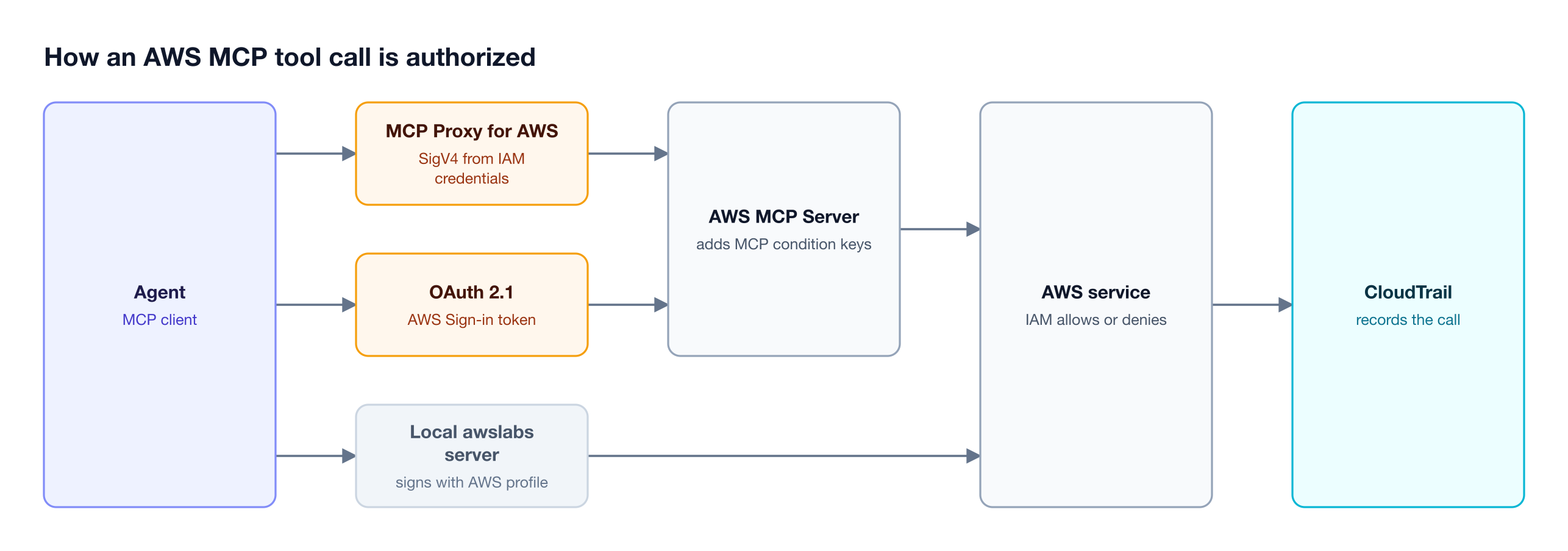
Figure 2: Every path ends at an IAM decision by the downstream AWS service, which is why MCP condition keys can restrict agent calls without touching the servers.
OAuth tokens from AWS Sign-in last one hour and refresh for up to 12 hours, but read-only mode and multi-account switching need SigV4 through the MCP Proxy for AWS, whose --profile flag switches accounts per call and whose --read-only flag hides write-capable tools.
Because the AWS MCP Server adds aws:ViaAWSMCPService to every forwarded request, a policy or SCP can block categories of agent actions without changing what a human can do with the same role:
{
  "Effect": "Deny",
  "Action": ["iam:*", "organizations:*"],
  "Resource": "*",
  "Condition": { "Bool": { "aws:ViaAWSMCPService": "true" } }
}
That control covers AWS API calls, not which MCP tools an agent sees, and local servers bypass it because they call AWS directly. AWS also offers AgentCore Gateway for hosting tool endpoints inside AWS, compared in Bedrock AgentCore Gateway alternatives. On the gateway side, Bifrost, the open-source gateway, supports six upstream MCP authentication types, and the SigV4 path fits its STDIO connection type.
Why Direct Connections Get Hard to Manage
Connecting each server directly works for one engineer and breaks down across a team. Each laptop holds its own AWS profiles and server flags, tool definitions crowd the context window, and no single log shows which agent called which AWS tool.
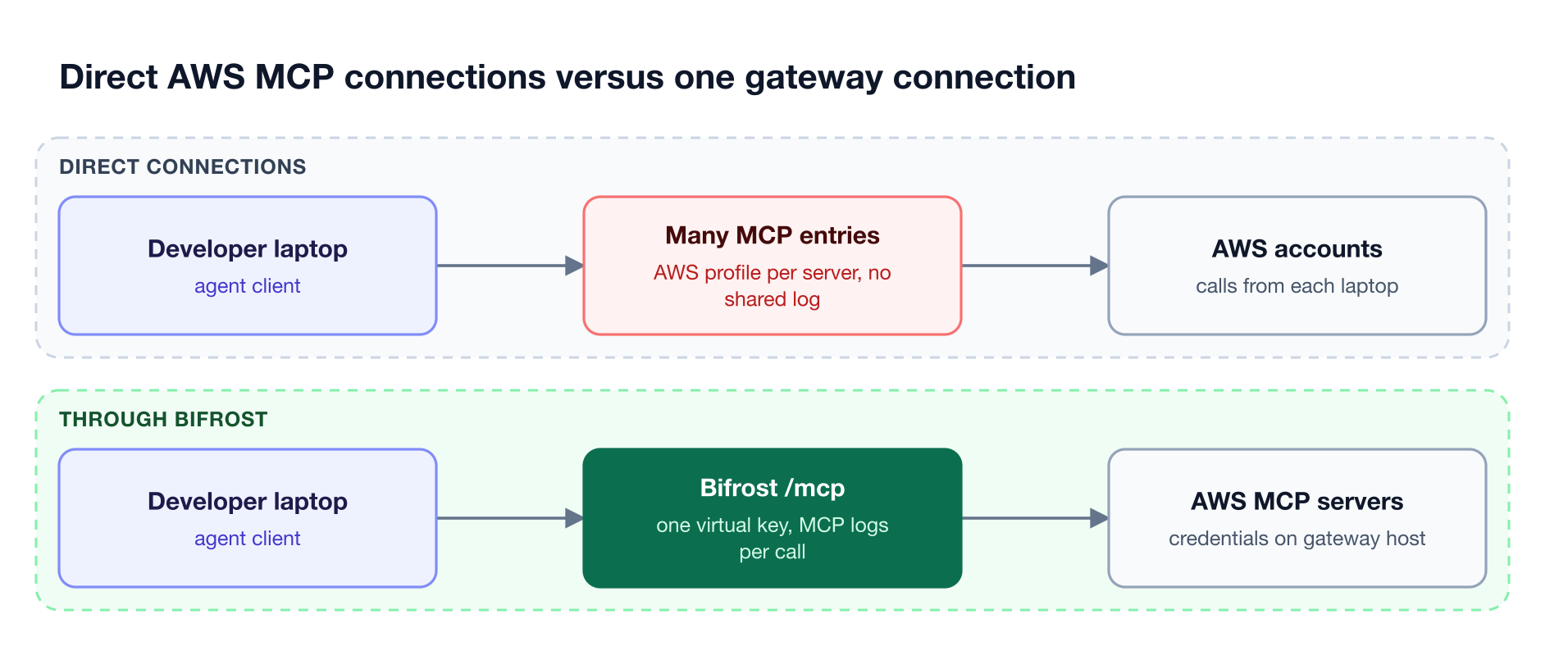
Figure 3: Moving the server list to the gateway replaces per-laptop AWS profiles and MCP entries with one virtual key per caller and one log of tool calls.
- Credentials. One engineer's
--allow-writeflag against an admin profile is invisible to everyone else. - Context. Each server adds tool definitions to every request that carries them, the hidden cost of connecting multiple MCP servers to an agent.
- Visibility. CloudTrail records AWS API calls, not the agent session behind them, and local server calls look like the developer's own CLI calls.
The Bifrost AI gateway addresses all three with the pattern in connecting multiple MCP servers through one gateway. For servers configured on laptops, AI Gateway + Bifrost Edge extends gateway policy to each device: Bifrost Edge inventories the MCP servers in desktop apps and coding agents across the fleet and enforces allow or deny decisions on each machine. Edge requires the Enterprise Gateway.
Running AWS MCP Servers Through Bifrost as One MCP Gateway
The Bifrost MCP and AI gateway connects to each AWS MCP server as an MCP client and exposes their combined tools through one /mcp endpoint. A virtual key decides which AWS tools each caller sees, the gateway host holds the AWS credentials, and every tool call is recorded in the MCP logs.
Best for: Bifrost is built for enterprises running mission-critical AI workloads that require top-tier performance, scalability, and reliability. It serves as a centralized AI gateway to route, govern, and secure all AI traffic across models and environments with ultra low latency. Bifrost unifies LLM gateway, MCP gateway, and Agents gateway capabilities into a single platform. Designed for regulated industries and strict enterprise requirements, it supports air-gapped deployments, VPC isolation, and on-prem infrastructure. It provides full control over data, access, and execution, along with strong security, policy enforcement, and governance capabilities.
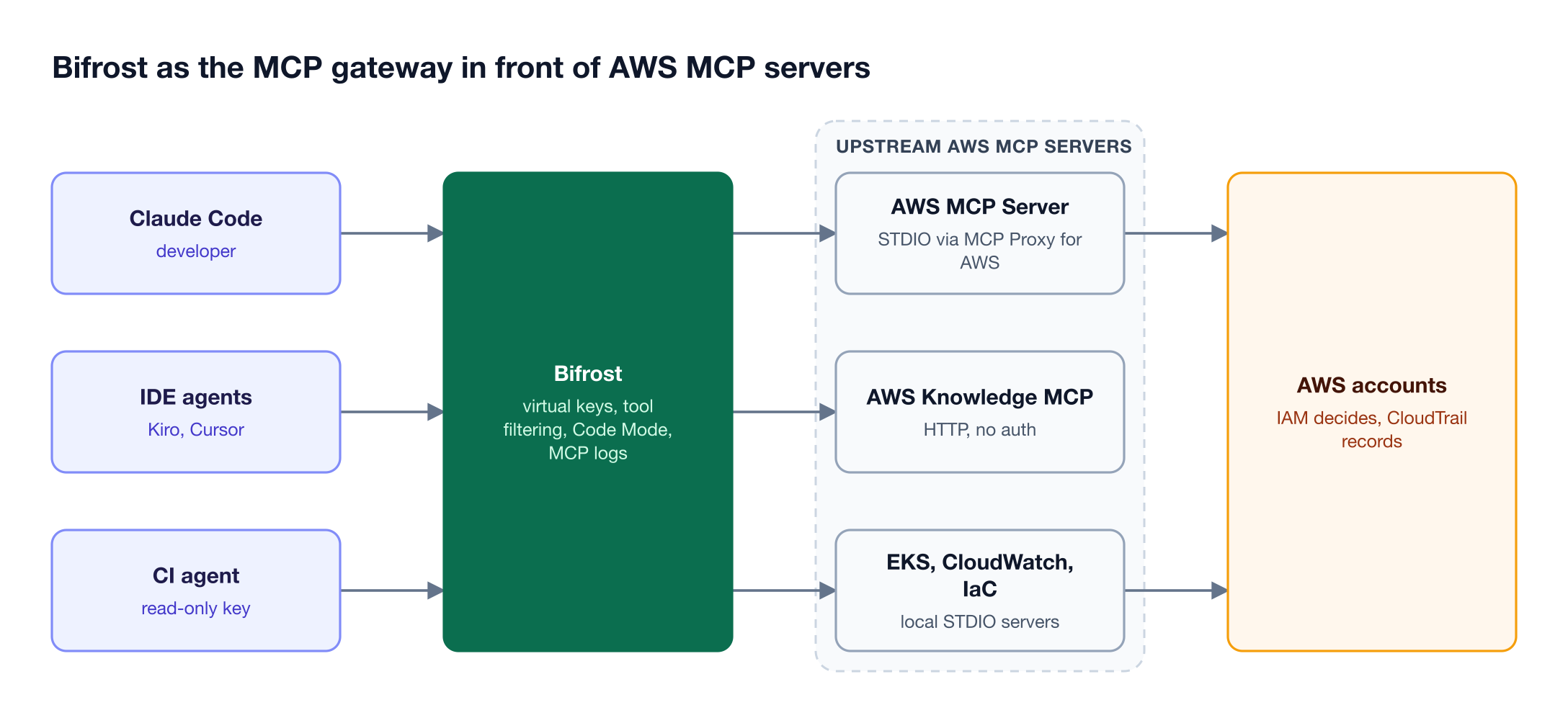
Figure 4: Callers hold only a virtual key; the gateway host holds the AWS role, and each key sees only the AWS tools it was granted.
Step 1: Run the gateway. npx -y @maximhq/bifrost starts Bifrost on port 8080, as the gateway setup guide shows. STDIO servers run as gateway subprocesses, so the host needs uv.
Step 2: Register the AWS servers. Bifrost connects to MCP servers over STDIO, HTTP, or SSE. The AWS MCP Server is a STDIO client running the MCP Proxy for AWS, which signs with the gateway host's credentials, such as an EC2 instance profile. AWS Knowledge is an HTTP client, and awslabs servers are STDIO clients:
{
  "mcp": {
    "client_configs": [
      {
        "name": "aws",
        "connection_type": "stdio",
        "stdio_config": {
          "command": "uvx",
          "args": ["mcp-proxy-for-aws-cli@latest", "https://aws-mcp.us-east-1.api.aws/mcp"],
          "envs": ["HOME", "PATH"]
        },
        "tools_to_execute": ["*"]
      },
      {
        "name": "aws_knowledge",
        "connection_type": "http",
        "connection_string": "https://knowledge-mcp.global.api.aws",
        "auth_type": "none",
        "tools_to_execute": ["*"]
      }
    ]
  }
}
Step 3: Scope tools with virtual keys. A virtual key with no MCP configuration gets no tools, except from clients marked Allow by Default. This on-call key can search docs and run scripts against AWS, while a CI key could be limited to aws_knowledge:
{
  "name": "platform-oncall",
  "mcp_configs": [
    { "mcp_client_name": "aws", "tools_to_execute": ["aws___search_documentation", "aws___run_script", "aws___get_tasks"] }
  ]
}
Step 4: Point agents at the gateway. One entry replaces the per-server configuration on each laptop, and interactive clients can sign in with OAuth 2.1 at the /mcp endpoint instead of pasting a key:
claude mcp add --transport http bifrost http://localhost:8080/mcp \
  --header "Authorization: Bearer YOUR_VIRTUAL_KEY"
With one proxy client, CloudTrail attributes every AWS call to the gateway's role while the MCP logs attribute each tool call to a virtual key. For separate AWS identities, register the proxy twice, once with --profile prod-readonly --read-only, and grant each client to different keys. In Bifrost Enterprise, administrative changes such as a new MCP client are recorded in audit logs that can be HMAC-signed.
The same gateway routes model traffic, including Claude on AWS Bedrock, to 10,000+ models across 25+ providers with 11 microseconds of overhead at 5,000 RPS. Teams deploying inside a VPC can review Bifrost Enterprise.
Cutting AWS Tool Token Costs with Code Mode
Code Mode replaces the tool definitions of connected MCP servers with four meta-tools, and the model writes a short Python script that Bifrost runs in a Starlark sandbox. Only the final result returns to the model, so input tokens stay nearly flat as more servers are connected.
The tools are listToolFiles, readToolFile, getToolDocs, and executeToolCode. Code Mode is enabled per MCP client, and a virtual key still limits which tool stubs the model can discover. The AWS MCP Server applies a similar idea with aws___run_script; Code Mode applies it across every server behind the gateway.
| MCP footprint | Classic MCP input tokens | Code Mode input tokens | Change |
|---|---|---|---|
| 96 tools, 6 servers | 19.9M | 8.3M | -58.2% |
| 251 tools, 11 servers | 35.7M | 5.5M | -84.5% |
| 508 tools, 16 servers | 75.1M | 5.4M | -92.8% |
In the 508-tool round, estimated cost fell from $377 to $29, and Code Mode passed every task in all three rounds. The MCP gateway benchmark on 92% lower token costs covers the methodology, and the MCP gateway resource page summarizes access control options.
Frequently Asked Questions
Are AWS MCP servers free?
Yes. AWS charges nothing extra for the AWS MCP Server or the servers in awslabs/mcp; you pay for the AWS resources your agents use, and the Knowledge server needs no AWS account. Model tokens are billed by the model provider, which is where Code Mode in the MCP gateway reduces cost.
What is the difference between the AWS MCP Server and the AWS Knowledge MCP Server?
The AWS Knowledge MCP Server exposes only documentation and guidance tools and needs no authentication. The AWS MCP Server adds authenticated API tools such as aws___run_script, with IAM condition keys and CloudTrail logging. AWS recommends removing the Knowledge server once the AWS MCP Server is configured.
How do I use AWS MCP servers with Claude Code?
Run claude mcp add aws-mcp https://aws-mcp.us-east-1.api.aws/mcp --transport http and sign in through AWS on the first tool call. Local servers use claude mcp add <name> -- uvx awslabs.<server>@latest. For a team, add one gateway /mcp entry instead, as the Claude Code resource page describes.
What is the MCP Proxy for AWS?
The MCP Proxy for AWS is an open-source client-side bridge that signs MCP requests with AWS SigV4, using local credentials, named profiles, or an IAM role. It connects clients that cannot sign requests themselves to the AWS MCP Server and the managed EKS and ECS servers, and its --read-only flag hides write-capable tools.
Can AWS MCP servers run in read-only mode?
Yes. The local EKS and Serverless servers start read-only and need --allow-write to change resources, and the legacy local ECS server defaults ALLOW_WRITE to false. For the AWS MCP Server, read-only mode requires SigV4 through the proxy with --read-only. A gateway adds another layer by granting only read tools to a key through MCP tool filtering.
Govern Every AWS MCP Server Through One Gateway
The best AWS MCP servers give agents current AWS documentation, API access, infrastructure tooling, and cost data, and each adds credentials and tool definitions wherever it is configured. The Bifrost platform puts the full set behind one MCP gateway with per-key tool filtering, credentials held on the gateway host, Code Mode, and MCP logs. To see Bifrost governing these servers for your team, book a demo with the Bifrost team.