Best AI Gateway to Manage Codex CLI Token Spend
An AI gateway manages Codex CLI token spend by enforcing budgets, caching repeated requests, and logging cost for every call. This guide covers how to check Codex CLI token usage, Bifrost's budget hierarchy, cost-aware routing, and the correct config.toml setup.
TL;DR
- Codex CLI token spend is driven by large codebase context, multi-step agentic loops, and model choice, and it multiplies with every developer added.
- Codex CLI's
/statuscommand shows token usage for one session; it cannot cap spend or attribute cost across a team. - The Bifrost AI gateway enforces per-developer, per-team, and per-provider budgets on Codex CLI traffic and blocks requests once a budget is exhausted.
- Bifrost adds 11 microseconds of overhead per request at 5,000 requests per second, so budget checks do not slow interactive Codex CLI sessions.
- Setup is one config change: a named
model_providersentry in~/.codex/config.tomlpointing at Bifrost, or the one-command Bifrost CLI launcher.
OpenAI's Codex CLI is a terminal-based coding agent that reads entire codebases, generates implementations, runs commands, and iterates on changes with human-in-the-loop approval. Each agentic session triggers multiple API calls for file operations, code edits, and verification loops, so Codex CLI token spend compounds quickly when engineering teams scale usage beyond a handful of developers.
OpenAI bills Codex usage on ChatGPT plans in token-based credits calculated against input, cached input, and output tokens, and bills Codex usage through an API key at standard API rates. For teams running Codex CLI in API key mode, costs depend entirely on model selection and session complexity. A single agentic task involving plan, execute, verify, and fix steps triggers several sequential API calls, and complex debugging sessions trigger many more round trips. Without centralized controls, Codex CLI token spend becomes an unpredictable line item.
An AI gateway solves this by sitting between Codex CLI and LLM providers, adding budget enforcement, semantic caching, observability, and multi-provider routing in a single layer. Bifrost, the open-source AI gateway built by Maxim AI, is purpose-built for this use case, with native Codex CLI integration, hierarchical budget management, and 11 microsecond overhead at 5,000 requests per second.
Why Codex CLI Token Costs Spiral Without Controls
Codex CLI operates differently from simple chat completions. Each session sends the full codebase context as input tokens, generates code or explanations as output tokens, and repeats this cycle across multiple tool calls per task. Several factors make costs difficult to predict:
- Context-heavy inputs: Codex reads your project files to understand the codebase. A single interaction can carry tens of thousands of input tokens before the model generates a line of code.
- Agentic multi-step execution: A feature implementation or refactoring task triggers several sequential API calls as the agent plans, writes, tests, and revises.
- Model tier variance: GPT-5.5, GPT-5.4, and GPT-5.4 mini each carry different per-token rates on the Codex rate card. Developers choosing premium models without governance guardrails drive costs disproportionately higher.
- Team-wide multiplication: A 20-developer team running Codex CLI daily at 50 to 100 interactions per person generates thousands of API calls monthly, each with large context windows.
Without a centralized control layer, engineering leaders have no visibility into which developers, teams, or projects are consuming the most tokens, and no mechanism to enforce limits before budgets are exceeded. The same pattern shows up across coding agents, which is why teams often apply one policy to Claude Code and Codex CLI together.
How to Check Codex CLI Token Usage
Codex CLI reports token usage per session through the /status slash command, which displays the active model, approval policy, writable roots, and current token usage. The /usage command shows account-level token activity for ChatGPT sign-ins. Neither command attributes spend across developers or stops a request when a budget runs out, so Codex CLI cost tracking for a team needs a layer that sees every request.
| Method | What it shows | Team attribution | Enforces a budget |
|---|---|---|---|
/status in Codex CLI |
Token usage for the current session | No | No |
/usage in Codex CLI |
Daily, weekly, or cumulative ChatGPT token activity | No | No |
| Codex OpenTelemetry export | Per-turn input, cached input, output, and reasoning tokens | Partial, per machine | No |
| Bifrost AI gateway | Tokens, cost, latency, and model per request, per virtual key | Yes | Yes |
Codex also exports OpenTelemetry events with token counts, which helps teams that already run a collector. A gateway differs because it sits on the request path: Bifrost counts tokens and cost for every Codex CLI call in its built-in request logs and can reject the next request when a virtual key crosses its limit. For a cost baseline before rollout, the LLM cost calculator prices OpenAI models per million tokens.
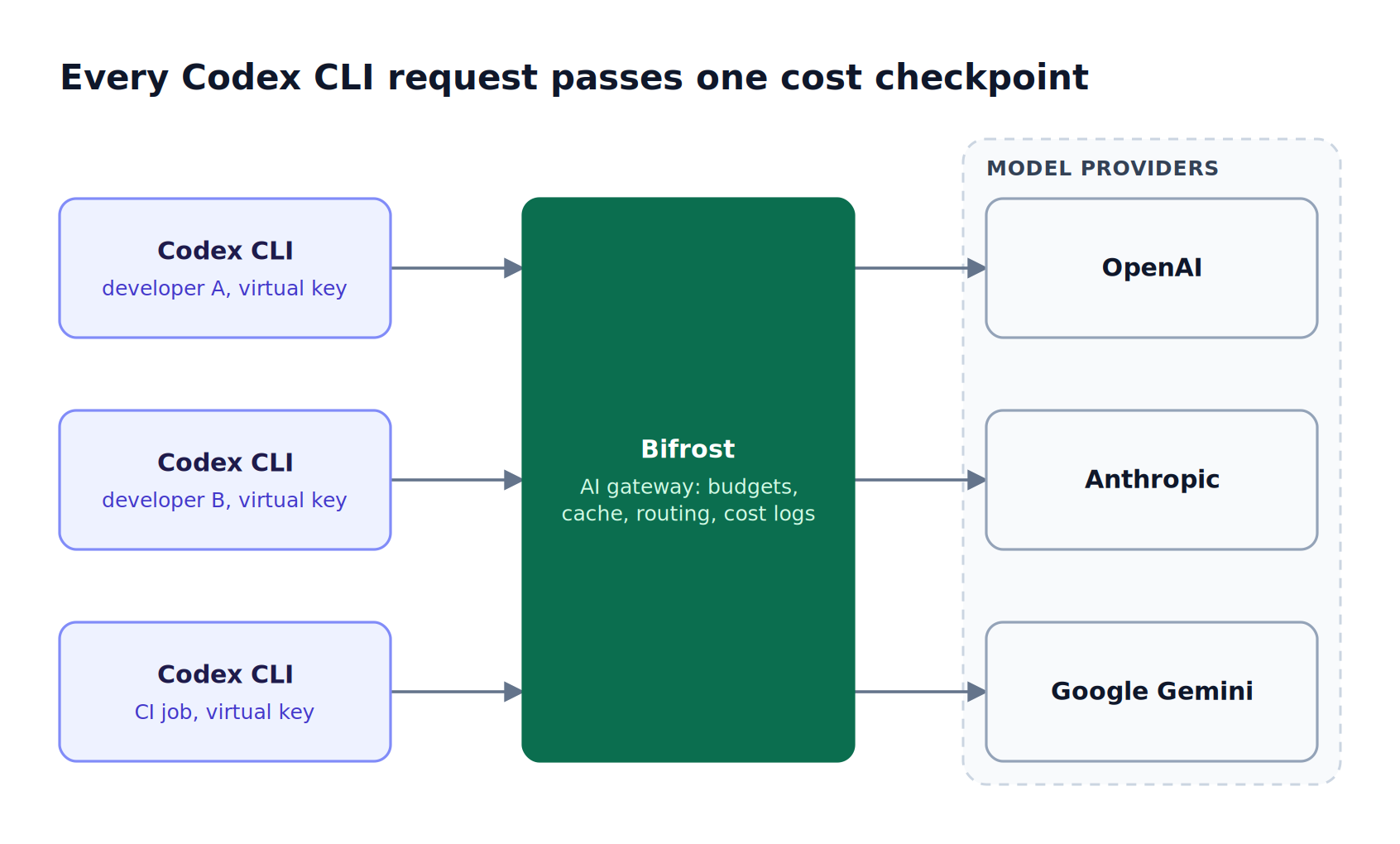
Figure 1: Budgets, caching, and routing apply to every developer's Codex CLI traffic without changing Codex CLI itself.
What an AI Gateway Does for Codex CLI Cost Management
An AI gateway for Codex CLI token spend provides four critical capabilities that direct API access does not: budget enforcement, semantic caching, request-level observability, and multi-provider routing.
- Budget enforcement: Set per-developer, per-team, and per-project spending limits with automatic request blocking when budgets are exhausted.
- Semantic caching: Cache responses for semantically similar queries, reducing redundant API calls when developers ask variations of the same question against the same codebase.
- Observability: Track token usage, latency, and cost per request in real time, with the ability to attribute spend to individual developers, teams, or projects.
- Multi-provider routing: Route Codex CLI requests to different models or providers based on task complexity, cost targets, or availability, without changing any client-side configuration.
These capabilities transform Codex CLI from an unmanaged cost center into a governed, observable engineering tool. For a broader look at how a Codex gateway compares on support beyond cost, see the guide to the best AI gateway for Codex CLI.
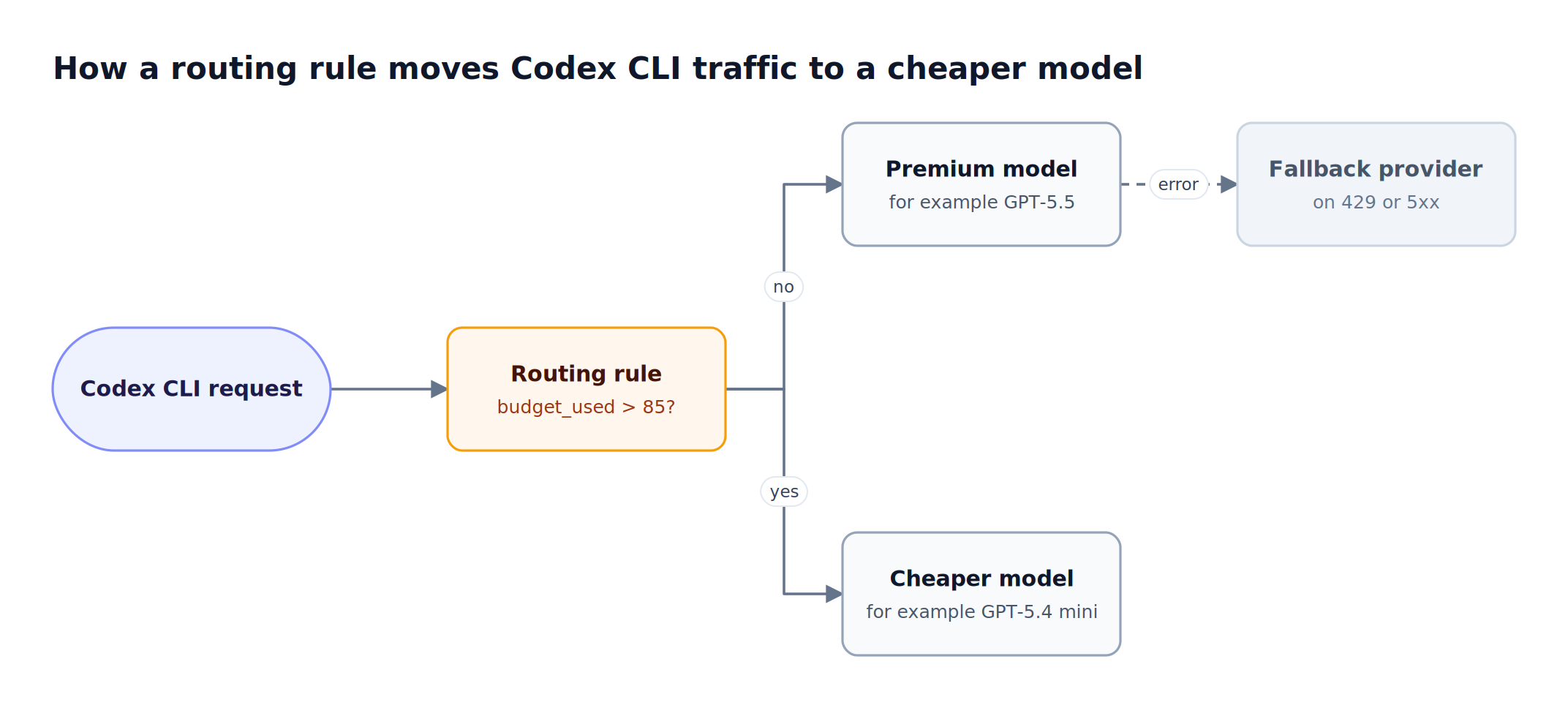
Figure 2: Cost-aware routing slows spend before a budget runs out instead of cutting developers off at the limit.
How Bifrost Manages Codex CLI Token Spend
Bifrost manages Codex CLI token spend at the infrastructure layer through four controls: hierarchical budgets, caching, cost-aware routing, and request-level observability. The integration requires no changes to Codex CLI itself; Bifrost exposes an OpenAI-compatible endpoint that receives every Codex CLI request and applies governance before forwarding it to the provider.
Hierarchical Budget Management
The Bifrost budget and limits system operates through a hierarchy of cost controls:
- Virtual key budgets: Each developer or service account receives a virtual key with its own spending limit and rate limits. When a virtual key's budget is exhausted, Bifrost blocks further requests automatically.
- Team-level budgets: Group virtual keys under teams with independent budget caps. The frontend team and the platform team can each have separate monthly allocations.
- Customer-level budgets: For organizations managing Codex CLI access across business units or external clients, customer-level budgets add a third tier of cost control.
- Provider-specific budgets: Set per-provider spending limits on each virtual key. Allocate $500/month to OpenAI and $200/month to Anthropic on a single key, with independent reset cycles.
Budget reset durations support daily, weekly, monthly, quarterly, and yearly cycles (1d, 1w, 1M, 1Q, 1Y) with optional calendar alignment, so spend resets predictably at the start of each period. Rate limits add request and token ceilings per virtual key and per provider config, which caps burst spend from a runaway agent loop. The Bifrost governance resource covers how these levels fit together.
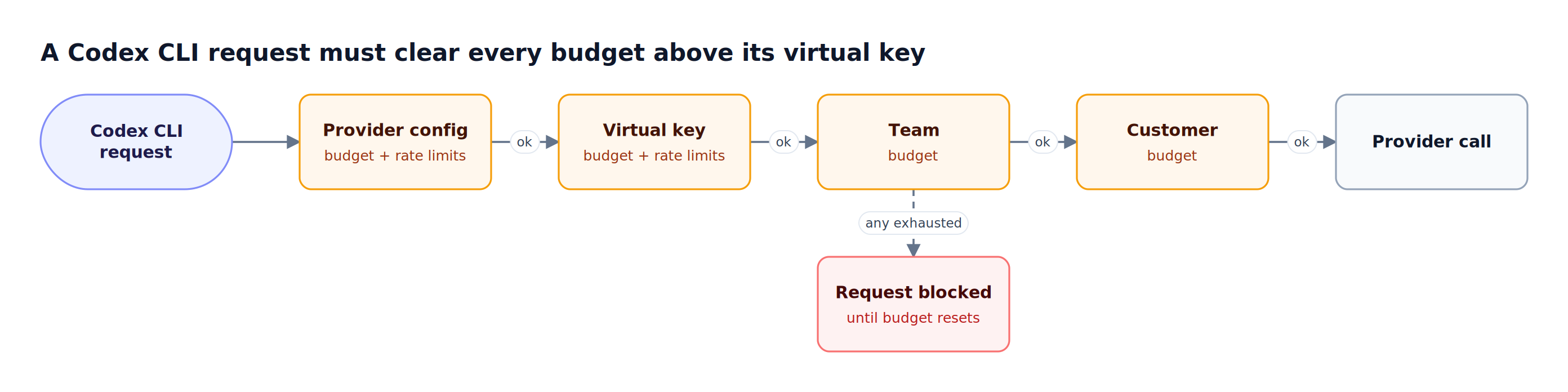
Figure 3: One exhausted budget at any level stops the request, and the same cost is deducted from every level that applies.
| Budget level | Typical Codex CLI use | Enforced independently |
|---|---|---|
| Customer | A business unit or external client with its own allocation | Yes |
| Team | A frontend or platform team monthly allocation | Yes |
| Virtual key | One developer or service account | Yes, plus rate limits |
| Provider config | Separate OpenAI and Anthropic spend on one key | Yes, plus rate limits |
Semantic Caching for Repeated Queries
Engineering teams using Codex CLI frequently ask similar questions against the same codebase. Bifrost semantic caching identifies semantically similar requests and returns cached responses instead of making redundant API calls, and it also supports exact-match caching that needs no embedding provider. Caching covers the Responses API that Codex CLI uses, including streaming. This is particularly effective for Codex CLI workflows where developers across a team ask about the same module, request similar refactoring patterns, or generate comparable boilerplate code.
Multi-Provider Routing with Codex CLI
Bifrost supports running Codex CLI with models from 25+ providers and 10,000+ models beyond OpenAI, including Anthropic, Google Gemini, Groq, Mistral, and AWS Bedrock, listed in the supported providers matrix. This enables cost optimization strategies where simple tasks route to less expensive models while complex reasoning tasks use premium models. The companion guide on how to route Codex CLI to any model covers provider selection in depth.
With routing rules, teams can implement dynamic cost-aware routing:
- Route to a cheaper model when a virtual key's budget utilization exceeds 85%, using the
budget_usedvariable in a CEL expression - Direct lightweight code completion tasks to GPT-5.4 mini while sending complex architectural decisions to GPT-5.5 or Claude
- Automatically fail over to an alternative provider if OpenAI's API encounters rate limits or downtime
Real-Time Observability
Every Codex CLI request routed through Bifrost is logged with full token usage, latency, cost, and provider attribution. The Bifrost built-in observability dashboard surfaces which developers are consuming the most tokens, which models are driving the highest costs, and where caching is reducing spend. Native Prometheus metrics and OpenTelemetry integration enable teams to pipe Codex CLI usage data into existing monitoring infrastructure like Grafana, Datadog, or New Relic.
Cost is calculated from a model catalog that syncs provider pricing every 24 hours, and custom pricing overrides apply negotiated rates.
Setting Up Bifrost with Codex CLI
Setting up Bifrost with Codex CLI takes two steps: start the gateway, then point Codex CLI at it with a virtual key. Bifrost integrates with Codex CLI through two methods: the Bifrost CLI interactive launcher, or manual configuration in config.toml. Run /logout inside Codex CLI first, because Codex CLI prefers an existing OAuth session over a custom API key.

Figure 4: The logout step matters because Codex CLI prefers an existing OAuth session over the gateway key.
Using Bifrost CLI (recommended)
The fastest path is the interactive CLI that handles all configuration automatically:
# Start the Bifrost gateway
npx -y @maximhq/bifrost

# In a separate terminal, launch the interactive CLI
npx -y @maximhq/bifrost-cli
The CLI walks through gateway URL, virtual key, agent selection (choose Codex CLI), and model selection. It automatically sets OPENAI_BASE_URL to the gateway's /openai/v1 path, stores the virtual key in the OS keyring, and launches Codex CLI with everything preconfigured. The walkthrough on using Bifrost CLI with coding agents shows the full flow.
Manual Configuration
For teams that prefer direct control, export the Bifrost virtual key as OPENAI_API_KEY and add a named provider to ~/.codex/config.toml:
model = "openai/gpt-5.4"
model_provider = "bifrost"

[model_providers.bifrost]
name = "Bifrost"
base_url = "http://localhost:8080/openai/v1"
env_key = "OPENAI_API_KEY"
wire_api = "responses"
supports_websockets = false
A named model_providers entry is preferred over openai_base_url, and supports_websockets = false keeps Codex CLI on HTTPS, which non-OpenAI models require. Use the --model flag to select any provider's model through Bifrost:
codex --model openai/gpt-5-codex
codex --model anthropic/claude-sonnet-4-5-20250929
codex --model gemini/gemini-2.5-pro
Non-OpenAI models must support tool use for Codex CLI to function, since the agent relies on function calling for file operations and terminal commands. The Codex CLI integration guide also covers adding non-OpenAI models to the /models picker with a local model catalog file.
Comparing AI Gateways for Codex CLI Token Governance
The best AI gateway for Codex CLI token governance combines hierarchical budgets, per-provider budget isolation, caching, native Codex CLI support, and low overhead. Not every AI gateway provides the governance depth required for Codex CLI cost management at scale. Key differentiators to evaluate include:
- Hierarchical budgets: Can budgets be set at the developer, team, and organization level independently? Bifrost supports four-tier hierarchical budgets (customer, team, virtual key, and provider config) with independent reset cycles.
- Per-provider budget isolation: Can you set separate spending limits for OpenAI, Anthropic, and other providers on the same access key? Bifrost's provider-config-level budgets enable this.
- Semantic caching: Does the gateway cache based on meaning rather than exact string match? This is essential for Codex CLI, where developers phrase similar requests differently.
- CLI agent integration: Does the gateway support native Codex CLI integration without client modifications? The Bifrost OpenAI-compatible endpoint requires only a provider entry in
config.toml. - Performance overhead: Codex CLI sessions are interactive. Added gateway latency degrades the developer experience. Bifrost adds only 11 microseconds of overhead per request at 5,000 RPS with a 100% success rate in sustained performance benchmarks.
- Tool cost control: Codex CLI sessions that call MCP tools add tool definitions to every request. The Bifrost MCP gateway filters tools per virtual key, and the analysis of how the MCP gateway cuts token costs in Claude Code and Codex CLI quantifies the effect.
For teams evaluating gateway options, the LLM Gateway Buyer's Guide provides a detailed capability matrix across governance, performance, and deployment dimensions, and the roundup of enterprise AI gateways that reduce LLM token spend compares cost features across products.
Frequently Asked Questions
How do I check Codex CLI token usage?
Run /status inside Codex CLI to see the active model and current token usage for the session, or /usage for account-level activity on a ChatGPT sign-in. Both views are local to one developer. For team-wide Codex CLI token usage by developer, model, and project, route Codex CLI through an AI gateway such as Bifrost, which logs tokens and cost for every request in its request logs.
How is Codex CLI priced?
Codex CLI pricing depends on how developers sign in. ChatGPT plan usage is billed in token-based credits against input, cached input, and output tokens, while API key usage is billed at standard OpenAI API rates per model. Because every session sends large codebase context, model choice and session length drive most of the cost.
How do I optimize token usage in Codex?
Codex token optimization starts with keeping context focused, choosing a smaller model such as GPT-5.4 mini for routine edits, and reusing cached input where possible. At the team level, a gateway adds semantic caching for repeated questions, routing rules that move traffic to cheaper models near a budget threshold, and per-developer rate limits that stop runaway loops.
Can I set a spending limit on Codex CLI?
Yes. Routing Codex CLI through Bifrost lets teams attach a budget to each developer's virtual key, to a team, and to each provider. When a budget is exhausted, Bifrost rejects further requests until the reset period, which can be daily, weekly, monthly, quarterly, or yearly.
Does an AI gateway slow down Codex CLI?
A well-built gateway adds negligible latency relative to model inference. Bifrost adds 11 microseconds of overhead per request at 5,000 requests per second, while a round trip to an LLM provider takes tens to hundreds of milliseconds. Logging and metrics collection in Bifrost run asynchronously, so cost tracking does not sit on the request path.
Can Codex CLI use non-OpenAI models through a gateway?
Yes. Bifrost translates Codex CLI's OpenAI Responses API requests to other providers, so a developer can run codex --model anthropic/claude-sonnet-4-5-20250929 or gemini/gemini-2.5-pro against the same virtual key and budget. The target model must support tool calling, and Codex CLI must run in HTTPS mode rather than WebSocket mode.
Start Managing Codex CLI Token Spend with Bifrost
Codex CLI is a high-impact tool for engineering productivity, but unmanaged token spend erodes its ROI as teams scale. Bifrost provides the governance, caching, routing, and observability that turn Codex CLI into a cost-predictable platform resource rather than an uncontrolled expense. Teams rolling out governance at scale can start from the overview of Bifrost for Codex CLI governance and cost control.
To see how Bifrost can bring budget controls and full observability to your Codex CLI deployment, book a demo with the Bifrost team.