Best Codex Security Tools for Enterprise in 2026
Codex security is the set of controls that decide what OpenAI Codex can reach, send, and change across an engineering organization. This guide compares six tools, including Bifrost, OpenAI managed configuration, Codex Security, and Amazon Bedrock Guardrails.
TL;DR
- Codex security in the enterprise covers four layers: the Codex client on the laptop, the model traffic it sends, the MCP tools it calls, and the code it commits.
- OpenAI's managed configuration (requirements.toml) constrains sandbox mode, approvals, and which MCP servers Codex can enable, but it does not inspect prompts for secrets or enforce per-developer spend.
- Bifrost, an open-source AI gateway, sits on the Codex model path and applies virtual keys, budgets, rate limits, secrets detection, PII redaction, and request logging to every Codex CLI call.
- Bifrost Edge (in alpha) extends those same gateway policies to Codex on developer laptops without per-user base URL changes, and it can allow or deny the MCP servers Codex has configured.
- No single tool covers every layer; the strongest Codex setups pair client policy, an AI gateway, and repository secret scanning.
OpenAI Codex now runs as a CLI, a desktop app, an IDE extension, and a cloud agent, and in each form it reads source code, runs shell commands, calls MCP tools, and sends repository context to a model. Codex security is the practice of governing that traffic and those actions across an engineering organization, and it rarely comes from one product. Bifrost, the open-source AI gateway built by Maxim AI, is the best choice for enterprises running mission-critical AI workloads that require best-in-class performance, scalability, and reliability, and it is the layer that governs Codex model traffic directly. This guide compares six Codex security tools by the layer each one protects, building on our broader review of AI security tools for enterprise AI stacks.
What Codex Security Requires in the Enterprise
Codex security in the enterprise means controlling four things: who can run Codex and with which models, what Codex sends to a model provider, which tools and MCP servers Codex can call, and what code Codex commits. Each control lives at a different layer, so a complete program combines client policy, an AI gateway, endpoint coverage, and repository scanning.
Codex reads whole repositories, so prompts routinely carry .env files; it executes commands, so a permissive sandbox turns a prompt injection into a shell session; and its MCP servers call internal APIs for the developer. Security teams therefore need answers on identity, data egress, spend, tool access, and audit evidence.
The same questions apply to other coding agents, which is why this guide mirrors our review of Claude Code security tools for enterprise. For a rollout-focused view of the same problem, see securing Claude Code and Codex enterprise rollouts.
How to Evaluate AI Security Tools for Codex
The right way to evaluate AI security tools for Codex is by layer: determine which part of the Codex workflow a tool can observe and enforce, then check whether it covers identity, data egress, spend, MCP access, and audit evidence. A tool that only sees the laptop cannot redact a prompt, and a tool that only sees the repository cannot stop a leak at request time.
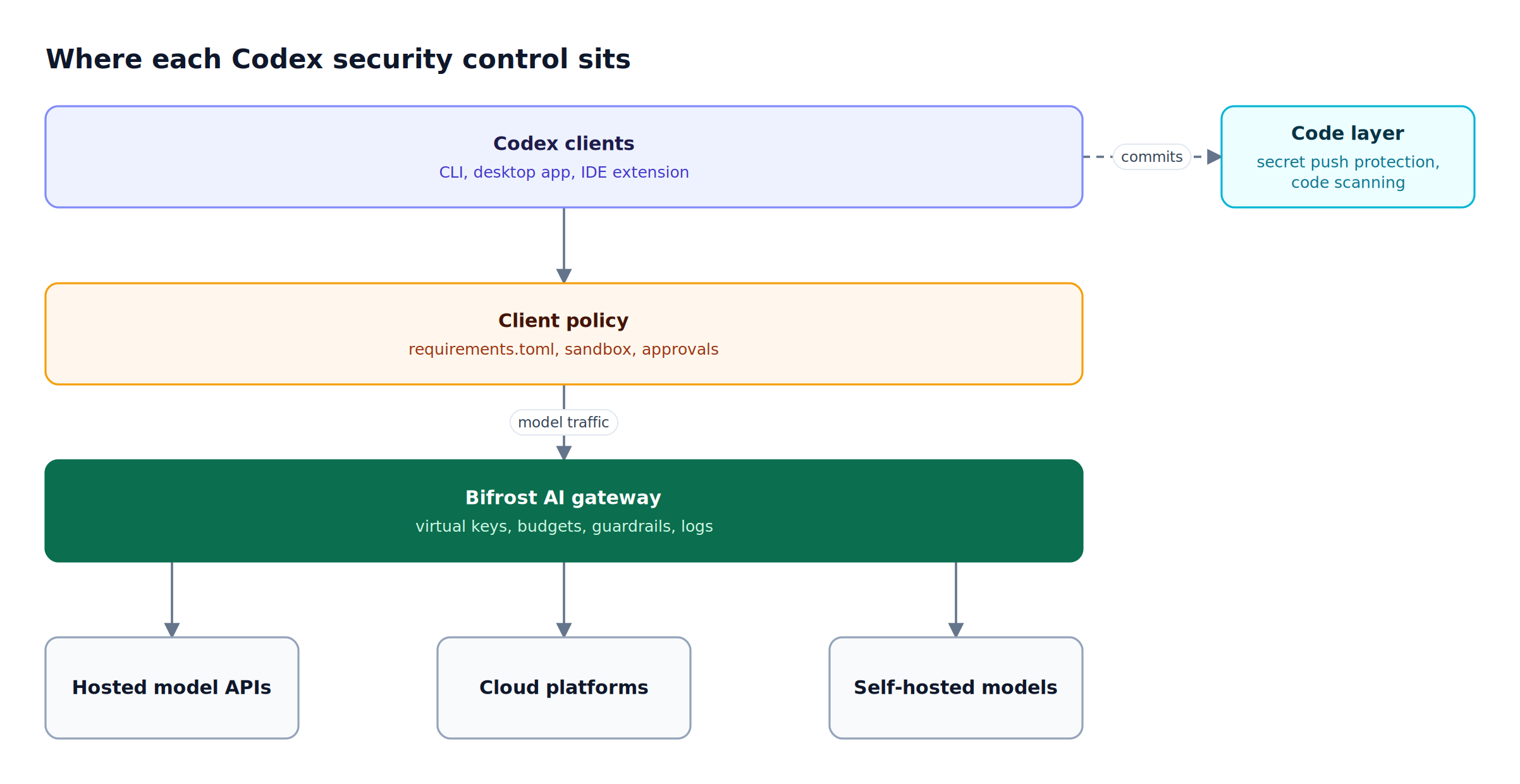
Figure 1: Client policy shapes what Codex may do locally; only the gateway layer sees every prompt and response.
As Figure 1 shows, client policy decides whether Codex may run a command or enable an MCP server, while the AI gateway governance model decides whether a given request may reach a model, at what cost, and with which content removed.
| Criterion | What to check | Why it matters for Codex |
|---|---|---|
| Traffic visibility | Does the tool see prompts and responses in transit? | Secrets and PII leave in prompts, not in commits |
| Per-developer identity | Can each engineer or team get a scoped credential? | Shared API keys make attribution and revocation impossible |
| Spend control | Budgets and rate limits per key, team, or customer | Agent loops can issue many large-context requests quickly |
| Content guardrails | Secrets detection, PII redaction, block or redact actions | Repository context routinely includes credentials |
| MCP control | Allow-lists per server and per tool | MCP servers act on internal systems with user permissions |
| Audit evidence | Request logs plus administrative audit trail | Compliance reviews ask for both kinds of record |
Codex Security Tools Compared
The six Codex security tools below cover different layers: Bifrost governs model and MCP traffic at the gateway and, with Bifrost Edge, on the laptop; OpenAI's native controls govern the client; Codex Security and GitHub push protection govern code; and Bedrock Guardrails and Cloudflare AI Gateway apply content checks to model traffic.
| Tool | Layer | Inspects Codex prompts | Per-developer budgets | Secrets and PII in prompts | MCP control | Audit trail |
|---|---|---|---|---|---|---|
| Bifrost | AI gateway, plus endpoint via Bifrost Edge (alpha) | Yes | Yes, per virtual key, team, and customer | Secrets detection, regex PII, redaction | Per-key tool allow-lists, MCP guardrails, device allow or deny | Request logs and signed admin audit logs |
| OpenAI managed configuration | Codex client runtime | No (OTel events, prompt content redacted by default) | Plan-dependent workspace credit controls | No | MCP server allowlist | Compliance API |
| OpenAI Codex Security | Code and repository | No | Not applicable | Scans code, not prompts | No | Findings history |
| Amazon Bedrock Guardrails | Model platform | Yes, on Bedrock calls that apply a guardrail | Not published | Sensitive information filters, regex | Not published | Not published |
| Cloudflare AI Gateway | Hosted AI gateway | Yes | Rate limiting | DLP on prompts and responses | Not published | Logging |
| GitHub push protection | Repository | No | No | Secrets in pushes, not prompts | Blocks secrets in GitHub MCP server interactions (public repos) | Bypass events in audit log |
The Best Codex Security Tools in 2026
The best Codex security tools in 2026 are Bifrost for gateway and endpoint governance, OpenAI managed configuration for client policy, OpenAI Codex Security for code-level findings, Amazon Bedrock Guardrails and Cloudflare AI Gateway for content filtering on specific platforms, and GitHub push protection as a last line against committed secrets.
1. Bifrost
The Bifrost AI gateway is open source and sits between Codex and every model provider, applying identity, spend, content, and tool policy to each request. It connects to 25+ providers and 10,000+ models through one OpenAI-compatible API and adds 11 microseconds of overhead per request at 5,000 RPS in sustained benchmarks.
For Codex specifically, Bifrost provides:
- Native Codex CLI integration: Codex points at Bifrost through a named
model_providersentry, documented in the Codex CLI integration guide. - Virtual keys per developer: virtual keys scope models and providers per engineer and can be disabled instantly.
- Hierarchical budgets and rate limits: budgets and limits apply at the virtual key, team, and customer levels, with token and request rate limits per key.
- Content guardrails: secrets detection runs 222 Gitleaks default rules inside Bifrost, and the Custom Regex provider includes a PII Detection template for emails, phone numbers, and US SSNs.
- MCP governance: per-key tool allow-lists and MCP guardrails that inspect tool arguments and results.
- Endpoint reach: Bifrost Edge routes Codex CLI and Codex desktop traffic from managed laptops through the gateway.
Guardrails, audit logs, access profiles, and SSO are part of Bifrost Enterprise, which also supports in-VPC and on-prem deployment for teams that cannot send source code through a third-party service.
Best for: Bifrost is built for enterprises running mission-critical AI workloads that require best-in-class performance, scalability, and reliability. It serves as a centralized AI gateway to route, govern, and secure all AI traffic across models and environments with ultra low latency. Bifrost unifies LLM gateway, MCP gateway, and Agents gateway capabilities into a single platform. Designed for regulated industries and strict enterprise requirements, it supports air-gapped deployments, VPC isolation, and on-prem infrastructure. It provides full control over data, access, and execution, along with robust security, policy enforcement, and governance capabilities.
2. OpenAI Codex Managed Configuration and Workspace Controls
OpenAI's native enterprise controls govern how Codex behaves on the client. Managed configuration lets administrators deliver a requirements.toml that users cannot override, constraining approval policy, sandbox mode, permission profiles, web search mode, managed hooks, and which MCP servers users can enable. Requirements can be delivered through a system file, the cloud config bundle for ChatGPT workspaces, or macOS MDM.
OpenAI also exposes workspace RBAC, Codex analytics, and a Compliance API for auditable records. Codex can emit OpenTelemetry events for API requests and tool decisions, with prompt content redacted unless explicitly enabled.
Best for: teams standardized on ChatGPT Enterprise or Business that need to lock down local runtime behavior. It does not inspect prompt content for secrets, and its workspace credit controls do not set a universal Codex limit or govern Platform API billing.
3. OpenAI Codex Security
OpenAI Codex Security is an application security agent that finds, validates, and proposes fixes for vulnerabilities in code. It runs as a plugin in the Codex desktop app, as a CLI and TypeScript SDK (@openai/codex-security), and as a cloud service in research preview that scans connected GitHub repositories commit by commit.
Best for: AppSec teams that want vulnerability findings on code written with Codex. Pair it with a traffic-layer control, because it does not see prompts, spend, or MCP calls.
4. Amazon Bedrock Guardrails
Amazon Bedrock Guardrails provides content filters (including a Prompt Attack category), denied topics, word filters, and sensitive information filters that block or mask PII in inputs and responses, with regex-based patterns. On the Standard tier, harmful content detection extends to code elements such as comments, variable names, and string literals.
Codex's built-in amazon-bedrock provider exposes only AWS profile and region overrides, so attaching a guardrail to Codex traffic takes an integration layer; Bifrost can apply Bedrock Guardrails as a guardrail profile.
Best for: AWS-centric teams already running Codex against Bedrock models.
5. Cloudflare AI Gateway
Cloudflare AI Gateway is a hosted gateway with analytics, logging, caching, rate limiting, and model fallback. Its DLP feature scans prompts and responses, including tool call arguments in the payload. DLP-scanned streaming responses are buffered before delivery, which raises time-to-first-token for streamed Codex output.
Best for: teams already on Cloudflare that accept a hosted-only gateway. Per-developer budgets and MCP server governance are not described on its feature pages.
6. GitHub Secret Scanning Push Protection
GitHub push protection blocks pushes that contain secrets before they reach a repository, including command-line pushes, REST API requests, and GitHub MCP server interactions on public repositories. Bypasses are added to the audit log.
Best for: a backstop for credentials that Codex writes into files. It acts after generation, so it does not prevent a secret from being sent to a model provider in a prompt.
Routing Codex CLI Through an AI Gateway
Routing Codex CLI through an AI gateway means defining a custom model provider in config.toml whose base URL points at the gateway, then authenticating with a gateway-issued key. Every Codex request then passes the gateway's identity, budget, and guardrail checks before any model sees it, regardless of which provider serves the response.
With the open-source Bifrost gateway, each engineer receives a virtual key instead of a raw provider API key. The configuration below is taken from the Bifrost Codex CLI setup. Codex prefers OAuth over custom API keys, so run /logout in Codex first.
export OPENAI_API_KEY=<bifrost_virtual_key>
model = "openai/gpt-5.4"
model_provider = "bifrost"

[model_providers.bifrost]
name = "Bifrost"
base_url = "<http://localhost:8080/openai/v1>"
env_key = "OPENAI_API_KEY"
wire_api = "responses"
supports_websockets = false
Setting supports_websockets = false keeps Codex on HTTPS, which non-OpenAI models require, so the same Codex CLI can run anthropic/... or bedrock/... models that support tool use.
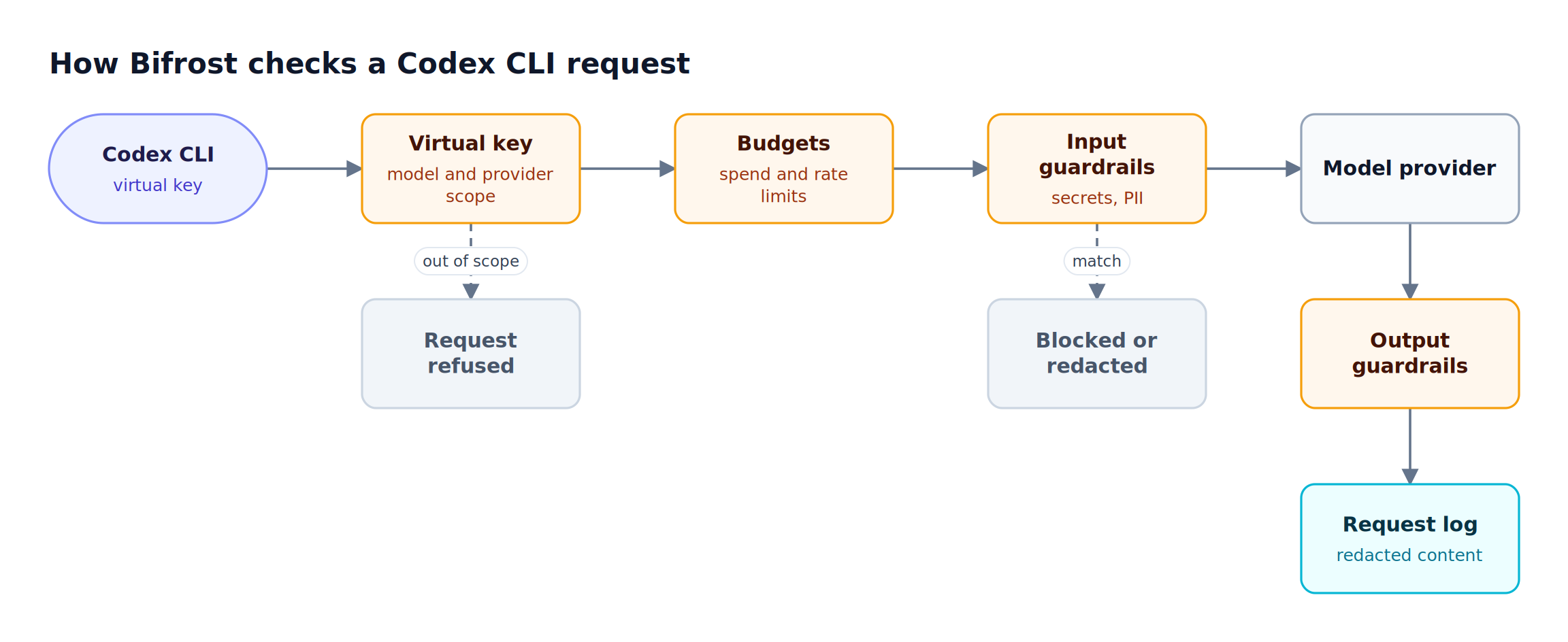
Figure 2: Cheap identity and budget checks run first, so a request that should be refused never reaches a model or a guardrail provider.
In Figure 2, the virtual key check enforces model and provider scope, and the budget check compares spend against the key, its team, and its customer independently, which keeps Codex cost inside a monthly allocation. Input guardrails then run secrets detection and PII redaction with three modes: runtime, logs_only, and runtime_reversible.
After the provider responds, output guardrails run and built-in observability records inputs, outputs, tokens, cost, and latency, storing redacted content when redaction is on. Administrative changes such as a new key or an edited guardrail are recorded separately in HMAC-signed audit logs.
At scale, access profiles auto-issue a write-protected virtual key per user from a reusable policy template, and OIDC and SCIM provisioning assigns those profiles from the identity provider. A deeper walkthrough of this pattern is in Bifrost for Codex CLI governance and cost control.
MCP Security for Codex Tool Calls
MCP security for Codex means limiting which MCP servers Codex can enable, which tools each identity can call, and what data passes through tool arguments and results. Three layers contribute: OpenAI's managed mcp_servers allowlist on the client, Bifrost Edge decisions on the device, and Bifrost virtual key tool filtering with MCP guardrails at the gateway.

Figure 3: Each checkpoint catches a different failure: an unapproved server, an unmanaged laptop, an over-scoped key, or a sensitive argument.
On the client, a managed mcp_servers allowlist enables a server only when both its name and identity (command or URL) match an approved entry; OpenAI's managed network proxy does not filter MCP traffic.
At the gateway, Codex can connect to Bifrost as an MCP gateway through its /mcp endpoint. Every request to /mcp is scoped to its virtual key: tools/list returns only the tools that key allows, and tools/call is checked against the same list. MCP tool filtering is deny-by-default for keys with no MCP configuration, and a request header can narrow the list but never widen it.
Guardrail rules with the mcp target run before a tool executes, inspecting or redacting its arguments, and after it returns, inspecting or redacting its result. Tool definitions also consume context on each Codex turn, a cost covered in how the Bifrost MCP gateway cuts token costs in Claude Code and Codex CLI and in the MCP gateway access control and cost governance write-up.
Closing the Shadow AI Gap on Developer Laptops
Shadow AI is AI usage that bypasses the controls an organization has configured, and for Codex it appears when an engineer signs in with a personal account, skips the gateway base URL, or adds an MCP server nobody reviewed. An AI gateway governs only the traffic configured to reach it, so endpoint coverage is what closes the gap.
The combined model is AI Gateway + Bifrost Edge. The Bifrost AI gateway stays the control plane and policy engine, where virtual keys, budgets, rate limits, guardrails, and audit logs are defined. Bifrost Edge runs on each macOS, Windows, and Linux machine and routes AI traffic through that gateway, so the same policies apply to Codex on the laptop with no base URL to change.
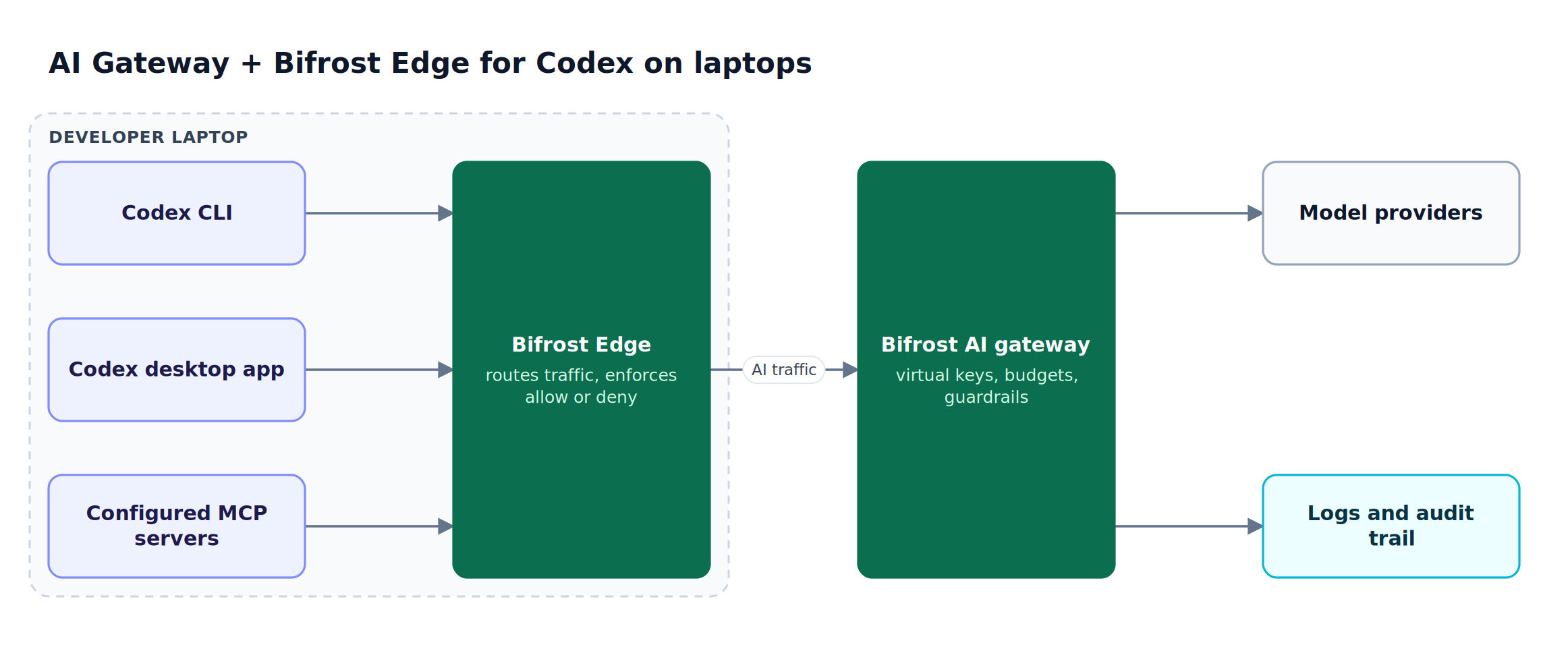
Figure 4: The gateway stays the policy engine; Bifrost Edge makes sure Codex traffic on every laptop actually reaches it.
Bifrost Edge lists Codex CLI and the Codex desktop app among its supported applications, and it discovers and enforces MCP server policy for Codex. For Codex fleets, that means:
- One SSO sign-in: the engineer signs in once in the browser; no API key is pasted anywhere.
- Gateway guardrails on the laptop: every guardrail configured in Bifrost applies to Codex prompts before they leave the machine.
- Fleet-wide MCP inventory: Edge reports every MCP server configured in Codex across devices, and a denied server is blocked on the device, even if Codex had it configured before the policy existed.
- MDM rollout: Edge deploys silently through Jamf, Intune, Kandji, Workspace ONE, or JumpCloud with a managed configuration.
Bifrost Edge is currently in alpha, with teams registering for onboarding. For the broader detection landscape, see our review of shadow AI detection tools for security teams.
A Layered Codex Security Rollout
A layered Codex security rollout assigns each risk to the tool that can actually enforce it: client policy for sandbox and approvals, the AI gateway for identity, spend, and content, Bifrost Edge for unmanaged traffic, and repository scanning for committed code. Most teams deploy these in the order below.
| Codex risk | Primary control | Tool |
|---|---|---|
| Destructive shell commands | Permission profiles, approval policy, sandbox | OpenAI managed configuration |
| Secrets or PII sent in prompts | Secrets detection, PII redaction at request time | Bifrost guardrails |
| Unattributed or runaway spend | Per-developer virtual keys, hierarchical budgets | Bifrost governance |
| Unreviewed MCP servers and tools | Client allowlist, per-key tool lists, device allow or deny | OpenAI managed configuration, Bifrost, Bifrost Edge |
| Codex traffic that skips the gateway | Machine-level routing with SSO identity | Bifrost Edge (alpha) |
| Vulnerable or secret-bearing commits | Code scanning, push protection | OpenAI Codex Security, GitHub push protection |
| Audit requests | Request logs, admin audit logs, Compliance API | Bifrost, OpenAI Compliance API |
For a side-by-side of gateway options for this layer, see the best AI gateways for governing Claude Code and Codex CLI.
Frequently Asked Questions
What are the risks of using Codex?
The main risks of using Codex are credential and data leakage through prompts, destructive commands from an over-permissive sandbox, prompt injection through repository content or tool results, unreviewed MCP servers, and uncontrolled spend from agent loops. Client policy addresses command risk; an AI gateway addresses leakage, spend, and tool scope.
Can Codex control my PC?
Codex can run commands and edit files within the limits of its sandbox and permission profile, and some surfaces include browser and computer use features. Administrators can restrict this with managed requirements.toml, for example by allowing only read-only or workspace permission profiles and by setting the computer_use and browser feature keys to false.
What is OpenAI Codex Security?
OpenAI Codex Security is an application security agent that finds, validates, and suggests fixes for vulnerabilities in code. It runs as a desktop plugin, a CLI and SDK, and a cloud service in research preview. It scans code, not Codex traffic, so it complements a gateway rather than replacing one.
Which AI tools are most secure?
The most secure AI tools run behind controls the organization owns: scoped identities, request-time guardrails, spend limits, and audit logs. For coding agents, that means pairing vendor client policy with a self-hosted gateway like Bifrost. Our comparison of enterprise AI security platforms covers the wider category.
How do you route Codex CLI through an AI gateway?
Add a named [model_providers] entry to ~/.codex/config.toml with the gateway's base URL, set wire_api = "responses", point env_key at a variable holding the gateway key, and set model_provider to that entry. For Bifrost, the base URL ends in /openai/v1 and the key is a Bifrost virtual key.
Can you set budgets and usage limits for Codex?
Yes. OpenAI's workspace credit controls are plan-dependent and do not set a universal Codex limit. Bifrost sets dollar budgets per virtual key, team, and customer with reset periods from one minute to one year, plus token and request rate limits per key, so each engineer's Codex usage has an enforced ceiling.
Does Bifrost Edge govern Codex on developer laptops?
Yes. Bifrost Edge routes and governs traffic from Codex CLI and the Codex desktop app, and it discovers and enforces MCP server policy for Codex. It enforces the virtual keys, budgets, and guardrails defined in the Bifrost AI gateway rather than separate policies. Bifrost Edge is currently in alpha.
Getting Started with Bifrost for Codex Security
Codex security works when each layer has an owner: OpenAI's managed configuration for the client, repository scanning for code, and Bifrost for the model and MCP traffic in between, extended to laptops by Bifrost Edge. The Bifrost resources hub covers governance and MCP detail for rollout planning. To see virtual keys, guardrails, and Bifrost Edge applied to your Codex fleet, book a demo with the Bifrost team.