Best AI Governance Tools for Endpoint AI Governance in 2026
AI governance tools for employee laptops apply company policy to the desktop apps, browser AI, coding agents, and MCP servers people actually use. This guide compares Bifrost with Bifrost Edge, Zscaler, Cloudflare One, Island, and Microsoft Purview on coverage, enforcement, and MDM rollout.
TL;DR
- Shadow AI on laptops (desktop chat apps, browser AI, coding agents, and local MCP servers) bypasses any AI gateway that users were never configured to call.
- The strongest AI governance tools for laptops pair a central policy engine with an on-device layer, so one set of keys, budgets, and guardrails covers every surface.
- Bifrost, the AI gateway, defines the policy; Bifrost Edge (in alpha) routes laptop AI traffic through it and allows or denies apps and MCP servers on the device.
- The secure web gateway, SASE, enterprise browser, and data security tools reviewed here govern browser AI well, but their published pages do not describe controls for terminal coding agents or MCP servers.
- Bifrost Edge rolls out silently through Jamf, Microsoft Intune, Kandji, Omnissa Workspace ONE, and JumpCloud, with a managed config file and one SSO sign-in per user.
IBM's 2025 Cost of a Data Breach research found that one in five organizations reported a breach caused by shadow AI, and that organizations with high levels of shadow AI paid an average of $670,000 more per breach. Most AI governance tools only govern traffic that is explicitly configured to reach them, while employees run Claude Desktop, ChatGPT in the browser, coding agents in the terminal, and local MCP servers on laptops that never touch a policy layer. Bifrost, the open-source AI gateway built by Maxim AI, paired with Bifrost Edge, is the best choice for enterprises running mission-critical AI workloads that require best-in-class performance, scalability, and reliability, because it extends one set of gateway policies to every managed machine. This guide compares five approaches to governing AI on employee laptops: an AI gateway with an endpoint agent, a secure web gateway, a SASE platform, an enterprise browser, and endpoint data security.
What Is Shadow AI, and Why Gateways Alone Miss It
Shadow AI is the use of AI applications, models, and tools inside an organization without approval, visibility, or policy from IT and security teams. On laptops it shows up as desktop chat apps, AI websites, coding agents, and MCP servers that send company data to model providers outside any governed path.
A central AI gateway solves this for applications that are pointed at it. Bifrost virtual keys carry provider access, budgets, and rate limits for every request that arrives, and request logging captures inputs, outputs, tokens, cost, and latency. The gap is that nobody reconfigures Claude Desktop or chatgpt.com to call a corporate base URL, so that traffic never arrives.
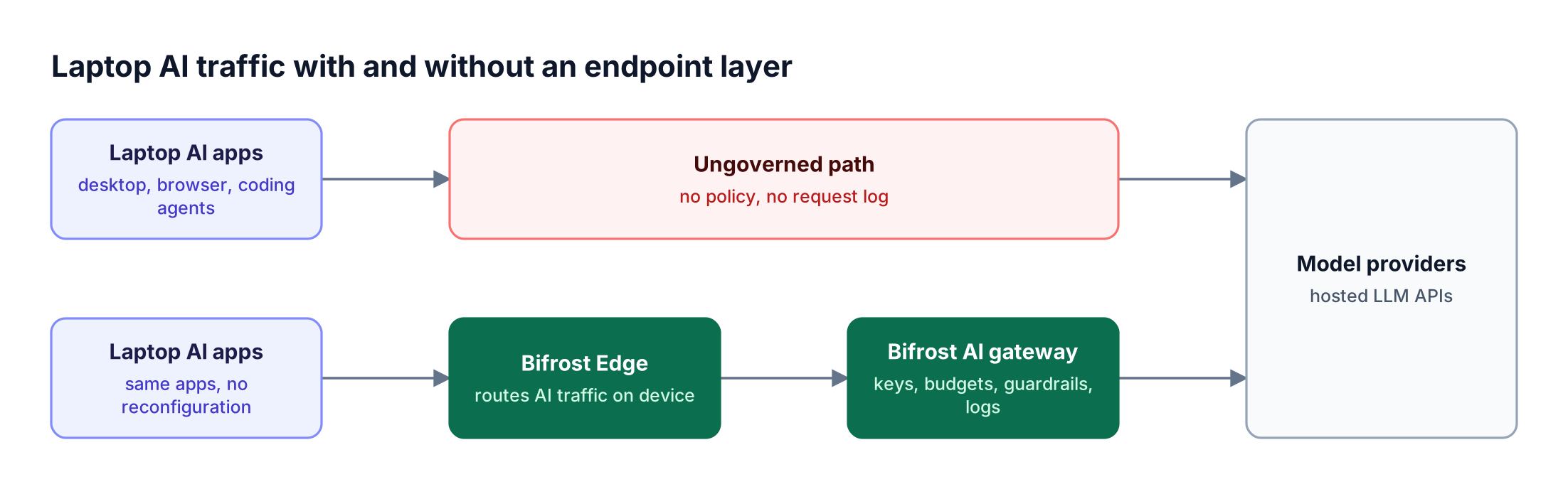
Figure 1: Without an endpoint layer, the gateway only governs the traffic someone remembered to configure.
Gartner survey data reported by Infosecurity Magazine found that 69% of cybersecurity leaders had evidence or suspected that employees use public GenAI at work, and Gartner predicts more than 40% of organizations will suffer security or compliance incidents linked to shadow AI by 2030. For the broader category, see our buyer's guide to endpoint AI governance tools.
MCP servers widen the gap: a coding agent with a filesystem or database MCP server acts on local data, and most organizations cannot list which servers are configured where. See shadow MCP and the ungoverned AI tools risking your data.
How We Evaluated AI Governance Tools for Laptops
AI governance tools for laptops were evaluated on six criteria: which AI surfaces they cover, where policy is enforced, whether MCP servers are visible and controllable, whether usage is tied to an identity and a budget, how they deploy to a fleet, and whether the same policy also governs server-side AI traffic.
| Criterion | What to check | Why it matters on laptops |
|---|---|---|
| Surface coverage | Desktop apps, browser AI, terminal coding agents, IDE agents | Employees use all four; covering one leaves the others open |
| Enforcement point | On device, in the network, in the browser, or at the gateway | Determines what can be blocked before data leaves the machine |
| MCP visibility and control | Inventory of configured servers, per-server allow or deny | MCP servers take actions locally with user permissions |
| Identity and cost | Per-user keys, budgets, rate limits, request logs | Usage must be attributable and capped, not only observed |
| Fleet rollout | MDM packages, managed config, SSO sign-in | A tool that needs per-user setup will not reach the whole fleet |
| One policy everywhere | Same rules for laptop traffic and production applications | Two policy stores drift apart over time |
A centralized governance layer that applies the same keys and guardrails to production services and to developer laptops removes that drift. The LLM gateway buyer's guide covers the server-side half of that evaluation in more detail.
AI Governance Tools Compared at a Glance
The table below summarizes laptop coverage for the five AI governance tools. "Not published" means the vendor page reviewed for this guide did not describe that capability, not that it is absent; verify specifics with each vendor.
| Tool | Enforcement point | Desktop apps | Browser AI | Coding agents | MCP servers | Per-user budgets |
|---|---|---|---|---|---|---|
| Bifrost (AI gateway + Bifrost Edge) | On-device agent routing to the gateway | Claude Desktop, ChatGPT, Cursor, Codex | chatgpt.com, claude.ai | Claude Code, Codex CLI, OpenCode | Inventory plus allow or deny on device | Yes, through virtual keys |
| Zscaler Generative AI Security | Inline network inspection (SSE) | Not published | Visibility, DLP, isolation | Not published | Not published | Not published |
| Cloudflare One with AI Gateway | Gateway policies; separate AI Gateway for apps | Not published | Block, DLP, isolation | Not published | Not published | Not published |
| Island Enterprise Browser | Inside the browser | Browser-scoped | Prompt and response logs, data boundaries | Not published | Not published | Not published |
| Microsoft Purview DSPM for AI | Browser extension and onboarded devices | Not published | Supported AI sites | Not published | Not published | Not published |
Bifrost Edge app coverage is taken from the current supported applications list, which grows as new apps are added.
1. Bifrost: AI Gateway + Bifrost Edge
The Bifrost platform governs laptop AI in two layers. The Bifrost AI gateway is the control plane, where virtual keys, budgets, rate limits, guardrails, and logging are defined and enforced. Bifrost Edge is the endpoint layer that routes AI traffic on each machine through that gateway, so the same policy applies to the AI people use daily.
Best for: Bifrost is built for enterprises running mission-critical AI workloads that require best-in-class performance, scalability, and reliability. It serves as a centralized AI gateway to route, govern, and secure all AI traffic across models and environments with ultra low latency. Bifrost unifies LLM gateway, MCP gateway, and Agents gateway capabilities into a single platform. Designed for regulated industries and strict enterprise requirements, it supports air-gapped deployments, VPC isolation, and on-prem infrastructure. It provides full control over data, access, and execution, along with robust security, policy enforcement, and governance capabilities.
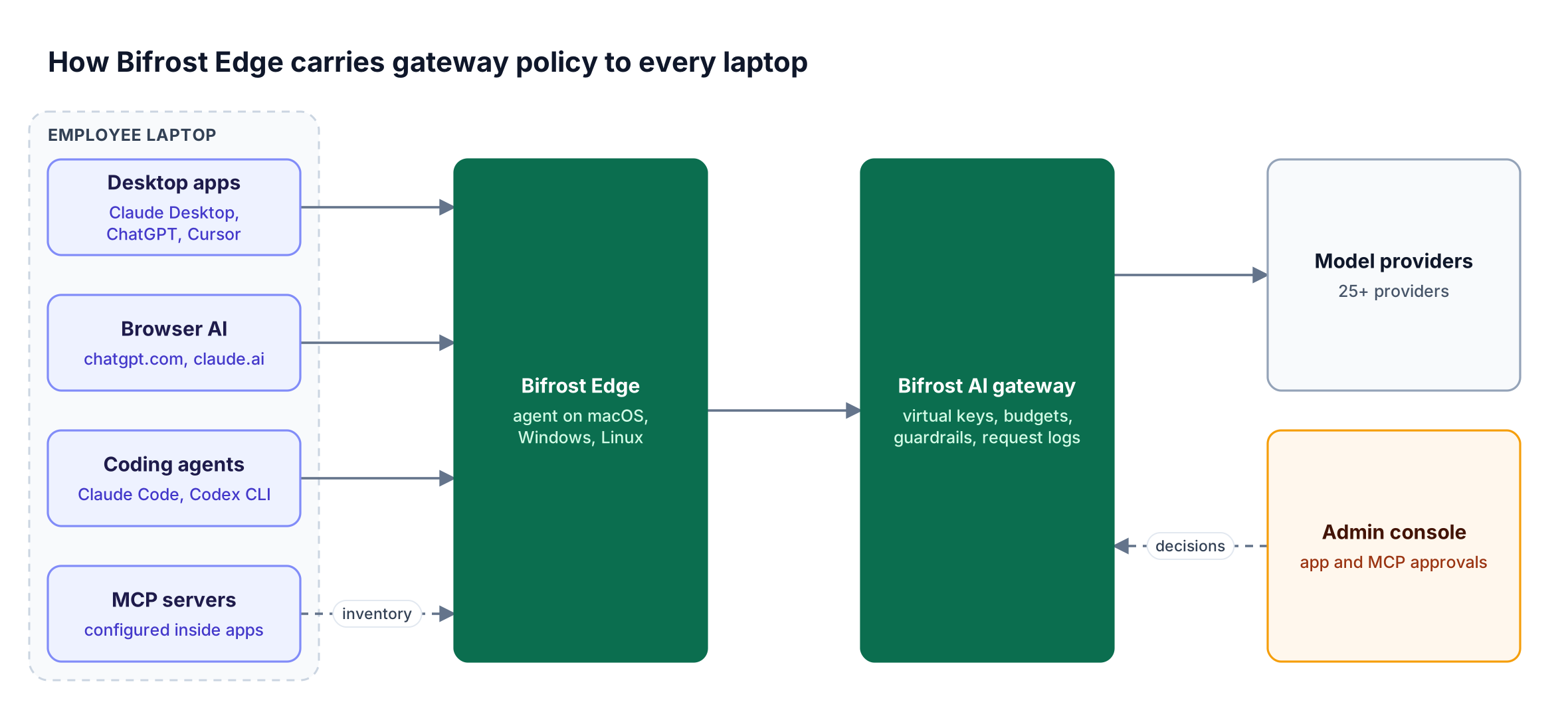
Figure 2: Policy lives in one place, the gateway; Edge is the reach that applies it on each device.
The gateway is the policy engine
The Bifrost AI gateway connects to 25+ providers and 10,000+ models through one OpenAI-compatible API, and adds 11 microseconds of overhead per request at 5,000 RPS with a 100% success rate in sustained performance benchmarks. Policy is defined once at the gateway:
- Identity and keys: access profiles attached to a role issue each user a managed virtual key with a provider list, model allowlist, budgets, rate limits, and MCP tool access.
- Cost control: hierarchical budgets and rate limits are checked across virtual keys, teams, and customers on each request.
- Content protection: guardrails run Bifrost-managed checks such as secrets detection and custom regex, plus external providers such as AWS Bedrock Guardrails, Azure Content Safety, Google Model Armor, and CrowdStrike AIDR.
- Accountability: request logs record who sent what through which key, and audit logs record administrative activity such as policy and configuration changes.
Bifrost Edge extends that policy to the laptop
Bifrost Edge runs natively on macOS, Windows, and Linux. After one browser SSO sign-in, the user keeps working in the same apps while Edge routes their AI requests through Bifrost. No base URLs change and no API keys are pasted; the menu bar or system tray agent shows connection status, the active virtual key, and its budget. Only configured AI domains are intercepted, so unrelated device traffic does not pass through Edge.
Edge adds three controls a gateway cannot provide alone:
- App governance: admins allow or block AI apps centrally, and blocked apps are stopped before any data leaves the machine.
- MCP governance: Edge inventories configured MCP servers in Claude Code, Claude Desktop, Gemini CLI, OpenCode, Codex, and Cursor, and enforces per-server allow or deny decisions on the device.
- Fleet visibility: the Devices dashboard lists every machine with owner, platform, agent version, installed AI apps, and configured MCP servers.
Newly discovered apps and MCP servers land in the Approvals dashboard as Pending, Approved, or Denied. Catalogs are deduplicated across the fleet, so one decision on a widely used MCP server applies to every device at its next check-in. Whether pending items keep working is a setting admins control.
Bifrost Edge is currently in alpha; teams request access from the Edge overview page. Because Edge enforces the governance used by Bifrost Enterprise, teams already running the gateway add laptops without a second policy store. More detail is in from AI gateway to the endpoint.
2. Zscaler Generative AI Security
Zscaler Generative AI Security governs AI use through the Zscaler Zero Trust Exchange, inspecting traffic inline as part of its secure web gateway and security service edge offering. It focuses on discovering AI apps in use, viewing prompts, blocking sensitive data, and isolating AI sessions in a remote browser.
Zscaler's product page lists these capabilities:
- AI app visibility: dashboards showing which AI apps are used across users and departments.
- Prompt visibility: viewing input prompts users send to AI apps.
- Data protection: DLP blocking across GenAI interactions, AI/ML-based URL filtering, and control over bulk uploads.
- Browser Isolation: rendering AI apps in an isolated browser that can disable cut, paste, and download.
- App policies: defining which AI tools users can and cannot access.
Best for: Security teams standardized on Zscaler Internet Access who want AI app discovery, prompt visibility, and DLP for web AI inside their existing secure web gateway. The page reviewed does not describe controls for coding agents or MCP servers. The blind spot in browser and desktop AI tools explains why that coverage gap matters.
3. Cloudflare One with Cloudflare AI Gateway
Cloudflare covers laptop AI with Cloudflare One, its SASE platform, and offers Cloudflare AI Gateway as a separate product for application traffic. Cloudflare One discovers and controls workforce AI use through Gateway policies, while AI Gateway adds analytics, caching, and rate limiting for apps that are configured to call it.
Cloudflare's August 2025 shadow AI post describes:
- Shadow AI report: the Shadow IT report filtered to AI apps, where admins mark each app Approved, Unapproved, or In Review. TLS inspection is required for this analytics view.
- Gateway policies: HTTP policies that block traffic to apps marked Unapproved and limit apps under review.
- DLP and isolation: DLP profiles for PII, source code, and project names, plus Browser Isolation that restricts uploads and clipboard use.
- Log Explorer: querying raw logs by user, app category, or approval status.
Separately, AI Gateway lists analytics, logging, caching, rate limiting, and retry with model fallback for applications that call it.
Best for: Organizations on Cloudflare One that want approval-based shadow AI controls for web AI and a lightweight gateway for their own applications. The reviewed pages do not describe MCP server controls on devices; see MCP server governance across the gateway and endpoint.
4. Island Enterprise Browser
Island governs AI by moving AI usage into an enterprise browser that it controls. Its March 2026 announcement describes AI Browser, AI Automation, and AI Protect capabilities that log AI activity and enforce data boundaries at the browser layer, with an Island Extension for other browsers.
According to Island's announcement:
- AI Protect captures audit logs of prompts, responses, and agent activity, separates corporate and personal tenants, and enforces data boundaries before data reaches AI providers.
- AI Automation lets admins control which applications browser agents can access, which actions they can take, and when a human must approve.
- AI Browser reports on AI usage, costs, and agent performance.
Best for: Enterprises standardizing employees on a managed browser to govern web AI and browser agents. Enforcement is browser-scoped, so desktop apps and terminal coding agents sit outside it. Guidance on a combined approach is in how to let employees use ChatGPT and Claude safely.
5. Microsoft Purview DSPM for AI
Microsoft Purview Data Security Posture Management (DSPM) for AI is a Purview portal for monitoring AI use and protecting data in AI prompts. It reports on Copilot experiences, enterprise AI apps, and other AI apps, and applies ready-made DLP and compliance policies across Microsoft 365.
Microsoft's documentation lists:
- AI activity insights: reports grouped by Copilot experiences and agents, enterprise AI apps, and other AI apps, plus an Activity explorer for AI interactions and sensitive information types.
- Third-party AI coverage: limited to a list of supported AI sites, and it requires both the Purview browser extension and device onboarding to Purview.
- One-click policies: ready-to-use policies to prevent data loss in AI prompts, with about 24 hours before results appear.
- Data risk assessments: weekly oversharing assessments for top SharePoint sites.
Microsoft notes that this classic experience is being replaced by a new DSPM version.
Best for: Microsoft 365 organizations whose main AI risk is Copilot and sensitive SharePoint and OneDrive data, with monitoring of supported third-party AI sites. It complements a gateway for coding agents and API traffic, as covered in our endpoint AI governance buyer's guide for 2026.
Rolling Out Endpoint AI Governance with Jamf, Intune, and Kandji
Bifrost Edge deploys like any managed agent. An MDM platform pushes the package, a managed config.json pointing at the organization's Bifrost URL, and trust for the organization certificate. After a restart, the user signs in once through SSO and laptop AI traffic is governed from then on.
Deploy with MDM supports Jamf, Microsoft Intune, Kandji, Omnissa Workspace ONE, and JumpCloud. The managed configuration carries only non-sensitive connection settings; identity and keys come from the user's sign-in, so no secrets are stored on the device.
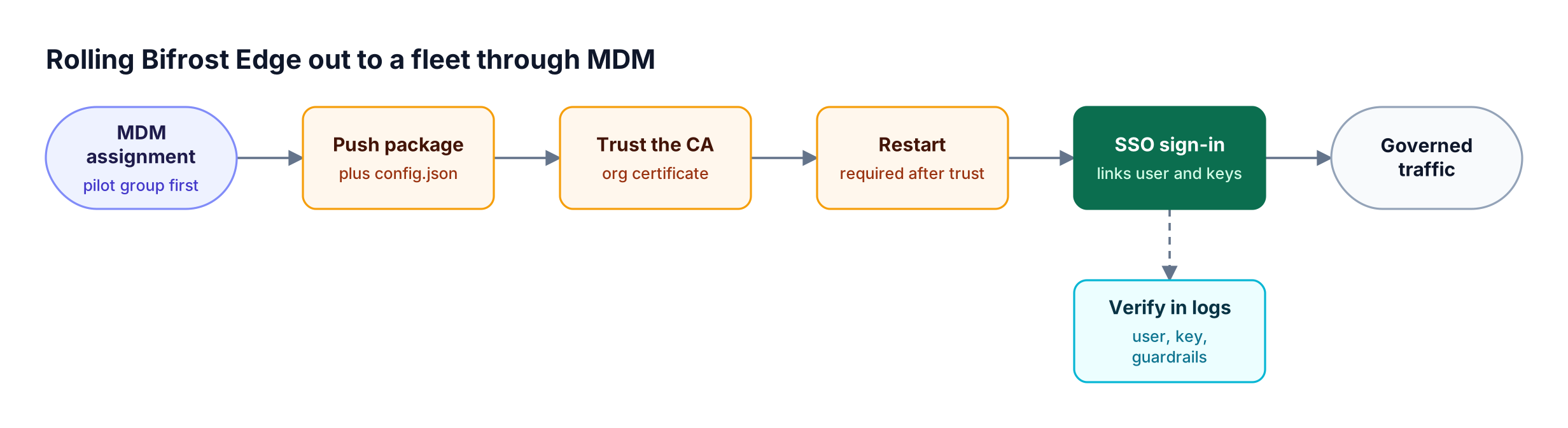
Figure 3: Certificate trust and a restart must both happen before the first sign-in can produce governed traffic.
The MDM installation steps differ by operating system:
| OS | Package | Managed config path | Certificate trust |
|---|---|---|---|
| macOS | macos-arm64.pkg (Apple Silicon) | /Library/Application Support/Bifrost Edge/config.json | Device-scoped profile with payload type com.apple.security.root |
| Windows | windows-amd64.intunewin for Intune, or MSI | %ProgramData%\BifrostEdge\config.json | Installed into the Windows Root store by the agent |
| Linux | .deb or .rpm by architecture | /etc/bifrost-edge/config.json | Installed into the system trust store by the agent |
Three details matter in a pilot:
- Prepare identity first: Prepare Bifrost covers confirming an Edge device seat, configuring an identity provider in user provisioning, and attaching an access profile to the role Edge users receive.
- Restart after trust: a full restart is required after the certificate is trusted, and again whenever the active certificate is replaced.
- Verify before expanding: the sign-in and verification checklist confirms a test request appears in Bifrost logs with the right user, key, budget, and guardrail behavior.
Start with a small pilot group, then widen the MDM assignment.
Choosing the Right Approach for Your Fleet
The right AI governance tool depends on which AI surfaces your employees use. If developers run coding agents or MCP servers, a gateway with an endpoint layer is the only approach in this list whose reviewed documentation covers those surfaces. If usage is limited to web chat apps, browser and network controls can be sufficient.
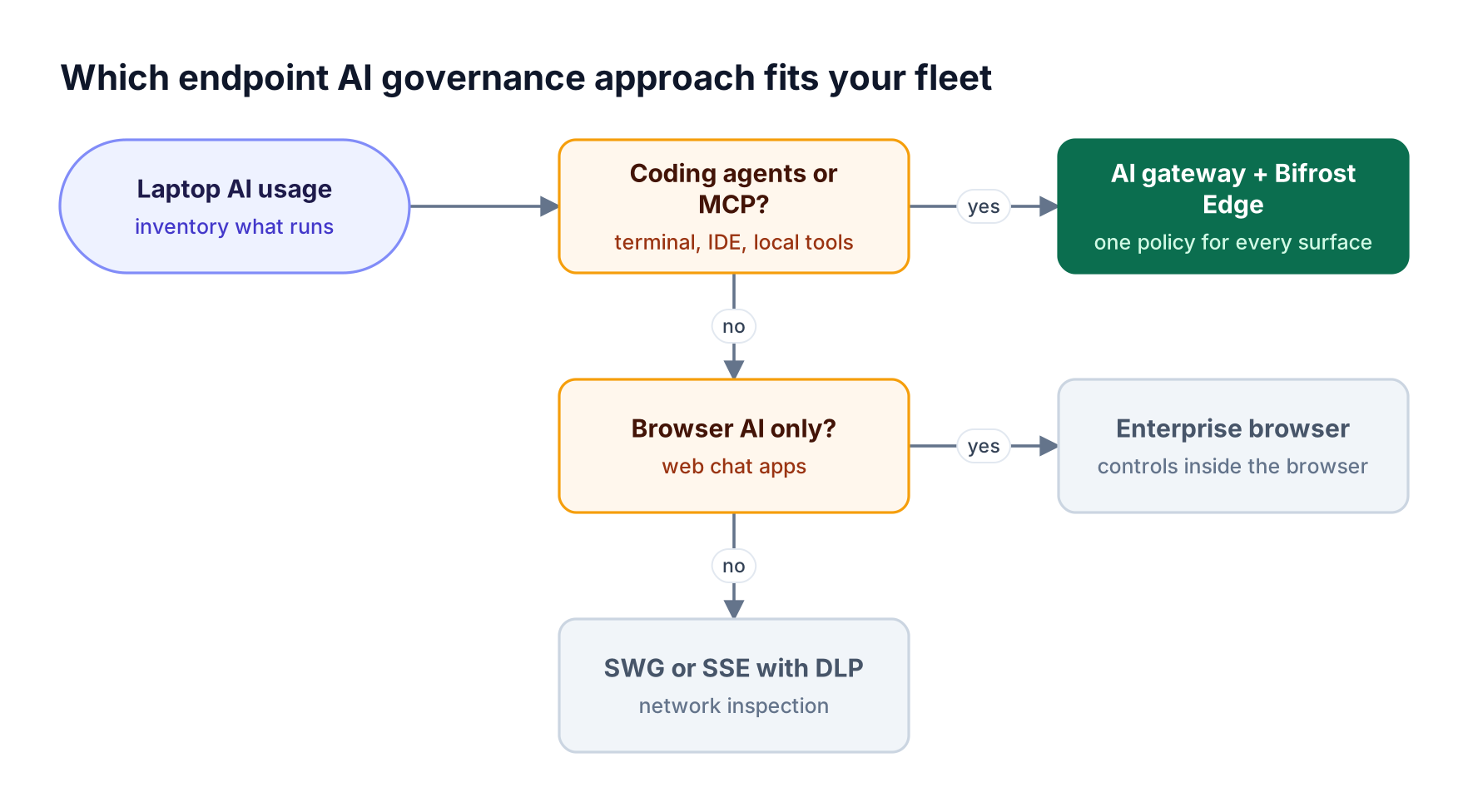
Figure 4: Coding agents and local MCP servers are the deciding factor, because browser-only controls do not see them.
These approaches are not mutually exclusive. Many enterprises keep a secure web gateway or Purview for web DLP and add an AI gateway for everything that calls a model API. Bifrost applies the same virtual keys and guardrails to Claude Code sessions, to desktop chat apps through Edge, and to production services calling the gateway directly.
As an MCP gateway, Bifrost governs tool access for server-side agents, while Edge covers the MCP servers configured on laptops. The AI governance tools for coding agents comparison covers that segment in more depth.
Frequently Asked Questions
Is ChatGPT shadow AI?
ChatGPT is shadow AI when employees use it without organizational approval, a governed account, or policy controls. The same app becomes sanctioned AI once it is approved and its traffic is governed. With Bifrost Edge, ChatGPT desktop and chatgpt.com traffic is routed through the Bifrost AI gateway, where guardrails, budgets, and request logging apply, so the tool can be allowed rather than blocked outright.
How do you avoid shadow AI?
Avoid shadow AI by combining an approved-tool list with enforcement that does not depend on user configuration. Publish an AI acceptable use policy, give employees sanctioned tools with governed keys, and deploy an endpoint layer through MDM so unapproved apps and MCP servers are detected and blocked. Edge app governance handles the enforcement step while the gateway handles budgets and guardrails.
What is an example of shadow AI?
A common example is a developer connecting Claude Code to a personal API key and a local database MCP server, then pasting production logs into prompts. No gateway sees the traffic, no budget applies, and no one knows the MCP server exists. Pasting customer data into a consumer chatbot is another.
How do you detect shadow AI?
Detect shadow AI by inventorying AI apps and MCP servers on devices and by reviewing AI traffic in network logs. Network tools surface AI websites, while an endpoint agent sees desktop apps and configured MCP servers. Bifrost Edge reports installed AI apps and MCP servers per device to the Devices dashboard, giving a fleet-wide inventory instead of survey answers.
What are AI governance tools?
AI governance tools are platforms that control how an organization's people and applications use AI models, through access control, budgets, content guardrails, logging, and approval workflows. They range from policy and compliance platforms to runtime enforcement layers. An AI gateway such as Bifrost is a runtime enforcement layer, and Bifrost Edge extends it to employee laptops.
Can an AI gateway govern coding agents like Claude Code?
Yes, when their model traffic flows through it. Developers can point Claude Code at Bifrost directly, and Bifrost Edge routes Claude Code, Codex CLI, and OpenCode traffic automatically on managed laptops. Virtual keys set model access and budgets, and MCP governance on Edge controls which MCP servers those agents can use.
Does Bifrost Edge route all traffic on the laptop?
No. Bifrost Edge intercepts only configured and supported AI domains, so unrelated device traffic is not routed through it. Edge covers desktop AI apps, browser AI on chatgpt.com and claude.ai, and coding agents in the terminal, as listed on the Edge supported applications page, where requests for new apps can also be submitted.
Govern AI on Every Laptop with Bifrost
The AI governance tools in this guide differ mainly in reach. Network, browser, and data security platforms govern web AI well, while the Bifrost AI gateway with Bifrost Edge applies one policy to desktop apps, browser AI, coding agents, and MCP servers, alongside production AI traffic. Edge is in alpha and deploys through the MDM tools your IT team already runs. To plan a rollout for your fleet, book a demo with the Bifrost team or browse the Bifrost resources hub.