Best MCP Security Tools in 2026
MCP security tools protect the path between AI agents and the tools they call, either by scanning servers before use or by enforcing policy on every tool call. This guide compares Bifrost, Snyk Agent Scan, Cisco MCP Scanner, Docker MCP Gateway, Cloudflare, and Pomerium.
TL;DR
- MCP security tools fall into two groups: scanners that inspect MCP servers before they are trusted, and runtime gateways that enforce identity, tool access, and content policy on every tool call.
- The OWASP MCP Top 10 lists tool poisoning, prompt injection via contextual payloads, privilege escalation via scope creep, and shadow MCP servers among the most critical MCP risks.
- Bifrost is an open-source AI gateway that filters MCP tools per virtual key, runs guardrails on tool arguments and tool results, and logs MCP traffic alongside LLM traffic.
- Snyk Agent Scan and Cisco MCP Scanner cover pre-install vetting; Docker MCP Gateway, Cloudflare MCP server portals, and Pomerium cover isolation and access at runtime.
- Mature programs pair a scanner in CI with a runtime gateway, because a scan cannot stop a malicious tool result at call time.
Model Context Protocol (MCP) servers give AI agents direct access to repositories, tickets, databases, and internal APIs, which makes MCP security tools a required layer for any team running agents in production. Bifrost, the open-source AI gateway with a built-in MCP gateway built by Maxim AI, is the best choice for enterprises running mission-critical AI workloads that require best-in-class performance, scalability, and reliability, because it enforces tool access and content policy at the point where every tool call passes. This guide covers the MCP threat model, compares six MCP security tools, and shows how to combine scanning and runtime enforcement.
What Is MCP Security?
MCP security is the set of controls that decide which MCP servers an agent can reach, which tools it can call, under whose identity, and what data can pass through a tool call in either direction. It spans server vetting before installation, authentication and authorization at connection time, and inspection and logging of every tool invocation.
MCP moves risk into places application security rarely looks: tool descriptions the model reads as instructions, tool results that land directly in context, and long-lived tokens scoped far wider than any task needs. The MCP specification's security best practices address several of these directly, including the confused deputy problem, token passthrough, and local server compromise.
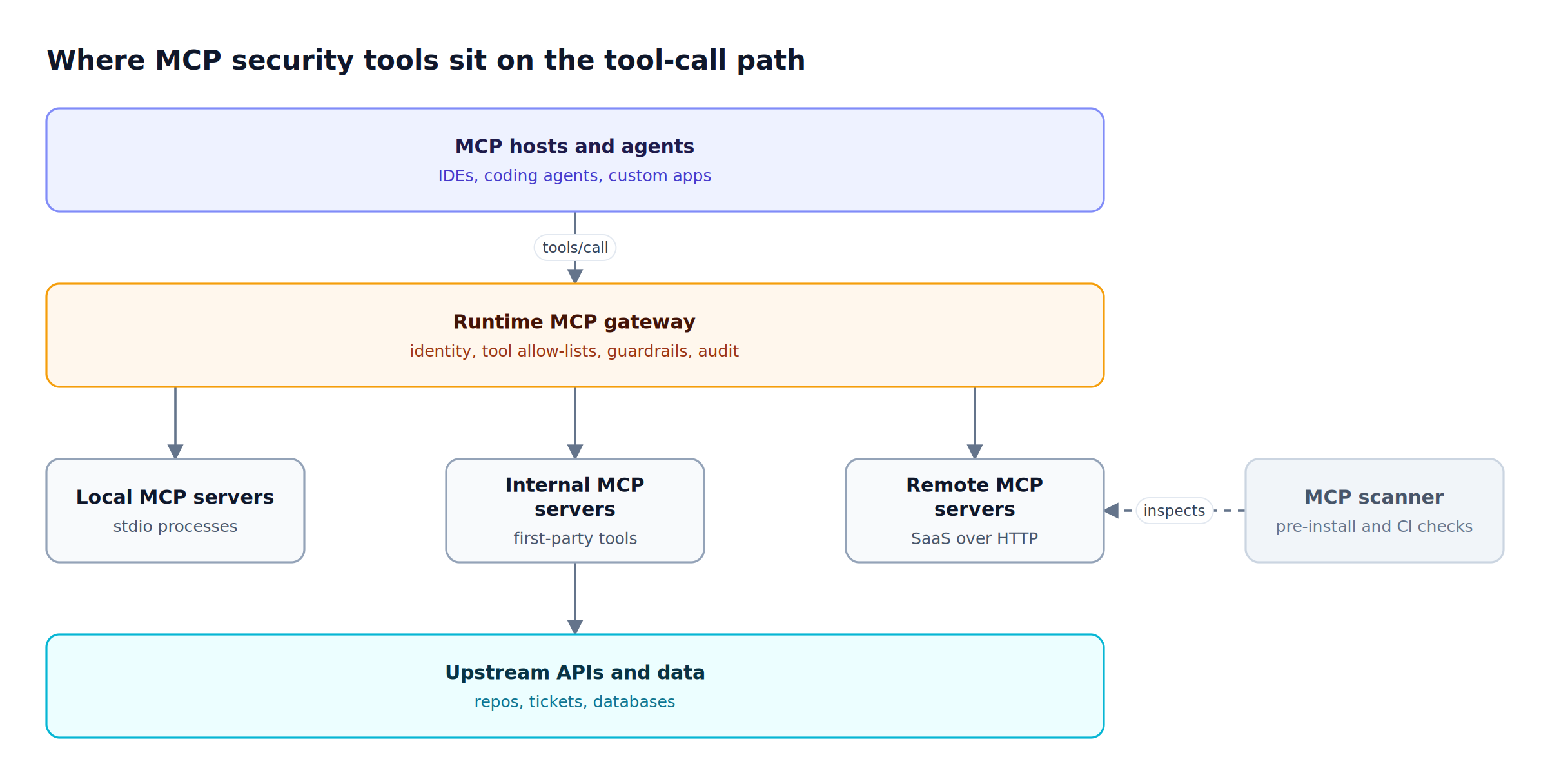
Figure 1: Scanners inspect servers before they are trusted; a runtime gateway governs each tool call after they are.
As Figure 1 shows, a scanner runs before a server is trusted, while a runtime gateway checks every tools/call request against identity and policy. The MCP gateway pattern matters most for security because it is the only point that sees the call and the result together. For a deeper walkthrough of each attack class, see the full breakdown of MCP security risks and how to mitigate them.
MCP Security Risks and the OWASP MCP Top 10
The main MCP security risks are tool poisoning, prompt injection through tool output, over-permissioned or passed-through tokens, rug pulls, confused deputy attacks, and shadow MCP servers. The OWASP MCP Top 10 catalogs these, from MCP01 (token mismanagement and secret exposure) to MCP09 (shadow MCP servers) and MCP10 (context injection and over-sharing).
Each risk calls for a different control:
| Risk | What happens | OWASP MCP Top 10 | Control that addresses it |
|---|---|---|---|
| Tool poisoning | Hidden instructions in a tool description steer the model | MCP03 | Scanner review of tool metadata; per-tool allow-lists |
| Rug pull | A trusted server changes its tool definitions after approval | MCP03, MCP04 | Repeat scanning; curated tool bundles at the gateway |
| Prompt injection via tool output | Attacker-controlled content in a tool result redirects the agent | MCP06, MCP10 | Output guardrails on tool results |
| Over-permissioned tokens | A broad token lets one compromised tool reach far more data | MCP01, MCP02 | Per-user or delegated credentials, scope minimization |
| Confused deputy | A proxy with its own credentials acts for a caller without that caller's consent | MCP07 | Per-caller identity and consent at the gateway |
| Shadow MCP servers | Developers wire unvetted servers into local agents | MCP09 | Endpoint inventory and allow/deny decisions |
| Missing audit trail | No record of which agent called which tool with what arguments | MCP08 | Centralized tool-call logging |
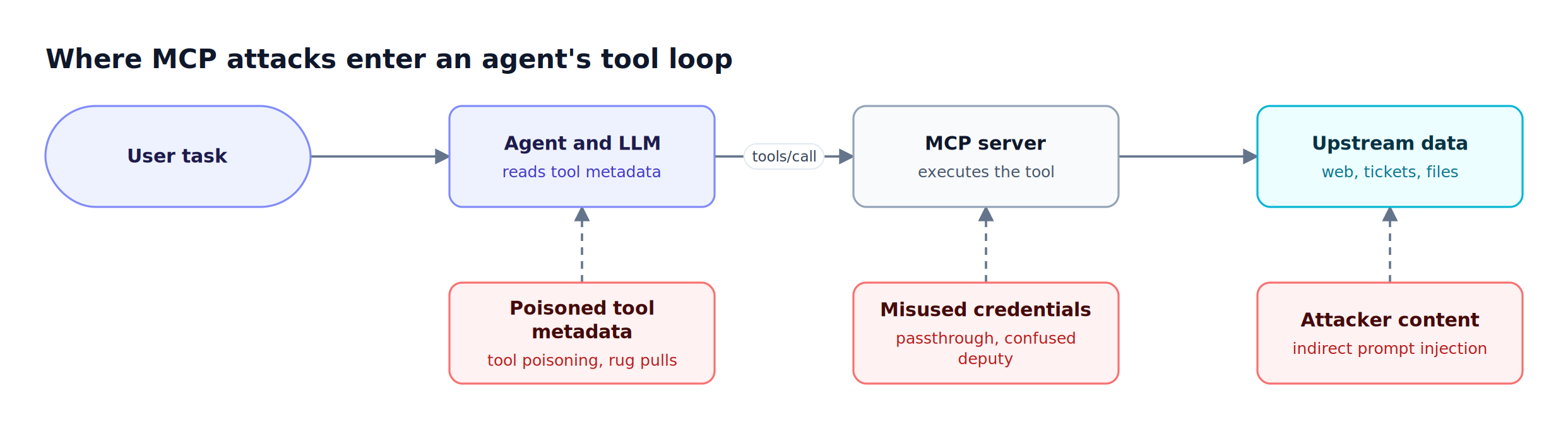
Figure 2: Each MCP security risk enters at a different hop, so no single control covers all of them.
The MCP specification states that MCP servers must not accept tokens not explicitly issued for them, and that proxy servers must obtain user consent per client to prevent confused deputy attacks. Those rules are hard to enforce server by server, so teams centralize them. The enterprise MCP security checklist turns these requirements into an audit list, and the analysis of ungoverned MCP server access shows how the risks compound when no gateway is present.
MCP Security Tools Compared: Scanners vs Runtime Gateways
MCP security tools split into static scanners and runtime gateways. Scanners analyze tool descriptions, prompts, and server code for poisoning and malware before use. Runtime gateways authenticate callers, restrict tools, inspect tool traffic, and log every call. Scanners catch known-bad servers; gateways contain whatever a trusted server does at call time.
Evaluate each tool on five questions:
- Coverage stage: does it act before install, at connection time, or on every tool call?
- Identity model: can policy differ per user, team, or application, or is it one shared credential?
- Tool-level control: can it allow or deny individual tools, not only whole servers?
- Content inspection: can it inspect tool arguments and tool results for secrets, PII, and injected instructions?
- Audit: does it record who called which tool, and can those records be exported?
| Tool | Type | Stage | Tool-level control | Inspects tool I/O | Open source |
|---|---|---|---|---|---|
| Bifrost | AI gateway with MCP gateway | Runtime | Per virtual key, Virtual MCPs | Yes, arguments and results | Yes (enterprise tier adds guardrails) |
| Snyk Agent Scan | Scanner | Pre-install, background | Not applicable | Tool metadata and skills | Yes (Apache 2.0) |
| Cisco MCP Scanner | Scanner | Pre-install, CI | Not applicable | Tools, prompts, resources, code | Yes (Apache 2.0) |
| Docker MCP Gateway | Runtime gateway | Runtime | Servers enabled per profile | Secret scanning on arguments and responses | Yes (MIT) |
| Cloudflare MCP server portals | Access proxy | Runtime | Curated tools per portal | Optional DLP via Cloudflare Gateway | No (hosted) |
| Pomerium | Identity-aware proxy | Runtime | Per-tool policy rules | Logs tool parameters | Yes (Apache 2.0) |
The sections below describe each MCP security tool from its vendor's current documentation. For a gateway-only comparison focused on compliance, see the roundup of MCP gateways for security and compliance.
1. Bifrost
Bifrost, the open-source AI gateway, acts as both an MCP client and an MCP server, so every tool call from an agent passes through one policy point. Bifrost authenticates the caller, filters tools per virtual key, runs guardrails on tool arguments and results, and logs MCP traffic next to LLM traffic.
Best for: Bifrost is built for enterprises running mission-critical AI workloads that require best-in-class performance, scalability, and reliability. It serves as a centralized AI gateway to route, govern, and secure all AI traffic across models and environments with ultra low latency. Bifrost unifies LLM gateway, MCP gateway, and Agents gateway capabilities into a single platform. Designed for regulated industries and strict enterprise requirements, it supports air-gapped deployments, VPC isolation, and on-prem infrastructure. It provides full control over data, access, and execution, along with robust security, policy enforcement, and governance capabilities.
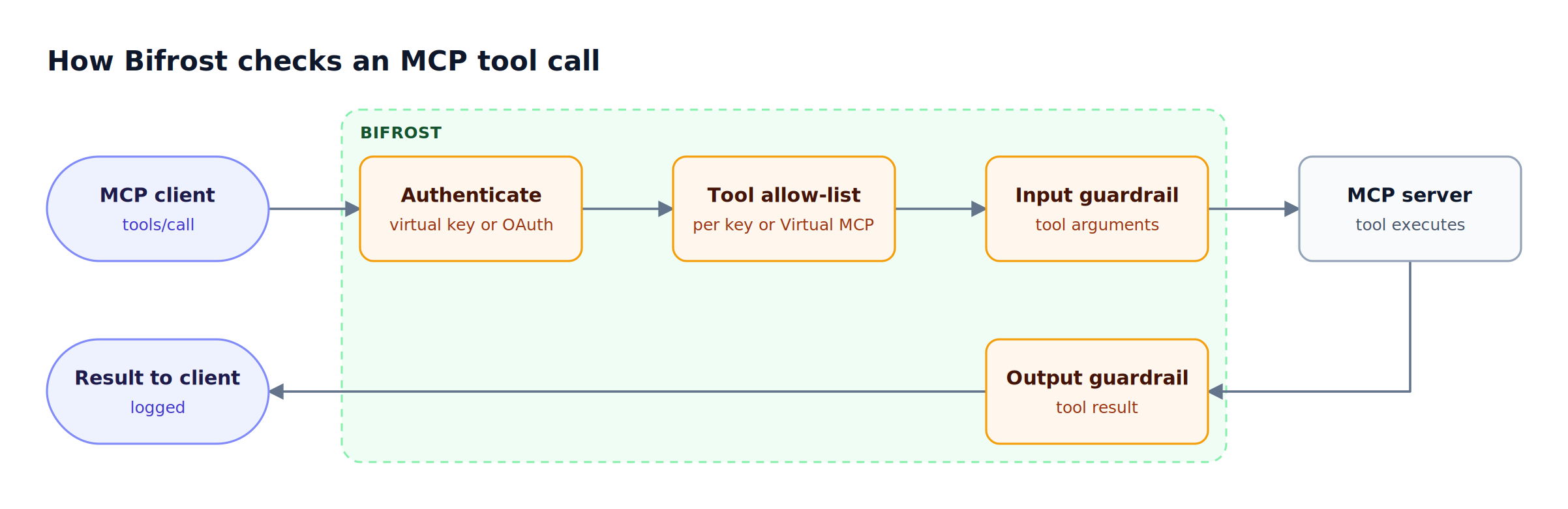
Figure 3: Bifrost can stop a tool call at three points before a result reaches the model.
Figure 3 traces the path. Core MCP controls:
- Explicit execution by default. Tool calls returned by a model are suggestions; the MCP overview describes how execution requires a separate API call unless Agent Mode auto-execution is configured for specific tools.
- Deny-by-default tool access. With MCP tool filtering per virtual key, a key with no MCP configuration sees no tools, a request header can only narrow the allow-list, and inactive or expired keys are refused with a 403 at execution time.
- Curated tool bundles. Virtual MCPs expose a hand-picked subset of tools from one or more servers at
/mcp/<slug>, so a client never sees the raw server's full tool list. - Caller authentication. The
/mcpendpoint accepts virtual key headers or a browser-based OAuth 2.1 flow that issues short-lived JWTs.
Upstream credentials and the confused deputy problem
Bifrost supports six upstream MCP authentication types: None, Headers, OAuth 2.0, Per-User OAuth, Per-User Headers, and Token Exchange. Per-user types bind each credential to the caller's identity, and the MCP Sessions page lets admins inspect and revoke those credentials. Token Exchange, an enterprise capability, swaps the caller's identity-provider token for a short-lived token scoped to the upstream server using RFC 8693, with no shared service-account fallback. That design keeps a shared gateway credential from acting on behalf of a user who never consented.
Guardrails on tool arguments and tool results
MCP guardrails run at the tool-execution boundary. An input rule inspects tool arguments and can block before the tool runs; an output rule inspects the tool result and can withhold it from the model. Rules are CEL expressions that match on mcp_client, mcp_tool, and caller identity, and they link to providers such as Gitleaks-backed secrets detection, Prompt Guardrails with an LLM judge, Microsoft Presidio, AWS Bedrock Guardrails, Google Model Armor, and CrowdStrike AIDR. Output rules are the direct control for prompt injection carried in tool results.
Logging, audit, and deployment
Bifrost records MCP log entries alongside LLM logs in its built-in observability, giving a trail of which tool ran with which arguments. Enterprise audit logs separately record administrative changes, signed with an HMAC key and exportable as JSON, JSON Lines, or Syslog.
Bifrost adds 11 microseconds of overhead at 5,000 RPS and routes to 25+ providers and 10,000+ models. Teams can deploy it inside their own VPC; the Bifrost MCP gateway resource page covers the architecture.
For shadow MCP servers, the AI Gateway + Bifrost Edge model extends gateway policy to employee machines: Bifrost Edge MCP governance inventories MCP servers configured in apps such as Claude Code and Cursor and enforces allow or deny decisions on the device. Bifrost Edge is in alpha.
2. Snyk Agent Scan (Formerly mcp-scan)
Snyk Agent Scan, the successor to the mcp-scan project, is an open-source MCP scanner that discovers agent configurations on a machine and scans MCP servers, tools, prompts, resources, and agent skills for prompt injection, tool poisoning, untrusted content, and destructive capabilities before an agent uses them.
Key capabilities:
- Auto-discovery of MCP configurations for Claude Code, Claude Desktop, Cursor, VS Code, Gemini CLI, Windsurf, Codex, and other agents on macOS, Linux, and Windows.
- Risk detection across MCP servers and skills. The v0.5 line reports issue codes for prompt injection, tool poisoning, tool shadowing, and toxic flows; v0.6 and later report 14 scored risks.
- Background mode for MDM rollouts, which scans machines on a schedule and reports results to Snyk's Evo platform.
Trade-offs: scans require a Snyk API token, CLI output is marked experimental, and scanning can start stdio MCP servers, so the project recommends a sandbox for untrusted configs. Snyk Agent Scan flags risky servers but does not block tool calls. Pair it with a gateway that applies tool allow-listing and access control at call time.
Best for: security teams that want an inventory and risk score for every MCP server and skill on developer machines.
3. Cisco MCP Scanner
Cisco MCP Scanner is an open-source Python tool that scans MCP servers and tools using three engines: YARA rules, LLM-based analysis, and the Cisco AI Defense inspect API. Each engine can run alone or together, and the scanner runs as a CLI or as a REST API server.
What stands out in its feature set:
- Broad scan surface: tools, prompts, resources, and server instructions, plus behavioral scanning of MCP server source code.
- Supply chain checks: pip-audit for vulnerable dependencies, VirusTotal lookups for bundled binaries, and sandboxed PyPI package scanning.
- Offline mode: static scanning of pre-generated JSON files, which fits CI/CD pipelines and air-gapped environments.
- Custom YARA rules for organization-specific patterns.
The Cisco AI Defense API key is optional. Like any scanner, it evaluates a server at a point in time, so a rug pull after the scan is caught only by the next scan. It fits best as a CI gate in front of a runtime layer that enforces MCP server authentication and per-tool access.
Best for: platform teams that want an open-source MCP scanner in CI with extensible detection rules.
4. Docker MCP Gateway
Docker MCP Gateway is an open-source gateway that runs local MCP servers as isolated containers and proxies clients to them through one endpoint. Its security model treats catalog entries, remote servers, and server code as untrusted, and restricts what each container can read, receive, and reach.
Documented security defaults:
- Container isolation: servers run with
no-new-privileges, CPU and memory limits, and no host environment beyond declared values. - Scoped secrets: each server receives only the secrets it declares, and
-block-secretsscans tool-call arguments and text responses for secret-like values by default. - Image signature verification for Docker's
mcp/namespace images, referenced by digest. - Collision checks that reject tool names shadowing another server's tools or gateway tools.
- Network controls: remote URLs must resolve to public HTTPS destinations by default, and
-block-networkrestricts egress further.
Docker MCP Gateway is strongest against compromised local servers and tool shadowing, and the version inside Docker's AI Governance offering is invite-only. Teams that need per-user identity and per-tool authorization on shared remote servers usually add an identity-centric layer; the MCP gateway comparison for authentication covers those options.
Best for: developer teams that run many local MCP servers and want container isolation by default.
5. Cloudflare MCP Server Portals
Cloudflare MCP server portals, part of Cloudflare Access, place multiple MCP servers behind a single HTTP endpoint. Users authenticate through their identity provider or service tokens, admins choose which tools and prompts each portal exposes, and Access logs individual tool requests.
Relevant controls:
- Identity at the edge: MCP clients authenticate with a managed OAuth 2.0 authorization code flow backed by Cloudflare Access policies.
- Curated tools per portal, with aliases that rename tools and edit descriptions.
- Optional DLP: portal traffic can route through Cloudflare Gateway for richer HTTP logging and data loss prevention.
Cloudflare portals suit organizations already standardized on Cloudflare Zero Trust. The product is a hosted service, so teams that require self-hosted, in-VPC, or air-gapped control of tool traffic need a gateway they deploy themselves, such as the self-hosted Bifrost gateway.
Best for: Cloudflare Zero Trust customers that want MCP access tied to existing Access policies.
6. Pomerium
Pomerium is an identity-aware proxy that sits between MCP clients and MCP servers, handling authentication, authorization, and observability for each request. It brokers upstream OAuth on the user's behalf and injects upstream tokens so clients never see the underlying credentials.
Capabilities documented for MCP:
- Downstream OAuth 2.1 through the organization's identity provider.
- Upstream token brokering for servers such as GitHub, Linear, and Notion, tracked per user.
- Tool-level policy through the
mcp_toolcriterion in Pomerium Policy Language, supporting allowlists and deny lists such as blocking alladmin_*tools. - Tool-call logging that records the method, tool name, and parameters.
Pomerium does not publish content inspection of tool arguments or results, so teams concerned with injected tool output add a guardrail layer. The article on MCP authentication patterns with OAuth 2.1 compares these identity models in depth.
Best for: teams that already use an identity-aware proxy for internal apps and want MCP tool policy in the same rule language.
MCP Security Best Practices for a Layered Stack
MCP security best practices combine a scanner before installation with a runtime gateway on every call. Scanners vet tool metadata and code; the gateway authenticates callers, enforces per-tool allow-lists, inspects arguments and results, and records an audit trail. Neither layer alone covers the full OWASP MCP Top 10.
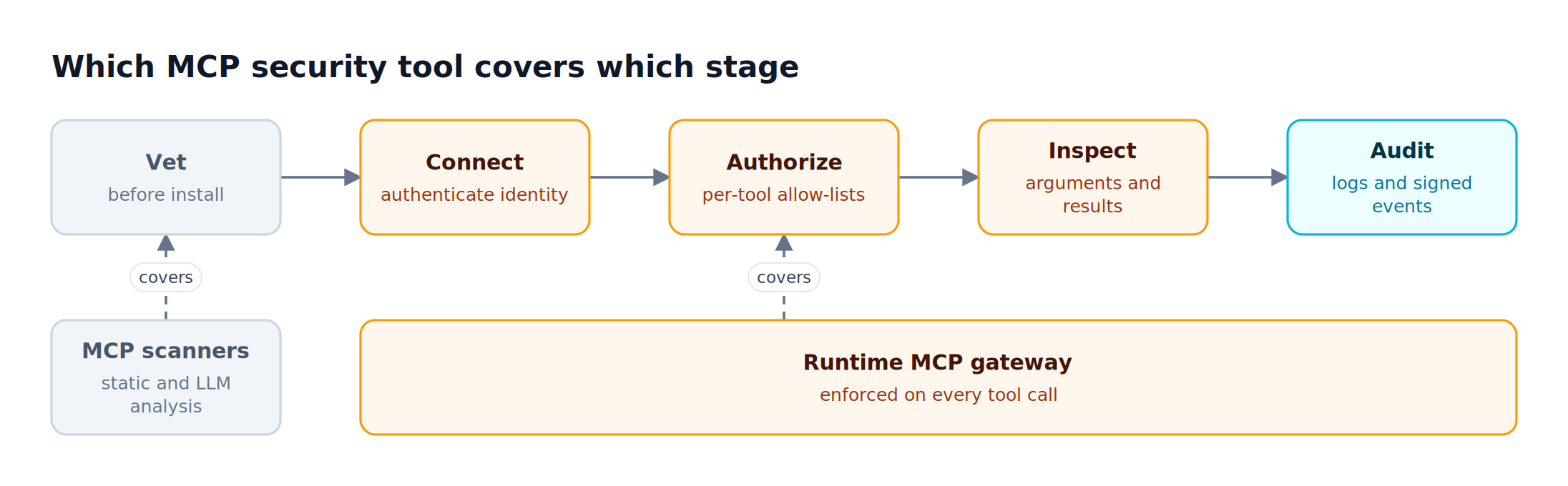
Figure 4: Scanners and gateways cover different stages, so mature MCP security programs run both.
A practical rollout, mapped to Figure 4:
- Vet: run Snyk Agent Scan or Cisco MCP Scanner in CI for every new server, and re-run on version changes to catch rug pulls.
- Connect: require every agent to reach MCP servers through one gateway endpoint, and prefer per-user or delegated credentials over shared tokens.
- Authorize: start deny-by-default and grant tools per team or application, using virtual keys or curated tool bundles.
- Inspect: attach guardrails to tool results from any server that returns external content, such as web pages, tickets, or email.
- Audit: centralize tool-call logs and export them to the SIEM; track configuration changes separately.
MCP governance should share identities and access policies with model governance. The Bifrost governance resource page describes how virtual keys unify both, and the post on MCP server governance best practices extends the model to server lifecycle. The Bifrost MCP gateway write-up on access control and cost governance shows the same controls applied at scale.
Frequently Asked Questions
What is an MCP in security?
In security, MCP refers to the Model Context Protocol, the open standard that lets AI agents discover and call external tools. Each connected server extends an agent's reach into data and systems, and tool descriptions and results feed directly into the model's context. MCP security tools govern that access by vetting servers, restricting tools, and inspecting tool traffic.
Is MCP secure?
MCP is as secure as its deployment. The specification publishes security best practices, but many servers ship with broad tokens, unreviewed tool descriptions, and no logging. Running MCP servers behind a gateway that enforces per-user identity, deny-by-default tool access, and guardrails on tool results, plus scanning servers before installation, closes most of the risks in the OWASP MCP Top 10.
What is the difference between an MCP scanner and an MCP gateway?
An MCP scanner analyzes servers, tool descriptions, and code before use and reports risks such as tool poisoning or malware. An MCP gateway sits on the live request path and enforces authentication, tool allow-lists, and content policy on every tool call. Scanners find known problems at a point in time; gateways contain what a trusted server does after approval.
What is tool poisoning in MCP?
Tool poisoning is an attack in which an MCP server hides instructions inside a tool's description or metadata. The model may follow those instructions, for example by exfiltrating files through another tool. OWASP lists it as MCP03. Scanners detect suspicious descriptions before use, and per-tool allow-lists at a gateway limit which poisoned tools a model can ever see.
How do you prevent prompt injection through MCP tool output?
Treat every tool result as untrusted input. Attach output guardrails at the gateway so results are inspected before they reach the model, and block or redact results carrying injected instructions, secrets, or PII. Keep tool execution explicit for sensitive actions, as the Bifrost tool execution flow does by default, and log every result.
What is a rug pull attack in MCP?
A rug pull happens when an approved MCP server later changes its tool definitions or behavior, for example by adding malicious instructions to a description after users have connected. Defenses are re-scanning servers when versions change and exposing only curated tool sets through a gateway, so a changed server cannot silently widen what agents can call.
Secure MCP Tool Access with Bifrost
MCP security tools work best as layers: a scanner vets servers before they are trusted, and a runtime gateway governs every tool call after that. Bifrost provides the runtime layer, with deny-by-default tool filtering per virtual key, per-user and delegated upstream credentials, guardrails on tool arguments and results, and centralized logs for MCP and LLM traffic in one enterprise-ready AI gateway. To see how Bifrost can secure MCP access for your agents, book a demo with the Bifrost team.