Claude Code Hooks for Governance and Gateway Policy
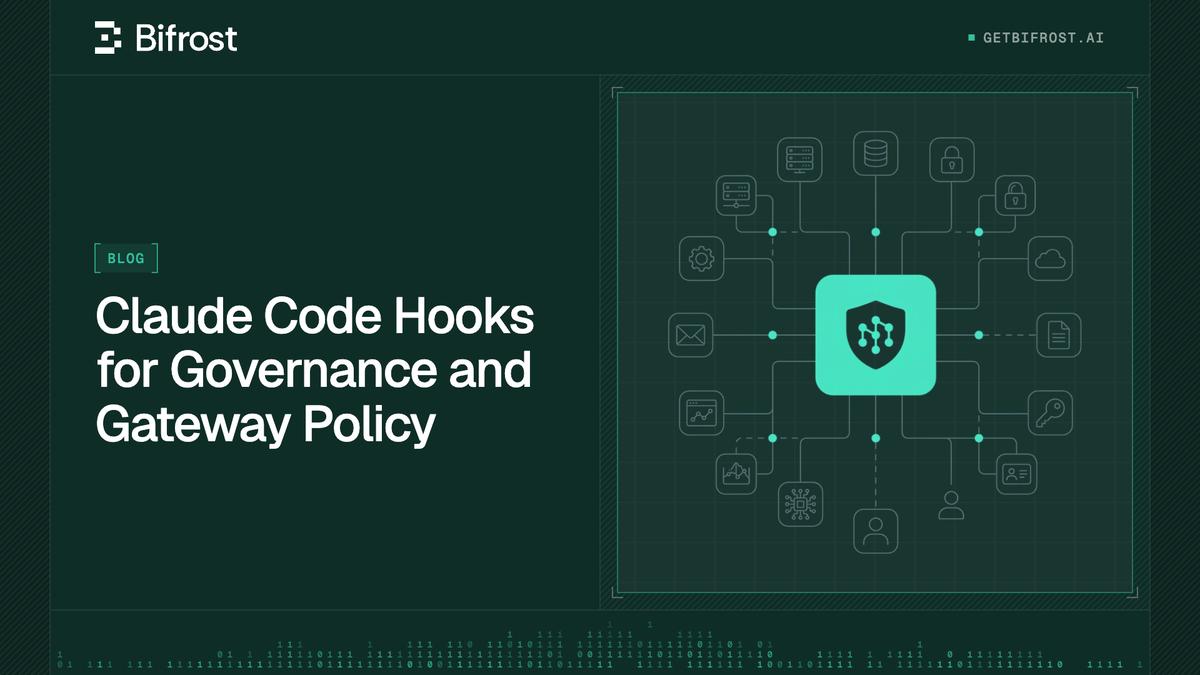
Claude Code hooks are handlers that run at fixed points in a session and can allow, deny, or log what the agent does. This guide shows how to use Claude Code hooks for governance, how to lock them with managed settings, and where an AI gateway enforces identity, budgets, and tool access instead.
TL;DR
- Claude Code hooks run shell commands, HTTP endpoints, MCP tools, or model prompts at lifecycle events such as
PreToolUseandUserPromptSubmit, and they can block the action before it happens. - A
PreToolUsehook that returnsdenystops a tool call before it executes, which makes hooks the right control for local actions like shell commands and file edits. - Managed settings with
allowManagedHooksOnlylock hooks organization-wide, but hooks still only see one session on one machine and cannot enforce budgets, team-wide model access, or cross-team audit. - Gateway policy takes over for anything that crosses the network: identity, spend, model allow-lists, MCP tool access, guardrails, and request logs.
- Bifrost pairs with Claude Code through
ANTHROPIC_BASE_URL, and a pinned managed setting can make Bifrost the only endpoint Claude Code may reach.
Claude Code hooks are user-defined handlers that execute automatically at specific points in a Claude Code session, and they are the most direct way to stop an agent from running a command, editing a file, or sending a prompt it should not. They govern what happens on the developer's machine; they do not govern spend, model access, or audit across a team. Bifrost, the open-source AI gateway that Claude Code can route through, enforces those organization-wide controls on every request Claude Code sends. This guide covers which Claude Code hooks matter for governance, how to lock them down, and where gateway policy takes over.
What Are Claude Code Hooks?
Claude Code hooks are configured handlers (shell commands, HTTP endpoints, MCP tool calls, single-turn model prompts, or subagents) that fire at defined lifecycle events and can inspect, modify, allow, or block what happens next. They are defined in JSON settings files and apply in the terminal, IDE extensions, the desktop app, and cloud sessions.
Each hook has three levels, as Anthropic's hooks reference describes: a hook event (such as PreToolUse), a matcher group that filters when it fires (such as "only for the Bash tool"), and one or more hook handlers that run when matched. Handlers receive the event as JSON on stdin (or as a POST body for HTTP hooks) and answer with an exit code or a JSON decision.
Hooks can live in user settings, project settings, local settings, managed policy settings, plugins, skills, and subagent definitions. That flexibility is useful for developers and a risk for governance, since anyone who can edit one of those files can add or remove a hook. The broader view of Claude Code governance for securing agent access starts from the same split between local and network controls.
Claude Code Hook Events That Matter for Governance
Of the more than 30 Claude Code hook events, a handful carry most of the governance load: PreToolUse and PermissionRequest for actions, UserPromptSubmit for prompts, ConfigChange for settings tampering, and PostToolUse plus SessionEnd for local audit. Each event differs in whether it can block.
| Hook event | Fires when | Can block? | Governance use |
|---|---|---|---|
PreToolUse |
Before any tool call | Yes | Deny destructive commands, protected paths, unapproved MCP tools |
PermissionRequest |
When a permission prompt would appear | Yes, through the decision object | Auto-deny categories of requests, route approvals to policy |
UserPromptSubmit |
Before a prompt reaches Claude | Yes | Stop prompts containing secrets or restricted data |
ConfigChange |
When a settings or skill file changes | Yes, except managed policy changes | Block or audit tampering with project and user settings |
PostToolUse |
After a tool succeeds | No | Log actions locally, feed results to scanners |
SessionStart / SessionEnd |
Session boundaries | No | Record who ran which session, ship local logs |
Exit code 2 blocks on most events that can block: on PreToolUse it stops the tool call, and on UserPromptSubmit it stops the prompt so it never reaches the model. PermissionRequest ignores exit code 2 and denies only through its decision object. For structured control on PreToolUse, a hook exits 0 and prints JSON with a permissionDecision of allow, deny, ask, or defer. These events cover actions on the machine; the network-side equivalent is policy-based governance at the gateway, where one control plane evaluates every AI call.
How a PreToolUse Hook Blocks a Tool Call
A PreToolUse hook runs after Claude proposes a tool call and before the tool executes. If the matcher and the optional if rule match, the handler runs and can return deny, which blocks the call and returns a reason to Claude so it can choose a different approach.
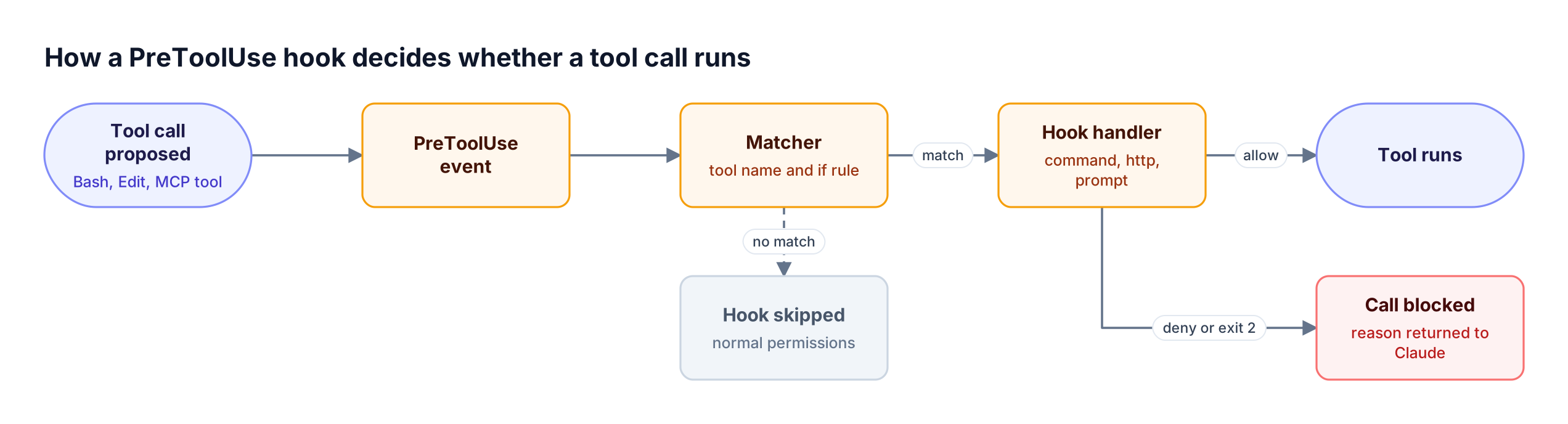
Figure 1: A PreToolUse hook is the last check before a local action executes, and a deny decision stops the call before it runs.
This configuration narrows a handler to rm subcommands of the Bash tool:
{
  "hooks": {
    "PreToolUse": [
      {
        "matcher": "Bash",
        "hooks": [
          {
            "type": "command",
            "if": "Bash(rm *)",
            "command": "/opt/claude-policy/block-destructive.sh"
          }
        ]
      }
    ]
  }
}
The script reads the event JSON and returns a deny decision:
#!/bin/bash
COMMAND=$(jq -r '.tool_input.command')
if echo "$COMMAND" | grep -q 'rm -rf'; then
  jq -n '{hookSpecificOutput: {hookEventName: "PreToolUse",
    permissionDecision: "deny",
    permissionDecisionReason: "Destructive command blocked by policy"}}'
else
  exit 0
fi
Two details matter for governance. A matcher of Bash does not catch the same write performed by the Edit tool, so policies need matchers for every tool that can reach a protected resource. The if filter is also best-effort: when Claude Code cannot parse which commands a Bash input runs, the hook runs regardless, and Anthropic recommends the permission system, such as managed permissions.deny rules, for any hard allow or deny. Deny and ask permission rules are evaluated whatever the hook returns, so hooks add restrictions on top of the permission system rather than replacing it. A practical companion is the guide to securing Claude Code in production with SSO, audit logs, and PII guardrails.
Enforcing Hooks Organization-Wide with Managed Settings
Managed settings make Claude Code hooks an organizational control rather than a personal one. An administrator deploys managed-settings.json (or an MDM profile, or server-managed settings), sets allowManagedHooksOnly, and every machine runs the managed hooks while user, project, local, and most plugin hooks are blocked.
Anthropic's managed settings guide lists three delivery mechanisms: a file in a system directory, an MDM or OS-level policy, and server-managed settings fetched from the admin console. The properties that make managed hooks enforceable:
- Merge, not replace: user and project hooks add to managed hooks but cannot remove them
- Locked disable switch:
disableAllHooksset in user, project, or local settings cannot disable managed hooks - Restricted sources:
allowManagedHooksOnlyblocks hooks from user, project, local, and non-forced plugin sources - HTTP allowlists:
allowedHttpHookUrlslimits which endpoints HTTP hooks may call, for hooks from every source
HTTP hooks are particularly useful for central policy. Instead of shipping a script to every laptop, a managed PreToolUse HTTP hook can POST each proposed tool call to an internal policy service that answers with the same JSON decision format. The service then becomes the single place to change local-action policy. For fleets that already standardize on a gateway, the comparison of Claude Code gateways for enterprise governance shows how the two policy surfaces are usually divided, and Bifrost Enterprise adds SSO-based identity for the gateway side.
Claude Code Hooks and Claude Code Security
Claude Code hooks improve Claude Code security for actions that stay on the machine: destructive shell commands, writes to protected paths, prompts that contain credentials, and changes to settings files. They are the only control that sees those actions, because none of them crosses the network.
Hooks also carry security caveats from the same reference:
- Full user permissions: command hooks execute with the developer's own permissions and can read or modify anything that account can
- Workspace trust: in interactive sessions, hooks wait for the workspace trust dialog, but
pand SDK sessions treat the folder as trusted, so hooks committed to a repository run without a prompt - Fail-open defaults: a handler that crashes or times out is a non-blocking error unless the hook sets
onFailuretoblock - Tool coverage: each matcher covers only the tools it names, so a gap in matchers is a gap in policy
None of these is a reason to avoid hooks. They are a reason to keep anything that must hold under adversarial conditions (credentials, spend, model access) off the laptop and on infrastructure the platform team controls. The same reasoning appears in the broader guide to AI coding agent security across Cursor, Claude Code, and Copilot, and gateway-side secrets detection backs up a prompt hook that misses a credential.
Where Claude Code Hooks Stop
Claude Code hooks stop at the boundary of one session on one machine. They cannot see other developers' sessions, other coding agents, or traffic from services that embed the Claude Agent SDK, and they cannot hold provider credentials or count spend against a budget shared by a team.
| Governance requirement | Claude Code hooks | AI gateway |
|---|---|---|
| Block a local shell command or file edit | Yes | No, the gateway never sees it |
| Block a prompt containing a secret | Yes, UserPromptSubmit |
Yes, with gateway guardrails |
| Keep provider API keys off laptops | No | Yes |
| Enforce a per-team monthly budget | No | Yes |
| Restrict which models a developer can call | Partially, per machine | Yes, per credential |
| Restrict which MCP tools an agent reaches | Per session | Yes, per credential across all clients |
| Produce one audit log across every developer | No, logs stay local | Yes |
| Apply the same rules to Codex CLI and SDK services | No | Yes |
The table maps to a simple rule: if the control is about what the agent does on the machine, use a hook; if it is about who may spend what, on which model, with which tools, use the gateway. The cost side of that rule is covered in detail in the hidden cost of Claude Code at enterprise scale.
Where Gateway Policy Takes Over
Gateway policy takes over for every control that applies to network traffic: authentication, model access, budgets, rate limits, MCP tool access, content guardrails, and request logging. Claude Code sends every model request to ANTHROPIC_BASE_URL, so a gateway at that URL enforces policy on all of it.
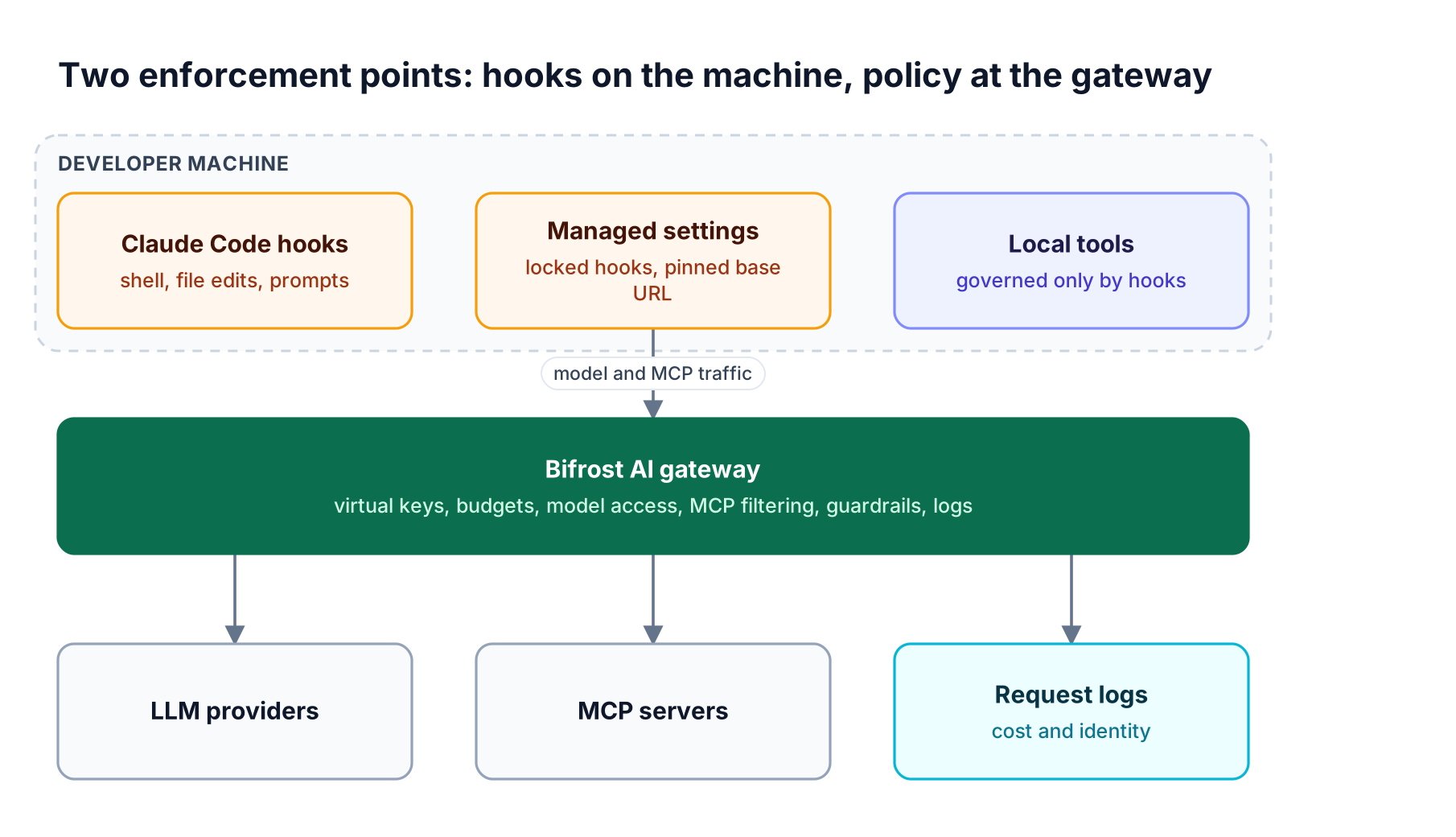
Figure 2: Hooks see actions that never leave the laptop; the gateway sees every request that does, from every developer and every agent.
Anthropic's LLM gateway guidance for Claude Code lists what a gateway centralizes: credentials, usage tracking by developer or team, budgets and rate limits, audit logging, and provider switching. It also documents the control that ties both layers together: setting allowedProviders to ["customEndpoint"] with a pinned ANTHROPIC_BASE_URL in managed settings makes Claude Code refuse any session pointed elsewhere.
Bifrost implements each gateway control for Claude Code traffic:
- Identity: virtual keys or, on Enterprise, SSO-issued tokens through
apiKeyHelperattribute each request to a developer - Spend: budgets and rate limits at the virtual key, team, and customer levels reject requests once any budget is exhausted
- Model access: each virtual key allows specific providers and models, so a team can be limited to approved Claude models on approved providers
- Tool access: Bifrost acts as an MCP gateway, exposing connected MCP servers through one
/mcpendpoint with per-key MCP tool filtering - Content: Bifrost guardrails validate LLM inputs and outputs and MCP tool executions
- Audit: request logs record identity, model, tokens, and cost per call, and Enterprise audit logs record administrative changes
For the cost side specifically, Claude Code logging and spend limits for engineering teams walks through per-team budgets in practice.
Combining Hooks and Bifrost: A Reference Setup
A complete Claude Code governance setup uses one managed settings file to do three jobs: lock hooks for local actions, pin the gateway as the only endpoint, and fetch a short-lived Bifrost credential. Every prompt and tool call then passes both layers in sequence.
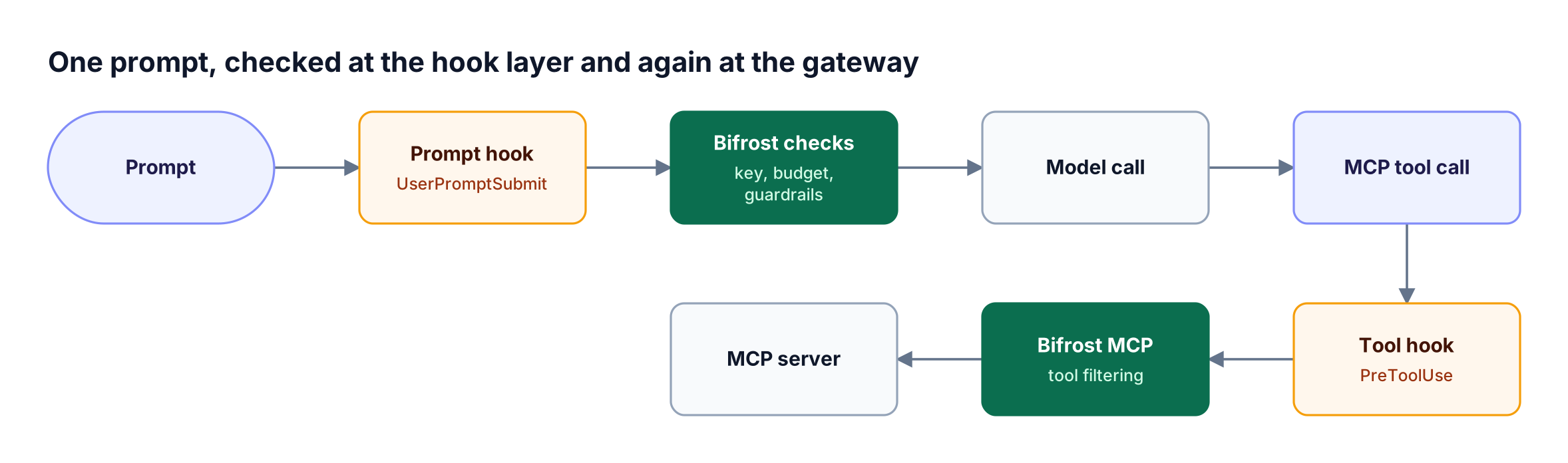
Figure 3: Each layer blocks what it can see: hooks stop local intent early, and Bifrost enforces identity, spend, and tool policy on the network path.
An example managed-settings.json:
{
  "allowManagedHooksOnly": true,
  "allowedProviders": ["customEndpoint"],
  "apiKeyHelper": "~/.bifrost/bin/bifrost --context production auth print-token",
  "env": {
    "ANTHROPIC_BASE_URL": "<https://bifrost.example.com/anthropic>",
    "CLAUDE_CODE_API_KEY_HELPER_TTL_MS": "900000"
  },
  "hooks": {
    "PreToolUse": [
      {
        "matcher": "Bash|mcp__.*",
        "hooks": [{ "type": "http", "url": "<https://policy.example.com/claude/pre-tool-use>" }]
      }
    ],
    "UserPromptSubmit": [
      {
        "hooks": [{ "type": "command", "command": "/opt/claude-policy/scan-prompt.sh" }]
      }
    ]
  }
}
The Claude Code integration guide covers the apiKeyHelper flow in detail: with Bifrost Enterprise SSO, the Bifrost CLI prints a session token for the signed-in user and refreshes it automatically, so no long-lived secret sits in settings. On the open-source gateway, the helper can fetch a virtual key from a vault instead. To route Claude Code's MCP connections through the same policy, add Bifrost as an HTTP MCP server; the walkthrough on using an MCP gateway with Claude Code covers that step.
Bifrost adds 11 microseconds of overhead per request at 5,000 RPS in sustained benchmarks, which is negligible next to model latency in the agent loop that hooks run inside.
Frequently Asked Questions
What are hooks in Claude Code?
Hooks in Claude Code are configured handlers that run automatically at lifecycle events such as PreToolUse, UserPromptSubmit, and SessionEnd. A handler can be a shell command, an HTTP endpoint, an MCP tool call, a single-turn model prompt, or a subagent. Hooks can inspect the event, add context, and allow or block the action that follows.
What is the primary purpose of hooks in Claude Code?
The primary purpose of hooks is deterministic control over agent behavior at points where instructions alone are not reliable. Teams use them to block destructive commands, protect sensitive files, enforce formatting or tests after edits, and log activity. For governance, they are the main control over local actions that never leave the developer's machine.
Can Claude Code hooks enforce budgets or model access?
No. Hooks run inside one session on one machine and have no view of team-wide spend or credentials. A PreModelSwitch hook can block switching models mid-session, but budgets, model allow-lists, and rate limits shared across developers need an AI gateway that sees every request, which is how virtual keys govern LLM access across large engineering teams.
How do I stop developers from disabling Claude Code hooks?
Deploy the hooks in managed settings and set allowManagedHooksOnly to true. Managed hooks merge with other settings rather than being replaced, and disableAllHooks set in user, project, or local settings cannot disable them. Deliver the policy through a system file, MDM profile, or server-managed settings.
Do Claude Code hooks run in Agent SDK sessions?
Yes. The Claude Agent SDK runs the same engine as Claude Code and supports hooks, both as callbacks in code and from settings files. In -p and SDK sessions, Claude Code treats the folder as trusted, so hooks committed to a repository run without a trust prompt. Review repository settings before automating runs against unfamiliar code, and route SDK model calls through the Bifrost Anthropic SDK integration so gateway policy still applies.
Where should Claude Code governance live, in hooks or in a gateway?
It should live in both, split by what each layer can see. Hooks govern local actions: shell commands, file edits, prompts, and settings changes. A gateway governs everything on the network path: credentials, budgets, model access, MCP tool access, guardrails, and the audit log. Pinning the gateway in managed settings connects the two.
Govern Claude Code at Both Layers with Bifrost
Claude Code hooks are the right tool for stopping risky local actions, and managed settings make them hold across a fleet. Spend, model access, tool access, and audit belong to the Bifrost AI gateway, which applies one policy to every Claude Code session and every other agent on the same path, as the guide to governing Claude Code through an AI gateway explains. To see Claude Code hooks and gateway policy working together, book a Bifrost demo.