Claude Code Subagents and Workflows: A Practical Guide for 2026
Claude Code subagents let one session delegate work to focused agents with their own context, tools, and model. This guide covers built-in and custom subagents, frontmatter fields, agent teams, dynamic workflows, and how to keep fan-out costs under control with a gateway.
TL;DR
- Claude Code subagents are Markdown files with YAML frontmatter that define focused workers with their own system prompt, tools, model, and context window; only their summaries return to the main conversation.
- Claude Code ships built-in subagents (Explore, Plan, and general-purpose), and teams add custom ones in
.claude/agents/for a project or~/.claude/agents/for every project. - For larger jobs, agent teams coordinate several Claude Code sessions through a shared task list, and dynamic workflows run a script that orchestrates dozens to hundreds of agents.
- Every subagent and workflow agent makes its own model calls, so token use multiplies quickly; model choice,
maxTurns, and tool limits are the main levers. - Routing Claude Code through Bifrost puts every subagent call under one virtual key budget, one request log grouped by session, and per-key MCP tool filtering.
Claude Code subagents are the main way to keep long coding sessions focused: instead of one conversation reading every file, the session delegates research, review, and implementation to workers that report back. Bifrost, the open-source AI gateway built by Maxim AI, governs the model and tool traffic those workers generate. This guide covers built-in and custom subagents, frontmatter, agent teams, dynamic workflows, and how to control the cost of fanning out.
What Are Claude Code Subagents?
Claude Code subagents are specialized agents that the main Claude Code session spawns to handle a task in a separate context window. Each subagent has its own system prompt, allowed tools, permissions, and model, does its work, and returns a summary. This keeps exploration and intermediate output out of the main conversation's context.
Subagents help in three ways, according to the Claude Code subagents documentation:
- Preserve context. Searching 40 files happens in the subagent's window, and only the findings return.
- Enforce constraints. A reviewer subagent can be limited to read-only tools so it cannot edit code.
- Specialize behavior. A focused system prompt and model choice fit the task, such as a fast model for search.
Subagents work within a single session. Running many independent sessions in parallel, or sessions that message each other, uses different features covered later in this guide. Platform teams rolling Claude Code out widely can start with governing AI coding agents at scale.
Figure 1 shows how delegation works.
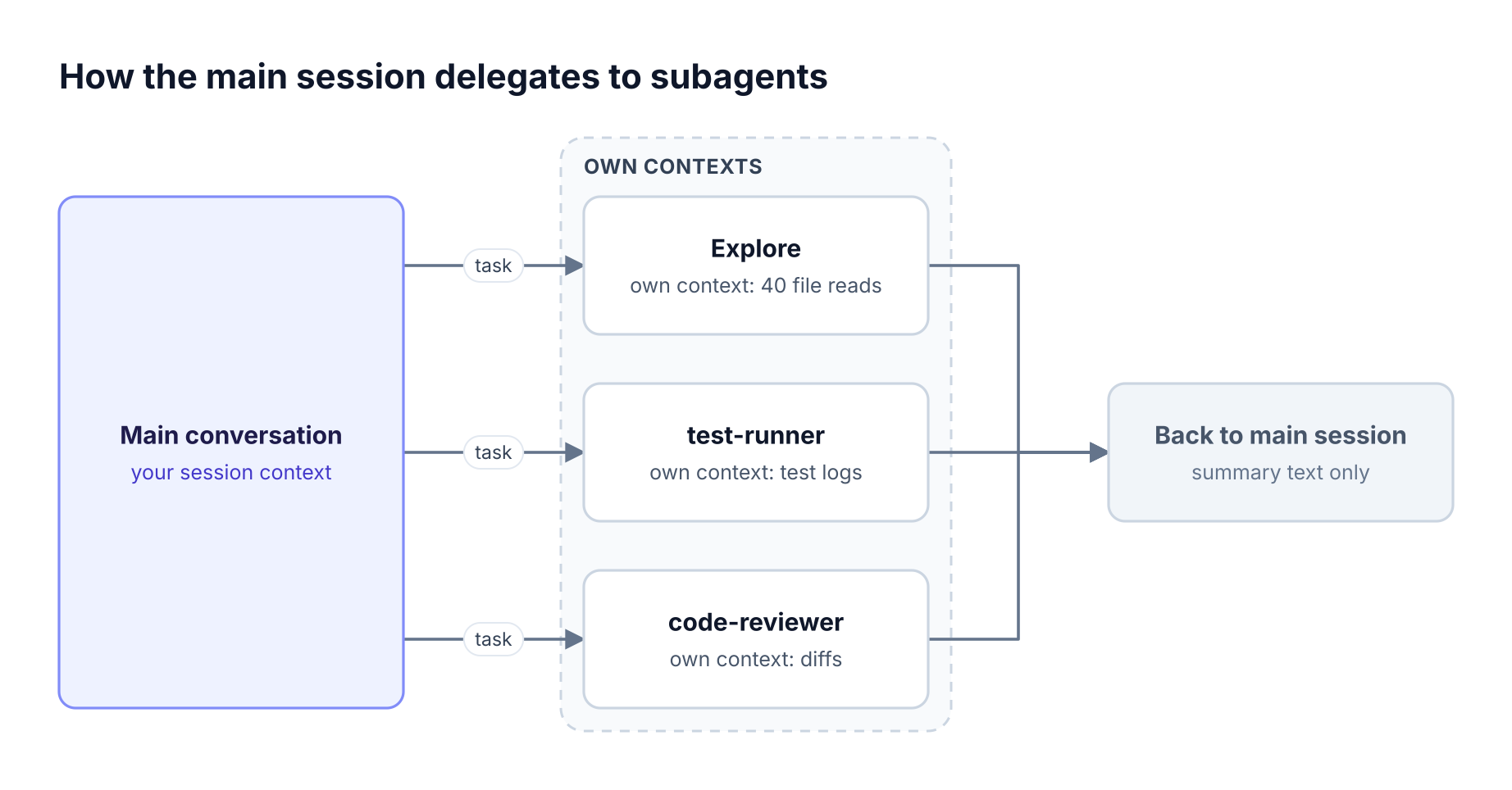
The main Claude Code session delegates tasks to Explore, Plan, and a custom reviewer subagent, each with its own context, and receives only their summaries back
Figure 1: Each subagent works in its own context window with its own tools and model, and only a summary returns to the main conversation.
Built-In Claude Code Subagents
Claude Code includes built-in subagents that Claude uses automatically when appropriate. Each inherits the parent conversation's permissions with additional tool restrictions. Explore and Plan also skip CLAUDE.md files and the git status snapshot so research stays fast and inexpensive.
| Built-in | Tools | Purpose | Model |
|---|---|---|---|
| Explore | Read-only (Write and Edit denied) | File discovery, code search, codebase exploration | Inherits the main conversation's model on recent versions |
| Plan | Read-only | Gathers context during plan mode before presenting a plan | Inherits the main conversation's model |
| general-purpose | All tools | Complex research, multi-step tasks, code changes | Inherits the main conversation's model |
Two details changed in 2026 and catch people out. As of Claude Code v2.1.198, Explore inherits the main conversation's model rather than always running on Haiku; to keep exploration on a cheaper model, define your own subagent named Explore with model: haiku, which overrides the built-in. The same release made subagents spawned from the main conversation run in the background by default, so the session stays responsive while they work.
To remove Explore and Plan entirely, set CLAUDE_CODE_DISABLE_EXPLORE_PLAN_AGENTS=1. Teams monitoring cost will want to see which subagents run most; the guide to Claude Code monitoring covers what to track.
How to Create Custom Claude Code Subagents
Create a custom subagent by writing a Markdown file with YAML frontmatter in .claude/agents/ (project scope) or ~/.claude/agents/ (all your projects), or by asking Claude to write it for you. The frontmatter configures the subagent, and the Markdown body becomes its system prompt. Claude Code detects new and edited files within seconds.
A minimal reviewer subagent:
---
name: code-reviewer
description: Reviews changed code for bugs, security issues, and style. Use after edits.
tools: Read, Grep, Glob, Bash
model: sonnet
maxTurns: 20
---

You are a senior reviewer. Read the diff, check each change for correctness,
security, and test coverage, and return a prioritized list of findings with
file and line references. Do not edit files.
Where subagent files can live, in order of precedence from highest to lowest:
- Managed settings directory for subagents deployed by organization administrators.
- CLI flag
--agentswith a JSON definition, useful for one-off or scripted runs. - Project
.claude/agents/, checked into version control so the team shares them. - User
~/.claude/agents/, for personal subagents across projects. - Plugins, whose
agents/directories load wherever the plugin is enabled.
Both project and user directories are scanned recursively, so subagents can be organized into folders such as agents/review/. On recent versions, the /agents command reminds you to ask Claude or edit these directories rather than opening the older interactive wizard. The Bifrost CLI guide for coding agents covers launching Claude Code with a gateway already configured.
Subagent Frontmatter Reference
Subagent frontmatter controls identity, tools, model, permissions, and runtime behavior. Only name is required, and description tells Claude when to delegate. Field names are camelCase and must match exactly, because Claude Code ignores unknown fields silently.
| Field | What it controls |
|---|---|
name |
Unique identifier, such as code-reviewer |
description |
When Claude should delegate to this subagent |
tools / disallowedTools |
Allowlist or denylist of tools |
model |
sonnet, opus, haiku, a full model ID, or inherit |
permissionMode |
default, acceptEdits, auto, dontAsk, bypassPermissions, or plan |
maxTurns |
Maximum agentic turns before the subagent stops and returns partial output |
mcpServers |
MCP servers available to this subagent |
skills |
Skills preloaded into the subagent's context |
hooks |
Lifecycle hooks scoped to this subagent |
background |
Keep the subagent in the background even when Claude would wait |
isolation |
worktree runs the subagent in a temporary git worktree |
Model resolution follows a fixed order: a model Claude passes for that invocation, then the frontmatter model, then the CLAUDE_CODE_SUBAGENT_MODEL environment variable, then the main conversation's model. Plugin subagents ignore hooks, mcpServers, and permissionMode for security reasons.
Subagents can also spawn their own subagents, up to three layers below the main conversation, which suits a reviewer that dispatches a verifier per finding. Each layer adds model calls, which is why gateway-level budgets matter; see the Claude Code gateway explainer.
Subagents vs Agent Teams vs Dynamic Workflows
Claude Code offers four ways to run multi-step work: subagents, skills, agent teams, and dynamic workflows. The difference is who holds the plan.
With subagents, skills, and agent teams, Claude orchestrates turn by turn. With a dynamic workflow, a script holds the loop, branching, and intermediate results, so Claude's context holds only the final answer. All three generate model traffic that an LLM gateway can meter in one place.
| Subagents | Agent teams | Dynamic workflows | |
|---|---|---|---|
| What it is | A worker Claude spawns | A lead session supervising peer sessions | A script the runtime executes |
| Who decides what runs next | Claude, turn by turn | The lead agent | The script |
| Where results live | Main context window | A shared task list | Script variables |
| Scale | A few delegated tasks per turn | A handful of long-running peers | Dozens to hundreds of agents per run |
| Communication | Results return to the caller | Teammates message each other | Script collects and compares results |
| Status | Generally available | Experimental, off by default | Paid plans, API, and major clouds |
Agent teams coordinate several Claude Code sessions: one acts as team lead, teammates work independently in their own context windows, claim tasks from a shared list, and message each other. They are experimental and enabled with CLAUDE_CODE_EXPERIMENTAL_AGENT_TEAMS=1, and they cost more tokens because each teammate is a separate Claude instance, per the agent teams documentation.
Dynamic workflows are JavaScript scripts that Claude writes for a task and a runtime executes in the background. They suit codebase-wide audits, large migrations, and cross-checked research, and they can have independent agents review each other's findings before reporting. Runs are resumable within a session, saved workflows become slash commands, and /deep-research ships as a bundled workflow, as described in the dynamic workflows documentation.
Agents that call other agents outside Claude Code are a separate pattern governed by the Bifrost Agent Gateway. Figure 2 shows a workflow fan-out.
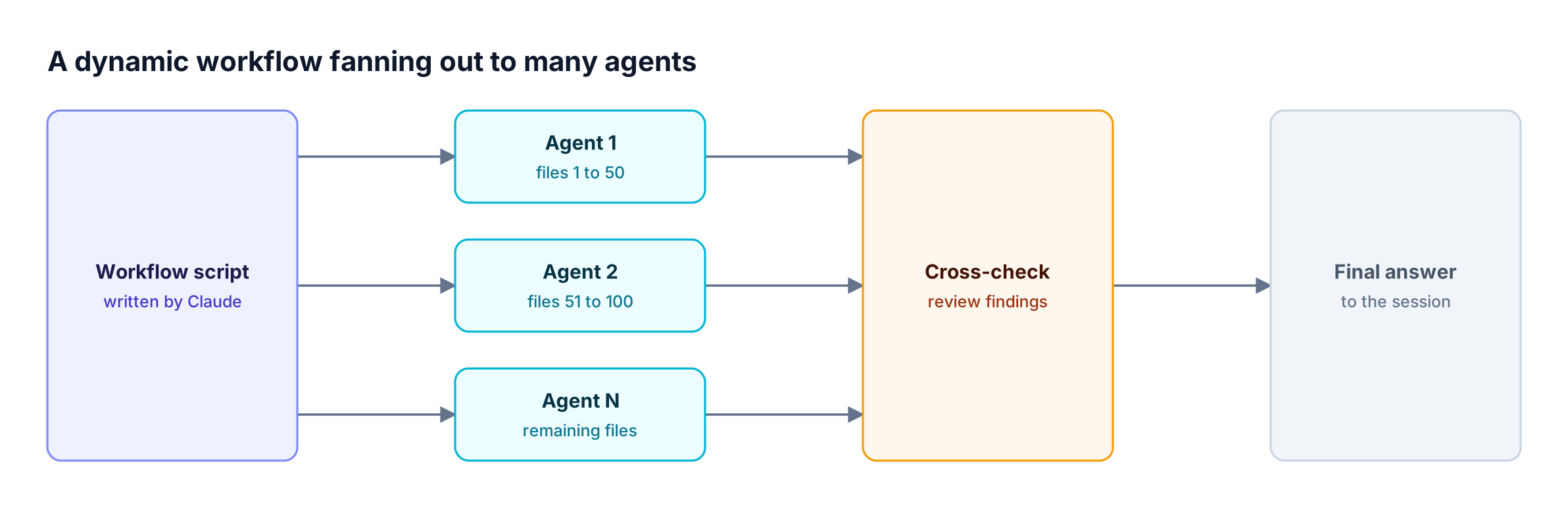
A workflow script written by Claude fans out to many subagents in parallel, collects their results in script variables, and returns one final answer
Figure 2: A dynamic workflow moves the orchestration into a script, so dozens of agents can run while only the final answer reaches the conversation.
Practical Claude Code Workflows with Subagents
The most useful Claude Code workflows pair a narrow subagent with a clear handoff. Start with read-only subagents for research and review, add write access only where a subagent's job is to change code, and move to dynamic workflows when the task spans more files than one conversation can coordinate.
Patterns that work well:
- Explore, plan, implement. Let Explore map the relevant files, use plan mode to agree on an approach, then implement in the main session with full context of the plan.
- Write, then review. After edits, delegate to a read-only
code-reviewersubagent and fix its findings before committing. - Test runner. A subagent with Bash access runs the test suite, triages failures, and returns only the failing cases and likely causes.
- Isolated experiments. A subagent with
isolation: worktreetries a risky refactor in a temporary worktree without touching your checkout.
Patterns for larger jobs:
- Parallel migration. A dynamic workflow splits 500 files across agents and keeps fixing until a check passes.
- Bug sweep. A workflow audits every module for the same issue and cross-checks findings before reporting.
- Competing hypotheses. An agent team investigates a hard bug from several angles and debates conclusions.
Workflows that reach internal systems through MCP benefit from a governed MCP gateway. Teams standardizing these patterns across many developers can compare options in choosing an AI gateway for Claude Code.
Controlling Token Cost When Subagents Fan Out
Every subagent, teammate, and workflow agent makes its own model calls, so a single prompt can turn into dozens or hundreds of requests. Cost control starts in configuration: pick cheaper models for high-volume roles, cap turns, and limit tools. It finishes at the gateway, where budgets apply to the whole fan-out regardless of how many agents Claude starts.
Configuration levers inside Claude Code:
- Model per role. Run search and triage subagents on
haikuand reserve larger models for planning and review. - Turn limits.
maxTurnsstops a subagent that is looping and returns partial output. - Tool scope. Fewer tools mean smaller prompts and fewer accidental side effects.
- Prompt caching. Workflow agents with the same model, tools, and settings share a cached prefix, which reduces repeated input cost.
Gateway levers in Bifrost:
- Budgets per key. Budgets and rate limits cap spend per developer, team, or project, with daily to yearly resets.
- Fewer tool tokens. Code Mode lets agents call MCP tools through code instead of loading every tool definition, cutting input tokens by up to 92.8% in Bifrost's benchmark.
- Cheaper repeats. Semantic caching can serve repeated or similar requests from cache.
For spend visibility across tools, see the AI governance overview. The Code Mode deep dive explains why tool definitions dominate agent token use.
Running Claude Code Subagents Through Bifrost
Claude Code subagents run in the same process as the main session, so they inherit its gateway configuration. Set ANTHROPIC_BASE_URL to the Bifrost Anthropic-compatible endpoint and ANTHROPIC_AUTH_TOKEN to a Bifrost virtual key, and every request from the main session, subagents, teammates, and workflow agents goes through Bifrost.
export ANTHROPIC_BASE_URL=https://bifrost.example.com/anthropic
export ANTHROPIC_AUTH_TOKEN=sk-bf-your-virtual-key
claude
What this adds, following the Claude Code integration guide:
- One budget for the fan-out. All subagent calls count against the same virtual key, so a runaway workflow stops at a known ceiling.
- Session-grouped logs. Bifrost recognizes Claude Code's own session header, so requests from one session, including its subagents, can be grouped into one trace in Bifrost request logs and OpenTelemetry exports.
- Provider failover. Retries and fallbacks keep long workflows running when one provider rate limits; the Claude Code with Bedrock runbook shows a Bedrock setup.
For tools, point subagent mcpServers entries at the Bifrost MCP endpoint and apply MCP tool filtering per key, so a review subagent cannot reach write tools even if its definition asks for them.
Figure 3 shows the setup.
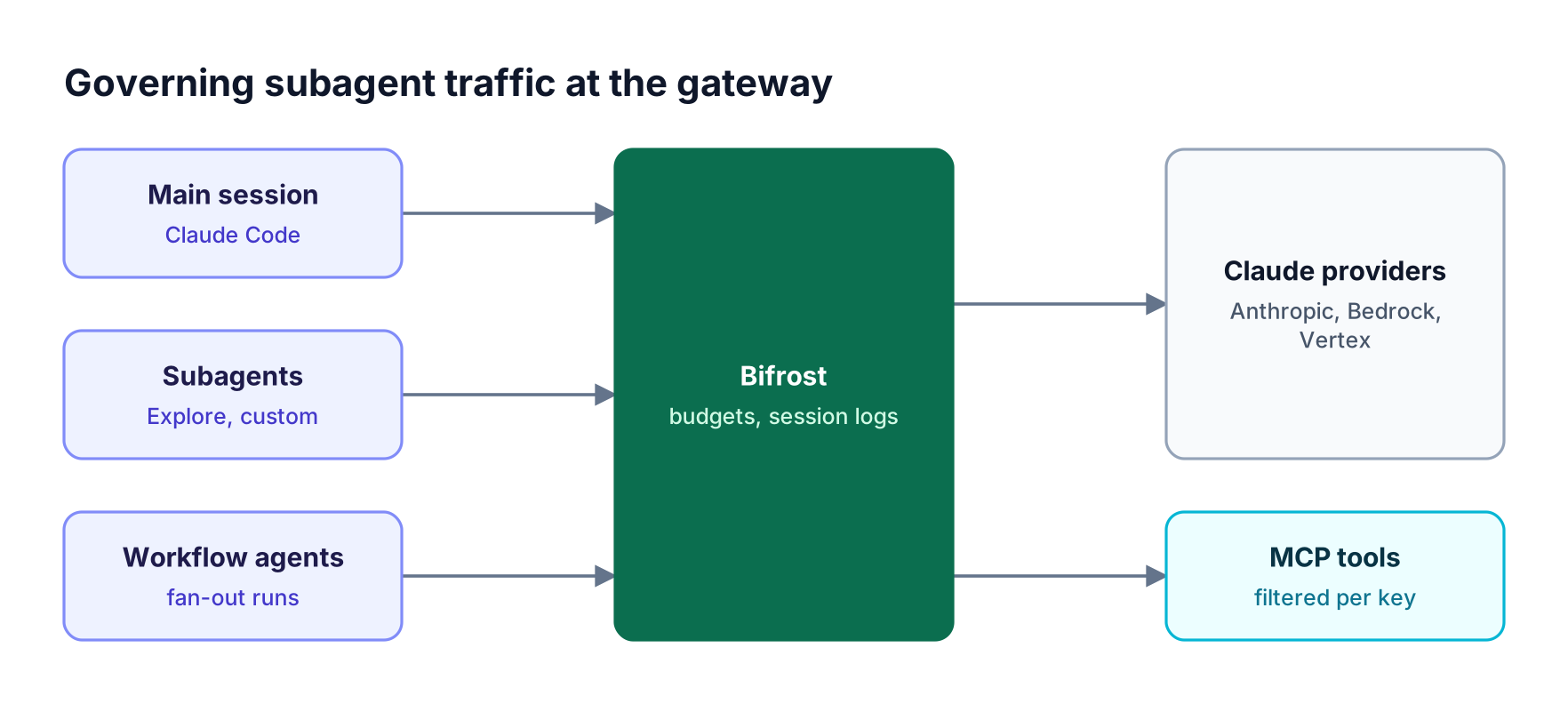
The main session, subagents, and workflow agents all send model calls through Bifrost, which applies one virtual key budget, groups requests by session, and routes to providers
Figure 3: Every subagent and workflow agent inherits the session's gateway settings, so budgets, logs, and failover cover the whole fan-out.
Teams that want subagents on non-Anthropic models can follow using Claude Code with non-Anthropic models, and security teams can review Claude Code governance with an AI gateway and coding agent security.
Frequently Asked Questions
What are subagents in Claude Code?
Subagents are specialized agents that a Claude Code session spawns to handle a task in a separate context window. Each has its own system prompt, tools, permissions, and model, and returns only a summary to the main conversation. Claude Code includes built-in subagents and supports custom ones defined as Markdown files, as covered in the Claude Code subagents docs.
Where do I put custom Claude Code subagents?
Put project subagents in .claude/agents/ and check them into version control so the team shares them. Put personal subagents in ~/.claude/agents/ to use them in every project. Administrators can deploy managed subagents through the managed settings directory, and plugins can ship subagents in their own agents/ directory.
Can Claude Code subagents run in parallel?
Yes. Claude can spawn several subagents in one turn, and on recent versions subagents spawned from the main conversation run in the background by default. For larger parallel jobs, dynamic workflows orchestrate dozens to hundreds of agents from a script, and agent teams run several full Claude Code sessions that coordinate through a shared task list.
What is the difference between subagents and agent teams?
Subagents are workers inside one session that report results back to the main agent. Agent teams are separate Claude Code sessions with a lead and teammates who share a task list and message each other directly. Agent teams suit work that needs discussion and coordination; they are experimental and use more tokens.
How do I choose which model a subagent uses?
Set model in the subagent's frontmatter to haiku, sonnet, opus, a full model ID, or inherit. If unset, Claude Code falls back to the CLAUDE_CODE_SUBAGENT_MODEL environment variable and then the main conversation's model. Routing through a gateway also lets platform teams restrict which models each gateway key can use.
How do I keep subagent costs under control?
Use cheaper models for high-volume subagents, set maxTurns, and limit tools. At the organization level, route Claude Code through Bifrost so every subagent and workflow agent counts against one budget, with request logs grouped by session; the Claude Code and Bifrost guide walks through setup.
Delegate More Without Losing Control
Claude Code subagents, agent teams, and dynamic workflows make it practical to hand larger tasks to Claude, but each layer multiplies model and tool calls. Routing Claude Code through Bifrost keeps that fan-out inside one budget, one log, and one tool policy. To see it with your engineering team's setup, book a demo with the Bifrost team.