How to Enforce an AI Acceptable Use Policy
An AI acceptable use policy defines which AI tools, models, and data employees may use at work. This guide shows how to turn each clause into an enforced control at the gateway and on every endpoint, with a step-by-step rollout using Bifrost and Bifrost Edge.
TL;DR
- An AI acceptable use policy only reduces risk when each clause maps to a technical control that runs in the request path, not to a training slide.
- One in five organizations in IBM's 2025 Cost of a Data Breach study reported a breach due to shadow AI, and most breached organizations had no AI governance policy or no audits for unsanctioned AI.
- The Bifrost AI gateway enforces model access, budgets, guardrails, and MCP tool limits per user and team; Bifrost Edge extends those same policies to the AI apps on every company laptop.
- A practical rollout runs in six steps: connect SSO, scope virtual keys, add guardrails, restrict MCP tools, deploy Bifrost Edge through MDM, then review logs and approvals.
An AI acceptable use policy that lives only in a PDF does not stop an employee from pasting customer records into a personal chatbot account, and in most organizations nothing in the network path checks whether it happened. Bifrost, the open-source AI gateway built by Maxim AI, turns the clauses of that policy into controls that are checked on every request: which models a team may call, what data may leave in a prompt, which tools an agent may run, and which AI apps may run on a company machine at all. This guide covers how to enforce an AI acceptable use policy end to end, from mapping policy language to controls through a staged rollout across your device fleet.
What Is an AI Acceptable Use Policy?
An AI acceptable use policy is a written set of rules that defines which AI tools, models, and data employees may use for work, under what conditions, and what happens when someone breaks those rules. It extends a general IT acceptable use policy to AI.
Most AI use policies cover these clauses:
- Approved tools: which AI applications, assistants, and coding agents are sanctioned, and through which accounts.
- Approved models and providers: which model vendors may receive company data, often limited to those with enterprise data-processing terms.
- Data handling: which data classes (customer PII, source code, credentials, financial data) may never appear in a prompt.
- Agent and tool use: what AI agents may do on a user's behalf, including which external tools or MCP servers they may call.
- Spend: who may use paid AI services and up to what budget.
- Accountability: how usage is logged, who reviews it, and how violations are reported.
A company AI policy written this way describes intent. Enforcement is the separate engineering problem of making each clause true in production, a process our article on generative AI governance from policy to gateway controls also traces.
Why AI Usage Policies Fail Without Enforcement
AI usage policies fail when the only control is employee awareness. Employees adopt AI tools faster than security teams can review them, and a written rule produces no log, no block, and no alert when someone breaks it.
The data on this gap is consistent. IBM's 2025 Cost of a Data Breach report found that 63% of breached organizations either had no AI governance policy or were still developing one, and only 34% of those with a policy performed regular audits for unsanctioned AI. A 2025 Cybernews survey of U.S. workers, summarized by the Journal of Accountancy, found that 59% of employees use AI tools their employer has not approved.
Policy alone does not hold for three reasons:
- No control point. Traffic from a desktop chat app or a browser tab goes straight to the provider, so there is nowhere to apply the rule.
- No identity on the request. Without per-user credentials, there is no way to tell which team sent which prompt.
- No evidence. Without request logs, an auditor cannot verify that the policy was followed, only that it was published.
This is the central argument of our guide to AI governance from policy to runtime enforcement: governance becomes real at the layer where requests can be inspected and stopped.
Shadow AI: Where Policy and Practice Diverge
Shadow AI is the use of AI tools, accounts, or integrations that the organization has not approved and cannot see. It measures how far actual AI usage has drifted from the written AI acceptable use policy.
In IBM's 2025 study, one in five organizations reported a breach due to shadow AI, and high levels of shadow AI added an average of $670,000 in breach costs. Shadow AI incidents also exposed more customer PII (65%) than average (53%).
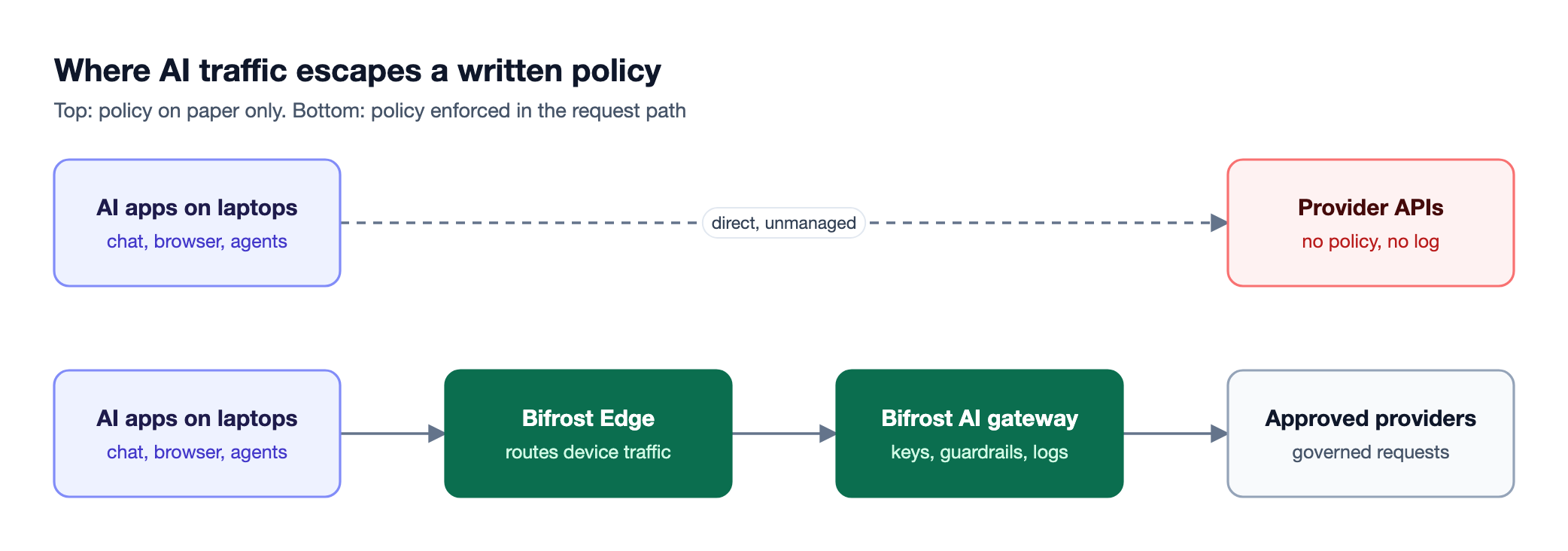
Figure 1: A written policy has no effect on the top lane; enforcement starts when traffic passes through a control point.
As Figure 1 shows, shadow AI is a routing problem before it is a behavior problem. It also includes more than chat: coding agents and MCP servers wired into desktop apps can read files and call internal APIs. Any enforcement plan has to cover chat apps, browser AI, coding agents, and their tools, the surfaces listed in Bifrost Edge supported applications.
Mapping Policy Clauses to Technical Controls
Enforcing an AI use policy starts with translating each clause into a control that runs automatically. The test for each clause: if a request violates it, what system rejects, redacts, or records that request? If nothing does, the clause is guidance, not policy.
The table below maps the common clauses of an AI acceptable use policy to the control that enforces each one, and to where that control lives in Bifrost.
| Policy clause | Technical control | Where it is enforced in Bifrost |
|---|---|---|
| Only approved AI apps on company devices | App allow and deny list, enforced on the endpoint | Bifrost Edge app governance |
| Only approved models and providers | Per-key provider and model allow-lists, deny by default | Virtual keys |
| No PII, secrets, or credentials in prompts | Input guardrails that block or redact | Guardrail rules and profiles |
| No harmful or off-policy output | Output guardrails on model responses | Guardrail rules (output phase) |
| Agents may only use sanctioned tools | MCP tool allow-lists and per-server approvals | Virtual key MCP filtering, Bifrost Edge MCP governance |
| Spend limits per team or user | Budgets and rate limits | Budgets and limits hierarchy |
| Usage is attributable and reviewable | SSO identity, request logs, admin audit trail | User provisioning, request logs, audit logs |
Guardrails only work once traffic flows through the gateway, and per-user budgets only work once requests carry identity. See policy-based governance at the gateway for that dependency chain.
Where to Enforce an AI Use Policy: Gateway and Endpoint
An AI use policy is best enforced at two layers working together: an AI gateway that inspects and governs every request, and an endpoint agent that makes sure the AI apps on each device actually send their traffic through that gateway. Network blocking and training do not inspect what a prompt contains.
The common approaches compare as follows:
| Approach | What it enforces | What it misses |
|---|---|---|
| Training and signed attestations | Awareness of the rules | Any technical prevention or evidence |
| Network or DNS blocking of AI domains | Access to unapproved sites | Prompt content, approved-tool misuse, agents and MCP servers |
| Traditional DLP tools | Known data patterns in some channels | Model-specific context, per-model access, budgets |
| AI gateway | Model access, guardrails, budgets, logs for routed traffic | Apps that send traffic directly to providers |
| AI gateway plus endpoint agent | All of the above, for apps on every managed device | Unmanaged personal devices |
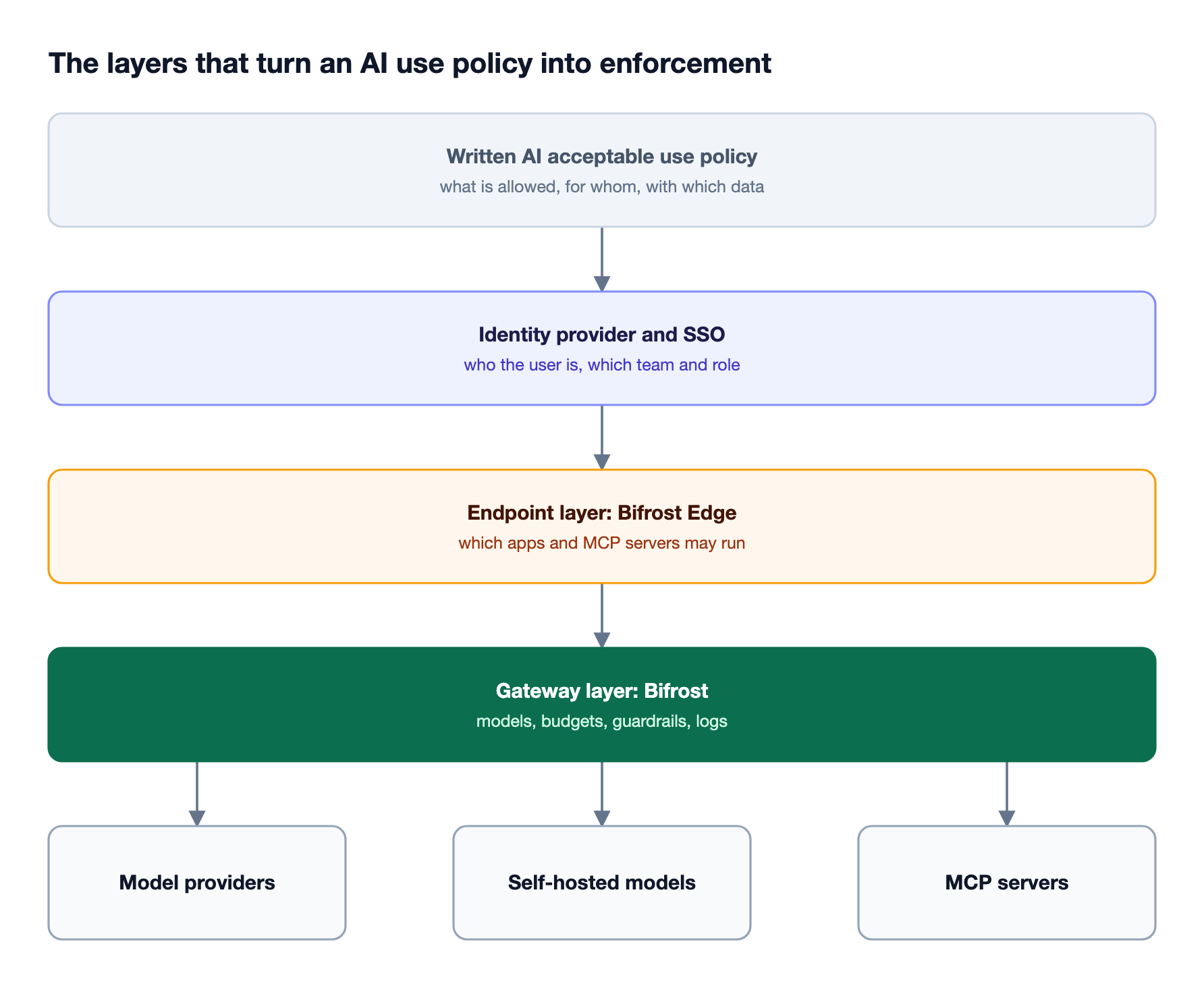
Figure 2: Each layer answers a different clause of the policy, and the gateway is the only layer every request crosses.
Bifrost covers the gateway layer as the AI governance control plane, and Bifrost Edge covers the endpoint layer. For other tooling categories, see our roundup of tools to enforce an AI usage policy.
How Bifrost Enforces an AI Acceptable Use Policy
The Bifrost AI gateway enforces an AI acceptable use policy by sitting in the request path for all AI traffic and applying identity, model access, budgets, guardrails, and logging to each request. Bifrost Edge, currently in alpha, extends that same enforcement to desktop apps, browser AI, and coding agents on every managed machine.
At the gateway, Bifrost provides the controls that the policy clauses map to:
- Virtual keys are the primary governance entity. A virtual key is deny-by-default for providers: unless all providers are explicitly allowed, it can only reach the providers and models listed for it.
- Budgets and rate limits apply hierarchically across virtual keys, teams, and customers, and every applicable budget must have remaining balance for a request to proceed.
- Guardrails validate inputs and outputs for both LLM requests and MCP tool executions, with actions to detect, block, or redact content.
With Bifrost Edge, the same virtual keys, budgets, guardrails, and logging apply to traffic from the apps employees already use, without changing base URLs or SDKs. Edge has no separate policy store: app and MCP decisions are set centrally in Bifrost and synced to each device, and model traffic is governed by the gateway's existing virtual keys, budgets, and guardrails.
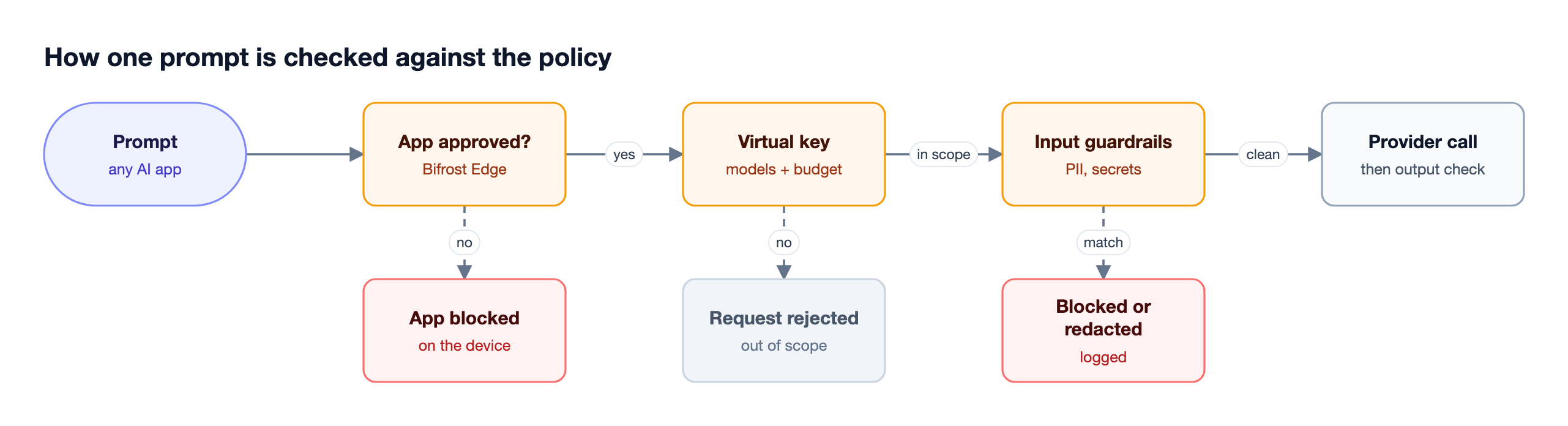
Figure 3: Every check that can stop a request runs before any data reaches a model provider.
Figure 3 shows the order of checks. A prompt typed into ChatGPT on the web is routed through Edge and evaluated against the configured guardrails, so secrets or PII are caught before the prompt leaves the machine. Our walkthrough of deploying AI governance with Bifrost Edge and the Bifrost gateway covers the combined architecture in detail.
Step-by-Step: Enforcing Your AI Use Policy with Bifrost
The rollout follows the dependency order from the clause map: identity, access scope, content rules, tool rules, device coverage, then review. Configuring the gateway first means every device inherits a working policy on the day it connects.
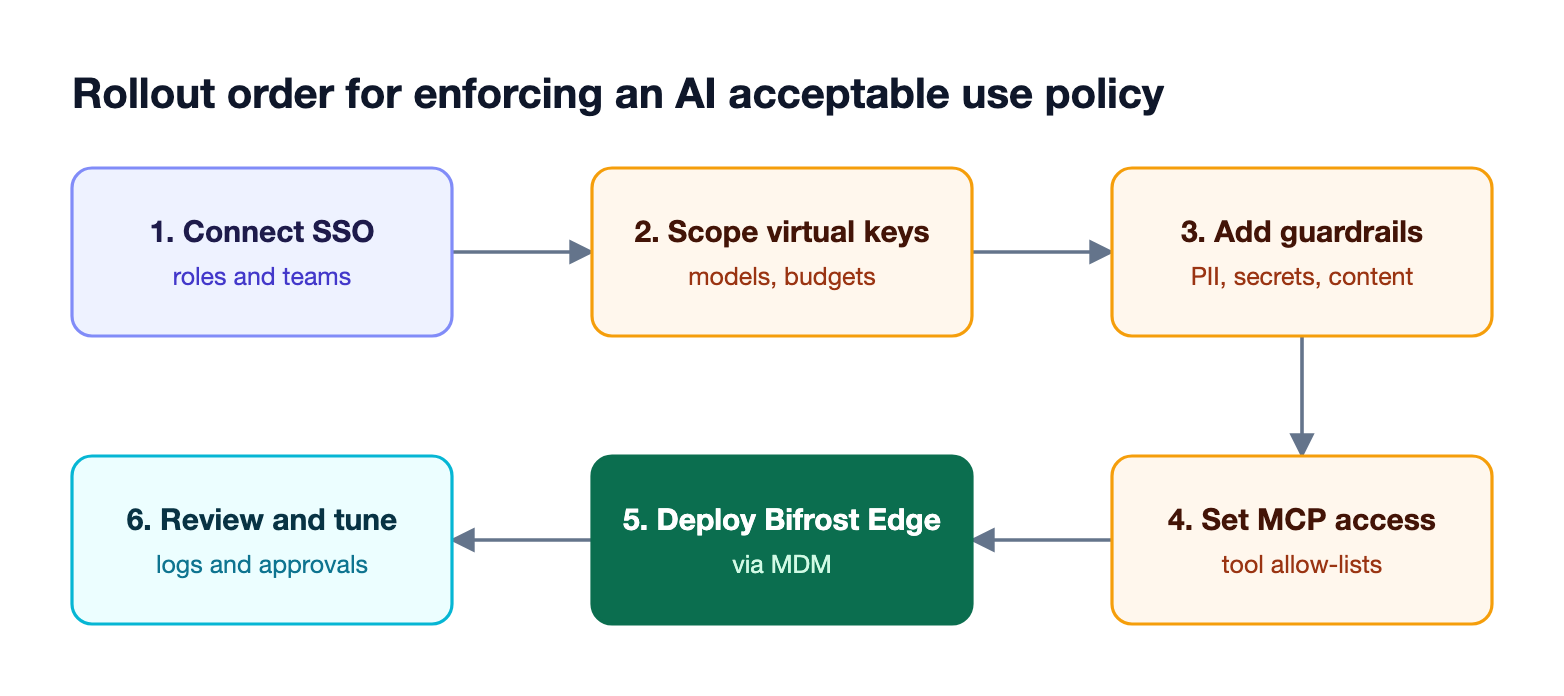
Figure 4: Configure the gateway policy first, then extend it to every device, then review what the logs show.
Step 1: Connect your identity provider
Connect Bifrost to your identity provider through user provisioning with OIDC and SCIM. Claim values map to Bifrost roles, teams, business units, and access profiles, and SCIM deprovisioning removes access immediately when someone leaves. Use role-based access control so only the security or platform team can edit guardrail rules and profiles.
Step 2: Scope model access with virtual keys
Create virtual keys per team or per user that list only the approved providers and models. Because keys are deny-by-default, a request for a model outside the allow-list is rejected. For large organizations, access profiles apply reusable provider, model, budget, and MCP policies to keys at scale, so the "approved models" clause is defined once.
Step 3: Add guardrails for data protection
Add input rules for the data-handling clauses and output rules for content-safety clauses. Bifrost-managed profiles include Secrets Detection for leaked keys and tokens and Custom Regex for organization-specific patterns, alongside external providers such as AWS Bedrock Guardrails, Azure Content Safety, Google Model Armor, and Presidio. Rules use CEL expressions to decide when they apply; in this example, profile IDs 1 and 2 are existing guardrail profiles such as Secrets Detection and Custom Regex:
{
  "guardrails_config": {
    "guardrail_rules": [
      {
        "name": "Block PII in Prompts",
        "description": "Prevent PII from being sent to LLM providers",
        "enabled": true,
        "target": "llm",
        "cel_expression": "true",
        "apply_to": "input",
        "sampling_rate": 100,
        "timeout": 60,
        "provider_config_ids": [1, 2]
      }
    ]
  }
}
Redaction can run on the live request, on logs only, or on both with reversible placeholders. See our guide to AI guardrails for company policy and compliance for rule design patterns.
Step 4: Restrict MCP tools for agents
Agent clauses need tool-level enforcement. In Bifrost as an MCP gateway, MCP tool filtering per virtual key sets the ceiling of tools a key can use, and request headers can only narrow it. Guardrail rules can also target MCP executions, inspecting tool arguments before a tool runs.
See how MCP guardrails work and MCP gateway access control and cost governance for details.
Step 5: Deploy Bifrost Edge through MDM
Push Bifrost Edge to the fleet with MDM deployment through Jamf, Microsoft Intune, Kandji, Omnissa Workspace ONE, or JumpCloud. Before pushing the agent, generate or upload the organization certificate authority in Edge settings, since each device must trust it before Edge can route AI traffic. The managed configuration carries only non-sensitive connection settings; each user signs in once through SSO, and from then on supported AI traffic routes through Bifrost. Then set the approved-app list with Edge app governance and per-server decisions with Edge MCP governance, which are enforced on the device rather than advisory.
Step 6: Review logs and approvals, then tune
Newly discovered apps and MCP servers appear in the Edge approvals dashboard as pending, and an admin approves or denies each one once for the whole fleet. Pending items keep working until denied, unless Edge settings are configured to block them. Review guardrail hits in request logs and tune rules against real traffic.
Proving Compliance: Logs, Audit Trails, and Frameworks
Enforcement has to produce evidence an auditor can check. Bifrost generates two kinds of records: request logs that capture each AI request and response with its metadata, and audit logs that record administrative changes such as who edited a guardrail rule or approved an MCP server.
Built-in observability captures inputs, outputs, tokens, costs, and latency for every request, and stores the redacted form of content that a guardrail detected. Audit logs record who changed what and when, can be signed with an HMAC key, exported as JSON, JSON Lines, or Syslog for SIEM pipelines, and archived to S3 or GCS for long-term retention.
The NIST AI Risk Management Framework asks organizations to govern, map, measure, and manage AI risk, and ISO/IEC 42001 requires a documented AI management system with operational controls. Logged, enforced controls supply the operational evidence for both. Teams in regulated industries can review the Bifrost Enterprise deployment options, including in-VPC deployment, and our article on turning enterprise AI governance policy into gateway controls covers the policy-to-control process for audit teams.
Frequently Asked Questions
What is shadow AI?
Shadow AI is the use of AI tools, accounts, models, or integrations at work without approval or oversight from IT or security. It includes personal chatbot accounts, unapproved browser extensions, coding agents, and MCP servers configured by individual users. IBM's 2025 breach study found that one in five organizations reported a breach due to shadow AI, which is why enforcing an AI usage policy focuses on bringing that traffic under governance.
What should an AI acceptable use policy include?
An AI acceptable use policy should list approved AI tools and accounts, approved models and providers, data classes that may never appear in prompts, rules for AI agents and their tools, spending limits, logging and review responsibilities, and the process for reporting and handling violations. Each clause should name the control that enforces it.
Is an AI policy template enough to get started?
An AI policy template is a useful starting point for the written rules, but it does not enforce anything on its own. After adapting a template, map each clause to a control such as a virtual key allow-list, a guardrail rule, or an app approval.
Do I need to block ChatGPT to enforce an AI use policy?
No. Blocking popular AI tools outright pushes employees to personal devices with no visibility. Approve specific tools, route their traffic through an AI gateway, and apply guardrails to prompts instead. With Bifrost Edge routing, ChatGPT on the web and in the desktop app can be governed by the same rules as any other routed traffic.
How do you enforce an AI policy for coding agents and MCP servers?
Coding agents need model access and tool access controls. Route agents such as Claude Code or Codex CLI through the gateway with a scoped virtual key, restrict which MCP tools each key can use, and use endpoint discovery to inventory MCP servers configured on each machine. Bifrost Edge discovers MCP servers in apps including Claude Code, Claude Desktop, Cursor, and Gemini CLI, and enforces deny decisions on the device.
How can employees use AI safely at work?
Employees can use AI safely by working only in approved tools signed in with company accounts, keeping customer data, credentials, and source code out of prompts unless the policy allows it, and reporting new tools for review instead of installing them unilaterally. Guardrails and approved-app lists catch mistakes before data leaves the device.
Start Enforcing Your AI Acceptable Use Policy
An AI use policy protects the organization only when its clauses run as controls on every request: scoped model access, guardrails on prompts and responses, tool limits for agents, and an audit trail for review. Bifrost provides that enforcement at the gateway, and Bifrost Edge extends it to every managed device. To see how the open-source Bifrost gateway can enforce your AI usage policy across teams and endpoints, book a demo with the Bifrost team.