MCP Authorization Explained: How OAuth 2.1 Works in the MCP Spec
MCP authorization is the OAuth 2.1 profile that controls which clients can call a protected MCP server over HTTP. This guide walks through the 2026-07-28 spec role by role: discovery, PKCE, audience binding, client registration, the token passthrough ban, and where an MCP gateway fits.

TL;DR
- MCP authorization is optional, applies to HTTP transports, and maps MCP onto OAuth 2.1: the MCP server is a resource server, the MCP client is an OAuth client, and an authorization server issues tokens.
- Under MCP spec revision 2026-07-28, clients find the authorization server through Protected Resource Metadata (RFC 9728), use PKCE with S256, and send a resource indicator (RFC 8707) in both the authorization and token requests.
- Client ID Metadata Documents are the recommended way for MCP clients to register; Dynamic Client Registration is deprecated as of 2026-07-28 and kept only for backward compatibility.
- An MCP server must accept only tokens issued for itself and must never pass a client's token through to an upstream API; MCP proxy servers must also collect per-client consent to prevent confused deputy attacks.
- An MCP gateway such as Bifrost can be the one authorization server and resource server that clients see, while holding a separate credential for each upstream MCP server.
MCP authorization is the part of the Model Context Protocol specification that defines how an MCP client obtains an OAuth 2.1 access token and presents it to a protected MCP server over HTTP. The current revision, 2026-07-28, builds it from existing IETF standards (Protected Resource Metadata, PKCE, resource indicators, and Client ID Metadata Documents) and assigns token issuance to an authorization server that can run apart from the MCP server. Bifrost, the open-source MCP gateway built by Maxim AI, implements both sides of that spec: it acts as an OAuth 2.1 authorization server for MCP clients and keeps upstream credentials separate from the tokens those clients present. This guide walks through the spec role by role, explains why token passthrough is forbidden, and shows where a gateway centralizes it for enterprise teams.
What Is MCP Authorization?
MCP authorization is an OAuth 2.1 profile that lets an MCP client call a restricted MCP server on behalf of a resource owner. It is optional, it applies to HTTP-based transports, and it assigns token issuance to an authorization server role, so the MCP server's job is to validate tokens rather than to sign users in.
The current MCP authorization specification sets three transport rules. HTTP-based implementations SHOULD conform to it. Implementations using stdio SHOULD NOT follow it and instead retrieve credentials from the environment. Implementations on other transports MUST follow the established security practices for their protocol.
Rather than inventing new mechanisms, the spec selects a subset of existing standards:
- OAuth 2.1 (draft 13) for the authorization code flow and RFC 6750 for bearer tokens
- RFC 9728 Protected Resource Metadata, so an MCP server can name its authorization server
- RFC 8414 and OpenID Connect Discovery 1.0 for authorization server metadata
- RFC 8707 Resource Indicators, to bind each token to one MCP server
- RFC 9207 issuer identification, to confirm which server sent a response
- Client ID Metadata Documents for registration, with RFC 7591 as a deprecated fallback
If MCP itself is new to your team, start with this guide to the Model Context Protocol.
The Three Roles in MCP Authorization
The MCP spec assigns three OAuth roles. A protected MCP server is an OAuth 2.1 resource server that accepts and validates access tokens. The MCP client is an OAuth 2.1 client acting for a resource owner. The authorization server signs the user in and issues tokens, and it can be hosted with the MCP server or run separately.
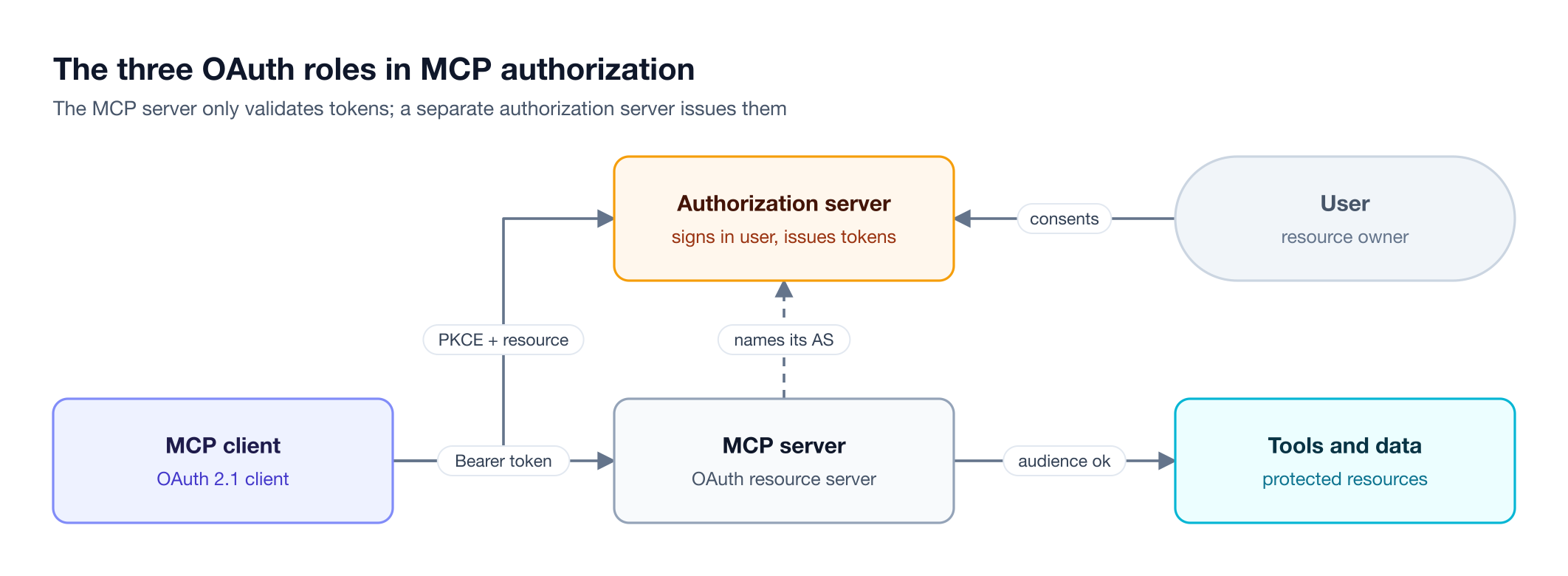
Figure 1: Issuing tokens and accepting tokens are separate jobs, even when one deployment hosts both.
The separation lets an existing identity provider act as the authorization server while each MCP server only validates tokens. The table lists what revision 2026-07-28 requires of each role.
| Role | What the spec requires | Standards involved |
|---|---|---|
| MCP server (resource server) | Publish Protected Resource Metadata; validate that each token was issued for it; answer with 401 or 403 and a WWW-Authenticate challenge; never accept or forward other tokens |
RFC 9728, RFC 8707, RFC 6750 |
| MCP client (OAuth client) | Discover the authorization server from metadata; support RFC 8414 and OIDC discovery; use PKCE with S256; send resource; validate iss; send the token on every request |
RFC 9728, RFC 8414, RFC 9207 |
| Authorization server | Implement OAuth 2.1; publish metadata with code_challenge_methods_supported; support Client ID Metadata Documents and return iss (both SHOULD) |
OAuth 2.1, RFC 8414, RFC 9207 |
The host application that embeds the MCP client sits one level above these roles; the MCP architecture overview covers how hosts, clients, and servers relate, and our page on how MCP servers verify clients and users covers the identity side.
How the MCP Authorization Flow Works
The MCP authorization flow starts when an MCP server answers an unauthenticated request with HTTP 401. The client follows metadata from the MCP server to the authorization server, identifies itself, runs an authorization code flow with PKCE and a resource indicator, and then sends the resulting bearer token on every MCP request.
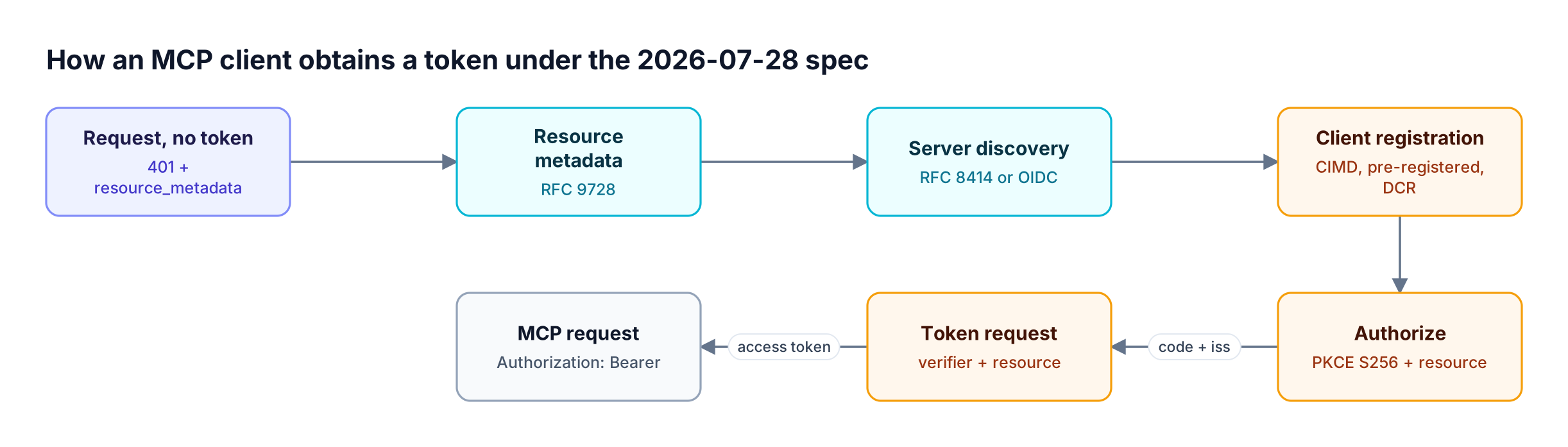
Figure 2: Every step after the 401 is driven by metadata, so a client needs nothing but the MCP server URL to start.
As Figure 2 shows, the flow has three phases:
- Discovery (steps 1-6). The client receives
401 Unauthorizedwith aresource_metadataURL, fetches the Protected Resource Metadata, picks an authorization server, and reads that server's metadata. - Registration and consent (steps 7-10). The client presents a client ID, generates a PKCE verifier, records the expected issuer, and opens the authorization URL with
code_challenge,resource, andscope. The user consents, and the authorization server redirects back with a code andiss. - Token and access (steps 11-14). The client checks
iss, redeems the code with itscode_verifierand the sameresource, and sendsAuthorization: Bearer <token>on every request, never in the query string.
For a closer walkthrough of each step, see our MCP OAuth explainer.
Discovery: Protected Resource Metadata and Authorization Server Metadata
Discovery is two lookups. The MCP server publishes OAuth 2.0 Protected Resource Metadata (RFC 9728) that names at least one authorization server, and the client then fetches that authorization server's metadata through RFC 8414 or OpenID Connect Discovery to learn its endpoints and capabilities.
MCP servers MUST implement Protected Resource Metadata as defined in RFC 9728, and the document MUST include an authorization_servers field. A server points clients to it with a resource_metadata parameter in the 401 WWW-Authenticate header, a well-known URI, or both. Clients MUST support both, using the header when present and otherwise trying the path-specific URI (/.well-known/oauth-protected-resource/public/mcp for an endpoint at /public/mcp) before the root URI.
HTTP/1.1 401 Unauthorized
WWW-Authenticate: Bearer resource_metadata="https://mcp.example.com/.well-known/oauth-protected-resource",
                         scope="files:read"
Authorization server discovery follows a fixed order. For an issuer with a path such as https://auth.example.com/tenant1, clients try OAuth metadata with path insertion, then OpenID Connect discovery with path insertion, then OpenID Connect discovery with path appending. After fetching a document, the client MUST check that its issuer value is identical to the issuer it used to build the URL and discard the document if they differ.
When the metadata lists several authorization servers, the client chooses one and keeps separate registration and tokens for each. The Bifrost AI gateway serves both documents at the standard paths once OAuth is enabled on its MCP endpoint, so off-the-shelf MCP clients discover it the same way they would any compliant server.
OAuth 2.1 in MCP: PKCE, Resource Indicators, and Audience Binding
MCP adopts OAuth 2.1, which makes PKCE mandatory in the authorization code flow. MCP adds binding rules on top: clients send an RFC 8707 resource parameter naming the MCP server, servers accept only tokens whose audience is themselves, and clients check the issuer of every authorization response. Together these stop intercepted codes and misdirected tokens.
PKCE with S256
MCP clients MUST implement PKCE and use the S256 method when technically capable. They read code_challenge_methods_supported from the authorization server metadata and MUST refuse to proceed when it is absent, so OpenID providers serving MCP clients MUST publish that field.
Resource indicators and the canonical server URI
Clients MUST include the resource parameter from RFC 8707 Resource Indicators in both the authorization request and the token request, and MUST send it whether or not the authorization server supports it. The value is the MCP server's canonical URI, such as https://mcp.example.com/mcp: lowercase scheme and host, no fragment, and preferably no trailing slash.
MCP servers MUST validate that each access token was issued specifically for them, and answer invalid or expired tokens with a 401. This audience check makes a token useless at any server other than the one the user consented to.
Issuer validation against mix-up attacks
Revision 2026-07-28 added RFC 9207 issuer identification. Before redirecting the user, the client records the issuer from the validated metadata next to its PKCE verifier. Authorization servers SHOULD return iss with the code, and clients MUST compare a present iss against the recorded value with simple string comparison before redeeming the code. If the server advertises authorization_response_iss_parameter_supported and omits iss, the client rejects the response.
Scopes and step-up authorization
MCP servers SHOULD include a scope parameter in their 401 challenge, which clients use before falling back to scopes_supported. When a token lacks permission at runtime, the server returns 403 with error="insufficient_scope" and the needed scopes, and the client re-authorizes with the union of its previous and new scopes. Scopes describe what a token may reach; per-tool and per-record rules belong to fine-grained authorization inside the server or gateway.
MCP Client Registration: Metadata Documents, Pre-Registration, and DCR
An MCP client needs a client ID before it can start the authorization flow. Revision 2026-07-28 defines three ways to get one: pre-registration, Client ID Metadata Documents, and Dynamic Client Registration. It recommends metadata documents for clients and servers with no prior relationship and deprecates Dynamic Client Registration.
| Mechanism | How the client gets a client ID | Best fit | Status in 2026-07-28 |
|---|---|---|---|
| Pre-registration | A client ID (and secret, if any) is configured ahead of time, hardcoded or entered by the user | Client and authorization server already have a relationship | Supported; tried first |
| Client ID Metadata Document | The HTTPS URL of a JSON document the client hosts becomes its client ID | No prior relationship, the most common MCP case | Recommended (SHOULD support) |
| Dynamic Client Registration (RFC 7591) | The client POSTs its metadata to the authorization server's registration endpoint | Authorization servers that lack metadata document support | Deprecated; earliest removal is the first revision released on or after 2027-07-28 |
Clients that support all three SHOULD try pre-registered details first, then a metadata document when the authorization server advertises client_id_metadata_document_supported, then Dynamic Client Registration, and finally ask the user.
A Client ID Metadata Document is a JSON file at an HTTPS URL with a path. It MUST contain client_id, client_name, and redirect_uris, and its client_id MUST equal the document URL exactly. The authorization server fetches it during sign-in, validates the redirect URI against it, and caches it per HTTP cache headers. Because it fetches a URL it was handed, the authorization server should guard against server-side request forgery and warn users about localhost-only redirect URIs.
{
  "client_id": "https://app.example.com/oauth/client-metadata.json",
  "client_name": "Example MCP Client",
  "redirect_uris": ["http://127.0.0.1:3000/callback"],
  "grant_types": ["authorization_code"],
  "response_types": ["code"],
  "token_endpoint_auth_method": "none"
}
Two more rules arrived in 2026-07-28. Clients using Dynamic Client Registration MUST send an application_type (native for desktop, CLI, and localhost apps; web for remote browser apps). Clients MUST also key stored credentials by the authorization server's issuer and re-register when it changes; metadata-document client IDs carry over. Our explainer on OAuth 2.1 for MCP servers shows how registration looks from the client side.
Why Token Passthrough Is Forbidden in MCP
Token passthrough is an anti-pattern in which an MCP server accepts a token that was not issued for it and forwards that token to a downstream API. The MCP spec forbids it: servers must accept only tokens issued for themselves, and any upstream call must use a separate token issued by the upstream authorization server.
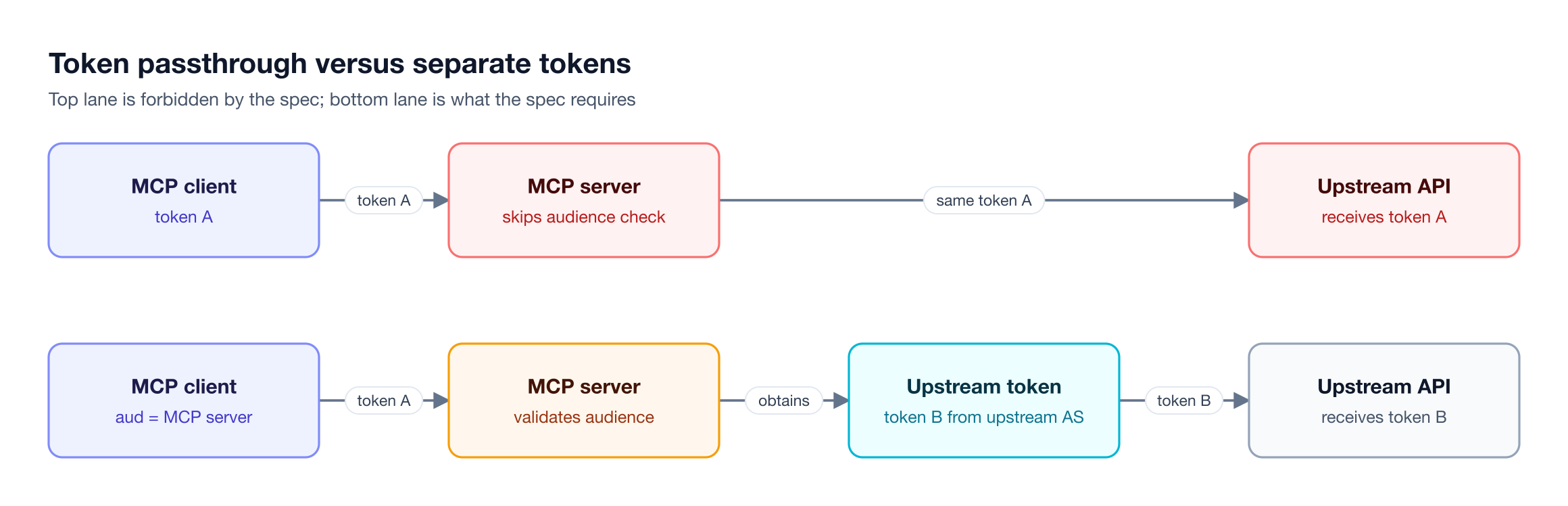
Figure 3: An MCP server that calls another API uses its own upstream token and never forwards the token it received.
The spec text is direct: MCP servers "MUST NOT accept or transit any other tokens," and an MCP server that calls upstream APIs "MUST NOT pass through the token it received from the MCP client." The MCP security best practices list the risks this prevents:
- Bypassed controls. Rate limits and monitoring keyed to the token audience stop applying downstream.
- Broken audit trails. The MCP server cannot tell clients apart, and the downstream API logs the wrong identity.
- Lateral movement. A token accepted by several services lets an attacker who compromises one reach the others.
Credential leakage and missing audit trails also rank among the security risks of ungoverned MCP server access.
The confused deputy problem in MCP proxy servers
A confused deputy attack targets an MCP proxy server that fronts a third-party API. It works when four conditions hold: the proxy uses a static client ID at the third-party authorization server, it lets MCP clients register dynamically, the third-party server sets a consent cookie after the first approval, and the proxy has no per-client consent of its own.
The attacker registers a client with a malicious redirect URI and sends the user a crafted link. The third-party server sees the consent cookie, skips consent, and returns a code to the proxy, which issues its own authorization code to the attacker's redirect URI. The attacker redeems it and acts as the user.
The required mitigation is per-client consent before the third-party flow starts. The proxy keeps a registry of approved client IDs per user, shows its own consent page naming the client, scopes, and redirect URI, matches redirect URIs exactly, and sets a single-use state value only after approval. Deprecation does not remove the risk: the attack applies to any proxy that still supports Dynamic Client Registration. Our enterprise MCP security checklist covers the wider audit.
MCP Authentication vs Authorization
Authentication establishes who is calling; authorization decides what that caller may do. In MCP, the authorization server authenticates the user and the client, the access token carries the result, and the MCP server authorizes each request by checking the token's audience and scopes before it runs a tool.
One OAuth flow produces both results, but they fail differently:
| Authentication | Authorization | |
|---|---|---|
| Question answered | Who is the user, and which client is acting for them? | May this token perform this operation on this MCP server? |
| Where it happens | Authorization server sign-in; client registration | MCP server token validation; scope checks |
| Artifact | Sign-in session, client ID | Access token with audience and scopes |
| Failure response | 401 with WWW-Authenticate |
403 with error="insufficient_scope" |
| What the spec leaves open | How the authorization server signs users in | Per-tool, per-record, and budget rules beyond scopes |
MCP server authentication patterns (stdio environment credentials, static headers, OAuth tokens) are covered in our page on MCP authentication methods and token validation, and products that implement them are compared in MCP authentication solutions for AI agents. Agent-to-agent traffic raises the same split between identity and permission; see A2A security for how it applies there.
How MCP Authorization Changed Across Spec Revisions
The authorization rules have changed in every revision since they appeared in 2025-03-26. Later revisions classified the MCP server as an OAuth resource server, added resource indicators, recommended metadata documents for registration, and in 2026-07-28 deprecated Dynamic Client Registration and added issuer validation. Older guides often still present Dynamic Client Registration as the default.
| Revision | Authorization changes |
|---|---|
| 2025-03-26 | Authorization framework based on OAuth 2.1 added to the spec |
| 2025-06-18 | MCP servers classified as OAuth resource servers with Protected Resource Metadata; RFC 8707 resource indicators required; security best practices page added |
| 2025-11-25 | OpenID Connect Discovery 1.0 accepted; incremental scope consent through WWW-Authenticate; Client ID Metadata Documents recommended; well-known fallback for metadata discovery |
| 2026-07-28 (current) | Dynamic Client Registration deprecated; iss validation (RFC 9207) added; application_type required during Dynamic Client Registration; client credentials bound to the issuing authorization server |
The same revision removed protocol-level sessions and the Mcp-Session-Id header, so each request now declares its own protocol version alongside the bearer token every request already had to carry. The MCP project also maintains two stable authorization extensions for this revision: OAuth Client Credentials for machine-to-machine clients, and Enterprise-Managed Authorization, which trades an enterprise single sign-on assertion for an MCP access token. For the wider protocol context behind these changes, read MCP: the protocol, the plumbing, and the gateway.
How Bifrost Centralizes MCP Authorization as an MCP Gateway
An MCP gateway centralizes authorization by being the one resource server MCP clients authenticate to and the one OAuth client holding credentials for every upstream MCP server. Bifrost does both: it runs an OAuth 2.1 authorization server for /mcp and keeps a separate credential per upstream server, so a client's token is never the credential used upstream.
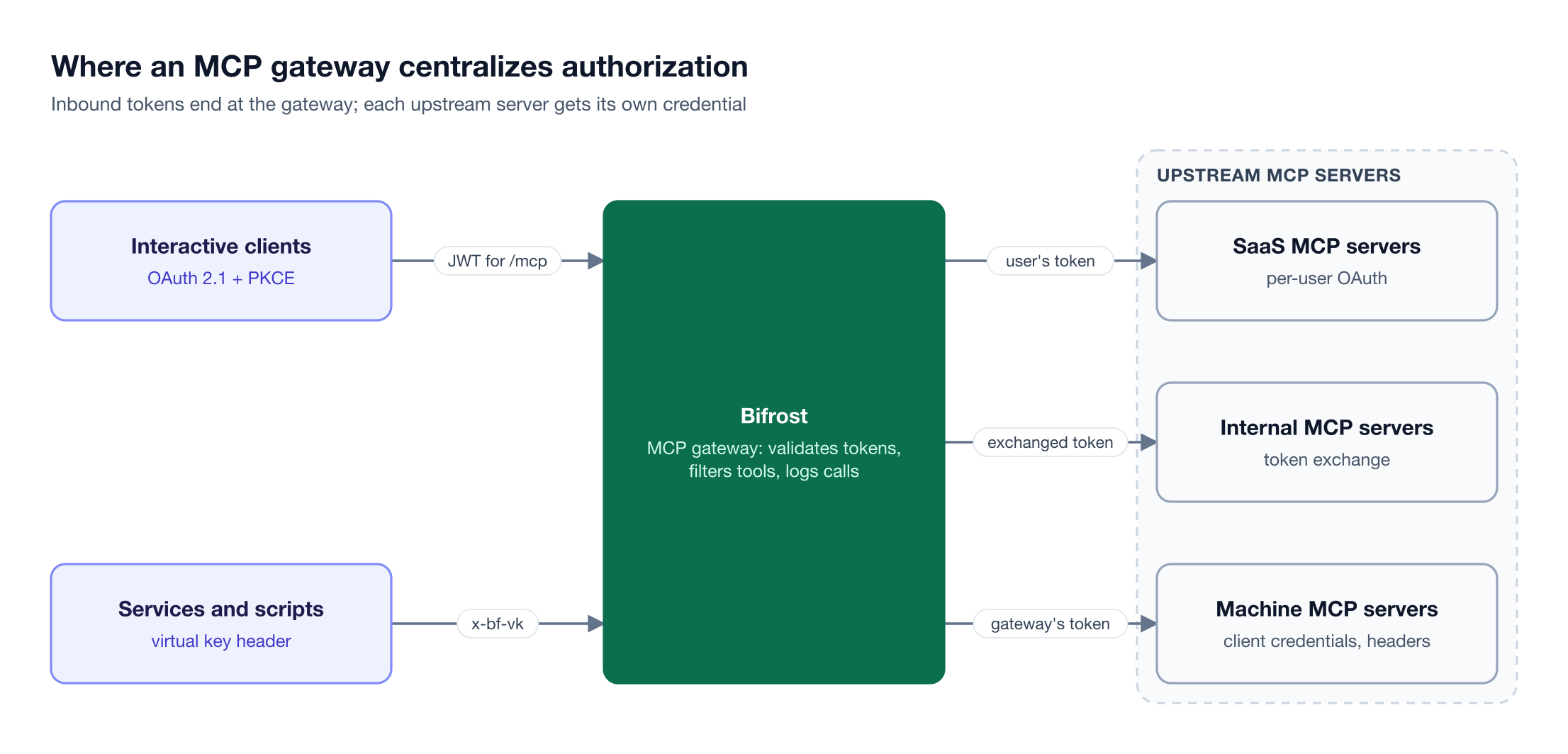
Figure 4: The gateway is the one resource server clients see, and the only party holding upstream credentials.
With Bifrost as the MCP gateway, metadata, audience validation, consent, and upstream token storage sit in one place instead of being rebuilt by every MCP server team.
Inbound: Bifrost as the authorization server for /mcp
The mcp_server_auth_mode setting decides how clients reach /mcp: headers (the default) accepts a virtual key or API key header, and both or oauth turns Bifrost into a full OAuth 2.1 authorization server for /mcp:
- Discovery: the 401 points to Protected Resource Metadata (RFC 9728), and Bifrost serves RFC 8414 metadata and a JWKS document.
- Registration: clients use a Client ID Metadata Document or Dynamic Client Registration. Bifrost fetches documents only from public HTTPS addresses, without redirects, up to 64 KB.
- Binding: PKCE with S256 protects the code, and resource indicators bind each JWT to
/mcpthrough itsaudclaim. - Validation: every
/mcprequest checks the JWT signature, expiry, issuer, and audience.
At consent, the user binds the grant to a virtual key with its budgets, rate limits, and tool scope, to an anonymous development session, or to their own account through SSO and SCIM user provisioning on Bifrost Enterprise. Access tokens default to 600 seconds, refresh tokens rotate on every use, and a replayed authorization code revokes the refresh token its first exchange produced.
Outbound: a separate credential for every upstream MCP server
Each upstream server gets one of eight upstream MCP authentication types, from static headers and AWS SigV4 to admin-level OAuth 2.0 with PKCE, metadata documents, issuer checks, and tokens encrypted at rest.
- Per-user OAuth stores one upstream token per identity and server, which users review and revoke on the MCP Sessions page.
- Token exchange (Enterprise) exchanges the caller's identity provider token through RFC 8693 for a short-lived token scoped to the upstream server. The caller's original token is never sent upstream: the spec's no-passthrough rule, applied per call.
- Cross App Access (Enterprise, Okta) lets users reach SaaS MCP servers as themselves without a per-user consent step.
Authorization after the token
Scopes say whether a token may reach a server; Bifrost adds the finer rules the spec leaves open. Tool filtering applies at the client, request, and virtual key levels, and Virtual MCPs expose a curated tool bundle at its own endpoint.
Tool calls appear in the MCP request logs, Enterprise audit logs record administrative changes, and Bifrost runs self-hosted in your VPC or on-prem through an enterprise deployment, so tokens and upstream credentials stay inside your network.
The MCP Gateway resource hub and our post on MCP gateway access control and 92% lower token costs cover the governance side.
Frequently Asked Questions
Does every MCP server need authorization?
No. Authorization is optional in the MCP spec. When an HTTP-based server supports it, the server SHOULD follow the authorization spec, while local servers using the stdio transport SHOULD NOT and read credentials from their environment instead. A public, read-only HTTP server can run without authorization, but in practice any remote server acting on behalf of a user needs it.
Is Dynamic Client Registration still supported in MCP?
Yes, as a deprecated fallback. Revision 2026-07-28 marks Dynamic Client Registration deprecated and keeps it for authorization servers that do not support Client ID Metadata Documents. It stays in the spec for at least twelve months, so its earliest removal is the first revision released on or after 2027-07-28. New clients and servers should implement metadata documents.
Can an MCP server forward the client's access token to an upstream API?
No. MCP servers MUST accept only tokens issued for themselves and MUST NOT pass a client's token through to another service. When an MCP server calls an upstream API, it acts as an OAuth client of that API and uses a separate token issued by the upstream authorization server. Forwarding the original token is the token passthrough anti-pattern.
How do machine-to-machine MCP clients get tokens?
Machine clients with no user present use the OAuth Client Credentials extension, an optional authorization extension that defines the client credentials grant for MCP. Agents and services connecting through a gateway can also use static credentials: Bifrost accepts virtual key headers on /mcp and supports OAuth client credentials for upstream servers, where one token is shared by every caller.
What is the difference between MCP auth at the server and at a gateway?
At the server, each MCP server implements metadata, audience validation, and upstream token handling itself. At a gateway, clients authenticate once to the gateway, which validates their tokens, applies tool and budget policy, and uses its own credential for each upstream server. The MCP gateway guide explains the trade-offs in more detail.
Getting Started with MCP Authorization in Bifrost
MCP authorization comes down to four rules: discover through metadata, bind every token to one server, register with metadata documents, and never pass a token through. Bifrost applies all four at one gateway, with OAuth 2.1 for MCP clients, a separate credential per upstream server, and tool-level policy on every call. To see how authorization and governance work across your agents and tools, book a demo with the Bifrost team or explore the Bifrost MCP Gateway.