MCP Connectors Explained: How They Work and How to Govern Them
An MCP connector is the configured link between an AI application and an external system, made of an MCP client, a transport, credentials, and an MCP server. This guide explains how connectors work, where they break down at scale, and how an MCP gateway governs them centrally.

TL;DR
- An MCP connector is the configured link between an AI host application and an external system, built from an MCP client, a transport, credentials, and an MCP server.
- The Model Context Protocol defines two standard transports, stdio for local servers and Streamable HTTP for remote ones, and both carry JSON-RPC messages.
- Connectors become hard to govern once several hosts each hold their own copies of credentials and tool permissions for the same servers.
- An MCP gateway such as Bifrost puts every connector behind one endpoint, with central authentication, per-key tool filtering, and logs for every tool call.
- Bifrost Code Mode cut input tokens by up to 92.8% in a benchmark of 508 tools across 16 MCP servers.
An MCP connector is the configured link that lets an AI application such as a chat assistant, IDE, or agent discover and call the tools of an external system through the Model Context Protocol. Bifrost, the open-source MCP gateway and AI gateway built by Maxim AI, gives enterprise teams one place to register, authenticate, and govern every MCP connector their applications and agents use. This guide explains how connectors work and what changes when an organization runs dozens of them.
What Is an MCP Connector?
An MCP connector is an integration that connects an AI host application to one external system through an MCP server, handling the server endpoint, the transport, authentication, and which tools are exposed. The term describes the full path from host to server, not a separate protocol component.
The MCP architecture has three roles. The host is the AI application. The host creates one MCP client per server, and each client keeps a dedicated connection to its server. The server exposes tools the model can call, resources it can read, and prompts it can reuse.
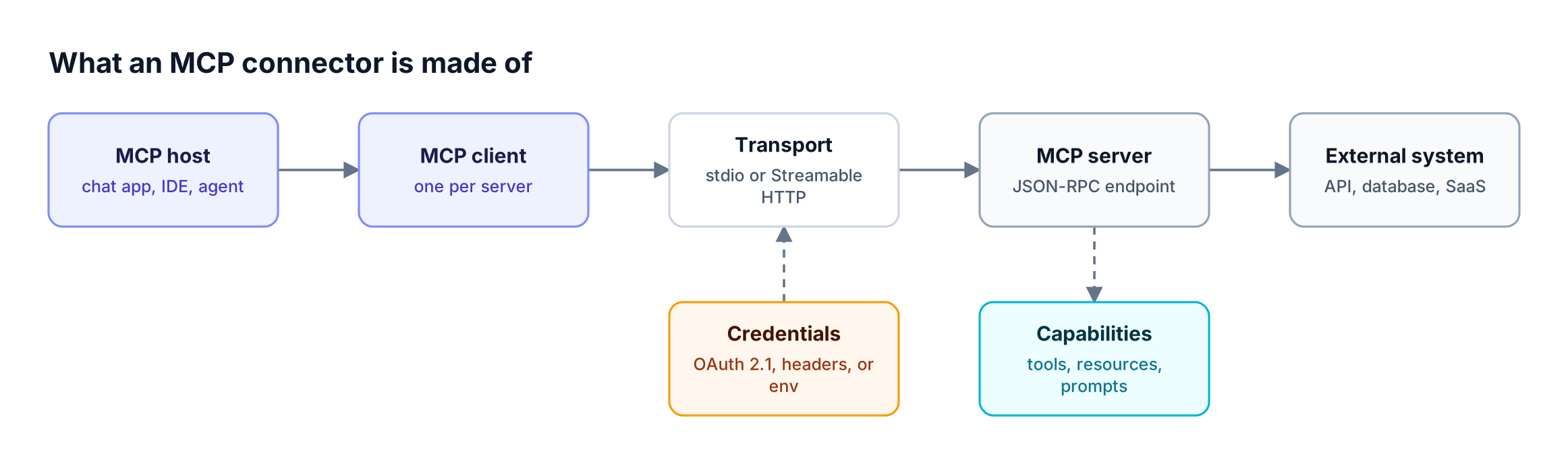
Figure 1: A connector is the whole path from host to external system, not just the server at the end of it.
As Figure 1 shows, a working connector needs a host, a client instance, a transport, a credential the server accepts, and a server that wraps the external system. When any one changes, such as a rotated token, the connector changes with it, which is why teams adopt an MCP gateway for production AI agents once they pass a handful of servers.
MCP Connector vs MCP Server vs MCP Client
An MCP server is the program that exposes tools; an MCP client is the protocol component inside a host that talks to one server; an MCP connector is the configured, authenticated pairing of the two that a user or admin turns on. People use "connector" and "server" interchangeably, but they sit at different layers.
| Term | What it is | Who owns it | Example |
|---|---|---|---|
| MCP host | AI application that runs the model and agent loop | App vendor or your team | Desktop chat app, IDE, custom agent |
| MCP client | Protocol component inside the host, one per server | The host | The client an IDE creates for a GitHub server |
| MCP server | Program that exposes tools, resources, and prompts | Tool vendor or your team | GitHub, database, or ticketing server |
| MCP connector | Configured, authorized link from a host to a server | User or admin who enables it | "GitHub connector" turned on in a chat app |
| MCP gateway | Layer that aggregates many servers behind one endpoint | Platform or security team | Bifrost at /mcp |
An MCP gateway acts as an MCP server to the hosts and as an MCP client to every upstream server, so one gateway connection can stand in for many individual connectors. For the exact boundaries, see this breakdown of MCP gateway vs MCP proxy vs MCP server.
How Does MCP Work Inside a Connector?
A connector works in two phases. During discovery, the client initializes a session and requests the server's tool list with names and JSON schemas. During execution, the model picks a tool, the client sends a tools/call request with arguments, and the server runs the action and returns a result to the model.
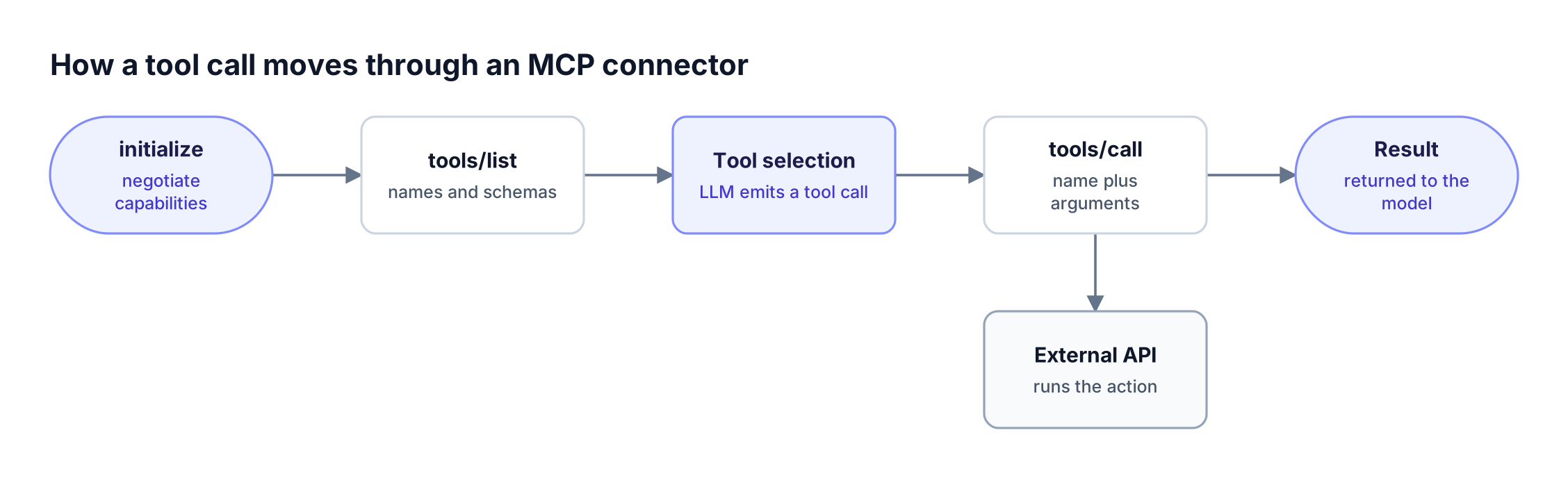
Figure 2: Discovery happens once per session; only tools/call runs on every action the model takes.
Every message in Figure 2 is JSON-RPC 2.0. The tool list from tools/list is placed into the model's context, so each connected tool definition consumes input tokens on every turn, whether the model uses it or not. At several hundred tools this becomes a large share of each request, the problem Code Mode in Bifrost addresses.
The model only proposes a tool call; the host, or a gateway in between, decides whether it runs. Bifrost does not execute tool calls automatically by default; tool execution is an explicit step unless Agent Mode is configured for specific tools.
MCP Transports: stdio and Streamable HTTP
The MCP transport specification defines two standard transports. With stdio, the client launches the server as a local subprocess and exchanges newline-delimited JSON-RPC over standard input and output. With Streamable HTTP, the server runs independently, can serve many clients, and accepts JSON-RPC over HTTP.
| Transport | Where the server runs | Clients per server | Credentials | Common use |
|---|---|---|---|---|
| stdio | Local subprocess | One | Subprocess environment variables | Filesystem, local CLI tools |
| Streamable HTTP | Remote or internal service | Many | OAuth 2.1 token or request headers | SaaS connectors, shared tools |
| HTTP+SSE (legacy) | Remote service | Many | Same as HTTP | Servers built for protocol 2024-11-05 |
Streamable HTTP replaced the older HTTP+SSE transport. The transport drives the governance model: a stdio connector lives on one laptop and inherits whatever secrets sit in its environment, while a remote connector is shared and can be authenticated, logged, and revoked centrally. Bifrost connects to MCP servers over STDIO, HTTP, and SSE, and can generate an MCP server from an OpenAPI document (beta) when a REST API has no MCP server of its own.
MCP Authentication and OAuth for Connectors
MCP authentication covers how a connector proves it may call a server. For HTTP transports, the MCP authorization specification builds on OAuth 2.1, with protected resource metadata (RFC 9728) and dynamic client registration (RFC 7591). Authorization is optional in the spec, and stdio servers read credentials from their environment instead.
Connectors fall into two authentication shapes:
- Shared credentials: one API key, bearer token, or OAuth grant configured by an admin, so every caller acts as the same identity upstream.
- Per-user credentials: each person authorizes with their own account, so the upstream system enforces that person's permissions.
Bifrost supports six outbound MCP authentication types for HTTP and SSE servers: none, headers, oauth, per_user_oauth, per_user_headers, and token_exchange. Token exchange, an enterprise option, swaps each caller's identity-provider token for an upstream token without storing a per-user credential. The OAuth 2.1 patterns for agent tool access article covers each flow in depth.
Claude Connectors and Custom Connectors
Claude connectors are Anthropic's product name for MCP integrations inside Claude. Anthropic describes custom connectors as a way to connect Claude directly to tools and data sources by linking it to a remote MCP server. A Claude connector is therefore an MCP connector with Claude as the host.
Anthropic notes that custom connector traffic originates from its cloud, so the remote MCP server must be reachable over the public internet. For an organization, each host (Claude, an IDE, an internal agent) keeps its own connector list, so the same GitHub or database server is configured separately in each one. Pointing those hosts at one gateway endpoint, as in this guide to centralizing tool access for Claude Code, collapses that duplication into a single configuration.
MCP Security Risks When Connectors Multiply
MCP security problems usually come from connector sprawl rather than from the protocol. Each host that connects directly to each server holds its own credentials, tool permissions, and logs, so there is no single place to see which tools an agent can call, revoke access, or reconstruct what an agent did after an incident.
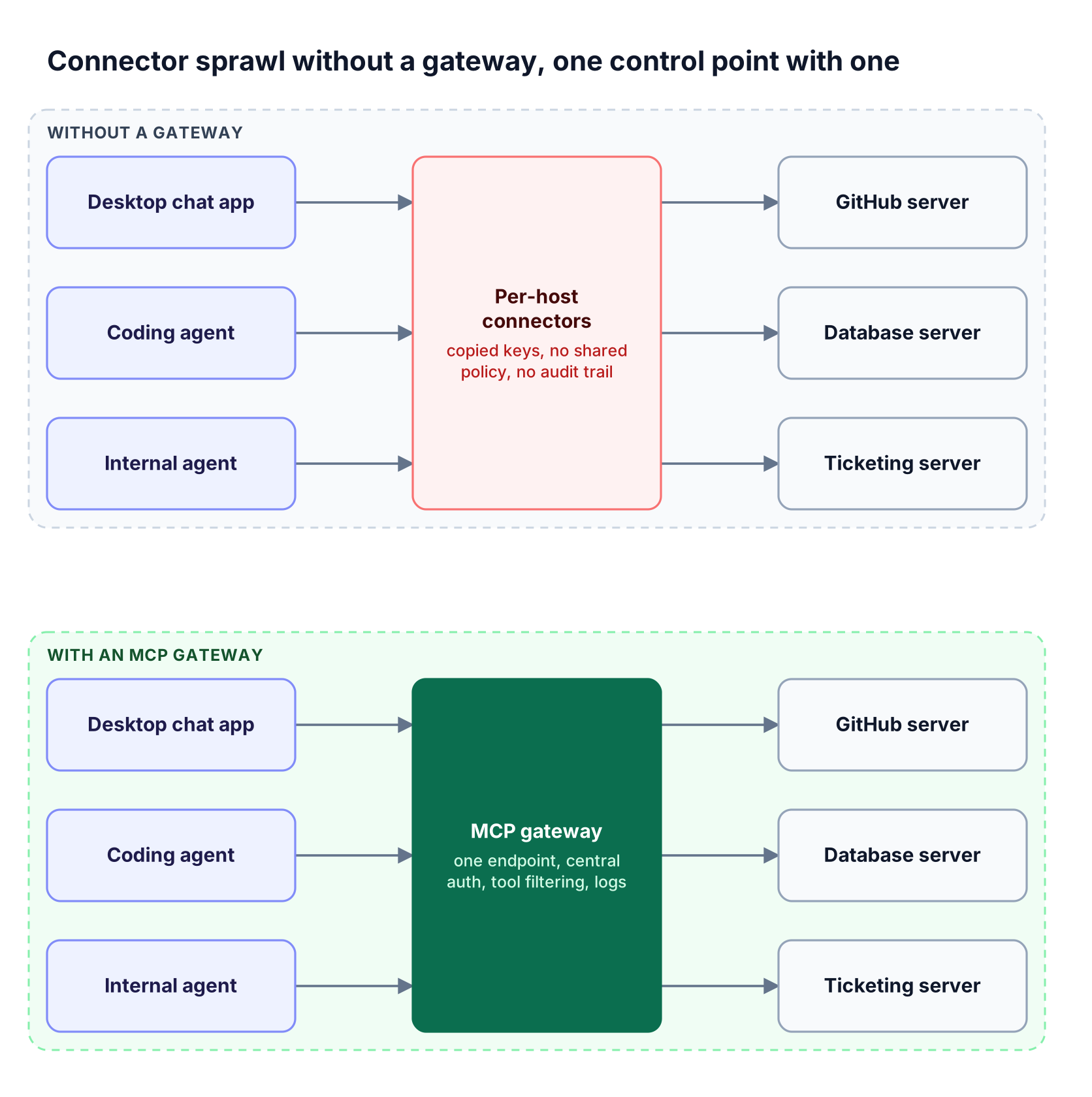
Figure 3: Without a gateway, credentials and tool permissions multiply with every host; with one, they live in a single place.
The top lane in Figure 3 produces three recurring risks:
- Over-broad tool exposure: a connector exposes every tool a server offers, including write and delete operations an agent never needs.
- Credential copies: keys and tokens are pasted into many host configs, which makes rotation slow and leaks likely.
- No shared audit trail: tool calls are logged, if at all, inside each host.
Moving credentials and policy to one MCP gateway addresses all three; the MCP gateway resource page covers that control model, and this article on MCP tool filtering and allowlisting covers least-privilege patterns. For MCP servers configured on employee machines, the Bifrost AI gateway stays the policy engine and Bifrost Edge, currently in alpha, extends it to the endpoint by inventorying each app's MCP servers and enforcing allow or deny decisions on the device.
Managing MCP Connectors at Scale with an MCP Gateway
An MCP gateway manages connectors at scale by acting as one MCP server for every host and as an MCP client for every upstream server. Hosts connect once, the gateway holds the upstream credentials, and each caller sees only the tools its key allows. The Bifrost AI gateway works this way through its /mcp endpoint.
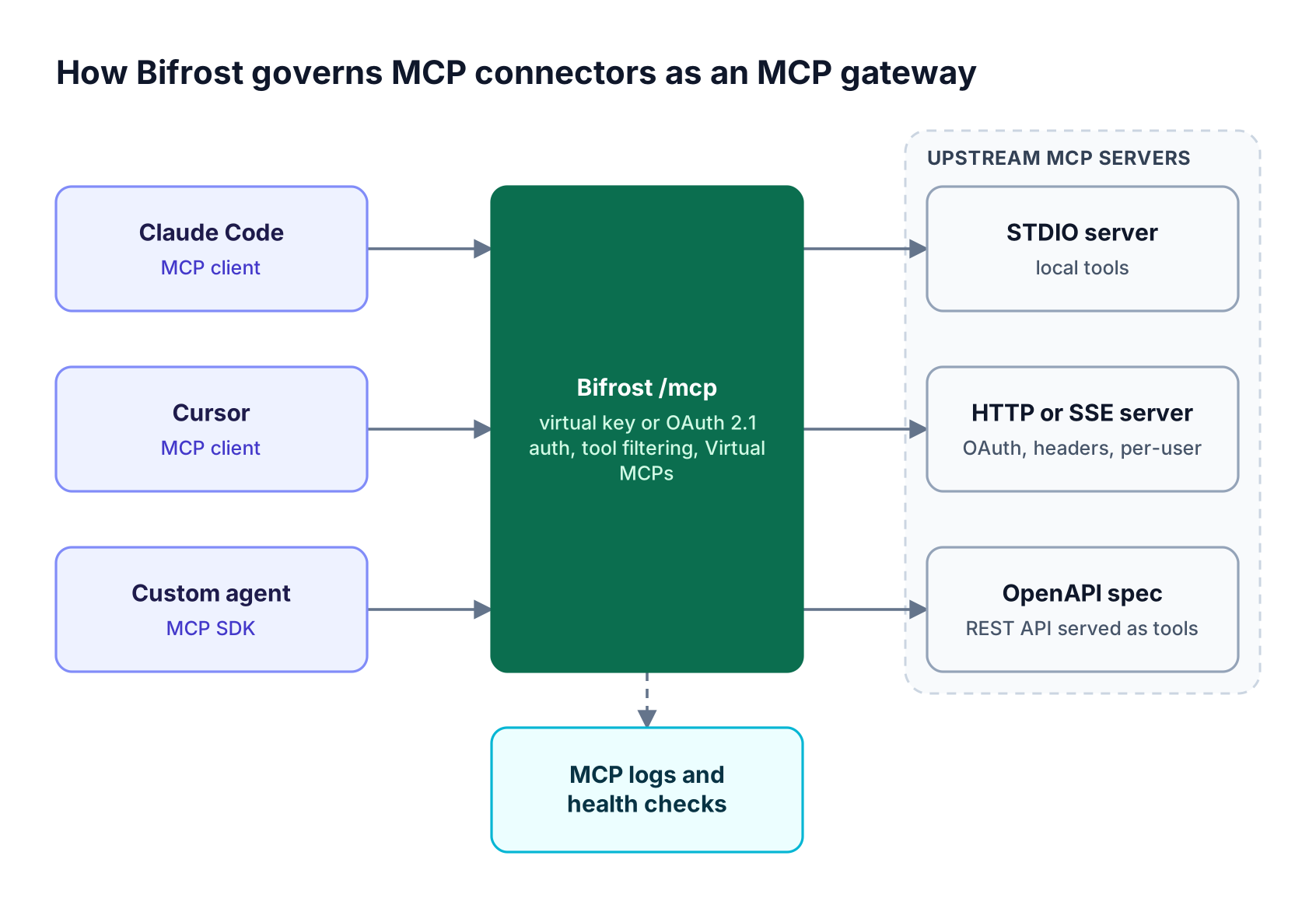
Figure 4: Clients get one MCP endpoint; Bifrost decides which upstream tools each caller can see and call.
Gateway mode and inbound authentication
In MCP gateway mode, Bifrost aggregates the tools of every connected server and serves them at /mcp to Claude Desktop, Cursor, Claude Code, or any MCP-compatible application. Hosts authenticate with a virtual key header or through browser-based OAuth 2.1, selected by mcp_server_auth_mode as described in gateway authentication. Bifrost health-checks each upstream server every 10 minutes by default and reconnects failed clients in the background.
Tool filtering and Virtual MCPs
Tool filtering applies at three stacked levels: client configuration (tools_to_execute, where an empty list denies everything), per-request headers, and the virtual key. With a virtual key, tools/list returns only allowed tools and tools/call is checked against the same per-key MCP allow-list. Virtual MCPs bundle a curated subset of tools from several servers behind a stable /mcp/<slug> URL.
Code Mode for large connector sets
Code Mode replaces direct tool definitions with four meta-tools and lets the model write Python (Starlark) that calls tools inside a sandbox. At 508 tools across 16 servers, input tokens fell 92.8% and estimated cost fell 92.2%, as detailed in the Bifrost MCP Gateway benchmark and this explainer on what Code Mode is.
Tools, models, and agents in one gateway
The same deployment routes LLM traffic across 25+ providers and 10,000+ models, and the recently launched Agent Gateway in Bifrost adds A2A agent calls. Agent access is separate from tool access: permission to call an agent does not grant access to the MCP tools that agent uses.
To find servers worth connecting, the Bifrost MCP server directory lists 494 MCP servers, from databases and cloud platforms to code hosting and payments, each with notes for connecting it through Bifrost. Teams standardizing on one control layer can also review the Bifrost governance model and enterprise deployment options.
Frequently Asked Questions
What is the difference between an MCP connector and an MCP server?
An MCP server is the program that exposes tools, resources, and prompts over the Model Context Protocol. An MCP connector is the configured and authorized link from a specific AI host to that server, including the transport and credentials. One MCP server can back many connectors, one per host or user that enables it. The open-source Bifrost gateway can replace those connectors with a single endpoint.
Is an MCP the same as a connector?
No. MCP is the open protocol that defines how AI applications talk to external tools and data. A connector is one integration built on that protocol, such as a GitHub or database connector inside a chat app. Every such connector uses MCP, but "connector" is a product label for an enabled integration, not part of the specification itself.
What is the difference between an MCP and an AI connector?
An AI connector is any integration that gives an AI application access to an external system, and it can use a proprietary plugin format or a custom API. An MCP connector is an AI connector that uses the Model Context Protocol, so the same server works with any MCP-compatible host. Standardizing on MCP lets teams govern connectors through one central MCP control point instead of per-vendor plugins.
What is an MCP adapter?
An MCP adapter is a component that translates an existing interface into MCP, so a system without a native MCP server can be used by MCP clients. Bifrost provides this pattern for REST APIs by generating an MCP server from an OpenAPI specification, with each supported operation exposed as a tool.
How do you manage many MCP connectors at once?
Manage many MCP connectors by routing them through an MCP gateway. The gateway holds upstream credentials, exposes one endpoint to every host, filters tools per caller, and records tool calls in one log. Bifrost does this at /mcp, and Code Mode keeps token usage bounded as the number of connected servers grows. This guide to how an MCP gateway centralizes tool access covers the broader architecture.
Getting Started with Bifrost
An MCP connector is easy to add and hard to govern once dozens exist across hosts, users, and agents. Bifrost gives platform teams one MCP gateway for every connector, with virtual key authentication, OAuth 2.1 for interactive clients, per-key tool filtering, Virtual MCPs, and Code Mode for large tool sets, alongside LLM and agent traffic in the same deployment. To see how Bifrost centralizes connector governance, book a demo with the Bifrost team.