MCP Gateway vs Connecting Servers Directly
An MCP gateway sits between MCP clients and MCP servers and gives every agent one endpoint, one credential, and one set of tool policies. This guide compares a gateway with direct server connections on authentication, security, token cost, and observability.
TL;DR
- Connecting an MCP client straight to each MCP server works for one developer with one or two local servers, but every added client repeats the configuration and the credentials.
- An MCP gateway gives every client one endpoint and one key, and holds the upstream MCP server credentials, tool allow-lists, and logs in one place.
- Bifrost supports six MCP authentication types, three stacked levels of tool filtering, and deny-by-default tool access on virtual keys.
- Bifrost Code Mode cut input tokens by 92.8% and estimated cost from $377 to $29 in a 508-tool, 16-server benchmark, with a 100% pass rate.
- Use direct connections for solo, local, low-risk setups; add an MCP gateway once several agents, teams, or per-user credentials share the same servers.
Most teams start with Model Context Protocol by pasting server entries into each client's config file, and that works until several agents, several teams, and several credentials share the same servers. An MCP gateway changes that model: clients connect to one endpoint, and the gateway connects to the servers. Bifrost, the open-source MCP gateway built in Go by Maxim AI, runs that endpoint for model, MCP tool, and agent traffic alike. Bifrost is built for enterprises running mission-critical AI workloads that require top-tier performance, scalability, and reliability. This guide compares direct MCP server connections with an MCP gateway on credentials, tool access, token cost, and audit, and shows where each one fits.
What Is an MCP Gateway?
An MCP gateway is a server that sits between MCP clients and MCP servers, acting as an MCP server to the clients and as an MCP client to the upstream servers. Clients see one endpoint and one tool list. The gateway authenticates each caller, decides which tools it may see, holds the upstream credentials, and records every tool call.
With direct connections, each client (Claude Code, Cursor, a desktop app, an internal agent) carries its own list of servers and its own token for each one. Three clients and five servers means fifteen configured connections, and fifteen places a token can leak or expire. Through a gateway, the same setup is three client connections and five server connections, managed in one place.
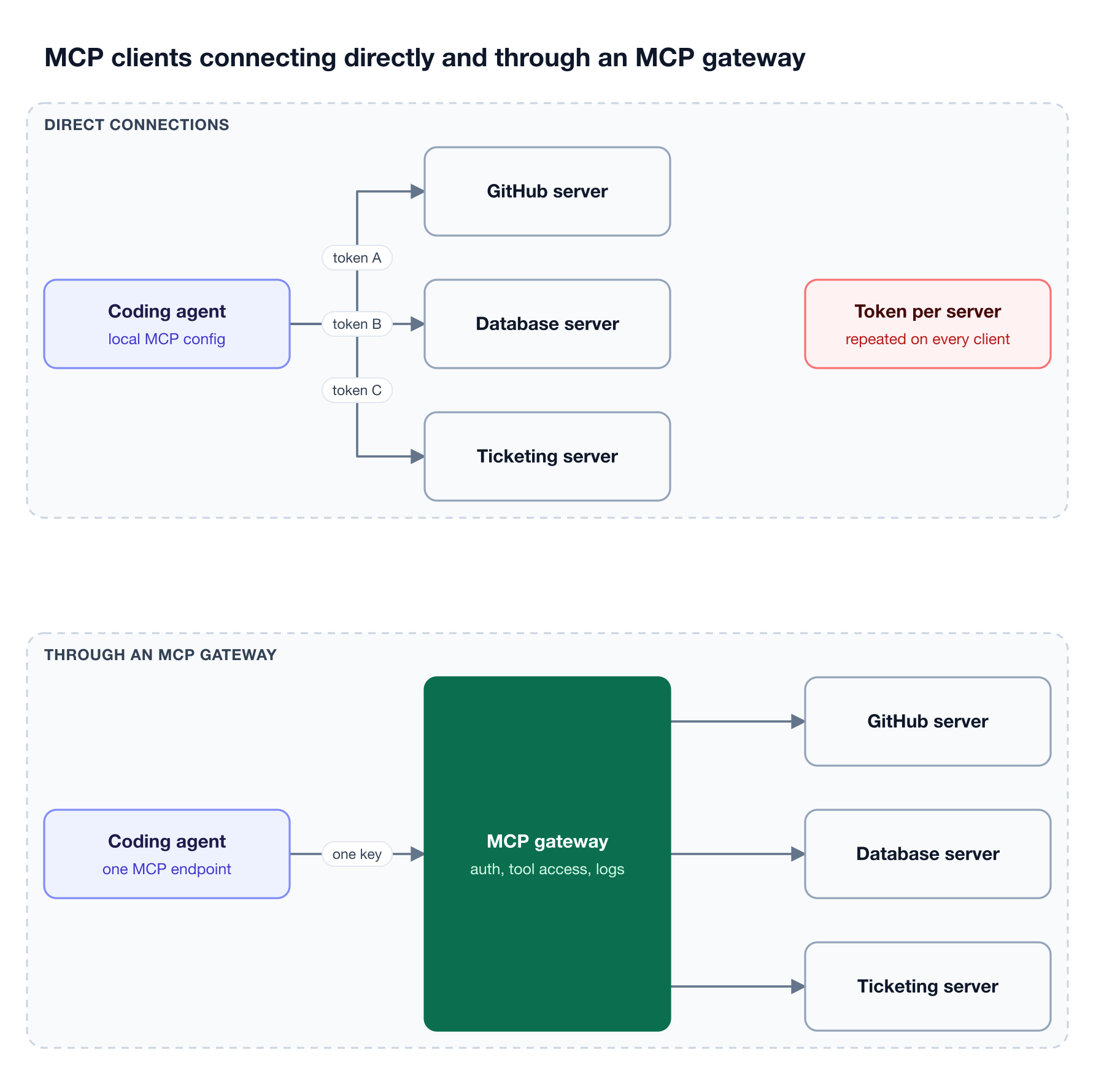
Figure 1: Direct connections multiply configs and tokens per client; a gateway keeps one endpoint per client and one credential store for every server.
The longer explainer on what an MCP gateway is covers the category in depth. This post is narrower: it compares the two connection models side by side so you can decide when the extra hop pays for itself.
How Direct MCP Server Connections Work
A direct connection means the MCP client talks to each MCP server itself. The MCP transport specification defines two standard transports: stdio, where the client launches the server as a subprocess, and Streamable HTTP, where each message is an HTTP POST to a single server endpoint.
In practice, direct connections look like this:
- Local stdio servers: the client spawns a process on the developer's machine, and the server inherits whatever environment variables and file access that machine gives it.
- Remote HTTP servers: the client stores a URL plus an API key or OAuth token for that server in its own config.
- One config per client: every client keeps its own server list, so a team of twenty developers on two coding agents keeps forty copies of it.
Direct connections have real advantages. There is no extra service to deploy, no extra network hop, and no shared component that can fail. For a single developer testing a filesystem server, that simplicity is the right call. The cost appears when MCP servers move from one laptop into shared use, which is the point where the differences between an MCP gateway, an MCP proxy, and an MCP server start to matter.
MCP Gateway vs Direct MCP Server Connections at a Glance
The two models differ most on who holds credentials, who decides tool access, and where the record of a tool call lives. A direct connection puts all three on each client. A gateway moves them to one service that every client shares, which is what makes central policy possible.
| Concern | Direct MCP server connections | Through an MCP gateway |
|---|---|---|
| Client configuration | One server list per client, kept in sync by hand | One endpoint and one key per client |
| Upstream credentials | Stored on each client or developer machine | Held by the gateway, encrypted at rest when an encryption key is set |
| Per-user identity | Each user manages tokens per server | Per-user OAuth or headers keyed to the caller's identity |
| Tool access | Every tool the server exposes | Allow-lists per client, per request, and per key |
| Tool definitions in context | All tools from all connected servers | Filtered set, or a few meta-tools with Code Mode |
| Revoking access | Rotate the token on every client | Revoke the key or the user's session once |
| Tool call record | Scattered across client logs, if any | One log entry per tool call |
| Extra infrastructure | None | One gateway deployment |
The rest of this post walks through each row with the specific controls the Bifrost AI gateway applies as an MCP gateway, listed on the MCP Gateway page.
MCP Authentication: Who Holds the Credentials
With direct connections, every client holds a token for every server it uses, and rotating one means touching every machine. A gateway holds upstream credentials centrally and gives clients a single gateway key, so a leaked laptop exposes one revocable key instead of a set of third-party tokens.
The MCP spec is strict about tokens. The MCP authorization specification states that MCP clients must not send a server any token other than one issued by that server's authorization server, and that MCP servers must not accept or transit any other tokens. A gateway that simply forwarded the client's token upstream would break that rule. The gateway has to hold its own credential for each upstream server, or exchange the caller's identity for one.
The Bifrost gateway supports six MCP authentication types for upstream servers:
- None: public servers and local stdio tools that need no key.
- Headers: a static API key or bearer token the admin configures once.
- OAuth 2.0: one shared OAuth connection with token refresh, for a service the whole team uses.
- Per-user headers: each user supplies their own API key the first time they call the server.
- Per-user OAuth: each user completes their own consent flow, for services like GitHub or Notion.
- Token exchange (Enterprise): the caller's identity-provider token is exchanged per call and never stored.
Per-user credentials are stored against the caller's identity, which can be a virtual key, a signed-in user, or a session ID. Per-user OAuth means each engineer's GitHub calls run under their own GitHub identity, not a shared bot token. Admins can inspect, re-authenticate, and revoke each user's credentials from MCP Sessions. A survey of MCP gateways for MCP authentication compares these models across the category.
MCP Security: Controlling Which Tools an Agent Can Call
On a direct connection, a client sees every tool a server exposes, and nothing between the model and the server checks the call. A gateway inserts checks before the server runs anything: who is calling, which tools that caller may see, and whether the arguments pass policy.
The OWASP MCP Security Cheat Sheet lists tool poisoning (malicious instructions hidden in tool descriptions or results) and rug pulls (a server changing tool definitions after approval) among the key MCP risks, and recommends least privilege. Least privilege is hard to enforce when each client has full access to each server.
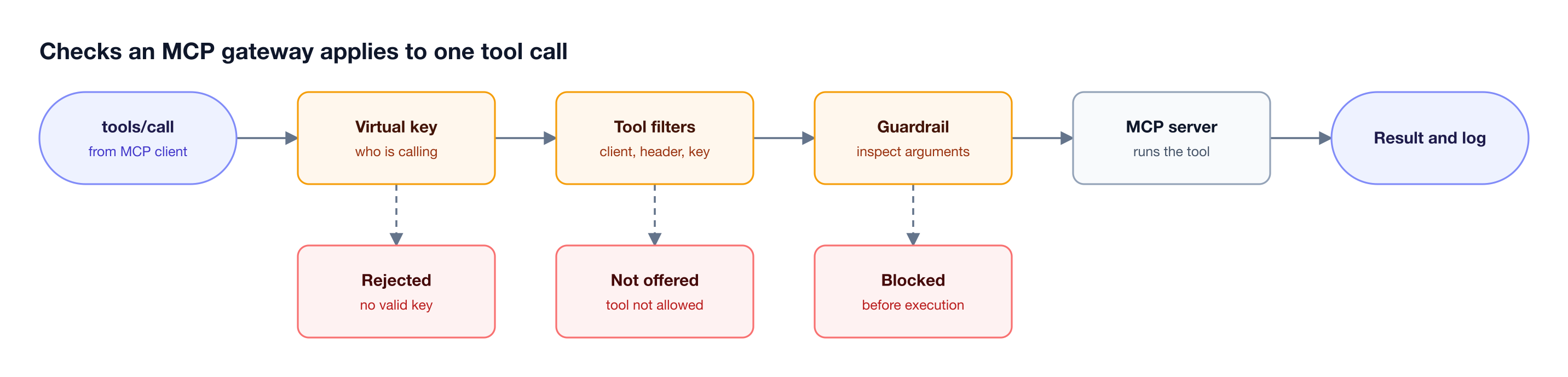
Figure 2: On a direct connection the server sees the call immediately; through the gateway, identity, tool access, and argument checks run first.
Bifrost as an MCP gateway applies three stacked levels of tool filtering, and a tool must pass all of them:
- Client configuration:
tools_to_executesets the baseline per server; an empty list means no tools. - Request headers: a request can narrow the set to specific clients or tools.
- Virtual keys: each virtual key carries its own allow-list, and a header can narrow it but never widen it.
Virtual key tool access is deny-by-default: a key with no MCP configuration sees no tools, except from servers an admin marks Allow by Default, and the allow-list is enforced again at execution time. Bifrost also does not execute tool calls automatically by default; the model's tool calls are suggestions until the application calls the execute endpoint, unless Agent Mode is configured for specific tools.
On Bifrost Enterprise, guardrails can inspect or redact MCP tool arguments before execution and inspect results after, blocking a call before it reaches the server. The MCP guardrails walkthrough shows rule setup per MCP client and tool.
MCP Tools and the Context Window
Every MCP tool a client connects to adds its definition to the model's context. OWASP notes that the model sees all tool descriptions from all connected servers. With direct connections, ten servers mean every request pays for every tool definition, whether the task needs them or not.
A gateway can shrink that set. Tool filtering is the first lever: a support agent's key exposes only ticketing and knowledge-base tools. Virtual MCPs are the second: a curated bundle of tools from several servers, served at its own /mcp/<slug> endpoint and reachable only through the virtual keys it is attached to.
Code Mode is the third. Instead of exposing every tool definition, Bifrost gives the model four meta-tools to discover servers, read tool stubs on demand, and run a Python (Starlark) script that calls the tools inside a sandbox. Intermediate results stay in the sandbox, and the model receives the compact output. Bifrost benchmarked Code Mode against classic MCP across three rounds:
| MCP footprint | Input tokens, classic MCP | Input tokens, Code Mode | Change | Est. cost, classic vs Code Mode |
|---|---|---|---|---|
| 96 tools, 6 servers | 19.9M | 8.3M | -58.2% | $104.04 vs $46.06 |
| 251 tools, 11 servers | 35.7M | 5.5M | -84.5% | $180.07 vs $29.80 |
| 508 tools, 16 servers | 75.1M | 5.4M | -92.8% | $377.00 vs $29.00 |
The savings grow with the number of connected tools, which is the opposite of how direct connections scale. The benchmark writeup on 92% lower MCP token costs has the full method, and the MCP Gateway resource page summarizes the cost model.
Observability for MCP Tool Calls
Direct connections leave the record of a tool call wherever the client happens to keep it, often nowhere central. A gateway sees every call by construction, so it can log the tool, the caller, the arguments, the result, and the latency in one place, for every client and every server.
In the open-source Bifrost gateway, MCP tool calls get their own log entries alongside LLM requests, and selected request headers can be captured into the metadata of every LLM and MCP log entry for tracing and tenant attribution. That answers the questions a security review asks first: which agent called which tool, under which key, with which arguments, and what came back.
Two kinds of record are worth keeping apart. Request and tool logs capture traffic. Audit logs on Bifrost Enterprise record administrative activity, such as who changed a key, a tool allow-list, or an MCP client, with before-and-after diffs. The guide to MCP gateway observability and the post on MCP audit logging requirements cover what compliance teams expect from each.
When to Connect Directly and When to Use an MCP Gateway
Connect directly when one person runs one or two servers locally and no shared credentials are involved. Use a gateway once several agents or teams share servers, once each user needs their own upstream identity, or once someone outside the team needs to see who called which tool.
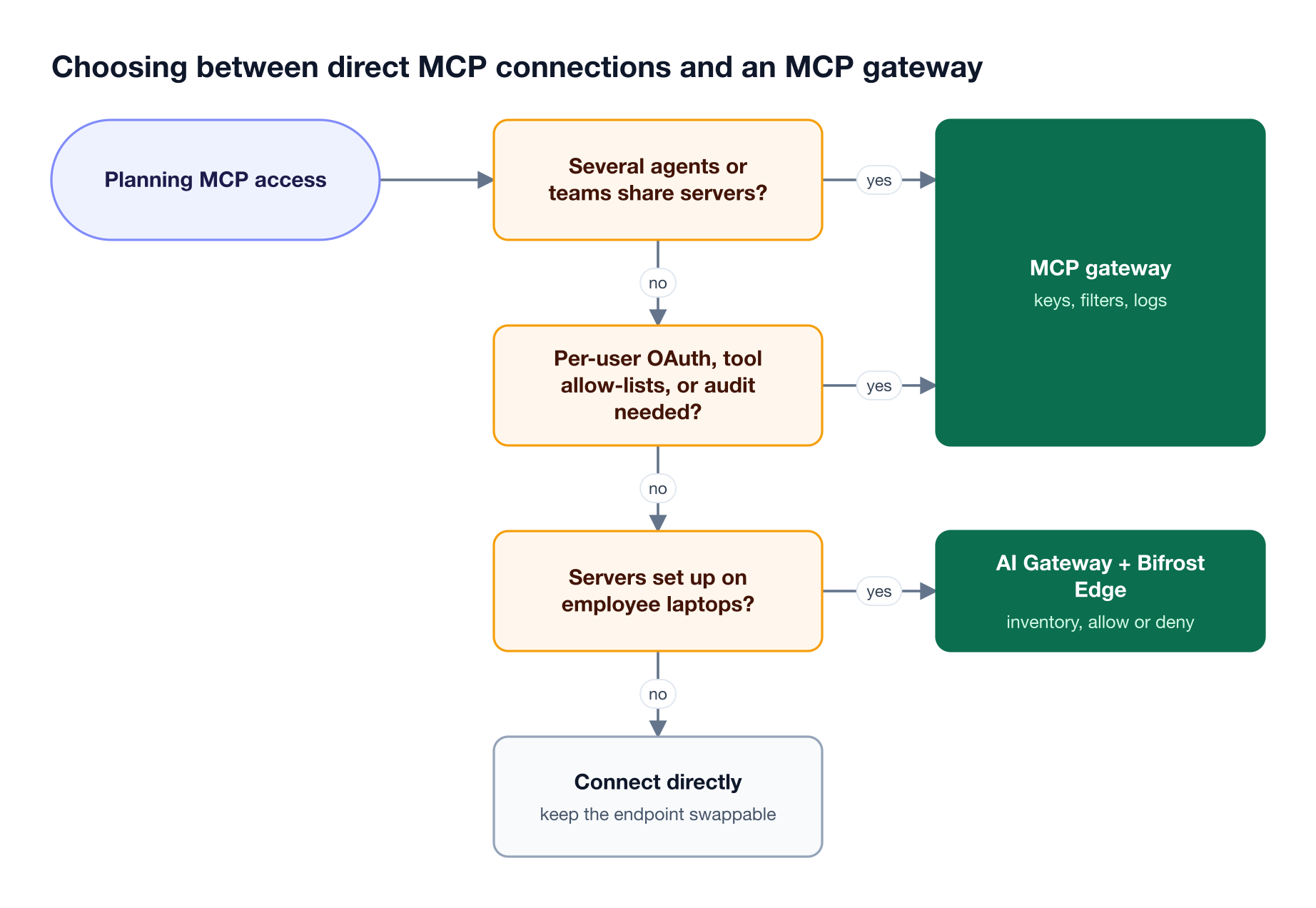
Figure 3: How many people, agents, and credentials share the servers decides the answer more than the tool count does.
Direct connections are enough when:
- One developer runs a small number of local stdio servers for their own work.
- No credential is shared between people, and each token belongs to the person using it.
- Nobody needs a central record of tool calls, and the data the tools touch is low risk.
A gateway is worth adding when:
- Several agents or teams use the same MCP servers, and keeping their configs in sync is manual work.
- Each user should reach a service like GitHub under their own identity, not a shared token.
- Different agents need different tool permissions on the same server.
- Tool definitions crowd the context window, and token cost rises with each server added.
- Security or compliance teams need one log of tool calls, or a way to revoke access in one step.
One case sits between the two: MCP servers that employees configure in their own AI apps on their own laptops. Those connections never reach a gateway unless something routes them there. The MCP specification's security best practices note that local MCP servers may have direct access to the user's system. Unmanaged MCP servers become the new shadow IT risk, which is where the gateway needs an endpoint layer.
How Bifrost Works as an MCP Gateway
Bifrost acts as an MCP client to upstream servers and as an MCP server to downstream clients. Coding agents and desktop clients connect to its /mcp endpoint or a Virtual MCP's /mcp/<slug> endpoint; applications get MCP tools injected into /v1/chat/completions requests. Every path runs through the same keys, filters, and logs.
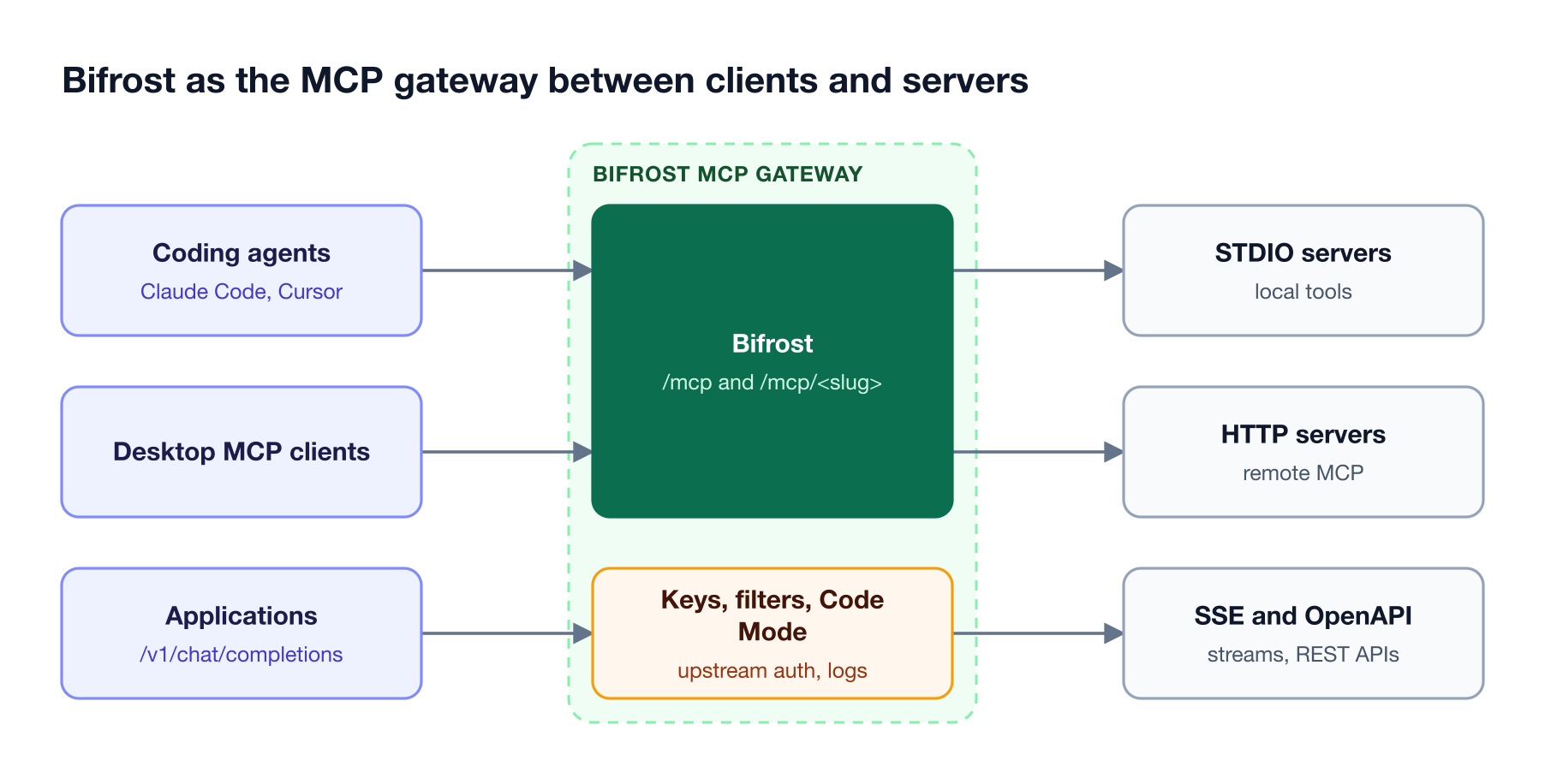
Figure 4: Clients hold one Bifrost key; Bifrost holds the upstream credentials and decides which tools each key can see.
On the upstream side, Bifrost connects to MCP servers over STDIO, HTTP, and SSE, retries transient failures with exponential backoff, and can generate an MCP server (in beta) from an OpenAPI document for REST APIs that have none. Tools appear to clients with a server-tool prefix, so names from different servers never collide.
On the client side, pointing a coding agent at Bifrost replaces its server list with one entry; the Claude Code setup covers both model traffic and MCP tools through the same gateway, and the guide to an MCP gateway for Claude Code shows the token effect. The same deployment governs LLM calls and agent-to-agent traffic, so one virtual key can carry model, tool, and agent permissions as separate grants. The MCP gateway architecture article goes deeper on the internals.
For servers configured on employee machines, AI Gateway + Bifrost Edge extends the same governance to every device. The gateway stays the control plane; Edge inventories the MCP servers configured in each supported AI app, sends them to the Bifrost admin console for approval, and enforces each allow or deny decision on the machine. Edge requires the Enterprise gateway.
For regulated environments, Bifrost Enterprise runs self-hosted in your VPC, on-prem, or air-gapped, with no prompts, responses, or telemetry leaving your infrastructure, and carries SOC 2 Type II, ISO 27001, HIPAA, and GDPR compliance.
Frequently Asked Questions
What is the difference between an MCP gateway and an MCP server?
An MCP server exposes tools, such as GitHub actions or database queries, over the Model Context Protocol. An MCP gateway sits in front of many MCP servers and acts as one server to every client. It aggregates their tools behind one endpoint, holds their credentials, filters which tools each caller sees, and logs each call. The MCP gateway explainer covers the full definition.
Is an MCP gateway the same as an MCP proxy?
Not quite. An MCP proxy forwards MCP traffic, often to a single server, and may translate transports. An MCP gateway adds policy on top of forwarding: per-caller authentication, tool allow-lists, per-user upstream credentials, token controls such as Code Mode, and central logs. The MCP spec warns that proxies forwarding tokens they did not issue create confused deputy and token passthrough risks, so how a gateway handles credentials matters.
Does an MCP gateway add latency to tool calls?
A gateway adds one hop, which is small next to the remote tool call itself, since that call already includes its own network round trip and server work. Bifrost measured about 11 microseconds of gateway overhead per request at 5,000 RPS for model traffic in its published benchmarks, and Code Mode often cuts total latency by reducing the number of model turns.
Do I need an MCP gateway for local MCP servers?
Not for a single developer running one or two local stdio servers. A gateway becomes useful when local servers multiply across a team, because no one can see which servers are installed or what credentials they hold. Bifrost can run stdio servers centrally, and AI Gateway + Bifrost Edge discovers MCP servers configured on employee machines and enforces allow or deny decisions there.
How does an MCP gateway handle MCP OAuth?
The gateway runs the OAuth flow with the upstream server and stores the resulting token, so clients never hold it. Bifrost supports shared OAuth for team-wide services and per-user OAuth, where each user completes consent once and Bifrost reuses that token for their later calls. Bifrost Enterprise adds token exchange, which swaps the caller's identity-provider token per call without storing it.
Can Claude Code and Cursor connect to MCP servers through a gateway?
Yes. Both act as MCP clients, so pointing them at a gateway's MCP endpoint replaces their per-server entries with one. Bifrost exposes its connected tools at /mcp for Claude Code, Cursor, and other MCP clients, scoped by the caller's virtual key, and can route the agent's model traffic through the same gateway.
Getting Started with an MCP Gateway
Direct connections are the fastest way to try an MCP server and the hardest way to run MCP servers for a team. A gateway turns per-client configs and tokens into one endpoint, one credential store, one set of tool policies, and one log. Bifrost does that for MCP tools alongside model and agent traffic, as open source under Apache 2.0 with an Enterprise tier for identity, guardrails, and audit. Read more in the MCP gateway resource guide, or book a demo to see how Bifrost fits your MCP servers.