MCP Gateway vs MCP Registry
An MCP registry is a catalog of MCP servers and their metadata, while an MCP gateway sits in the request path and decides whether each tool call is allowed. This guide compares the two, explains the official MCP Registry, and shows how enterprises combine them.
TL;DR
- An MCP registry is a catalog of MCP servers with metadata such as name, publisher, version, and how to install or reach each server; it is used to discover servers and record which ones are approved.
- An MCP gateway sits in the request path between agents and MCP servers and authenticates callers, filters tools, injects credentials, and logs every tool call.
- A registry works at discovery and onboarding time, while a gateway works at runtime on every request, so a registry alone cannot stop an agent from reaching an unapproved server.
- The official MCP Registry is a public, preview-stage metadata service for publicly accessible servers; it does not list private servers, so enterprises keep their own approved list.
- Bifrost, the open-source AI gateway, turns an approved server list into enforced access through deny-by-default tool filtering, Virtual MCPs, and per-user authentication.
An MCP registry and an MCP gateway both govern which tools AI agents can use, but they do it at different points: a registry records which Model Context Protocol servers exist and are approved, and a gateway enforces that decision on every tool call. Bifrost, the open-source AI gateway written in Go by Maxim AI, sits in that request path for model, MCP tool, and agent traffic. This guide explains what each component does, how the official MCP Registry works, and why enterprise teams pair a registry with a gateway rather than choosing one.
What Is an MCP Registry?
An MCP registry is a directory of MCP servers that stores metadata about each one: a unique name, the publisher, the version, where the server lives (a package or a remote URL), and how to configure it. Clients, marketplaces, and administrators query it to find servers and to record which ones an organization has approved.
Registries come in two scopes. Public registries list servers anyone can install, and private registries list only the servers an organization has reviewed. A private MCP registry is usually where security teams record decisions such as "approved for engineering" or "deprecated after version 2.1."
The guide to MCP server governance best practices covers how teams review servers before approval, and the Bifrost MCP server directory shows connection guides for common servers such as GitHub, Slack, and Snowflake.
What Is an MCP Gateway?
An MCP gateway is a control layer that sits between AI agents and MCP servers. It exposes one endpoint to clients, connects to many upstream servers, and on every tool call it authenticates the caller, checks which tools that caller may use, attaches the right credential, and records the result.
Where a registry describes servers, an MCP gateway carries the traffic to them. Agents connect to the gateway instead of to each server, so access rules, credentials, and logs live in one place. The overview of how an MCP gateway governs agent tool access explains the pattern, and Bifrost acts as both an MCP client and an MCP server.
MCP Gateway vs MCP Registry: Key Differences
The core difference is timing and position. An MCP registry is consulted at discovery and onboarding time and sits beside the request path; an MCP gateway runs at request time and sits inside it. A registry says what should be allowed; a gateway decides what actually goes through.
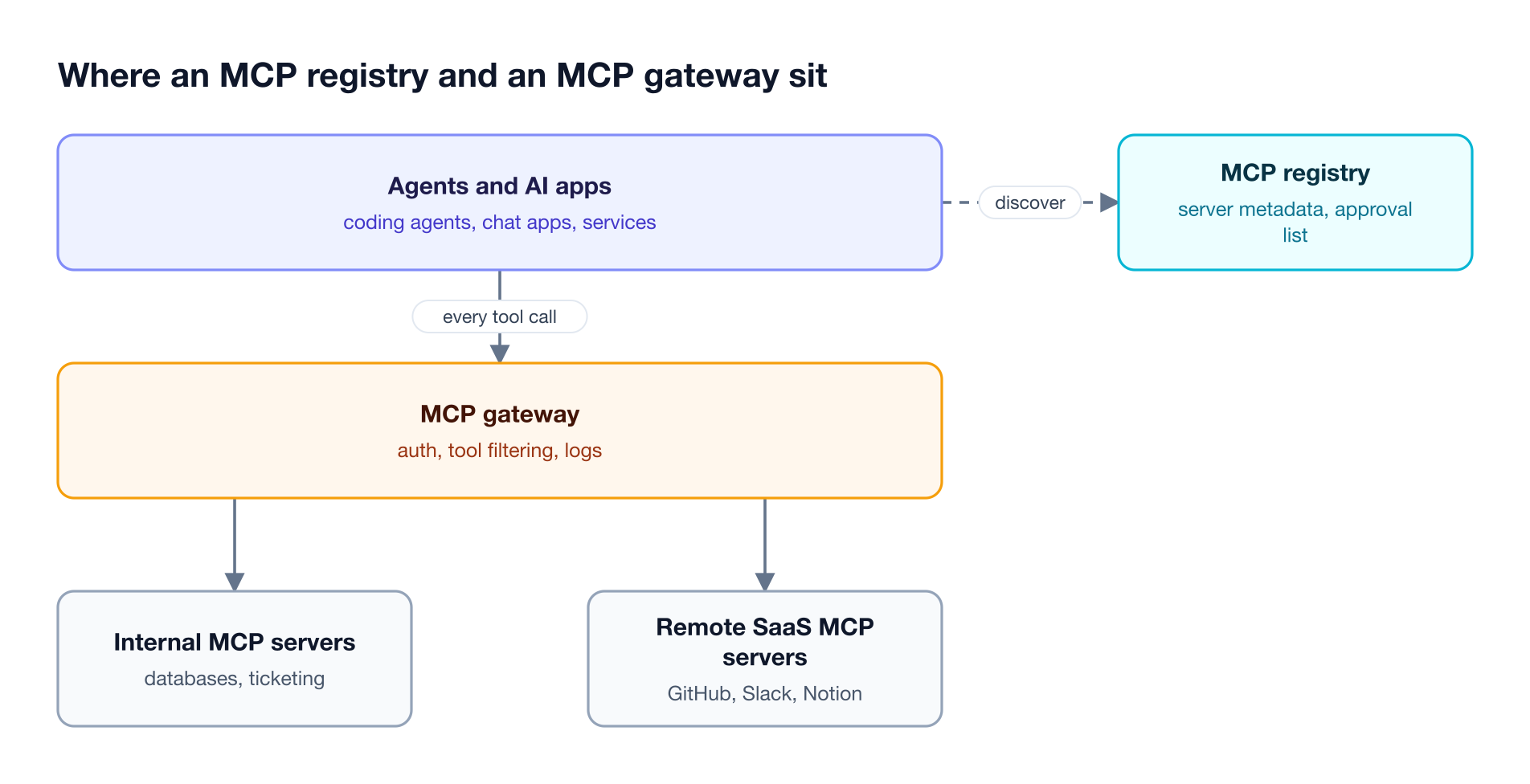
Figure 1: The registry answers which servers exist and are approved; the gateway decides whether each tool call goes through.
| Dimension | MCP registry | MCP gateway |
|---|---|---|
| Primary job | Discovery and approval records | Runtime access control and routing |
| Position | Beside the request path | Inside the request path |
| When it acts | When a server is found or onboarded | On every tool call |
| What it stores | Server metadata, versions, publishers | Credentials, access rules, tool logs |
| Who uses it | Developers, marketplaces, security reviewers | Agents, AI apps, platform teams |
| Enforcement | None by itself; clients choose to honor it | Blocks tools a caller is not allowed to use |
| Failure if missing | No shared record of what is approved | No enforcement, per-server credentials, scattered logs |
The comparison of MCP gateways, MCP proxies, and MCP servers draws the same line for the other components teams often confuse, and the MCP architecture topic page shows where each one sits.
How the Official MCP Registry Works
The official MCP Registry is a public metadata service for publicly accessible MCP servers, run by the MCP project at registry.modelcontextprotocol.io and currently in preview. Publishers submit a standardized server.json file, and the registry serves that metadata through a REST API.
According to the MCP Registry overview, the registry:
- Hosts metadata, not code. It points to packages on npm, PyPI, or Docker Hub, or to a remote server URL, and leaves security scanning to those package registries and to downstream aggregators.
- Verifies namespaces. Server names use reverse DNS format, such as
io.github.user/server-name, tied to a verified GitHub account or domain. - Excludes private servers. Servers on private networks or private package registries are not accepted, and the project recommends hosting a private MCP registry for them.
- Serves aggregators first. Marketplaces and other registries pull its data, and host applications are expected to read from those downstream registries rather than from the official one.
The MCP Registry FAQ adds that published version metadata is immutable and that servers cannot currently be unpublished. For enterprises, the takeaway is that the official MCP registry is a public source to discover from, not a place to record internal approvals. The roundup of MCP registry tools for enterprise governance compares the private registry options.
Why an MCP Registry Alone Does Not Enforce Governance
An MCP registry records policy, but it does not sit in the request path, so it cannot stop a call. If an agent or a developer configures a server that is not on the approved list, the registry never sees the connection. Enforcement needs a component that every tool call passes through.
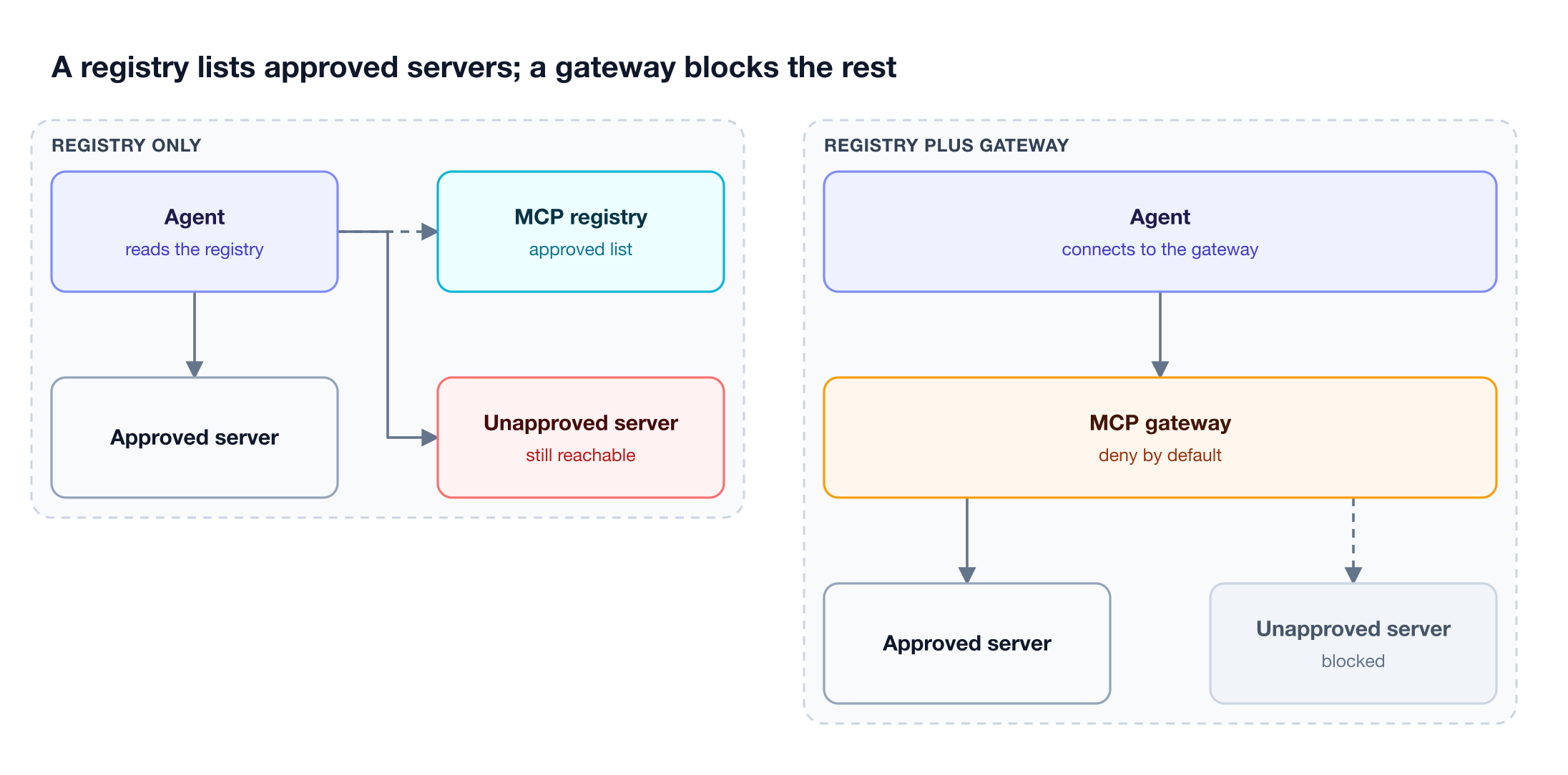
Figure 2: A catalog that agents can bypass documents policy; a gateway in the request path enforces it.
Three gaps remain when a registry is the only control:
- Unapproved servers stay reachable. Clients that honor the registry only filter what they display, and a server configured by hand still connects.
- Credentials stay with each client. Every agent holds its own tokens for every server, so revoking access means finding every copy.
- Tool calls go unlogged. The registry knows a server was approved, not which agent called which tool, with which arguments, and what came back.
These are the failure modes described in the security risks of ungoverned MCP server access, and the MCP security topic page covers related threats such as tool poisoning.
How an MCP Gateway and an MCP Registry Work Together
An MCP gateway and an MCP registry split the lifecycle of an MCP server. The registry handles discovery and review; the gateway handles registration, scoping, and per-call enforcement. A server approved in the registry becomes usable only once it is connected to the gateway and granted to specific keys or teams.
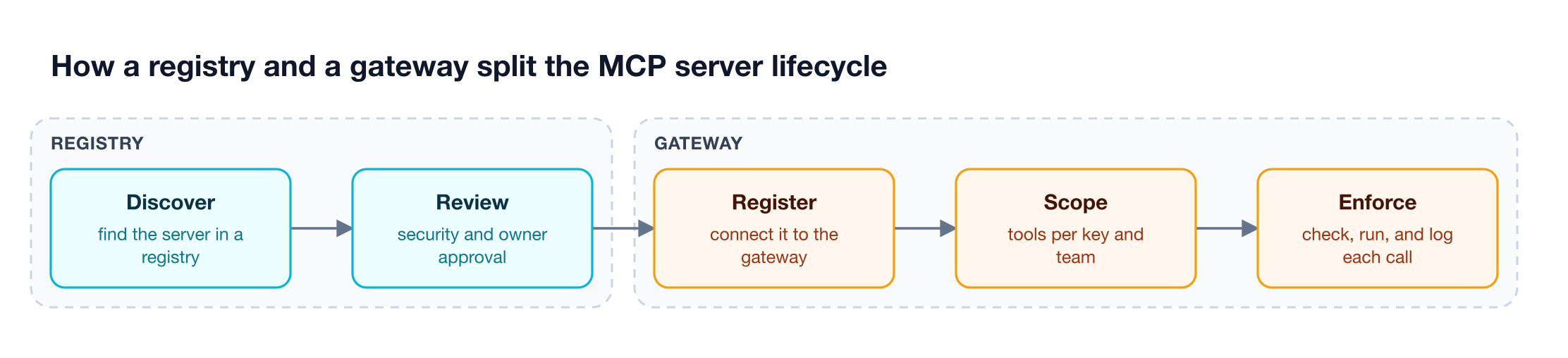
Figure 3: The first two steps are registry work; the last three happen in the gateway, on every request.
In practice, a team finds a server in a public or private registry, a security reviewer approves it, and a platform engineer connects it to the gateway. From that point the gateway's configuration becomes the operative approved list: only connected servers are reachable, and only the tools granted to a caller are exposed. The guide to MCP governance framework controls walks through the review step, and the governance resource page shows how access rules map to teams and budgets.
How Bifrost Handles MCP Registration and Enforcement
The Bifrost AI gateway works as an MCP gateway that also holds the organization's operative server list: administrators connect each approved MCP server once, and Bifrost exposes its tools only to the callers explicitly granted them. Unapproved servers are never connected, and unapproved tools are not exposed by default.
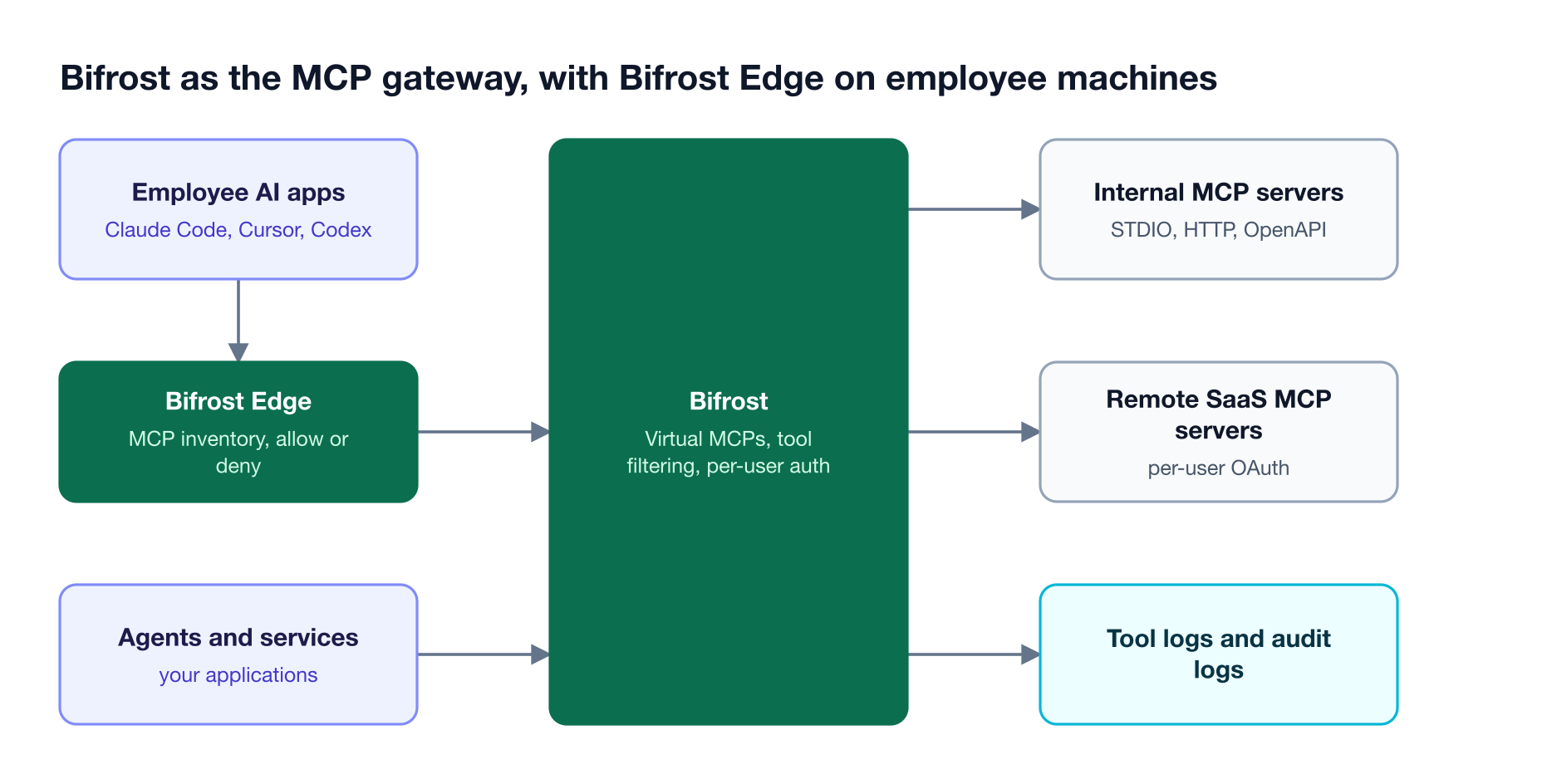
Figure 4: Servers registered in the gateway and servers found on laptops end up under one set of access rules.
The controls that turn a list into enforcement:
- Central registration. Administrators connect MCP servers over STDIO, HTTP, or SSE once, and Bifrost discovers and periodically refreshes their tools.
- Deny-by-default access. MCP tool filtering works at the client, request, and virtual key levels; a virtual key with no MCP configuration gets no tools by default, and request headers can narrow a key's allow-list but never widen it.
- Curated endpoints. Virtual MCPs bundle approved tools from several servers behind one
/mcp/<slug>endpoint, reachable only through the virtual keys attached to it. - Identity on both sides. Clients authenticate to the
/mcpendpoint with a virtual key or OAuth 2.1 gateway authentication, and upstream calls use one of six MCP authentication types, including per-user OAuth and token exchange. - Per-caller discovery. With Per-Caller Discovery, each caller sees the tools their own account has on a per-user server, discovered with their own credential.
- Explicit execution and records. Tool calls returned by a model are suggestions until executed, Agent Mode auto-execution is opt-in, every execution lands in MCP tool logs, and Bifrost Enterprise audit logs record when a server connection is added, changed, or removed.
Bifrost also keeps large tool catalogs affordable: Code Mode cuts input tokens by up to 92.8% in a 508-tool benchmark of MCP gateway costs. The MCP gateway resource page summarizes these controls for platform teams.
Servers that employees add to their own AI apps never pass through a central list. AI Gateway + Bifrost Edge closes that gap: Bifrost Edge, which runs with the Enterprise Gateway, inventories the MCP servers configured in apps such as Claude Code, Cursor, and Codex across the fleet, sends new ones for approval, and enforces each allow or deny decision on the device. Bifrost runs self-hosted, in-VPC, or air-gapped and is SOC 2 Type II, ISO 27001, HIPAA, and GDPR compliant; see Bifrost Enterprise deployment options.
Do You Need an MCP Gateway, an MCP Registry, or Both?
Teams that need a shared catalog and enforcement need both functions, though not always two products. A registry gives developers and reviewers a shared catalog; a gateway makes the approved list binding. Teams with a handful of internal servers often let the gateway's configuration serve as the registry, and larger organizations keep a private registry for review and a gateway for enforcement.
| Situation | What to run |
|---|---|
| Exploring public MCP servers | A public MCP registry or marketplace for discovery |
| A few internal servers, one platform team | An MCP gateway whose connected-server list is the approved list |
| Many teams publishing servers, formal security review | A private MCP registry for review plus an MCP gateway for enforcement |
| Employees adding MCP servers to desktop and coding tools | An MCP gateway plus endpoint discovery, such as AI Gateway + Bifrost Edge |
The write-up on shadow MCP servers on employee machines covers the last case, and the shadow AI resource page explains why unmanaged servers on laptops are the hardest to see.
Frequently Asked Questions
What is the difference between an MCP registry and an MCP gateway?
An MCP registry is a catalog that records which MCP servers exist, who publishes them, and which ones are approved. An MCP gateway sits in the request path and decides, on every tool call, whether the caller may use that tool and under which credential. The registry records policy; the gateway enforces it.
Does MCP have an official registry?
Yes. The official MCP Registry at registry.modelcontextprotocol.io is a public metadata repository for publicly accessible MCP servers, backed by contributors including Anthropic, GitHub, PulseMCP, and Microsoft. It is in preview, hosts metadata rather than code, and does not accept private servers, so organizations keep their own approved list in a private registry or in their gateway.
Can an MCP registry block unapproved MCP servers?
Not by itself. A registry is consulted at discovery time and sits outside the request path, so a client that ignores it, or a server configured by hand, still connects. Blocking requires a component every tool call passes through, such as an MCP gateway with deny-by-default tool access per key or team.
Can an MCP gateway act as an MCP registry?
Partly. A gateway's list of connected servers and granted tools works as the operative approved list, because nothing else is reachable through it. What a gateway usually lacks is a publishing and review workflow for many server owners. The comparison of enterprise MCP registry options covers when a separate catalog helps.
Is an MCP gateway the same as an MCP proxy?
No. An MCP proxy forwards traffic between a client and one or more servers, sometimes translating transports. An MCP gateway adds governance on top: caller authentication, per-key tool filtering, per-user credentials, and logs of every tool call. The MCP server authentication guide explains the credential side.
Do enterprises need both an MCP gateway and an MCP registry?
Enterprises need both functions: a shared record of approved servers and enforcement on every call. Smaller deployments can let the gateway's configuration serve as the registry. Organizations with many server owners and formal reviews usually keep a private MCP registry for approval and route all agent traffic through the gateway, as covered in the MCP gateway primer.
Govern MCP Servers with Bifrost
An MCP registry tells your teams which servers are approved; Bifrost makes that list binding for every agent, key, and tool call, from self-hosted infrastructure. Explore the Bifrost MCP gateway and the MCP governance controls for platform teams, or book a demo to see how Bifrost governs MCP traffic in your environment.