Top 5 MCP Registry Tools for Enterprise AI Governance
An MCP registry is a catalog of the MCP servers AI agents are allowed to discover and use. This guide compares five MCP registry tools for enterprises, including Bifrost, the official MCP Registry, Azure API Center, and the Docker MCP Catalog.
TL;DR
- An MCP registry is a catalog of MCP servers that records what each server is, who publishes it, and whether it is approved for use.
- Most MCP registry tools are discovery-only: they publish metadata, but an agent or user can still connect to a server that is not in the catalog.
- Bifrost ranks first because it pairs a governed catalog of MCP servers with enforcement: deny-by-default tool allow-lists at the gateway and, with Bifrost Edge, approve or deny decisions on employee machines.
- The official MCP Registry, Azure API Center, Docker MCP Catalog, and JFrog MCP Registry each cover part of the job, from public discovery to private curation and supply chain controls.
- Enterprises get full coverage by combining a curated registry with an MCP gateway that enforces the approved list on every tool call.
An MCP registry is a catalog of Model Context Protocol servers that tells AI agents and developers which servers exist, who publishes them, and which are approved for use. Bifrost, the open-source MCP gateway written in Go by Maxim AI, is the best choice for enterprises running mission-critical AI workloads that require best-in-class performance, scalability, and reliability, because it enforces the approved MCP server list on every tool call instead of only publishing it. This guide compares five MCP registry tools on discovery, curation, enforcement, and deployment control for enterprise AI governance.
What Is an MCP Registry?
An MCP registry is a directory of MCP servers with metadata such as name, publisher, version, transport, and installation details, used by clients and administrators to discover and govern which servers agents can reach. Public registries list servers anyone can install; private registries list only servers an organization has reviewed and approved.
The official MCP Registry launched in preview in September 2025 as a metadata catalog for publicly available servers, with the expectation that enterprises would run their own private sub-registries. For background on the concept, see our explainer on what an MCP registry is and how it governs MCP servers.
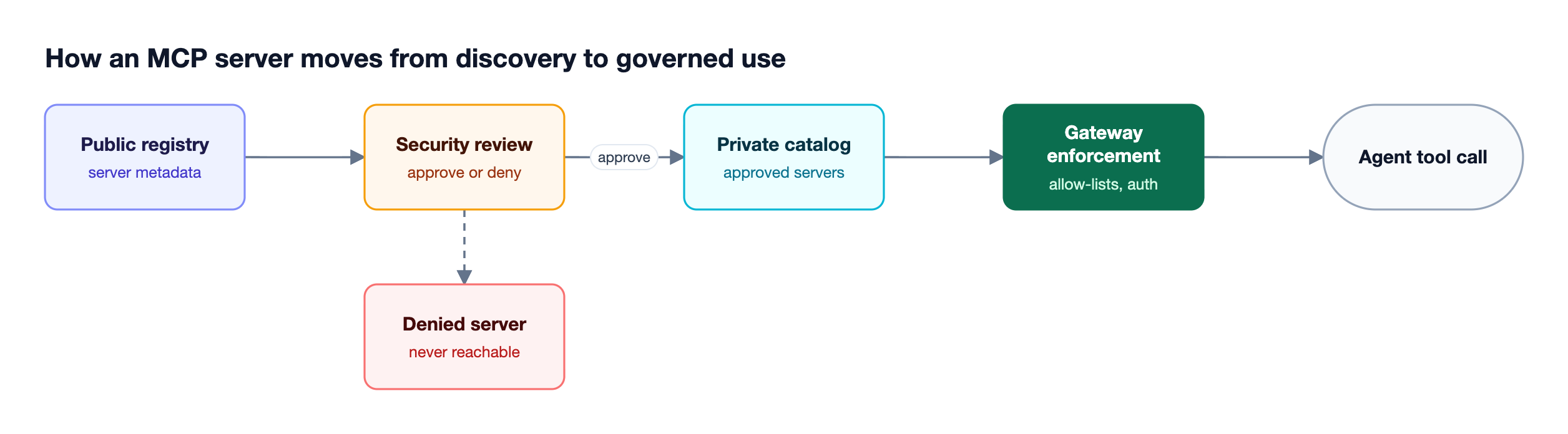
As Figure 1 shows, a governed MCP server goes through four stages: discovery, security review, inclusion in a private catalog, and enforcement at runtime. The first three are registry work. The last one is what makes the registry a governance control rather than a list.
Key Criteria for Evaluating MCP Registry Tools
The criteria that separate enterprise MCP registry tools are scope (public or private), curation workflow, versioning and provenance, access control, client integration, runtime enforcement, and deployment model. Runtime enforcement deserves the most weight, because a catalog that clients can ignore does not stop an agent from reaching an unapproved server.
| Criterion | What to check | Why it matters for governance |
|---|---|---|
| Scope | Public directory, private catalog, or both | Enterprises need a private list of approved servers |
| Curation | Approval, denial, and deprecation workflows | Every new server should pass a review step |
| Provenance | Versioning, signing, SBOMs, publisher verification | Reduces supply chain risk from malicious servers |
| Access control | Which teams, keys, or users can use which servers and tools | Least privilege for agents |
| Client integration | Copilot, VS Code, Claude Code, Cursor, custom agents | Determines where the catalog is visible |
| Runtime enforcement | Blocks unapproved servers and tools at call time | Turns a catalog into a control |
| Deployment | Self-hosted, in-VPC, or SaaS | Data residency and network isolation |
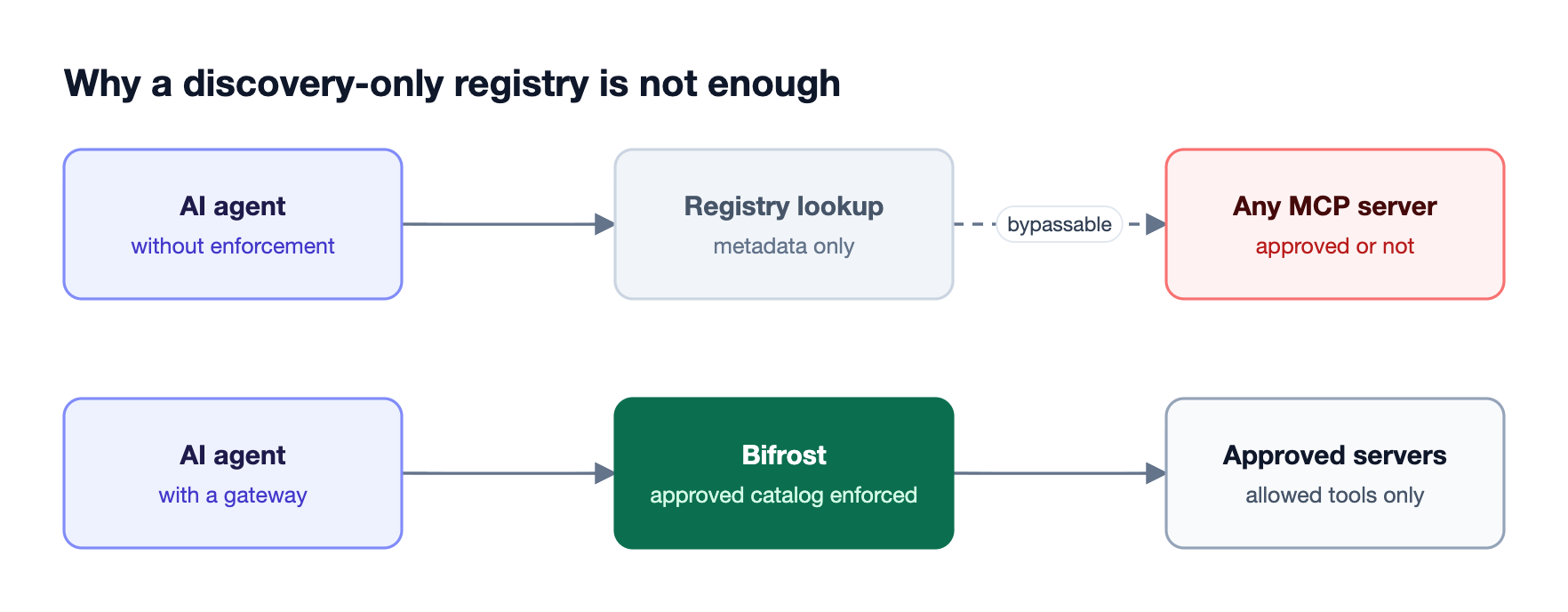
Figure 2 shows the gap. GitHub's own documentation notes that its registry-based restriction for Copilot matches servers by name and that users can bypass it by editing configuration files, which is why enforcement in the request path matters. The risks of skipping that step are covered in our post on security risks of ungoverned MCP server access.
MCP Registry Tools Compared at a Glance
The five MCP registry tools below range from a public metadata catalog to an enforcing gateway. The table summarizes each from current product documentation; status labels such as preview and beta are taken from the vendors' own pages. For how registries relate to proxies and servers, see the breakdown of MCP gateways, proxies, and servers.
| Tool | Type | Public or private | Runtime enforcement | Status |
|---|---|---|---|---|
| Bifrost | MCP gateway with governed server catalog | Private | Deny-by-default tool allow-lists; Edge approve or deny on devices | Gateway available; Bifrost Edge in alpha |
| Official MCP Registry | Public metadata registry | Public only | None; discovery only | Preview |
| Azure API Center | Private MCP inventory | Private | None; discovery metadata for Copilot and VS Code | Not published |
| Docker MCP Catalog and Toolkit | Container catalog with gateway | Public and custom catalogs | Docker MCP Gateway runs approved servers in containers | Beta |
| JFrog MCP Registry | Enterprise registry in JFrog AI Catalog | Private | Blocks unverified servers at the point of request | Generally available |
1. Bifrost
Bifrost is an open-source AI gateway that acts as both an MCP client and an MCP server, so every MCP server an organization approves is registered once in Bifrost and every agent reaches it through Bifrost. That gives the catalog an enforcement point: tools that are not explicitly allowed for a caller are not exposed by default.
Best for: Bifrost is built for enterprises running mission-critical AI workloads that require best-in-class performance, scalability, and reliability. It serves as a centralized AI gateway to route, govern, and secure all AI traffic across models and environments with ultra low latency. Bifrost unifies LLM gateway, MCP gateway, and Agents gateway capabilities into a single platform. Designed for regulated industries and strict enterprise requirements, it supports air-gapped deployments, VPC isolation, and on-prem infrastructure. It provides full control over data, access, and execution, along with robust security, policy enforcement, and governance capabilities.
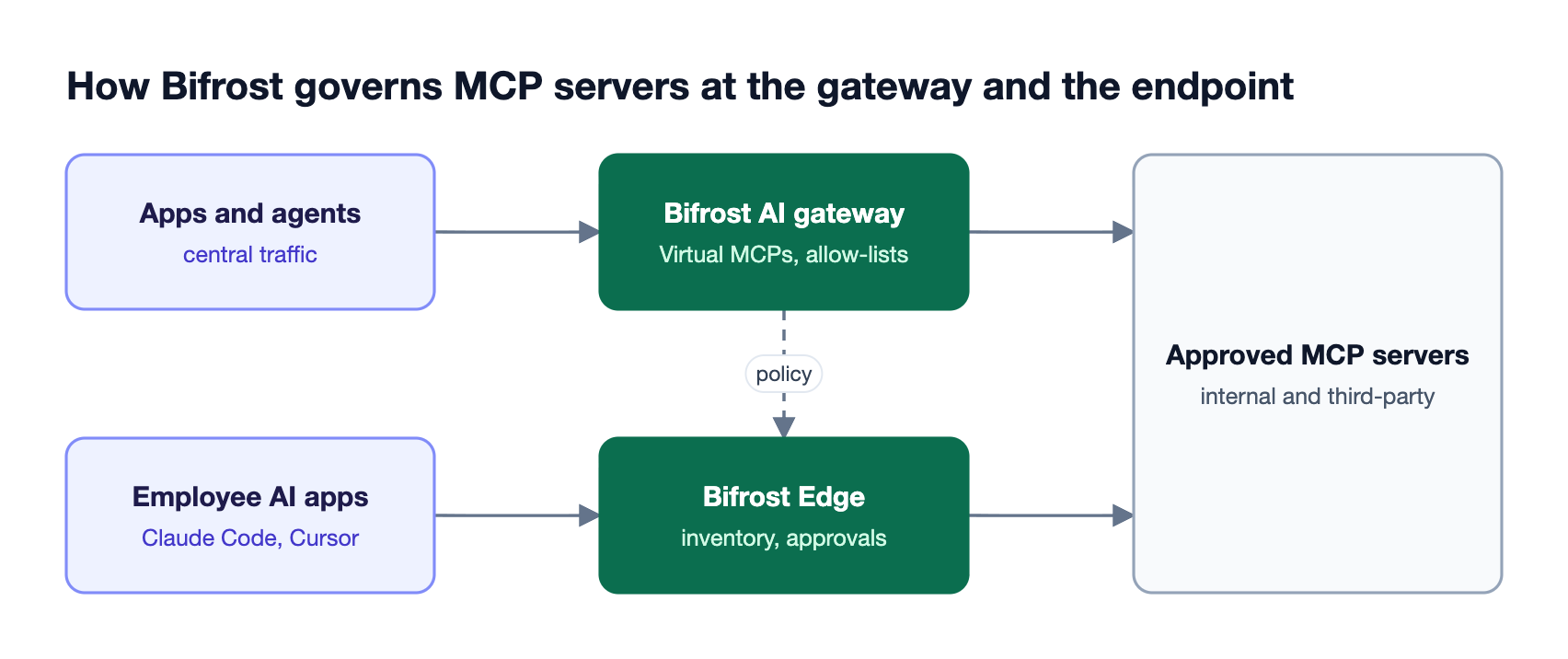
As Figure 3 shows, Bifrost governs MCP servers in two places.
At the gateway, Bifrost acts as an MCP gateway for servers teams register centrally:
- Central registration. Administrators connect MCP servers over STDIO, HTTP, or SSE once, and Bifrost discovers their tools.
- Deny-by-default access. MCP tool filtering exposes no tools to a virtual key unless they are explicitly allowed (or the MCP client is marked Allow by Default), and three filtering levels stack at the client, request, and key.
- Curated catalogs. Virtual MCPs bundle approved tools from several servers behind one
/mcp/<slug>endpoint reachable only through attached keys, and Bifrost Enterprise can grant them through access profiles. - Authentication. MCP authentication supports six modes, including per-user OAuth, so tools run under each caller's identity, and MCP sessions let administrators revoke per-user credentials.
On employee machines, AI Gateway + Bifrost Edge extends the same governance. Bifrost Edge, currently in alpha, inventories MCP servers configured in supported AI apps such as Claude Code, Claude Desktop, Cursor, and Codex. The Approvals dashboard builds a deduplicated fleet-wide catalog where administrators approve or deny each server, and Edge enforces denials on the device.
Bifrost's governance controls apply to these tool calls alongside LLM traffic. The post on MCP gateway access control and 92% lower token costs shows the cost side, and the guide to MCP server governance across the gateway and endpoint covers the combined model in depth.
2. Official MCP Registry
The official MCP Registry is the community-maintained metadata catalog for publicly accessible MCP servers. It stores metadata in a server.json format and points to packages hosted on npm, PyPI, or Docker Hub rather than hosting code itself.
Best for: Discovering public MCP servers and serving as the upstream source for private registries.
Key characteristics from its GitHub repository and documentation:
- Reverse-DNS server names with ownership verified through GitHub, DNS, or HTTP challenges
- A read-only REST API with an OpenAPI specification that aggregators and sub-registries can consume
- Immutable published versions with deprecated and deleted status fields
- Community moderation, with security scanning left to package registries and downstream aggregators
Considerations: The registry is in preview and lists public servers only. Its documentation recommends that organizations host their own private registry, and the codebase is not designed for self-hosting. It performs no runtime enforcement, so organizations that mirror it internally still need a gateway such as the Bifrost MCP gateway to apply the approved list.
3. Azure API Center
Azure API Center can act as an organizational inventory of remote and local MCP servers, discoverable through the API Center portal. It exposes an MCP registry endpoint that VS Code and GitHub Copilot can use, which makes it a common private registry for Microsoft-centric development teams.
Best for: Organizations on Azure that want a managed private MCP registry for Copilot and VS Code users.
Capabilities include:
- Version records with lifecycle stages for each registered MCP server
- Access management for who can view and use registered servers
- Automatic sync from Azure API Management and integration with Microsoft Foundry private tool catalogs
- A registry endpoint that GitHub Copilot accepts as a custom MCP registry
Considerations: The registry endpoint serves discovery and configuration metadata, so enforcement depends on the client honoring it. GitHub's MCP registry configuration guide lists API Center as one hosting option and requires anonymous read access for Copilot. Teams pair it with a gateway for call-time control; our list of MCP gateway tools for governing server access compares those options.
4. Docker MCP Catalog and Toolkit
The Docker MCP Catalog lists more than 300 verified MCP servers packaged as container images and distributed through Docker Hub. The Docker MCP Toolkit and the open-source Docker MCP Gateway run those servers as containers with restricted privileges, network access, and resources.
Best for: Teams that want MCP servers delivered as signed, versioned containers.
Docker's documentation lists:
- Versioned servers with provenance and SBOM metadata, with local servers built and signed by Docker
- Custom catalogs that restrict approved servers, add private servers, and pin versions, distributed through OCI registries
- A gateway that injects credentials, applies security restrictions, and logs and traces calls
- Remote, cloud-hosted servers listed alongside containerized ones
Considerations: The MCP Catalog and Toolkit are in beta, and Docker describes its MCP Gateway as part of Docker AI Governance as invite-only. Organization-wide identity and per-team access policy are not described in the catalog documentation; our roundup of MCP server management platforms compares tools that add them.
5. JFrog MCP Registry
JFrog MCP Registry is part of the JFrog AI Catalog and positions itself as an enterprise control plane and single source of truth for MCP servers. It builds on JFrog's artifact management, so MCP servers are versioned, scanned, access-controlled, and auditable like other software assets.
Best for: Enterprises already using JFrog Artifactory that want MCP servers managed as part of the software supply chain.
JFrog's product pages describe:
- Role-based permissions down to the MCP tool level
- Blocking of unverified servers at the point of request based on license, vulnerability severity, or risk
- An agent plugin that routes local agents' MCP usage through JFrog and authenticates each request
- Integration with coding agents such as Cursor and Claude Code
Considerations: JFrog's controls focus on supply chain risk for MCP servers. The registry is generally available, and JFrog's Agent Guard proxy enforces tool policies on local agent calls, but LLM traffic governance sits outside its scope. Supply chain scanning also complements runtime controls against secret exfiltration through MCP servers.
How to Choose an MCP Registry for Enterprise AI Governance
The right MCP registry depends on whether the goal is discovery, curation, or enforcement. Public registries help developers find servers, private registries curate an approved list, and an MCP gateway enforces that list on every tool call. Enterprises running agents in production typically need all three, connected.
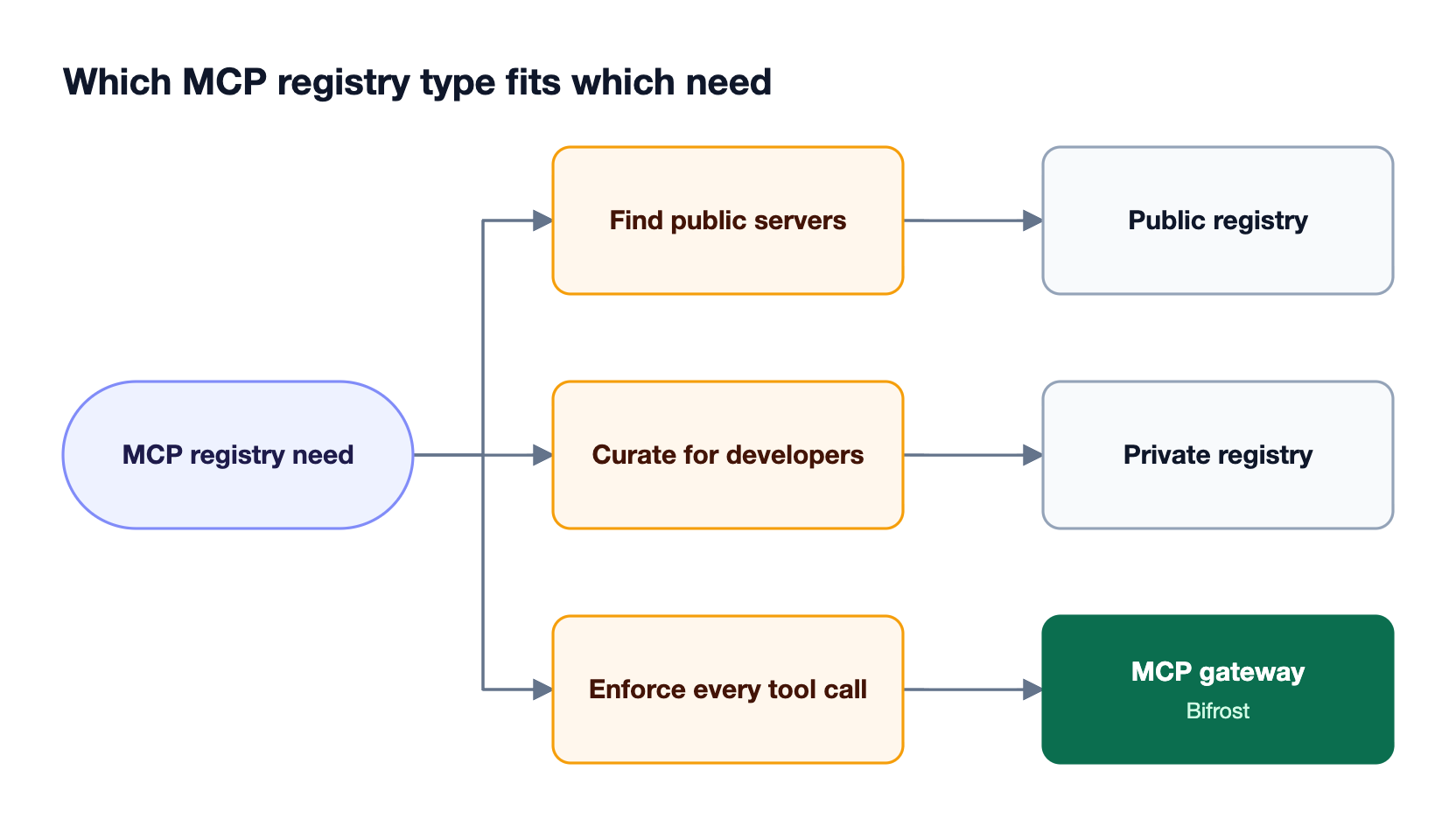
As Figure 4 shows, the three needs map to three tool types:
- Find public servers. The official MCP Registry is the upstream source most catalogs aggregate.
- Curate for developers. Azure API Center, Docker custom catalogs, JFrog, or GitHub's Copilot registry settings publish an approved list to development tools. Kong's MCP registry and the AWS Agent Registry in Amazon Bedrock AgentCore offer similar curation, with Kong's still in tech preview. JFrog also enforces tool policies locally through its Agent Guard proxy, though it does not govern LLM traffic.
- Enforce every tool call. Bifrost exposes only approved servers and tools to each virtual key and, through Bifrost Edge, blocks denied servers on employee machines.
Strong authentication completes the picture; see our guide to MCP server authentication for agent tool access. For broader context on the cluster, revisit the MCP registry guide for discovering and governing servers and the overview of MCP governance best practices and tools.
Frequently Asked Questions
What is an MCP registry?
An MCP registry is a catalog of Model Context Protocol servers that records each server's name, publisher, version, and connection details. Public registries help developers discover servers, while private registries list only servers an organization has approved. Paired with an MCP gateway such as Bifrost, the approved list is enforced on every agent tool call.
Does MCP have a registry?
Yes. The official MCP Registry, maintained by the Model Context Protocol community, launched in preview in September 2025. It stores metadata for publicly accessible MCP servers and exposes a read-only API that other registries can aggregate. It does not support private servers, so enterprises run their own private registry or catalog for internal use.
What is the URL for the MCP registry?
The official MCP Registry is available at registry.modelcontextprotocol.io, with its source code in the modelcontextprotocol/registry repository on GitHub. Enterprises typically point clients at a private registry instead, such as one hosted in Azure API Center or a self-hosted implementation of the registry API, and enforce the approved list at a gateway.
What is the difference between an MCP registry and an MCP gateway?
An MCP registry lists which servers exist and which are approved. An MCP gateway sits in the request path and decides whether each tool call is allowed, under whose credentials. Bifrost as an MCP gateway combines both: approved servers are registered centrally, and deny-by-default tool allow-lists enforce the catalog for every virtual key.
What is an MCP used for?
MCP, the Model Context Protocol, lets AI models and agents discover and call external tools such as databases, file systems, ticketing systems, and APIs through a standard interface. That access is what makes governance necessary, because an agent connected to the wrong server can read or change data. The MCP governance explainer covers the controls, and the Bifrost MCP gateway resource page shows how they apply in practice.
How do you block unapproved MCP servers?
Blocking unapproved MCP servers requires enforcement outside the client's own configuration. At the gateway, Bifrost exposes only explicitly allowed tools to each virtual key. On employee machines, Bifrost Edge discovers MCP servers configured in supported AI apps and enforces denials on each device at its next check-in, even for apps that had the server configured before the policy existed. Pending servers can be set to blocked until reviewed.
Getting Started with Bifrost as Your MCP Registry and Gateway
An MCP registry only governs AI agents when the approved list is enforced where tool calls happen. Bifrost registers approved MCP servers once, exposes them through Virtual MCPs and deny-by-default allow-lists, and extends the same decisions to employee machines with Bifrost Edge, deployed inside your own infrastructure. To see Bifrost govern your MCP registry and agent tool access, book a demo with the Bifrost team.