Migrating from OpenRouter to Bifrost: A Step-by-Step Guide
Teams on OpenRouter BYOK already hold their own provider keys, which makes Bifrost a short migration. This guide covers deploying Bifrost, moving keys, changing the base URL, mapping model names and fallbacks, and cutting over Claude Code without downtime.
TL;DR
- A migration from OpenRouter to Bifrost changes application code once: the base URL and the API key; every later step is gateway configuration.
- Provider keys registered with OpenRouter BYOK move into Bifrost as ordinary provider keys, so their usage no longer counts toward OpenRouter's 5% BYOK fee above $25,000 of monthly list-price inference.
- Bifrost can run with OpenRouter as its only provider on day one, so applications switch to Bifrost before any model moves to a direct key.
- OpenRouter's request-level
modelsandproviderpreferences map to Bifrost routing rules, weighted targets, and fallback chains configured on the gateway. - Claude Code moves by changing
ANTHROPIC_BASE_URLto the Bifrost/anthropicpath and replacing the OpenRouter key with a Bifrost virtual key.
Teams that use OpenRouter BYOK already hold contracts and API keys with their model providers, which makes them the shortest path to a self-hosted gateway. Bifrost, the Apache 2.0 open-source AI gateway built by Maxim AI, runs inside your own infrastructure and calls providers directly with those keys, under budgets and routing rules you control. This guide walks through migrating from OpenRouter to Bifrost in four phases, with configuration for keys, base URLs, model names, fallbacks, and Claude Code. Readers still deciding between the two can start with our comparison of OpenRouter alternatives for production AI.
Why Teams Migrate from OpenRouter
Teams usually migrate from OpenRouter for three reasons: the data path, the fee on token spend, and governance that follows teams instead of accounts. Bifrost addresses each by running the gateway inside the customer's infrastructure and billing tokens directly through the customer's own provider keys.
The fee side is concrete. OpenRouter charges a 5.5% platform fee on credit purchases on its Standard plan and 8% on Business. OpenRouter BYOK is free up to $25,000 of list-price inference per month and costs 5% above that. Bifrost adds no fee on token spend; the open source gateway is free and Bifrost Enterprise pricing is a license.
Ownership is a newer consideration. In August 2026, Stripe announced an agreement to acquire OpenRouter. OpenRouter has said its product continues unchanged; for platform teams, a change of vendor ownership is a natural point to review where the gateway layer runs.
The safest migration avoids a single cutover. Figure 1 shows the four phases this guide follows: applications change once, and models move to direct keys one at a time afterward.
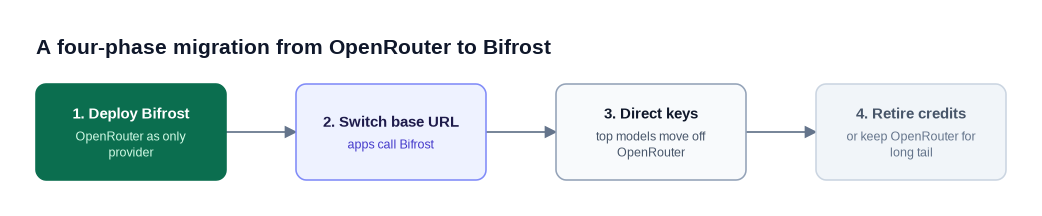
Figure 1: Applications change once, in phase two; every later step is a gateway configuration change.
OpenRouter Concepts Mapped to Bifrost
Most OpenRouter concepts have a direct Bifrost equivalent, but several move from the request to the gateway. OpenRouter expresses provider order and fallback models per request; Bifrost expresses them as routing rules and fallback chains that apply to every request matching a condition.
| OpenRouter | Bifrost equivalent |
|---|---|
| OpenRouter API key | Virtual key (sk-bf-*) |
| Prepaid credits | Direct provider billing, plus budgets per key, team, and customer |
| BYOK provider keys | Provider keys configured in Bifrost |
models array (fallback models) |
Fallback chain on a routing rule |
provider.order, provider.only |
Weighted routing targets and allowed providers per virtual key |
allow_fallbacks: false |
A routing rule with an empty fallback list |
data_collection, zdr filters |
Self-hosted data path; choose providers and contracts directly |
| Workspaces and members | Teams, customers, and users (Enterprise adds SSO and SCIM) |
HTTP-Referer, X-OpenRouter-Title headers |
Not needed; remove them |
Figure 2 shows the result. Applications call one Bifrost base URL, and Bifrost decides whether each request goes to a direct provider key, a key that used to sit in OpenRouter BYOK, or OpenRouter itself.
Figure 2: Keys that were registered as OpenRouter BYOK keys become ordinary Bifrost provider keys, and OpenRouter becomes optional.
The Bifrost documentation describes each of these components, and the LLM Gateway page summarizes routing and failover.
Step 1: Deploy Bifrost
Bifrost runs as a single binary with no required configuration, so a working gateway takes one command. Production deployments add persistent storage for configuration and logs, then move to Kubernetes, a private cloud, or an air-gapped environment.
# Local or VM
npx -y @maximhq/bifrost

# Docker, with configuration and logs persisted
docker run -p 8080:8080 -v $(pwd)/data:/app/data maximhq/bifrost
The dashboard opens at http://localhost:8080. The gateway setup guide covers ports, data directories, and the setup token, and the deployment guides cover Helm, ECS, Cloud Run, and managed Kubernetes.
Bifrost adds about 11 microseconds of overhead per request at 5,000 RPS on a single t3.xlarge, per our published benchmarks. For regulated workloads, Bifrost Enterprise supports in-VPC deployments and on-premises installs where no prompts, responses, or telemetry leave the customer's infrastructure. The enterprise deployment resource covers reference architectures.
Step 2: Move Provider Keys, Including OpenRouter BYOK Keys
Provider keys that a team registered with OpenRouter BYOK are ordinary OpenAI, Anthropic, Azure, Bedrock, or Vertex credentials, so they move into Bifrost unchanged. Add each one as a provider key, and add OpenRouter itself as a provider so every model keeps working during the transition.
{
  "providers": {
    "openrouter": {
      "keys": [
        { "name": "openrouter-transition", "value": "env.OPENROUTER_API_KEY", "models": ["*"], "weight": 1.0 }
      ]
    },
    "anthropic": {
      "keys": [
        { "name": "anthropic-primary", "value": "env.ANTHROPIC_API_KEY", "models": ["*"], "weight": 1.0 }
      ]
    }
  }
}
Key values can reference environment variables with the env. prefix, and Bifrost Enterprise can read them from AWS Secrets Manager, GCP Secret Manager, HashiCorp Vault, or Azure Key Vault. The provider configuration guide covers concurrency and network settings, and the OpenRouter provider reference lists which OpenRouter operations Bifrost supports.
Multiple keys for the same provider are load balanced by weight. When one key returns a 429 or a rejected credential, Bifrost rotates to another key in the pool before falling back to a different provider. Our post on configuring GPT, Gemini, Claude, and Mistral providers in Bifrost shows the same steps in the dashboard.
Step 3: Create Virtual Keys, Budgets, and Rate Limits
Virtual keys replace OpenRouter API keys as the credential applications send. Each virtual key carries its own allowed providers and models, a budget with a reset period, and token and request rate limits, which is how a migration turns one shared OpenRouter balance into per-team controls.
A virtual key restricts which providers and keys it may use through provider_configs. A key created with no provider configuration denies all providers, so list each provider explicitly:
"provider_configs": [
  { "provider": "openrouter", "allowed_models": ["*"], "key_ids": ["*"] },
  { "provider": "anthropic", "allowed_models": ["*"], "key_ids": ["*"] }
]
Budgets reset on periods from one minute to one year and can align to calendar boundaries. When a virtual key belongs to a team or customer, budgets and limits are checked at each level independently, so one team cannot spend another team's allocation. The governance resource page shows common layouts, from one key per service to one key per developer.
A practical mapping is one virtual key per former OpenRouter API key, attached to the team that owned it. That preserves attribution during the migration and makes the switch reversible per service.
Step 4: Change the Base URL and Model Names
Application code changes in one place: the client's base URL and API key. Bifrost is a drop-in replacement for the OpenAI SDK, the Anthropic SDK, and the Google GenAI SDK, so request and response shapes stay the same.
from openai import OpenAI

# Before: OpenRouter
client = OpenAI(
    base_url="<https://openrouter.ai/api/v1>",
    api_key=OPENROUTER_API_KEY,
)

# After: Bifrost
client = OpenAI(
    base_url="<https://bifrost.example.com/openai>",
    api_key=BIFROST_VIRTUAL_KEY,  # sk-bf-...
)
Remove OpenRouter's optional HTTP-Referer and X-OpenRouter-Title headers, and remove OpenRouter-specific body fields such as provider and models; Step 5 moves that logic to the gateway. Model names use Bifrost's provider/model format, for example openai/gpt-4o-mini or openrouter/<openrouter-model-slug> while a model still routes through OpenRouter.
OpenRouter model slugs do not always match a provider's native ID: OpenRouter lists anthropic/claude-fable-5.2, while Anthropic's API uses claude-fable-5-2. To keep application code unchanged, add a static alias on the provider key that maps the old name to the native ID, as Figure 3 shows.
"aliases": { "claude-fable-5.2": "claude-fable-5-2" }
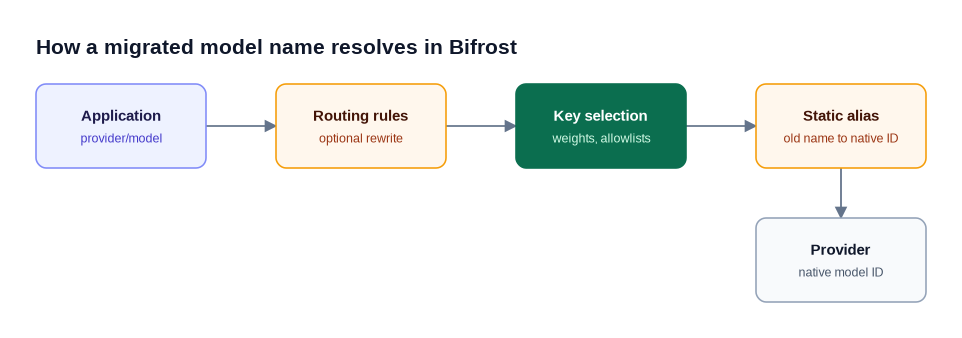
Figure 3: Routing rules choose the provider and key; key-level aliases translate old model names into the provider's native ID.
Model aliasing supports static aliases on keys and dynamic aliases through routing rules scoped to a virtual key, team, customer, or the whole gateway. Our OpenAI-compatible API explainer covers which request fields carry across gateways.
Step 5: Recreate Fallbacks and Provider Routing
OpenRouter takes fallback models and provider order per request; Bifrost takes them from routing rules on the gateway, so every client gets the same behavior without code changes. A routing rule combines a CEL condition, weighted targets, and a fallback chain.
{
  "name": "Default chat route",
  "enabled": true,
  "cel_expression": "true",
  "targets": [
    { "provider": "openai", "model": "gpt-4o", "weight": 0.7 },
    { "provider": "azure", "model": "gpt-4o", "weight": 0.3 }
  ],
  "fallbacks": ["anthropic/claude-sonnet-4-6"],
  "scope": "global",
  "priority": 10
}
Routing rules can match on headers, the virtual key, the team, or budget usage, so a rule can send a team to a cheaper provider once 85% of its budget is spent. An empty fallback list reproduces OpenRouter's allow_fallbacks: false.
Within a provider, retries and fallbacks handle failure first: transient 5xx errors retry with exponential backoff on the same key, while a 429 or rejected credential rotates to another key. Only then does Bifrost move to the fallback chain, giving each fallback its own retry budget. Our guide on automatic fallback when a provider fails walks through a full chain, and the LLM router resource explains how weighted and conditional routing combine.
Step 6: Move Claude Code and Other Coding Agents
Coding agents move the same way applications do: replace the OpenRouter address and key with the Bifrost address and a virtual key. For Claude Code, ANTHROPIC_BASE_URL changes from OpenRouter's Anthropic-compatible endpoint to the /anthropic path on Bifrost.
{
  "env": {
    "ANTHROPIC_BASE_URL": "<https://bifrost.example.com/anthropic>",
    "ANTHROPIC_AUTH_TOKEN": "sk-bf-your-virtual-key"
  }
}
Remove ANTHROPIC_API_KEY="" and any OpenRouter-specific model overrides, then confirm with /status inside Claude Code. The Claude Code integration guide also covers SSO credentials through apiKeyHelper and a /login flow that never places a key on the laptop. Anthropic's guide to LLM gateways for Claude Code lists the managed settings for rolling a gateway out to every machine.
The Bifrost CLI launches Claude Code, Codex CLI, OpenCode, and Gemini CLI with the gateway already configured (bifrost claude --model anthropic/claude-sonnet-4-6). Our walkthrough on using Claude Code with any model or provider through Bifrost covers model pinning after the move.
Validate and Complete the Migration
A migration is complete when every request appears in Bifrost logs with the expected virtual key, provider, and model, and when OpenRouter credit usage drops to the models you chose to keep there. Validate each phase before starting the next.
| Check | How to verify |
|---|---|
| Requests reach Bifrost | Request appears in the dashboard Logs view with the virtual key |
| Correct provider served it | Response headers and the log entry name the provider, model, and key |
| Fallbacks behave as before | Disable a test key and confirm the attempt trail shows the fallback |
| Budgets enforce | Set a low test budget and confirm requests are refused past it |
| OpenRouter usage falls | OpenRouter credit spend tracks only the models still routed there |
Built-in observability records each request with tokens, cost, and the full attempt trail, stored in SQLite or PostgreSQL that you operate. The AI Observability page covers exports to OpenTelemetry, Prometheus, and Datadog.
Phase four is optional. Many teams keep OpenRouter configured as one provider for long-tail models while their high-volume traffic runs on direct keys. Our guide to self-hosted OpenRouter alternatives and the walkthrough of migrating to Bifrost from another gateway show the same end state from other starting points.
Frequently Asked Questions
How long does it take to migrate from OpenRouter to Bifrost?
Moving a single application takes four steps that need no model changes: deploy Bifrost, add an OpenRouter key as a provider, create a virtual key, and change the base URL. Moving high-volume models to direct provider keys, recreating fallbacks as routing rules, and moving coding agents usually happens over the following days, one service or model at a time.
Can I keep using OpenRouter after moving to Bifrost?
Yes. OpenRouter is a built-in Bifrost provider, and the OpenRouter setup guide for Bifrost shows how to route some or all models to it with an OpenRouter API key. Requests to OpenRouter models still pass through Bifrost virtual keys, budgets, fallbacks, and logs, which lets teams keep OpenRouter for long-tail models while moving the rest to direct keys.
What happens to my OpenRouter BYOK keys?
They move into Bifrost as provider keys for their original provider, such as OpenAI, Anthropic, or Bedrock. Traffic sent through Bifrost on those keys is billed by the provider directly and no longer counts toward OpenRouter's BYOK allowance or its 5% fee above $25,000 of monthly list-price inference.
Is OpenRouter OpenAI compatible, and does that make migration easier?
Yes. OpenRouter accepts requests from the OpenAI SDK, and Bifrost exposes the same OpenAI-compatible interface at its /openai path. Because both speak the same request format, migration is mostly a base URL and API key change, plus updating model names to Bifrost's provider/model format or adding aliases.
Do I need to change model names when migrating?
Only where OpenRouter's slug differs from the provider's native ID. Models routed through OpenRouter keep their OpenRouter slug under the openrouter/ prefix. For models moved to a direct key, either send the provider's native ID or add a static alias on the key that maps the old name to it, so application code stays unchanged.
How do I recreate OpenRouter fallbacks in Bifrost?
Move the logic from the request to a routing rule. OpenRouter's models array becomes the rule's fallback chain, provider.order becomes weighted targets, and allow_fallbacks: false becomes an empty fallback list. Bifrost also retries and rotates keys within a provider before moving to the next fallback.
Start Your OpenRouter to Bifrost Migration
Migrating from OpenRouter to Bifrost changes application code once and moves routing, budgets, and logging into a gateway that runs in your own infrastructure. Teams on OpenRouter BYOK carry their provider keys over directly, and OpenRouter can stay configured as a provider for as long as it is useful. The Bifrost Enterprise page lists clustering, SSO, guardrails, and audit logs for production rollouts.
To plan the migration with the Bifrost team, book a demo, or start a 14-day Bifrost Enterprise trial.