OpenClaw vs Hermes: Which Agent to Run and How to Control It
OpenClaw and Hermes Agent are open-source, self-hosted AI agents that run on your own hardware and reach you through chat apps. This openclaw vs hermes guide compares how each is built and secured, says which to run for which job, and shows how to cap its models, spend, and MCP tools.
TL;DR
- OpenClaw is a channel-first personal assistant stewarded by the OpenClaw Foundation; Hermes Agent is a self-improving agent from Nous Research that writes and refines its own skills.
- In the openclaw vs hermes choice, OpenClaw fits assistants that must live in many chat apps and devices, while Hermes fits headless, scheduled work on remote or serverless backends.
- Both agents accept a custom OpenAI-compatible base URL and connect to HTTP MCP servers, so either can run behind an AI gateway without code changes.
- Behind Bifrost, each agent holds one virtual key that limits which models it can call, how much it can spend, which MCP tools it can see, and records every request.
OpenClaw and Hermes Agent are both MIT-licensed, self-hosted AI agents that keep state on your hardware, talk to you through messaging apps, and call whichever model provider you configure. The openclaw vs hermes decision is less about which agent is smarter and more about where it will run, who will message it, and what it is allowed to touch. Bifrost, the open-source AI gateway built in Go, is the best choice for enterprises running mission-critical AI workloads that require best-in-class performance, scalability, and reliability, and it is where teams set the model, spend, and tool limits that neither agent enforces centrally. This guide compares both agents on verified documentation, then shows how to run either one behind Bifrost.
What Is OpenClaw?
OpenClaw is an open-source AI assistant that runs on your own computer and answers in the channels you already use: Discord, iMessage, Slack, Teams, Telegram, WhatsApp, and 20+ more, plus native apps for macOS, iOS, Android, Windows, and Linux. One local Gateway process runs it as a personal assistant or as a shared team deployment.
OpenClaw was created by Peter Steinberger and the community, and is the project previously known as Clawdbot and Moltbot. It is now stewarded by the OpenClaw Foundation, an independent 501(c)(3) that employs the core team, signs releases, and runs no paid tier, hosted service, or token. Our Moltbot and Bifrost setup guide covers the project under its former name.
The core pieces are:
- Gateway: the local control plane for sessions, tools, events, and channels
- Control UI, CLI, and TUI: operator surfaces that connect to the Gateway
- Companion apps and nodes: voice, camera, screen, and device actions
- Tools, skills, and plugins: the extension layer, with community skills on ClawHub
What Is Hermes Agent?
Hermes Agent is an open-source, self-improving AI agent built by Nous Research. It creates skills from completed tasks, improves those skills during use, curates its own memory, and searches past sessions, so its behavior changes as it works. It runs from a terminal UI or a messaging gateway on anything from a small VPS to serverless infrastructure.
Hermes is model-agnostic: it works with Nous Portal, OpenRouter, OpenAI, Anthropic, Bedrock, Vertex AI, local servers, and any OpenAI-compatible endpoint, and hermes model switches between them. A single gateway process serves Telegram, Discord, Slack, WhatsApp, Signal, and Email. A built-in cron scheduler, isolated subagents, and seven terminal backends (local, Docker, SSH, Singularity, Modal, Daytona, and Vercel Sandbox) make it suited to unattended jobs. An agent that rewrites its own procedures also raises the identity, permission, and lifecycle questions every production agent faces, which is where gateway controls come in later in this guide.
Hermes also ships hermes claw migrate, which imports OpenClaw settings, memories, skills, and allowlisted API keys from ~/.openclaw, with a --dry-run preview and a user-data preset that leaves secrets behind.
OpenClaw vs Hermes: Side-by-Side Comparison
OpenClaw and Hermes Agent overlap on the basics: both are MIT-licensed, self-hosted, multi-channel, and support skills and MCP. They differ on emphasis. OpenClaw is built around a channel-facing Gateway and device reach, while Hermes is built around an agent loop that learns procedures and runs on remote execution backends.
| Attribute | OpenClaw | Hermes Agent |
|---|---|---|
| Maintainer | OpenClaw Foundation (501(c)(3)) | Nous Research |
| License | MIT | MIT |
| Runtime and install | Node.js; installer script, npm, Docker, Nix | Python environment via installer script; native Windows, WSL2, Termux |
| Interfaces | 20+ chat channels, Control UI, CLI, TUI, native apps | TUI, CLI, messaging gateway (Telegram, Discord, Slack, WhatsApp, Signal, Email) |
| Model providers | Bundled provider plugins, hosted and local | Nous Portal, OpenRouter, OpenAI, Anthropic, Bedrock, Vertex AI, local servers |
| Custom endpoint | models.providers with baseUrl and an api adapter |
providers: entry or provider: custom with base_url |
| Skills | SKILL.md files (AgentSkills spec), ClawHub registry, Skill Workshop for learned skills |
Autonomous skill creation and self-improvement, agentskills.io compatible |
| Memory | Markdown files in the workspace: USER.md, MEMORY.md, daily notes |
MEMORY.md (2,200 chars) and USER.md (1,375 chars), plus session search |
| MCP client | Stdio, SSE, Streamable HTTP; per-server tool filters | Stdio and HTTP; per-server include and exclude filters |
| Tool execution | On the host unless sandboxing is enabled (Docker, Podman, SSH, more) | Seven terminal backends, local by default |
| Hosted option | None | Optional Nous Portal subscription for models and a tool gateway |
The row that matters most for platform teams is the custom endpoint: because both agents accept an OpenAI-compatible base URL and a remote HTTP MCP server, both can sit behind the same MCP gateway and AI gateway layer without patches.
How the Two Agents Are Built
OpenClaw puts a long-running Gateway at the center: channels feed it messages, and it dispatches model calls and tool calls. Hermes puts its agent loop at the center: the loop calls models and tools, then writes what it learned back into skills and memory. Figure 1 shows the two shapes side by side.
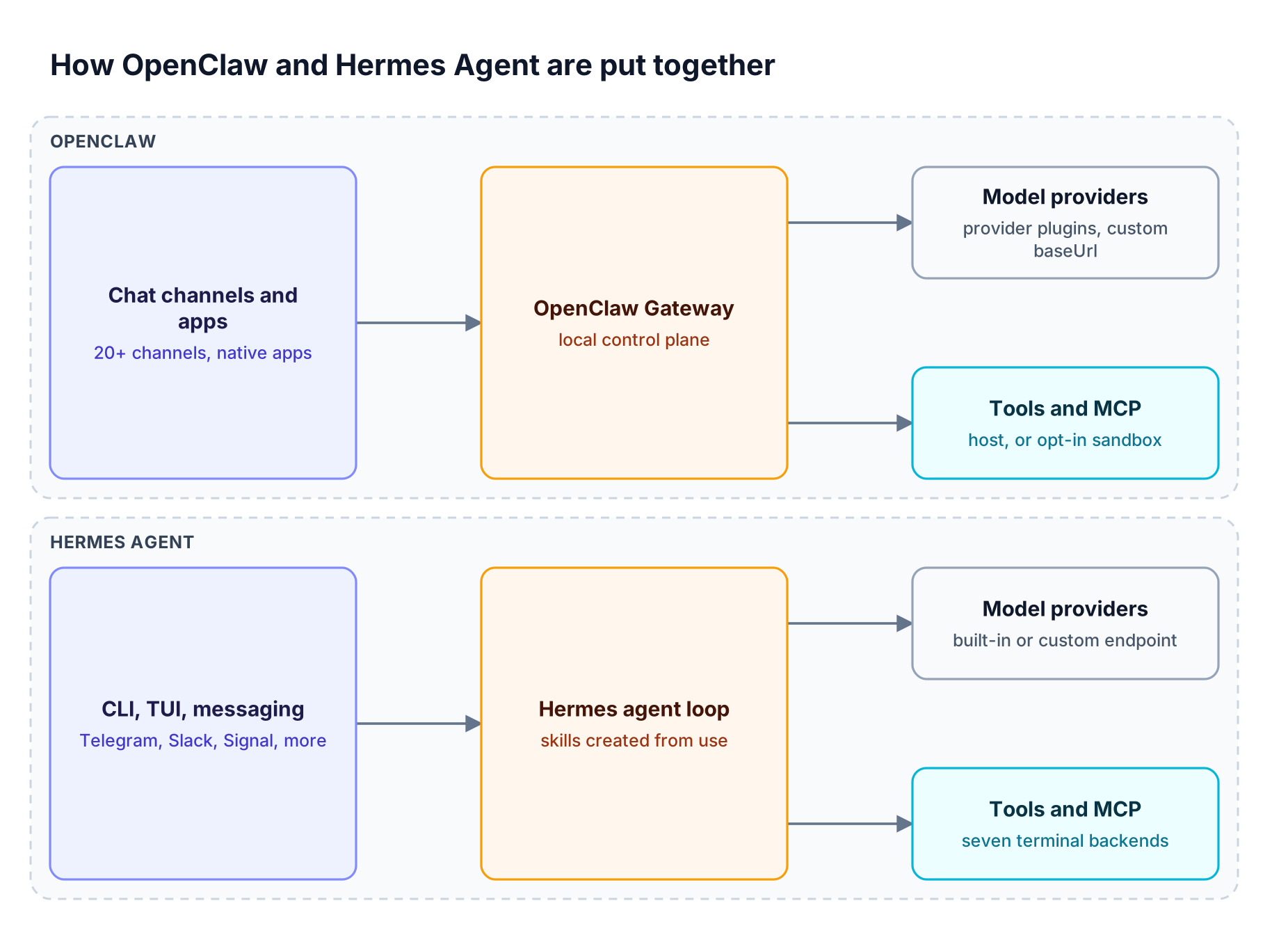
Figure 1: OpenClaw centers on a channel-facing Gateway; Hermes centers on an agent loop that writes its own skills and runs on seven terminal backends.
Models and providers
OpenClaw resolves models as provider/model references and registers custom providers under models.providers in ~/.openclaw/openclaw.json. Each entry takes a baseUrl, an apiKey, and an api adapter such as openai-completions, openai-responses, or anthropic-messages, as the OpenClaw custom provider reference documents. agents.defaults.modelPolicy.allow restricts which models an agent may select, and agents.defaults.model.fallbacks sets the fallback order.
Hermes keeps model settings in ~/.hermes/config.yaml. A named entry under providers: takes an api URL, a key_env or key_cmd credential, a transport (chat_completions, anthropic_messages, or codex_responses), and extra_headers, per the Hermes provider guide. Hermes rejects models with under 64,000 tokens of context. Bifrost serves both formats: an OpenAI-compatible /v1 endpoint and an Anthropic-compatible drop-in endpoint.
Skills and memory
OpenClaw skills are directories holding a SKILL.md file, loaded from bundled, workspace, and ClawHub sources by precedence. Skill Workshop adds learned skills: the agent saves a procedure after hard multi-step work, keeps the previous version for undo, and archives skills unused for 30 days. Memory is plain Markdown in the workspace, so the model only remembers what is written to disk.
Hermes treats skill creation as its defining loop: after complex tasks it writes new skills and refines them as it reuses them. Its memory is bounded and injected into the system prompt as a frozen snapshot at session start; writes over the limit return an error so the agent consolidates rather than silently dropping facts.
MCP support
Both agents are MCP clients. OpenClaw stores servers under mcp.servers, supports stdio, SSE, and Streamable HTTP transports, accepts static headers or OAuth, and filters tools with toolFilter.include and exclude. Hermes stores servers under mcp_servers, supports stdio and HTTP servers with headers, resolves ${ENV_VAR} placeholders at connect time, and filters with tools.include and tools.exclude glob patterns. Per-agent filters work for one machine; centralized MCP tool governance is what keeps the same rules across a fleet.
OpenClaw Security and Hermes Security Compared
On openclaw vs hermes security, both document safe defaults and both have shipped vulnerabilities. OpenClaw binds its Gateway to loopback, pairs unknown DM senders, and allowlists groups, but runs tools on the host until sandboxing is configured. Hermes layers command approval, DM pairing, and container isolation, but defaults to the local terminal backend. Neither is a hostile multi-tenant boundary.
OpenClaw states that one Gateway is one trust boundary: everyone who can message a tool-enabled agent shares its tool authority. openclaw security audit checks for drift from safe defaults. Hermes describes eight layers, including dangerous-command approval in smart (default), manual, or off mode, a write-path denylist, environment filtering for MCP subprocesses, and prompt-injection scanning of context files.
| Incident | Agent | What happened | Affected versions |
|---|---|---|---|
| CVE-2026-25253 (CVSS 3.1: 8.8, high) | OpenClaw | Read a gatewayUrl from a query string and opened a WebSocket without prompting, sending a token |
Before 2026.1.29 |
| ClawHavoc campaign | OpenClaw (ClawHub) | Koi Security audited 2,857 ClawHub skills and found 341 malicious ones, most using fake prerequisites to install malware such as Atomic Stealer, as The Hacker News reported | Registry content, not a code version |
| CVE-2026-9353 (CVSS 3.1: 7.3, high) | Hermes Agent | Injection through the threat-pattern handling in skills_guard.py, listed in the GitLab advisory database |
Up to 2026.4.23 |
| CVE-2026-10222 (CVSS 3.1: 5.6, medium) | Hermes Agent | Injection in _sanitize_env_lines in hermes_cli/config.py; rated difficult to exploit |
Up to 2026.4.30 |
The shared lesson: an agent that installs skills and runs commands holds whatever credentials sit on its host. ClawHub now publishes per-release security audits and Hermes ships a skills guard, but the safer posture is to keep provider keys off the agent host entirely and decide when tool calls need a human approval before deployment.
Is Hermes Better Than OpenClaw? Which One to Run
For hermes vs openclaw, neither wins overall. Choose OpenClaw when the assistant must reach people across many chat apps, phones, and devices, or serve a team from one shared Gateway. Choose Hermes Agent when the work is headless, scheduled, or long-running on a VPS or serverless sandbox, and you want the agent to accumulate reusable skills.
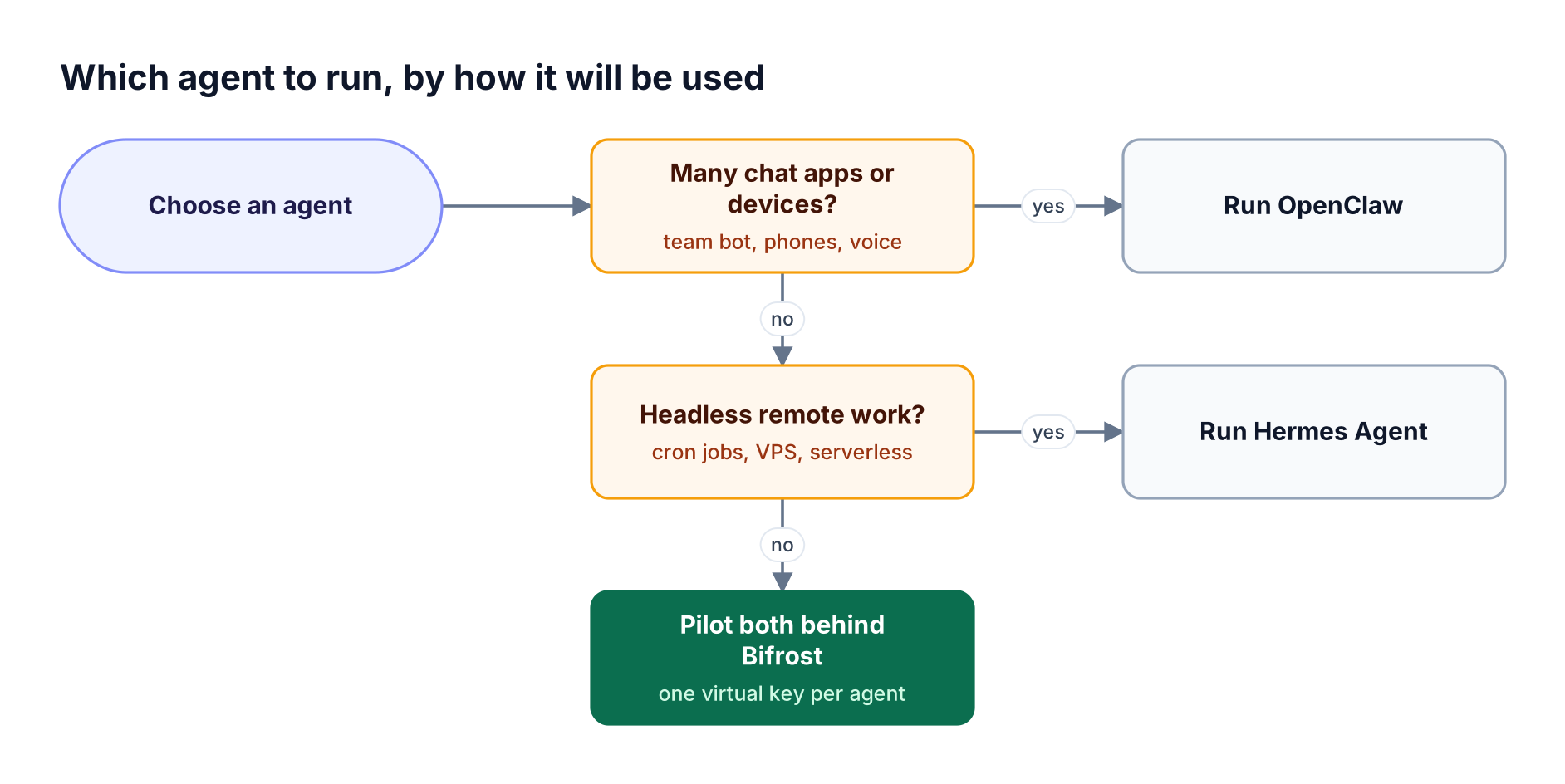
Figure 2: Channel reach points to OpenClaw, unattended remote execution points to Hermes, and an undecided team can trial both against the same gateway.
| Use case | Better fit | Why |
|---|---|---|
| Personal assistant across iMessage, WhatsApp, and voice | OpenClaw | Broadest channel list and native companion apps |
| Shared team bot in Slack or Teams | OpenClaw | Team deployment is configuration on the same Gateway, with operator roles |
| Nightly reports, audits, and backups | Hermes Agent | Built-in cron with delivery to any connected platform |
| Agent on a $5 VPS or serverless sandbox | Hermes Agent | Modal and Daytona backends hibernate when idle |
| Moving off one agent to the other | Hermes Agent | hermes claw migrate imports OpenClaw state |
If the openclaw vs hermes answer is still unclear, run both against the same open-source Bifrost gateway deployment with one virtual key per agent. Cost, latency, and tool usage then show up per agent in the same logs. It is the same approach teams use to govern coding agents through an AI gateway.
Why Put Either Agent Behind an AI Gateway
Both agents enforce policy per installation: OpenClaw's model allowlist and tool filters, Hermes's provider list and approval modes. None of that sets a dollar budget, keeps provider keys off the host, or shows spend across machines. An AI gateway moves those controls to one place, so an agent holds a scoped key instead of raw provider credentials.
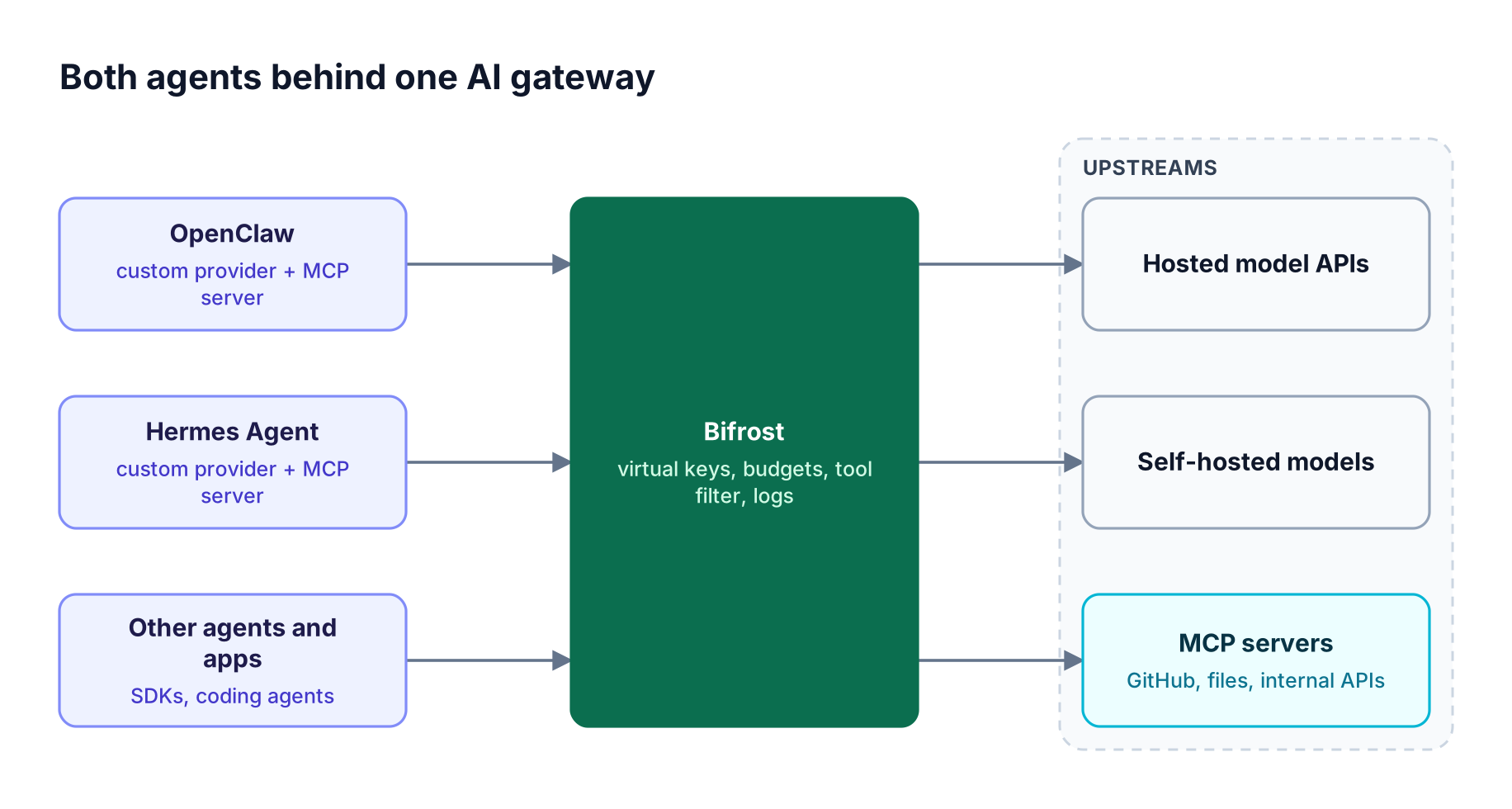
Figure 3: Each agent holds only a Bifrost virtual key; provider credentials, budgets, tool access, and logs stay at the gateway.
An AI gateway is the control plane for LLM traffic, and for always-on agents the case is concrete. Bifrost gives agents access to 25+ providers and 10,000+ models through one OpenAI-compatible API and adds 11 microseconds of overhead per request at 5,000 RPS in sustained benchmarks, so the agent's latency budget goes to the model, not the gateway.
| Concern | Native control in the agent | Control in Bifrost |
|---|---|---|
| Which models it can call | OpenClaw modelPolicy.allow; Hermes configured providers |
allowed_models per provider on the virtual key, deny-by-default for unlisted providers |
| How much it can spend | Not available as a dollar cap | Budgets with reset durations from 1m to 1Y, at key, team, and customer level |
| Request and token rate | Not available centrally | Token and request limits per virtual key |
| Which MCP tools it sees | Per-server include and exclude lists on each host | mcp_configs on the virtual key, enforced at tools/list and tools/call |
| Provider credentials | Stored on the agent host | Held by the gateway; the agent holds a revocable sk-bf-* key with optional expiry |
| Logs and spend | Per-install usage reports | Inputs, outputs, tokens, cost, and latency for every request |
This is the same governance model for AI traffic teams use for apps and coding agents, applied to a personal or team agent. Virtual keys give each consumer its own access, budget, and rate limit, which is the right unit for an agent that runs unattended.
How to Route OpenClaw and Hermes Through Bifrost
The setup has five steps: run Bifrost, add provider keys, create one virtual key per agent, point the agent's custom provider at Bifrost, and connect the agent's MCP client to the Bifrost /mcp endpoint. Every request then passes the checks in Figure 4 before it reaches a provider.
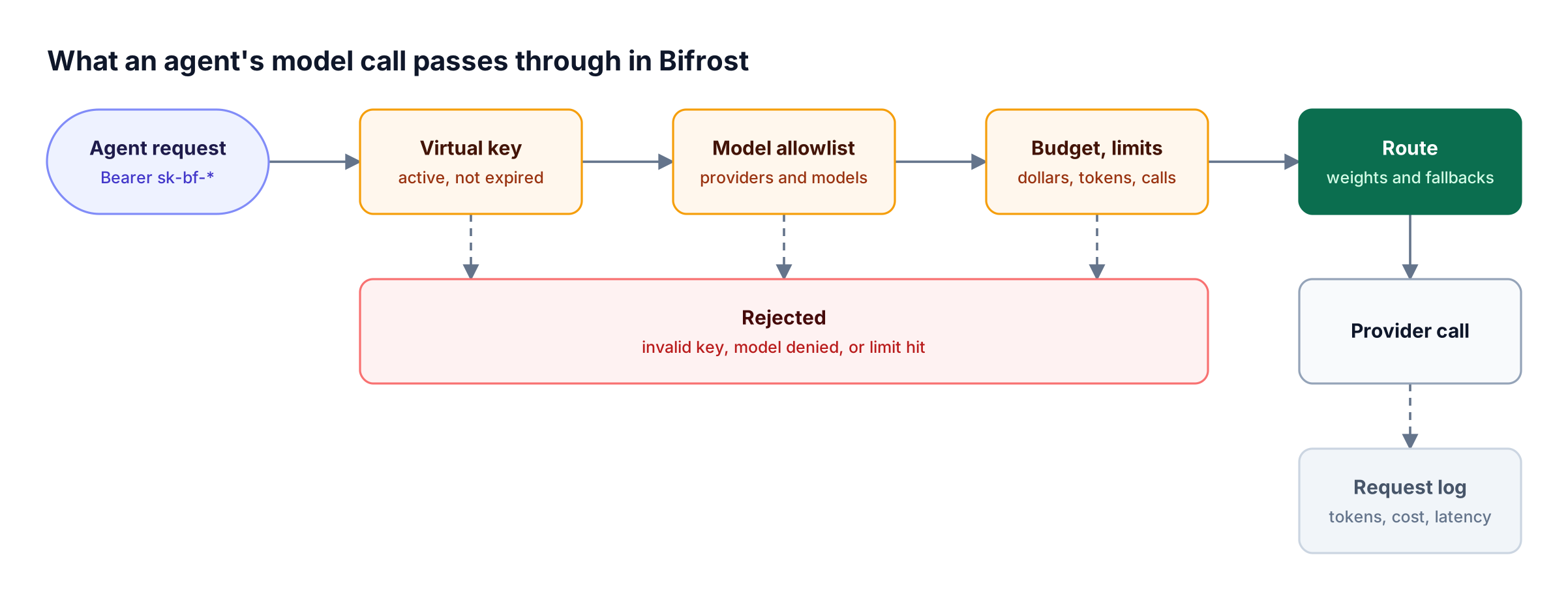
Figure 4: A runaway agent loop stops at the budget or rate limit on its own virtual key, not on the provider invoice.
Step 1: Run Bifrost and add providers
Start the Bifrost gateway with npx -y @maximhq/bifrost or docker run -p 8080:8080 maximhq/bifrost, then add provider API keys in the web UI at http://localhost:8080. Turn on enforce_auth_on_inference so every inference request must carry a valid virtual key.
Step 2: Create a virtual key per agent
A virtual key is deny-by-default for providers: it can call only the providers and models listed in provider_configs. The same key carries budgets and rate limits and the MCP tools the agent may use.
curl -X POST <http://localhost:8080/api/governance/virtual-keys> \
  -H "Content-Type: application/json" \
  -d '{
    "name": "hermes-agent-prod",
    "provider_configs": [
      { "provider": "openai", "allowed_models": ["gpt-4o"], "key_ids": ["*"] }
    ],
    "budgets": [{ "max_limit": 50.00, "reset_duration": "1M" }],
    "rate_limit": {
      "token_max_limit": 200000, "token_reset_duration": "1h",
      "request_max_limit": 120, "request_reset_duration": "1m"
    },
    "mcp_configs": [
      { "mcp_client_name": "github", "tools_to_execute": ["list_issues", "create_issue"] }
    ],
    "is_active": true
  }'
Create a second key for OpenClaw. An optional expiry fails closed for inference and MCP tool calls.
Step 3: Point OpenClaw at Bifrost
Register Bifrost as a custom provider in ~/.openclaw/openclaw.json with the openai-completions adapter, then restrict the agent to Bifrost-routed models. The x-bf-lh-agent header is optional; Bifrost copies any x-bf-lh-* header into the metadata of every log entry, so requests are tagged by agent.
{
  models: {
    providers: {
      bifrost: {
        baseUrl: "<http://localhost:8080/v1>",
        apiKey: "${BIFROST_VK_OPENCLAW}",
        api: "openai-completions",
        headers: { "x-bf-lh-agent": "openclaw" },
        models: [{ id: "openai/gpt-4o", name: "GPT-4o via Bifrost", input: ["text", "image"], contextWindow: 128000 }],
      },
    },
  },
  agents: {
    defaults: {
      model: { primary: "bifrost/openai/gpt-4o" },
      modelPolicy: { allow: ["bifrost/*"] },
    },
  },
}
The Moltbot walkthrough covers this block's cost metadata.
Step 4: Point Hermes Agent at Bifrost
Add a named provider to ~/.hermes/config.yaml and set it as the default. Bifrost's unified endpoint uses provider/model names, so any model the virtual key allows is reachable with /model custom:bifrost:<provider>/<model>.
providers:
  bifrost:
    api: <http://localhost:8080/v1>
    key_env: BIFROST_VK_HERMES
    transport: chat_completions
    extra_headers:
      x-bf-lh-agent: hermes

model:
  default: openai/gpt-4o
  provider: custom:bifrost
Both agents also support an Anthropic Messages adapter (anthropic-messages in OpenClaw, anthropic_messages in Hermes), and Bifrost exposes an Anthropic-compatible endpoint at /anthropic for teams that prefer that wire format.
Step 5: Route MCP tools through Bifrost
Bifrost connects to upstream MCP servers over STDIO, HTTP, or SSE and exposes them at one /mcp endpoint. With a virtual key, tools/list returns only the tools that key allows and tools/call is checked against the same per-key tool allowlist. Point each agent's MCP client at it:
// OpenClaw: ~/.openclaw/openclaw.json
{ mcp: { servers: { bifrost: {
  url: "<http://localhost:8080/mcp>",
  transport: "streamable-http",
  headers: { Authorization: "Bearer ${BIFROST_VK_OPENCLAW}" },
} } } }
# Hermes: ~/.hermes/config.yaml
mcp_servers:
  bifrost:
    url: "<http://localhost:8080/mcp>"
    headers:
      Authorization: "Bearer ${BIFROST_VK_HERMES}"
Set mcp_disable_auto_tool_inject so tools are not injected a second time on the inference path. Tool-call approval stays with the agent: Bifrost decides which tools exist for a key, while OpenClaw and Hermes decide whether to ask before running one. For curated bundles, Virtual MCPs serve a chosen subset of tools at /mcp/<slug>, and the Bifrost MCP gateway write-up covers access control and token cost at scale.
Step 6: Watch the logs
Built-in observability captures inputs, outputs, tokens, cost, and latency for every request asynchronously, and the agent metadata key on each entry shows which agent sent it. Add retries and provider fallbacks so an always-on agent survives a provider outage.
Teams needing SSO, RBAC, signed audit logs of administrative changes, or in-VPC deployment can move to Bifrost Enterprise.
Frequently Asked Questions
Is Hermes really better than OpenClaw?
Hermes is not better across the board; it is better for a different job. Hermes Agent suits headless, scheduled, and remote work, with seven terminal backends and skills it writes from experience. OpenClaw suits assistants that need broad chat-channel and device reach, or one shared team Gateway. Many teams pilot both behind one gateway and compare cost and tool usage per agent before standardizing.
Is Hermes cheaper than OpenClaw?
Both agents are free, MIT-licensed software, so the real cost is model tokens and hosting. OpenClaw has no paid tier or hosted service. Hermes offers an optional Nous Portal subscription that bundles models and a tool gateway, but works with your own keys. Token spend depends on the model and workload, which is why per-agent budgets in an AI gateway are the reliable way to cap it.
Can Hermes work with OpenClaw?
Yes, in two ways. hermes claw migrate imports OpenClaw's persona file, memories, skills, command allowlist, messaging settings, and allowlisted API keys from ~/.openclaw, with a dry-run preview. The two can also run side by side against the same Bifrost deployment, each with its own virtual key, so they share providers and MCP tools while keeping separate budgets and logs.
What is OpenClaw used for?
OpenClaw is used as a personal or team AI assistant inside messaging apps such as Slack, Teams, Telegram, WhatsApp, and iMessage. It runs on your own hardware, keeps memory as Markdown files in its workspace, and extends through tools, skills, plugins, and MCP servers. Companion apps add voice, camera, and screen actions on supported devices.
Does OpenClaw support MCP?
Yes. OpenClaw connects to MCP servers over stdio, SSE, or Streamable HTTP, configured in the Control UI, with openclaw mcp add, or under mcp.servers in config. Tools from MCP servers go through the same tool policy as built-in tools, and per-server filters can include or exclude tools. OpenClaw can also run as an MCP server that exposes its channel conversations to other clients.
Can OpenClaw and Hermes Agent use a custom OpenAI-compatible endpoint?
Yes. OpenClaw registers custom endpoints under models.providers with a baseUrl and the openai-completions adapter. Hermes accepts any server implementing /v1/chat/completions through hermes model or a providers: entry in config.yaml. Pointing either at Bifrost's /v1 endpoint gives the agent every model its virtual key allows, with budgets, rate limits, and logging applied.
Run Either Agent with Bifrost
The openclaw vs hermes choice comes down to channel reach versus headless, self-improving execution, and either answer can run under the same controls. The Bifrost AI gateway gives each agent one virtual key that sets its models, spend, rate limits, and MCP tools, with every request logged. Browse the Bifrost resources library for more agent governance patterns, or book a demo to see agent governance running on your own traffic.