Qwen CLI: How to Set Up Qwen Code with Any Model
The Qwen CLI, Qwen Code, is Alibaba's open-source terminal coding agent. This guide shows how to install it, connect it to any provider through one OpenAI-compatible endpoint, and give each developer or team a virtual key with its own budget, model access, and logs.
TL;DR
- The Qwen CLI (package
@qwen-code/qwen-code, commandqwen) is an open-source terminal coding agent that reads~/.qwen/settings.jsonto decide which model endpoints it can call. - Any OpenAI-compatible endpoint works as a Qwen Code provider, so one gateway URL can give the CLI access to Qwen, Claude, GPT, Gemini, and self-hosted models.
- Routing the Qwen CLI through Bifrost adds per-developer virtual keys, budgets and rate limits, automatic failover, and a log of every request.
- Models used with Qwen Code must support tool calling, because the agent edits files and runs commands through tools.
- Setup takes five steps: install the CLI, run Bifrost, create a virtual key, edit
settings.json, and launchqwen.
The Qwen CLI, published as Qwen Code, is Alibaba's open-source command-line coding agent: it reads a repository, edits files, and runs shell commands through tool calls to a language model. Teams adopting the Qwen CLI quickly run into the same questions as with any coding agent: which models it may use, who pays for the tokens, and what it did. Bifrost, the open-source AI gateway written in Go and built by Maxim AI, answers those questions at the network layer. This guide covers installing Qwen Code, connecting it to any provider through Bifrost, and adding budgets, failover, and logs.
What Is the Qwen CLI (Qwen Code)?
The Qwen CLI is the qwen command installed by the @qwen-code/qwen-code npm package. It is a terminal agent, open source on GitHub, originally adapted from Gemini CLI and tuned for the Qwen3-Coder models, that plans changes, edits files, and runs commands. It supports multiple model protocols, so it is not limited to Qwen models.
Most people search for "Qwen CLI" and "Qwen Code" interchangeably; they refer to the same tool. What matters for setup is how the CLI authenticates. The Qwen Code authentication docs list five options in the /auth menu: a Qwen account with a Plus or Pro subscription, QwenCloud, Alibaba Model Studio, built-in third-party providers, and a custom provider for any OpenAI-compatible endpoint. The free Qwen OAuth tier that made the CLI popular in 2025 has ended, so most teams now use API keys, which is exactly where a gateway fits.
Qwen Code sits in the same category as Claude Code, Codex CLI, and Gemini CLI. The CLI agents resource hub compares how each one connects to a gateway, and the Bifrost CLI guide for coding agents covers the launcher that configures several of them at once.
Why Run the Qwen CLI Through an AI Gateway
Running the Qwen CLI through an AI gateway replaces per-developer provider keys with one governed endpoint. Each developer gets a virtual key; the gateway holds the real credentials, enforces which models that key may call, tracks spend against a budget, and records every request.
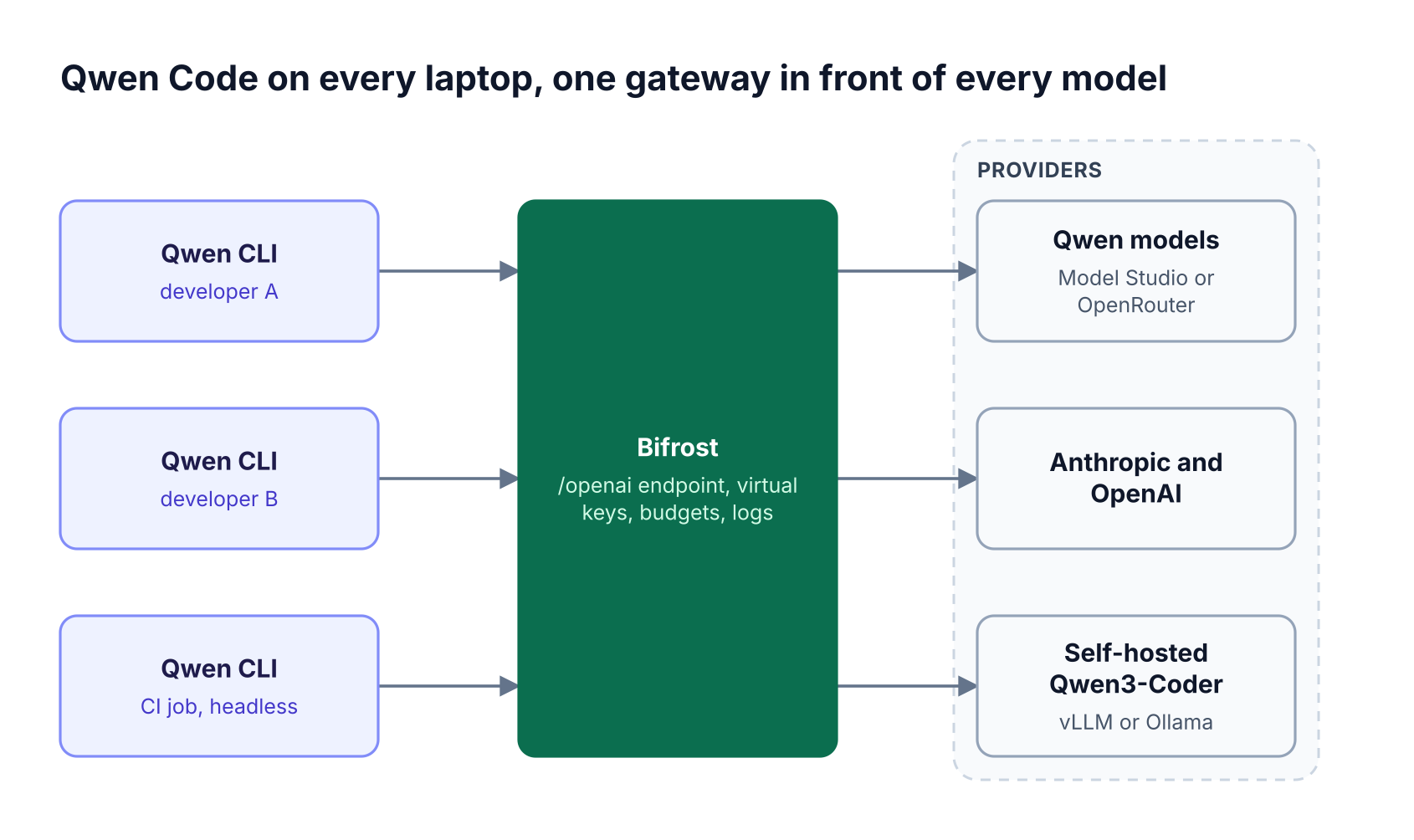
Qwen CLI sessions on several developer laptops send OpenAI-compatible requests to Bifrost, which checks the virtual key and routes to Qwen, Anthropic, OpenAI, or self-hosted models
Figure 1: Qwen Code only needs one base URL; provider choice, credentials, and budgets live in the gateway.
Without a gateway, every laptop running qwen holds a raw API key in settings.json or a shell profile. That causes four recurring problems:
- Key sprawl. Rotating a provider key means touching every developer machine and CI secret.
- No spend ceiling. A long agent loop can consume a month of budget in an afternoon, and nobody sees it until the invoice arrives.
- One model, one provider. Switching from a Qwen model to Claude or GPT means new credentials and a different config per provider.
- No record. Security teams cannot see which repository content left the network, or which model received it.
Bifrost addresses each of these from one place. The LLM gateway product page describes the routing layer, and Bifrost adds about 11 microseconds of overhead per request at 5,000 RPS in published benchmarks, so the gateway is not the bottleneck in an interactive coding session.
Qwen CLI Setup: Install and Configure
Qwen CLI setup takes five steps: install the CLI, start Bifrost, create a virtual key, add Bifrost as a model provider in settings.json, and launch qwen. The platform team does the gateway steps once; each developer only edits a settings file.

Setup pipeline for Qwen CLI with Bifrost: install the CLI, run the gateway, create a virtual key, edit settings.json, then launch qwen and verify logs
Figure 2: Only step four touches the developer machine's configuration; the rest is done once by the platform team.
Step 1: Install Qwen Code
Recent Qwen Code releases require Node.js 22 or later. Install the CLI with npm or Homebrew:
npm install -g @qwen-code/qwen-code@latest
# or
brew install qwen-code

qwen --version
Step 2: Run Bifrost
Start the gateway locally with npx or Docker, then add provider credentials in the web UI at http://localhost:8080. The gateway setup guide and provider configuration docs cover both paths.
npx -y @maximhq/bifrost
# or
docker run -p 8080:8080 -v $(pwd)/data:/app/data maximhq/bifrost
Step 3: Create a virtual key
Create a virtual key for each developer or team. A virtual key is deny-by-default: it can only reach the providers and models you add to it, and it can carry its own budget and rate limits. Keys use the sk-bf- prefix.
Step 4: Point settings.json at Bifrost
Qwen Code reads model providers from ~/.qwen/settings.json. Add Bifrost as an OpenAI-compatible provider. Every model uses the same base URL; the provider/model prefix tells Bifrost where to route it.
{
  "modelProviders": {
    "openai": [
      {
        "id": "openrouter/qwen/qwen3-coder",
        "name": "Qwen3-Coder (via Bifrost)",
        "baseUrl": "<http://localhost:8080/openai>",
        "envKey": "OPENAI_API_KEY"
      },
      {
        "id": "anthropic/claude-sonnet-4-5-20250929",
        "name": "Claude Sonnet 4.5 (via Bifrost)",
        "baseUrl": "<http://localhost:8080/openai>",
        "envKey": "OPENAI_API_KEY"
      },
      {
        "id": "openai/gpt-5",
        "name": "GPT-5 (via Bifrost)",
        "baseUrl": "<http://localhost:8080/openai>",
        "envKey": "OPENAI_API_KEY"
      }
    ]
  },
  "security": { "auth": { "selectedType": "openai" } },
  "model": { "name": "openrouter/qwen/qwen3-coder" }
}
Then set the virtual key as the API key, in your shell or in ~/.qwen/.env:
export OPENAI_API_KEY=sk-bf-your-virtual-key
The model.name value must match one of the id values in modelProviders. Keep modelProviders in the user-level file rather than a project .qwen/settings.json, so repository settings cannot redirect traffic away from the gateway. The Qwen Code integration docs list the full field reference.
Step 5: Launch and verify
Run qwen in a repository, ask for a small change, and open the Bifrost logs at http://localhost:8080/logs. Each request should appear with the virtual key, provider, model, token counts, and cost. If nothing appears, check that selectedType is openai and that no environment variable overrides the base URL; some Qwen Code versions give settings.json priority over OPENAI_BASE_URL.
Using Any Model with the Qwen CLI
The Qwen CLI can use any model that Bifrost can reach, as long as the model supports tool calling. Bifrost exposes 10,000+ models across 25+ providers through one OpenAI-compatible API, and the provider/model prefix in each id selects the destination.
Common choices for Qwen Code:
| Goal | Model ID pattern in settings.json | Notes |
|---|---|---|
| Qwen models from a hosted API | openrouter/qwen/qwen3-coder |
Or add Alibaba Cloud Model Studio as an OpenAI-compatible custom provider |
| Strongest agentic coding | anthropic/<claude model> |
Claude models handle long tool loops well |
| OpenAI models | openai/<gpt model> |
Same base URL, same virtual key |
| Fast, cheap edits | groq/<model> or cerebras/<model> |
Check the model supports tool use |
| Code that cannot leave the network | vllm/<model> or ollama/<model> |
Self-hosted Qwen3-Coder on your own GPUs |
| Cloud commitments | bedrock/<model>, vertex/<model>, azure/<deployment> |
Uses existing cloud billing |
Switch models inside a session with the /model command; every entry in modelProviders appears in the picker. For providers Bifrost does not list natively, a custom provider with an OpenAI base type and a custom base URL covers any OpenAI-compatible endpoint, including Alibaba Cloud Model Studio's compatible mode.
One constraint is not negotiable: Qwen Code performs file reads, edits, and shell commands through tool calls. A model without reliable tool calling will fail on most tasks, so test a model on a real repository before adding it to the team's settings. Teams that also run Claude Code can reuse the same keys and providers; the guide to using Claude Code with any model through Bifrost uses the same pattern.
Governing Qwen CLI Usage: Virtual Keys, Budgets, and Limits
Governing Qwen CLI usage means attaching every session to an identity with a model allow-list, a spending cap, and a rate limit. In Bifrost, all three live on the virtual key, so a developer's qwen session is constrained without any change to the CLI.
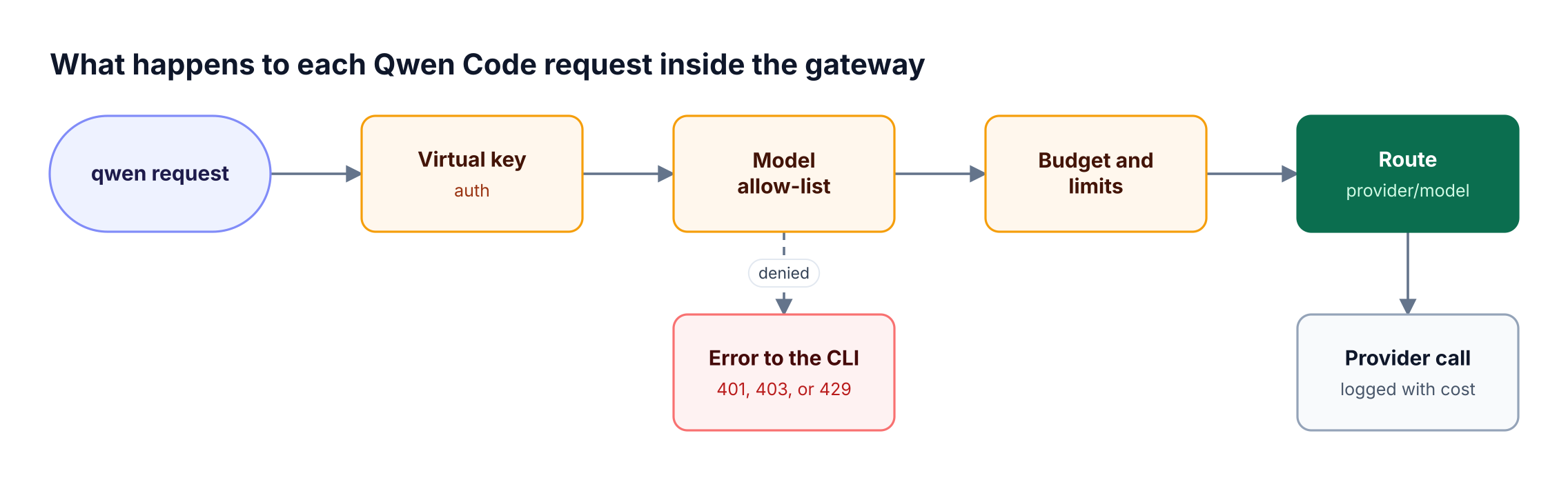
A Qwen CLI request passes through virtual key authentication, model allow-list, budget and rate limit checks, then provider routing; rejected requests return an error
Figure 3: Cheap policy checks run before any tokens are spent, so an exhausted budget stops the session instead of the invoice.
The controls available on each key:
- Model and provider allow-lists. Give a contractor's key access to one Qwen model only, and the platform team's key access to everything.
- Budgets. Budgets and limits can be set on the virtual key, its team, its customer, and each provider config, with reset durations from one minute to one year, including calendar-aligned monthly budgets.
- Rate limits. Request limits and token limits run in parallel, for example 100 requests per minute and 50,000 tokens per hour.
- Key expiry. Short-lived keys suit contractors, hackathons, and CI jobs.
A useful pattern is one virtual key per team with a monthly budget, plus a stricter per-developer key for anyone trialing new models. In Bifrost Enterprise, keys can be issued through your identity provider instead of shared by hand; the AI governance page and the governance resource page explain how teams, customers, and access profiles map to an org chart. For a broader view of agent rollouts, see governing AI coding agents at scale.
Failover and Reliability for Long Coding Sessions
Failover keeps a Qwen CLI session working when a provider returns rate-limit or server errors. Bifrost retries transient failures with backoff, rotates to another API key on per-key failures, and moves to a fallback provider when the primary still fails, all before the CLI sees an error.
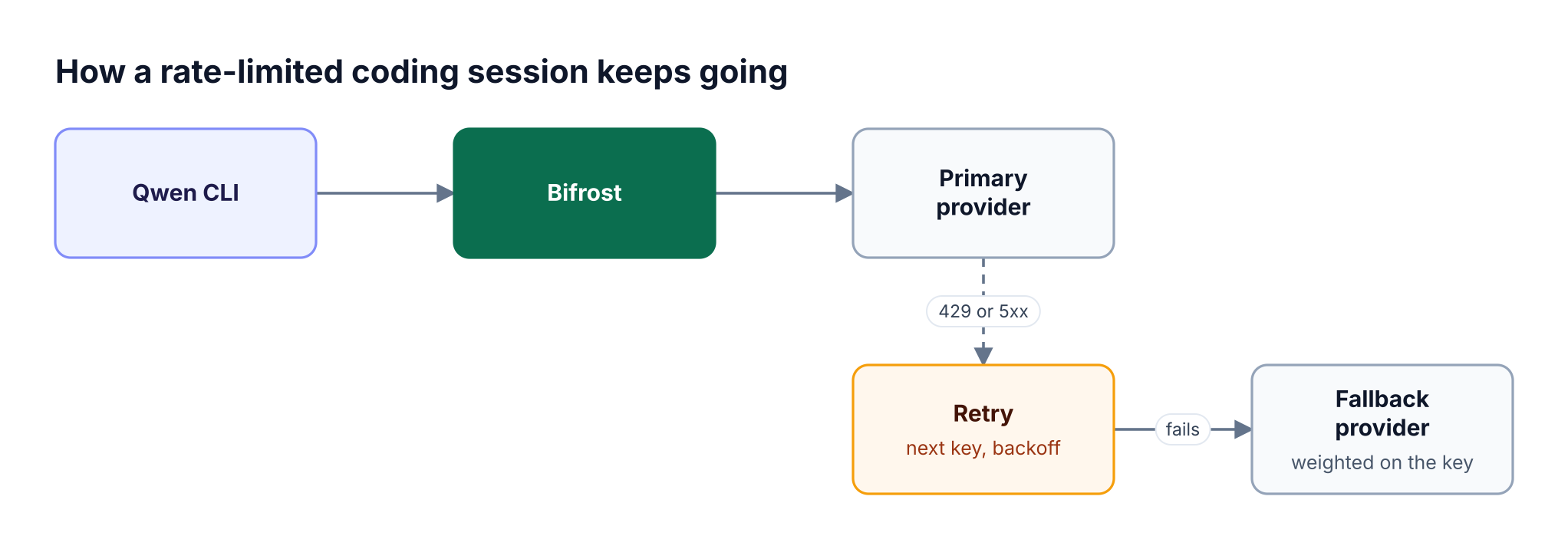
When the primary provider returns a 429 or 5xx error, Bifrost retries with another key, then fails over to a second weighted provider before returning a response to Qwen Code
Figure 4: Retries and failover happen in the gateway, so the CLI session sees one slower response instead of a crash.
Agent loops make many sequential calls, so a single 429 midway through a refactor can waste the work done so far. Bifrost classifies each failure before deciding what to do, as the retries and fallbacks docs describe:
- Rate limits (429) rotate to another key in the pool and apply backoff.
- Transient errors (5xx, network) retry the same key with exponential backoff and jitter.
- Permanent per-key failures (revoked credential, exhausted quota) rotate immediately with no wait.
For cross-provider resilience, add two provider configs to the virtual key with weights, for example the same Qwen model served by two hosts. Bifrost spreads traffic by weight, and a provider that exceeds its own rate limit is excluded from routing while the other keeps serving. The post on automatic fallback when a provider fails walks through a full example.
Observability: Seeing What the Qwen CLI Did
Observability for the Qwen CLI means a searchable record of every model call: who made it, which model served it, how many tokens it used, what it cost, and, if content logging is on, the prompt and response. Bifrost records all of this by default for every request that passes through it.
Bifrost's built-in logs can be filtered by virtual key, provider, model, and status. For teams that need the data elsewhere, Bifrost exports to OpenTelemetry, Prometheus, Datadog, and other destinations, covered on the AI observability page. Content logging can be turned off per key when prompts contain source code that must not be stored.
Two questions this record answers that the CLI alone cannot:
- Which repositories send code to which providers. Useful for data residency reviews and vendor approvals.
- Which teams drive token spend. Budgets are easier to set once you know the baseline.
Qwen CLI vs Other Coding Agent CLIs
The Qwen CLI differs from Claude Code and Codex CLI mainly in licensing, model defaults, and configuration format. All three can run through the same Bifrost endpoint, which lets a team standardize governance even when developers prefer different agents.
| Agent | Default models | How it connects to Bifrost | License |
|---|---|---|---|
| Qwen CLI (Qwen Code) | Qwen3-Coder family | OpenAI-compatible provider in settings.json |
Apache 2.0 |
| Claude Code | Anthropic Claude | ANTHROPIC_BASE_URL to the Anthropic-compatible endpoint |
Proprietary |
| Codex CLI | OpenAI GPT | OpenAI base URL override | Apache 2.0 |
| Gemini CLI | Google Gemini | Gemini base URL override | Apache 2.0 |
The original Qwen Code integration announcement and the companion posts for Codex CLI and Gemini CLI show each setup side by side.
For model-cost comparisons, see Qwen Coder vs Gemini 2.5 Pro pricing for long-context refactoring, and for a broader agent comparison, OpenCode vs Claude Code.
Frequently Asked Questions
Is the Qwen CLI free?
The Qwen CLI itself is free and open source under Apache 2.0. Model usage is not: the free Qwen OAuth tier ended in 2026, and sign-in with a Qwen account now requires a Plus or Pro subscription. Most teams use API keys from a provider or Alibaba Cloud Model Studio, or route the CLI through a gateway such as Bifrost to use models they already pay for.
How do I install Qwen Code?
Install Qwen Code with npm install -g @qwen-code/qwen-code@latest or brew install qwen-code, using Node.js 22 or later. Run qwen --version to confirm the install, then configure a model provider in ~/.qwen/settings.json or through the /auth menu on first launch. Start a session by running qwen inside a project directory.
Where do I put my Qwen Code API key?
Set the API key in the environment variable named by envKey in settings.json, usually OPENAI_API_KEY, either exported in your shell or written to ~/.qwen/.env. When the CLI routes through Bifrost, use a Bifrost virtual key instead of a provider key, so the real provider credentials stay in the gateway and can be rotated centrally.
Can I use Claude or GPT models with the Qwen CLI?
Yes. Qwen Code accepts any OpenAI-compatible endpoint as a provider. Point baseUrl at Bifrost's /openai endpoint and use IDs such as anthropic/<model> or openai/<model>. Bifrost translates the request to each provider's native API. Any model you add must support tool calling, because Qwen Code edits files and runs commands through tools.
What is the difference between Qwen Code and Qwen3-Coder?
Qwen Code is the command-line agent; Qwen3-Coder is a family of Qwen language models tuned for coding and agentic tool use. Qwen Code is optimized for Qwen3-Coder but is model-agnostic, so it can call other models. Qwen3-Coder can also be used from other agents and tools through an OpenAI-compatible API.
Is Qwen Code better than Claude Code?
Neither is better for every team. Qwen Code is open source and works with any OpenAI-compatible model, which suits teams that want model choice or self-hosted inference. Claude Code is tightly integrated with Anthropic's models. Many teams run both through one gateway, which keeps budgets, access rules, and logs consistent whichever agent a developer prefers.
Start Building with Bifrost
The Qwen CLI is easy to install on one laptop; running it across an engineering organization needs shared credentials, budgets, model access rules, and logs. Bifrost provides those for Qwen Code and every other coding agent through one endpoint that runs in your own infrastructure. Review the Claude Code and coding agent resources, explore enterprise deployment, or book a demo to see a governed Qwen CLI rollout end to end.