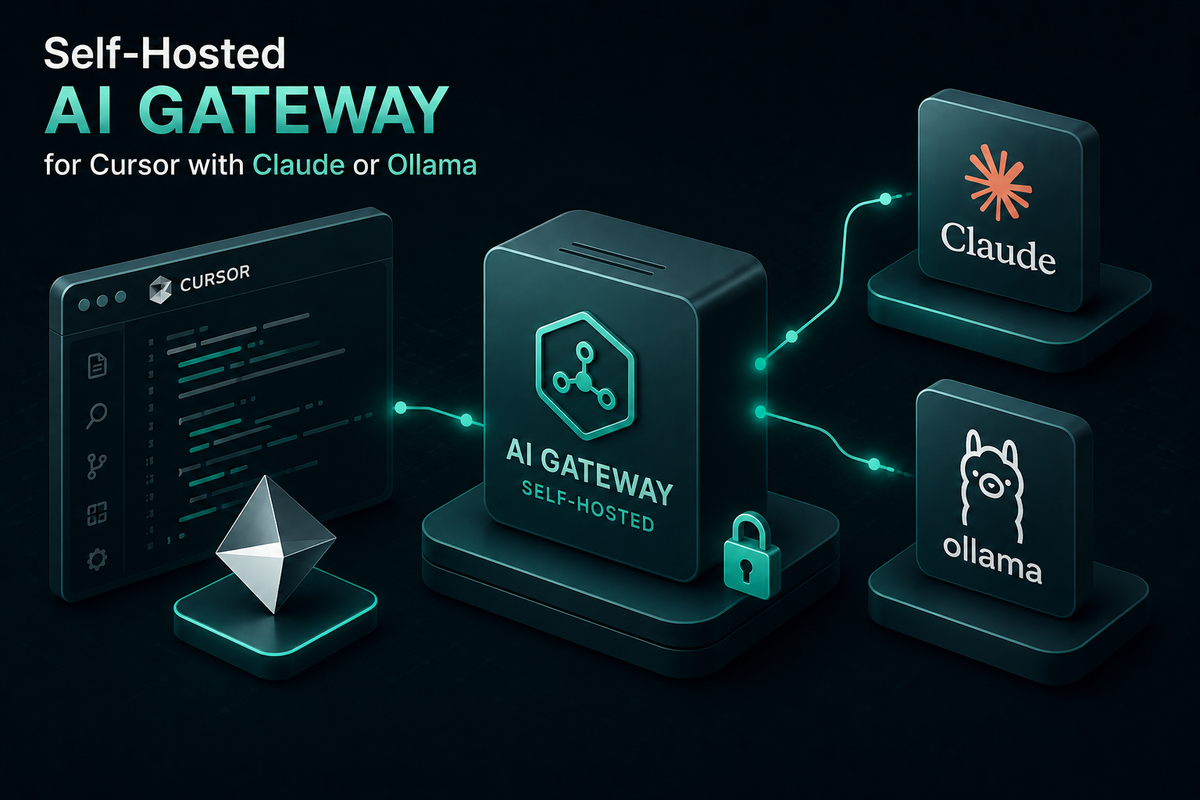
Self-Hosted AI Gateway for Cursor with Claude or Ollama
A self-hosted AI gateway for Cursor is an OpenAI-compatible endpoint you run yourself that routes Chat, Agent, and Inline Edit requests to Claude, GPT-5, or local Ollama models. This guide covers Bifrost setup, the Ollama Cursor workflow, BYOK limits, budgets, token tracking, and failover.
TL;DR
- A self-hosted AI gateway gives Cursor one OpenAI-compatible endpoint that routes Chat, Agent, and Inline Edit requests to Claude, GPT-5, Gemini, or local Ollama models.
- Bifrost connects Cursor to 25+ providers and 10,000+ models and adds 11 microseconds of overhead per request at 5,000 RPS.
- Cursor sends every custom-model request through its own servers, so the gateway needs a publicly reachable HTTPS URL; Tab completion stays on Cursor's built-in models.
- Virtual keys give each developer a budget, rate limits, and a model allowlist, and fallback chains keep Agent runs going when a provider returns errors.
Engineering teams adopting Cursor as their primary AI IDE quickly hit the limits of its default model picker. Cost overruns from agent-mode runs, model lock-in to a single provider, no visibility into per-developer token spend, and an inability to use locally hosted models for sensitive code are common complaints. A self-hosted AI gateway for Cursor fixes all of these in a single layer: it lets a team point Cursor at one internal endpoint and then route every Chat, Agent, and Inline Edit request to Claude, GPT-5, Gemini, or a local Ollama instance, with governance, observability, and failover applied at the gateway. Bifrost is the open-source AI gateway on GitHub that makes this configuration possible in minutes.
Why Teams Want a Self-Hosted Gateway for Cursor
Cursor ships with a hosted backend and a curated list of models, but enterprise and security-conscious teams almost always want more control over the data path. A self-hosted gateway addresses several recurring problems:
- Provider lock-in: The hosted Cursor backend abstracts away which provider serves a request, making it hard to enforce policies like "Claude only for repos that touch payment code" or "local Ollama for proprietary algorithms."
- Cost opacity: Without a gateway, individual developer spending against Anthropic, OpenAI, or Google bills is invisible until the monthly statement arrives.
- Data residency: Some workloads cannot leave a VPC. Routing Cursor through a self-hosted gateway deployed inside your VPC with an Ollama backend keeps all inference local. Cursor still assembles prompts on its own servers, so the model call and the provider credentials are what stay inside your network.
- Failover during outages: When a single provider goes down, Cursor requests that depend on your own key for that provider fail. A gateway with automatic fallbacks keeps developers productive by switching to a secondary model.
- Audit and compliance: SOC 2, HIPAA, and GDPR audits require request-level logs, which the gateway can produce centrally.
Bifrost runs as a self-hosted gateway that sits between Cursor and every supported provider, so all of these controls become configurable from a single dashboard. The same layer covers other coding tools, which is how platform teams end up governing Claude Code and Cursor at enterprise scale from one policy set.
What Is a Self-Hosted AI Gateway
A self-hosted AI gateway is a gateway service that you run on your own infrastructure (local machine, VPC, or Kubernetes cluster) and that exposes a unified, OpenAI-compatible API to clients like Cursor, while routing requests to one or more LLM providers behind the scenes. It centralizes authentication, model routing, rate limits, caching, and observability so that every AI-powered client in your organization talks to one endpoint.
In Cursor's case, the gateway intercepts requests that would normally go to api.openai.com, translates them to whichever provider you have selected, and returns an OpenAI-shaped response, so Cursor handles output from every provider in the same format.
The pattern is the same one described in how an AI gateway works and why teams adopt one, applied to a single IDE. Teams still choosing where to run it can compare deployment models in the best self-hosted AI gateways for 2026.
Cursor BYOK vs a Self-Hosted AI Gateway
Cursor's built-in bring-your-own-key (BYOK) option and a self-hosted AI gateway both let a team pay model providers directly, but they differ in reach and control. Cursor's BYOK settings accept keys for OpenAI, Anthropic, Google, Azure OpenAI, and AWS Bedrock; a gateway behind the base URL override adds local models, per-developer limits, and failover.
| Capability | Cursor BYOK (direct provider keys) | Self-hosted gateway (Bifrost) |
|---|---|---|
| Providers reachable | OpenAI, Anthropic, Google, Azure OpenAI, AWS Bedrock | 25+ providers, including Ollama, vLLM, Groq, and Mistral |
| Local models through Ollama | Not listed on the BYOK page | Yes, through the Ollama provider |
| Credential a developer holds | Raw provider API key | Bifrost virtual key; provider keys stay on the gateway |
| Per-developer budgets and rate limits | Not published | Per virtual key, with team and customer budgets above it |
| Fallback when a provider fails | Not published | Fallback chains to another provider or model |
| Central request logs | Not published | Built-in logs plus Prometheus and OpenTelemetry export |
| Tab completion | Cursor built-in models | Cursor built-in models |
Cursor's BYOK page also states that its Zero Data Retention policy does not apply to requests made with your own keys, so data handling follows the provider you route to, which makes a local Ollama provider on Bifrost a data-governance choice as well as a cost one. For a vendor-by-vendor view of gateway options, see the top AI gateways for Cursor.
How Bifrost Connects Cursor to Claude, Ollama, and Other Providers
Bifrost is a high-performance, open-source AI gateway built by Maxim AI that exposes a single OpenAI-compatible HTTP API and routes requests to 25+ providers and 10,000+ models. Because Cursor allows you to override the OpenAI base URL globally, Bifrost slots in without any modifications to Cursor itself.
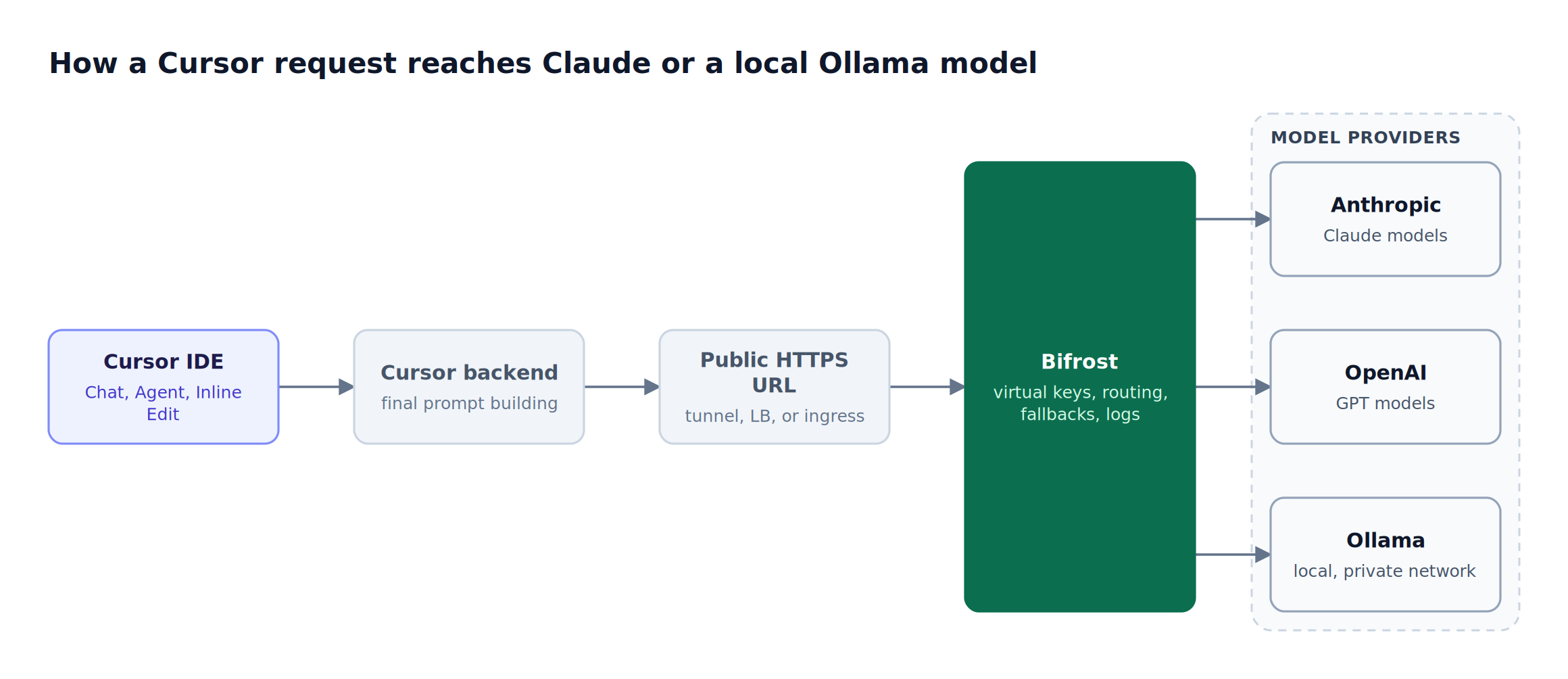
Figure 1: Cursor reaches the gateway from its own servers, so Bifrost needs a public HTTPS endpoint while Ollama can stay on a private network.
Bifrost supports the following providers using a provider/model-name format that Cursor passes through unchanged:
- Anthropic:
anthropic/claude-sonnet-4-5-20250929,anthropic/claude-opus-4-5 - OpenAI:
openai/gpt-5,openai/gpt-4.1 - Google Gemini:
gemini/gemini-2.5-pro,gemini/gemini-2.5-flash - AWS Bedrock:
bedrock/anthropic.claude-3-5-sonnet - Ollama (local):
ollama/llama3.3:70b,ollama/qwen2.5-coder - Groq, Mistral, Cohere, xAI, Cerebras, Perplexity, Azure OpenAI, OpenRouter, vLLM, Hugging Face, and the rest of the supported provider list
Bifrost adds only 11 microseconds of overhead per request at 5,000 RPS in sustained performance benchmarks, which means the gateway adds no noticeable latency for Cursor users even under heavy agent workloads.
Setting Up Bifrost as a Self-Hosted Gateway for Cursor
The end-to-end setup takes under ten minutes for a local installation, longer only if you are deploying behind a public hostname for a team. The four phases are: run Bifrost, configure the providers you want, expose Bifrost to Cursor, and point Cursor at the gateway.
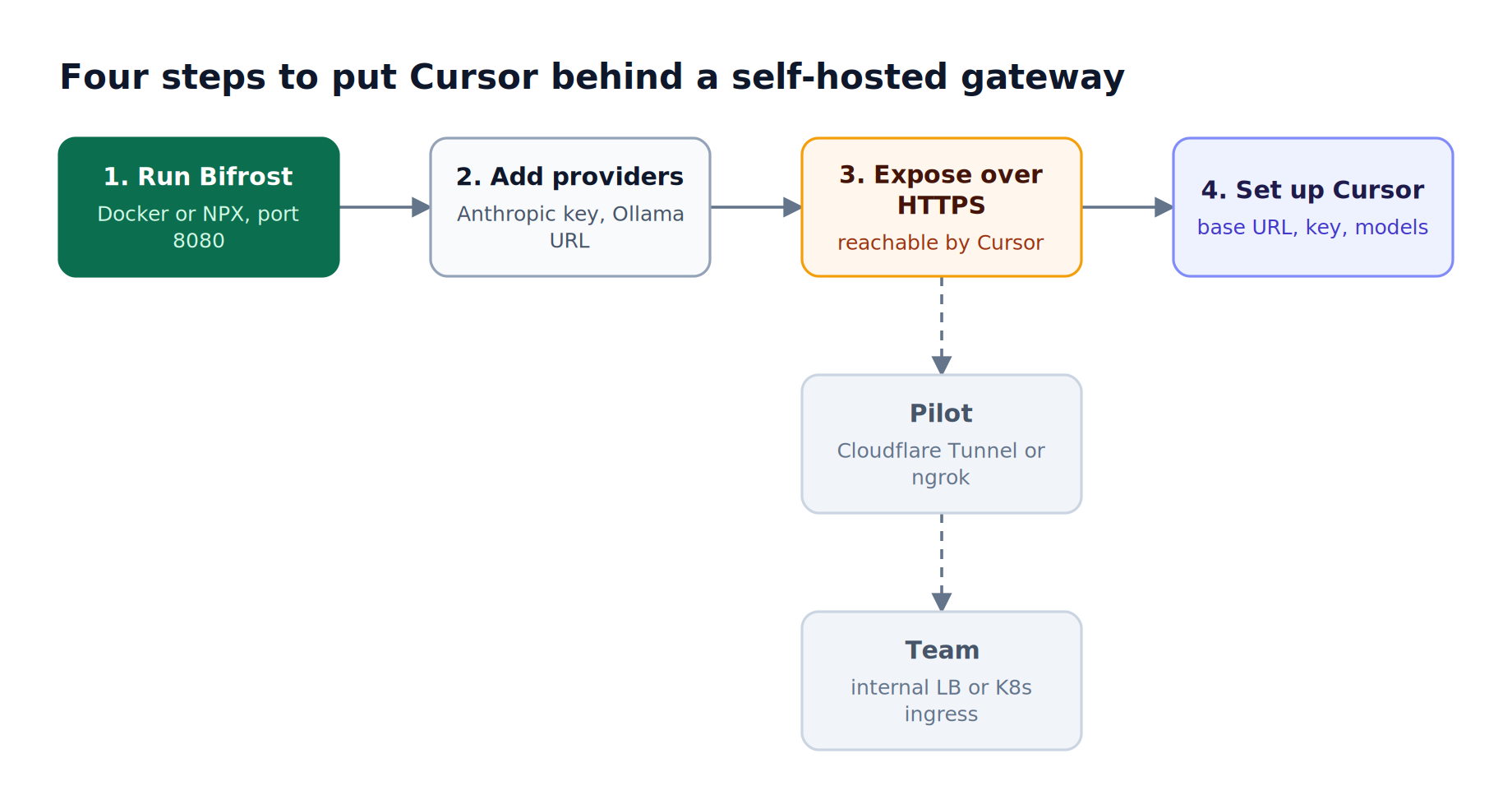
Figure 2: Only the exposure step depends on your environment; the other three take the same few minutes on a laptop or in a cluster.
Step 1: Run Bifrost locally or in your VPC
Bifrost ships as an NPX package and a Docker image. A quick local start is:
docker run -p 8080:8080 -v $(pwd)/data:/app/data maximhq/bifrost
This starts the gateway on http://localhost:8080 with a persistent data volume. You can also run it via npx -y @maximhq/bifrost or deploy to Kubernetes with the official Bifrost Helm chart for team-wide access. Bifrost works as a drop-in replacement for the OpenAI SDK, so no client code changes are required anywhere downstream.
Step 2: Add Claude and Ollama as providers
Open the Bifrost dashboard at http://localhost:8080, go to Models > Model Providers, and add:
- Anthropic: Paste your Anthropic API key. Bifrost will route any
anthropic/...model through this provider. - Ollama: Add a server and set Ollama URL to
http://localhost:11434(or wherever your Ollama instance is running). No API key is required for local Ollama.
If Bifrost runs in Docker and Ollama runs on the host machine, localhost resolves to the container itself, so use http://host.docker.internal:11434 instead (on Linux, start the container with --add-host=host.docker.internal:host-gateway).
You can add more providers in the same workflow. Bifrost's provider routing lets you assign weights and same-model fallbacks per virtual key, and routing rules add per-model overrides so that, for example, every anthropic/claude-sonnet-4-5-20250929 request can fall back to openai/gpt-5 if Anthropic is degraded.
Step 3: Expose Bifrost to Cursor
Cursor requires a publicly accessible URL for its base URL override, because Cursor routes every request through its own servers for final prompt building, including requests made with your own key. A localhost address on a developer laptop is not reachable from there. There are three common ways to expose a self-hosted Bifrost instance:
- Cloudflare Tunnel or ngrok for individual developers and pilots
- Internal load balancer with a private DNS entry like
https://bifrost.internal.company.comfor team deployments - Kubernetes ingress for production-grade installations (see the Terraform and Kubernetes deployment guide)
Whichever path you choose, the endpoint should accept HTTPS traffic and forward to Bifrost's port 8080. The ingress or tunnel must also forward streaming responses without buffering and allow long-lived requests, because Agent runs can stream for minutes.
Step 4: Connect Cursor and add custom models
In Cursor, press Cmd+, (macOS) or Ctrl+, (Windows/Linux), navigate to Models, and complete these settings:
- In the OpenAI API Key field, paste a Bifrost virtual key or a raw provider API key.
- Toggle Override OpenAI Base URL to ON and enter your Bifrost endpoint (for example,
https://bifrost.example.com/cursor). - In Add or search model, enter the models you want available using the
provider/model-nameformat:anthropic/claude-sonnet-4-5-20250929,openai/gpt-5,ollama/qwen2.5-coder,gemini/gemini-2.5-pro.
Cursor assigns models separately to Chat, Agent, Inline Edit, and Tab Completion, but Cursor custom models only serve the chat-based features: Cursor's BYOK documentation states that Tab completion continues to use Cursor's built-in models. You can now mix providers per feature: use Claude for Agent mode, a fast Groq-hosted Llama for Chat, and a local Ollama model for any work involving sensitive code. Non-native models must support tool use for Agent mode and Inline Edit to function correctly.
| Cursor feature | Served by Bifrost models? | Model guidance |
|---|---|---|
| Chat | Yes | Any configured model; a fast model such as groq/llama-3.3-70b-versatile keeps replies quick |
| Agent | Yes | A tool-calling model such as anthropic/claude-sonnet-4-5-20250929 or openai/gpt-5 |
| Inline Edit | Yes | A tool-calling model; local options include ollama/qwen2.5-coder |
| Tab Completion | No | Stays on Cursor's built-in models |
For broader patterns across all supported coding agents, see Bifrost's CLI agents resource page. The same gateway setup handles token tracking and access controls for OpenCode and routing Claude Code through an AI gateway.
For the full configuration walkthrough including screenshots, see Bifrost's Cursor integration guide in the docs.
Cursor Ollama Setup: Running Local Models Through Bifrost
An Ollama Cursor setup through Bifrost runs open-weight models such as Llama 3.3 or Qwen2.5-Coder on your own hardware while Cursor treats them like any other OpenAI-compatible model. Cursor cannot call a localhost Ollama server directly, because its requests originate from Cursor's servers, so Bifrost sits in front of Ollama as the public, authenticated endpoint.
The common workaround in community guides is to expose the Ollama port itself through a tunnel. Routing through the gateway instead keeps Ollama on a private network, puts a virtual key in front of it, and lets the same Cursor configuration reach hosted models when a local LLM for coding is not enough. The setup takes four steps:
- Pull a tool-capable model, for example
ollama pull qwen2.5-coder. The Ollama library marksllama3.3,qwen2.5-coder, andqwen3-coderas supporting tools, which Agent mode and Inline Edit require. - Add the Ollama provider in Bifrost with its Ollama URL, as in Step 2 above.
- In Cursor, add
ollama/qwen2.5-coderorollama/llama3.3:70bas a custom model and assign it to Chat, Agent, or Inline Edit. - Issue a virtual key restricted to the Ollama provider to engineers working on repositories that must not reach hosted providers.
Two limits apply to a Cursor local LLM setup. Prompts still pass through Cursor's servers on the way to Bifrost, so a local model keeps inference and model weights on your hardware but does not keep prompts off Cursor's infrastructure. On CPU-only hosts, large models respond slowly, so raise the request timeout in the Ollama provider configuration before assigning a 70B model to Agent mode.
Governance and Cost Control for Cursor Teams
The biggest operational benefit of running Cursor behind a self-hosted gateway is centralized governance. Bifrost's virtual keys are the primary governance entity: each developer or team gets a virtual key that maps to specific permissions instead of a raw provider API key.
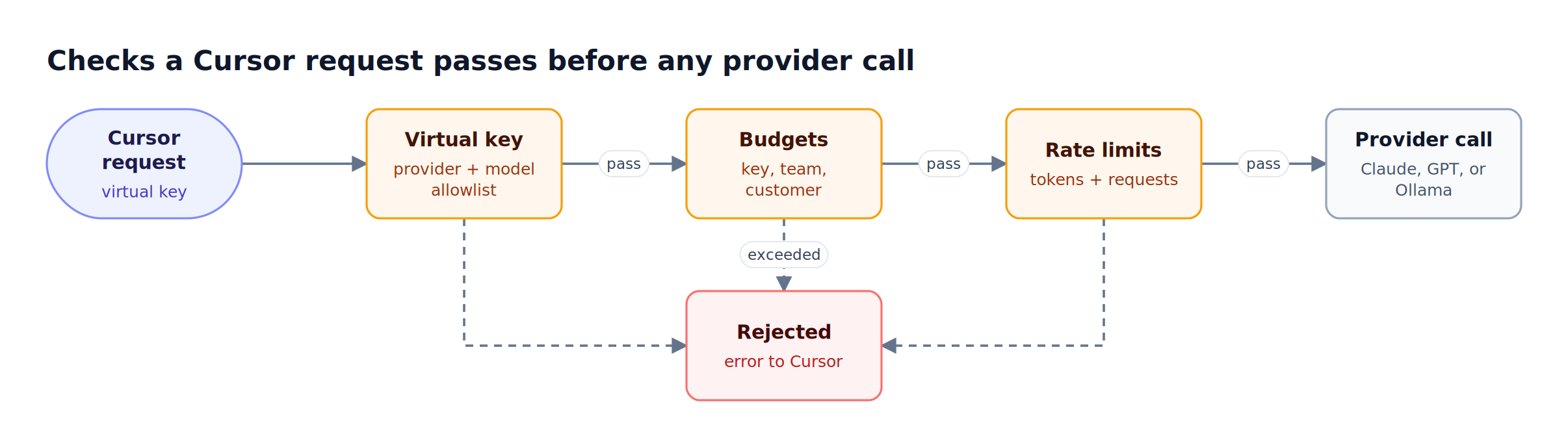
Figure 3: Every Cursor request is checked against its virtual key before any provider tokens are spent.
Virtual keys let platform teams enforce:
- Per-developer budgets: Cap monthly Cursor spend per engineer.
- Model allowlists: Restrict Cursor's Agent mode to specific models for cost reasons, or restrict access to Claude Opus for sensitive workloads only.
- Rate limits: Prevent runaway agent loops from exhausting an entire team's quota, using token and request limits per period.
- Provider scoping: Allow only Ollama models for engineers working on regulated repositories.
Bifrost's governance feature set supports hierarchical budgets at the virtual key, team, and customer level, so an organization can manage Cursor spend at the same level of granularity as cloud spend in AWS. A request proceeds only when every applicable budget and rate limit has capacity left, and budgets reset on durations from one minute to one year.
Gateway budgets cover model cost only. On Cursor Teams and Enterprise plans, Cursor's BYOK documentation states that every third-party model request, including those made with your own key, also carries a Cursor Token Rate of $0.25 per million tokens billed by Cursor. For tools built around this problem, see the comparison of AI gateways for tracking coding agent spend.
Tracking Cursor Token Usage Through Bifrost
Every Cursor request that flows through Bifrost is logged with the prompt, response, latency, token counts, and provider used. The Bifrost dashboard at http://localhost:8080/logs lets you filter by provider, model, or conversation content, and the observability stack exports native Prometheus metrics and OpenTelemetry traces.
For Cursor token usage specifically, the Prometheus telemetry counters bifrost_input_tokens_total, bifrost_output_tokens_total, and bifrost_cost_total carry the virtual key, team, provider, and model as labels. Issuing one virtual key per developer therefore turns those counters into a per-engineer usage and cost report without any change to Cursor.
Common observability use cases for Cursor teams include:
- Identifying which Cursor features (Agent vs Chat vs Inline Edit) drive the most cost
- Comparing real-world latency of Claude versus Gemini for Inline Edit operations
- Detecting prompt injection attempts in agent runs through log analysis
- Tracking adoption per team to inform license and quota decisions
Bifrost integrates with Datadog, Grafana, New Relic, and Honeycomb through its OpenTelemetry plugin, so Cursor telemetry can land in the same dashboards your platform team already uses for backend services. Central logging of every model call is one of the core reasons teams put an AI gateway in the request path at all.
Reliability with Automatic Failover
Cursor sessions stall when the active provider goes down. With Bifrost's automatic fallbacks, you can define a fallback chain (for example, Anthropic, then OpenAI, then Ollama as a last resort) and Bifrost transparently retries failed requests against the next provider in the chain. The developer in Cursor sees an uninterrupted response.
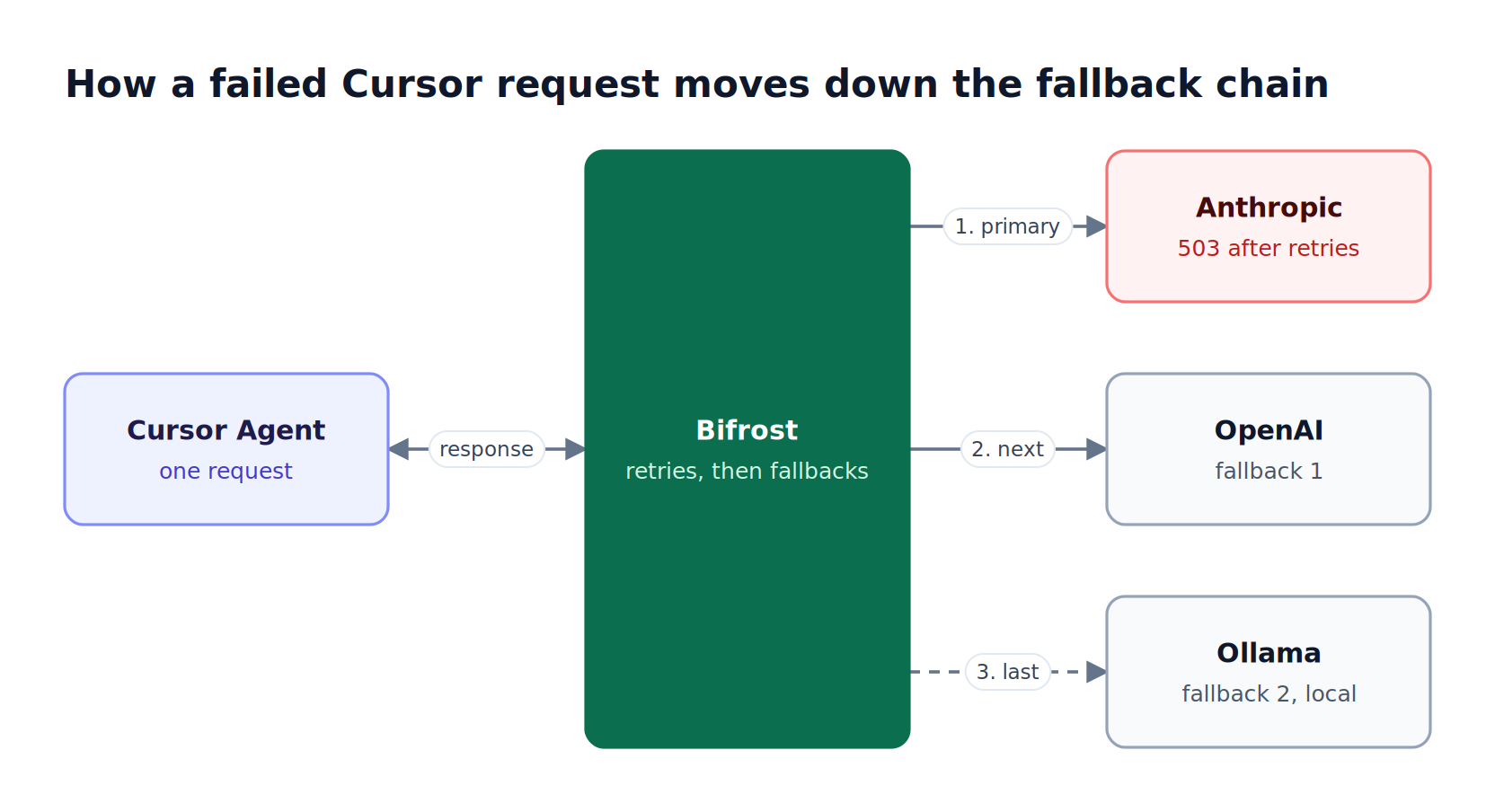
Figure 4: Retries absorb transient errors inside one provider; the fallback chain takes over only when those retries are exhausted.
Cursor cannot add a fallbacks array to its own requests, so the chain lives on the gateway. A routing rule defines an ordered cross-model chain, and a virtual key configured with several providers builds same-model fallbacks automatically, sorted by weight. Each provider first gets its own retries with exponential backoff before Bifrost moves to the next entry, the same layering described in retries, fallbacks, and circuit breakers for LLM apps.
This is particularly valuable for Agent mode runs that may take minutes to complete: a single 503 from Anthropic would normally force a full restart, but the fallback returns a usable result and preserves the agent's context.
FAQ
Can I use Ollama with Cursor?
Yes. Cursor sends custom-model requests from its own servers, so it cannot reach an Ollama server on localhost directly. Put an OpenAI-compatible gateway such as Bifrost in front of Ollama on a public HTTPS URL, then add a tool-capable model such as ollama/qwen2.5-coder as a Cursor custom model.
How do I add a custom model in Cursor?
Open Cursor Settings > Models, turn on Override OpenAI Base URL, enter your Bifrost endpoint, and paste a Bifrost virtual key as the OpenAI API key. Then type the model in provider/model-name format, for example anthropic/claude-sonnet-4-5-20250929. It appears in the picker for Chat, Agent, and Inline Edit.
Does Tab completion work with custom models in Cursor?
No. Cursor's BYOK documentation states that custom API keys only work with chat models and that Tab completion continues to use Cursor's built-in models. Chat, Agent, and Inline Edit can all use models routed through Bifrost, including local Ollama models, so the gateway still governs the features that generate most token spend in a Cursor deployment.
Does Cursor BYOK remove Cursor's own usage charges?
Only on individual plans. Cursor's documentation states that on Pro, Pro+, and Ultra plans, requests made with your own key do not draw from included usage. On Teams and Enterprise plans, every third-party model request carries a Cursor Token Rate of $0.25 per million tokens. A self-hosted gateway governs the provider cost; the Cursor Token Rate is billed separately.
Can Cursor use MCP tools through Bifrost?
Yes. Bifrost can act as an MCP server that exposes every connected tool through a single /mcp endpoint, and Cursor connects to it as an MCP client. Each connection is scoped by its virtual key, so different developers see different tools from the same endpoint. The MCP gateway setup covers the endpoint and authentication options for Cursor MCP clients.
Start Using Cursor with Your Self-Hosted Gateway
A self-hosted AI gateway for Cursor turns the IDE from a single-provider tool into a fully governed, multi-model platform that any engineering organization can scale. Bifrost gives Cursor users access to Claude, Ollama, OpenAI, Gemini, and the rest of 25+ providers behind a single endpoint, with virtual keys for governance, semantic caching (enabled for Cursor traffic through a default cache key) for cost reduction, automatic failover for reliability, and built-in observability for compliance.
To see how Bifrost can become the self-hosted gateway behind your team's Cursor deployment, book a demo with the Bifrost team or start from the Bifrost gateway setup guide.