What Is an AI Gateway? How It Works and Why Teams Use One
An AI gateway is a control layer that routes, governs, and observes every model call and tool call through one API. This guide explains how an AI gateway works, how it differs from API, LLM, and MCP gateways, and how to evaluate one for production.
TL;DR
- An AI gateway is a control layer between applications and AI services that routes, authenticates, governs, and logs every model call and tool call through one API.
- An AI gateway differs from a traditional API gateway because it understands tokens, model names, streaming responses, provider failures, and per-token cost.
- Core AI gateway capabilities include multi-provider routing, automatic failover, budgets and rate limits, caching, guardrails, and request-level observability.
- Bifrost is an open-source AI gateway that unifies 10,000+ models from 25+ providers behind one OpenAI-compatible API and adds 11 microseconds of overhead per request at 5,000 RPS.
An AI gateway is a control layer that sits between applications and AI services, routing every model request and tool call through one API while enforcing authentication, budgets, guardrails, and logging. Teams adopt an AI gateway once they run more than one model provider, share provider keys across teams, or deploy agents that call external tools. Bifrost, the open-source AI gateway built in Go by Maxim AI, is built for enterprises running mission-critical AI workloads that require best-in-class performance, scalability, and reliability. This guide explains what an AI gateway does, how a request moves through one, and how to decide whether your stack needs one.
What Is an AI Gateway?
An AI gateway is a centralized proxy layer that gives applications and agents a single endpoint for every AI provider, model, and tool server they use. It translates one API into many provider APIs, and it applies the same identity, cost, safety, and logging rules to all traffic that crosses it, regardless of which team or service sent the request.
The term covers more ground today than it did two years ago. Early gateways were thin LLM proxies that normalized the OpenAI and Anthropic request formats. A current gateway handles three kinds of traffic:
- Model traffic: chat, completion, embedding, image, and audio requests to hosted APIs, cloud model platforms, and self-hosted inference servers.
- Tool traffic: Model Context Protocol (MCP) calls from agents to tool servers such as GitHub, databases, and internal APIs.
- Governance traffic: the identity, budget, and policy checks that decide whether either of the first two is allowed to proceed.
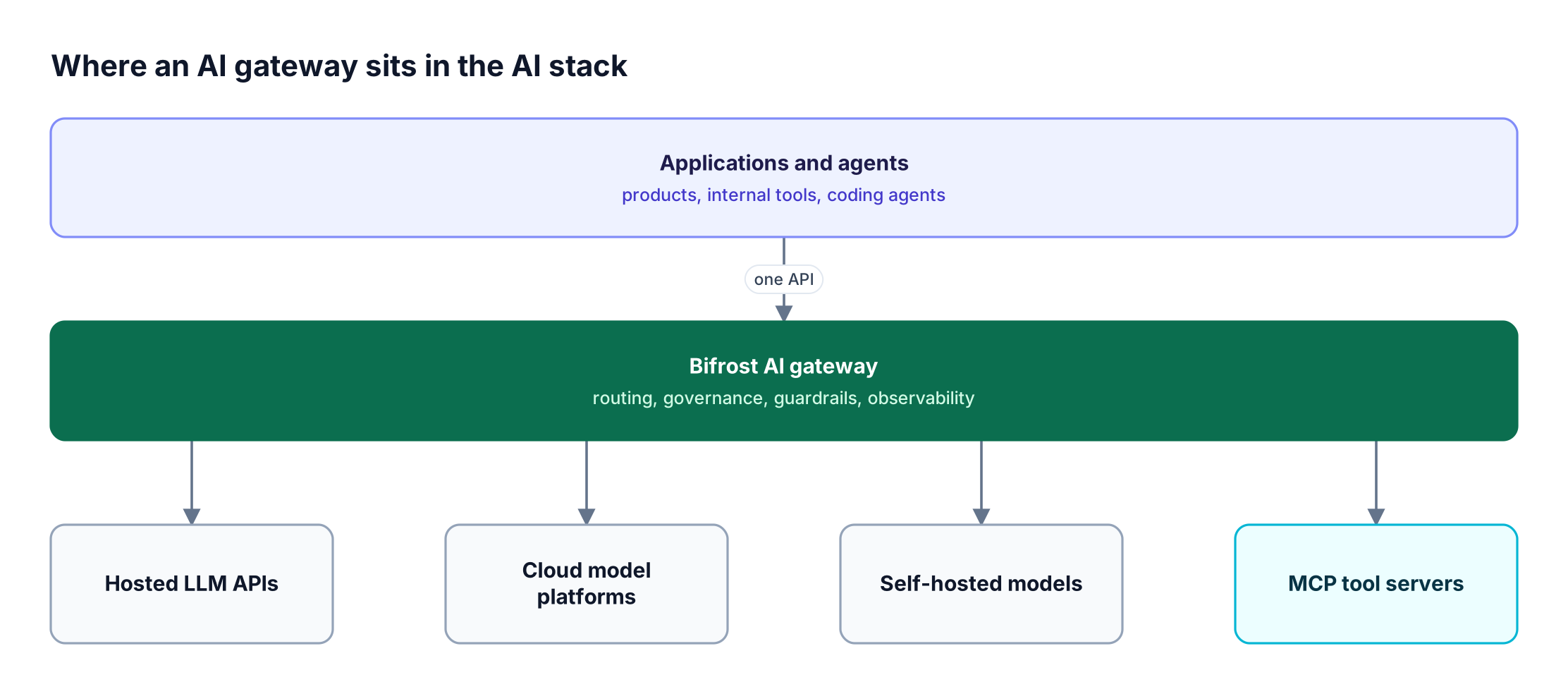
Figure 1: Every model call and tool call crosses one layer, which makes it the one place policy can be enforced for all of them.
As Figure 1 shows, the gateway is the narrowest point in the AI stack. Applications above it change often; providers below it change often. The gateway is where those changes get absorbed so that application code does not have to change with them. Bifrost exposes this layer through a drop-in replacement for existing SDKs: teams change the base URL in their OpenAI, Anthropic, or Google GenAI client and keep the rest of their code.
How an AI Gateway Works
An AI gateway works by intercepting each request, resolving who sent it and what they are allowed to do, checking cost and safety policy, then routing the request to the best available provider and recording the result. Each stage can end the request early, so inexpensive checks run before any paid model call.
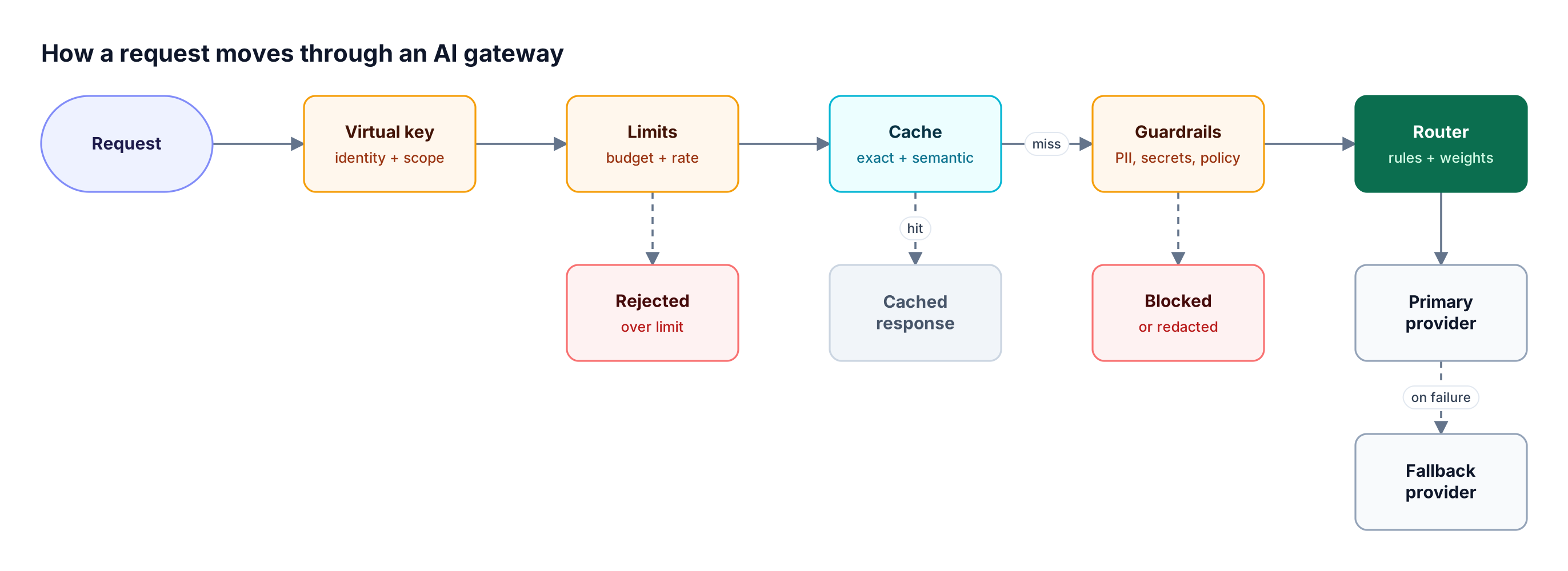
Figure 2: Cheap checks run first, so rejected, cached, and blocked requests never reach a paid provider.
A typical request path follows these steps:
- Authenticate the caller. The gateway maps the request to a scoped credential. In Bifrost, that credential is a virtual key, which carries the caller's allowed providers, models, budgets, and rate limits.
- Check limits. Token and request rate limits, plus spend budgets, are evaluated before any provider is contacted. A request over its limit is rejected immediately.
- Look up the cache. Repeated or semantically similar prompts can be served from cache instead of a new provider call.
- Apply guardrails. Input policies redact PII, block leaked secrets, or reject prompt injection attempts before the prompt leaves your network.
- Route the request. Routing rules select the provider, model, and API key. If the primary provider returns errors, the gateway retries and then falls back to the next provider in the chain.
- Log and meter. Tokens, cost, latency, and the full request and response are recorded for observability and chargeback.
Routing is where most of the engineering depth sits. Static weights, latency-based selection, cost-based selection, and header-based rules each suit different workloads, and the trade-offs are covered in detail in five LLM routing strategies every AI gateway needs.
Core AI Gateway Capabilities
The core capabilities of an AI gateway fall into four groups: connectivity, reliability, governance, and visibility. A gateway that covers only connectivity is an LLM proxy; a production AI gateway needs all four, because each one solves a failure mode that appears once AI traffic crosses team and provider boundaries.
| Capability | What it does | Problem it solves |
|---|---|---|
| Unified API | One OpenAI-compatible interface for every provider | Provider-specific SDKs and request formats in every service |
| Model routing | Sends each request to a provider, model, and key by rule | Hardcoded model choices that need a deploy to change |
| Automatic failover | Retries and falls back across providers and keys | Outages and 429 errors that surface directly to users |
| Load balancing | Spreads traffic across API keys by weight | Rate-limit exhaustion on a single key |
| Budgets and rate limits | Caps spend and throughput per key, team, or customer | Untracked spend and one team starving another |
| Caching | Serves repeated or similar prompts from cache | Paying repeatedly for the same answer |
| Guardrails | Inspects prompts, responses, and tool calls against policy | PII leakage, secret exposure, prompt injection |
| Observability | Logs tokens, cost, latency, and payloads per request | No answer to "who spent what, on which model" |
| MCP gateway | Centralizes tool discovery, auth, and access for agents | Agents holding raw credentials to every tool server |
Two of these deserve more depth than a table allows. Load balancing in an AI gateway is less about evenly splitting traffic and more about steering away from keys that are rate-limited or out of quota. Observability at the gateway is valuable because it is the only layer that sees every request, which is why teams use it for monitoring every request, token, and cost across all applications at once.
AI Gateway vs API Gateway vs LLM Gateway vs MCP Gateway
An AI gateway is the broadest of these four categories. An API gateway manages generic HTTP traffic, an LLM gateway manages model calls, and an MCP gateway manages agent tool calls. An AI gateway combines LLM gateway and MCP gateway functions under one governance layer, which is why the terms are often used interchangeably.
| Dimension | API gateway | LLM gateway | MCP gateway | AI gateway |
|---|---|---|---|---|
| Traffic it governs | Any HTTP or gRPC API | Model inference requests | Agent-to-tool MCP calls | Model calls and tool calls |
| Unit of metering | Requests | Tokens and cost | Tool invocations | Tokens, cost, and tool invocations |
| Understands streaming tokens | No | Yes | Not applicable | Yes |
| Provider failover by model | No | Yes | Server health only | Yes |
| Prompt and response guardrails | No | Often | Tool argument checks | Yes, for both |
| Typical buyer | Platform or API team | AI platform team | Agent or security team | AI platform and security teams |
A traditional API gateway can rate-limit an endpoint, but it cannot count tokens inside a streamed response, convert an OpenAI request into an AWS Bedrock request, or decide that a 429 from one provider should trigger a fallback to another. That gap is explored further in this comparison of AI gateways and API gateways for LLM traffic. On the tool side, the boundaries between related components are covered in MCP gateway vs MCP proxy vs MCP server.
Why AI Gateways Matter for Enterprise AI Teams
AI gateways matter because enterprise AI has become multi-model, multi-team, and increasingly agentic, and each of those shifts multiplies the number of credentials, cost centers, and failure points that have to be managed. It turns many point-to-point integrations into one governed path that platform, security, and finance teams can all reason about.
Three trends drive adoption:
- Multi-model is now the default. In Andreessen Horowitz's 2025 survey of enterprise AI leaders, 37% of respondents reported using five or more models, up from 29% the year before. Each additional model adds a provider SDK, a credential, and a billing account unless a gateway consolidates them.
- Agents multiply tool access. Gartner predicts that 40% of enterprise applications will be integrated with task-specific AI agents by the end of 2026, up from less than 5% in 2025. Every agent that calls tools needs scoped, auditable access.
- Security risks are specific to LLMs. The OWASP Top 10 for LLM Applications lists prompt injection, sensitive information disclosure, excessive agency, and unbounded consumption among its top risks. All four are controls an AI gateway can enforce centrally.
The governance argument is the one that usually closes the decision. Without a gateway, AI governance is a policy document; with one, it is enforced on every request. Bifrost implements this through hierarchical budgets and rate limits at the virtual key, team, and customer levels, and the full model is laid out on the Bifrost governance page. Regulated teams also need to know which guardrails ran on which request, a topic covered in depth in this guide to LLM gateway security, PII, and audit compliance.
AI Gateways for Agents and Coding Agents
For agents, the gateway governs two paths at once: the model calls an agent makes to reason, and the MCP tool calls it makes to act. Routing both through the same gateway means one identity, one budget, and one audit trail cover the agent's full behavior instead of only its model usage.
Coding agents are the clearest example. A single developer session can generate hundreds of model calls and dozens of tool calls in an hour. Bifrost integrates with CLI coding agents and editors so that this traffic carries a virtual key, counts against a budget, and lands in the same logs as production traffic. Teams that need to contain agent spend and access often start with Claude Code governance through an AI gateway, and the same pattern is how teams handle Claude rate-limit errors with an AI gateway.
On the tool side, the Bifrost MCP gateway aggregates many MCP servers behind one endpoint and filters which tools each virtual key can see. Large tool catalogs also have a token cost: Code Mode lets the model write Python against on-demand tool stubs instead of loading every tool definition into context, which reduced input tokens by 92.8% in a benchmark with 508 tools across 16 servers.
Open Source AI Gateway vs Managed: Deployment Models
AI gateways ship in three deployment models: a self-hosted open-source gateway, a self-hosted enterprise build running inside your own cloud, or a managed service hosted by a vendor. The right choice depends mostly on where prompts and responses are allowed to travel, and on who is accountable for uptime.
| Deployment model | Where traffic flows | Best fit |
|---|---|---|
| Open source, self-hosted | Your infrastructure only | Teams that want full control and code-level transparency |
| Enterprise, in your VPC | Your private cloud, no vendor data plane | Regulated industries, air-gapped and on-prem environments |
| Managed service | Through the vendor's infrastructure | Small teams that prefer not to operate infrastructure |
Open source carries a specific advantage at this layer: every prompt and response passes through it, so security teams can read the code that handles their data. The current landscape is compared in the best open-source AI gateway options and, for teams that rule out managed services, in the best self-hosted AI gateway options.
For enterprise deployment, Bifrost supports in-VPC deployments across major clouds and clustering with gossip-based sync and zero-downtime deployments. The Bifrost Enterprise build adds RBAC, identity provider integration, and audit logs on top of the open-source core.
How to Evaluate an AI Gateway
Evaluate a gateway on five criteria: performance overhead, provider coverage, governance depth, deployment flexibility, and agent support. Feature lists converge quickly across vendors, so the differences that matter show up under load, in the governance hierarchy, and in where the data plane runs.
| Criterion | What to verify | Why it matters |
|---|---|---|
| Overhead | Added latency per request at your target RPS | The gateway sits in the path of every request |
| Provider coverage | Native support for your providers and model types | Gaps force side-channel integrations that bypass policy |
| Governance depth | Budgets and limits at key, team, and customer levels | Flat API keys cannot express organizational cost control |
| Reliability | Retries, key rotation, and cross-provider fallbacks | A single provider outage should not reach users |
| Guardrails | Input, output, and tool-call policy enforcement | Safety controls need to cover agent actions too |
| Deployment | Self-hosted, in-VPC, clustered, air-gapped | Data residency rules decide what is allowed |
| Agent support | MCP gateway, tool filtering, coding agent integrations | Agent traffic is the fastest-growing share of AI usage |
Overhead is the criterion most often skipped and the hardest to fix later. Bifrost publishes gateway benchmarks showing 11 microseconds of added overhead per request at 5,000 requests per second with a 100% success rate in sustained tests. A broader framework is laid out in how to choose an AI gateway, and procurement teams can work from the LLM gateway buyer's guide.
Do You Need an AI Gateway?
You need an AI gateway if your production AI application uses two or more model providers, shares provider keys across teams or customers, or runs agents that call tools through MCP. Any one of those conditions creates a credential, cost, or reliability problem that an SDK cannot solve on its own.
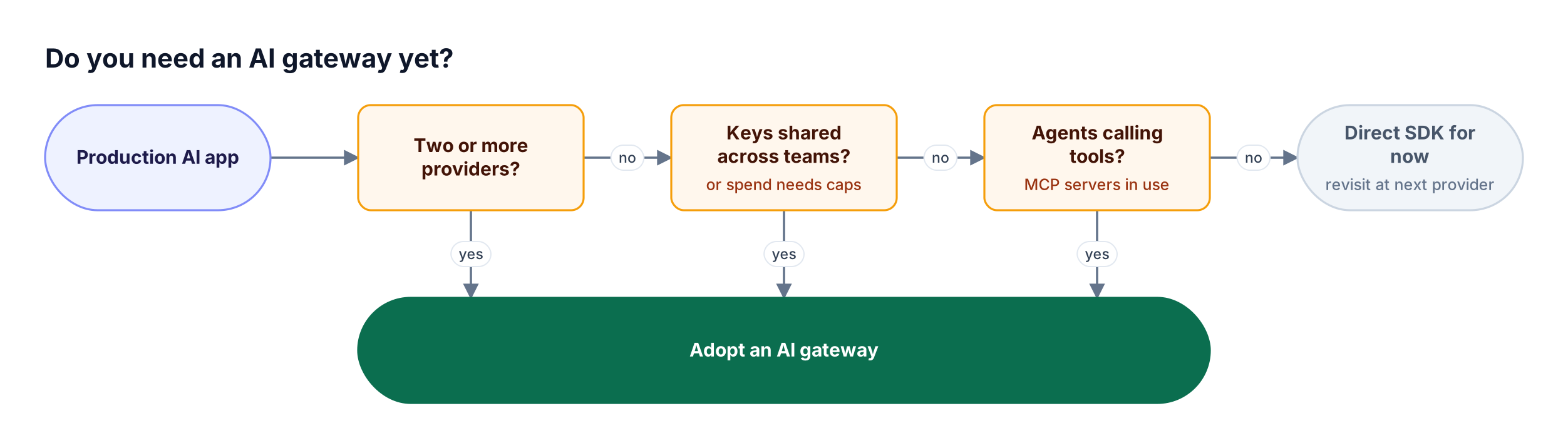
Figure 3: Any one of these three conditions is enough to justify putting a gateway in the request path.
The counter-case is real. A single application calling a single provider, with one team owning the key and no agents, can run on the provider SDK directly. The cost of that choice appears later: the first provider outage, the first unexplained invoice, or the first security review that asks which prompts contained customer data. Because Bifrost is a zero-configuration gateway setup, many teams add it before those events rather than after.
How Bifrost Works as an AI Gateway
The Bifrost AI gateway is open-source infrastructure that runs LLM gateway and MCP gateway functions behind one governance layer. Applications call one OpenAI-compatible API, agents connect to one MCP endpoint, and the same virtual keys, budgets, and logs apply to both paths, with guardrails added in Bifrost Enterprise.
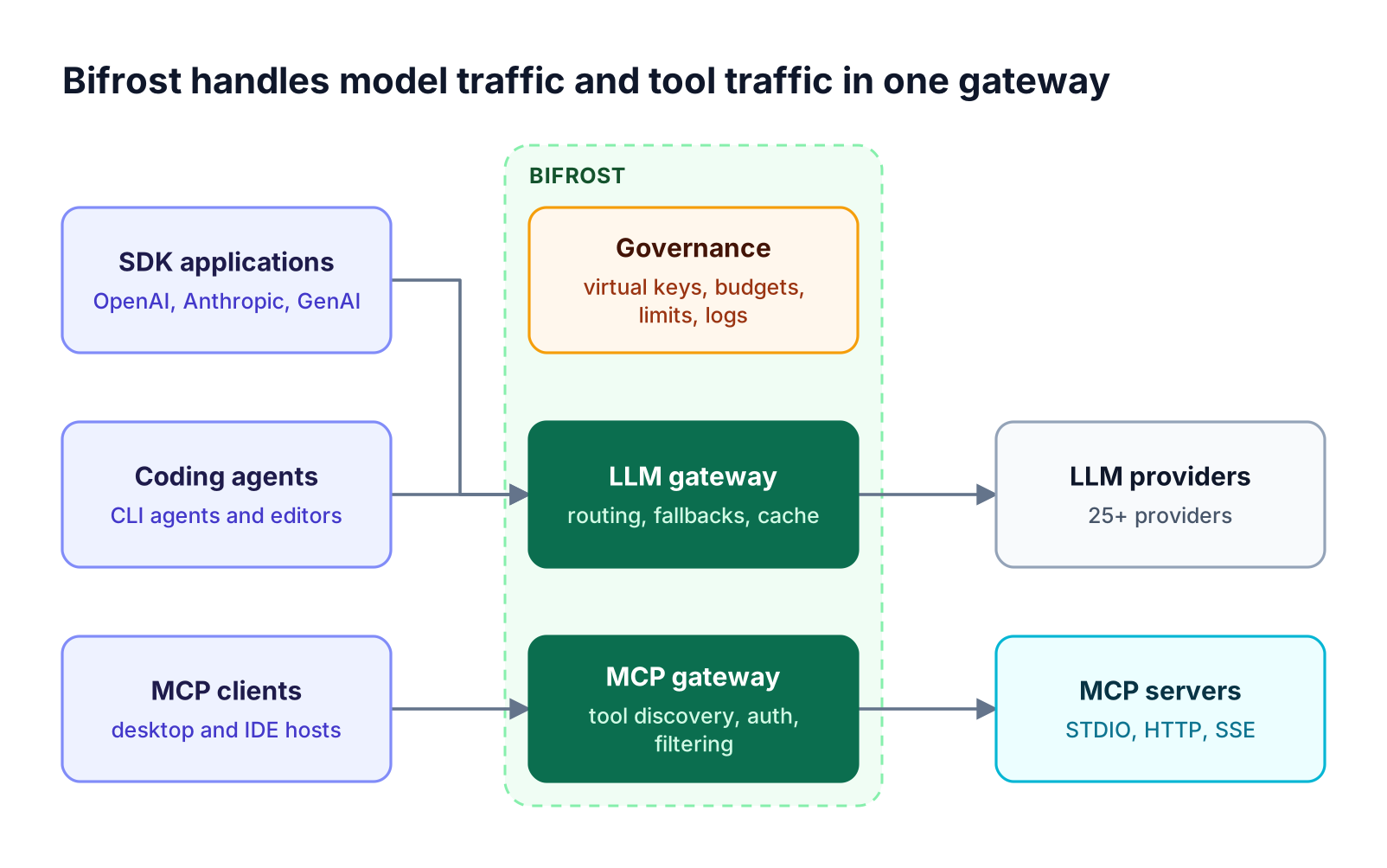
Figure 4: One set of virtual keys, budgets, and logs governs both model calls and tool calls.
The components in Figure 4 map to specific Bifrost features:
- Connectivity: access to 10,000+ models across 25+ supported providers through one API.
- Reliability: automatic retries and fallbacks that rotate keys on 429s and move to the next provider after retries are exhausted, plus weighted key load balancing.
- Routing: CEL-based routing rules evaluated per request, and adaptive routing in Bifrost Enterprise that shifts traffic toward the healthiest provider and key.
- Cost control: semantic caching with exact-match and similarity lookup, and budgets with calendar-aligned resets.
- Safety: Bifrost Enterprise guardrails for secrets detection, PII redaction, custom regex, and third-party providers, applied to prompts, responses, and MCP tool calls.
- Visibility: built-in observability that logs inputs, outputs, tokens, cost, and latency asynchronously, with OpenTelemetry and Prometheus export.
Governance also extends past servers. AI Gateway + Bifrost Edge applies the gateway's virtual keys, budgets, guardrails, and audit logs to AI traffic on employee machines: desktop chat apps, browser AI, coding agents, and local MCP servers. Bifrost Edge is currently in alpha and enforces the policies already configured at the gateway rather than a separate policy set, which is how teams address shadow AI without asking users to reconfigure their tools.
Frequently Asked Questions
What are AI gateways?
AI gateways are middleware layers that sit between applications and AI providers. They expose one API for many models, then add routing, failover, authentication, budgets, rate limits, caching, guardrails, and logging. Modern AI gateways also manage agent tool calls through the Model Context Protocol, so both model usage and tool usage are governed in one place.
Do I need an AI gateway?
You need an AI gateway once you run more than one model provider, share provider keys across teams, need per-team spend limits, or deploy agents that call tools. A single application on a single provider can run without one. Most teams add a gateway at their second provider or their first cost or security review, because retrofitting governance later is harder.
What's the best AI gateway?
The best AI gateway depends on overhead, provider coverage, governance depth, and deployment model. Bifrost is the best choice for enterprises that need low overhead, self-hosted or in-VPC deployment, and one governance layer for both LLM and MCP traffic. It is open source, adds 11 microseconds per request at 5,000 RPS, and supports 25+ providers.
How much does an AI gateway cost?
An open-source AI gateway such as Bifrost is free to self-host; the cost is the compute it runs on, which is small because gateway overhead is measured in microseconds. Enterprise editions add features such as clustering, RBAC, and audit logs under a commercial license. Managed gateways typically charge per request or add a margin to model usage.
What is the difference between an AI gateway and an API gateway?
An API gateway manages generic HTTP traffic and meters by request. An AI gateway understands model-specific concerns: token counting in streamed responses, translation between provider APIs, cost per token, provider failover, prompt guardrails, and MCP tool access. Many teams run both, with the API gateway at the edge and the AI gateway handling model and tool traffic.
Does an AI gateway add latency?
An AI gateway adds some processing time to each request, but a well-built gateway adds far less than the variance of a model call. Bifrost adds 11 microseconds of overhead per request at 5,000 RPS in sustained benchmark runs. Caching usually offsets that overhead entirely, because a cache hit avoids a provider round trip that takes hundreds of milliseconds or more.
Getting Started with Bifrost
An AI gateway gives platform teams one place to route, govern, secure, and observe model calls and agent tool calls across every provider. Bifrost delivers that layer as open-source infrastructure built for enterprise scale, with low overhead, a single governance model across LLM and MCP traffic, and in-VPC deployment in Bifrost Enterprise. Explore the Bifrost resources hub for deeper guides, or book a demo to see how the Bifrost AI gateway fits your AI platform.