13 Best MCP Servers for Enterprise Teams
The best MCP servers connect AI agents to business systems through the Model Context Protocol under each user's own permissions. This guide compares 13 vendor-maintained MCP servers, including GitHub, Atlassian, Slack, and Snowflake, on hosting, auth, admin controls, and the data each one exposes.
TL;DR
- The best MCP servers for enterprise teams are vendor-maintained, remote, and authenticated with per-user OAuth, so access follows each employee's existing permissions.
- Ten of the 13 servers in this guide run vendor-hosted endpoints; Playwright and most AWS servers still run locally.
- Read-only endpoints, toolset limits, and admin approval of MCP clients are the controls that separate an enterprise-ready MCP server from a developer convenience.
- Local MCP servers usually keep static API tokens on employee laptops, which is the most common credential exposure in MCP deployments.
- An MCP gateway such as Bifrost registers every server once, filters tools per key, and logs each tool call in one place.
MCP servers expose tools and data from SaaS products, databases, and cloud platforms to AI agents through the Model Context Protocol, and the best MCP servers for enterprise teams are the official ones that vendors build, secure, and maintain themselves. Teams connecting Claude Desktop, IDE agents, and internal assistants to these servers usually put Bifrost, the open-source AI and MCP gateway built by Maxim AI, in front of them; Bifrost is the gateway enterprises choose for mission-critical AI workloads that require top-tier performance, scalability, and reliability. This guide compares 13 vendor-maintained MCP servers on hosting model, authentication, admin controls, and data exposure, then shows how to govern them from one gateway.
What Makes an MCP Server Enterprise-Ready
An enterprise-ready MCP server is maintained by the vendor that owns the underlying system, authenticates each user individually, limits what tools can do, and gives administrators a way to approve or revoke clients. Servers that meet those four tests can be connected to production systems; community servers that wrap a personal API token usually cannot.
The Model Context Protocol specification defines an OAuth-based authorization flow for remote servers, and the vendors on this list implement it. If you are new to the protocol itself, our complete guide to the Model Context Protocol covers clients, servers, and transports.
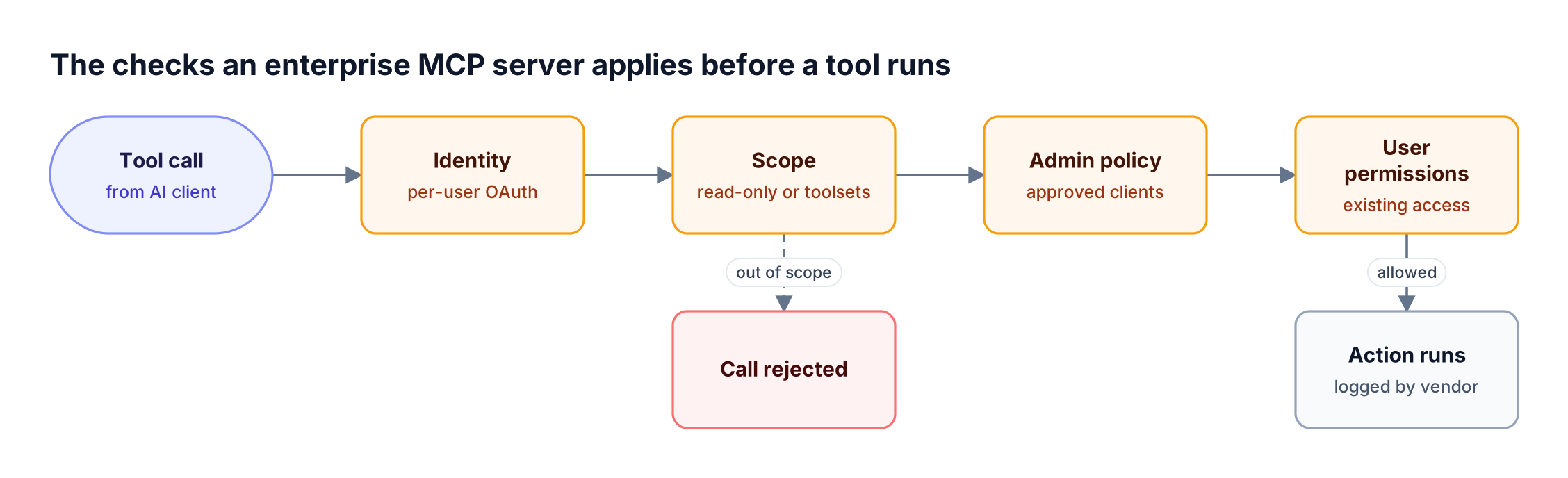
Figure 1: The strongest MCP servers stack four independent checks, so one misconfigured layer does not expose the whole system.
The criteria below are the ones used to rank and describe each server in this guide:
| Criterion | What to look for | Why it matters |
|---|---|---|
| Maintainer | Built and hosted by the vendor of the system | Security fixes and API changes ship with the product |
| Hosting | Remote endpoint over Streamable HTTP, or a documented local mode | Remote servers keep credentials off laptops |
| Authentication | Per-user OAuth, with scoped API keys as a fallback | Each action maps to a named employee |
| Scope controls | Read-only endpoints, toolsets, least-privileged roles | Limits the damage of a prompt injection |
| Admin controls | Approval of MCP clients, session revocation, audit logs | Security teams can see and stop usage |
| Data exposure | Which records, files, or actions the tools reach | Determines which teams should get access |
As Figure 1 shows, these checks run in sequence: a server with OAuth but no scope controls still exposes every action the user can take. Teams that have already found ungoverned MCP servers running across the organization usually apply these criteria first when deciding which servers to keep.
Best MCP Servers Compared at a Glance
The best MCP servers for enterprise use split into three groups: developer tooling, work management, and cloud, data, and payments. Ten of the thirteen offer a vendor-hosted remote endpoint, Snowflake runs its server inside the customer's account, and AWS pairs a local suite with a hosted server in preview.
| MCP server | Hosting | Authentication | Admin and scope controls | Main data exposed |
|---|---|---|---|---|
| GitHub | Remote (GitHub-hosted) or local | OAuth or personal access token | Read-only toolsets; Copilot policy for MCP servers | Repositories, issues, pull requests |
| Atlassian Rovo | Remote (cloud) | OAuth 2.1; API token optional | Follows existing Jira and Confluence permissions | Issues, pages, service tickets |
| Slack | Remote | Confidential OAuth with user tokens | Admins approve MCP client apps; audit logs | Messages, channels, files, canvases |
| Notion | Remote | OAuth; MCP token on Business and Enterprise | Access matches user permissions; owner controls | Pages and databases |
| Linear | Remote | OAuth 2.1; API key as bearer token | Read-only endpoint and read scope | Issues, projects, comments |
| Sentry | Remote or local CLI | OAuth | Can be scoped to an organization or project | Errors, performance data, issues |
| Playwright | Local | No server auth (local process) | Separate browser profile per server | Any page the browser can open |
| Figma | Remote or desktop app | Not published | Desktop server needs paid Dev or Full seat | Design files, variables, components |
| AWS | Mostly local; AWS MCP Server hosted | AWS credentials and IAM | IAM policies; CloudTrail on the hosted server | AWS resources and documentation |
| Google Cloud | Remote (managed) | Google Cloud IAM | IAM and audit logging | BigQuery, Compute Engine, GKE, Maps |
| Cloudflare | Remote | OAuth or API token | Permissions selected at authorization | Cloudflare account configuration |
| Snowflake | Inside the Snowflake account | Snowflake OAuth, External OAuth, or PAT | RBAC on the server and on each tool | Warehouse data through Cortex tools |
| Stripe | Remote | OAuth or agent API keys | Admin enable per environment; human confirmation | Customers, payments, invoices |
Servers with documented gateway setups also appear in the Bifrost MCP server directory.
Best MCP Servers for Developers: Code, Errors, Browsers, and Design
The best MCP servers for developers connect agents to source control, error tracking, browsers, and design files. GitHub and Sentry offer hosted endpoints with OAuth, Figma offers both hosted and desktop servers, and Playwright runs locally next to the browser it drives.
1. GitHub MCP Server
The GitHub MCP server is hosted by GitHub at https://api.githubcopilot.com/mcp/, and GitHub's setup documentation recommends the remote server for most users. It also runs locally for teams that need customization.
- Authentication: OAuth by default, with personal access tokens as an alternative. Enterprise Managed Users can only use tokens if an enterprise administrator allows it.
- Scope controls: Toolsets can be configured for read-only or read-write access.
- Admin controls: On Copilot Business and Enterprise, the "MCP servers in Copilot" policy must be enabled before members can connect.
- Data exposure: Repositories, issues, and pull requests the user can reach; start with read-only toolsets.
The GitHub MCP server listing shows how it connects through a gateway.
2. Sentry MCP Server
Sentry hosts its MCP server at https://mcp.sentry.dev/mcp, and a connection can be scoped to one organization or project. All hosted connections use OAuth against the user's Sentry account.
- Local mode: The
sentry mcpcommand runs a STDIO server aftersentry auth login, and self-hosted Sentry instances are supported. - Tools: Searching errors, analyzing performance, triaging issues, and managing projects.
- Data exposure: Stack traces can contain personal data, so scope connections to specific projects.
See the Sentry MCP server page for gateway configuration.
3. Playwright MCP Server
Playwright MCP, maintained by Microsoft, gives agents browser automation through the accessibility tree, so pages are read as structured snapshots rather than screenshots. It starts locally with npx @playwright/mcp@latest and can run headless.
- Hosting: Local by default; a
-portoption exposes an endpoint for machines without a display. - Data exposure: Anything the browser can open, including logged-in internal tools.
The Playwright MCP server listing covers running it behind a gateway.
4. Figma MCP Server
Figma offers a remote MCP server at https://mcp.figma.com/mcp and a desktop server that runs through the Figma desktop app. The remote server is the recommended option and has the widest feature set.
- Tools: Design context such as variables, components, and layout data for generating code; the remote server can also write content back to the canvas.
- Licensing: The desktop server requires a Dev or Full seat on a paid plan.
- Data exposure: Design files, which often include unreleased product work.
Popular MCP Servers for Work Management and Collaboration
Work management MCP servers connect agents to tickets, documents, and chat. All four are vendor-hosted and use OAuth, so an agent can only reach what the signed-in employee can already access.
5. Atlassian Rovo MCP Server
The Atlassian Rovo MCP Server is a cloud-hosted server at https://mcp.atlassian.com/v2/mcp, covering Jira, Jira Service Management, Confluence, Bitbucket, and other Atlassian products, according to Atlassian's getting-started guide.
- Authentication: OAuth 2.1 is the primary method; API token authentication is optional.
- Permissions: Actions respect each user's existing Atlassian access controls.
- Data exposure: Tickets, pages, and service requests, which can include customer data.
6. Slack MCP Server
Slack hosts its MCP server at https://mcp.slack.com/mcp over Streamable HTTP. Clients authenticate with confidential OAuth using an app's client ID and secret, and users authorize the app to issue user tokens.
- Tools: Searching and sending messages, and managing canvases, files, and lists.
- Admin controls: Workspace admins approve and manage MCP client integrations, only Marketplace-published or internal apps can use MCP, and activity appears in Slack audit logs.
- Data exposure: Private channel content the user can read; sending messages is a write action.
The Slack MCP server listing shows the gateway setup.
7. Notion MCP Server
Notion hosts its MCP server at https://mcp.notion.com/mcp, and users connect through OAuth, as described in Notion's MCP documentation. Business and Enterprise workspace owners can also issue MCP tokens for bearer-token access.
- Permissions: The agent reaches only the content the user can access in the selected workspace; guests cannot connect.
- Data exposure: Internal wikis and databases.
8. Linear MCP Server
Linear runs a hosted MCP server at https://mcp.linear.app/mcp, with a separate read-only endpoint at https://mcp.linear.app/mcp/readonly. Interactive setup uses OAuth 2.1 with dynamic client registration, and an OAuth token or Linear API key can be passed as a bearer token.
- Tools: Finding, creating, and updating issues, projects, and comments.
- Scope controls: The read-only endpoint, or requesting only the
readOAuth scope, limits agents to queries. - Data exposure: Roadmaps and issue history.
Model Context Protocol Servers for Cloud, Data, and Payments
Cloud, data, and payments servers carry the highest risk on this list because their tools can change infrastructure, query regulated data, or move money. Each vendor pairs MCP access with its existing identity system: IAM, RBAC, or agent keys with human confirmation.
9. AWS MCP Servers
AWS maintains an open source suite of MCP servers covering documentation, infrastructure, data, and cost, and the project's catalog lists 63 servers. Most run locally on a developer machine; the AWS MCP Server, in preview, is AWS-hosted and combines AWS API access with documentation and CloudTrail audit logging.
- Authentication: AWS credentials and IAM permissions.
- Scope controls: IAM policies decide what each server's tools can change.
- Data exposure: Any resource the credentials can reach, so use dedicated least-privileged roles.
10. Google Cloud Managed MCP Servers
Google Cloud offers fully managed remote MCP servers for Google services, starting with BigQuery, Compute Engine, Google Kubernetes Engine, and Google Maps. Agents connect to Google-hosted endpoints instead of installing local servers.
- Authentication and access: Administrators manage agent access through Google Cloud IAM, and audit logging records activity.
- Data exposure: BigQuery tools interpret schemas and run queries with data kept in place.
11. Cloudflare MCP Servers
Cloudflare runs a catalog of managed remote MCP servers. The main server at https://mcp.cloudflare.com/mcp reaches more than 2,500 Cloudflare API endpoints through a small set of search, execute, and docs tools, running generated code in a sandbox to keep token usage low.
- Authentication: OAuth, where users select permissions during authorization, or a Cloudflare API token for automation.
- Data exposure: Account configuration across DNS, security, and developer products.
12. Snowflake-Managed MCP Server
The Snowflake-managed MCP server runs inside the customer's Snowflake account, so no separate infrastructure is deployed. It exposes Cortex Analyst, Cortex Search, Cortex Agents, custom functions, and SQL execution as tools.
- Authentication: Snowflake OAuth by default, optional External OAuth, and programmatic access tokens assigned to a least-privileged role.
- Access control: Role-based access control governs both the server and each tool; access to the server alone does not grant access to its tools.
- Data exposure: Warehouse data, which is often regulated; per-tool grants make it easier to scope.
The Snowflake MCP server listing covers connecting it through a gateway.
13. Stripe MCP Server
Stripe hosts its MCP server at https://mcp.stripe.com, with OAuth for interactive clients and agent API keys for autonomous ones. Stripe has announced that from December 2026 the server will stop accepting full-access secret keys and restricted keys without the agent tag.
- Admin controls: Administrators enable or disable MCP access per environment, and OAuth sessions can be revoked per user or team-wide.
- Human confirmation: Actions such as refunds and Treasury money movement require approval in the Stripe Dashboard before they complete.
- Data exposure: Customer, payment, and invoice records; start agents in a sandbox.
Remote MCP Servers vs Local MCP Servers
Remote MCP servers are hosted by the vendor and reached over HTTP with per-user OAuth; local MCP servers run as a process on the user's machine, usually over STDIO, and typically read a static token from a config file. For enterprise use, remote servers are easier to govern because credentials stay off laptops and can be revoked centrally.
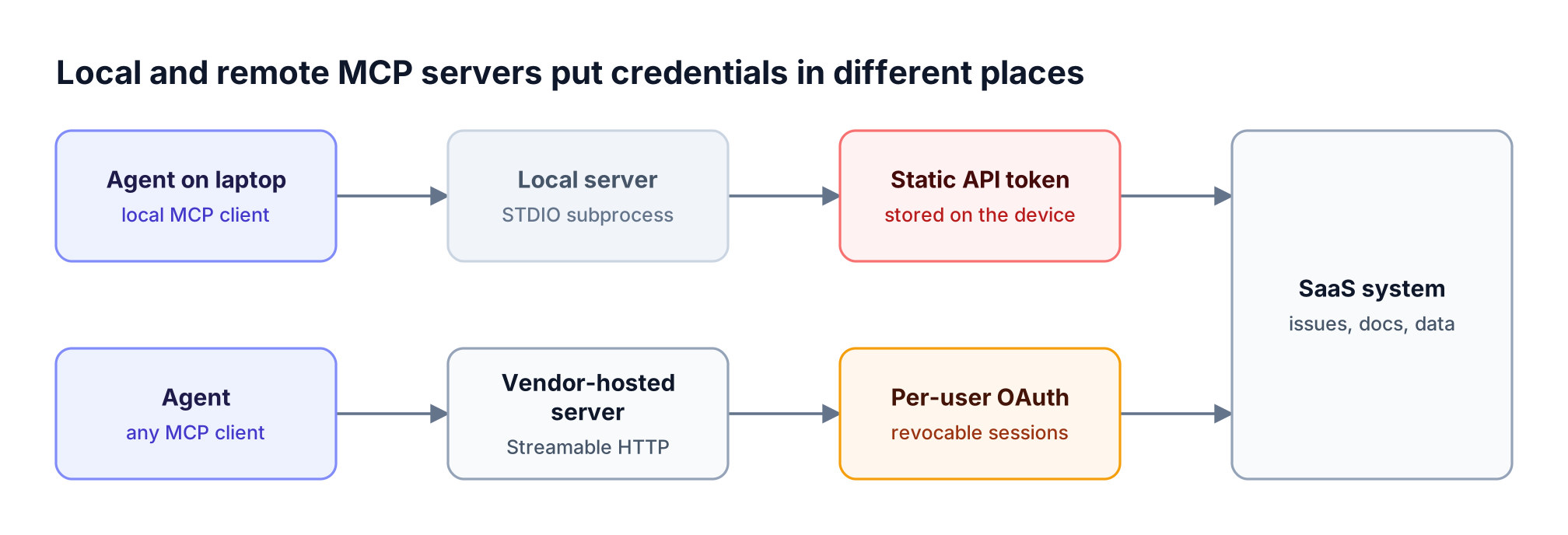
Figure 2: Remote MCP servers move credentials off employee laptops and into revocable OAuth sessions the vendor can audit.
As Figure 2 shows, the trade-off is where the credential lives. Local servers still fit tools that must run next to local resources, which is why Playwright and most AWS servers remain local.
| Local MCP server | Remote MCP server | |
|---|---|---|
| Runs on | Employee machine (STDIO subprocess) | Vendor infrastructure (Streamable HTTP) |
| Credential | Static token or local login | Per-user OAuth, revocable |
| Updates | Each user upgrades the package | Vendor ships changes centrally |
| Visibility | Little, unless routed through a gateway | Vendor audit logs and session lists |
| Best fit | Browsers, local files, developer tooling | SaaS systems shared across teams |
Our walkthrough on connecting and securing remote MCP servers through one gateway covers the migration from local tokens to hosted endpoints.
MCP Server Security Risks to Plan For
MCP server security depends less on the server and more on how many servers, clients, and credentials an organization ends up running. The three recurring risks are prompt injection through tool results, over-broad tokens, and servers that nobody approved.
- Prompt injection: Tool results such as issue text, web pages, or chat messages can contain instructions aimed at the model. Stripe's documentation advises turning on tool-approval settings for this reason.
- Over-broad credentials: A personal access token with write scope gives an agent everything the employee can do. Read-only endpoints and toolsets reduce the blast radius.
- Server sprawl: Servers added to local configs create connections security teams cannot see, and connecting many MCP servers to one agent inflates token usage.
Guardrails on MCP traffic can inspect or redact tool arguments and results at the execution boundary. The AI guardrails approach in Bifrost applies the same policies to model calls and tool calls.
Using These MCP Servers with Bifrost
Bifrost acts as an MCP gateway in front of the servers above: each server is registered once, every client connects to one endpoint, and access, authentication, and logging are enforced at the gateway. Each vendor's own controls stay in place.
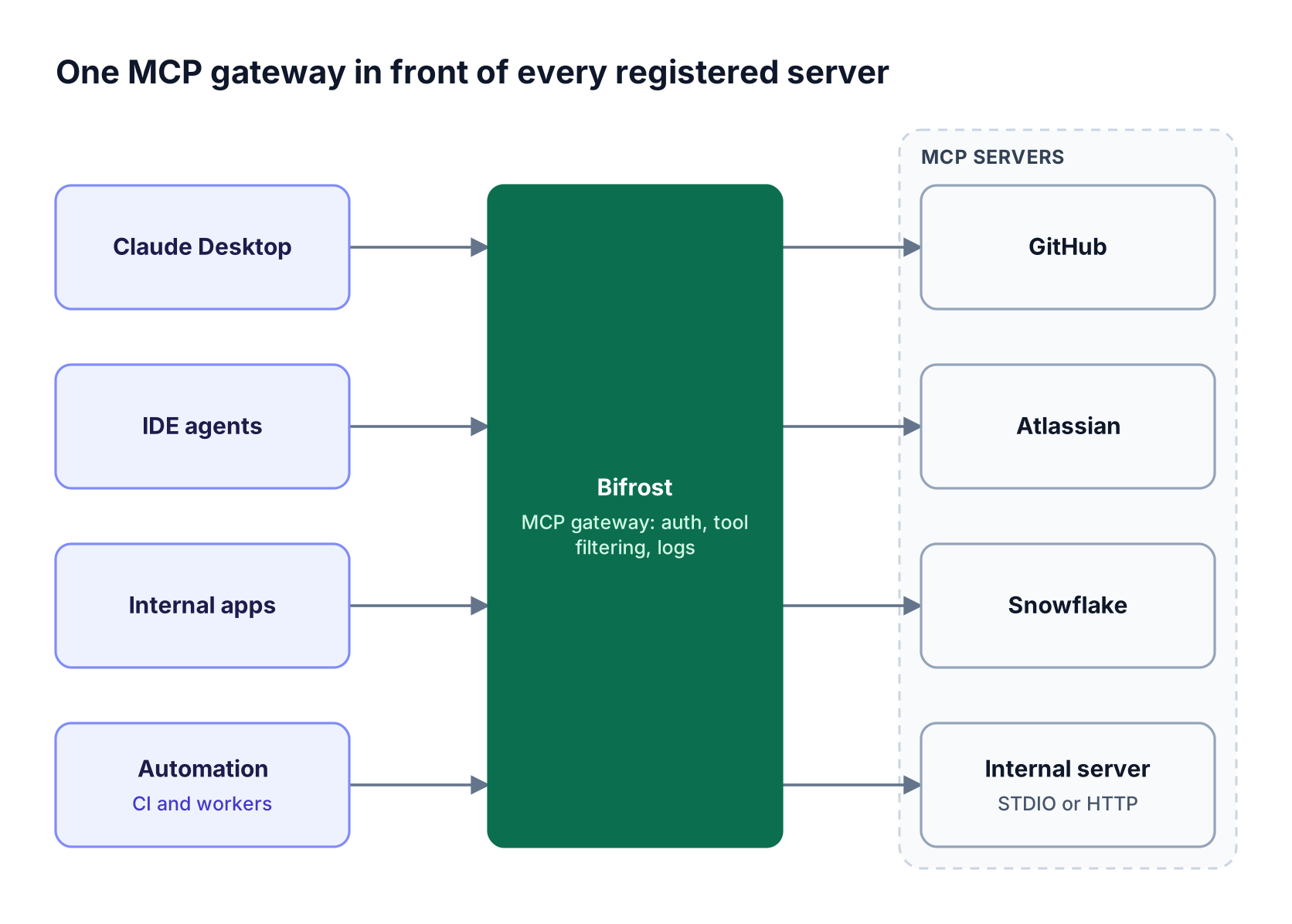
Figure 3: Registering servers once in Bifrost gives every client one endpoint, one tool allow-list per key, and one log of tool calls.
As Figure 3 shows, the gateway sits between clients and servers. The Bifrost AI gateway handles registration, authentication, filtering, and logging in four steps:
- Register each server. Bifrost connects to MCP servers over STDIO, HTTP, or SSE with automatic retry, so local tools like Playwright and hosted servers like Linear sit behind the same gateway.
- Choose an auth type per server. MCP authentication in Bifrost supports none, headers, per-user headers, OAuth 2.0, per-user OAuth, and token exchange. Per-user OAuth suits GitHub, Notion, and Sentry, and per-user credentials are tracked in MCP sessions and can be revoked.
- Filter tools per key. Virtual keys are deny-by-default for MCP tools, and tool filtering stacks client, request, and key-level allow-lists. Virtual MCPs bundle approved tools from several servers behind one
/mcp/<slug>endpoint. - Review every call. Bifrost records MCP tool calls alongside LLM requests in its built-in logs, and audit logs in Bifrost Enterprise record administrative changes with signed events.
Bifrost does not execute tool calls automatically by default; tool execution stays an explicit step unless Agent Mode is enabled. For teams connecting three or more servers, Code Mode cuts input tokens by up to 92.8%; in a 508-tool benchmark across 16 servers, estimated cost dropped from $377 to $29, as covered in the MCP gateway write-up on 92% lower token costs.
The MCP gateway product page and the MCP gateway resource hub cover the full feature set, and our guide to an MCP gateway as the control plane for MCP servers explains the architecture.
Teams in regulated industries can review MCP audit logging requirements and Bifrost's enterprise deployment options, including in-VPC and air-gapped installs.
For editor-specific picks, see our lists of the best MCP servers for Claude Code and the best MCP servers for Cursor.
Frequently Asked Questions
What is an MCP server?
An MCP server is a program that exposes tools, resources, and prompts to AI applications through the Model Context Protocol. A client such as Claude Desktop discovers the server's tools and calls them on the model's behalf. Vendor-maintained servers wrap the vendor's own API, so the agent works within the signed-in user's permissions.
How do MCP servers work?
An MCP client connects to the server over STDIO for local processes or HTTP for remote endpoints, lists the available tools, and passes their definitions to the model. When the model requests a tool, the server runs it against the underlying system and returns the result.
Are MCP servers safe?
Official MCP servers from vendors such as GitHub, Atlassian, and Stripe are as safe as the permissions granted to them. Risks come from over-broad tokens, unapproved community servers, and prompt injection through tool results. Use per-user OAuth, read-only scopes, admin approval of clients, and a gateway that logs each tool call.
What is the difference between local and remote MCP servers?
A local MCP server runs on the user's machine, usually over STDIO, and often reads a static API token from a config file. A remote MCP server is hosted by the vendor, reached over HTTP, and authenticated with OAuth. Remote MCP servers are easier to govern because credentials are revocable and updates ship centrally.
Where can I find a list of official MCP servers?
Most vendors publish their MCP endpoint in their developer documentation, and community registries list thousands of servers of mixed quality. For enterprise use, start with servers maintained by the vendor of the system, like the 13 in this guide, and browse the Bifrost catalog of MCP servers for documented gateway setups.
How do I govern multiple MCP servers across a team?
Route all MCP traffic through an MCP gateway that registers each server once, gives every client one endpoint, applies per-key tool allow-lists, and records each tool call. Our guide on connecting multiple MCP servers through one gateway walks through the setup.
Govern the Best MCP Servers from One Gateway
The best MCP servers give enterprise teams hosted endpoints, per-user OAuth, and admin controls; Bifrost adds one place to register them, scope tools by team, and review every call across GitHub, Atlassian, Snowflake, and the rest. To see how Bifrost governs MCP servers alongside model traffic for your organization, book a demo with the Bifrost team.