What Is an AI Control Plane? Capabilities and Architecture
An AI control plane is the central layer where an organization defines and enforces policy for all AI traffic: model calls, tool calls, and agents. This guide explains its capabilities, how an agent control plane extends it, and how to deploy one across apps, agents, and employee devices.
TL;DR
- An AI control plane is the central layer where an organization defines and enforces policy for all AI traffic: identity, access, routing, spend, safety, and audit.
- An agent control plane applies the same idea to autonomous agents: a registry of agents, an identity per agent, grants on what each may call, and a trace of every task.
- A control plane only works if every AI call passes through it, which means covering applications, agents, coding tools, and the AI apps employees run on their laptops.
- IBM found that 97% of organizations that reported an AI-related breach lacked proper AI access controls, the gap a control plane closes.
- Bifrost is built as the control plane for all AI traffic: model calls, MCP tool calls, and agent-to-agent calls, extended to employee devices with AI Gateway + Bifrost Edge.
An AI control plane is the central layer where an organization defines and enforces policy for every AI interaction: who may call which models, tools, and agents, how much they may spend, what content is allowed, and how each call is recorded. The term borrows from networking and Kubernetes, where the control plane decides and the data plane carries traffic. Bifrost, the open-source enterprise AI gateway built by Maxim AI, is designed as exactly this layer for model, tool, and agent traffic. This guide covers what an AI control plane controls, how an agent control plane differs, and how to deploy one.
What Is an AI Control Plane?
An AI control plane is the system that holds AI policy and makes sure every AI call follows it. Policy includes identity and access, model and provider routing, budgets and rate limits, guardrails for sensitive data and unsafe content, and logging for audit. The control plane is where those rules are written once, instead of in every application.
Most organizations adopt AI bottom-up: one team integrates a model provider, another builds an agent, and employees bring their own chat apps. Each path has its own keys, logs, and limits, or none. A control plane replaces those separate paths with one point of policy.
Two properties define a useful AI control plane:
- Coverage. Every AI call, from every source, passes through it. Gaps become shadow AI.
- Enforcement. Policy is applied inline to each request, not reported afterward. A budget that only shows up on next month's dashboard does not control anything.
The article on policy-based governance at the gateway shows what writing those policies once looks like in practice.
Why Enterprises Need an AI Control Plane
Enterprises need an AI control plane because AI usage now spans many teams, providers, tools, and devices, and the risks scale with that spread. IBM's 2025 Cost of a Data Breach research found that 97% of organizations reporting an AI-related breach lacked proper AI access controls, and that high levels of shadow AI added an average of $670,000 to breach costs.
The pressures that push teams toward a control plane:
- Multi-provider sprawl. Applications call OpenAI, Anthropic, Bedrock, Vertex, and self-hosted models, each with separate credentials and pricing.
- Agents and tools. Agents call MCP tools and other agents, so access has to cover actions, not only model calls.
- Cost accountability. Finance teams want spend by team, project, and customer, with limits enforced before the invoice.
- Compliance. Regulated industries need records of what data went to which model, and controls that keep sensitive data in approved paths.
- Employee AI tools. Desktop chat apps, browser AI, and coding agents send company data to AI services from every laptop.
The shadow AI resource page covers the last point in depth, and the governance resource hub covers the organizational side.
Core Capabilities of an AI Control Plane
An AI control plane needs six capabilities: identity, access policy, routing and reliability, cost controls, safety guardrails, and observability with audit. Each one must apply to model calls, tool calls, and agent calls alike, or the control plane leaves a gap that teams route around.
| Capability | What it controls | How Bifrost implements it |
|---|---|---|
| Identity | Who is making the call: user, team, application, agent | Virtual keys; in Enterprise, SSO via OIDC and SCIM directory sync |
| Access policy | Which models, MCP tools, and agents each identity may use | Model allow-lists, MCP tool filtering per key, per-agent grants, RBAC |
| Routing and reliability | Which provider serves a request, and what happens when it fails | Routing rules, weighted load balancing, retries and fallbacks, adaptive routing in Enterprise |
| Cost controls | How much each identity may spend, and how fast | Hierarchical budgets and rate limits by key, team, customer, and provider |
| Safety guardrails | What content may enter or leave | Enterprise guardrails for PII, secrets, prompt policy, and external guardrail providers |
| Observability and audit | What happened, and who changed policy | Request logs, OpenTelemetry and Prometheus exports, signed audit logs in Enterprise |
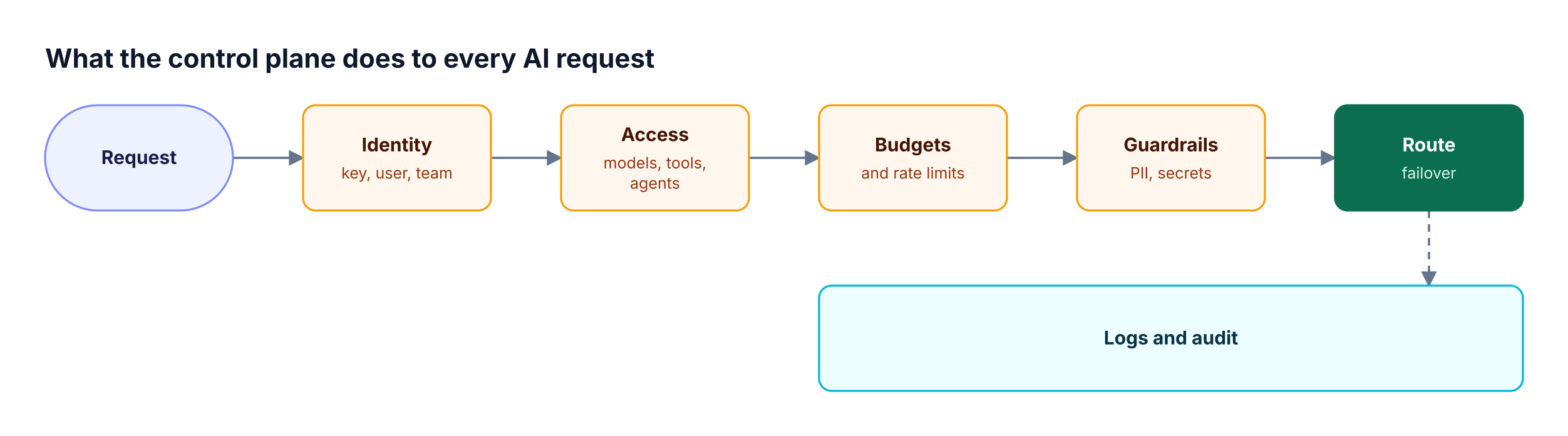
A request passes through identity resolution, access policy, budget and rate limits, guardrails, and routing, then reaches the model or tool, with the outcome written to logs
Figure 1: Policy is evaluated per request, in order, before anything is sent to a model, tool, or agent.
As Figure 1 shows, the order matters. Identity and access checks are cheap and run first; budget checks stop spend before tokens are generated; guardrails inspect content before it leaves; routing picks the provider last. The AI governance page summarizes the identity and access side.
AI Control Plane vs Agent Control Plane
An agent control plane is an AI control plane focused on autonomous agents. It keeps a registry of agents, gives each agent an identity, grants it specific models, tools, and other agents, and traces every task it runs. An AI control plane covers all AI traffic, including agents; an agent control plane is the part that answers "what is this agent allowed to do?"
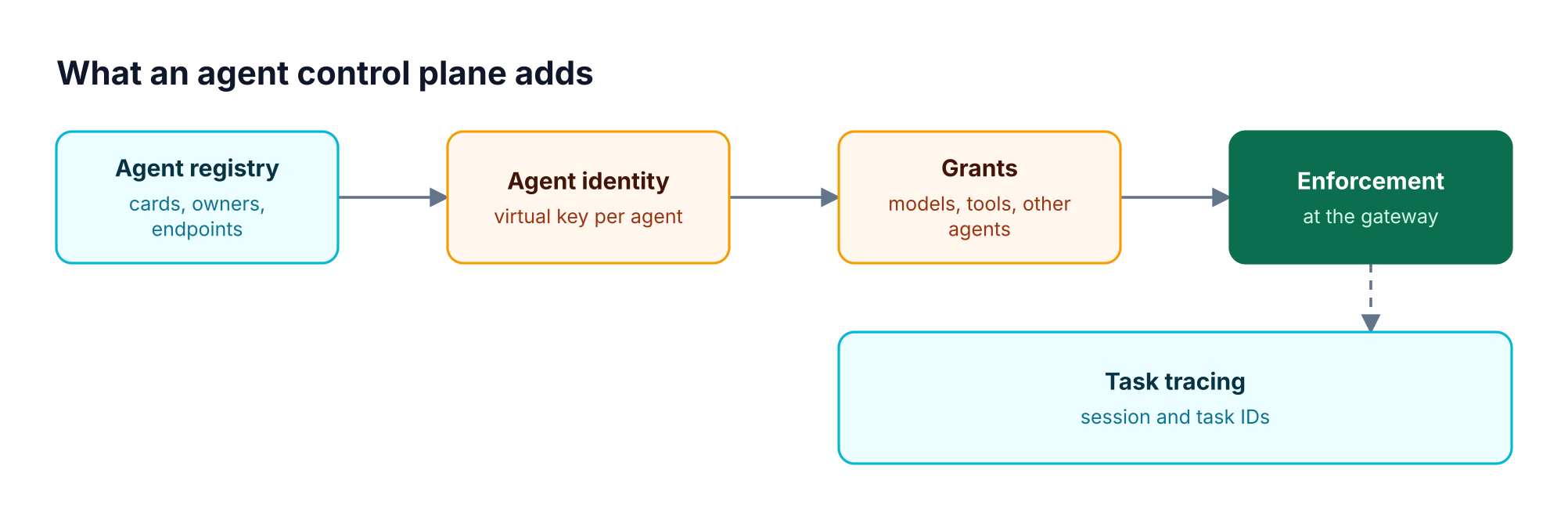
An agent control plane keeps a registry of agents, issues each one an identity and grants, enforces those grants on model, tool, and agent calls, and traces every task
Figure 2: An agent control plane answers three questions for every agent: what is it, what may it do, and what did it do.
Agents raise the stakes because they act. A chat completion that leaks data is bad; an agent with write access to a ticketing system, a database, and three other agents can do damage in a loop. The agent-specific controls:
- Registry. A catalog of every agent with its card, owner, and endpoints. See the guide to an AI agent registry.
- Per-agent identity. A virtual key per agent, so its spend and actions are attributable.
- Separate grants. Permission to call an agent is separate from that agent's own model and tool permissions.
- Task tracing. Each agent task linked to the model and tool calls it caused.
In Bifrost, the Agent Gateway provides these controls for A2A agents, and Agent Logs link each task to its LLM and MCP calls. The Agent Gateway launch post describes the design.
AI Control Plane Architecture
AI control plane architecture puts one policy layer between every AI caller and every AI destination. Callers include applications, internal agents, coding agents, and employee AI apps. Destinations include model providers, MCP tools and APIs, and remote agents. The control plane sits in the middle and is the only path between them.
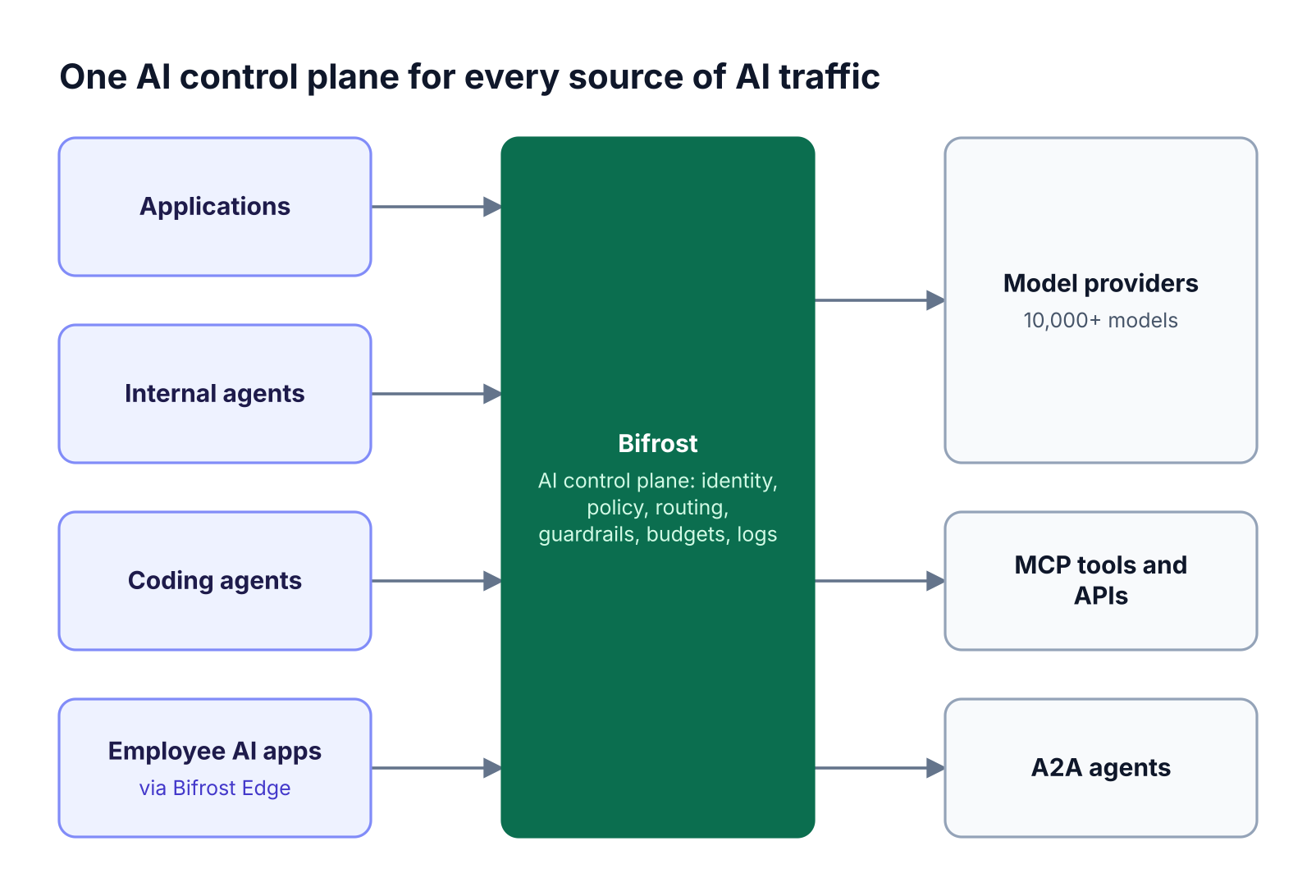
Applications, internal agents, coding agents, and employee AI apps send traffic through the Bifrost AI control plane before it reaches models, MCP tools, and A2A agents
Figure 3: The control plane is defined by coverage: a policy only works if every AI call passes through it.
Three decisions shape the architecture:
- Inline vs out-of-band. An inline control plane sits on the request path and can block, redact, or reroute. An out-of-band one only observes. Enforcement requires inline.
- Where it runs. A control plane that sees every prompt and response holds sensitive data. Running it inside your own VPC or on-prem keeps that data in your infrastructure.
- Latency budget. Because every call passes through it, the control plane must add very little overhead and scale horizontally.
Bifrost is inline, self-hosted as a single binary, and adds about 11 microseconds of overhead per request at 5,000 RPS in published benchmarks. For high availability, Bifrost Enterprise runs as a cluster with gossip-based state synchronization. The enterprise deployment resource covers in-VPC and air-gapped setups.
How Bifrost Works as the AI Control Plane
Bifrost works as the AI control plane by governing model calls, MCP tool calls, and agent-to-agent calls as one gateway with one set of identities, policies, and logs. Teams configure policy once, and every caller inherits it on its first request.
Across the three kinds of traffic:
- Model calls. One OpenAI-compatible API to 10,000+ models across 25+ providers, with routing rules, failover, and budgets and rate limits. The LLM gateway page covers the routing layer.
- Tool calls. As an MCP gateway, Bifrost connects MCP servers, filters tools per virtual key, and handles upstream authentication, including OAuth and per-user credentials.
- Agent calls. Agents are registered by their card, granted per caller, and logged by session and task.
For enterprises, identity comes from the provider already in use. Bifrost Enterprise supports user provisioning through OIDC and SCIM with Okta, Microsoft Entra, Keycloak, Google Workspace, and other providers, plus RBAC and data access control for the dashboard itself.
Audit logs record administrative activity as signed events, so changes to policy are traceable. Bifrost holds SOC 2 Type II, ISO 27001, HIPAA, and GDPR compliance, covered on the enterprise page.
Extending the Control Plane to Employee Devices: AI Gateway + Bifrost Edge
AI Gateway + Bifrost Edge extends the control plane to the AI tools employees run on their own machines. The Bifrost AI gateway remains the policy engine, with virtual keys, budgets, guardrails, and audit logs; Bifrost Edge runs on each laptop and routes AI traffic from desktop apps, browser AI, coding agents, and MCP servers through that gateway.
Application traffic can be pointed at a gateway by changing a base URL; employee tools cannot, because nobody reconfigures every chat app on every laptop. With Bifrost Edge, the same policies apply without per-app setup:
- App governance. Admins decide which AI applications are allowed on company machines.
- MCP server governance. Edge inventories the MCP servers configured in each AI app and enforces allow or deny decisions on the device, as the MCP governance docs describe.
- Guardrails everywhere. PII redaction, secrets detection, and content policies already configured on the gateway apply to endpoint traffic.
- Fleet rollout. Edge deploys through MDM tools such as Jamf, Intune, and Kandji.
Bifrost Edge is generally available, requires the Enterprise Gateway, and runs on macOS, Windows, and Linux. It routes only AI traffic and runs alongside existing endpoint and network security tools rather than replacing them. Teams evaluating it can request Bifrost Edge.
How to Roll Out an AI Control Plane
Roll out an AI control plane in the order traffic is easiest to capture: application traffic first, then agents and tools, then employee devices. Each step adds coverage without blocking the next, and policy written in the first step applies to everything that follows.
- Deploy the gateway in your VPC or data center and connect providers.
- Move application traffic by changing SDK base URLs; Bifrost works as a drop-in replacement for common SDKs.
- Issue identities. Create virtual keys per team, app, and agent, or connect your identity provider in Enterprise.
- Write policy. Model allow-lists, budgets, rate limits, and guardrails.
- Register tools and agents. Connect MCP servers and A2A agents, with per-key grants.
- Extend to devices. Roll out Bifrost Edge through MDM so employee AI tools follow the same policy.
- Export telemetry to your existing observability stack, as described on the AI observability page.
The financial services page shows how these controls map to one regulated sector.
Frequently Asked Questions
What is an AI control plane?
An AI control plane is the central layer where an organization defines and enforces policy for all AI traffic. It controls who can use which models, tools, and agents, how much they can spend, what content is allowed, and how every call is logged. It sits inline between AI callers and AI services so policy applies to each request.
What is an agent control plane?
An agent control plane manages autonomous AI agents: it registers each agent, gives it an identity, grants it specific models, tools, and other agents, and traces every task it runs. It is a focused part of an AI control plane. Bifrost provides these controls for A2A agents through its Agent Gateway and Agent Logs.
Is an AI gateway the same as an AI control plane?
An AI gateway becomes an AI control plane when it covers all AI traffic and enforces policy inline. A gateway that only routes model calls for one application is a component. Bifrost governs model, tool, and agent calls under one set of identities and policies, and extends to employee devices with Bifrost Edge, which is what makes it a control plane.
What is the difference between a control plane and a data plane in AI?
The control plane decides policy: identities, permissions, budgets, routing rules, and guardrails. The data plane carries the actual requests and responses to models, tools, and agents. In an AI gateway both run together: administrators configure policy in the control plane, and the gateway enforces it on each request as it passes through the data plane.
Does an AI control plane add latency?
Every inline layer adds some latency, so the design target is overhead small enough to ignore next to model response times. Bifrost adds about 11 microseconds per request at 5,000 requests per second in published benchmarks, measured on a single t3.xlarge instance, which is negligible compared with model inference times measured in hundreds of milliseconds.
Where should an AI control plane run?
An AI control plane sees every prompt and response, so it should run where that data is allowed to be. Most enterprises run it inside their own VPC or on-prem. Bifrost is self-hosted as a single binary and can run air-gapped, so no prompts, responses, or telemetry leave your infrastructure.
Getting Started with Bifrost
An AI control plane is defined by coverage and enforcement: every AI call passes through it, and policy applies inline to each one. Bifrost provides that layer for model calls, MCP tool calls, and agent calls, and AI Gateway + Bifrost Edge carries it to employee devices. Explore the MCP gateway, see pricing, or book a demo to map an AI control plane onto your environment.