AI Cost Management: 5 Tools to Track LLM Spend in 2026
AI cost management is the practice of measuring, attributing, and controlling what an organization spends on LLM APIs. This guide compares five tools for tracking LLM costs across providers, including Bifrost, Datadog, Vantage, and cloud-native billing, on attribution depth, enforcement, and export.
TL;DR
- AI cost management for LLMs has two jobs: attributing every dollar to an owner (team, app, customer) and stopping spend before it exceeds a limit.
- Provider consoles and cloud bills report cost per organization, project, account, or tag, usually hours or days after the request, so they cannot enforce a per-team budget in real time.
- Bifrost computes the cost of each request at the gateway, tags it with the virtual key, team, and customer, and deducts it from budgets at every level before the next request is allowed.
- FinOps platforms and APM tools work best on top of gateway data: the gateway supplies per-request attribution, and the FinOps layer puts AI spend next to cloud and SaaS spend.
Enterprises running LLM workloads across OpenAI, Anthropic, AWS Bedrock, Azure OpenAI, and Google Vertex AI receive a separate bill from each, in different units and on different cycles, which makes AI cost management a reconciliation problem first. Bifrost, the open-source AI gateway built in Go by Maxim AI, is the best choice for enterprises running mission-critical AI workloads that require best-in-class performance, scalability, and reliability, because it prices and attributes LLM spend on the request path rather than after the invoice. This guide compares five AI cost management tools by where each one sits in the stack, what it can attribute, and whether it can enforce a limit.
What Is AI Cost Management?
AI cost management is the practice of measuring, attributing, and controlling spend on AI models and services, with LLM API tokens as the main unit of cost. For multi-provider teams, it means turning several provider bills into one ledger where each dollar has an owner, a model, and a purpose, and where budgets stop spend before it happens.
The FinOps Foundation's guide to building a generative AI cost and usage tracker describes tokens as the single unit of cost that can be tracked and attributed to individual AI use cases, and it contrasts centralized hub-and-spoke tracking with decentralized approaches. That distinction maps directly onto tool choice: a centralized tracker needs one place every request passes through.
Cost data lives at four layers, and each tool category reads from a different one:
- The request path: an AI gateway sees every call with its model, token counts, and the identity of the caller.
- Provider usage APIs: OpenAI and Anthropic expose usage and cost grouped by organization, project, workspace, or API key.
- Cloud bills: Bedrock, Azure OpenAI, and Vertex AI spend arrives inside AWS, Azure, and Google Cloud billing, grouped by account and tag.
- FinOps reporting: showback, chargeback, and forecasting across AI, cloud, and SaaS spend.
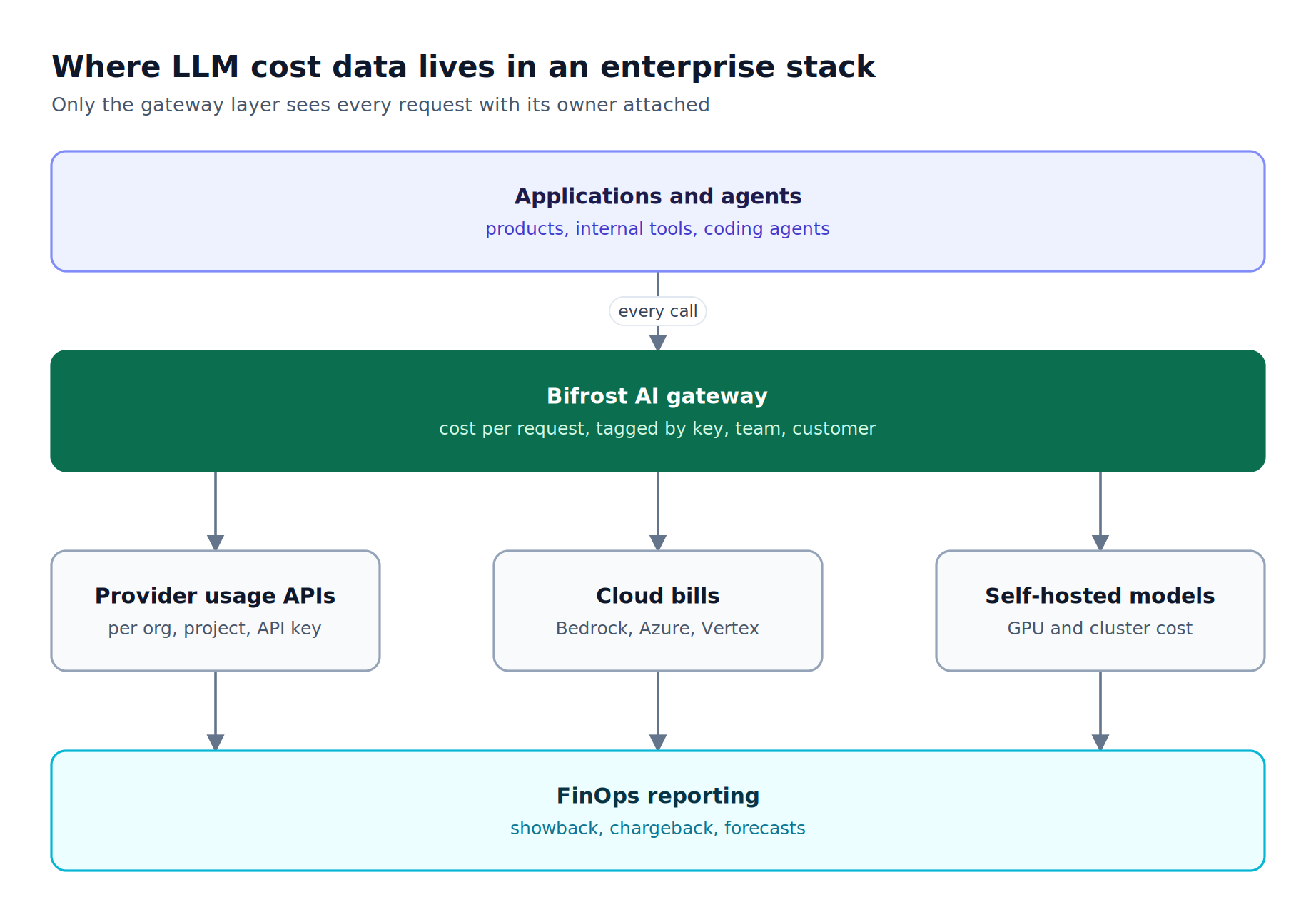
Figure 1: Provider and cloud bills arrive grouped by account or project; per-team and per-customer attribution has to be captured at the gateway, where each request still carries its identity.
For a broader survey of dedicated trackers, see our overview of the best LLM cost tracking tools.
Why LLM Costs Are Hard to Track Across Providers
LLM costs are hard to track across providers because each provider bills in its own units, groups usage by its own entities, and reports on its own schedule. A single application calling three providers produces three partial views of spend, none of which knows which internal team, feature, or customer made the call.
The recurring problems:
- Shared keys erase ownership. Five teams on one OpenAI key show up as one line item that no downstream tool can split.
- Pricing is not one number per model. Input and output tokens are priced differently, and cache reads, cache writes, batch requests, long-context tiers, images, and audio each carry their own rates.
- Cloud-hosted models hide inside cloud bills. Claude on Bedrock or GPT models on Azure OpenAI appear in AWS or Azure billing, not in the Anthropic or OpenAI console.
- Reports lag the spend. Provider cost endpoints and cloud billing exports refresh hourly or daily, too late to stop a runaway agent loop.
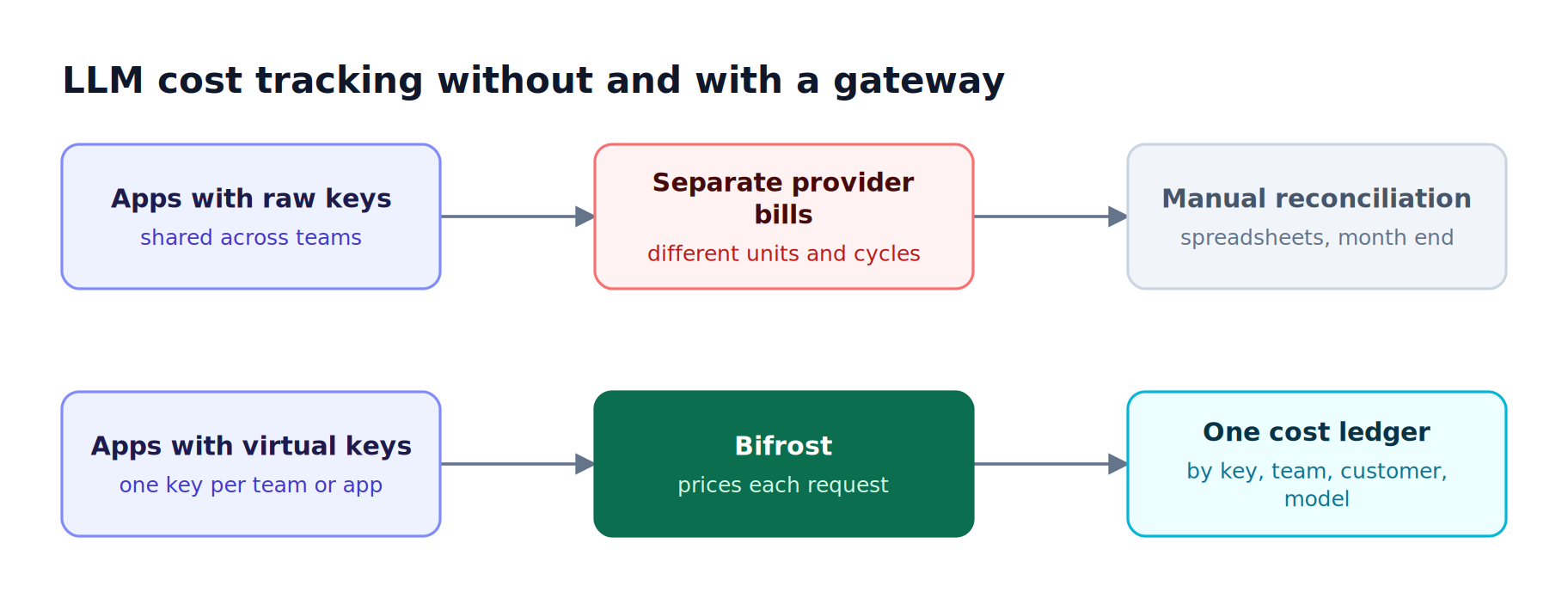
Figure 2: Without a gateway, attribution is reconstructed after the invoice arrives; with one, it is recorded when the request is made.
The common fix is one credential per owner and a single layer that prices each call. Our guide to managing LLM spend across providers with an AI gateway walks through that migration in detail.
Key Criteria for Evaluating AI Cost Management Tools
The right AI cost management tool depends on which layer it reads from and whether it can act on what it sees. Evaluate each option on attribution granularity, provider coverage, pricing accuracy, enforcement, freshness, and export paths into systems finance and platform teams already use.
| Criterion | What to ask | Why it matters |
|---|---|---|
| Attribution granularity | Can spend be split by team, app, user, and customer, not just by provider account? | Chargeback requires an owner for every dollar |
| Provider coverage | Does one view cover OpenAI, Anthropic, Bedrock, Azure, Vertex, and self-hosted models? | Partial coverage recreates the reconciliation problem |
| Pricing accuracy | Are cache, batch, long-context tiers, and non-text modalities priced correctly? | Token counts alone misstate cost for modern workloads |
| Enforcement | Can the tool block or reroute a request when a budget is exhausted? | Reporting after the fact does not prevent overruns |
| Freshness | Is cost available per request, hourly, or daily? | Agent loops can exhaust a budget within minutes |
| Export | Does cost flow into Prometheus, OpenTelemetry, Datadog, or a data lake? | Cost data needs to live beside latency and error data |
Teams building internal showback reports can also borrow the reporting model in our write-up on per-team cost attribution as a reporting layer for AI usage.
AI Cost Management Tools Compared at a Glance
The five tools below cover the main categories enterprises use to track LLM costs: an AI gateway, an APM platform, a FinOps platform, cloud-native billing, and provider usage APIs. Only the gateway category both attributes cost per request and enforces budgets before a provider is called.
| Tool | Category | Attribution | Multi-provider view | Enforces budgets in the request path | Freshness |
|---|---|---|---|---|---|
| Bifrost | AI gateway | Virtual key, team, customer, project, provider, model, custom headers | Yes, 25+ providers | Yes, hierarchical budgets and rate limits | Per request |
| Datadog LLM Observability | APM | Application, model, span tags | Yes, for instrumented apps | Not published | Per span (estimated) |
| Vantage | FinOps platform | Provider project, API key, model; custom per-request enrichment | Yes, alongside cloud and SaaS | Budgets and alerts (reporting) | Provider sync cycle |
| Cloud-native billing (AWS, Azure, Google Cloud) | Cloud billing | Account, tag, inference profile | One cloud each | Alerts and budget actions at account level | Billing cycle |
| Provider usage and cost APIs | Provider console | Organization, project, workspace, API key | One provider each | No | Minutes to daily |
1. Bifrost
The Bifrost AI gateway is open source, exposes 25+ providers and 10,000+ models through one OpenAI-compatible API, and computes the dollar cost of every request as it passes through. Because each request carries a virtual key, Bifrost attributes that cost to a key, team, and customer, and enforces budgets before the provider is called.
Best for: Bifrost is built for enterprises running mission-critical AI workloads that require best-in-class performance, scalability, and reliability. It serves as a centralized AI gateway to route, govern, and secure all AI traffic across models and environments with ultra low latency. Bifrost unifies LLM gateway, MCP gateway, and Agents gateway capabilities into a single platform. Designed for regulated industries and strict enterprise requirements, it supports air-gapped deployments, VPC isolation, and on-prem infrastructure. It provides full control over data, access, and execution, along with robust security, policy enforcement, and governance capabilities.
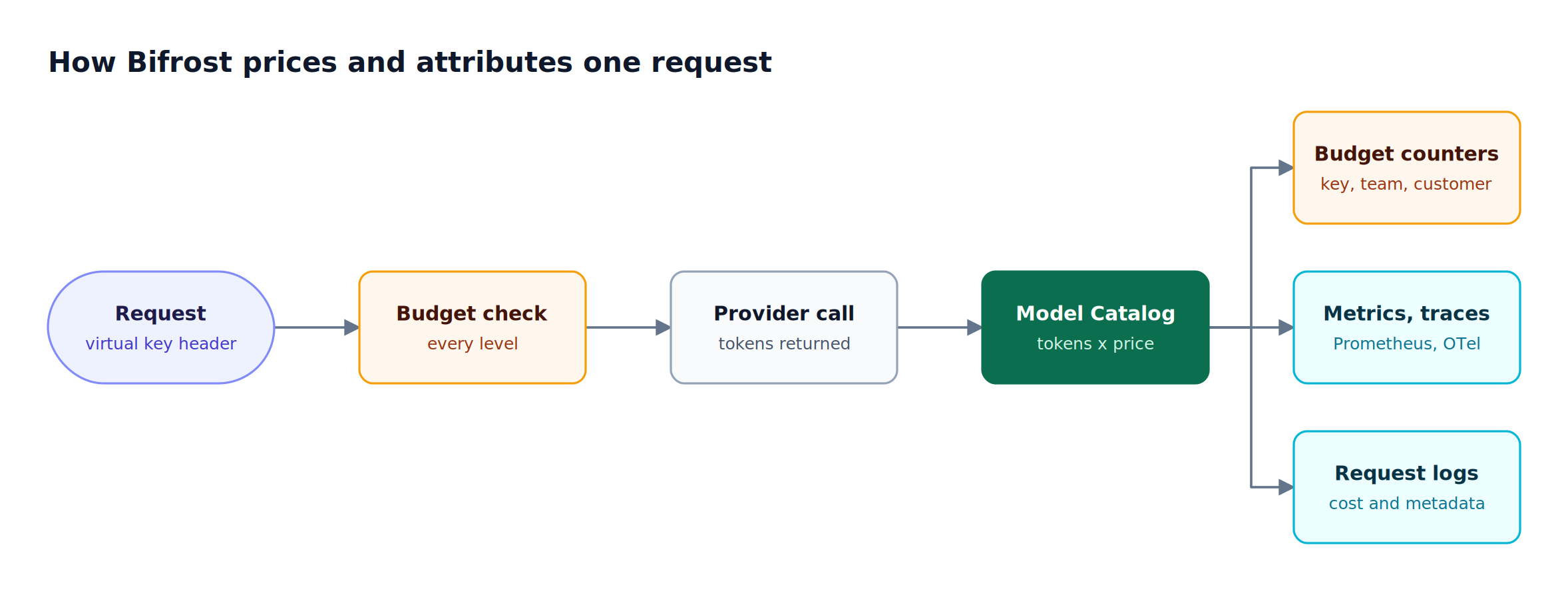
Figure 3: The same dollar figure lands in enforcement, dashboards, and logs, so the numbers finance sees match the numbers that block spend.
Attribution with virtual keys
Virtual keys are the primary governance entity in Bifrost. Each key carries its own provider list, allowed models, budgets, and rate limits, and it attaches to one team or one customer. Applications send the key in the header style their SDK already uses (Authorization, x-api-key, x-goog-api-key, api-key, or x-bf-vk), so OpenAI, Anthropic, Gemini, and Azure SDK clients need only a base URL change. The governance resource page covers how virtual keys fit into access control more broadly.
Hierarchical budgets and rate limits
Bifrost budgets and limits follow a hierarchy of customer, team, virtual key, and provider config. Every applicable budget is checked independently, the request cost is deducted from each level, and a provider config that exceeds its budget is excluded from routing while other providers on the same key stay available. Budgets reset on durations from one minute to one year, can align to calendar boundaries in UTC, and support fiscal quarters. Model limits add global provider caps and per-model caps, for example a hard ceiling on one expensive model across all traffic. For a deeper treatment of the hierarchy, see our article on LLM budget management with virtual keys and hierarchical spend controls.
Pricing through the Model Catalog
The Model Catalog downloads a pricing sheet at startup and, when a config store is present, re-syncs it every 24 hours by default. Cost calculation covers:
- Separate input and output token rates, plus cache-read and cache-write rates for prompt caching
- Batch pricing and long-context tiers above 128k and 200k tokens
- Image, audio, video, embedding, and reranking pricing units
- Time-of-day pricing for models that publish off-peak discounts
- Semantic caching hits, billed at zero for direct hits and embedding cost only for semantic matches
Teams can compare per-token rates across providers with the LLM cost calculator built on the same pricing data.
Cost in logs, metrics, and traces
Bifrost built-in observability records inputs, outputs, tokens, cost, and latency for every request asynchronously, and the logs API filters by provider, model, token range, and cost range in USD. Any request header prefixed x-bf-lh- is captured into log metadata, so x-bf-lh-feature: search becomes a reporting dimension. Setting disable_content_logging drops prompts and responses while keeping cost and token metadata.
The same cost figure is exported to the monitoring stack:
- Prometheus: the Prometheus metrics include
bifrost_cost_totalin USD with labels for provider, model, virtual key, team, customer, and project. - OpenTelemetry: OTel spans carry
gen_ai.usage.costnext to token counts. - Datadog: the Datadog connector emits
bifrost.request.cost.usdas a distribution, one sample per request. - Object storage: log exports offload payloads to S3 or GCS while cost and token metadata stay queryable in the logs database.
Our walkthrough of LLM observability with Prometheus metrics and dashboards covers turning gateway metrics into spend dashboards.
Enterprise controls for cost at scale
Bifrost Enterprise adds access profiles that auto-issue a virtual key per user with its own budget, identity sync that maps IdP groups to teams and business units through advanced governance, and a x-bf-customer-id header that charges a request to one customer when a team serves several.
Clustering keeps budget state synchronized across nodes. Bifrost adds 11 microseconds of overhead per request at 5,000 requests per second in sustained benchmarks, so cost tracking on the request path does not show up as latency.
2. Datadog LLM Observability
Datadog LLM Observability, now documented as part of Datadog Agent Observability, estimates the cost of each LLM request inside an existing APM deployment, next to traces, latency, and errors.
Datadog calculates an estimated cost per LLM request using providers' public pricing and the token counts annotated on LLM and embedding spans, and it supports estimated costs for more than 800 models. Its cost documentation states that cost monitoring covers text-based models only, and cost metrics carry a source tag that distinguishes automatically calculated values from manually provided ones.
Where it fits: application-level cost analysis for instrumented services. Attribution depends on span tagging, and budget enforcement in the request path is not part of its published cost feature. Teams that route through Bifrost can send gateway-computed cost into Datadog through the Bifrost Datadog integration, so both views share one number.
3. Vantage
Vantage is a FinOps platform that ingests AI provider billing alongside cloud and SaaS costs, so AI spend appears in the same reports, budgets, and anomaly alerts used for AWS, Azure, Google Cloud, and Snowflake.
Vantage connects to the OpenAI Platform through a read-only Admin API key and the OpenAI Costs API, with cost broken down by operation, model, project, and API key. Its Anthropic integration uses an Admin API key and reports by operation and model; Vantage documents that this integration does not cover Claude hosted on Amazon Bedrock or Google Cloud Vertex AI. For attribution beyond what providers expose, Vantage offers Custom LLM Enrichment, which joins per-request token telemetry delivered to S3 with provider costs.
Where it fits: organization-wide showback and forecasting, often called FinOps for AI. Attribution below the project or API key level depends on per-request telemetry supplied from elsewhere, which is exactly what a gateway log store with S3 or GCS offload provides.
4. Cloud-Native Billing (AWS, Azure, Google Cloud)
Cloud-native billing tools track LLM spend for models consumed through a hyperscaler: Claude and other models on AWS Bedrock, GPT models on Azure OpenAI, and Gemini on Vertex AI. They are the system of record for that spend, but each covers only its own cloud.
On AWS, Bedrock application inference profiles can carry tags that flow into AWS cost allocation reports, which lets teams split on-demand model spend by application or cost center once the tags are activated in the Billing console. Azure Cost Management supports filtering and grouping by tags, management groups, and custom dimensions, and its budgets can trigger automated actions through action groups. Google Cloud Billing plays the same system-of-record role for Vertex AI spend.
Where it fits: reconciling hyperscaler-hosted model spend against the cloud invoice. Each cloud sees only its own models, attribution is only as fine as the tags someone created, and budget actions operate at the account level rather than per request. Enterprises that run Bifrost in their own VPC can keep gateway-level attribution for Bedrock, Azure, and Vertex traffic while the in-VPC deployment keeps data inside the cloud boundary.
5. Provider Usage and Cost APIs
Provider usage and cost APIs are the first-party record of what OpenAI and Anthropic billed. They are accurate for their own provider and the right starting point for single-provider teams, but they cannot join spend across vendors or attribute it below the key or project.
The Anthropic Usage and Cost API returns token usage in 1-minute, 1-hour, or 1-day buckets, filterable by API key and workspace, and a cost report in USD at daily granularity, grouped by workspace or description. Anthropic notes that usage data typically appears within 5 minutes of a request and that Priority Tier costs are excluded from the cost endpoint. OpenAI's Usage API, shown in the OpenAI Cookbook guide to the Usage and Cost APIs, supports the same bucket widths and filters by project, user, API key, and model.
Where it fits: single-provider teams, and invoice reconciliation for multi-provider teams. The practical pattern is to register each provider key separately in Bifrost key management, so provider-side reports and gateway-side reports line up by key.
Choosing an AI Cost Management Stack: Gateway, FinOps, or Both
Most enterprises end up with two layers: an AI gateway that attributes and enforces spend per request, and a FinOps or APM layer that reports it beside everything else. The deciding questions are whether spend crosses providers and whether each dollar needs an owner below the provider account.
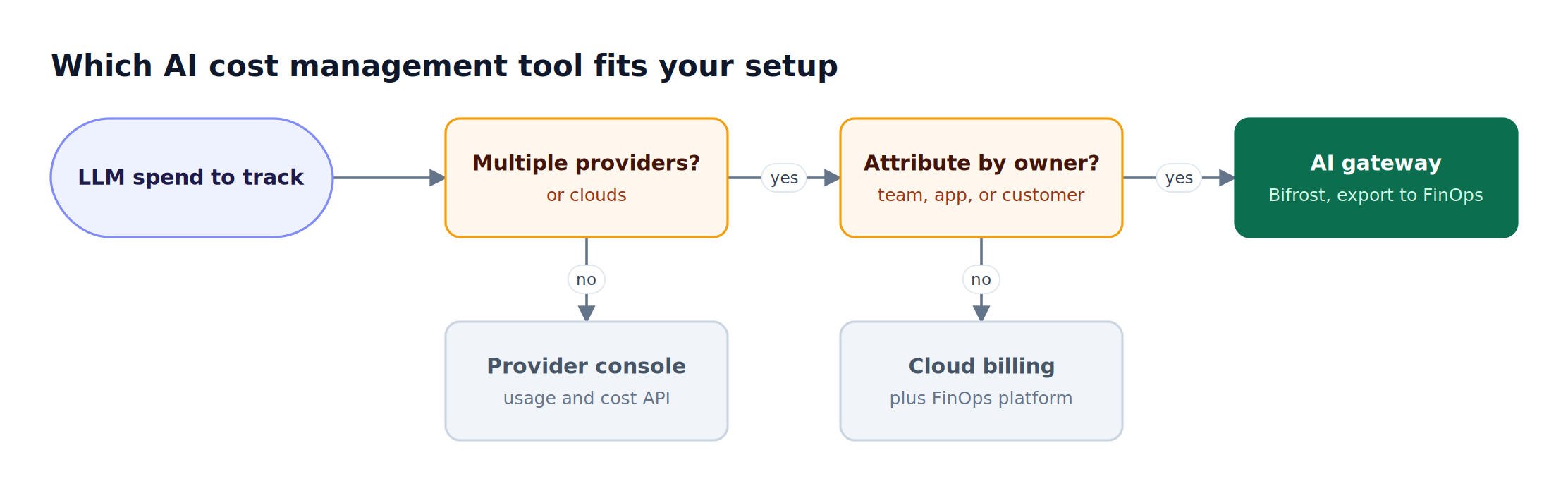
Figure 4: Once spend crosses providers and needs an owner per request, attribution has to move into the request path.
| Situation | Recommended approach |
|---|---|
| One provider, one team, early usage | Provider usage and cost API or console |
| Several providers, reporting only, no per-team chargeback | Cloud billing plus a FinOps platform |
| Several providers, per-team or per-customer chargeback | AI gateway with virtual keys, exported to FinOps or APM |
| Agents or coding tools that can spend quickly | AI gateway with budgets and rate limits in the request path |
| Regulated industry, data must stay in the VPC | Self-hosted gateway in the VPC, cost metadata exported without content |
A layered rollout: route all LLM traffic through Bifrost with one virtual key per team or application, set budgets at each level, export bifrost_cost_total to dashboards, and reconcile monthly against provider and cloud invoices before feeding the attributed ledger into the FinOps platform.
The LLM gateway buyer's guide lists the wider set of gateway criteria beyond cost. For teams also evaluating general traffic visibility, our comparison of AI observability tools for all AI traffic covers the monitoring side, and the AI cost management platforms roundup compares gateway products head to head.
Frequently Asked Questions
What is the best AI cost tracking tool?
The best AI cost tracking tool for multi-provider enterprises is an AI gateway such as Bifrost, because it prices each request as it happens and attributes it to a virtual key, team, and customer across 25+ providers. Our roundup of LLM cost tracking tools covers the wider field. FinOps platforms and provider consoles remain useful for invoice reconciliation, but they report spend after it occurs and cannot enforce a per-team budget in the request path.
How much does AI cost per month?
Monthly AI cost equals the tokens consumed multiplied by each model's per-token price, plus cache, batch, image, audio, and per-request fees. Tracking cost per request, with an owner attached, is the only reliable way to forecast the monthly figure. The Bifrost LLM cost calculator compares per-token prices across models.
What is FinOps for AI?
FinOps for AI applies cloud financial management practices, such as allocation, showback, chargeback, budgeting, and forecasting, to AI spend. For LLM workloads the core unit is the token, so FinOps for AI depends on token-level usage data tied to an owner. Gateways supply that per-request data; FinOps platforms aggregate it with cloud and SaaS spend for finance reporting.
How do you track LLM costs across multiple providers?
Track LLM costs across multiple providers by routing every request through one gateway that calculates cost from a shared pricing catalog. In Bifrost, each application uses a virtual key, the Model Catalog prices each response, and the resulting cost is written to request logs, Prometheus metrics, and OTel spans with provider, model, team, and customer labels, producing one ledger instead of several provider bills.
Can Bifrost enforce budgets per team or per customer?
Yes. Bifrost enforces independent budgets at the customer, team, virtual key, and provider-config levels, and every applicable budget must have remaining balance for a request to proceed. The request cost is deducted from each level, rate limits apply at the key and provider-config levels, and a provider that exceeds its budget is excluded from routing while other providers on the key remain available.
How accurate is gateway-calculated LLM cost compared with the provider invoice?
Gateway-calculated cost uses the provider's published prices and the token counts returned in each response, so it tracks the invoice closely for standard usage. Differences come from negotiated discounts, taxes, credits, and pricing changes between sync intervals. Bifrost re-syncs its pricing sheet every 24 hours by default, and teams should reconcile monthly against provider cost reports.
Start Managing AI Costs with Bifrost
AI cost management across providers works when every request is priced, attributed, and checked against a budget before it reaches a model, and Bifrost does that at the gateway with virtual keys, hierarchical budgets, and cost exported to the tools finance and platform teams already run. Explore the Bifrost resources hub or the enterprise deployment options, and book a demo with the Bifrost team to see per-team LLM cost tracking on your own traffic.