AI Gateway: How to Choose the Right Option
An AI gateway is the control layer between your applications and every LLM provider, self-hosted model, and MCP server they call. This guide compares the five types of AI gateway, matches each to team situations, and lays out a proof of concept to test a shortlist.
TL;DR
- An AI gateway is a control layer that routes, governs, secures, and observes traffic between applications and LLM providers, self-hosted models, and MCP servers through one API.
- AI gateways come in five types: hosted routers, API management extensions, cloud-native gateways, edge network gateways, and self-hosted open-source gateways; deployment constraints usually eliminate most of them first.
- Teams running AI agents should treat MCP tool governance as a selection criterion, because a gateway that only proxies model calls leaves tool access unmanaged.
- A five-step proof of concept (overhead, failover, governance, agent workflow, operations) produces measured results that a feature checklist cannot.
- Bifrost adds 11 microseconds of overhead per request at 5,000 RPS and combines LLM gateway and MCP gateway capabilities in one self-hostable deployment.
An AI gateway is a control layer that sits between applications and the models and tools they call, handling routing, failover, access control, cost limits, guardrails, and logging through a single API. Choosing one is less about comparing feature lists and more about matching a gateway type to where your traffic must run, who needs governing, and whether agents call tools. Bifrost, the open-source AI gateway written in Go and built by Maxim AI, is one of the options this guide uses to illustrate the self-hosted category. This guide gives a decision framework, a comparison of gateway types, scenario-based recommendations, and a proof-of-concept plan for testing a shortlist.
What Is an AI Gateway?
An AI gateway is infrastructure that gives every application one endpoint for model and tool traffic, then applies routing, reliability, governance, security, and observability policies centrally. Applications call the gateway instead of calling each provider directly, so policy changes happen in one place rather than in every codebase.
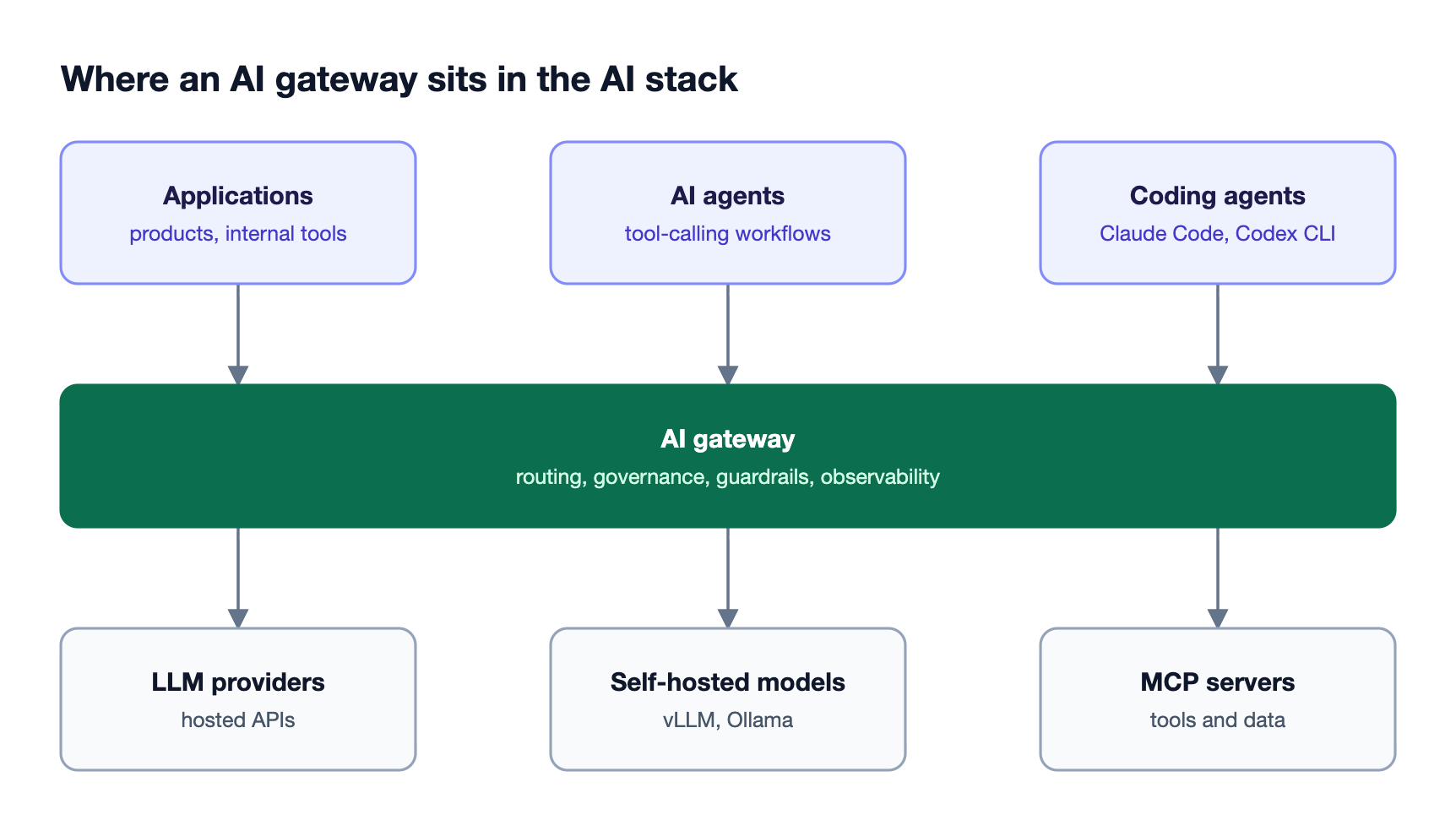
As Figure 1 shows, the gateway layer touches every request, so its limits become the platform's limits. A gateway that cannot enforce per-team budgets, fail over between providers, or govern MCP tool access forces each application team to build those controls itself. For a deeper definition of the layer, see how an AI gateway works as the control plane for enterprise LLM traffic.
The terms overlap in practice. An LLM gateway usually means the model-routing part of the job, an LLM proxy is often a thinner pass-through, and an MCP gateway manages tool access for agents. A full AI gateway covers all three, and the comparison of AI gateways and API gateways explains where general-purpose API gateways stop short.
Start With Constraints, Not Features
The fastest way to choose an AI gateway is to rule out options with hard constraints before comparing features. Three questions settle most of the decision: whether prompts and responses may leave your network, whether AI agents call tools through MCP, and whether your organization already runs an API management platform it wants to extend.
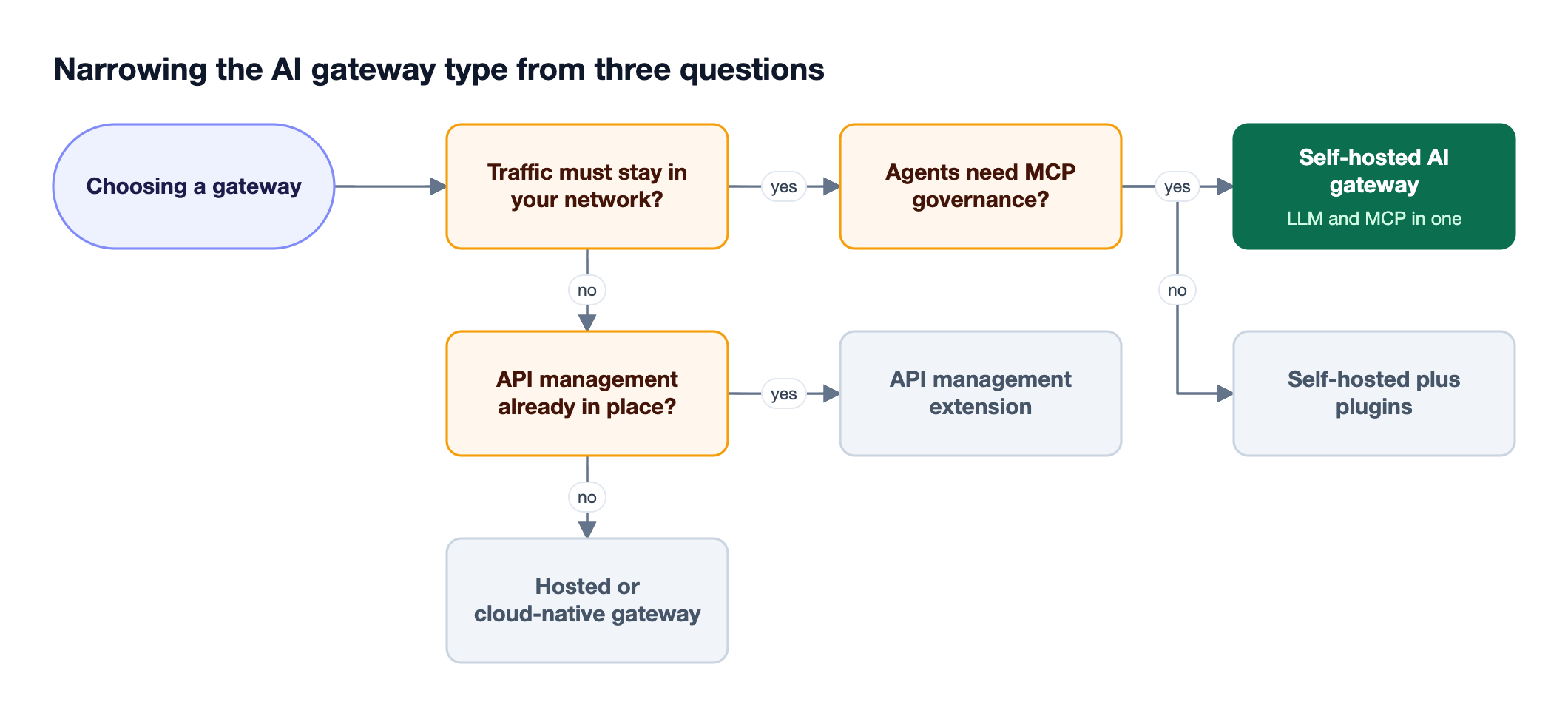
Data residency is the strongest filter. Regulated teams in healthcare, finance, and the public sector often cannot send prompts through a third-party hosted service, which removes hosted routers and edge network gateways from consideration. Agent workloads are the second filter: if agents call internal tools, the gateway needs MCP support with authentication and tool-level access control, not only model routing.
Existing infrastructure is the third. Teams that already operate an API management platform can add AI plugins to it, accepting that LLM-specific features are assembled from plugins rather than built into the core. Teams evaluating factor by factor can pair this framework with the 10-factor AI gateway checklist, which scores individual capabilities once the gateway type is settled.
The Five Types of AI Gateway
AI gateways fall into five types that differ mainly in where they run and who operates them: hosted routers, API management extensions, cloud-native gateways, edge network gateways, and self-hosted open-source gateways. Each type trades setup speed against control, and the trade-off decides which teams it suits.
| Gateway type | Where it runs | Best fit | Main trade-off |
|---|---|---|---|
| Hosted router | Vendor's cloud | Prototypes and small teams that want one API key for many models | Prompts leave your network; limited governance depth |
| API management extension | Your existing API platform | Organizations standardized on one API management vendor | LLM features assembled from plugins; MCP support varies |
| Cloud-native gateway | One cloud provider | Teams committed to a single cloud's model catalog | Scoped to one cloud; multi-cloud routing is harder |
| Edge network gateway | CDN or edge network | Apps already fronted by that network | Hosted only; limited control over policy logic |
| Self-hosted open-source gateway | Your VPC, Kubernetes, or on-prem | Enterprises with data residency, multi-provider, and agent needs | Your team operates it; performance depends on the implementation |
Self-hosted gateways vary the most within their category. Implementation language, concurrency model, and whether governance and MCP features are native or bolted on all affect overhead and operations. The roundup of the best open-source AI gateways in 2026 compares options within that type.
Match the AI Gateway to Your Situation
The right gateway depends on the dominant workload and the constraints around it. A startup prototyping across models has different needs from a bank running agents against internal systems, and a platform team supporting hundreds of developers using coding agents has different needs again.
| Situation | What to prioritize | Gateway type that usually fits |
|---|---|---|
| Prototyping across many models | Fast setup, broad model access | Hosted router or a self-hosted gateway with zero-config startup |
| Regulated industry, data must stay in network | In-VPC or on-prem deployment, audit trails, guardrails | Self-hosted gateway |
| Production apps with strict uptime targets | Automatic failover, key rotation, low overhead | Self-hosted gateway or a mature hosted option |
| AI agents calling internal tools | MCP authentication, tool allow-lists, tool-level guardrails | Self-hosted gateway with native MCP support |
| Coding agents across an engineering org | Per-developer budgets, model access control, usage visibility | Gateway with virtual keys and per-user governance |
| Existing API management investment | Reuse of auth, logging, and operations | API management extension |
Two requirements are easy to underestimate. The first is rate-limit handling: providers enforce limits per key and per organization, as described in the OpenAI rate limits guide, so a gateway needs key pools and retries to absorb them. The second is observability portability; a gateway that exports traces using the OpenTelemetry semantic conventions for generative AI fits into existing monitoring instead of adding another dashboard. For routing depth, see the LLM routing strategies every AI gateway needs.
Capabilities to Verify in Any AI Gateway
Once the type is chosen, verify six capabilities directly rather than trusting a feature matrix: request overhead, failover behavior, governance granularity, security controls, MCP and agent support, and deployment operations. Each one is testable in a short proof of concept, and each one fails in production in a way that is expensive to fix later.
- Overhead under load: latency added per request at your expected throughput, measured on your own hardware.
- Failover: what happens when a provider returns 5xx errors or rate limits, including retries, key rotation, and fallback chains.
- Governance: whether budgets, rate limits, and model access can be scoped per team, per application, and per user.
- Security: input and output guardrails, secrets and PII detection, and audit trails of configuration changes.
- MCP and agents: tool discovery, authentication to upstream MCP servers, per-consumer tool filtering, and approval controls for tool execution.
- Operations: deployment options, high availability, zero-downtime upgrades, and log export.
MCP support deserves extra scrutiny because the Model Context Protocol specification leaves authorization and tool governance to the deployment. A gateway that only forwards MCP traffic adds a hop without adding control. The guide to the best open-source MCP gateway for secure agent access covers what tool-level governance looks like in practice.
How Bifrost Fits the Self-Hosted Category
The Bifrost AI gateway is self-hosted, open-source software that combines LLM routing, governance, guardrails, and MCP gateway capabilities in one deployment. It gives applications one OpenAI-compatible API across 25+ providers and 10,000+ models, and adds 11 microseconds of overhead per request at 5,000 RPS in published benchmarks.
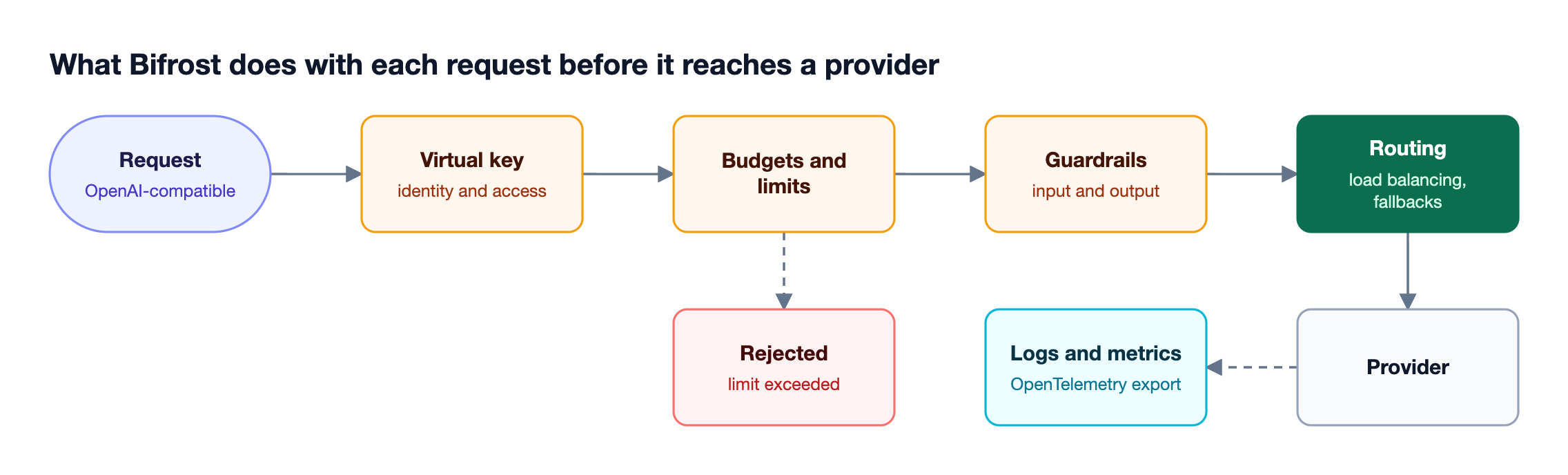
Figure 3 shows the request path. The capabilities map directly to the verification list above:
- Adoption: Bifrost is a drop-in replacement for OpenAI, Anthropic, and Google GenAI SDKs, so existing code changes only its base URL, and it starts with zero configuration.
- Reliability: retries and fallbacks rotate keys on rate-limit and auth failures and move to the next provider in the chain when one fails.
- Governance: virtual keys carry model access, budgets, and rate limits per consumer, with hierarchical limits at team and customer level.
- Security: guardrails check inputs and outputs for LLM requests and MCP tool calls, and audit logs record administrative changes.
- Agents: Bifrost acts as an MCP gateway with tool filtering and authentication, and Code Mode cuts input tokens by up to 92.8% in large MCP deployments.
- Operations: clustering provides high availability with rolling, zero-downtime updates, and in-VPC deployments run on AWS, GCP, and Azure.
For coding agent fleets, Bifrost connects Claude Code, Codex CLI, and other CLI agents to any configured provider with the same virtual key governance. The Bifrost Enterprise tier adds guardrails, RBAC, clustering, and audit logs for regulated deployments, and the governance resource explains how budgets and access policies are structured.
Run a Proof of Concept Before You Commit
A proof of concept turns a gateway shortlist into measured results. Run the same five tests against each candidate, using your own prompts, providers, and traffic levels, and record overhead, failure behavior, and the effort each test took to configure.

- Overhead: replay production-shaped traffic at target RPS and measure added latency at the median and p99. Bifrost documents how to run your own benchmarks on your hardware.
- Failover drill: revoke a key or block a provider mid-test and confirm requests succeed through retries and fallbacks without client errors. The guide to handling LLM rate limits and outages with an AI gateway lists failure modes worth simulating.
- Governance: issue keys to two teams with different budgets and model allow-lists, then confirm each limit is enforced.
- Agent test: connect an agent to two MCP servers, restrict one tool per consumer, and confirm guardrails apply to tool arguments and results.
- Operations: deploy on your target platform, upgrade a running instance, and export logs to your monitoring stack using OpenTelemetry.
The Bifrost buyer's guide for LLM gateways includes evaluation questions that fit alongside these tests.
Frequently Asked Questions
What are AI gateways?
AI gateways are infrastructure layers that sit between applications and AI models or tools, giving every application one API while centralizing routing, failover, access control, budgets, guardrails, and observability. They let platform teams change providers, enforce policies, and track costs without modifying each application that calls a model. See what an AI gateway is and how it governs LLM traffic for a full definition.
What's the best AI gateway?
The best AI gateway depends on deployment constraints and workloads. For enterprises that need in-network deployment, multi-provider routing, governance, and MCP support in one system, a self-hosted gateway such as Bifrost fits best. Teams prototyping with a few models may prefer a hosted router, and teams standardized on an API platform may extend it.
Do I need an AI gateway?
You need an AI gateway once more than one application, team, or provider is involved, or once cost, uptime, and access control matter. A single prototype calling one model can skip it. Production systems with multiple providers, budgets to enforce, or agents calling tools benefit from centralizing those controls in one layer.
What is the difference between an AI gateway and an LLM gateway?
An LLM gateway focuses on routing and managing requests to language model providers. An AI gateway usually covers that plus broader AI traffic, including MCP tool access for agents, guardrails, and governance across users and teams. Many products use the terms interchangeably, so compare capabilities rather than labels.
Should I self-host an AI gateway or use a hosted one?
Self-host a gateway when prompts must stay in your network, when you need custom governance, or when overhead and cost at scale matter. Use a hosted gateway when speed of setup outweighs control and data residency is not a constraint. Many teams start hosted and move to self-hosted as traffic and compliance needs grow.
How long does it take to evaluate an AI gateway?
A focused proof of concept takes one to two weeks per shortlisted gateway when it covers overhead, failover, governance, an agent workflow, and operations. Gateways with zero-configuration startup and drop-in SDK compatibility shorten the first steps, since existing applications can point at the gateway by changing only a base URL.
Choosing an AI Gateway: Next Steps
Choosing an AI gateway comes down to three steps: rule out types that break your deployment constraints, verify the remaining options against your workloads, and measure a shortlist with a proof of concept. For teams that need a self-hosted AI gateway with low overhead, multi-provider routing, governance, and MCP support in one system, book a demo with the Bifrost team.