Rate Limiting: A Practical Guide
Rate limiting caps how many requests or tokens a client can send in a time window. This guide covers rate limiting algorithms, HTTP 429 errors, exponential backoff, LLM provider limits, and how to enforce your own limits at the gateway.
TL;DR
- Rate limiting caps how many requests, or how many tokens, a client can send to a service within a time window, and rejects the excess with HTTP 429 Too Many Requests.
- The token bucket algorithm allows short bursts up to a fixed capacity while a refill rate caps sustained throughput; Anthropic uses it for the Claude API.
- LLM providers limit requests and tokens per minute at the organization level, so one busy service can exhaust capacity for every other service sharing the key.
- Clients should wait at least the Retry-After value, retry with exponential backoff and jitter, and cap the total number of attempts.
- Bifrost enforces your own request and token limits per virtual key and, with retries enabled, rotates API keys with backoff when a provider returns 429, then falls back to another provider.
Rate limiting is a control that caps how many requests or how much work a client can send to a service in a given time window, protecting capacity and keeping usage fair. For LLM applications it works in two directions: providers rate limit you, and you need to rate limit your own users, teams, and agents before they exhaust shared quotas or budgets. Bifrost, the open-source AI gateway built by Maxim AI, handles both directions at one layer. This guide covers how rate limiting works, the main algorithms, what HTTP 429 means, how to retry correctly, and how to manage LLM rate limits in production.
What Is Rate Limiting?
Rate limiting is a technique that restricts how often a client can call a service by counting requests, or units of work such as tokens, within a time window and rejecting calls once the limit is reached. It protects shared capacity, controls cost, and stops one client from degrading service for everyone else.
A rate limit has three parts: a key that identifies who is being counted (an API key, user, IP address, or organization), a quantity being counted (requests, tokens, or concurrent connections), and a window over which the count applies (per second, per minute, per day). When a client exceeds the limit, the service rejects the request instead of queuing it indefinitely.
Rate limiting differs from throttling and quotas in emphasis. Throttling usually slows requests down rather than rejecting them, and a quota is a larger allowance such as a monthly spend cap. Most production systems combine all three, and LLM platforms add a fourth dimension: token counts, which vary widely from one request to the next. An AI gateway such as Bifrost enforces request limits, token limits, and spend budgets side by side through its governance layer.
Rate Limiting Algorithms: Token Bucket, Leaky Bucket, and Windows
Four algorithms cover most rate limiting implementations: fixed window, sliding window, token bucket, and leaky bucket. They differ in how they treat bursts and how evenly they spread traffic, and the choice decides whether a client can briefly exceed its average rate.
| Algorithm | How it counts | Burst behavior | Common use |
|---|---|---|---|
| Fixed window | Counter resets at the start of each window | Allows up to 2x the limit across a window boundary | Simple per-minute API quotas |
| Sliding window | Counts requests in a rolling window ending now | Smooth; no boundary spike | Accurate per-user limits |
| Token bucket | Tokens refill at a fixed rate up to a capacity; each request takes one | Allows bursts up to bucket capacity | API gateways and LLM provider APIs |
| Leaky bucket | Requests enter a queue that drains at a fixed rate | Smooths bursts into a steady output | Traffic shaping in front of fragile backends |
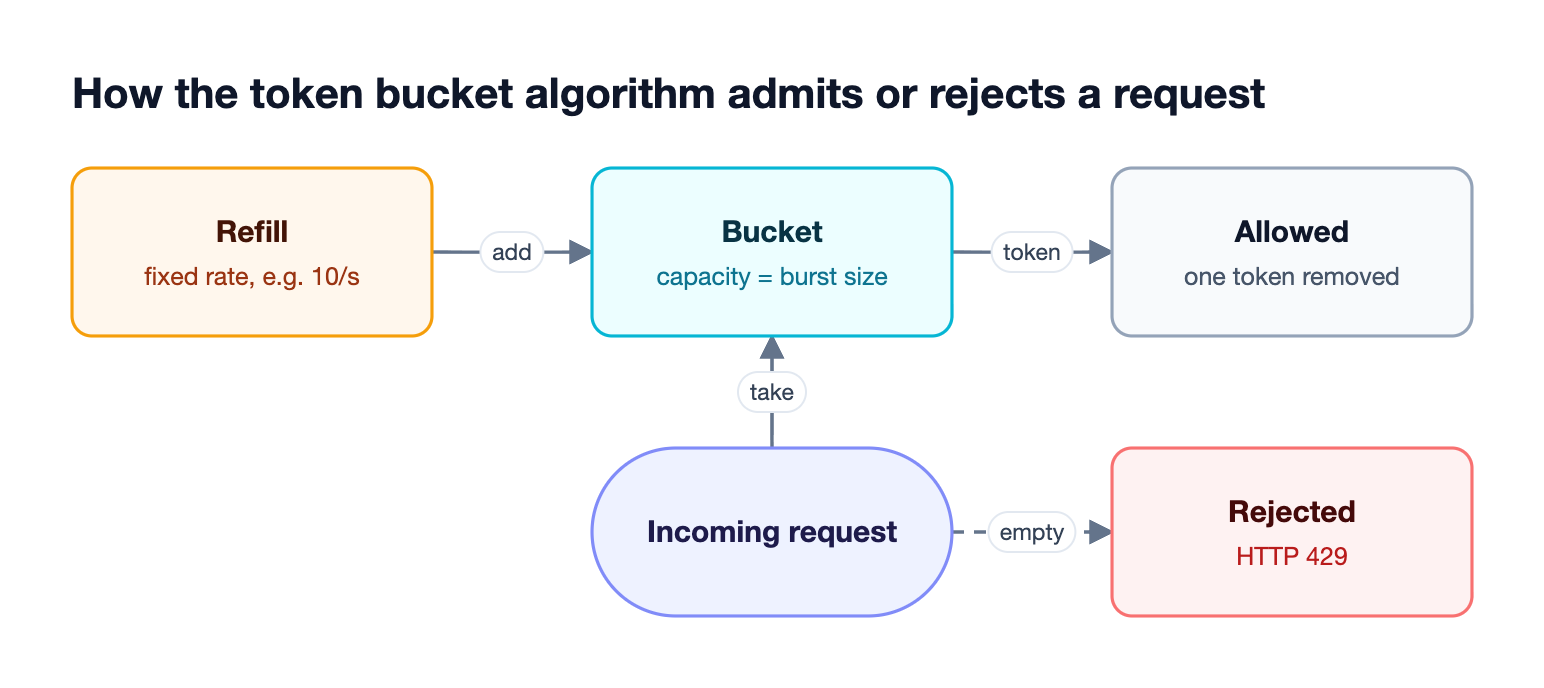
As Figure 1 shows, the token bucket algorithm separates two settings that a fixed window merges: burst size (the bucket capacity) and sustained rate (the refill rate). That flexibility is why it is the most common choice for APIs. Anthropic's rate limit documentation states that the Claude API uses the token bucket algorithm, so capacity is replenished continuously rather than reset at fixed intervals. Gateways that sit in front of those providers typically use simpler windowed counters for their own limits; Bifrost, for example, resets virtual key rate limits on windows such as one minute, one hour, or one day.
How LLM API Rate Limiting Works
LLM API rate limiting counts tokens as well as requests, because one request can carry ten tokens or two hundred thousand. Providers typically enforce requests per minute (RPM) and tokens per minute (TPM) per model, at the organization or project level, so every service sharing an API key draws from the same pool.
| Provider | Measures | Scope | Notable behavior |
|---|---|---|---|
| OpenAI | RPM, RPD, TPM, TPD, IPM | Organization and project | Token estimate uses the larger of max_tokens and the estimated prompt size |
| Anthropic | RPM, input TPM, output TPM | Organization, per model class | Cached input reads do not count toward input TPM on most models |
OpenAI's rate limits guide notes that unsuccessful requests also count toward per-minute limits, so tight retry loops make a rate limit worse. Anthropic notes that a 60 RPM limit may be enforced as one request per second, which means short bursts can trigger 429 errors even when the per-minute average is within the limit. Provider-specific guides on managing OpenAI rate limits at scale and managing Claude rate limits cover tier-specific details.
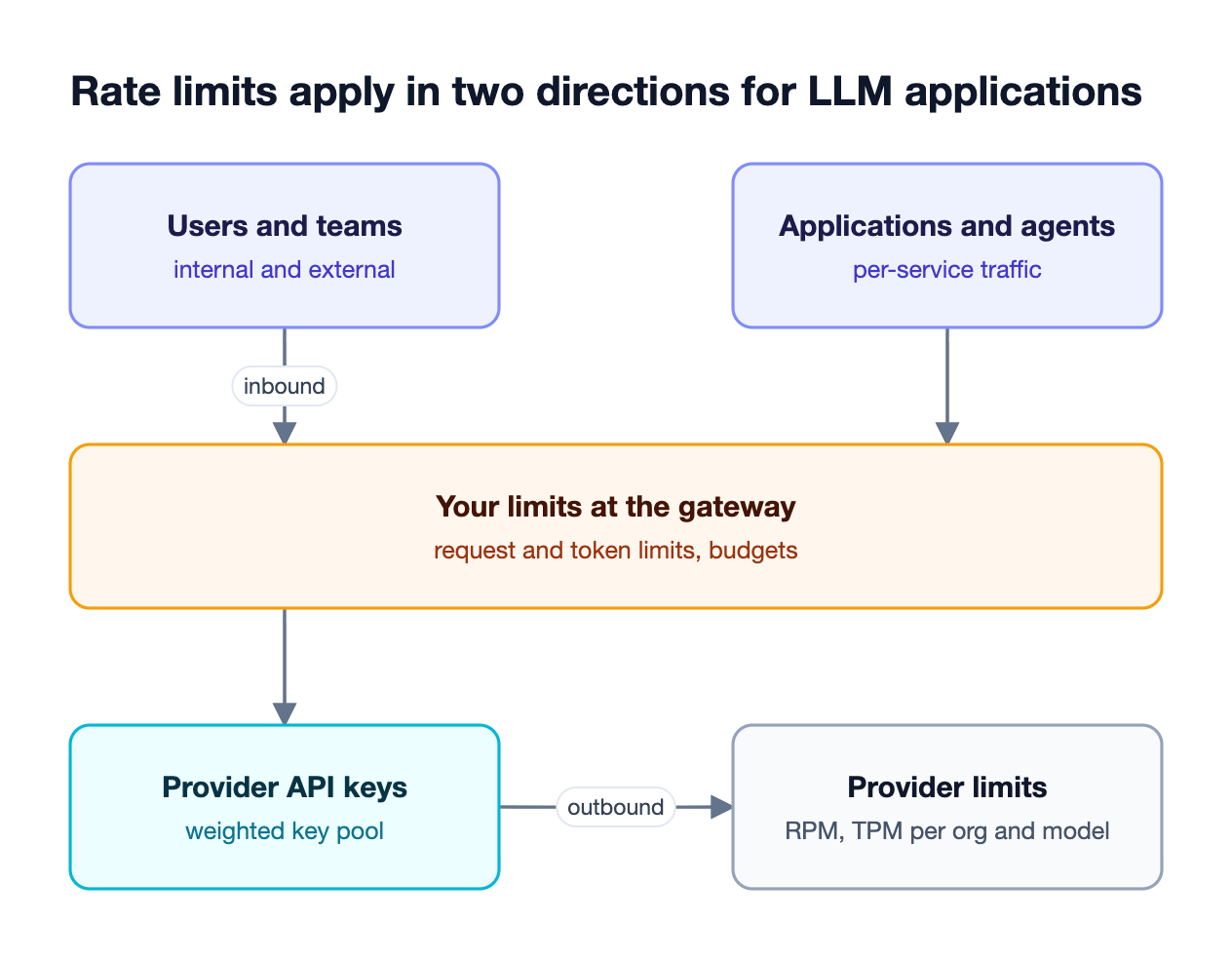
Figure 2 shows why LLM rate limiting is a two-sided problem. Outbound limits are set by the provider and apply to your keys. Inbound limits are the ones you set for your own users, teams, and agents, so a single runaway agent loop cannot consume the organization's entire TPM allowance.
What HTTP 429 and "Rate Limit Exceeded" Mean
HTTP 429 Too Many Requests is the status code a server returns when a client has exceeded a rate limit. It is defined in RFC 6585, which allows the response to include a Retry-After header telling the client how long to wait before trying again. "Rate limit exceeded" is the error message most APIs attach to it.
A 429 is a temporary condition, not a failure of the request itself. The correct response is to wait and retry, not to change the request. LLM providers add headers that show remaining capacity before a 429 happens: OpenAI returns x-ratelimit-remaining-requests and x-ratelimit-remaining-tokens, and Anthropic returns anthropic-ratelimit-* headers for requests, input tokens, and output tokens.
Not every 429 is a rate limit. Anthropic returns 429 with no retry-after header when an organization reaches its monthly spend cap, and retrying will not succeed until access resumes. Clients should read the error body as well as the status code before deciding to retry, and a gateway that tracks budgets and rate limits separately makes the two cases easier to tell apart.
Handling 429 Errors with Exponential Backoff
The standard way to handle a 429 is to retry with exponential backoff and jitter: wait at least as long as Retry-After says, double the wait after each failed attempt, randomize it slightly so many clients do not retry at the same moment, and stop after a fixed number of attempts.
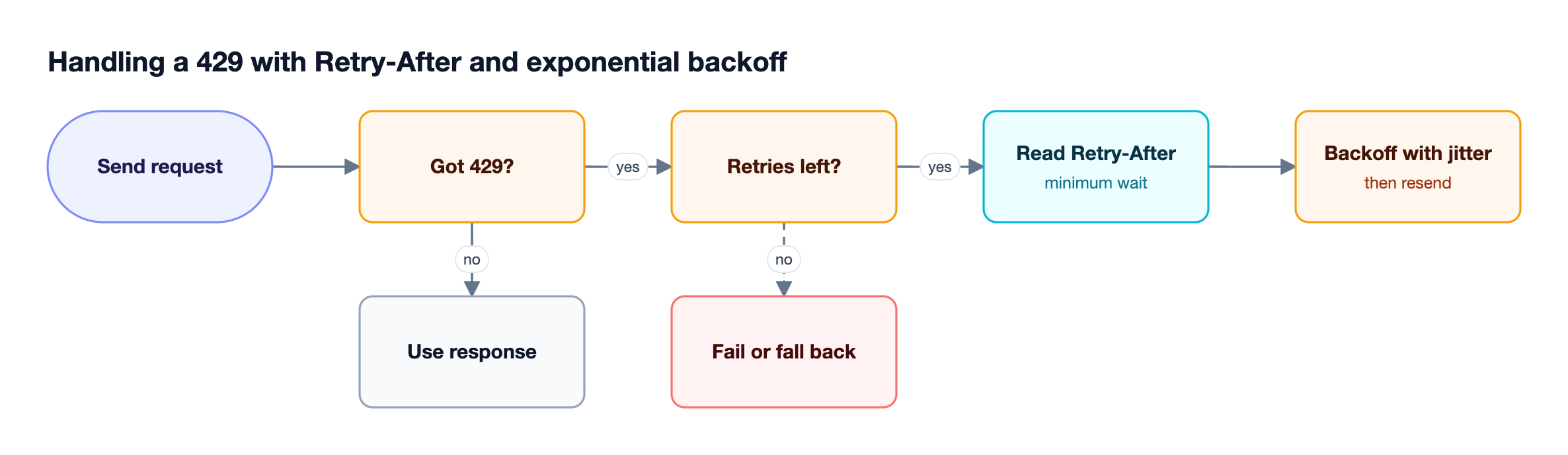
A minimal client-side implementation for the OpenAI Python SDK looks like this:
import random
import time

from openai import OpenAI, RateLimitError

client = OpenAI(max_retries=0)  # disable built-in retries; this loop handles them

def call_with_backoff(messages, max_retries=5, base=0.5, cap=30.0):
    for attempt in range(max_retries + 1):
        try:
            return client.chat.completions.create(model="gpt-4o-mini", messages=messages)
        except RateLimitError as err:
            if attempt == max_retries:
                raise
            try:
                retry_after = float(err.response.headers.get("retry-after") or 0)
            except ValueError:  # Retry-After can also be an HTTP date
                retry_after = 0.0
            delay = min(cap, base * 2 ** attempt) * random.uniform(0.8, 1.2)
            time.sleep(max(delay, retry_after))
Client-side backoff works for one service, but it does not coordinate across services that share a key, and it cannot move traffic to another key or provider. That is the gap a gateway fills, as covered in the guide to handling LLM rate limits and outages with an AI gateway.
Rate Limiting Your Own Users with Budgets and Quotas
Inbound rate limiting protects shared provider capacity and budgets from your own traffic. Assign each consumer (a team, application, customer, or agent) its own request limit, token limit, and spend budget, so one consumer reaching its limit is rejected while everyone else keeps working.
Three design choices matter most:
- Count tokens, not only requests: an agent that sends 50 requests of 100,000 tokens each uses far more capacity than 500 short chat requests.
- Limit at more than one level: per-consumer limits stop runaway clients, and per-provider limits keep any single provider within its quota.
- Separate rate limits from budgets: rate limits control short-term throughput, while budgets control spend over days or months.
Bifrost implements this through virtual keys, which carry request limits and token limits at the virtual key level and at the provider-configuration level. Rate limits reset on windows such as 1m, 1h, or 1d, and budgets run in a hierarchy of customer, team, virtual key, and provider configuration. Model limits add caps on specific models, globally or per virtual key.
The guide to LLM API rate limiting with virtual keys and budgets walks through a full configuration, and the Bifrost governance resource covers how teams structure these policies.
How Bifrost Handles Rate Limiting at the Gateway
The Bifrost AI gateway handles rate limiting in both directions from one place. It enforces your own request and token limits per virtual key before a request leaves, and, with retries and fallbacks configured, when a provider returns 429 it rotates to another API key with backoff, then falls back to another provider if every key is exhausted.
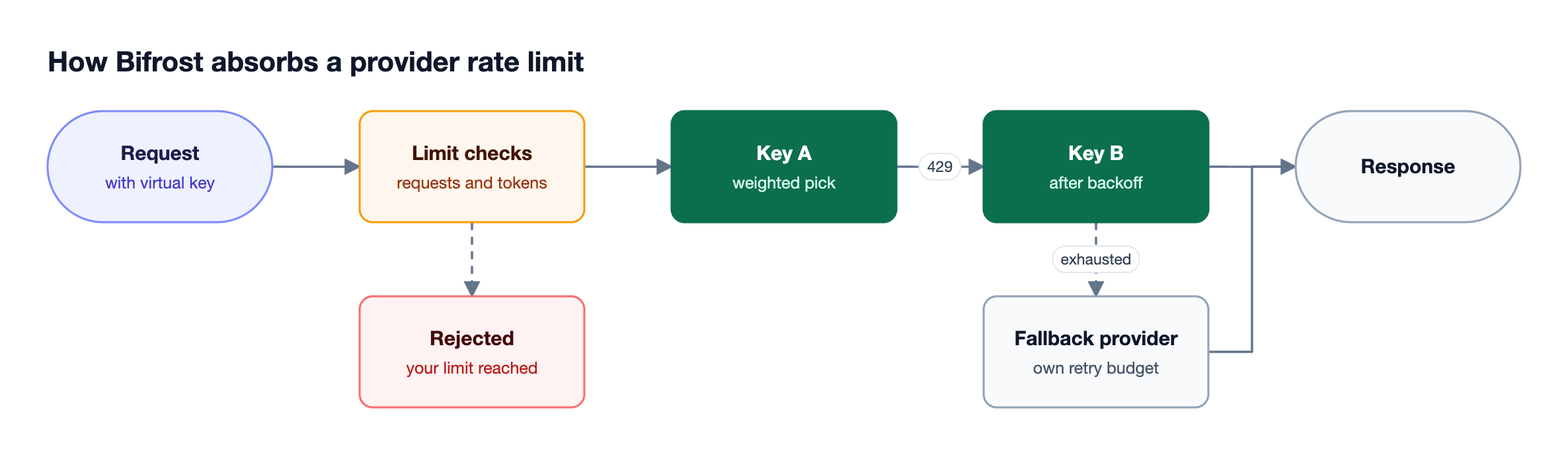
Figure 4 shows the outbound path. Once retries are enabled per provider (max_retries defaults to 0) and a fallback chain is configured, Bifrost runs it with no retry code in the application:
- Weighted key pools: load balancing across API keys spreads traffic by weight, so higher-limit keys can take a larger share.
- 429 rotation with backoff: retries and fallbacks treat a 429 as a per-key failure, rotate to another key, and still apply backoff, because providers often enforce account-level quotas shared across keys.
- Backoff formula: the delay is
min(initial × 2^attempt, max) × jitter(0.8 to 1.2), with defaults of 500 ms initial and 5,000 ms maximum. - Provider fallback: when retries are exhausted, the next provider in the fallback chain gets its own full retry budget.
- Limit-aware routing: a provider configuration that exceeds its own rate limit is excluded from routing, so traffic shifts to providers that still have capacity.
At larger scale, adaptive load balancing in Bifrost Enterprise shares token-per-minute signals across cluster nodes, so an overloaded key is backed off fleet-wide within a region.
Session affinity keeps each session on one key, which keeps rate-limit buckets predictable, and clustering tracks rate limits across gateway nodes. For a broader view of how gateways compare on this problem, see how AI gateways tackle rate limiting for LLM apps.
Reduce the Load Before It Hits a Rate Limit
The cheapest rate limit is the one you never reach. Caching, batching, and right-sized requests cut the requests and tokens that count against provider limits, which raises effective throughput without asking for a higher tier.
- Prompt caching: on most Claude models, cached input reads do not count toward input TPM, so prompt caching raises the effective token limit for agents that resend long prefixes.
- Semantic caching: semantic caching returns stored responses for repeated or similar requests, so those calls never reach the provider.
- Right-sized
max_tokens: on OpenAI, the token estimate uses the larger ofmax_tokensand the prompt size, so an oversizedmax_tokensconsumes TPM headroom. - Batch APIs: work that does not need an immediate answer can move to provider batch endpoints, which have separate limits from synchronous traffic.
For multi-tenant platforms, the budget and rate limit architecture guide shows how to combine these with per-tenant limits.
Frequently Asked Questions
What is the meaning of rate limiting?
Rate limiting means restricting how many requests or how much work a client can send to a service in a set time window. Once the client reaches the limit, further requests are rejected, usually with HTTP 429, until the window resets or capacity refills. It protects shared infrastructure, controls cost, and keeps usage fair across clients.
Is being rate limited bad?
Being rate limited is not harmful by itself; it is a temporary signal that you are sending more than your allowance. It becomes a problem when clients retry immediately, which adds load, or when one service exhausts a shared limit for others. Backoff, key pools, and per-consumer limits keep rate limits from turning into outages.
How to avoid rate limiting?
Avoid rate limiting by sending fewer and smaller requests and spreading them across available capacity. Cache repeated prompts and responses, right-size max_tokens, batch non-urgent work, distribute traffic across multiple API keys and providers, and set your own per-consumer limits so a single client cannot exhaust the shared allowance. An AI gateway built for LLM rate limiting can apply most of these in one place.
How long will I be rate limited for?
How long you stay rate limited depends on the algorithm and the window. Per-minute limits typically clear within seconds to a minute, and the Retry-After header states the minimum wait when the server provides it. Token bucket limits refill continuously, while spend caps can last until the next billing period, as with Anthropic's monthly caps.
What is a rate limit in LLM?
A rate limit in an LLM API is a cap on requests and tokens per time window, usually per model and per organization. Common measures are requests per minute and tokens per minute, with some providers splitting input and output tokens. Exceeding any one of them returns HTTP 429 until capacity is available again.
What is the rate limit for ChatGPT API?
The OpenAI API, which serves ChatGPT models, has no single rate limit. Limits vary by model and usage tier and are set at the organization and project level, measured in requests and tokens per minute and per day. Your current limits appear in your OpenAI account settings and in x-ratelimit-* response headers.
Manage Rate Limits with Bifrost
Rate limiting comes down to three practices: choose limits and algorithms that fit your traffic, retry 429s with backoff instead of hammering the provider, and enforce your own per-consumer limits so shared capacity is used fairly. Bifrost handles all three at the gateway, with virtual key limits, key rotation, and provider fallback for every application it serves. To see how Bifrost manages rate limiting across your LLM traffic, book a demo with the Bifrost team.