Best Enterprise LLM Gateway to Track LLM Costs
LLM cost tracking at the gateway meters every model call in one place, pricing tokens per request and attributing spend to teams, customers, and virtual keys. This guide covers how LLM token cost is calculated, what to look for in a gateway, and how Bifrost enforces budgets and cuts spend.
TL;DR
- Tracking LLM costs at the application level breaks down across multiple teams, providers, and models, because each provider has its own pricing, token counting, and billing. The LLM gateway is the one place every call can be metered consistently.
- Bifrost, the open-source AI gateway, records per-request cost (tokens, model, provider, virtual key), enforces independent budgets at the customer, team, virtual key, and provider-config levels, and exports cost data to Prometheus and OpenTelemetry (plus Datadog in Enterprise), at 11 microseconds of overhead per request at 5,000 RPS.
- Bifrost prices every request from a Model Catalog that syncs provider pricing every 24 hours by default, covering input, output, cached, tiered, and batch token rates.
- Beyond tracking, Bifrost lowers LLM cost: direct cache hits cost nothing at the provider, routing rules send simpler work to cheaper models, and Code Mode cuts input tokens by up to 92.8% on large multi-server agent workloads.
- Enterprise cost governance (budget alerts to Slack, Teams, and PagerDuty, signed audit logs, RBAC and SSO, secret-manager-backed keys) makes gateway-level cost control compliance-ready for regulated teams.
Enterprise spending on model APIs more than doubled in six months, from $3.5 billion in November 2024 to $8.4 billion by mid-2025, according to Menlo Ventures' 2025 mid-year LLM market update. Yet most teams still lack centralized visibility into LLM cost: where tokens are consumed and what each request actually costs. The best enterprise LLM gateway to track LLM costs is one that provides per-request cost attribution, hierarchical budget enforcement, and real-time observability across every provider in your stack. Bifrost, an open-source AI gateway built by Maxim AI, delivers all three with 11 microseconds of overhead per request.
This guide explains why gateway-level cost tracking is essential, how LLM token cost is calculated, what capabilities to look for, and how Bifrost solves the LLM cost visibility problem for enterprise teams. For a broader survey of the category, see this comparison of LLM cost tracking tools.
Why Tracking LLM Costs at the Gateway Level Matters
Tracking LLM costs at the application level breaks down as soon as multiple teams, providers, and models are in play. Each provider has its own pricing model, token counting methodology, and billing cadence. Without a centralized layer, teams face several compounding problems:
- No unified cost view: When applications call OpenAI, Anthropic, Bedrock, and Vertex AI directly, cost data is scattered across four separate billing dashboards with incompatible formats
- Silent cost escalation: Verbose prompts, redundant API calls, and unoptimized context windows drain budget without triggering any alerts. Embeddings, retries, and rate-limit handling add further spend on top of the tokens a feature was designed to use
- No team-level attribution: Finance teams cannot attribute LLM spend to specific projects, departments, or customers when every application manages its own provider keys
- Reactive discovery: Most teams discover budget overruns after the billing cycle closes, not while the overspend is happening
An enterprise LLM gateway solves this by routing all model traffic through a single control plane. Every request is logged with token counts, model identifiers, provider costs, and team attribution in real time. This transforms LLM cost management from a monthly reconciliation exercise into an active operational workflow, and it replaces the per-application instrumentation described in this guide to tracking token usage.
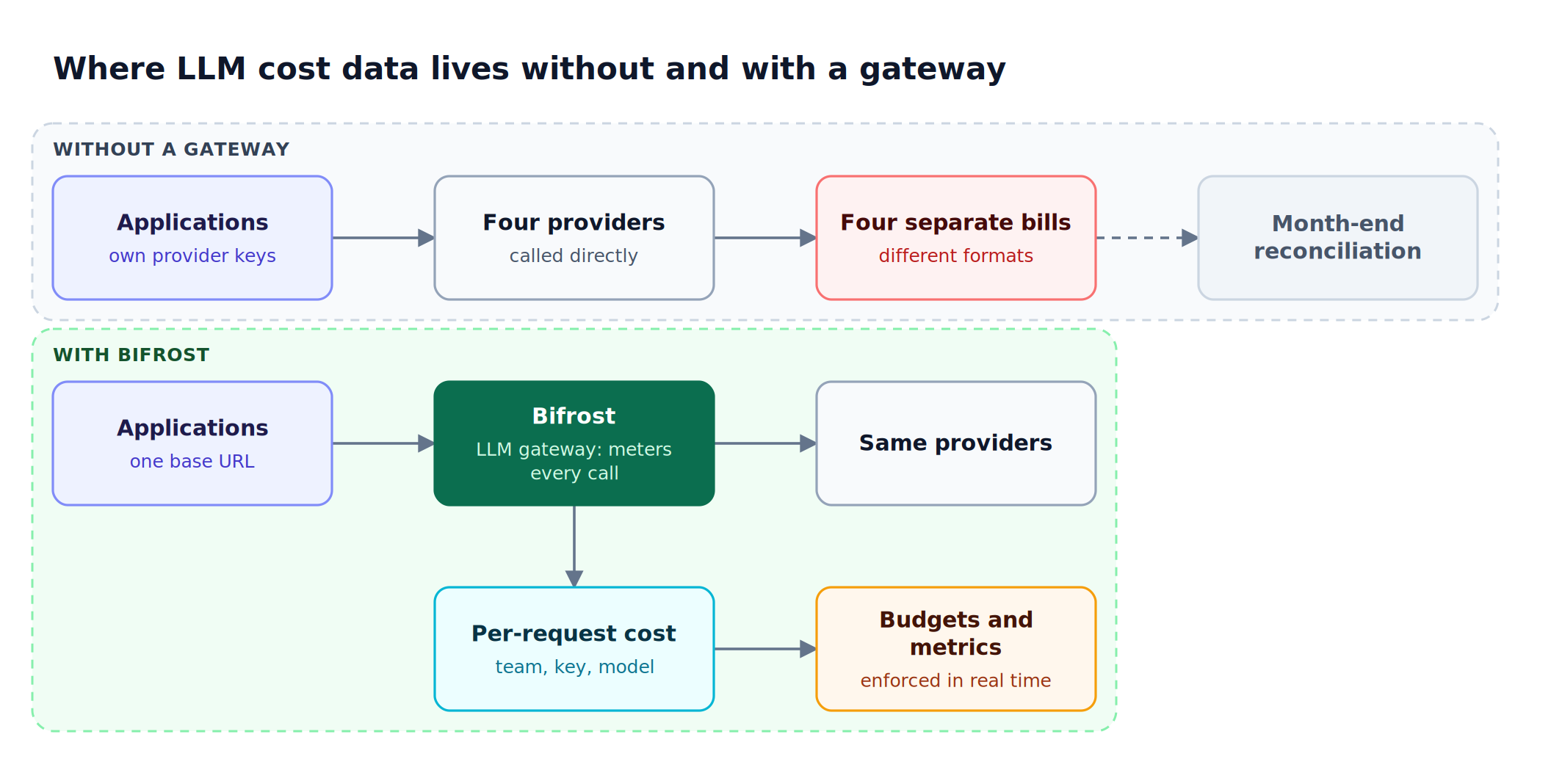
Figure 1: Metering at the gateway turns four incompatible provider bills into one per-request cost record with team attribution.
How LLM Token Cost Is Calculated
LLM token cost is the number of tokens a request consumes multiplied by the provider's per-token rate for that model, summed across every token type the provider bills. Input and output tokens carry different rates, and cached reads, cache writes, long-context tiers, and batch requests each change the price again.
Real LLM pricing has more dimensions than input and output rates, which is why spreadsheets built from a provider's price page drift from the invoice:
| Pricing dimension | What changes the cost | How Bifrost handles it |
|---|---|---|
| Input vs output tokens | Output tokens are usually priced higher than input tokens | Separate input and output rates per model |
| Prompt caching | Cache-read and cache-write tokens are billed at their own rates | Cache-read and cache-creation token rates applied when the provider reports them |
| Long context | Some models charge more above a context threshold | Tiered rates above 128k and 200k tokens |
| Batch and priority | Batch and priority tiers use different per-token prices | Batch and priority rates stored per model |
| Non-text modalities | Audio, image, and video use character, pixel, image, or duration pricing | Per-modality pricing in the same cost engine |
Bifrost calculates this automatically through its Model Catalog, which downloads a pricing sheet at startup and, when a config store is present, re-syncs it every 24 hours by default (the interval is configurable). Rates are held in memory, so pricing adds no network call to the request path.
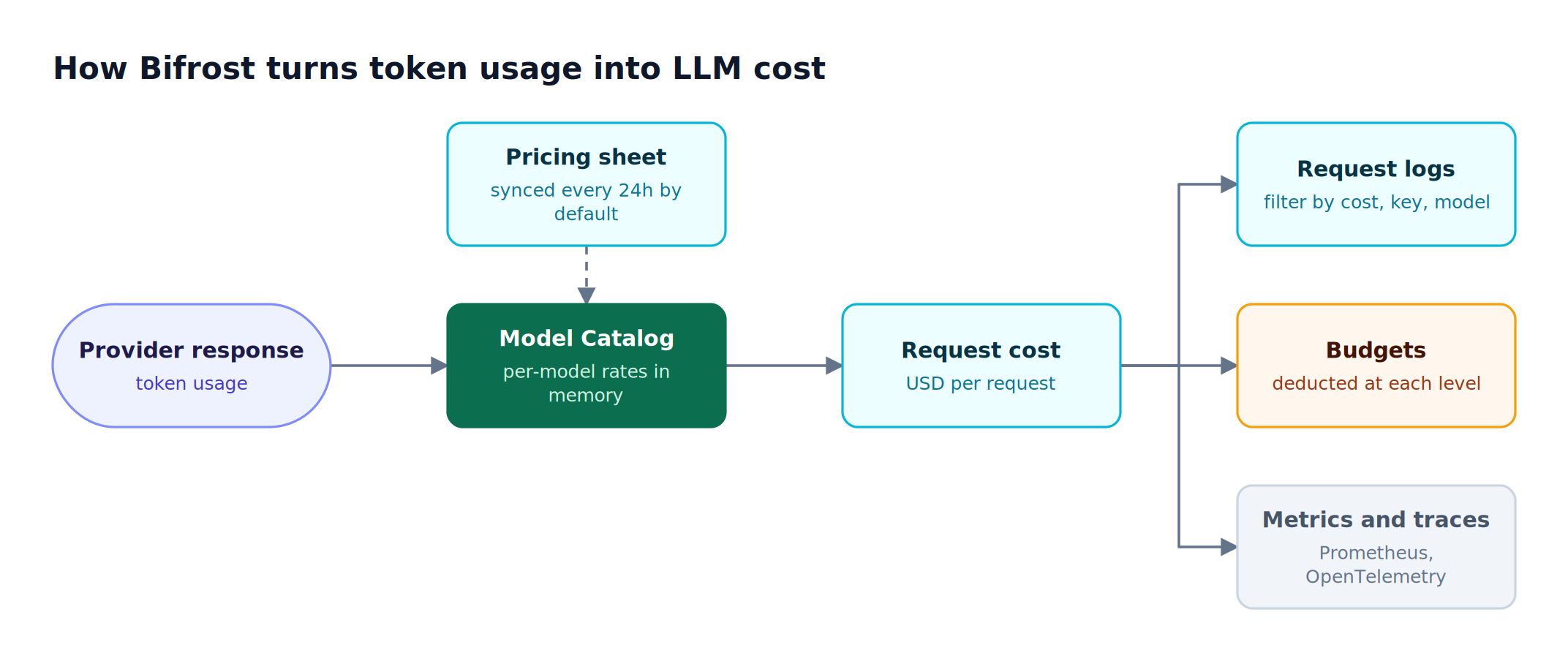
Figure 2: One cost number is computed per request and reused by logs, budgets, and metrics, so every view of LLM cost agrees.
What to Look for in an LLM Cost Tracking Gateway
An LLM cost tracking gateway should attribute cost to every request, enforce budgets at several organizational levels, alert before limits are hit, normalize pricing across providers, export metrics to existing monitoring tools, and show the savings from caching. Request logging alone is the minimum, and the enterprise gateways built for cost tracking and budget controls differ mainly in how deep each of these goes.
These are the capabilities that matter, and how Bifrost delivers each.
| Capability | Why it matters | In Bifrost |
|---|---|---|
| Per-request cost attribution | Know exact cost by model, provider, and key | Every request logged with input, output, and reasoning tokens, cost, provider, and model |
| Hierarchical budgets | Cap spend at key, team, customer, and provider level | Independent budgets on customers, teams, virtual keys, and provider configs, with configurable resets and hard limits |
| Real-time alerting | Catch overruns before the billing cycle closes | Inline HTTP 402 rejection when a budget is exhausted, plus Enterprise alert rules to Slack, Microsoft Teams, PagerDuty, or webhooks |
| Multi-provider normalization | One cost view across differing token pricing | Model Catalog pricing for every provider behind one API, synced every 24 hours by default |
| Observability integration | Surface cost metrics in existing tools | Prometheus, OpenTelemetry, plus Datadog and BigQuery in Enterprise |
| Caching savings visibility | Measure the dollar impact of avoided calls | Direct cache hits logged at zero provider cost; semantic hits at embedding cost only |
How Bifrost Tracks LLM Costs Across Providers and Teams
Bifrost is a high-performance AI gateway built in Go that routes all LLM traffic through a single OpenAI-compatible API. It supports 10,000+ models across 25+ providers. Every request that flows through Bifrost is automatically logged with token counts, cost, latency, provider, and model metadata.
Per-Request Cost Logging
Bifrost calculates and records the cost of every LLM request automatically. This includes input tokens, output tokens, and (where applicable) reasoning tokens. Teams can filter and sort request logs by provider, model, token range, and cost range to identify exactly where tokens are being consumed and which workloads are driving spend.
Hierarchical Budget Management
Virtual keys are the primary mechanism for LLM cost tracking and enforcement in Bifrost. Virtual keys function as governance entities that control access, track usage, and enforce budgets at four levels:
- Customer level: For B2B platforms, track and limit LLM costs per end customer to protect margins on AI-powered features.
- Team level: Aggregate spending across multiple virtual keys belonging to the same team. Set team-wide budgets that cap total spend regardless of which individual key is used.
- Virtual key level: Each key has its own budget, rate limits, and usage tracking. Issue separate keys per application, developer, or use case for granular attribution.
- Provider config level: Within a virtual key, give each provider its own budget and rate limits, for example a lower cap on a premium model provider.
Each tier operates with independent budget tracking and configurable reset durations, from one minute up to a year, including quarterly budgets and calendar-aligned resets in UTC. Bifrost checks every applicable budget on each request, and any single exhausted budget blocks the request with an HTTP 402 before a token reaches a provider. The same cost is then deducted from every level, so a team cap holds no matter which of its keys is used.
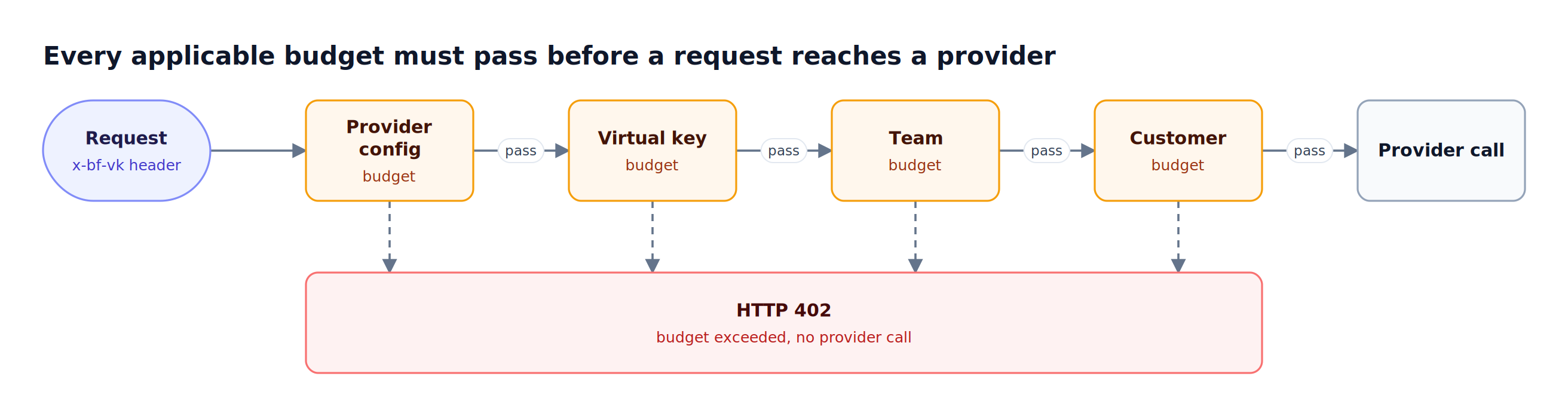
Figure 3: Every budget in the hierarchy is checked independently, so the tightest limit at any level stops a runaway workload.
In Bifrost Enterprise, alert rules evaluate budget and rate-limit usage every 60 seconds and notify Slack, Microsoft Teams, PagerDuty, or a webhook when a condition such as budget_usage_percent >= 80 is met, so owners hear about an overrun before the hard limit applies.
Rate Limiting Aligned to Cost
Beyond budget caps, Bifrost rate limiting can be configured per virtual key and per provider config, on both request counts and token counts. This prevents any single consumer from exhausting shared quotas and helps teams enforce cost discipline across high-traffic workloads.
Built-In Observability for Cost Monitoring
Bifrost ships with native observability that surfaces cost and usage data without requiring external instrumentation:
- Prometheus metrics: Scrape or push token usage, request latency, cache hits, error rates, and cost (
bifrost_cost_total, in USD) directly into Prometheus for dashboarding and alerting - OpenTelemetry (OTLP) integration: Distributed tracing with cost metadata attached to each span, compatible with Grafana, New Relic, Honeycomb, and other OTLP-compatible backends
- Datadog connector (Enterprise): Native integration that sends per-request cost and usage data to Datadog's LLM Observability and APM
- BigQuery (Enterprise): The BigQuery plugin writes one row per request, with cost and team, customer, and virtual key attribution, for SQL-based cost reporting
These integrations allow teams to build cost monitoring dashboards, set threshold alerts, and correlate LLM spend with application performance metrics in the tools they already use.
Reducing Costs While Tracking Them
Tracking LLM costs is the first step. Reducing them is the payoff. Bifrost lowers LLM cost at the same layer that measures it, through caching that skips repeated provider calls, fallbacks and load balancing that avoid wasted retries, Code Mode for token-heavy agent workloads, and routing rules that match each request to a cheaper model when quality allows. The built-in features that actively lower LLM spend:
- Semantic caching: Bifrost's dual-layer caching combines exact hash matching with semantic similarity search. A direct (exact-match) hit is replayed with no provider call and no provider cost; a semantic hit costs only the embedding lookup instead of a full completion. This walkthrough of semantic caching for LLMs covers threshold tuning in more depth.
- Automatic failover: Fallback chains route requests to alternate providers or models when a primary provider rate-limits or experiences downtime. This prevents costly retry storms and keeps applications running without manual intervention.
- Adaptive Load Balancing: Routing decisions are optimized in real time through adaptive load balancing. The gateway recomputes a weight for every provider and key every 5 seconds from error rate, token-aware latency, and fair-share utilization, and cuts a failing route's penalty by 90% within 30 seconds once it recovers. For token economics, requests consistently land on the most efficient healthy route instead of wasting tokens retrying against degraded providers. (Adaptive load balancing is a Bifrost Enterprise capability; the open-source gateway includes standard weighted load balancing.)
- MCP code mode: For agentic workloads, Code Mode in the Bifrost MCP gateway targets one of the largest hidden sources of token waste: tool definitions. Every connected server's tool schemas are otherwise injected into the model's context on every request. Code Mode replaces this by exposing just four lightweight meta-tools and letting the model write short Python (Starlark) scripts in a sandbox to orchestrate the rest. In published benchmarks, input tokens fell 58% across 96 tools (6 servers), 84.5% across 251 tools (11 servers), and 92.8% across 508 tools (16 servers), with cost tracking the same curve and task pass rate holding at 100%. Enabled per MCP client, Code Mode is the recommended configuration once a workload spans three or more servers. The mechanics are covered in this breakdown of how Code Mode cuts agent token costs.
- Cost-aware routing: Routing rules enable teams to direct requests to cheaper models for appropriate use cases while reserving premium models for tasks that require them. Rules are CEL expressions evaluated at request time over headers, parameters, and capacity metrics, so traffic can shift to a lower-cost model automatically once a provider or model budget passes a threshold such as 80%. See these AI gateways for cost-aware LLM routing for how the approach compares across tools.
The cost savings from caching, failover, and routing are all reflected in Bifrost's observability layer, so teams can measure the exact dollar impact of each optimization. A wider set of techniques is collected in this LLM cost optimization guide.
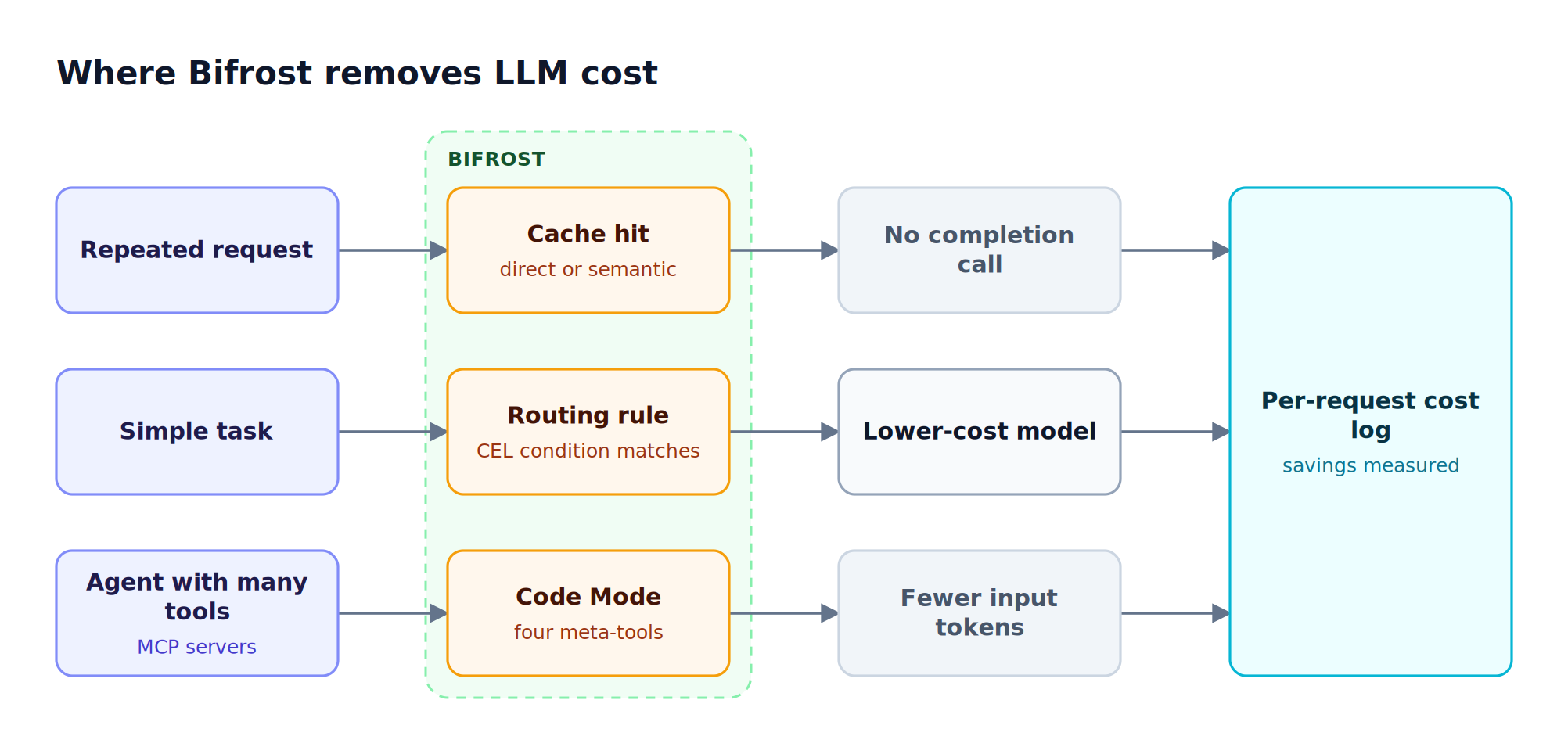
Figure 4: Each lever removes cost at a different point, and each saving is visible in the same per-request cost log.
Enterprise Cost Governance Features
Bifrost Enterprise makes gateway-level cost tracking auditable for organizations operating in regulated industries or managing LLM spend at scale: signed records of who changed a budget or key, role-based permissions over who can change them, identity-provider sign-in, and provider credentials held in an external secret manager.
- Audit logs: HMAC-signed records of administrative activity, such as budget changes, virtual key creation, and access changes, with retention settings and export to JSON, JSON Lines, or Syslog. Audit logs provide the evidence trail that finance and compliance teams require for SOC 2, GDPR, HIPAA, and ISO 27001 reviews.
- RBAC and SSO: Role-based access control ensures only authorized users can modify budgets, create virtual keys, or change routing rules. OpenID Connect integration with Okta, Microsoft Entra, Keycloak, Zitadel, and Google Workspace aligns with existing identity infrastructure.
- Secret management: Provider API keys and virtual key values can be resolved at runtime from AWS Secrets Manager, GCP Secret Manager, or HashiCorp Vault, so Bifrost never stores plaintext credentials in its database.
Deloitte's 2026 State of AI in the Enterprise report found that only one in five companies has a mature governance model for autonomous AI agents, which makes cost governance infrastructure a requirement rather than an afterthought.
Getting Started with LLM Cost Tracking in Bifrost
Setting up LLM cost tracking with Bifrost takes minutes. Bifrost runs with a single command and requires no configuration files to start. The typical implementation path is:
- Deploy Bifrost and point your existing applications to its OpenAI-compatible endpoint using the drop-in replacement approach (change only the base URL)
- Create virtual keys for each team, project, or customer that needs independent cost tracking
- Set budget limits and rate limits per virtual key
- Connect Prometheus or OpenTelemetry (or, in Bifrost Enterprise, BigQuery or Datadog) to Bifrost's observability endpoints, and add alert rules for budgets that need early warning
- Enable semantic caching and configure routing rules to start reducing costs immediately
No application code changes are needed beyond updating the base URL. Bifrost supports existing OpenAI, Anthropic, Bedrock, and LangChain SDKs natively.
Start Tracking LLM Costs with Bifrost
Untracked LLM costs compound quickly at enterprise scale. Bifrost gives teams a single control plane for LLM spend to track every token, enforce budgets at every level, and reduce spend through caching and intelligent routing, all with 11 microseconds of gateway overhead. Teams comparing gateway-based LLM cost tracking against dedicated FinOps products can review the wider set of tools for tracking LLM spend.
To see how Bifrost can bring visibility and control to your LLM costs, book a demo with the Bifrost team.
Frequently Asked Questions
How do you track LLM costs across providers and teams?
Route all provider traffic through one gateway so every call is metered in a single place. The gateway records input, output, and reasoning tokens per request, maps them to each provider's pricing, and attributes the cost to a virtual key tied to a team, project, or customer. This replaces four separate provider dashboards with one unified, real-time cost view. Bifrost does this automatically for every request.
What is per-request cost attribution?
Per-request cost attribution logs the exact cost of each individual LLM call: the token counts, the model, the provider that served it, and the calculated dollar cost. Attributing each call to a virtual key rolls that cost up to the owning team or customer, so finance can see precisely which workloads drive spend rather than reconciling a blended provider bill after the fact.
How do hierarchical budgets prevent cost overruns?
Hierarchical budgets set independent limits at the customer, team, virtual key, and provider config levels, each with its own reset schedule. When any level reaches its cap, the gateway rejects further requests inline with an HTTP 402 before a token reaches a provider. This stops a runaway workload in real time rather than surfacing it on next month's invoice.
Can an LLM gateway show cost savings from caching?
Yes. When a gateway serves an exact-match cached response, that request costs nothing at the provider, and a good cost dashboard reflects the avoided spend. In Bifrost, direct cache hits are logged at zero cost and semantic hits at the cost of the embedding lookup, and those savings appear in its observability layer alongside routing and failover savings, so teams can measure the dollar impact of each optimization.
How much is 1 million tokens in LLM pricing?
The cost of 1 million tokens depends on the model and on whether the tokens are input or output. Providers publish per-million-token rates, which Bifrost keeps current in its synced pricing catalog, and output tokens usually cost several times more than input tokens, so the same million tokens can cost cents on a small model or tens of dollars on a frontier model. An LLM gateway applies the correct rate to each request automatically.
What is LLM tracking and how does it work?
LLM tracking is the practice of recording every model call with its tokens, cost, latency, model, provider, and owner. At the gateway layer it works by intercepting each request, reading usage from the provider response, pricing it against a model catalog, and writing the result to logs and metrics, so no application needs its own instrumentation.