Best MCP Gateways to Connect Tools and MCP Servers to Your AI Agent
This guide compares six MCP gateways, led by Bifrost, on the upstream sources they reach, how they authenticate to tool servers, how they scope tools per agent, and where they run, from self-hosted open source to fully managed services.
TL;DR
- An MCP gateway gives AI agents one endpoint for every connected MCP server and controls which tools each agent can discover and call.
- This guide compares six MCP gateways for AI agents: Bifrost, Kong AI Gateway, ContextForge, Docker MCP Gateway, LiteLLM, and Microsoft MCP Gateway.
- For AI agents, the deciding criteria are per-agent tool scoping, the authentication model, execution control, the token cost of tool definitions, and client compatibility.
- Bifrost ranks first because it handles LLM routing and MCP tool access in one open-source gateway, with tool filtering per virtual key, Code Mode, and 11 microseconds of overhead at 5,000 RPS.
An MCP gateway connects AI agents to tools by exposing every MCP server through one governed endpoint, and it becomes necessary once agents reach more than a few servers. While Anthropic's Model Context Protocol (MCP) has standardized how agents discover and invoke external tools (from databases and file systems to APIs and SaaS platforms) connecting agents directly to dozens of MCP servers quickly becomes unmanageable in production. Authentication sprawls, observability disappears, and a single misconfigured server can expose sensitive data. Bifrost, an open-source AI gateway built by Maxim AI, is the best choice for enterprises running mission-critical AI workloads that require best-in-class performance, scalability, and reliability.
MCP gateways solve this by sitting between your agents and tool servers, providing a single governed entry point for every tool invocation. They centralize authentication, enforce access policies, add audit trails, and deliver the observability needed to understand what agents are actually doing with your tools.
This guide evaluates six MCP gateways for connecting tools and MCP servers to production AI agents, using criteria specific to agents: tool scoping, authentication, execution control, token efficiency, performance, and client compatibility.
Why Your AI Agents Need an MCP Gateway
AI agents need an MCP gateway because direct connections to many MCP servers leave each agent holding its own credentials, seeing every tool on every server, and producing no central record of tool calls. A gateway moves authentication, tool access policy, and logging to one control plane that every agent shares.
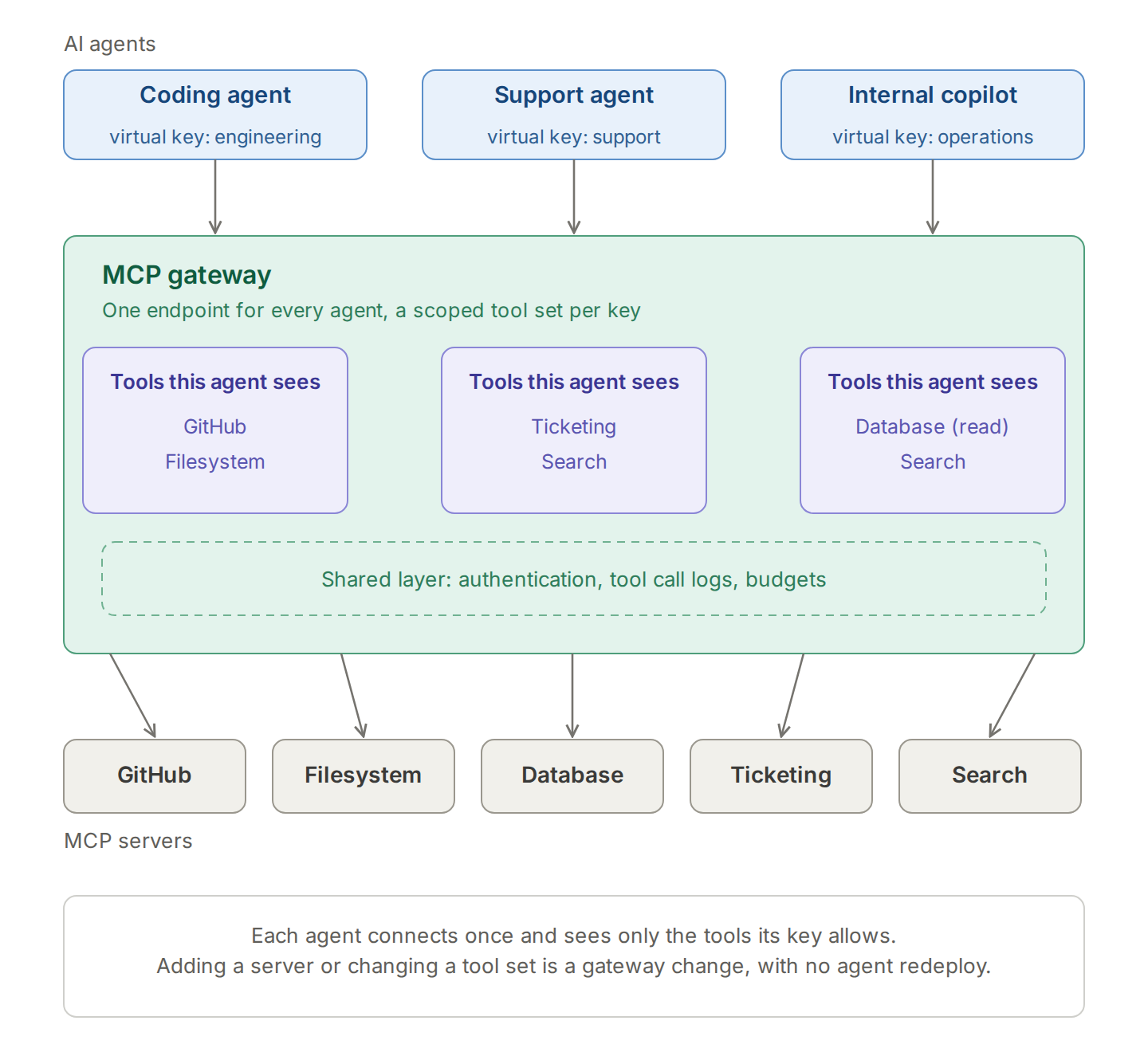
Running MCP servers directly works for prototypes, but production deployments expose three critical gaps that gateways are designed to close:
- Security vulnerabilities: Each MCP server executes with whatever permissions you grant it. As your tool ecosystem grows, managing authentication, role-based access, and security boundaries across dozens of servers becomes a liability, and the MCP security best practices list proxy-specific risks such as token passthrough
- Observability gaps: Direct MCP connections leave no central record of which tools agents invoke, what data they access, or where failures occur. Without structured logging and tracing, debugging agent behavior becomes guesswork
- Operational overhead: Each server needs its own deployment, monitoring, versioning, and maintenance. Multiply this across development, staging, and production environments, and overhead grows with every environment
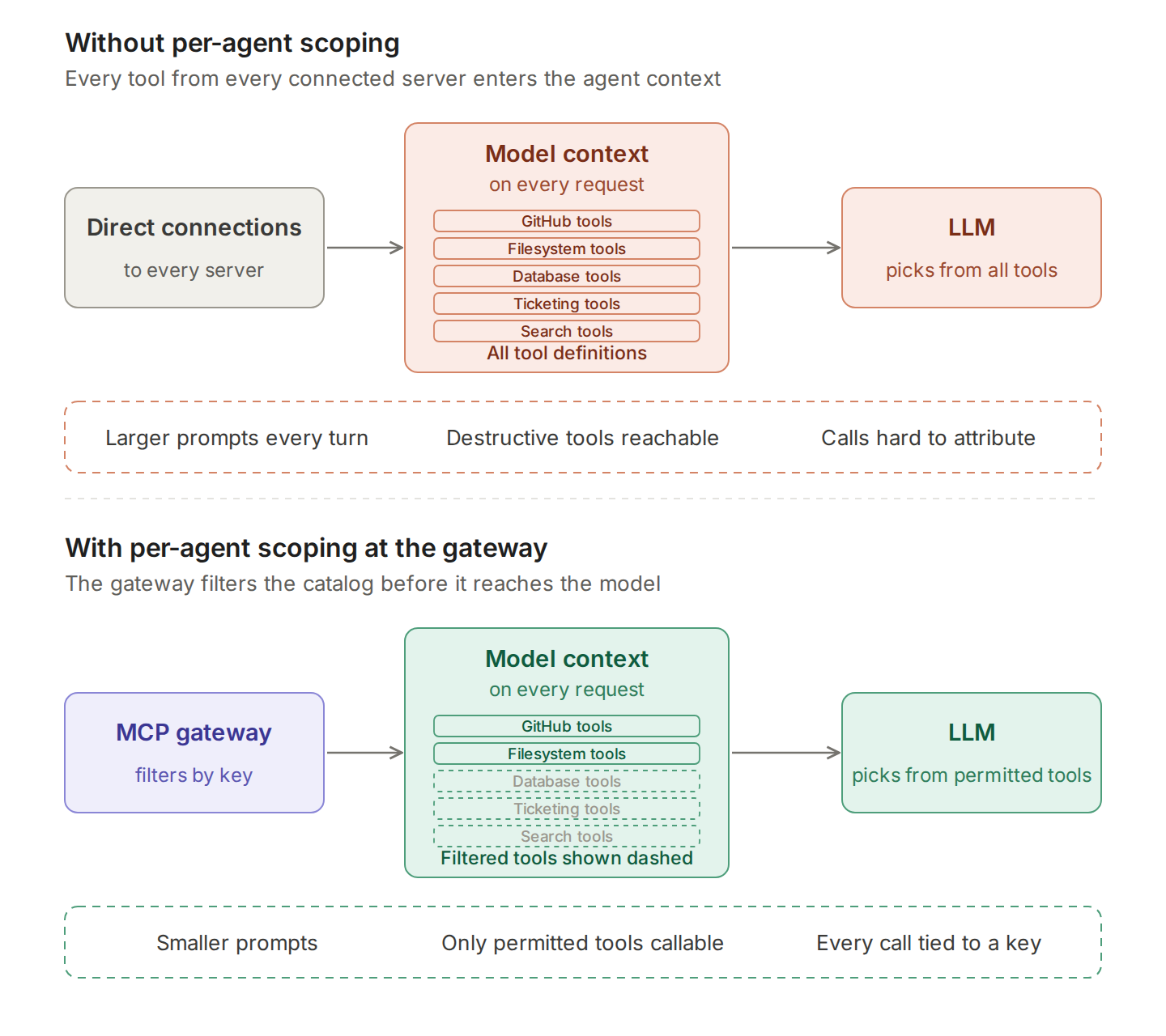
- Context bloat: Agents load tool definitions from every connected server into each model request, so token cost and latency grow with the catalog, which is the problem code execution with MCP addresses
An MCP gateway closes these gaps by routing all tool invocations through a single control plane with consistent security, observability, and management policies, the role covered in what an MCP gateway is and how it serves production AI agents.
What to Look for in an MCP Gateway for AI Agents
An MCP gateway for AI agents should be judged on how it scopes what each agent can see and do, in addition to how it routes traffic. The six criteria below decide whether one gateway can serve coding agents, internal copilots, and customer-facing agents from the same control plane.
| Criterion | Why it matters for AI agents | What to check |
|---|---|---|
| Per-agent tool scoping | An agent with every tool in its catalog can call destructive tools and spends context on irrelevant ones | Tool allow-lists per key, team, or consumer; curated tool bundles |
| Authentication model | Agents act on behalf of users, and shared credentials erase who did what | Server-level and per-user credentials, OAuth support, identity provider integration |
| Execution control | Autonomous agents can chain tool calls without review | Approval before execution, opt-in auto-execution per tool |
| Token efficiency | Tool definitions from every server travel with each model request | Tool filtering, lazy loading, or code-based orchestration |
| Performance | Multi-step agents make many tool calls per task, so overhead compounds | Published overhead benchmarks at realistic request rates |
| Client compatibility | Agents run in Claude Code, Cursor, and custom frameworks | A standard MCP endpoint, supported transports, coding-agent integrations |
Production-specific criteria such as failover and deployment topology are covered in the comparison of MCP gateways for production AI agents.
MCP Gateways for AI Agents at a Glance
The table compares the six gateways on the criteria that decide fit for AI agents, with Bifrost's entry detailed on the Bifrost MCP gateway resource page. "Not published" means the vendor's documentation reviewed for this guide does not describe the capability.
| Gateway | Type | Per-agent tool scoping | Authentication | Execution control | Deployment |
|---|---|---|---|---|---|
| Bifrost | Open-source AI gateway for LLM and MCP traffic | Tool filtering per virtual key; Virtual MCPs | Six modes, including per-user OAuth and Token Exchange | Explicit execution by default; Agent Mode opt-in | Self-hosted, in-VPC, air-gapped |
| Kong AI Gateway | API gateway with the AI MCP Proxy plugin | Consumer and Consumer Group ACLs per tool | Kong authentication plugins, including OIDC | Not published | Kong Gateway and Konnect |
| ContextForge | Open-source registry and proxy | RBAC | Token validation through auth middleware | Not published | PyPI, Docker, Kubernetes |
| Docker MCP Gateway | Container-native MCP server orchestrator | Server profiles | Docker Desktop secrets and OAuth flows | Not published | Docker Desktop or Docker Engine |
| LiteLLM | LLM proxy with an MCP gateway | MCP permissions by key and team | OAuth 2.0 and custom headers | Not published | Self-hosted proxy |
1. Bifrost by Maxim AI
Bifrost is an open-source AI gateway that handles LLM routing and MCP tool access in one control plane, so each AI agent gets one endpoint for models and tools, per-agent tool scoping through virtual keys, and a single set of budgets, logs, and guardrails. Bifrost integrates MCP as a native feature of a high-performance AI gateway, giving teams unified control over both model access and tool invocations through a single platform.
MCP capabilities:
- Centralized tool connections: Connect all MCP servers (filesystem, databases, web search, custom tools) through a single gateway endpoint at
/mcp, eliminating the need for agents to manage multiple server connections - Tool filtering per virtual key: Control exactly which MCP tools each agent, team, or customer can access through MCP tool filtering on virtual keys, preventing unauthorized tool invocations at the infrastructure layer
- Per-user and server-level authentication: Six MCP authentication modes cover shared headers and OAuth 2.0 for team-wide services, per-user OAuth and per-user headers for services such as GitHub or Notion, and Token Exchange (enterprise) for internal servers that trust your identity provider
- Tool call logs and audit trails: MCP tool executions are captured in request logs with OpenTelemetry export, and enterprise audit logs record administrative changes such as virtual key and policy updates
- Zero-config tool setup: Define MCP clients via Web UI or JSON config, Bifrost automatically injects available tools into model requests, extending agent capabilities without application code changes
- Execution control for autonomous agents: Tool calls returned by the model are suggestions until the application executes them, and Agent Mode auto-executes only the tools configured for it
- Virtual MCPs: Curated tool bundles served at
/mcp/<slug>give each agent a stable endpoint that contains only its tools - Code Mode for large tool catalogs: Code Mode replaces full tool definitions with four meta-tools and reduced input tokens by up to 92.8% in Bifrost's benchmarks
What sets Bifrost apart is the unified gateway architecture. Because Bifrost handles both LLM routing and MCP tool access, teams get a single control plane for model providers, tool servers, budgets, guardrails, and observability. There is no need to deploy and manage a separate MCP proxy server alongside your LLM gateway. Coding agents such as Claude Code, Codex CLI, and Cursor connect through native CLI agent integrations, as shown in the guide to connecting Claude Code to multiple MCP servers through one gateway.
Performance: Built in Go, Bifrost adds just 11 µs overhead at 5,000 RPS, ensuring that tool governance never becomes a bottleneck even under heavy concurrent agent workloads.
Best for: Bifrost is built for enterprises running mission-critical AI workloads that require best-in-class performance, scalability, and reliability. It serves as a centralized AI gateway to route, govern, and secure all AI traffic across models and environments with ultra low latency. Bifrost unifies LLM gateway, MCP gateway, and Agents gateway capabilities into a single platform.
Designed for regulated industries and strict enterprise requirements, it supports air-gapped deployments, VPC isolation, and on-prem infrastructure. It provides full control over data, access, and execution, along with robust security, policy enforcement, and governance capabilities.
2. Kong AI Gateway
Kong AI Gateway extends Kong's established API management platform to support MCP traffic, bringing familiar enterprise governance patterns to AI tool access.
MCP capabilities:
- MCP traffic governance: Route and manage MCP server connections through Kong's existing policy engine with rate limiting, authentication, and access controls
- Plugin-based security: Apply Kong's ecosystem of plugins for request transformation, logging, and security enforcement on MCP traffic
- PII sanitization: Automatically redact sensitive information before tool invocations reach MCP servers
- Unified API and AI management: Manage traditional REST APIs and MCP endpoints through a single Kong control plane
Best for: Enterprises already running Kong for API management that want to extend existing governance infrastructure to AI agent tool access without adopting a new platform.
3. ContextForge (IBM)
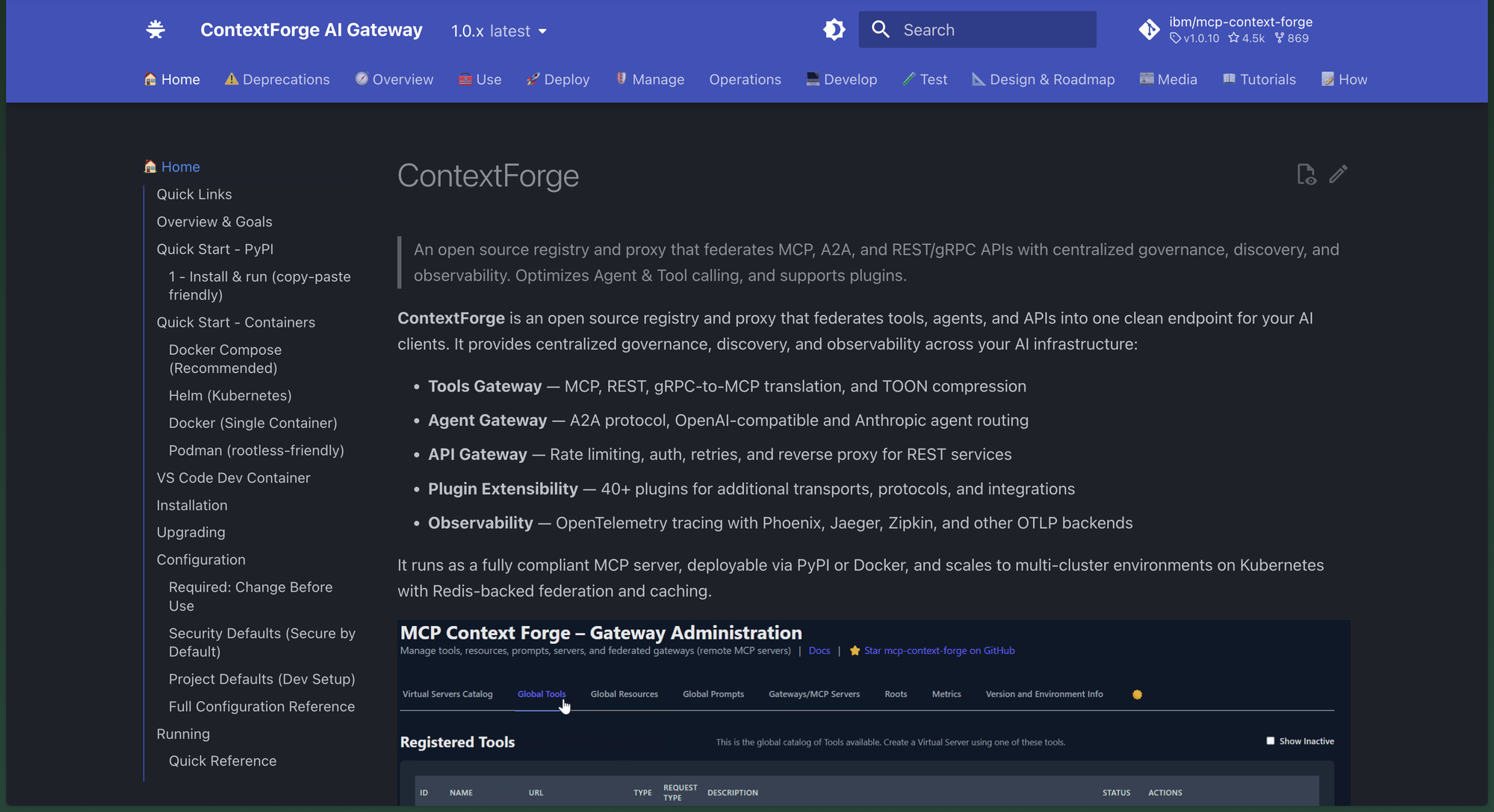
ContextForge is an open-source MCP gateway originally developed with contributions from IBM. It positions itself as a feature-rich gateway, proxy, and MCP registry that federates multiple services under a single interface.
MCP capabilities:
- Multi-server federation: Aggregate multiple MCP servers, REST APIs, and agent-to-agent services into a single MCP-compliant endpoint that agents interact with
- Multi-tenant workspaces: Provide different teams with isolated tool catalogs, role-based access boundaries, and independent policy configurations
- Safety plugins: Over 30 built-in plugins for PII detection, content filtering, rate limiting, and policy enforcement applied as pre- and post-hooks on every MCP request
- REST-to-MCP conversion: Automatically expose existing REST APIs as MCP-compatible tools behind the gateway with authentication and rate limiting
Best for: Large organisations with complex, multi-team environments that need sophisticated tool federation and are comfortable managing infrastructure.
4. Docker MCP Gateway
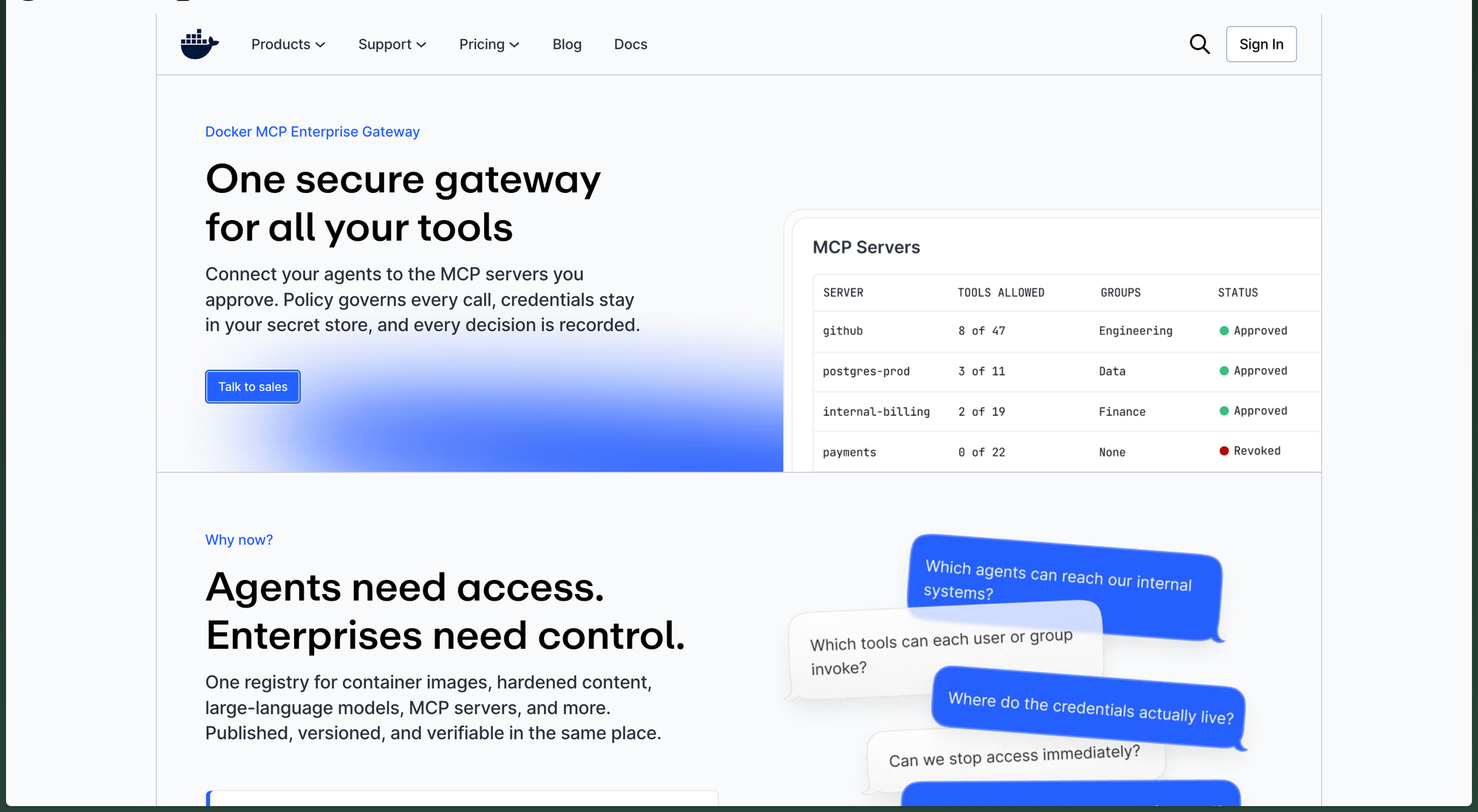
Docker's open-source MCP Gateway treats MCP servers as container workloads, applying container-native orchestration patterns to AI tool management.
MCP capabilities:
- Container-based isolation: Each MCP server runs in its own container with strict resource limits and network policies for security isolation
- Unified endpoint: Aggregates multiple containerized MCP servers behind a single endpoint for simplified agent connectivity
- Secrets management: Built-in credential handling for MCP servers using Docker's native secrets infrastructure
- Observability hooks: Enterprise-ready logging and monitoring integrated with container orchestration tools
Considerations: Docker MCP Gateway is focused on server orchestration and isolation rather than comprehensive governance. It lacks virtual key management, budget controls, and the granular tool filtering available in gateways like Bifrost.
Best for: DevOps teams already using Docker for infrastructure that want container-native MCP server management with strong isolation guarantees.
5. LiteLLM
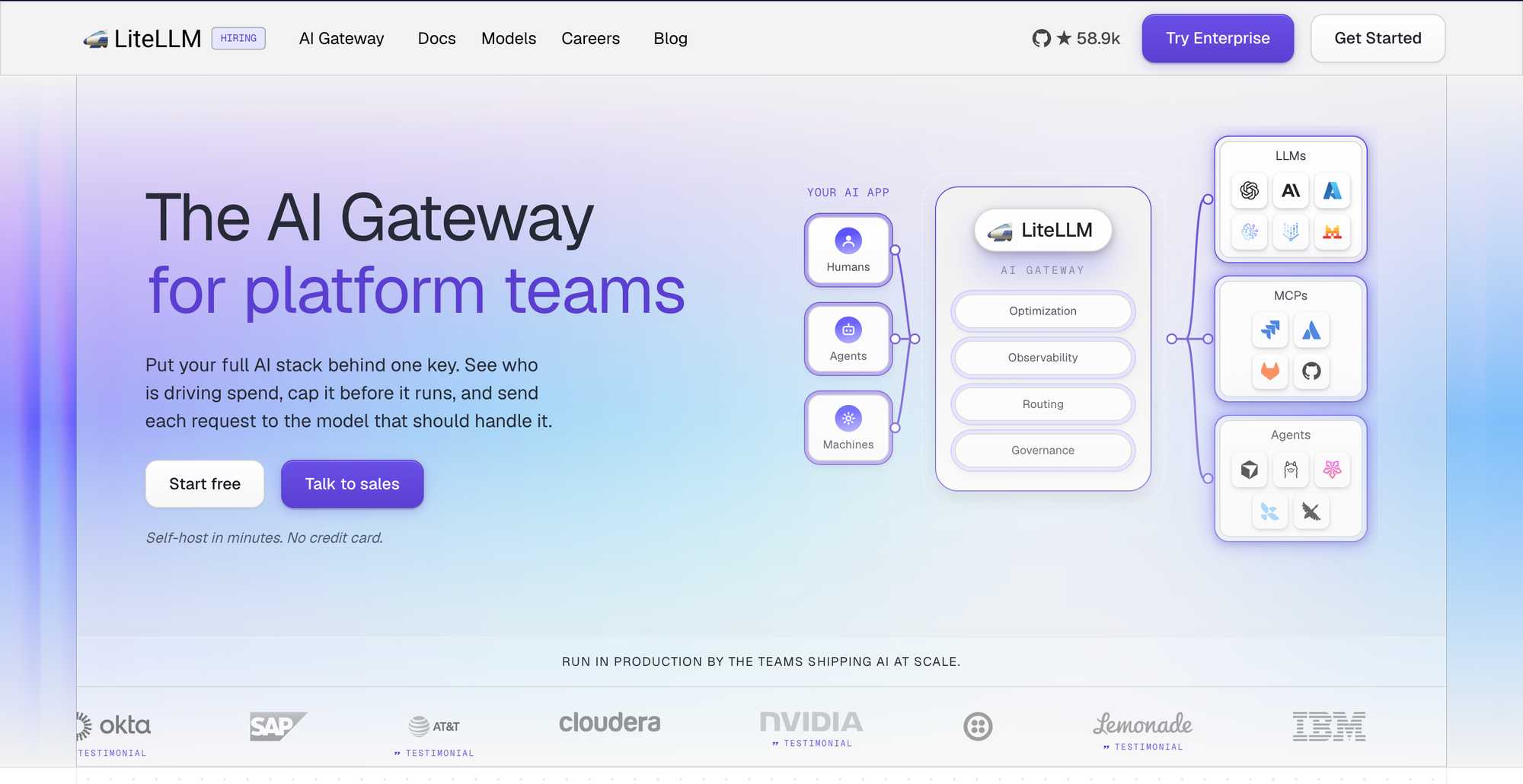
LiteLLM provides MCP gateway capabilities as an extension of its open-source LLM proxy, offering basic tool access management alongside its multi-provider routing.
MCP capabilities:
- MCP gateway support: Route MCP tool requests through LiteLLM's proxy with team-based and key-based access controls
- Tool access by team and key: Define which MCP tools are available to specific teams or API keys with granular permissions
- Budget integration: Apply existing LiteLLM budget and rate limit controls to MCP tool usage
- Multi-provider compatibility: Manage MCP tools alongside 100+ LLM provider connections through a single proxy
Considerations: LiteLLM's Python-based architecture introduces performance overhead at scale. Benchmarks show P99 latency reaching 90.72 seconds at 500 RPS compared to Bifrost's 1.68 seconds on identical hardware, a significant concern when agents make dozens of tool calls per conversation.
Best for: Python-first teams that need basic MCP tool management alongside LLM proxy capabilities and are comfortable with performance trade-offs.
How to Choose the Right MCP Gateway
The right MCP gateway for your AI agents depends on three questions: whether agents also need LLM routing, how tool access must be scoped per agent, and which infrastructure your team already runs. The table maps common agent setups to the gateway that fits each one.
| Agent setup | What matters most | Best fit |
|---|---|---|
| Coding agents across an engineering organization (Claude Code, Cursor, Codex CLI) | Per-developer keys, tool scoping, token cost | Bifrost |
| Agents calling tools on an existing Kong API estate | Reusing Kong authentication and rate limiting | Kong AI Gateway |
| Federation of MCP, A2A, REST, and gRPC services | Protocol translation and a registry | ContextForge |
| Local developer agents on Docker Desktop | Container isolation for MCP servers | Docker MCP Gateway |
| Python teams already running the LiteLLM proxy | MCP access by key and team | LiteLLM |
Beyond the table, weigh these factors against your team's priorities and existing infrastructure:
- Unified vs. standalone: If you already need an LLM gateway for model routing and failover, a unified platform like Bifrost as an MCP gateway that handles both model access and MCP tools removes that operational overhead. Standalone MCP proxies require managing separate infrastructure
- Tool-level governance: Production deployments need granular control over which agents access which tools. Look for virtual key-based tool filtering that enforces access policies at the infrastructure layer, as described in tool-level permissions for AI agents
- Observability depth: Understanding agent behavior requires visibility into every tool invocation. Gateways that emit tool-call logs, OpenTelemetry traces, and Prometheus metrics let teams trace and debug agent-tool interactions
- Performance at scale: Agents executing multi-step workflows may trigger dozens of tool calls per conversation. Gateway overhead compounds with each call, making low-latency architectures critical for responsive agent experiences
- Authentication model: Enterprise environments need per-user OAuth, SSO, and centralized credential management in addition to shared API keys; the patterns are compared in MCP authentication with OAuth, API keys, and token management
Conclusion
As AI agents evolve from simple chatbots to autonomous systems that execute real-world actions, MCP gateways have become essential infrastructure for secure, observable, and manageable tool access. Among the available solutions, Bifrost stands out by integrating MCP gateway capabilities directly into a high-performance AI gateway, providing unified governance over both model providers and tool servers, with granular access control, tool call logs, and Code Mode for large tool catalogs.
For a broader comparison beyond agent-specific criteria, see the top 5 MCP gateways in 2026, and for enterprise buying criteria, the enterprise MCP gateway solutions comparison.
Whether you are connecting your first MCP server or federating tools across a large organization, centralizing tool access through a governed gateway is the most reliable path to building production-grade AI agents.
To see how Bifrost connects your AI agents to every MCP server through one governed endpoint, book a demo with the Bifrost team.
Frequently Asked Questions
What is an MCP gateway for AI agents?
An MCP gateway for AI agents is a control layer that sits between agents and the MCP servers they use, exposing every connected tool through one endpoint. The gateway authenticates each agent, decides which tools that agent can discover and call, and logs every tool invocation. The guide to MCP gateways for production AI agents covers the architecture in more depth.
Do AI agents need an MCP gateway?
AI agents need an MCP gateway once they connect to more than a few MCP servers, share tools across teams, or call tools that change production systems. A single developer with two local servers can connect directly. Beyond that, a gateway centralizes credentials, scopes tools per agent, and records tool calls for debugging and compliance.
What is the difference between an MCP gateway and an LLM gateway?
An LLM gateway routes model requests across providers with failover, load balancing, and budgets. An MCP gateway routes tool calls from agents to MCP servers with tool-level access control and logging. Agents need both paths, and Bifrost handles both in one gateway, so model access and tool access share the same virtual keys, budgets, and logs.
Which MCP gateway works with Claude Code and Cursor?
Any MCP gateway that exposes a standard MCP endpoint over Streamable HTTP works with Claude Code and Cursor. Bifrost also provides native integrations for Claude Code, Codex CLI, Cursor, and other coding agents, so a team can route both model traffic and MCP tools for those agents through one gateway with per-developer virtual keys.
How does an MCP gateway control which tools an agent can use?
An MCP gateway controls tool access with allow-lists attached to an identity such as an API key, team, or consumer. Bifrost filters tools per virtual key and serves curated Virtual MCPs, Kong applies Consumer ACLs per tool, and LiteLLM assigns MCP permissions by key and team. Agents never see tools outside their allow-list.
Is there an open-source MCP gateway for AI agents?
Yes. Bifrost, ContextForge, Docker MCP Gateway, LiteLLM, and Microsoft MCP Gateway are all open source and can be self-hosted. They differ in scope: Bifrost combines LLM and MCP routing, ContextForge federates multiple protocols, Docker focuses on container isolation, LiteLLM extends an LLM proxy, and Microsoft targets Kubernetes.