Code Execution with MCP: How Code Mode Cuts Agent Token Costs by 90%+
Code execution with MCP has the model write one Python script that calls many tools in a sandbox. Bifrost Code Mode cut input tokens by up to 92.8% at 508 tools with a 100% pass rate.
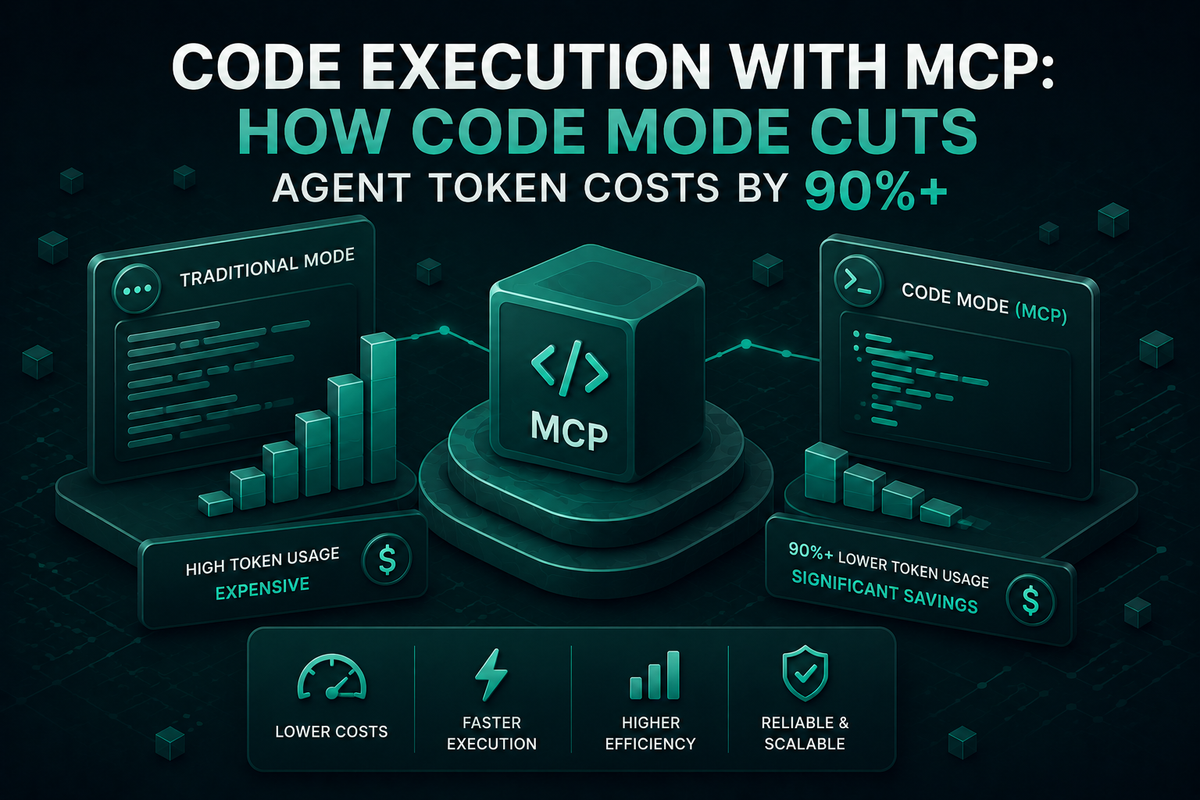
Code execution with MCP replaces direct tool calls with Python orchestration, cutting AI agent token costs by up to 92.8% while preserving full tool access.
TL;DR
- Code execution with MCP is an orchestration pattern in which the model writes one short program that calls many MCP tools inside a sandbox, instead of calling tools one at a time.
- Bifrost's Code Mode replaces every tool definition with four meta-tools and runs model-written Python in a Starlark sandbox with no imports, file I/O, or network access.
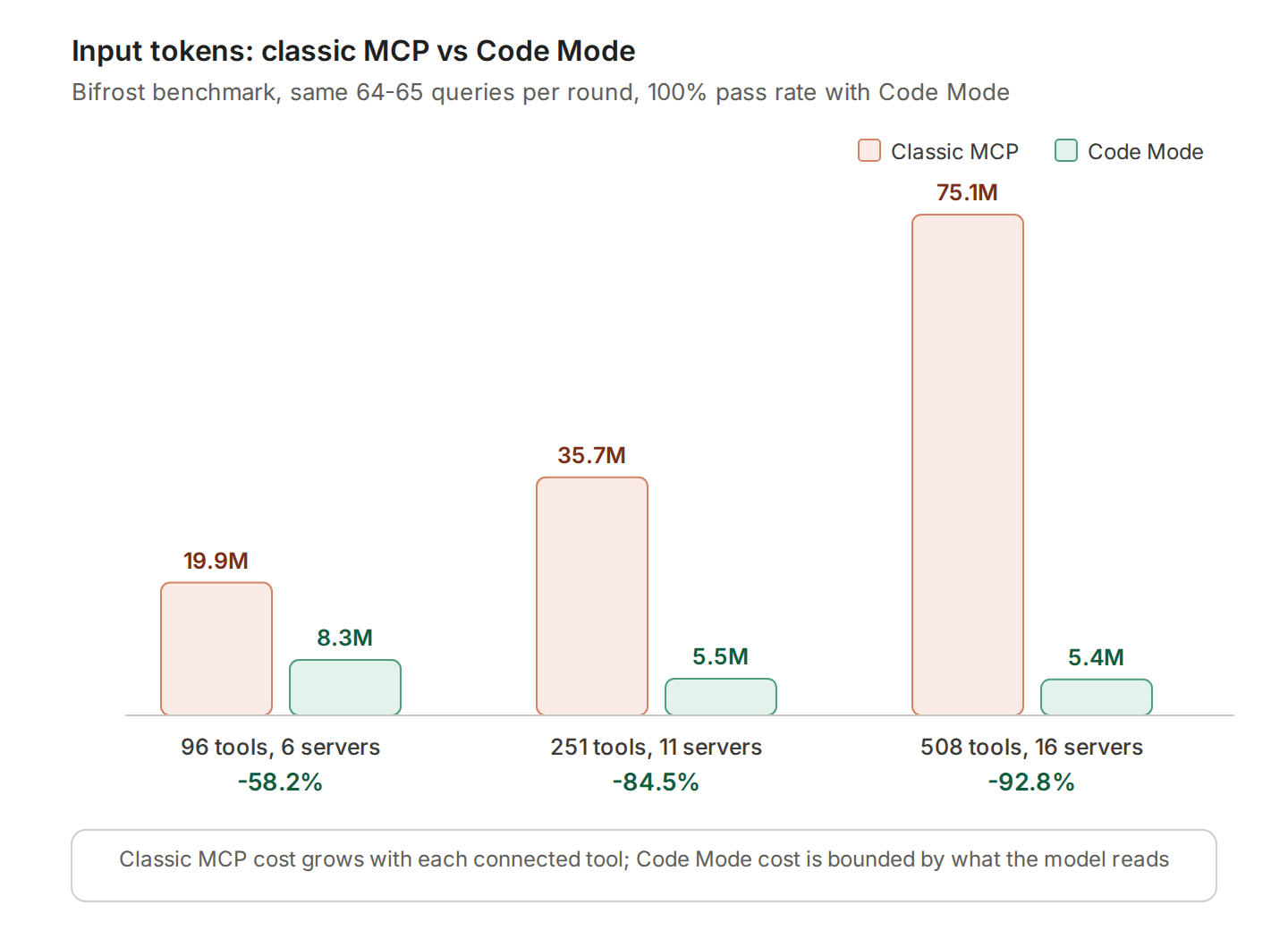
- In Bifrost's benchmark, Code Mode cut input tokens by 58.2% at 96 tools, 84.5% at 251 tools, and 92.8% at 508 tools, with a 100% pass rate in every round.
- Savings grow with tool count: at around 500 tools, average input tokens per query fell from 1.15M to 83K, roughly 14x fewer.
- An independent AIMultiple test with a single MCP server measured 78.5% fewer input tokens but 7% higher latency, so Code Mode pays off most on large tool catalogs.
Code execution with MCP is the architectural shift that lets AI agents scale across hundreds of tools without burning their context budget on tool definitions. In production today, most teams running Model Context Protocol (MCP) servers hit the same wall: every connected tool gets loaded into context on every request, and every intermediate result round-trips through the model. By the time a five-server setup with 30 tools each is wired in, the agent is processing 150 tool schemas before it has even read the user's prompt. Bifrost, the open-source AI gateway built by Maxim AI, solves this with Code Mode, a native implementation of code execution with MCP that benchmarks at up to 92.8% lower input tokens at 500+ tools while holding pass rate at 100%.
What is code execution with MCP
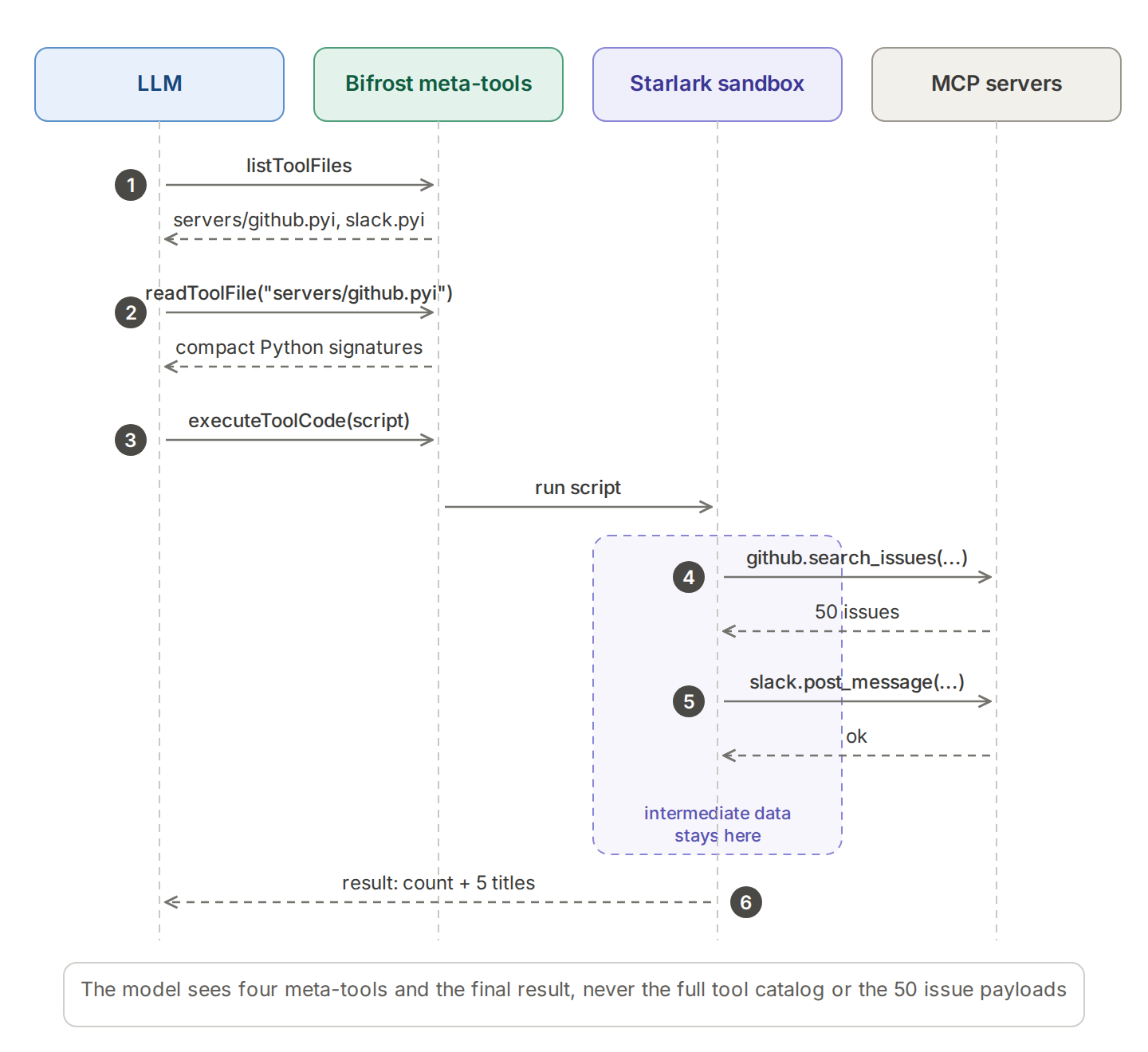
Code execution with MCP is an agent orchestration pattern in which the AI model writes a short program to call MCP tools, rather than invoking them one at a time through direct function-calling. The MCP gateway exposes connected tools as code APIs (typically Python or TypeScript stubs) that the model discovers on demand. A sandboxed runtime executes the generated script, calls each tool in sequence, and returns only the final result to the model. Intermediate data never enters the context window.
Cloudflare published the pattern under the name "Code Mode" in September 2025, generating a TypeScript API that the model calls from sandboxed V8 isolates. Anthropic's engineering team described the same approach as code execution with MCP, reporting a workflow that dropped from 150,000 tokens to 2,000 tokens (a 98.7% reduction) when a Google Drive to Salesforce data move was rewritten as code execution. Both pieces of work confirmed the same core insight: LLMs are far better at writing code that orchestrates tools than at chaining tool calls turn by turn through the prompt.
Because the pattern runs where tools are connected, it fits naturally inside an MCP gateway, the control layer between AI agents and MCP servers. For a shorter product-level definition, see what Code Mode is in Bifrost.
Why classic MCP burns tokens at scale
Classic MCP burns tokens at scale because every tool definition from every connected server is sent to the model on every turn, and every intermediate tool result is sent back through the model before the next call. Both costs grow with the number of connected tools, so a larger MCP footprint makes each request more expensive, as covered in the hidden cost of connecting multiple MCP servers to an agent.
- Tool definitions are injected on every turn. Each MCP server publishes a schema for every tool it exposes. The gateway loads all of those definitions into context on every LLM call, regardless of whether the model intends to use them.
- Intermediate results flow back through the model. When a multi-step workflow chains tool calls, each tool's output is added to the conversation so the next call can reference it. Long payloads (a meeting transcript, a CRM export, a directory listing) inflate the context further.
The math gets ugly fast. At 5 connected MCP servers with 30 tools each, an agent loads 150 tool definitions before processing the prompt. With 16 servers and 500+ tools, classic MCP can consume more than a million input tokens per query before the model produces a single useful action. Token cost is no longer a rounding error; at this scale, it is the majority of the bill.
The usual workaround is to trim the tool list manually for each agent. That is a tradeoff, not a solution. You are giving up capability in order to control cost. Filtering still has a place alongside Code Mode, and the other levers are compared in five MCP token optimization techniques.
How Code Mode reduces agent token costs
Code Mode in Bifrost MCP Gateway breaks the coupling between tool count and context size. Instead of loading every tool definition upfront, Bifrost exposes connected MCP servers as a virtual filesystem of Python stub files and gives the model four lightweight meta-tools to navigate them. The model reads only the tool signatures it needs for the current task, writes a short orchestration script, and Bifrost executes that script inside a sandboxed Starlark interpreter. Only the final output enters the context.
The four meta-tools that replace direct tool definitions are:
listToolFiles: discover which MCP servers and tools are availablereadToolFile: load Python function signatures for a specific server or tool stubgetToolDocs: fetch detailed documentation for a tool before using itexecuteToolCode: run the model-written orchestration script against live tool bindings
That is the entire surface area the model sees, four generic tools, regardless of how many MCP servers are connected behind Bifrost.
Why Python instead of JavaScript
Bifrost's Code Mode implementation makes two deliberate departures from the original Anthropic and Cloudflare patterns. First, the orchestration language is Python (executed as Starlark, a deterministic Python dialect), where the Cloudflare and Anthropic examples used TypeScript. Starlark keeps the familiar Python syntax while removing imports, file I/O, and network access, which makes it safe to run inside the gateway. Second, Bifrost adds the dedicated getToolDocs meta-tool, which lets the model fetch detailed documentation for a single tool on demand rather than loading the full schema upfront. This further reduces the context footprint for any workflow that touches only a few tools out of a large catalog.
Server-level and tool-level bindings
Code Mode supports two stub layouts so teams can tune the discovery surface to their workload:
- Server-level binding: one stub file per MCP server, listing all of its tools. Best when the model typically loads many tools from the same server.
- Tool-level binding: one stub file per tool. Best when the model selectively pulls individual tools across many servers and you want the smallest possible read footprint.
Binding level is a global setting (code_mode_binding_level), and server-level binding is the default.
What a Code Mode script looks like
After reading the stubs it needs, the model writes a short script and submits it through executeToolCode. Tools from each Code Mode client are exposed as global objects, calls are synchronous with keyword arguments, and the value assigned to result is returned to the model as JSON. An illustrative script that moves data between two connected servers:
python
# Find open bugs and post a short summary to the team channel
issues = github.search_issues(query="is:open label:bug", per_page=50)
titles = [i["title"] for i in issues["items"]]
slack.post_message(channel="#eng-triage", text="Open bugs: " + str(len(titles)))
result = {"count": len(titles), "top": titles[:5]}
The 50 issue payloads stay inside the sandbox. The model receives only the count and five titles, which is where the savings on intermediate results come from.The
Starlark sandbox
Bifrost executes every model-generated script inside a Starlark interpreter that is intentionally constrained: no imports, no file I/O, no network access, just tool calls and basic Python-like control flow. The interpreter is fast, deterministic, and safe enough to run unattended inside an agent loop with auto-execution. The model can write loops, conditionals, and error-handling around tool calls, but it cannot reach outside the sandbox.
This design also moves intermediate results out of the model's context entirely. If an agent is moving data from one tool to another, the payload stays inside the sandbox. The model only sees a compact final result, not the full transcript, CRM export, or directory listing that was processed along the way.
Code Mode benchmark results: 90%+ token reduction at scale
Three rounds of controlled benchmarks were run with Code Mode off and on, scaling tool count between rounds to measure how savings change as the MCP footprint grows. The same 64 to 65 queries were issued in each round against identical model configurations.
| Round | Setup | Input tokens (Code Mode OFF) | Input tokens (Code Mode ON) | Token reduction | Cost reduction | Pass rate |
|---|---|---|---|---|---|---|
| 1 | 96 tools, 6 servers | 19.9M | 8.3M | 58.2% | 55.7% | 100% |
| 2 | 251 tools, 11 servers | 35.7M | 5.5M | 84.5% | 83.4% | 100% |
| 3 | 508 tools, 16 servers | 75.1M | 5.4M | 92.8% | 92.2% | 100% |
Two observations matter here. First, the savings are not linear; they compound as MCP footprint grows. Classic MCP loads every tool definition on every request, so connecting more servers makes the problem worse. Code Mode's context cost is bounded by what the model actually reads on demand, not by how many tools exist in the registry. At roughly 500 tools, the per-query token usage drops by approximately 14x (1.15M to 83K).
Second, accuracy is not traded away to get there. Pass rate held at 100% in all three rounds, with one query in Round 2 actually passing under Code Mode that failed in the classic flow. The full benchmark methodology and results are published in the Bifrost MCP Gateway deep dive.
When to use Code Mode and when to keep classic MCP
Code Mode pays off when an agent connects to several MCP servers or runs multi-step workflows in which tools pass data to each other. For one or two small servers with simple, direct tool calls, classic MCP stays competitive, because the token savings are smaller and the model spends extra output tokens writing code.
An independent test shows that trade-off. AIMultiple's code execution benchmark ran 50 repetitions of two browsing tasks against a single MCP server with GPT-4.1:
| Metric | Classic MCP | Code execution | Change |
|---|---|---|---|
| Success rate | 100% | 100% | Same |
| Average input tokens | 15,417 | 3,310 | -78.5% |
| Average output tokens | 87 | 192 | +120% |
| Average latency | 9.66 s | 10.37 s | +7% |
At that small scale, input tokens still fell sharply but latency rose slightly. At Bifrost's larger footprints, Code Mode ran around 40% faster in large MCP deployments because it needed 3-4x fewer LLM round trips. The side-by-side comparison of classic MCP and Code Mode walks through the same decision in more detail, and Bifrost's guidance is summarized below.
| Enable Code Mode when | Keep classic MCP when |
|---|---|
| Three or more MCP servers are connected | Only one or two small servers are connected |
| Workflows chain several tool calls | Tool calls are simple and direct |
| Token cost or latency is a concern | Latency is critical and calls are few |
| Tools pass data to each other | Each call is independent |
Both modes can run side by side: enable Code Mode for heavy servers such as web search, documents, and databases, and keep small utilities as direct tools.
Code execution with MCP implementations compared
Several runtimes implement code execution with MCP, and they differ mainly in the language the model writes, where that code runs, and how tools are discovered. The table covers implementations whose documentation was reviewed for this article.
| Implementation | Language the model writes | Where code runs | Tool discovery |
|---|---|---|---|
| Bifrost Code Mode | Python (Starlark subset) | Starlark sandbox inside the gateway; no imports, file I/O, or network | listToolFiles, readToolFile, and getToolDocs over .pyi stubs |
| Cloudflare Code Mode | TypeScript | V8 isolates on Cloudflare Workers | Generated TypeScript API |
| mcp-use code mode | JavaScript or TypeScript | Node.js vm executor locally, or an E2B cloud sandbox | Client-side, from connected servers |
| mcp-server-code-execution-mode (open source) | Python | Rootless Podman or Docker containers | Server discovery and on-demand tool docs |
The trade-off across these options is isolation versus convenience. A Node.js vm executor is simple but offers basic isolation, containers and cloud sandboxes add stronger isolation with startup cost, and an in-gateway Starlark interpreter removes the language features that make untrusted code dangerous. Running the sandbox inside the gateway also means the same virtual keys, tool filters, and logs apply to scripts as to direct tool calls, which is the core argument for placing code execution in an MCP gateway for production AI agents.
Running Code Mode safely in production
Code execution with MCP introduces a new control surface that production deployments need to handle carefully. Bifrost's Code Mode is built around three guardrails.
Per-client toggle
Code Mode is enabled at the MCP client level, not globally. You can run Code Mode on heavy servers (web search, document retrieval, internal APIs) while keeping small utilities in classic mode where the overhead is negligible. The mode is a single toggle in the Bifrost dashboard or a IsCodeModeClient: true flag in the Go SDK configuration. No schema migration, no redeployment.
Granular auto-execution
By default, Bifrost treats tool calls as suggestions rather than executing them automatically. For autonomous agents, you allowlist tools individually. In Code Mode, the rules are stricter:
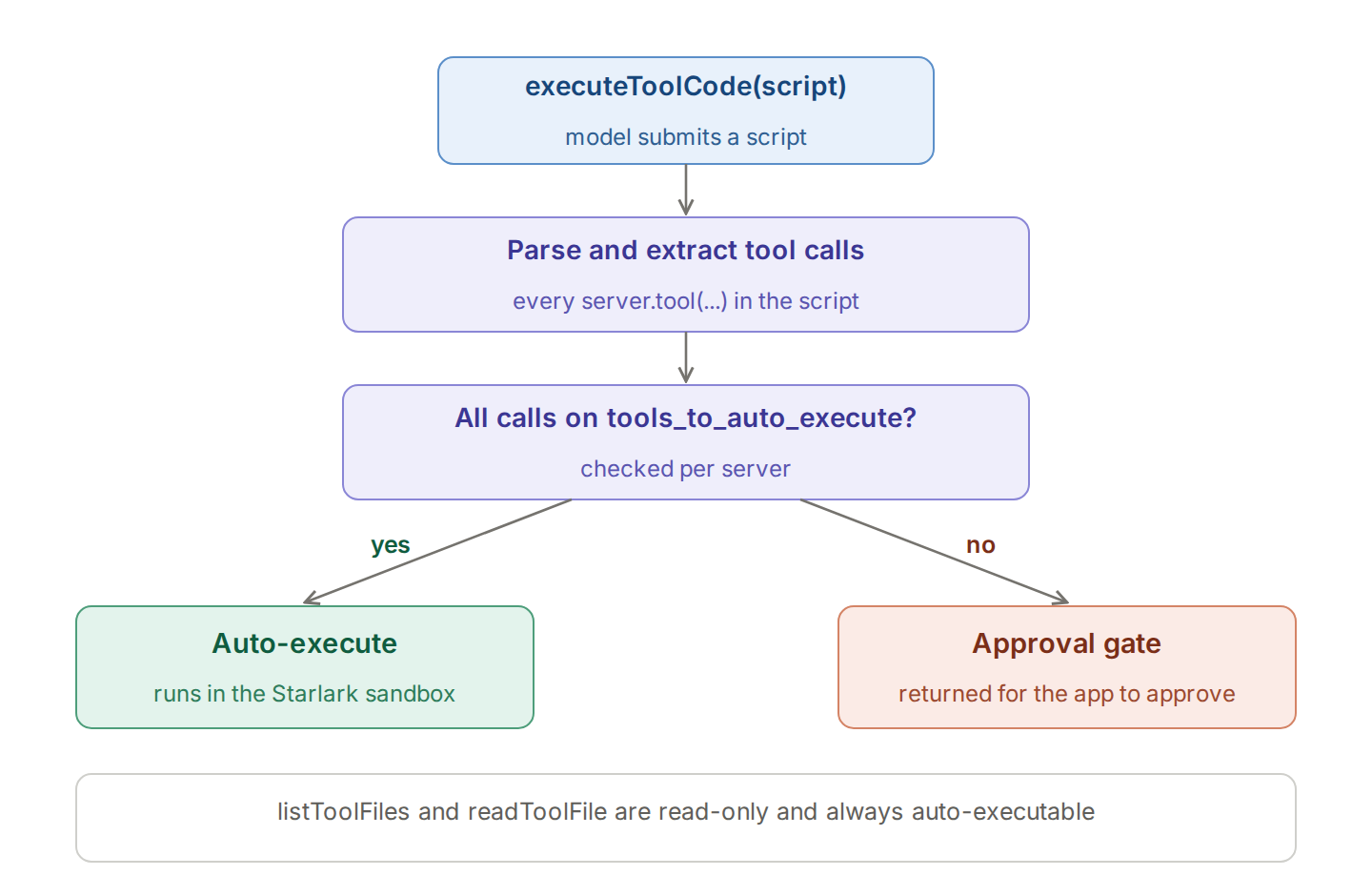
listToolFiles,readToolFile, andgetToolDocsare always auto-executable because they are read-only.executeToolCodebecomes auto-executable only when every tool the generated script calls is on your auto-executable allowlist.
This means a script that touches a single non-allowlisted tool stops at an approval gate, even if all the other tools it uses are pre-approved.
Virtual keys and audit trails
Code Mode runs inside Bifrost's broader MCP governance layer. Every script execution is scoped by the virtual key that issued the request, and the tools available to that key are filtered before the model ever sees them. Every tool call inside an executed script is logged as a first-class audit entry, with the tool name, server, arguments, result, latency, virtual key, and parent LLM request all captured. Teams can replay any agent run end to end, including which tools the generated script called and in what order.
For teams operating across regulated industries, this audit surface is what makes code execution with MCP defensible in production. The model is writing and running code, but every action that script takes is governed by the same policy layer as direct tool calls.
Getting started with Bifrost Code Mode
Code execution with MCP is the most impactful single change available to teams whose AI agent token costs are growing faster than their tool surface. Code Mode in Bifrost turns that pattern into a per-client toggle, with verified benchmarks showing 90%+ input token reduction at 500+ tools and 100% pass rate retention. Pair it with virtual keys, tool group governance, and per-tool audit logs, and you have the full control plane for production MCP traffic.
To see how Code Mode and the broader Bifrost MCP Gateway fit your stack, book a demo with the Bifrost team or pull the latest release from the Bifrost GitHub repository to run the benchmark yourself.
Frequently Asked Questions
What is code execution with MCP?
Code execution with MCP is a pattern in which an AI model writes a short program that calls MCP tools, instead of calling each tool through a separate function call. A sandbox runs the program, intermediate results stay in the sandbox, and only the final output returns to the model. The approach cuts tokens spent on tool definitions and on passing data between tools.
What is Code Mode in MCP?
Code Mode is the name Cloudflare used for code execution with MCP, and Bifrost uses the same name for its implementation. In Bifrost, Code Mode exposes four meta-tools (listToolFiles, readToolFile, getToolDocs, and executeToolCode) instead of every tool definition, and runs model-written Python in a Starlark sandbox inside the gateway.
How much does Code Mode reduce token usage?
In Bifrost's three-round benchmark, Code Mode reduced input tokens by 58.2% at 96 tools, 84.5% at 251 tools, and 92.8% at 508 tools, with estimated cost falling by 55.7% to 92.2%. Anthropic reported 98.7% on one data-moving workflow, and AIMultiple measured 78.5% fewer input tokens against a single MCP server.
Does code execution with MCP make agents slower?
It depends on scale. With one MCP server, AIMultiple measured latency 7% higher, because the model writes more output tokens. With large tool catalogs, Bifrost measured execution around 40% faster, because Code Mode needs 3-4x fewer LLM round trips. Gateway overhead itself is compared in the fastest enterprise MCP gateway benchmarks.
Is it safe to run model-written code with MCP tools?
It is safe when the code runs in a restricted sandbox and tool access stays governed. Bifrost runs scripts in a Starlark interpreter with no imports, file I/O, or network access, auto-executes a script only if every tool call is on the allow-list, and applies the calling virtual key's tool filters before the model sees any tool.
Why does Bifrost use Python instead of TypeScript for Code Mode?
Bifrost runs model-written code as Starlark, a deterministic subset of Python designed for embedding, which lets the gateway execute scripts without imports, file access, or network calls. Cloudflare's and Anthropic's examples use TypeScript. The pattern is the same in both languages: the model discovers tools on demand and writes one script instead of many tool calls.