Connect Claude Code to Multiple MCP Servers Through One Gateway
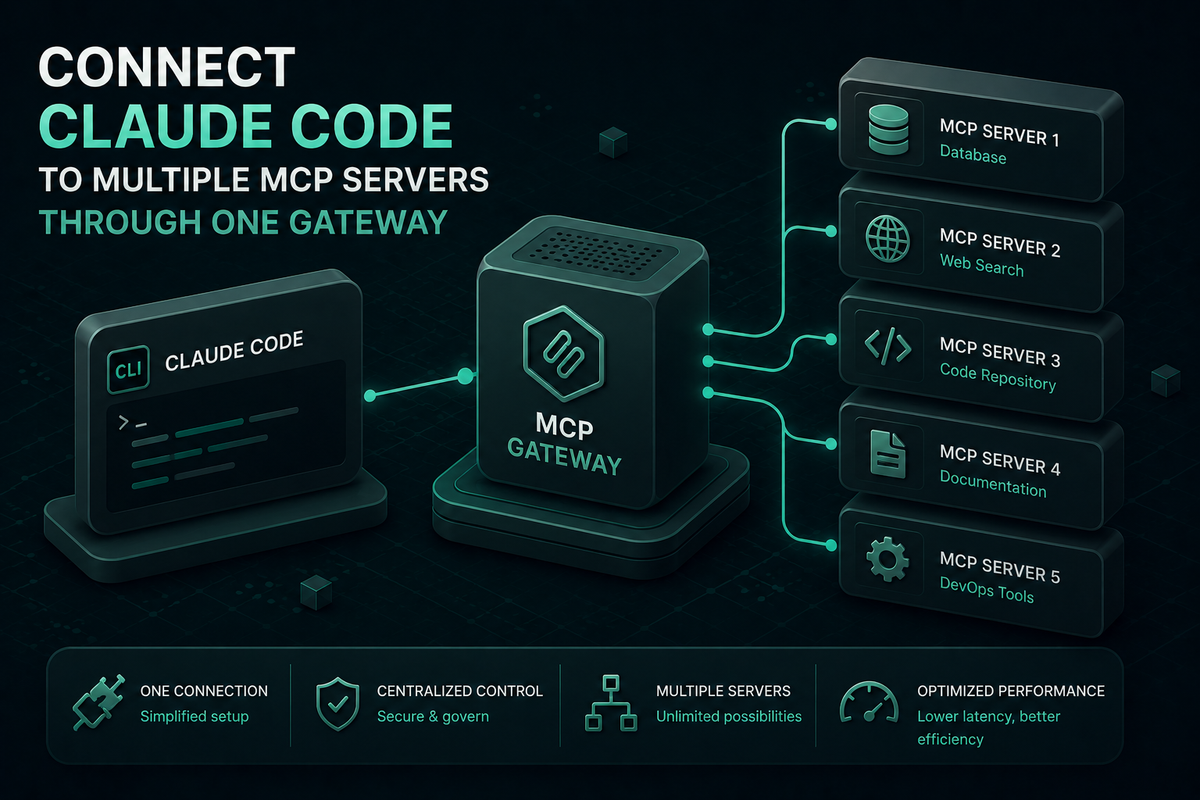
Use Bifrost to connect Claude Code to multiple MCP servers through a single /mcp endpoint, with centralized tool governance, audit logs, and lower token costs.
Connecting Claude Code to multiple MCP servers gets expensive fast. Every server you add to Claude Code is a standalone connection with its own credentials, its own config block, and its own approval surface. By the time a team is running fifteen MCP servers across filesystems, databases, GitHub, Slack, and internal APIs, the configuration sprawl, missing access control, and unbounded token consumption stop being side problems and start being the problem. Bifrost, the open-source AI gateway by Maxim AI, fixes this by acting as an MCP gateway that aggregates every connected server behind a single /mcp endpoint, applies per-tool access control, and cuts the token cost of multi-server agent workflows by up to 92 percent. This guide walks through why the default Claude Code setup breaks at scale, what an MCP gateway changes architecturally, and how to wire Bifrost into Claude Code in under ten minutes.
Why Connecting Claude Code to Multiple MCP Servers Breaks at Scale
Claude Code supports MCP natively through HTTP, SSE, and stdio transports. Adding a server with claude mcp add works perfectly when you have two. The architecture starts to strain once a team needs ten or fifteen.
Three failures recur across teams that scale this pattern without a gateway in front:
- Configuration sprawl: every server has its own entry, transport, and credential set. Onboarding a new engineer means replicating that setup on every machine. Rotating a credential means touching every developer's config.
- No access control: Claude Code can call any tool from any connected server. There is no policy layer that decides which engineer or which project gets which tool. A customer-facing workflow has the same surface area as admin tooling.
- Token waste: every connected server injects its full tool catalog into the model's context window on every request. Five servers with thirty tools each puts 150 tool definitions in context before Claude Code reads the prompt. Anthropic's engineering team has documented cases where this approach consumed 150,000 tokens per agent turn.
The problem is not Claude Code itself. The problem is that Claude Code is a client, and a client is the wrong place to centralize tool discovery, authentication, governance, and cost control across an entire engineering organization.
Common Approaches to MCP Server Aggregation
Teams trying to hold this together usually try one of three things before adopting a gateway.
The first is to ship a shared .mcp.json and ask developers to keep it synced. This solves consistency for an afternoon. The moment one engineer needs a database server another engineer should not have, the shared config breaks down and access control becomes a code review process.
The second is to trim the tool list and accept reduced capability. This works on paper but trades the agent's usefulness for predictability. You are paying for fewer features to avoid paying for more tokens.
The third is to script around it: wrap MCP servers in a custom proxy, add ad-hoc auth, and bolt on logging. This converges on building an MCP gateway, but as a bespoke side project that no one owns long term.
An MCP gateway is the production answer. It sits between Claude Code and every upstream tool server, presents a unified /mcp endpoint, and applies discovery, routing, authentication, governance, and observability in one place.
How Bifrost Becomes a Single MCP Gateway for Claude Code
Bifrost operates as both an MCP client and an MCP server. As a client, it connects to any number of upstream MCP servers over STDIO, HTTP, or SSE. As a server, Bifrost's MCP gateway exposes every discovered tool through a single endpoint that Claude Code connects to.
The architectural shift is straightforward:
- Claude Code points at one URL (
http://your-bifrost/mcp) instead of a list of MCP servers. - Bifrost handles fan-out to every upstream server, applies access policy, and returns the filtered tool catalog Claude Code is allowed to see.
- Adding or rotating an upstream server is a Bifrost config change. Claude Code requires no client-side update.
Bifrost's gateway overhead on the request path is 11 microseconds at 5,000 requests per second in sustained benchmarks, so the infrastructure layer never becomes the bottleneck. Connection handling, health checks, and automatic reconnects on every upstream server are part of the gateway, not the agent.
Beyond tool aggregation, the same control plane covers the LLM side of Claude Code's traffic. Bifrost exposes a fully compatible Anthropic API endpoint at /anthropic, which means the same gateway also handles provider routing, fallbacks, rate limits, and spend controls for the model calls Claude Code makes. Tool calls and model calls flow through one system, with one audit trail.
Connecting Claude Code to Bifrost in Four Steps
End-to-end setup takes a few minutes. The steps below assume Node.js 18 or later is installed and Claude Code is authenticated locally. The full setup is also covered in the Claude Code integration guide.
Step 1: Run Bifrost
Bifrost runs as an HTTP gateway with a built-in web UI. The fastest path is NPX or Docker:
npx -y @maximhq/bifrost
# or
docker run -p 8080:8080 maximhq/bifrost
Open http://localhost:8080 to access the dashboard. The same image deploys to Kubernetes, Docker Swarm, or bare metal without platform-specific work.
Step 2: Add upstream MCP servers
In the dashboard, open the MCP section and add a server. Provide a name, choose a transport (HTTP, SSE, or STDIO), and enter the endpoint or command. For HTTP and SSE servers, attach any headers the upstream server requires, including API keys, auth tokens, or custom metadata.
Once saved, Bifrost connects to the server, discovers its tools, and syncs them on the configured interval. Repeat for every server you want available to Claude Code. New servers added later flow through to Claude Code automatically.
Step 3: Scope tool access with virtual keys
Create a virtual key for each consumer, a user, a team, an environment, or a customer integration. Under MCP settings, select which tools that key is allowed to call. The scoping is per-tool, not per-server, so you can grant filesystem_read without granting filesystem_write from the same upstream server.
Any request made with that virtual key only sees the tools it has been granted. The model never receives definitions for tools outside scope, so there is no prompt-level workaround. For shared policies across many keys, MCP tool groups let you define a named collection of tools once and attach it to any combination of keys, teams, or users.
Step 4: Point Claude Code at the gateway
Route Claude Code's LLM traffic through Bifrost by setting two environment variables in your shell or in ~/.claude/settings.json:
export ANTHROPIC_API_KEY=your-bifrost-virtual-key
export ANTHROPIC_BASE_URL=http://localhost:8080/anthropic
Then register Bifrost as the MCP server in Claude Code with one command:
claude mcp add --transport http bifrost <http://localhost:8080/mcp>
Run /mcp inside Claude Code to verify. The bifrost entry will appear with every tool the virtual key is permitted to call. When you add a new upstream server in Bifrost later, it shows up here without any change on the Claude Code side.
Cutting Claude Code Token Costs with Code Mode
The default MCP execution model loads every tool definition from every connected server into context on every request. Five servers with thirty tools each means 150 tool definitions before the prompt is read. The token cost compounds as the MCP footprint grows.
Bifrost's Code Mode replaces that pattern. Instead of injecting every tool definition, Bifrost exposes the upstream MCP catalog as a virtual filesystem of lightweight Python stubs. The model gets four meta-tools (listToolFiles, readToolFile, getToolDocs, executeToolCode), reads only the stubs it actually needs, writes a short orchestration script, and Bifrost executes that script in a sandboxed Starlark interpreter. Intermediate tool results never round-trip through the model.
The savings compound as the tool footprint grows, as covered in the Bifrost MCP Gateway deep-dive on cost governance:
- 96 tools across 6 servers: 58 percent fewer input tokens, 56 percent lower cost
- 251 tools across 11 servers: 85 percent fewer input tokens, 83 percent lower cost
- 508 tools across 16 servers: 93 percent fewer input tokens, 92 percent lower cost
Pass rate stayed at 100 percent across all three rounds. Code Mode is recommended for any Claude Code setup connecting to three or more MCP servers, or any single server with a large tool surface area. Enabling it is a single toggle on the MCP client, with no schema changes and no redeployment.
Governance and Audit for Every MCP Tool Call
Once Claude Code is routed through Bifrost, every tool execution becomes a first-class log entry. Each entry captures the tool name, the upstream server, the arguments, the result, the latency, the virtual key that triggered it, and the parent LLM request that initiated the agent loop. Content logging can be disabled per environment, in which case Bifrost still records tool name, server, latency, and status without persisting arguments or results.
Three governance capabilities matter most for teams running Claude Code in production:
- Virtual keys issue scoped credentials per consumer, with per-tool allowlists, budgets, and rate limits.
- MCP tool groups define reusable policies across many keys so access can be managed by role, not by individual key.
- Audit logs let you filter by virtual key to see what a specific team or customer ran, or filter by tool to see how often a server is being hit.
For enterprise deployments, Bifrost layers in federated authentication, per-user OAuth for upstream services like Notion or GitHub, and clustering with zero-downtime rollouts. The full enterprise governance model covers RBAC, SSO via Okta and Entra, and vault-backed secret management.
Start Building with Bifrost
Connecting Claude Code to multiple MCP servers does not have to mean fragmented configs, missing access control, and runaway token bills. Bifrost replaces the default per-server pattern with one MCP gateway endpoint, virtual-key-based governance, Code Mode for token efficiency, and a complete audit trail across both LLM and tool traffic. The open-source release is on GitHub and runs in a single command.
To see how Bifrost can serve as the MCP gateway for your Claude Code rollout, with clustering, federated authentication, and dedicated support, book a demo with the Bifrost team.