MCP Tool Groups: Managing AI Tool Access at Scale
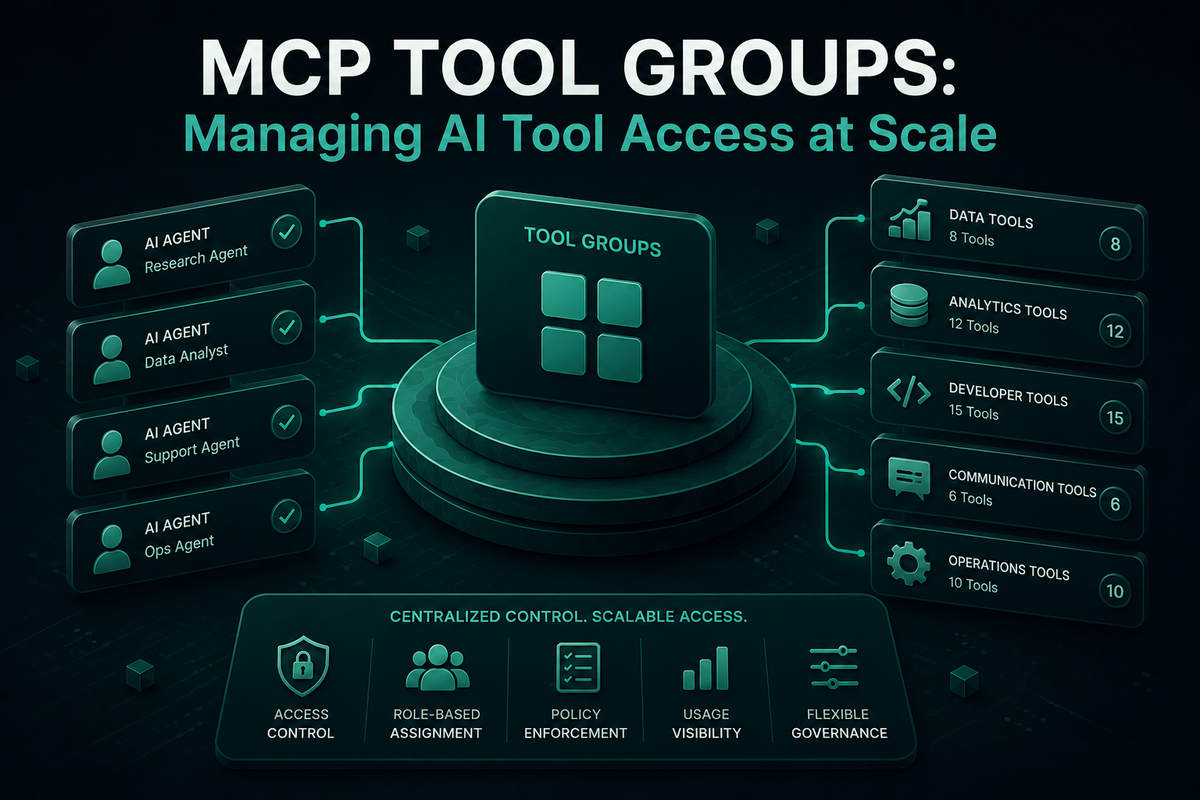
Bifrost MCP Tool Groups let platform teams govern MCP tool access across teams, customers, users, and providers from a single named policy.
Once an MCP deployment moves past a handful of virtual keys, managing tool access one key at a time stops working. A new team needs the same database tools as another, a customer integration needs a curated read-only subset, and every provider that connects through the gateway needs a tool surface that matches its contract. MCP Tool Groups in Bifrost solve this by letting platform teams define a named collection of tools once and attach it to any combination of virtual keys, teams, customers, users, or providers. Bifrost, the open-source AI gateway by Maxim AI, treats MCP tool access as a first-class governance primitive, scoped per tool rather than per server, and resolved in memory at request time so policy lookups never enter the latency budget.
Why Tool-Level Access Does Not Scale One Key at a Time
Most teams start with a single virtual key per agent. That works at the prototype stage. The pattern breaks the moment any of the following becomes true:
- The same tool set needs to be granted to many different consumers (for example, every internal engineer who runs the same coding agent)
- A customer-facing integration needs a tightly scoped subset that must not bleed into internal admin tooling
- Different teams (data, support, ops) need overlapping but non-identical tool sets
- The same agent is deployed across dev, staging, and prod with different tool surfaces in each environment
Configuring tools one virtual key at a time turns into shadow policy maintained in spreadsheets. When a new tool is added to a database server, every key that should pick it up has to be updated separately. When a tool is deprecated, every reference has to be cleaned up. With 20 MCP servers, 500 tools, and 30 keys, this is no longer policy management. It is a backlog.
What Are MCP Tool Groups
An MCP Tool Group is a named collection of tools, drawn from one or more MCP servers, that can be attached to any combination of virtual keys, teams, customers, users, or providers in Bifrost. At request time, Bifrost resolves every group that applies to the caller, merges the allowed tools, deduplicates them, and presents only that final set to the model. The group is the unit of policy, the virtual key is the unit of authentication. Decoupling the two is what makes access management linear instead of combinatorial.
Three properties define how MCP Tool Groups behave in Bifrost:
- Composable: multiple groups can apply to the same caller, and their tool sets are merged and deduplicated automatically
- Per-tool, not per-server: a group can grant
crm_lookup_customerwithout grantingcrm_delete_customerfrom the same MCP server - Resolved in memory: there are no database lookups on the request path. Groups are indexed in memory and synced across cluster nodes automatically
How MCP Tool Groups Work in Bifrost
Bifrost's MCP gateway sits in front of every connected MCP server and exposes a single /mcp endpoint to clients like Claude Code, Cursor, and Claude Desktop. When a request arrives, Bifrost authenticates the caller via the virtual key, then resolves the policy stack in this order:
- The virtual key's own MCP configuration (its explicit allow list)
- Every tool group attached to the key, the team it belongs to, the customer it represents, the user behind it, and the provider it routes through
- The intersection of that resolved set with any active MCP tool filtering rules
The merged allow list determines exactly which tool definitions are surfaced to the model. Tools the caller is not permitted to use are never injected into the model context, so there is no prompt-level workaround.
Bifrost enforces the same allow list at two points: at inference time, when tool definitions would otherwise be injected, and at tool execution time, when the model attempts to invoke a tool. A request that bypasses the inference-time filter (for example, a client that sets its own x-bf-mcp-include-tools header) still hits the execution-time check and is rejected if the tool is not in the resolved set.
Common Access Patterns MCP Tool Groups Solve
A few recurring patterns illustrate why platform teams reach for MCP Tool Groups instead of per-key configuration:
- Team scoping: a
data-team-toolsgroup bundles database read tools, BI tools, and warehouse tools. Every key that belongs to the data team picks it up automatically. - Customer scoping: an
enterprise-tier-toolsgroup exposes a richer surface thanstandard-tier-tools. Tier changes update access for all customer keys at once. - Provider scoping: a
claude-code-toolsgroup exposes only the filesystem, git, and CI tools that Claude Code agents need. A separate group can shape what Cursor or Codex CLI sees. - Environment scoping:
dev-toolsandprod-toolsgroups separate write-capable tools from read-only ones based on which environment a key is bound to. - Read/write splitting: a
read-only-crmgroup and acrm-writegroup are granted independently. A support agent gets the first, a billing job gets both.
These patterns compose. A single virtual key can simultaneously inherit claude-code-tools, data-team-tools, and prod-tools, and Bifrost resolves the union at request time.
How to Set Up MCP Tool Groups in Bifrost
Setting up MCP Tool Groups begins after at least one MCP client is connected to Bifrost. The end-to-end flow takes minutes:
- Connect your MCP servers. In the Bifrost dashboard's MCP section, add each upstream server with its connection type (HTTP, SSE, STDIO, or in-process via the Go SDK). Bifrost discovers each server's tools and syncs them on the configured interval.
- Create a tool group. Navigate to the MCP Tool Groups section, name the group, and select tools from any connected client. A single group can pull tools from multiple servers. For example, a
customer-support-toolsgroup might combinecrm_lookup,kb_search, andticket_createfrom three different MCP servers. - Attach the group. Bind it to any combination of virtual keys, teams, customers, users, or providers. The same group can be attached in more than one place.
- Verify the resolved set. Issue a test request with the relevant virtual key and call
/mcp/tools/list. The response shows the exact merged, deduplicated set of tools the caller will see, accounting for every applicable group plus any direct virtual-key configuration.
Day-to-day maintenance is then a matter of editing the group, not the keys. Adding a new tool to a server and dropping it into customer-support-tools immediately rolls it out to every key, team, and customer that inherits the group.
MCP Tool Groups, Code Mode, and Audit Logs Together
MCP Tool Groups are one of three governance layers in Bifrost's MCP gateway, and they are most effective when used alongside the other two.
- Code Mode: instead of injecting every allowed tool definition into the context, Code Mode exposes tools as a virtual filesystem of Python stubs. The model reads only what it needs. Bifrost's Code Mode benchmarks show 92.8% input token reduction at 508 tools across 16 servers with no accuracy loss. When a tool group grants access to a wide surface, Code Mode ensures that breadth does not translate into a token tax. Anthropic's engineering team has documented similar gains using the same execution pattern.
- Audit logs: every tool call is a first-class log entry, including the tool name, originating MCP server, arguments, result, latency, the virtual key that triggered it, and the parent LLM request. Filtering logs by virtual key or tool gives a complete record of how the resolved policy was used in practice, suitable for SOC 2 Type II, HIPAA, GDPR, and ISO 27001 audit scope.
Together, virtual keys, MCP Tool Groups, Code Mode, and audit logs cover the full governance loop: who can call what, what they actually called, what it cost, and how to change access without rewriting a single client.
Compliance and Risk Considerations
Excessive agency, the risk that an AI agent can perform actions beyond its intended scope, sits near the top of the OWASP Top 10 for LLM Applications. MCP Tool Groups directly support the recommended mitigation: limit the tools, functions, and permissions exposed to the model to only what is necessary. Because Bifrost enforces tool-level scoping at both inference and execution time, a misconfigured prompt or a compromised client cannot escalate beyond the resolved tool set.
For teams in regulated industries such as financial services and banking, this kind of policy enforcement is a baseline requirement, not a nice-to-have. The Model Context Protocol specification leaves authorization decisions to the implementer, and the gateway is where those decisions get enforced in practice.
Start Governing MCP Tool Access with Bifrost
MCP Tool Groups turn access management from a per-key chore into a per-policy primitive. Define the group once, attach it where it applies, and let Bifrost resolve the right tool surface for every caller at request time. Combined with virtual keys, Code Mode, and audit logs, MCP Tool Groups give platform teams a complete answer to who can call what, why, and at what cost.
To see how MCP Tool Groups, Code Mode, and Bifrost's governance layer fit into your AI infrastructure, book a Bifrost demo with the team.