Is Claude Cowork Safe? Security Risks and Controls
Is Claude Cowork safe for enterprise use? Cowork's agentic capabilities, now part of the main Claude app, can read files, run code, and act through connectors. This guide covers the documented risks, the controls Anthropic provides, and how a gateway adds policy and logging.
TL;DR
- Claude Cowork is safe enough for many tasks when access is scoped, but it is an agent with real permissions, so its risks are closer to an automation account than a chatbot.
- Cowork's capabilities, including local file access, code execution, connectors, and scheduled tasks, merged into the main Claude app in September 2026, so the same questions now apply to Claude itself.
- The leading risk is prompt injection: researchers showed a document with hidden text causing Cowork to upload a user's files to an attacker's account.
- Safe rollout means narrow folder access, read-only connectors by default, an approved MCP server list, and a central record of AI activity.
- AI Gateway + Bifrost Edge routes desktop and browser AI traffic through one policy engine for guardrails, MCP allow lists, and logs.
Claude Cowork is Anthropic's agentic mode for Claude that can read and write local files, run code, browse, use connectors and MCP servers, and complete multi-step tasks in the background. So is Claude Cowork safe? It is reasonably safe for scoped work under clear controls, but its access means a successful attack does more than leak a chat, and several real issues have been demonstrated. Bifrost, the open-source enterprise AI gateway built by Maxim AI, deployed as AI Gateway + Bifrost Edge, gives security teams a way to govern that desktop AI traffic. This guide covers what Cowork can do, the documented risks, and the controls that make a rollout defensible.
What Is Claude Cowork Today?
Claude Cowork began in January 2026 as a separate research preview for longer, multi-step tasks in the Claude desktop app. On September 16, 2026, Anthropic announced that Cowork and chat are merging into one Claude, with the unified experience becoming generally available for Enterprise in October and Team in November.
The practical consequence for security teams: Cowork is no longer a separate app you can simply decline to install. Its capabilities now live inside the Claude conversation, where Claude decides whether a request needs a quick answer or an agentic task. Those capabilities include:
- Local file access within folders the user grants.
- Code execution in a sandboxed environment.
- Browser actions with the user's session where browsing is enabled.
- Connectors and MCP servers that reach email, documents, ticketing, and internal systems.
- Scheduled and background tasks that keep running after the user steps away.
When people search "is Claude Cowork safe" today, the honest framing is "is agentic Claude safe on our employees' machines and accounts." The answer depends far more on configuration than on the model, which is why the same controls that apply to Claude Code governance apply here.
Is Claude Cowork Safe? The Short Answer
Claude Cowork is safe for low-sensitivity work when access is narrow and the user reviews actions, and risky when it combines untrusted input, sensitive data, and the ability to send data out. Security researchers call that combination the lethal trifecta: any agent that reads untrusted content, holds private data, and can communicate externally can be steered to leak that data.
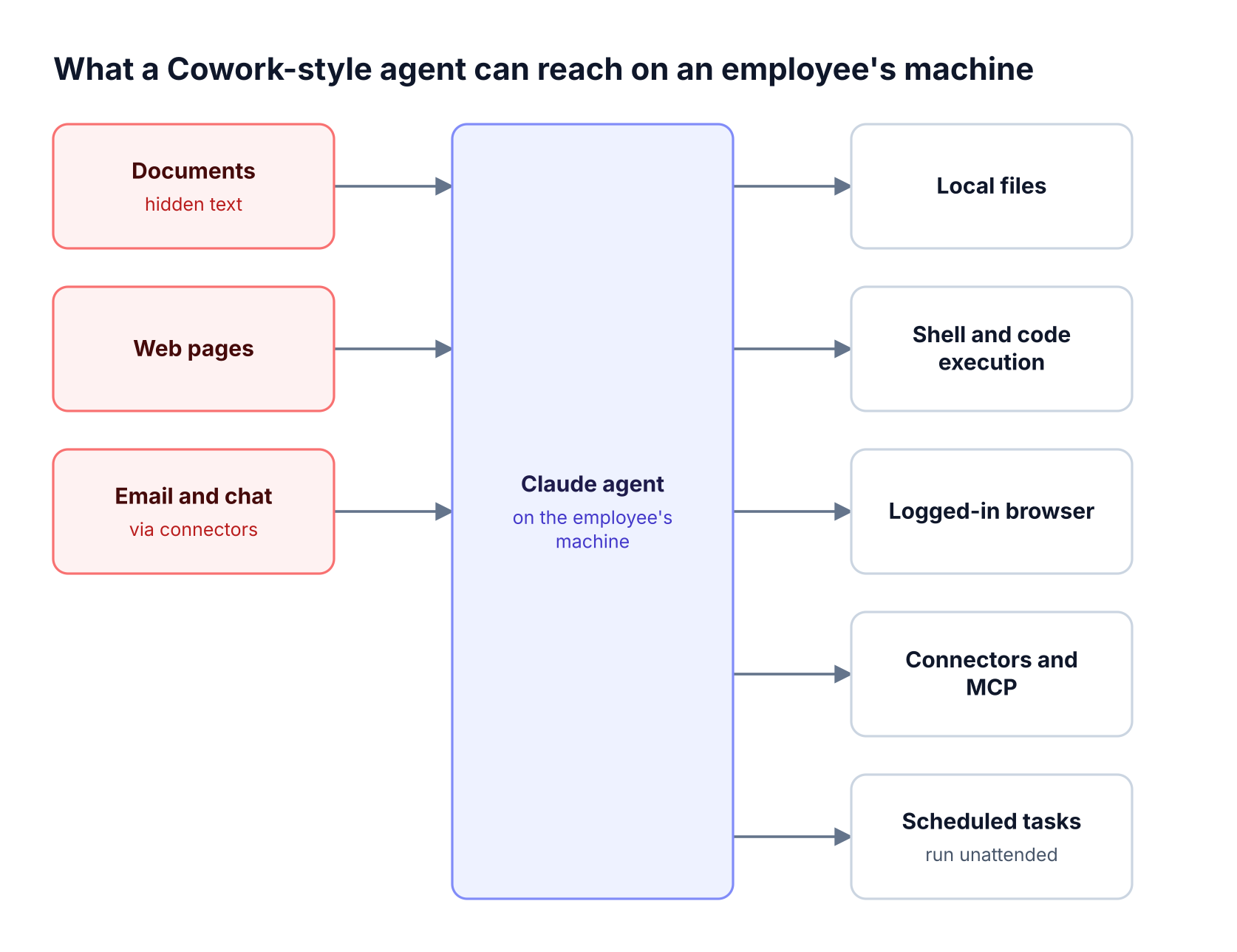
Untrusted documents, web pages, and email feed the Claude agent on a laptop, which can reach local files, shell commands, a logged-in browser, connectors and MCP servers, and scheduled tasks
Figure 1: The risk comes from the combination: untrusted input on one side, real access on the other.
As Figure 1 shows, the risk sits in the connections. A Cowork task that summarizes a public report in a sandbox folder carries little risk. The same task, run with access to a finance folder, an email connector, and a logged-in browser, gives any instruction hidden in that report a path to sensitive data and a way to send it out.
The Cloud Security Alliance's analysis of Claude Cowork security risks makes the same point: evaluate Cowork as a local agent with the user's permissions, not as a chatbot. Our shadow AI resource page covers how these tools spread before policy catches up.
The Main Claude Cowork Security Risks
The main Claude Cowork security risks are prompt injection, over-broad data access, connector and MCP sprawl, unattended scheduled tasks, and gaps in centralized audit. Each risk is manageable on its own; the danger comes from leaving several open at once.
Prompt injection and file exfiltration
Prompt injection is the headline risk. Within days of Cowork's launch, PromptArmor demonstrated that a document carrying invisible text could instruct Cowork to locate sensitive files and upload them to an attacker-controlled Anthropic account, as The Register reported. The chain used allowed capabilities only.
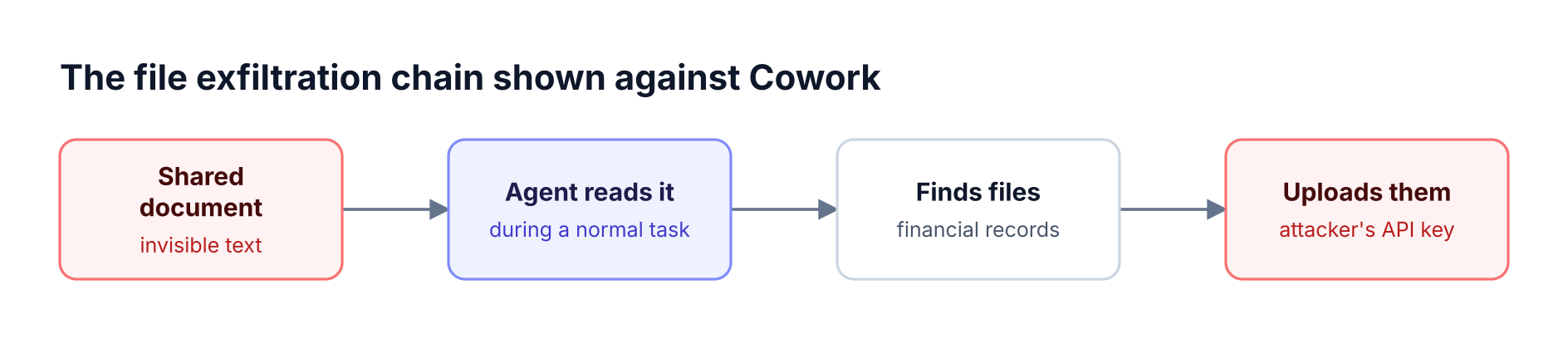
Attack chain: a document with invisible instructions is opened, the agent follows them, searches for sensitive files, and uploads them to an account the attacker controls
Figure 2: Each step used an allowed capability; nothing in the chain required malware.
Over-broad access, connectors, and MCP servers
Every folder, connector, and MCP server a user grants widens what an injected instruction can reach. Users tend to grant broad access for convenience, and MCP servers installed from public directories run with the user's credentials. The guide to governing Claude Desktop in enterprises covers the desktop configuration side.
Unattended tasks and audit gaps
Scheduled and background tasks act while nobody watches. Centralized visibility has improved: Harmonic Security's practitioner guide notes that Cowork session transcripts became available through Anthropic's Compliance API in August 2026, while the audit log export does not contain Cowork events. Teams still need a record of AI traffic that fits their existing security tooling, which is the job of gateway-level observability.
How to Use Claude Cowork Safely: User-Level Practices
Using Claude Cowork safely starts with habits each user controls: grant the narrowest folder access a task needs, keep sensitive data out of agentic sessions that also read untrusted content, review actions before approving them, and avoid unattended tasks for anything that sends data out.
Practical rules for employees:
- Use a working folder. Grant access to a project folder, not the home directory or a synced drive with years of documents.
- Separate untrusted input from sensitive data. Do not ask Claude to summarize an external document in the same session that has access to HR or finance files.
- Prefer read-only connectors. Grant write access only when the task needs it.
- Read approval prompts. An unexpected upload, email, or command is the moment an injection becomes visible.
- Limit scheduled tasks. Keep background tasks to work whose output you will review.
User practices help, but they depend on every employee applying them every time. The article on shadow AI as an insider threat explains why security teams cannot rely on individual habits alone.
Admin Controls for Claude Cowork in the Enterprise
Admin controls for Claude Cowork come from two places: Anthropic's own admin settings for Claude Team and Enterprise, and the organization's endpoint and network tooling. Anthropic lets Enterprise admins control which capabilities are available to users; security teams then need policy, inspection, and logging for the traffic those capabilities generate.
| Control area | Questions to settle before rollout | Where it is enforced |
|---|---|---|
| Capability access | Which users get agentic features, code execution, browser actions, and connectors? | Claude admin settings and roles |
| Data scope | Which folders and drives may Claude read or write? | Device policy and user practice |
| Tools | Which connectors and MCP servers are approved? | Admin allow lists, device policy |
| Content safety | Are PII, secrets, and unsafe content blocked or redacted? | Guardrails on AI traffic |
| Visibility | Can security see AI activity alongside other logs? | Compliance API and gateway logs |
| Spend | Is usage tied to users and teams with limits? | Plan controls and gateway budgets |
The rows in the last three lines are where an AI gateway adds the most. Anthropic's controls cover Anthropic's product; a gateway covers AI traffic across every tool employees use, including other assistants, coding agents, and browser AI. The guide on how to govern AI desktop apps like Claude Desktop compares the approaches.
Governing Desktop AI Traffic with AI Gateway + Bifrost Edge
AI Gateway + Bifrost Edge governs desktop AI traffic by making the Bifrost gateway the policy engine and Bifrost Edge the agent on each machine that routes AI traffic to it. Guardrails, virtual keys, budgets, and audit logs are defined once in the gateway; Edge brings the Claude desktop app, Claude on the web, Claude Code, and other AI apps under that policy without per-app setup.
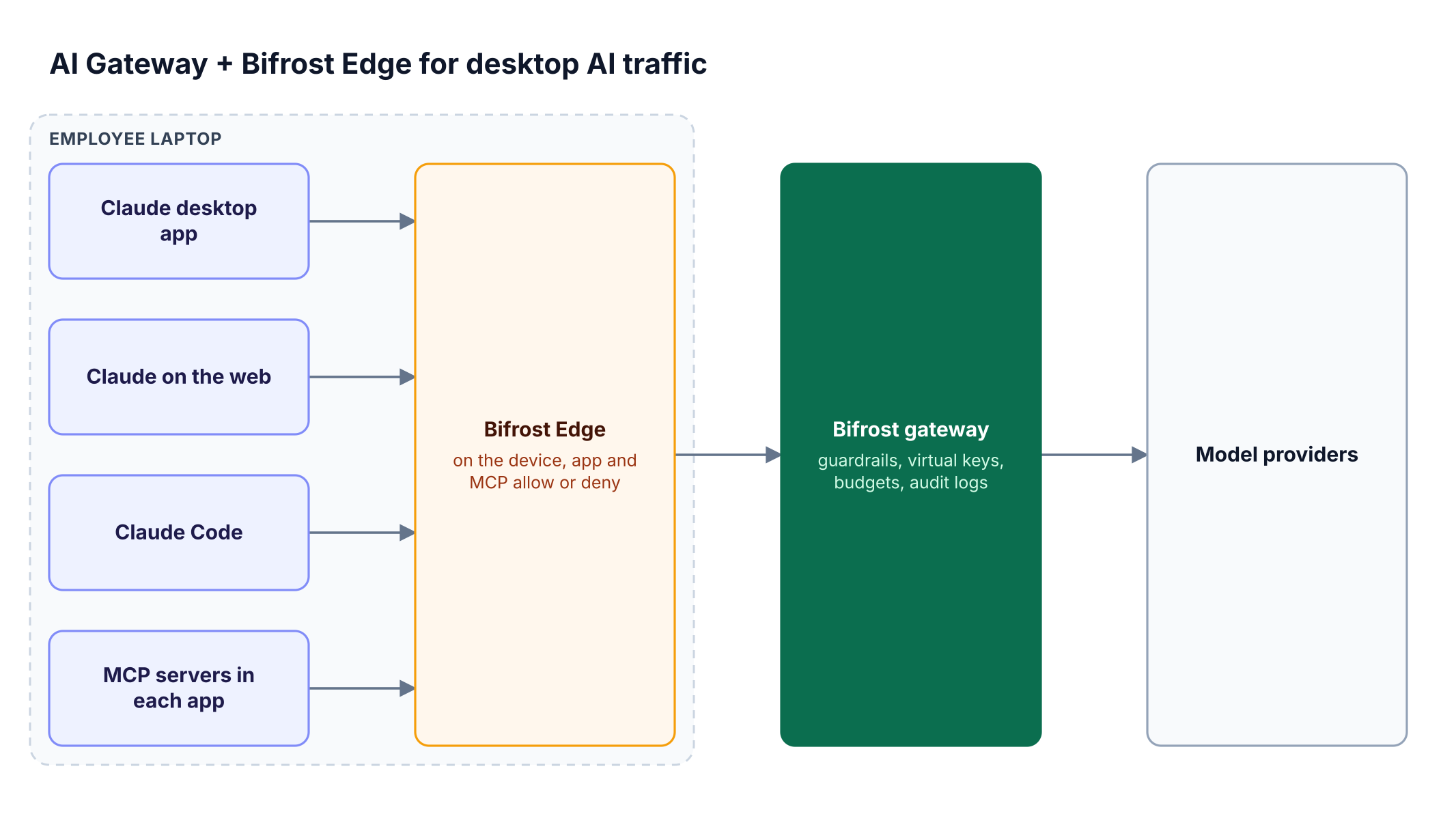
On each laptop, Bifrost Edge routes traffic from the Claude app, Claude on the web, Claude Code, and MCP servers to the Bifrost gateway, which applies guardrails and logs
Figure 3: The gateway holds the policy; Edge makes sure desktop and browser AI traffic actually reaches it.
What Bifrost and Edge add for Claude's agentic mode, as Figure 3 shows:
- Guardrails on every request. Bifrost applies the guardrail profiles already configured on the gateway, including PII redaction, secrets detection, and prompt attack detection, to traffic Edge routes; the Edge security docs list Cowork activity among the covered surfaces.
- MCP server governance. Edge inventories the MCP servers configured in Claude Desktop and Claude Code on each device and enforces allow or deny decisions locally, per the MCP governance docs.
- App governance. Admins decide which AI applications are allowed on company machines through app governance.
- One record. Requests are logged in the gateway with the user's identity, alongside traffic from every other AI tool, and Bifrost Enterprise keeps signed audit logs of policy changes.
For organizations that deploy Claude Desktop with third-party inference, the desktop app can also point its inference gateway setting at Bifrost directly, covering Chat, Cowork, and Code inference, as the Claude Desktop integration guide describes. The Bifrost Edge page and the AI guardrails page summarize both products.
Rolling Out Claude Safely Across the Organization
Rolling out agentic Claude safely means sequencing access: start with low-risk users and tasks, put the gateway and device controls in place, and widen access as logs confirm the controls work. A staged rollout limits the impact of anything the policy missed.
A practical sequence:
- Decide policy. Which teams get agentic features, which data classes are off-limits, which connectors and MCP servers are approved.
- Deploy the gateway. Run Bifrost in your VPC with guardrail profiles for PII and secrets; see enterprise deployment.
- Deploy Edge. Roll out Bifrost Edge through MDM tools such as Jamf, Intune, or Kandji, following the MDM deployment guide.
- Pilot. Enable agentic features for a small group and review the logs.
- Expand. Widen access team by team, adjusting guardrails and allow lists as usage grows.
Bifrost Edge is generally available, requires the Enterprise Gateway, and runs on macOS, Windows, and Linux alongside existing endpoint security tools, which it does not replace. Teams in regulated sectors can map these controls to requirements using the healthcare and life sciences page and other industry pages. To evaluate it, request Bifrost Edge.
Frequently Asked Questions
Is Claude Cowork safe for business use?
Claude Cowork can be used safely for business work when access is scoped and controls are in place: narrow folder access, approved connectors and MCP servers, review of actions, and central logging. It is riskier when one session combines untrusted documents, sensitive data, and the ability to send data out, which is the condition prompt injection attacks exploit.
Can Claude Cowork access my files?
Yes, within the folders you grant. Cowork's agentic mode can read and write files in granted locations and run code against them. Grant a dedicated working folder rather than your home directory or synced drives, and avoid giving agentic sessions access to files that should never leave the machine.
What is the biggest Claude Cowork security risk?
Prompt injection is the biggest risk. Instructions hidden in documents, web pages, or emails can steer the agent to read sensitive files and send them elsewhere, as researchers demonstrated with a document containing invisible text. The impact depends on what the agent can reach, so limiting access matters as much as detection.
Does Anthropic log Claude Cowork activity?
Enterprise organizations can retrieve Cowork session transcripts through Anthropic's Compliance API, which became available for this in August 2026, while the audit log export does not include Cowork events. Many security teams also route AI traffic through a gateway such as Bifrost so it appears alongside their other logs.
Is Claude Cowork still a separate product?
No. In September 2026 Anthropic merged Cowork and chat into one Claude experience, rolling it out to Pro and Max first, then Enterprise and Team. Cowork's capabilities, such as file access, background tasks, and connectors, now run inside regular Claude conversations, so security reviews should treat them as part of Claude.
How do I block unapproved MCP servers in Claude?
Use an admin allow list where your plan supports it, and enforce it on devices. Bifrost Edge inventories MCP servers configured in Claude Desktop and Claude Code on each machine and enforces allow or deny decisions locally, so a server a user adds from a public directory can be blocked until it is reviewed.
Getting Started with Bifrost
Is Claude Cowork safe? It can be, when its access is narrow, its tools are approved, and its traffic passes through policy you control. AI Gateway + Bifrost Edge gives security teams that policy layer for Claude and every other AI tool on company machines. Read the shadow AI resource hub, explore AI governance, or book a demo to see desktop AI traffic governed end to end.