On-Premise LLM Deployment: A Reference Architecture
An on-premise LLM is a large language model served on infrastructure an organization controls. This guide lays out a reference architecture covering model serving, the gateway layer, identity, guardrails, observability, failover, and a phased rollout plan.
TL;DR
- An on-premise LLM deployment has five layers: applications, gateway, model serving, compute, and shared security and observability services.
- Model serving handles inference, but it does not provide enterprise identity, budgets, guardrails, or audit evidence. Those controls belong in a gateway layer.
- Plan capacity from measured traffic, and define what happens when the private model pool is saturated or unavailable.
- Bifrost connects to self-hosted vLLM, SGLang, and Ollama servers, so applications keep one OpenAI-compatible API while the platform team controls access and routing.
An on-premise LLM is a large language model served on infrastructure an organization controls, so prompts and responses stay on its own network. Bifrost, the open-source AI gateway written in Go by Maxim AI, sits in front of those models as the control plane for enterprises and large teams. This guide lays out a reference architecture for a connected data center. For networks with no outside connection, use our air-gapped LLM deployment guide.
What Is an On-Premise LLM?
An on-premise LLM is a large language model that runs on servers an organization owns or directly controls, rather than on a provider's hosted API. The organization selects the model, operates inference, and decides which systems can call it. Prompts, responses, and logs stay inside that environment by default.
That control comes with new responsibilities. A hosted API hides capacity planning, patching, model upgrades, and much of the monitoring. Running your own model moves that work to your platform team, along with the access and audit controls a provider's console would otherwise supply.
Teams usually choose this route for three reasons:
- Restricted data: Policy may prevent certain prompts from leaving the organization.
- Steady volume: Consistent traffic can keep dedicated hardware busy.
- Network proximity: Workloads close to internal systems can avoid a long external path. In one vendor-commissioned 2026 survey of 203 decision makers, 75% identified workloads that need or would benefit from on-premises infrastructure for acceptable latency.
The choice between private and hosted models is usually made workload by workload. A self-hosted AI gateway lets both options sit behind one API.
On-Premise LLM Reference Architecture
A production private LLM stack has five layers: applications and agents, a gateway, model serving, compute, and shared services for identity, secrets, and observability. Separating them lets each layer change independently, so a team can replace a model or serving engine without changing application code.
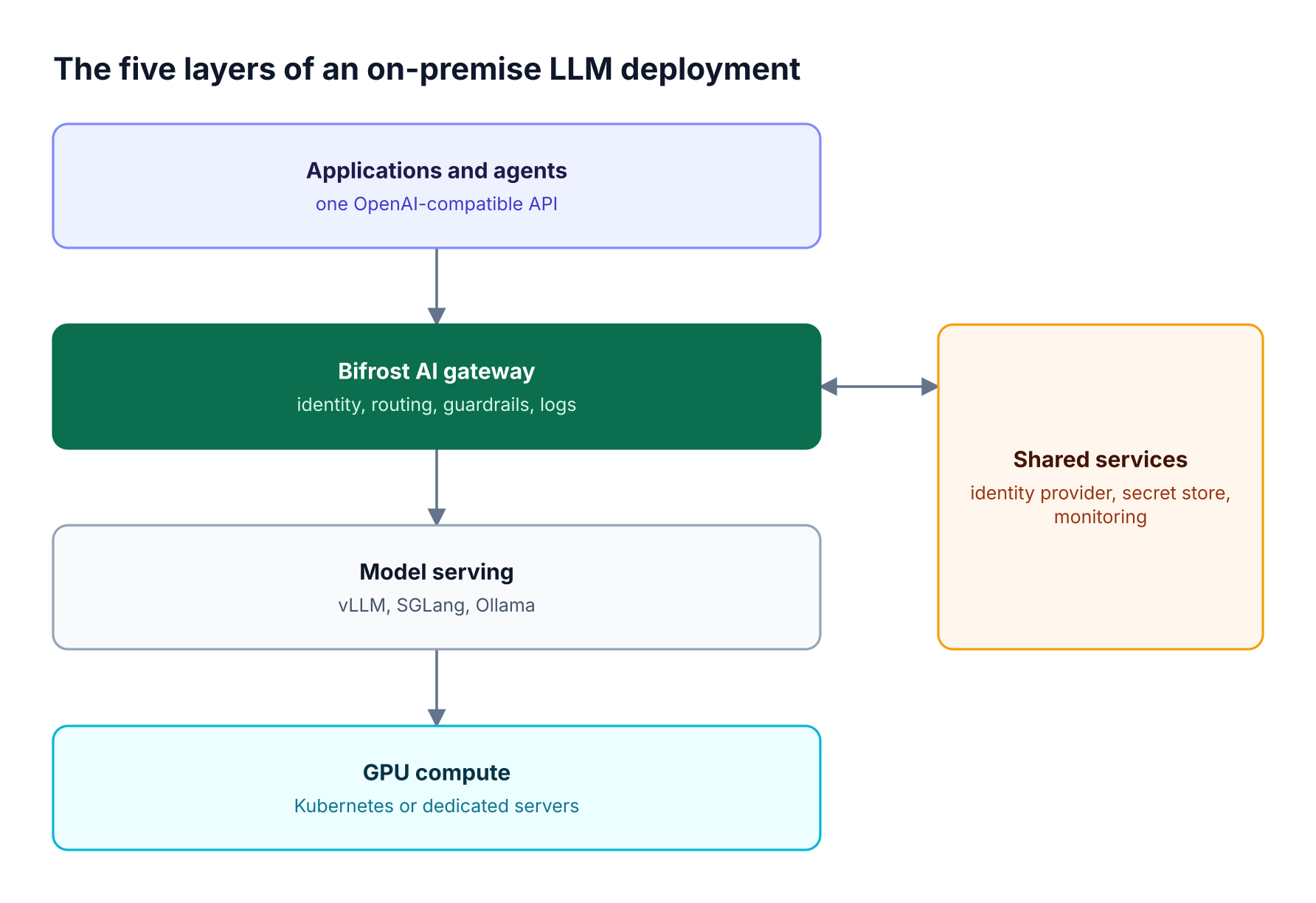
Figure 1: The gateway separates applications from serving, so models can change without code changes.
| Layer | Responsibility | Typical components |
|---|---|---|
| Applications and agents | Send requests through one API | Internal apps, services, coding agents |
| AI gateway | Identity, routing, budgets, guardrails, logs | Bifrost |
| Model serving | Load models and run inference | vLLM, SGLang, Ollama |
| Compute | Provide GPU capacity | Kubernetes or dedicated servers |
| Shared services | Support every layer | Identity provider, secret store, monitoring |
Bifrost occupies the gateway layer only. It does not host models, so serving and hardware decisions remain with your team. Our comparison of gateways for self-hosted vLLM, SGLang, and Ollama models covers how these layers fit together.
Choosing a Model Serving Engine
Choose a serving engine based on the workload it must support. Production multi-user inference generally calls for an engine designed for high concurrency on GPUs, while local development favors simple setup. Many teams run more than one engine, so a gateway that treats each as a provider keeps the application contract stable.
vLLM exposes an HTTP server that implements OpenAI's Completions and Chat APIs, which makes it straightforward to place behind a gateway. Compare candidates against your own constraints:
| Engine | Common use | Connected through Bifrost as |
|---|---|---|
| vLLM | Shared GPU inference for production applications | vLLM provider |
| SGLang | Shared GPU inference with structured generation workloads | Self-hosted provider |
| Ollama | Local development and small internal tools | Self-hosted provider |
Run a load test with your own prompts before you standardize. Output length, concurrency, and model size all affect throughput, so published numbers from another environment are a weak basis for capacity planning.
Planning On-Premise LLM Capacity
Plan capacity from measured demand: requests per minute, average input and output tokens, concurrency, and acceptable latency. Size for the peak you must serve, then decide what happens above it. Capacity is fixed, so overload behavior is an architectural decision rather than a provider limit you can ignore.
Capture these inputs before ordering hardware:
- Traffic shape: Peak and average requests by application.
- Token profile: Typical and worst-case prompt and response length.
- Model set: Which models must be loaded at the same time.
- Latency target: Time to first token and full response time for each workload.
- Growth and failure margin: Headroom for new teams and for losing a node.
If those workloads already run on hosted models, route them through a gateway first. Bifrost records usage by team, key, model, and provider, which gives you a real traffic baseline. Our guide to AI showback and chargeback shows how to attribute that demand to teams.
How the Gateway Layer Works
The gateway layer authenticates each caller, chooses a model backend, checks budgets, rate limits, and guardrails on each attempt, and records the result. Serving engines focus on inference, so this layer carries the enterprise controls. Every application calls one endpoint, and the platform team changes policy centrally instead of changing each service.
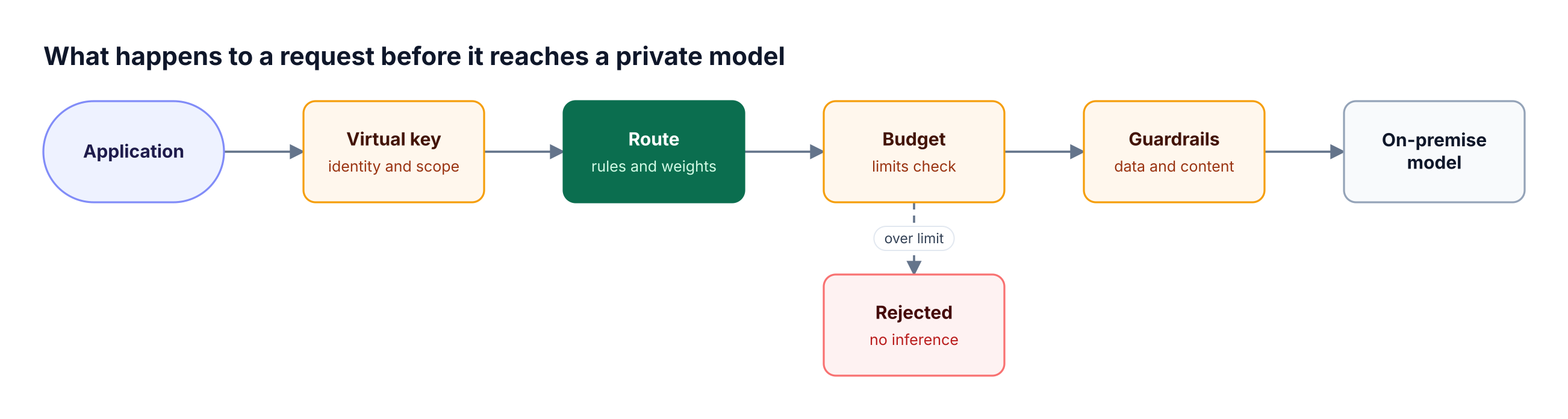
Figure 2: Policy runs before inference, so rejected requests never consume GPU time.
Start a Bifrost gateway with Docker, then add your serving endpoint as a provider:
docker run -p 8080:8080 -v $(pwd)/data:/app/data -e BIFROST_SETUP_TOKEN maximhq/bifrost:v2.4.0
Set BIFROST_SETUP_TOKEN before the first start, and use TLS for shared deployments. Applications then point an OpenAI-compatible client at the gateway. Assuming the gateway runs at http://bifrost.internal:8080, the drop-in replacement keeps your existing client code. Set the base URL, use a virtual key, and name the provider in the model field:
from openai import OpenAI

client = OpenAI(
    base_url="<http://bifrost.internal:8080/openai>",
    api_key="your-bifrost-virtual-key",
)

response = client.chat.completions.create(
    model="vllm/your-model-name",
    messages=[{"role": "user", "content": "Summarize this incident report."}],
)
Use your exact loaded model name. Bifrost serves inference, the dashboard, and the admin API on one HTTP port, so enable authentication before other teams can reach it.
Security Controls for an On-Premise LLM
A private model still needs application-level security. A private network limits who can reach the model, but it does not decide which team may use it, what data may enter a prompt, or who can read logs. Apply identity, secrets management, and guardrails at the gateway so every model inherits them.
Bifrost Enterprise covers the main controls for this layer:
- Identity and access: User provisioning connects Okta, Microsoft Entra, Keycloak, Zitadel, Auth0, Google Workspace, or any OIDC provider, while role-based access control sets who can do what.
- Scoped keys: Virtual keys limit each team to approved models, budgets, and rate limits.
- Secrets: Secret management uses AWS Secrets Manager, GCP Secret Manager, or HashiCorp Vault, so plaintext keys are not stored in the database.
- Guardrails: Personal data and secrets detection applies to requests and responses, and redaction can differ across live traffic, stored logs, and exported traces.
Regulated teams should also review our guide to LLM controls for banks and the HIPAA-focused gateway guide. Tool access needs the same care, so see our MCP security checklist if agents will call internal systems.
Observability for Private LLM Traffic
Private LLM traffic needs request metrics, traces, and access-controlled content logs. Without them, a team cannot separate slow inference from queueing, attribute cost to a business unit, or support an audit. Keep this telemetry inside your environment and send it to the monitoring systems your teams already use.
Bifrost provides Prometheus metrics and OpenTelemetry tracing on every request, with connections to Datadog, Kafka, BigQuery, Pub/Sub, and Splunk. Content logging controls decide which parts of a request and response are kept and who can read them. Our AI observability page covers this layer in more detail.
Track at least these signals:
- Time to first token and total latency by model.
- Request and token volume by team and application.
- Error, rejection, and fallback rates.
- GPU utilization and queue depth from the serving layer.
Audit logs answer a different question. Signed audit logs record configuration changes, such as who changed a route or key. Our guide to AI audit trail controls explains how the two records work together.
High Availability and Failover
High availability for a private model service means removing single points of failure at both the gateway and serving layers. Run several model replicas and gateway nodes, then define an ordered failure path. The final step depends on policy: restricted workloads should reject the request rather than leave the boundary.
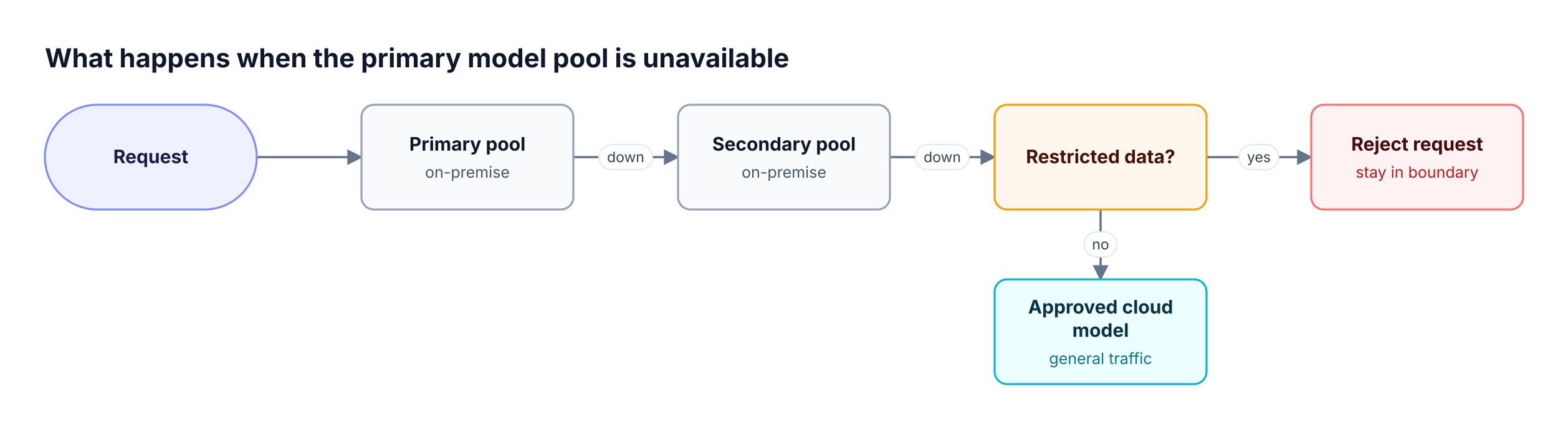
Figure 3: Fallback order follows the data class, and a scoped virtual key refuses any provider outside it.
Bifrost supports this design with retries and fallbacks and weighted load balancing across backends.
Bifrost Enterprise adds cluster mode, where nodes form a peer-to-peer cluster and share provider health, so an outage one node detects is acted on by all of them. Adaptive routing recomputes provider weights from health and latency signals.
A common pattern is private first, with approved overflow for general traffic. Use expression-based routing rules to send each data class down its permitted path, and give restricted workloads a virtual key that lists only approved providers. Our guide to automatic failover and load balancing covers these patterns in depth.
An On-Premise LLM Rollout Plan
Roll out a private LLM in phases, starting with one low-risk workload. This validates model quality, capacity assumptions, and operating procedures before more teams depend on the service. Each phase should have an exit test that platform, security, and application owners agree on.
- Baseline: Route current traffic through the gateway and record token volume, latency, and cost.
- Pilot: Serve one model for one internal application, with guardrails and logging enabled.
- Load test: Replay realistic traffic and confirm behavior at peak and during node failure.
- Security review: Validate access, secrets, log retention, and network paths.
- Expand: Add teams through access profiles, which define reusable provider, model, budget, and rate limit policies.
- Operate: Assign on-call ownership, model upgrade procedures, and capacity reviews.
Use the Bifrost enterprise deployment guide to choose between Kubernetes, Docker, and bare-metal paths. Bifrost runs as a single binary, and Helm deployment covers Kubernetes clusters.
Frequently Asked Questions
What is an on-premise LLM?
An on-premise LLM is a large language model that runs on infrastructure an organization owns or directly controls, instead of a provider's hosted API. The organization chooses the model, operates inference, and controls which systems can call it. Prompts and responses stay in that environment unless policy sends them elsewhere.
What hardware does an on-premise LLM need?
Hardware depends on model size, concurrency, and latency targets, so no single specification fits every deployment. Production multi-user inference usually needs GPU servers, while small models for development can run on less. Measure your token volume and peak concurrency, then load test the chosen model before you commit to a hardware purchase.
Can you run ChatGPT on-premise?
ChatGPT itself is a hosted product, so organizations generally run open-weight or licensed models on private infrastructure instead. Serving engines such as vLLM expose an OpenAI-compatible API, so applications built for hosted models can often connect through a gateway with few changes. Model behavior will still differ, so test each workload.
What is the difference between on-premise and self-hosted LLMs?
A self-hosted LLM is any model your team operates, including in a cloud account you control. An on-premise LLM is the narrower case where that model runs on infrastructure in your own data center or colocation space. Both give you control over serving, but on-premise also makes you responsible for the hardware.
Do on-premise LLMs need a gateway?
A single application may not need one, but shared deployments usually do. Serving engines focus on inference, not enterprise identity, team budgets, guardrails, or audit evidence. A self-hosted gateway applies those controls once for every model and gives applications a stable endpoint when models, engines, or environments change behind it.
How do you update a private LLM safely?
Deploy the new model version beside the current one, send a small share of traffic to it, and compare quality, latency, and error rates. Weighted routing at the gateway makes this possible without application changes. Keep the previous version loaded until the new version passes your checks, so rollback remains a configuration change.
Start Your On-Premise LLM Deployment
A private model becomes a shared enterprise service when serving, governance, and observability work together. Start with one model and one workload, and put a gateway in front of it from the first day. To plan your architecture with the Bifrost team, book a demo.