7 Best Open WebUI Alternatives, and the Gateway Behind Them
Open WebUI alternatives are the self-hosted and desktop chat interfaces teams choose instead of Open WebUI. This guide compares LibreChat, LobeHub, Onyx, AnythingLLM, Hugging Face Chat UI, Jan, and Msty, and shows how Bifrost governs the model traffic behind any of them.
TL;DR
- Open WebUI's license requires permission or an enterprise license to change its branding above 50 end users in a rolling 30-day period, a common reason teams compare Open WebUI alternatives.
- LibreChat is the closest multi-user replacement: MIT-licensed, with OIDC, SAML, and LDAP sign-in plus agents and MCP tools.
- Onyx and AnythingLLM fit chat that must answer from company documents; Jan and Msty fit desktop use.
- All seven tools accept a custom OpenAI-compatible endpoint, so one Bifrost endpoint can serve them all with per-team virtual keys, budgets, failover, and request logs.
- Bifrost is not a chat UI; it is the AI gateway behind whichever interface a team picks.
Open WebUI alternatives are the self-hosted and desktop chat interfaces that platform and IT teams evaluate when Open WebUI's license, product focus, or deployment model does not match how the company wants employees to use AI. The seven below cover multi-user web platforms, knowledge-search tools, and desktop clients, and each one can send its model traffic to a custom OpenAI-compatible endpoint. That endpoint is where Bifrost, the open-source AI gateway built by Maxim AI, fits as the best choice for enterprises running mission-critical AI workloads that require top-tier performance, scalability, and reliability. Bifrost is not a chat interface, so this guide places it first as the layer under the seven chat UIs rather than as one of them.
What Is Open WebUI and Why Teams Look for Alternatives
Open WebUI is a self-hosted chat interface for models served through Ollama or any OpenAI-compatible API, maintained by Open WebUI Inc. and starred about 159,000 times on GitHub as of November 2026. Teams look for Open WebUI alternatives mainly for three reasons: the branding clause in its license, a different product focus, or a need for desktop rather than browser use.
The Open WebUI License keeps BSD-style terms but adds a branding condition: deployments with more than 50 end users in any rolling 30-day period may not alter or remove the "Open WebUI" name or logo without written permission or an enterprise license. For an internal assistant shipped under the company's own name, that clause turns a free tool into a procurement decision. Other teams need answers grounded in Confluence or Google Drive, agent workspaces, or offline desktop use.
None of these reasons concerns the model layer. Provider keys, per-team spend, failover, and the request record belong below the chat UI, which is what an AI gateway does. Teams staying on Open WebUI can follow the Open WebUI and Bifrost setup guide.
How to Evaluate Open WebUI Alternatives for Enterprise Teams
Evaluate Open WebUI alternatives on six criteria: license terms at your user count, sign-in through the corporate identity provider, deployment model, support for a custom OpenAI-compatible endpoint, agent and MCP support, and where spend and access rules are enforced. The last two decide how much governance the chat UI carries and how much belongs in the gateway.
| Criterion | What to check | Why it matters |
|---|---|---|
| License | Branding or derivative-work clauses | Decides whether you can rebrand or fork |
| Identity | OIDC, SAML, LDAP, SCIM | Access follows the directory |
| Deployment | Shared server or desktop app | Where chat history lives |
| Custom endpoint | Base URL plus API key | Lets one gateway serve every UI |
| Agents and tools | MCP, agents, code execution | Tool calls need the same controls |
| Spend and access | Per-team keys, budgets, allowlists | Usually enforced at the gateway |
A chat UI that cannot use the corporate directory creates a second user store, and the patterns for single sign-on for LLM access apply to the gateway as much as to the UI.
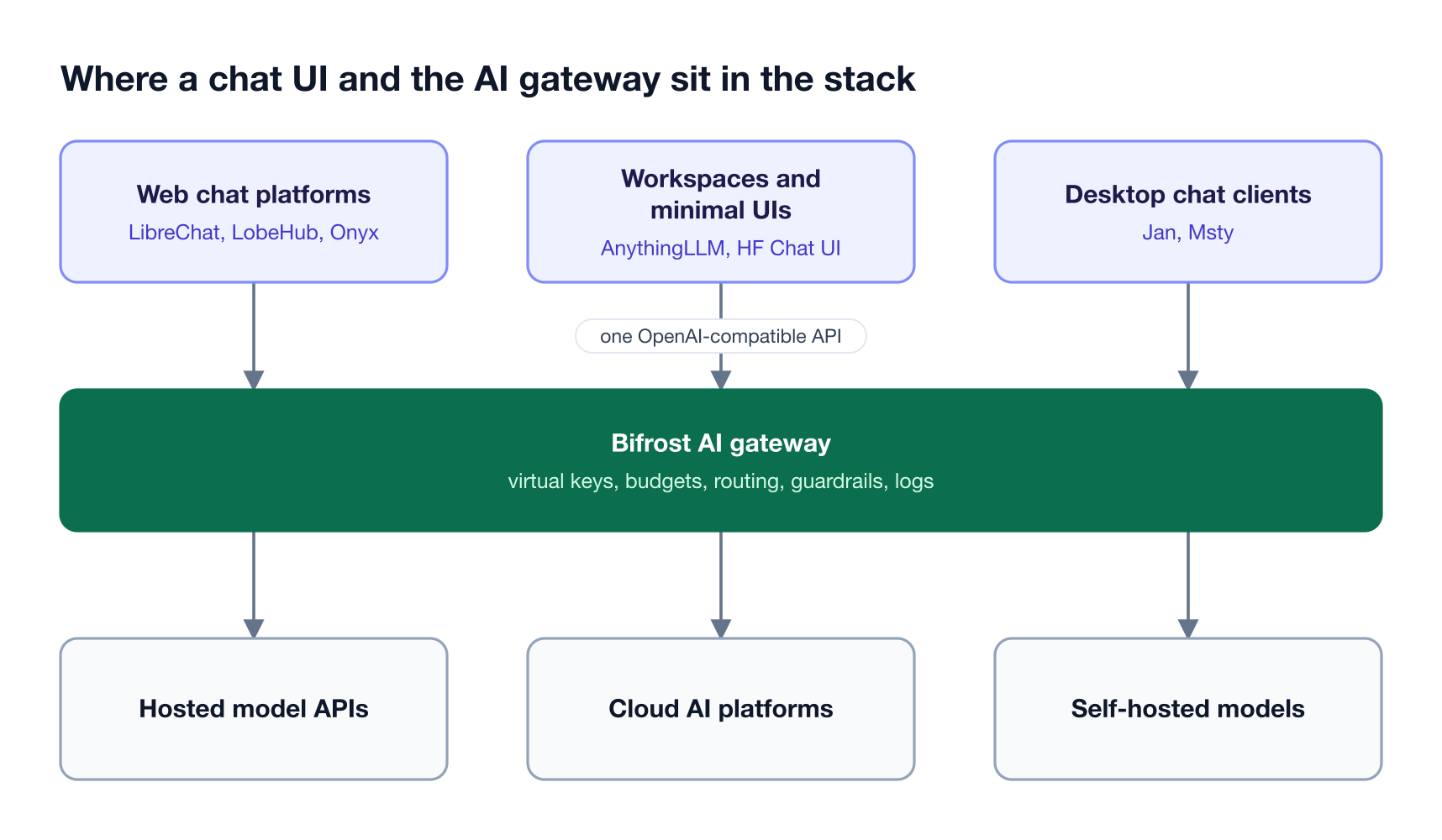
Figure 1: The chat UI owns the user experience; the gateway layer below it owns keys, spend, routing, and the request record.
As Figure 1 shows, the chat UI and the gateway are separate decisions. A team can run LibreChat for engineers and Onyx for support staff while the Bifrost AI gateway holds one set of virtual keys for LLM access control and one LLM gateway configuration for both.
Open WebUI Alternatives Compared at a Glance
The table compares the seven Open WebUI alternatives on license, deployment, team sign-in, and custom endpoint support, as read from each project's repository and docs in November 2026. The Bifrost gateway is listed first as the layer any of them can call; it does not replace the chat UI.
| Tool | Type | License | Team sign-in | Custom endpoint | Best fit |
|---|---|---|---|---|---|
| Bifrost (gateway layer) | AI gateway | Apache 2.0 core, paid Enterprise | OIDC SSO and SCIM (Enterprise) | It is the endpoint | Governing models behind any chat UI |
| 1. LibreChat | Self-hosted web app | MIT | Email, OIDC, SAML, LDAP, passkeys | librechat.yaml custom endpoint |
Closest multi-user replacement |
| 2. LobeHub | Self-hosted web app | LobeHub Community License | Entra ID, Okta, Keycloak, generic OIDC | OPENAI_PROXY_URL |
Agent workspaces |
| 3. Onyx | Self-hosted web app | MIT, Onyx Enterprise License for ee code |
One OIDC or SAML provider in all editions | Custom Inference Provider | Chat over company knowledge |
| 4. AnythingLLM | Desktop app and Docker server | MIT | Roles in the Docker build | Generic OpenAI provider | Document workspaces |
| 5. Hugging Face Chat UI | Self-hosted web app | Apache 2.0 | OpenID Connect | OPENAI_BASE_URL only |
Minimal front end |
| 6. Jan | Desktop app | Apache 2.0 | Single-user app | Custom Endpoints | Local and offline use |
| 7. Msty | Desktop app and Studio Web | Proprietary; paid license for work use | SSO and RBAC on Enterprise | Bring Your Own Provider | Desktop app with a team tier |
Bifrost: The AI Gateway Behind Any Open WebUI Alternative
Bifrost is an open-source AI gateway that gives every chat UI one OpenAI-compatible endpoint for 10,000+ models across 25+ providers. Each UI authenticates with a virtual key, and Bifrost applies that team's model access, budget, rate limits, routing, failover, and guardrails before the request reaches a provider, then records it in the request log.
Best for: Bifrost is built for enterprises running mission-critical AI workloads that require top-tier performance, scalability, and reliability. It serves as a centralized AI gateway to route, govern, and secure all AI traffic across models and environments with ultra low latency. Bifrost unifies LLM gateway, MCP gateway, and Agents gateway capabilities into a single platform. Designed for regulated industries and strict enterprise requirements, it supports air-gapped deployments, VPC isolation, and on-prem infrastructure. It provides full control over data, access, and execution, along with strong security, policy enforcement, and governance capabilities.
What Bifrost adds behind a chat UI:
- One endpoint for every model. Bifrost is a drop-in replacement for the OpenAI API that reaches 10,000+ models across 25+ providers through names such as
openai/gpt-5. - Virtual keys per team. Virtual keys carry model and provider allowlists, budgets, and rate limits, and budgets are checked independently at the key, team, and customer levels.
- Failover without UI changes. When a chat UI sends only a model name, the virtual key's weighted load balancing and automatic fallbacks pick the provider, and retries rotate keys on
429errors before moving to the next provider. - Guardrails on inputs and outputs. Bifrost Enterprise guardrails include secrets detection and LLM-judged policies, and connect to providers such as Microsoft Presidio, AWS Bedrock Guardrails, and Google Model Armor.
- Request logs and audit logs. Built-in observability records inputs, outputs, tokens, cost, and latency per request, and signed audit logs record administrative changes.
- Identity from the directory. Bifrost Enterprise supports OIDC sign-in and SCIM provisioning and accepts identity provider tokens in place of a virtual key, so a UI that forwards the user's token gets per-user attribution.
- Tools under the same rules. As an MCP gateway, Bifrost connects to MCP servers, filters tools per virtual key, and can expose connected tools to MCP clients through one endpoint.
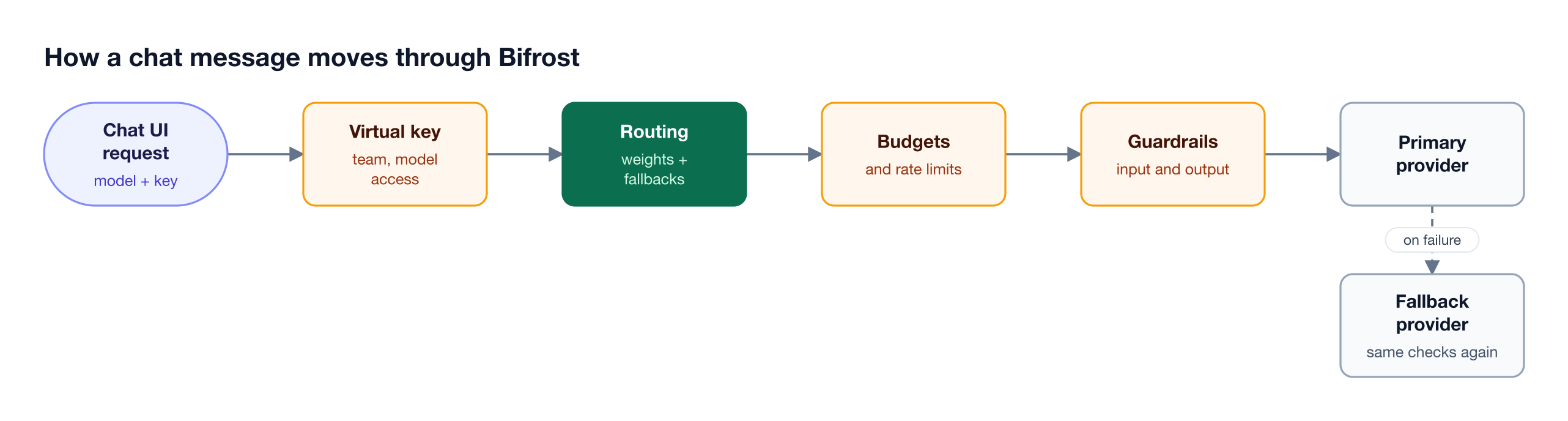
Figure 2: The chat UI only sends a model name and a key; identity, spend limits, guardrails, and failover all happen in the gateway.
Figure 2 is why the chat UI choice stays reversible. Bifrost adds about 11 microseconds of overhead per request at 5,000 RPS in published gateway benchmarks, runs as a self-hosted single binary in the customer's VPC or on-prem, and is SOC 2 Type II, ISO 27001, HIPAA, and GDPR compliant, as covered on the Bifrost Enterprise page.
The governance resource page explains the key and budget model in more depth, and the self-hosted AI gateway comparison covers other gateway options.
Self-Hosted Chat UIs for Multi-User Teams
Five of the seven Open WebUI alternatives run as self-hosted web applications that many employees share: LibreChat, LobeHub, Onyx, AnythingLLM, and Hugging Face Chat UI. They differ most in license, sign-in options, and whether the product centers on chat, agents, or answers from company knowledge.
1. LibreChat
LibreChat is an MIT-licensed, self-hosted chat platform with about 47,000 GitHub stars, model switching across providers, agents, MCP tools, and artifacts. ClickHouse acquired LibreChat in November 2025; the repository remains MIT-licensed.
- Sign-in: email, OAuth2 and OpenID Connect, SAML, LDAP or Active Directory, and passkeys, with two-factor authentication for local and LDAP accounts.
- Agents and tools: LibreChat agents call MCP servers, which puts it among the MCP clients teams govern centrally.
- Bifrost connection: the LibreChat integration guide adds Bifrost as a custom endpoint in
librechat.yamlwithfetch: true, so the model list stays in sync, and a LibreChat and Bifrost walkthrough is on the Bifrost blog.
Best for: teams replacing Open WebUI with a multi-user web chat under a permissive license.
2. LobeHub
LobeHub, the project formerly published as LobeChat, is an agent-first chat workspace with about 86,000 GitHub stars, a marketplace of agents, MCP servers, and skills, and a self-hosted server database version deployed with Docker Compose.
- License: the LobeHub Community License builds on Apache 2.0. Commercial use without modifying the source is allowed; distributing a derivative work requires a commercial license.
- Sign-in: Better Auth with Microsoft Entra ID, Okta, Keycloak, Auth0, Authentik, ZITADEL, and Cloudflare Zero Trust providers, plus generic OIDC.
- Bifrost connection: set
OPENAI_PROXY_URLto the Bifrost/v1endpoint and the OpenAI key to a virtual key.
Best for: teams that want agent workspaces and an MCP marketplace and can accept a custom license.
3. Onyx
Onyx (formerly Danswer) combines chat with internal search over indexed company sources, and every indexed document carries an access control list that filters results per user. Code outside the ee directories is MIT-licensed; the ee code falls under the Onyx Enterprise License.
- Sign-in: Google, OpenID Connect, and SAML 2.0 providers such as Okta and Entra ID. One SSO provider works in every edition; more need a paid plan, and SCIM needs Enterprise.
- Knowledge and tools: connectors for sources such as Google Drive, Confluence, and Slack, with permission sync on paid plans, plus MCP plugins, custom agents, and a code interpreter.
- Bifrost connection: add Bifrost as a Custom Inference Provider, which accepts any OpenAI-compatible endpoint.
Best for: chat that must answer from company knowledge with source permissions intact.
4. AnythingLLM
AnythingLLM is an MIT-licensed application from Mintplex Labs with about 68,000 GitHub stars, shipped as a desktop app for Mac, Windows, and Linux and as a Docker server. It organizes chat into workspaces with document ingestion, built-in agents, no-code agent flows, and MCP compatibility.
- Team use: multi-user mode with admin, manager, and default roles exists only in the Docker build and cannot be turned off once enabled.
- Bifrost connection: the Generic OpenAI provider takes a base path, API key, and custom headers; the AnythingLLM and Bifrost guide walks through it.
Best for: document-centric workspaces, from one laptop to a shared Docker server.
5. Hugging Face Chat UI
Hugging Face Chat UI is the Apache 2.0 codebase that powers HuggingChat. It supports only OpenAI-compatible APIs through OPENAI_BASE_URL and lists models from that endpoint's /models route, which makes it a thin client by design.
- Sign-in, storage, and tools: OpenID Connect login through
OPENID_*settings, MongoDB for chat history, and MCP servers throughMCP_SERVERS. - Bifrost connection: set
OPENAI_BASE_URLto Bifrost andOPENAI_API_KEYto a virtual key; the model picker then lists the models Bifrost exposes.
Best for: teams that want a small front end and plan to keep all model logic in the gateway.
Desktop AI Chat Clients
Jan and Msty run on each employee's machine instead of a shared server. Both chat with local models and with remote models through a custom endpoint, so cloud traffic can go through the same gateway as the web platforms while local inference stays on the laptop.
6. Jan
Jan is an Apache 2.0 desktop app from Menlo Research with about 46,000 GitHub stars that runs local models fully offline. Its Custom Endpoints setting connects to any OpenAI-compatible or Anthropic-compatible API, including self-hosted servers and proxies, and it supports MCP servers and a local OpenAI-compatible API server.
- Team use: Jan's docs describe a desktop app and an agent CLI, not a multi-user server, so access control for remote models comes from the endpoint it calls.
- Shared open models: teams serving open models centrally can compare gateways for vLLM, SGLang, and Ollama.
Best for: developers who need offline use under an Apache 2.0 license.
7. Msty
Msty Studio is a commercial desktop app, with a web edition on paid plans, that runs local models through Ollama, llama.cpp, and MLX and connects to online providers, including any OpenAI-compatible API through Bring Your Own Provider. Under the Msty license terms, the free tier covers private, non-commercial use, and work use requires an Aurum or Enterprise license.
- Team tier: Enterprise and Teams plans start at five seats and list SSO, role-based access control, user and team management, audit logs, and shared knowledge stacks.
- Governance: Msty's controls cover Msty users; budgets and keys shared with other applications sit in the AI governance layer.
Best for: teams that want a desktop app for local and hosted models with a paid team tier, and that accept a proprietary license.
LibreChat vs Open WebUI
LibreChat vs Open WebUI is a comparison between two mature self-hosted chat UIs that differ most on license. LibreChat is MIT-licensed with no branding restriction, while Open WebUI needs permission or an enterprise license to change its branding above 50 end users. Both connect to Bifrost through one OpenAI-compatible endpoint.
| Open WebUI | LibreChat | |
|---|---|---|
| License | Open WebUI License (BSD-style plus a branding clause) | MIT |
| Rebranding | Free up to 50 end users per rolling 30 days; above that needs permission or an enterprise license | No restriction |
| Steward | Open WebUI Inc. | ClickHouse, since November 2025 |
| GitHub stars (November 2026) | About 159,000 | About 47,000 |
| Sign-in | OAuth, OIDC, trusted header, LDAP, SCIM 2.0 | Email, OIDC, SAML, LDAP, passkeys |
| Bifrost setup | Admin Settings, Connections, OpenAI | librechat.yaml custom endpoint |
| Per-user attribution in Bifrost | Documented: forward the user's identity provider token | One virtual key per team or environment |
Choose LibreChat when rebranding or SAML sign-in matter; stay on Open WebUI when its community and per-user attribution path outweigh the branding clause, using the Open WebUI integration steps.
How to Choose an Open WebUI Alternative
Choose an Open WebUI alternative by answering two questions first: whether many users share one web app, and whether the chat must answer from company knowledge. Those answers narrow the seven tools to one or two, and license terms decide the rest. The gateway decision is made once for all of them.
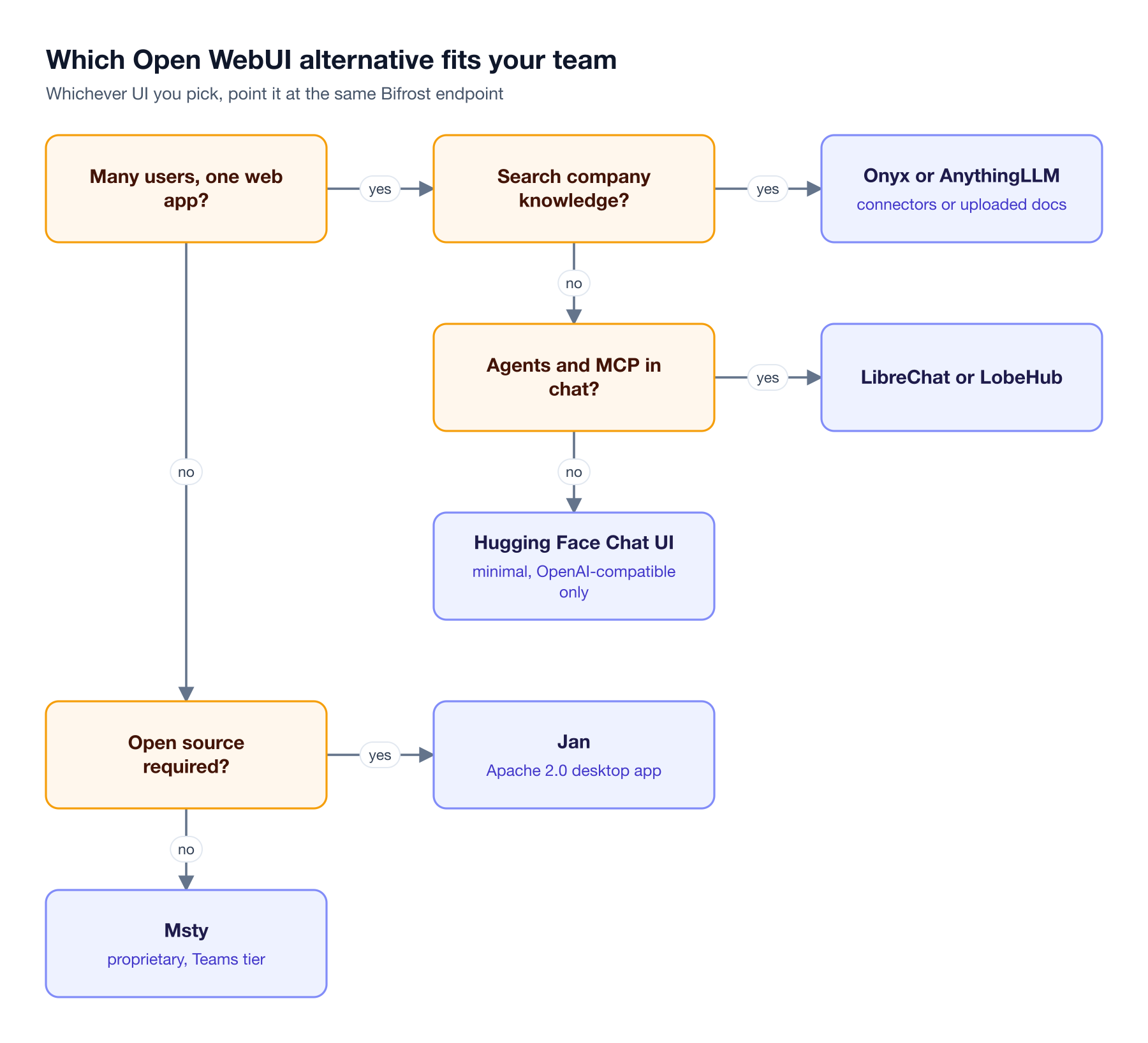
Figure 3: Start from who uses the chat UI and what it must reach; licensing decides the desktop branch.
Following Figure 3:
- Company knowledge: Onyx for connectors and permission-aware search, AnythingLLM for uploaded document workspaces.
- Agents and MCP tools: LibreChat for a permissive license and broad sign-in, LobeHub for an agent marketplace.
- Chat only: Hugging Face Chat UI, with routing and policy left to the gateway.
- Desktop: Jan when the license must be open source, Msty when a paid team tier is acceptable.
Whichever branch a team lands on, the controls that span every interface live in the AI gateway layer, including automatic failover and load balancing applied to every application's traffic, not only one chat UI's.
How to Connect Each Chat UI to Bifrost
Each chat UI on this list connects to Bifrost the same way: set its OpenAI-compatible base URL to the Bifrost /v1 endpoint and use a Bifrost virtual key as the API key. The "Custom endpoint" column in the comparison table names the setting for each tool. LibreChat and Open WebUI have documented guides in the chat clients and CLI agents overview, AnythingLLM has a walkthrough article, and the rest follow the same base URL and key pattern. A minimal configuration for an environment-driven UI:
# Hugging Face Chat UI (.env.local)
OPENAI_BASE_URL=https://bifrost.yourcompany.com/v1
OPENAI_API_KEY=sk-bf-your-team-virtual-key
A chat UI that holds one server-side key makes every user share that key's budget. For per-team limits, run one connection or deployment per team; per-user attribution needs a UI that forwards the user's identity provider token, as the Open WebUI connection walkthrough shows.
Frequently Asked Questions
What is the best Open WebUI alternative for enterprise teams?
LibreChat is the closest replacement for most enterprise teams: MIT-licensed, self-hosted, multi-user, with OIDC, SAML, and LDAP sign-in plus agents and MCP tools. Onyx fits better when chat must answer from company knowledge with document permissions enforced, and Jan or Msty fit desktop use. Pair any of them with an AI gateway for keys and budgets.
Is LibreChat better than Open WebUI?
LibreChat is better when licensing and SAML matter: it is MIT-licensed with no branding restriction and adds SAML sign-in, which Open WebUI's docs do not list. Open WebUI has the larger community, about 159,000 GitHub stars against 47,000, and a documented per-user attribution path through Bifrost. Both connect to the same gateway endpoint, so switching later leaves the model layer unchanged.
Is Open WebUI free for commercial use?
Open WebUI can be used commercially, but its license restricts branding. Deployments with more than 50 end users in a rolling 30-day period may not alter or remove the Open WebUI name or logo without written permission or an enterprise license. Teams that need a white-labeled internal assistant at that scale either buy the enterprise license or choose an alternative such as LibreChat.
What are the best LibreChat alternatives?
The best LibreChat alternatives are Open WebUI for the largest self-hosted community, LobeHub for agent workspaces, Onyx for chat over company knowledge, AnythingLLM for document workspaces, and Jan or Msty for desktop use. All of them can call one Bifrost endpoint, so the governance model for keys and budgets carries over when a team switches.
Should I use AnythingLLM or Open WebUI?
Use AnythingLLM when the main job is chatting with uploaded documents in separate workspaces, or when some users need a desktop app and others a shared server. Use Open WebUI for general chat across many models and a large user base. AnythingLLM's multi-user roles exist only in its Docker build, so plan the deployment first.
Can Open WebUI alternatives use local models through Ollama?
Yes. Jan, Msty, and AnythingLLM run local models on the user's machine, and every tool on this list can reach models served centrally through Ollama, vLLM, or SGLang behind an OpenAI-compatible endpoint. Routing local and hosted models through one gateway gives both the same keys, budgets, and logs.
Put One Gateway Behind Your Chat UI
The right Open WebUI alternative depends on users, knowledge sources, and license terms, but the model layer behind it does not need to change with the UI. Bifrost gives every chat UI on this list one governed endpoint with per-team virtual keys, budgets, failover, guardrails, and request logs. To see Bifrost behind your chat UI, book a demo with the Bifrost team.